

Ad automoli
💡 Fully automatic light management based on conditions like motion, illuminance, humidity, and other clever features
Fully *automatic light management* based on motion as [AppDaemon](https://github.com/home-assistant/appdaemon) app. The project is written primarily in Python, distributed under the MIT License license, first published in 2019. Key topics include: app, appdaemon, appdaemon-apps, auto-discovery, automoli.

Fully automatic light management based on motion as AppDaemon app.
🕓 multiple daytimes to define different scenes for morning, noon, ...
💡 supports Hue (for Hue Rooms/Groups) & Home Assistant scenes
🔌 switches lights and plugs (with lights)
☀️ supports illumination sensors to switch the light just if needed
💦 supports humidity sensors as blocker (the "shower case")
🔍 automatic discovery of lights and sensors
⛰️ stable and tested by many people with different homes
Getting Started
Docker Image (amd64, arm and arm64)
You can try AutoMoLi via Docker without installing anything! The Image is the default AppDaemon one with AutoMoLi and a simple default configuration added. See the AppDaemon Docker Tutorial on how to use it in general.
AutoMoLi expects motion sensors and lights including a room name. The exact patterns are listed in Auto-Discovery of Lights and Sensors You can set a room with the AUTOMOLI_ROOM variable in the Docker run command.
bashdocker run --rm --interactive --tty --name AutoMoLi \ --env HA_URL="<HA URL>" \ --env TOKEN="<HA Token>" \ --env AUTOMOLI_ROOM="bathroom" \ --ports 5050:5050 \ benleb/automoli:latest
Port 5050 is opened to give access to the AppDaemon Admin-UI at http://127.0.0.1:5050
Example
To test AutoMoLi in your Esszimmer (german for dining room), use ... --env AUTOMOLI_ROOM="esszimmer" ... in the Docker run command.
-
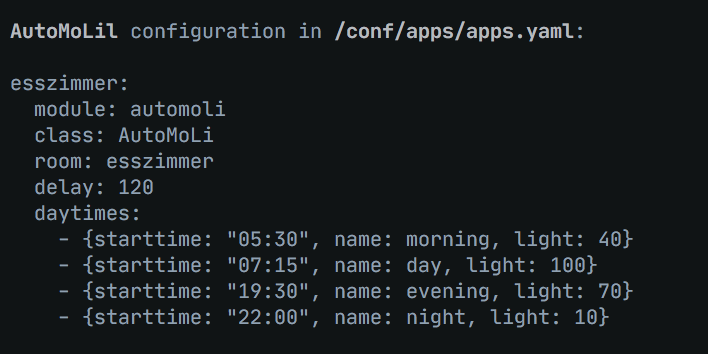
AppDaemon will show you its config file on startup:
-
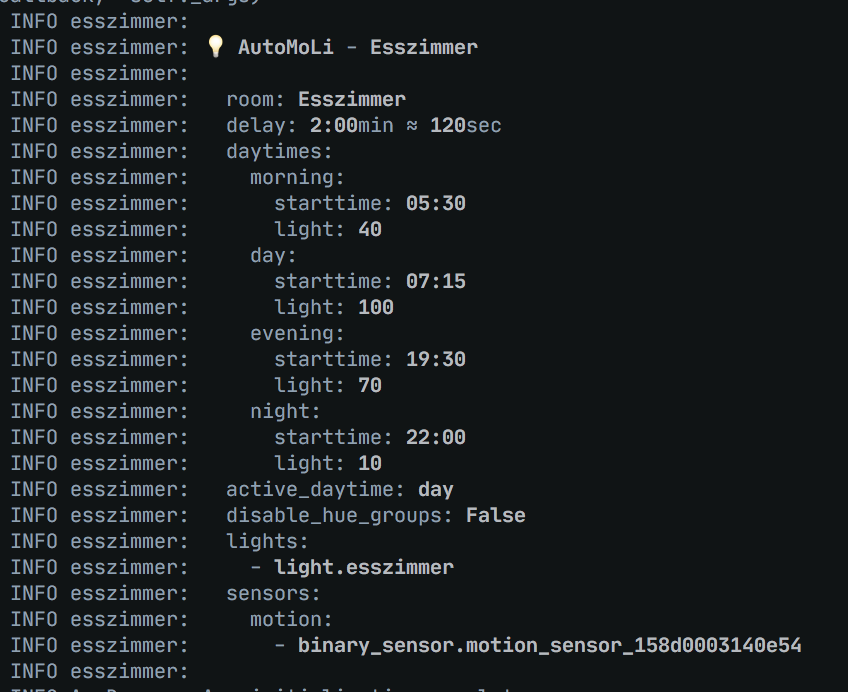
If everything works, AutoMoLi will show you the configuration it has parsed, including the discovered sensors:
-
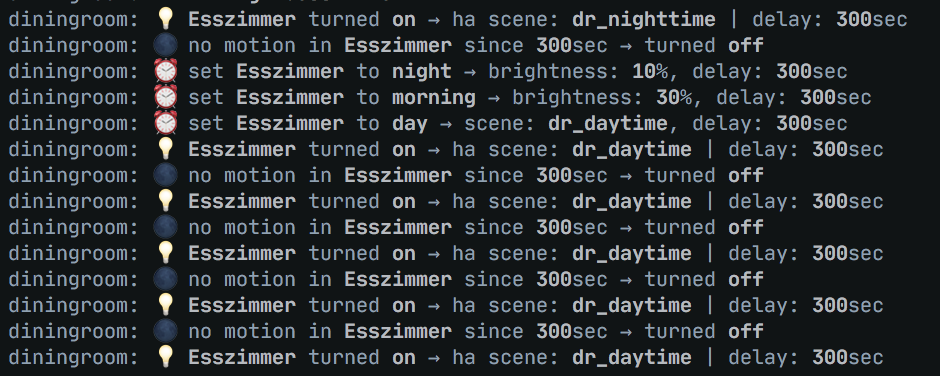
This is how it looks when AutoMoLi manages your lights:
Installation
Use HACS or download the automoli directory from inside the apps directory here to your local apps directory, then add the configuration to enable the automoli module.
Example App Configuration
Add your configuration to appdaemon/apps/apps.yaml, an example with two rooms is below.
yamllivingroom: module: automoli class: AutoMoLi room: livingroom disable_switch_entities: - input_boolean.automoli - input_boolean.disable_my_house delay: 600 daytimes: # This rule "morning" uses a scene, the scene.livingroom_morning Home Assistant scene will be used - { starttime: "sunrise", name: morning, light: "scene.livingroom_morning" } - { starttime: "07:30", name: day, light: "scene.livingroom_working" } # This rule"evening" uses a percentage brightness value, and the lights specified in lights: below will be set to 90% - { starttime: "sunset-01:00", name: evening, light: 90 } - { starttime: "22:30", name: night, light: 20 } # This rule has the lights set to 0, so they will no turn on during this time period - { starttime: "23:30", name: more_night, light: 0 } # If you are using an illuminance sensor you can set the lowest value here that blocks the lights turning on if its already light enough illuminance: sensor.illuminance_livingroom illuminance_threshold: 100 # You can specify a light group or list of lights here lights: - light.livingroom # You can specify a list of motion sensors here motion: - binary_sensor.motion_sensor_153d000224f421 - binary_sensor.motion_sensor_128d4101b95fb7 # See below for info on humidity humidity: - sensor.humidity_128d4101b95fb7 bathroom: module: automoli class: AutoMoLi room: bathroom delay: 180 motion_state_on: "on" motion_state_off: "off" daytimes: - { starttime: "05:30", name: morning, light: 45 } - { starttime: "07:30", name: day, light: "scene.bathroom_day" } - { starttime: "20:30", name: evening, light: 100 } - { starttime: "sunset+01:00", name: night, light: 0 } # As this is a bathroom there could be the case that when taking a bath or shower, motion is not detected and the lights turn off, which isnt helpful, so the following settings allow you to use a humidity sensor and humidity threshold to prevent this by detecting the humidity from the shower and blocking the lights turning off. humidity: - sensor.humidity_128d4101b95fb7 humidity_threshold: 75 lights: - light.bathroom - switch.plug_68fe8b4c9fa1 motion: - binary_sensor.motion_sensor_158d033224e141
Auto-Discovery of Lights and Sensors
AutoMoLi is built around rooms. Every room or area in your home is represented as a seperate app in AppDaemon with separat light setting. In your configuration you will have one config block for every room, see example configuration.
For the auto-discovery of your lights and sensors to work, AutoMoLi expects motion sensors and lights including a room name (can also be something else than a real room) like below:
- sensor.illumination_
room - binary_sensor.motion_sensor_
room - binary_sensor.motion_sensor_
room_something - light.
room
AutoMoLi will detect them automatically. Manually configured entities will take precedence, but need to follow the naming scheme above.
Configuration Options
| key | optional | type | default | description |
|---|---|---|---|---|
module | False | string | automoli | The module name of the app. |
class | False | string | AutoMoLi | The name of the Class. |
room | False | string | The "room" used to find matching sensors/light | |
disable_switch_entities | True | list/string | One or more Home Assistant Entities as switch for AutoMoLi. If the state of any entity is off, AutoMoLi is deactivated. (Use an input_boolean for example) | |
only_own_events | True | bool | Track if automoli switched this light on. If not, an existing timer will be deleted and the state will not change | |
disable_switch_states | True | list/string | ["off"] | Custom states for disable_switch_entities. If the state of any entity is in this list, AutoMoLi is deactivated. Can be used to disable with media_players in playing state for example. |
disable_hue_groups | False | boolean | Disable the use of Hue Groups/Scenes | |
delay | True | integer | 150 | Seconds without motion until lights will switched off. Can be disabled (lights stay always on) with 0 |
motion_event | replaced by motion_state_on/off | |||
daytimes | True | list | see code | Different daytimes with light settings (see below) |
transition_on_daytime_switch | True | bool | False | directly activate a daytime on its start time (instead to just set it as active daytime used if lights are switched from off to on) |
lights | True | list/string | auto detect | Light entities |
motion | True | list/string | auto detect | Motion sensor entities |
illuminance | True | list/string | Illuminance sensor entities | |
illuminance_threshold | True | integer | If illuminance is above this value, lights will not switched on | |
humidity | True | list/string | Humidity sensor entities | |
humidity_threshold | True | integer | If humidity is above this value, lights will not switched off | |
motion_state_on | True | integer | If using motion sensors which don't send events if already activated, like Xiaomi do, add this to your config with "on". This will listen to state changes instead | |
motion_state_off | True | integer | If using motion sensors which don't send events if already activated, like Xiaomi do, add this to your config with "off". This will listen to the state changes instead. | |
debug_log | True | bool | false | Activate debug logging (for this room) |
daytimes
| key | optional | type | default | description |
|---|---|---|---|---|
starttime | False | string | Time this daytime starts or sunrise | |
name | False | string | A name for this daytime | |
delay | True | integer | 150 | Seconds without motion until lights will switched off. Can be disabled (lights stay always on) with 0. Setting this will overwrite the global delay setting for this daytime. |
light | False | integer/string | Light setting (percent integer value (0-100) in or scene entity |
<!-- ## Used by Feel free to add you project! --> <!-- ## Acknowledgments -->
Meta
Ben Lebherz: automation lover ⚙️ developer & maintainer - @benleb | @ben_leb
<!-- See also the list of [contributors](CONTRIBUTORS) who participated in this project. -->This project is licensed under the MIT License - see the LICENSE file for details
Contributors
Showing top 10 contributors by commit count.





Related Repositories

jaywcjlove/awesome-mac
This project is dedicated to collecting high-quality macOS software and organizing them systematically by different categories for easy search and use.

toeverything/AFFiNE
There can be more than Notion and Miro. AFFiNE(pronounced [ə‘fain]) is a next-gen knowledge base that brings planning, sorting and creating all together. Privacy first, open-source, customizable and ready to use.

lencx/ChatGPT
🔮 ChatGPT Desktop Application (Mac, Windows and Linux)

dkhamsing/open-source-ios-apps
:iphone: Collaborative List of Open-Source iOS Apps

freeCodeCamp/devdocs
API Documentation Browser

directus/directus
The flexible backend for all your projects 🐰 Turn your DB into a headless CMS, admin panels, or apps with a custom UI, instant APIs, auth & more.