

Boa
Boa is an embeddable Javascript engine written in Rust.
Boa is an experimental JavaScript lexer, parser and interpreter written in Rust 🦀, it has support for **more** than 90% of the latest ECMAScript specification. We continuously improve the conformance to keep up with the ever-evolving standard. The project is written primarily in Rust, distributed under the MIT License license, first published in 2018. It has gained significant community traction with 7,312 stars and 632 forks on GitHub. Key topics include: ecmascript, hacktoberfest, interpreter, javascript, javascript-engine.
Boa
<p align="center"> <a href="https://boajs.dev/"> <picture> <source media="(prefers-color-scheme: dark)" srcset="https://raw.githubusercontent.com/boa-dev/boa/refs/tags/v0.21/assets/logo_yellow.svg"> <source media="(prefers-color-scheme: light)" srcset="https://raw.githubusercontent.com/boa-dev/boa/refs/tags/v0.21/assets/logo_black.svg"> <img alt="Boa logo" style="width:auto;" src="https://raw.githubusercontent.com/boa-dev/boa/refs/tags/v0.21/assets/logo.png"> </picture> </a> </p>Boa is an experimental JavaScript lexer, parser and interpreter written in Rust 🦀, it has support for more than 90% of the latest ECMAScript specification. We continuously improve the conformance to keep up with the ever-evolving standard.






⚡️ Live Demo (Wasm)
Try out the engine now at the live Wasm playground here!
Prefer a CLI? Feel free to try out boa_cli!
📦 Crates
Boa currently publishes and actively maintains the following crates:
boa_ast- Boa's ECMAScript Abstract Syntax Treeboa_cli- Boa's CLI && REPL implementationboa_engine- Boa's implementation of ECMAScript builtin objects and
executionboa_gc- Boa's garbage collectorboa_interner- Boa's string internerboa_parser- Boa's lexer and parserboa_icu_provider- Boa's ICU4X data providerboa_runtime- Boa's WebAPI featuresboa_string- Boa's ECMAScript string implementation.tag_ptr- Utility library that enables a pointer to be associated with a tag of typeusize.
[!NOTE]
The
Boaandboa_unicodecrates are deprecated.
🚀 Example
To start using Boa simply add the boa_engine crate to your Cargo.toml:
toml[dependencies] boa_engine = "0.21.0"
Then in main.rs, copy the below:
rustuse boa_engine::{Context, Source, JsResult}; fn main() -> JsResult<()> { let js_code = r#" let two = 1 + 1; let definitely_not_four = two + "2"; definitely_not_four "#; // Instantiate the execution context let mut context = Context::default(); // Parse the source code let result = context.eval(Source::from_bytes(js_code))?; println!("{}", result.display()); Ok(()) }
Now, all that's left to do is cargo run.
Congrats! You've executed your first JavaScript code using Boa!
🔎 Documentation
For more information on Boa's API, feel free to check out our documentation.
🏅 Conformance
To know more details about Boa's conformance surrounding the ECMAScript specification,
you can check out our ECMAScript Test262 test suite results here.
🪚 Contributing
Please, check the CONTRIBUTING.md file to know how to
contribute in the project. You will need Rust installed and an editor. We have
some configurations ready for VSCode.
🐛 Debugging
Check debugging.md for more info on debugging.
🕸 Web Assembly
[!IMPORTANT]
This only applies to
wasm32-unknown-unknowntarget,
WASIandEmscriptentarget variants are handled automatically.
- Enable the
jsfeature flag. - Set
RUSTFLAGS='--cfg getrandom_backend="wasm_js"'
The rustflags can also be set by adding a .cargo/config.toml file in the project root directory:
toml[target.wasm32-unknown-unknown] rustflags = '--cfg getrandom_backend="wasm_js"'
For more information see: getrandom WebAssembly Support
⚙️ Usage
- Clone this repo.
- Run with
cargo run -- test.jsin the project root directory wheretest.jsis a path to an existing JS file with any valid JS code. - If any JS doesn't work then it's a bug. Please raise an issue!
Example
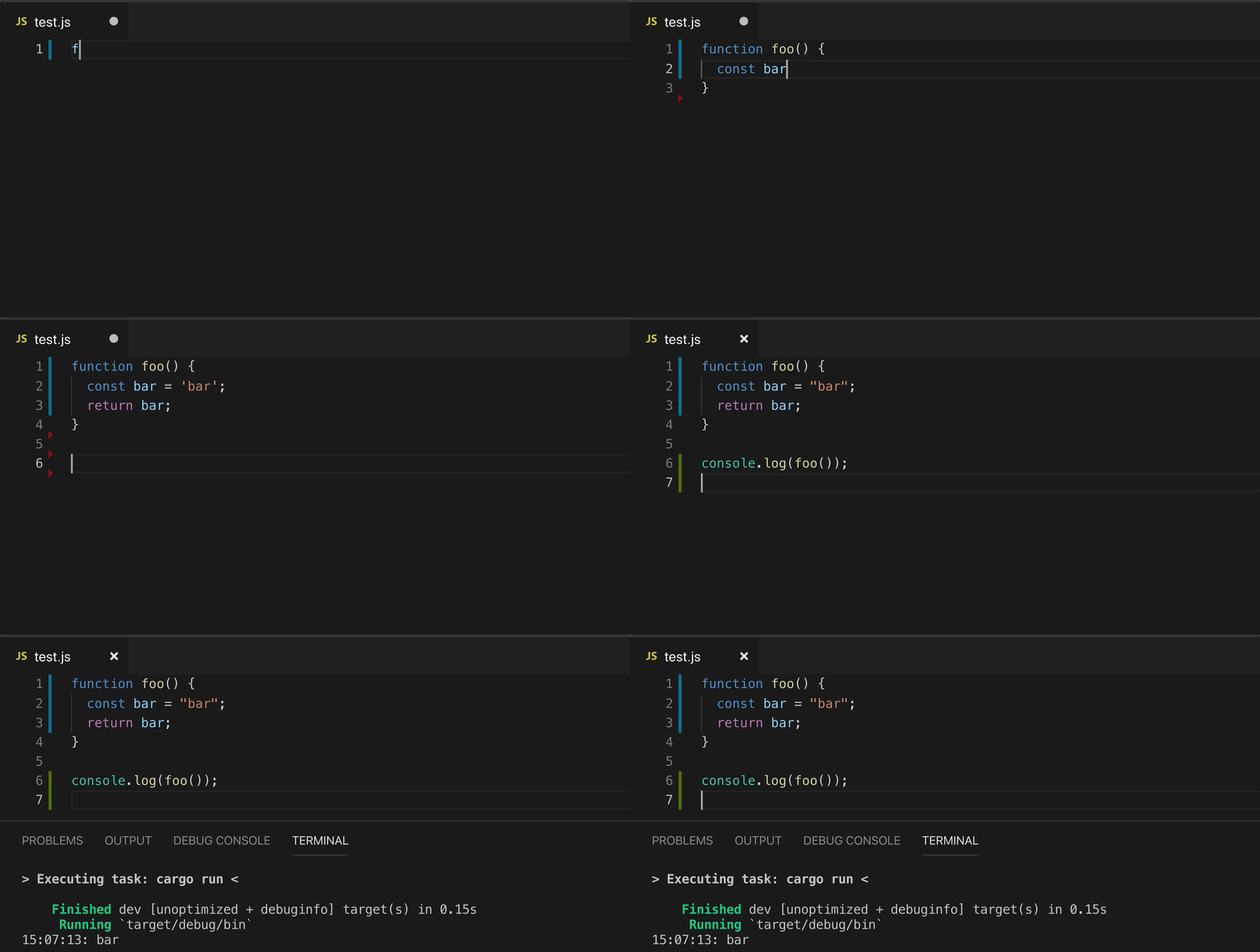
Command-line Options
txtUsage: boa [OPTIONS] [FILE]... Arguments: [FILE]... The JavaScript file(s) to be evaluated Options: --strict Run in strict mode -a, --dump-ast [<FORMAT>] Dump the AST to stdout with the given format [possible values: debug, json, json-pretty] -t, --trace Dump the AST to stdout with the given format --vi Use vi mode in the REPL -O, --optimize --optimizer-statistics --flowgraph [<FORMAT>] Generate instruction flowgraph. Default is Graphviz [possible values: graphviz, mermaid] --flowgraph-direction <FORMAT> Specifies the direction of the flowgraph. Default is top-top-bottom [possible values: top-to-bottom, bottom-to-top, left-to-right, right-to-left] --debug-object Inject debugging object `$boa` --test262-object Inject the test262 host object `$262` -m, --module Treats the input files as modules -r, --root <ROOT> Root path from where the module resolver will try to load the modules [default: .] -h, --help Print help (see more with '--help') -V, --version Print version
🧭 Roadmap
See Milestones.
📊 Benchmarks
The current benchmarks are taken from v8's benchmark that you can find here. You can also view the results of nightly benchmark runs comparing Boa with other JavaScript engines here.
If you wish to run the benchmarks locally, then run Boa in release using the combined.js script which contains all the sub-benchmarks in the bench-v8 directory.
bashcargo run --release -p boa_cli -- bench-v8/combined.js
[!TIP]
If you'd like to run only a subset of the benchmarks, you can modify the
Makefilelocated in thebench-v8directory.
Comment out the benchmarks you don't want to include, then runmake. After that, you can run Boa using the same command as above.
🧠 Profiling
See Profiling.
📆 Changelog
See CHANGELOG.md.
💬 Communication
Feel free to contact us on Matrix if you have any questions.
Contributor discussions take place on the same Matrix Space if you're interested in contributing.
We also have a Discord for any questions or issues.
⚖️ License
This project is licensed under the Unlicense or MIT licenses, at your option.
Contributors
Showing top 12 contributors by commit count.
![dependabot[bot]](https://avatars.githubusercontent.com/in/29110?v=4)


Related Repositories

swc-project/swc
Rust-based platform for the Web

standard/standard
🌟 JavaScript Style Guide, with linter & automatic code fixer

eslint/eslint
Find and fix problems in your JavaScript code.

tc39/proposals
Tracking ECMAScript Proposals
tc39/ecma262
Status, process, and documents for ECMA-262

jsx-eslint/eslint-plugin-react
React-specific linting rules for ESLint