

Image actions
A Github Action that automatically compresses JPEGs, PNGs, WebPs & AVIFs in Pull Requests.
Image Actions is a Github Action built by your #webperf monitoring friends at [Calibre](https://calibreapp.com/). It automatically compresses JPEGs, PNGs, WebPs and AVIFs for each Pull Request. The project is written primarily in TypeScript, distributed under the GNU General Public License v3.0 license, first published in 2019. It has gained significant community traction with 1,561 stars and 78 forks on GitHub. Key topics include: compression, github-action, github-actions, image-compression, image-processing.
Calibre Image Actions



Image Actions is a Github Action built by your #webperf monitoring friends at Calibre. It automatically compresses JPEGs, PNGs, WebPs and AVIFs for each Pull Request.
Image Actions offers:
- Fast, efficient and near-lossless compression
- Best image compression algorithms available (libvips)
- Ease of customisation: use default settings or adapt to your needs
- Running on demand or schedule
- Supports GitHub Enterprise
...and more!
🖇 Table of Contents
🛠 Usage
- Create a
.github/workflows/calibreapp-image-actions.ymlfile in your repository with the following configuration:
ymlname: Compress Images on: pull_request: # Run Image Actions when JPG, JPEG, PNG, WebP or AVIF files are added or changed. # See https://help.github.com/en/actions/automating-your-workflow-with-github-actions/workflow-syntax-for-github-actions#onpushpull_requestpaths for reference. paths: - '**.jpg' - '**.jpeg' - '**.png' - '**.webp' - '**.avif' workflow_dispatch: jobs: build: # Only run on Pull Requests within the same repository, and not from forks. if: github.event.pull_request.head.repo.full_name == github.repository name: calibreapp/image-actions permissions: write-all runs-on: ubuntu-latest steps: - name: Checkout Repo uses: actions/checkout@v4 - name: Compress PR Images uses: calibreapp/image-actions@main
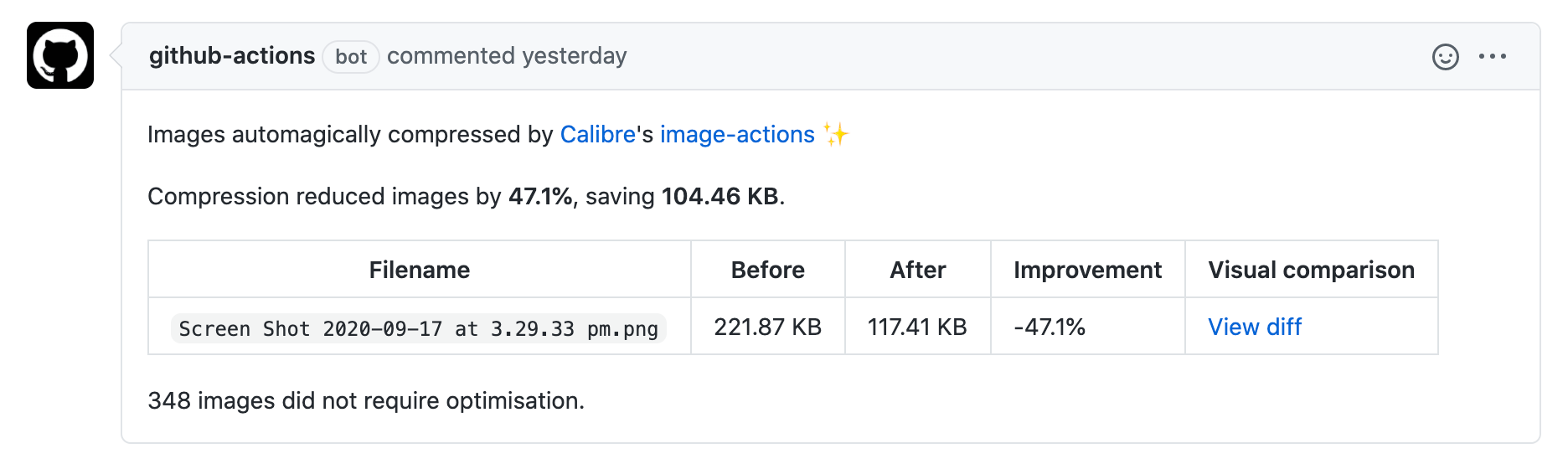
- Open a Pull Request with new or updated imagery. Image Actions will optimise images, and commit them to your branch:
- Merge your Pull Request and enjoy lighter images or explore what’s possible further with configuration options. 👇🏻
⚙️ Configuration
By default, Image Actions optimises new or updated images in each Pull Request. For manual runs (workflow_dispatch), scheduled runs, or API failures, all images will be processed.
Control image quality settings
Add the following arguments to the workflow definition to control compression settings:
ymlwith: jpegQuality: '85' jpegProgressive: false pngQuality: '80' webpQuality: '85' avifQuality: '75'
Options:
- jpegQuality: Number, integer 1-100, default 85 stored in a string.
- jpegProgressive: Boolean, true or false, default false.
- pngQuality: Number, integer 1-100, default 80 stored in a string.
- webpQuality: Number, integer 1-100, default 85 stored in a string.
- avifQuality: Number, integer 1-100, default 75 stored in a string.
Ignore paths
Ignore selected paths using comma-separated minimatch pattern globbing:
ymlwith: ignorePaths: 'node_modules/**,build'
Run compression only
By default, Image Actions adds optimised images to the current Pull Request and posts a summary comment.
Use the compressOnly option with true value to skip the commit and summary comment if you want to handle this separately (including for forks):
ymlwith: compressOnly: true
compressOnly accepts a Boolean value (true or false) and defaults to false.
Minimum change
By default, Image Actions commits optimised images if the new size satisfies the following conditions:
- it's at least 5% smaller than the original
- the reduction is at least 1 KB
Use the minPctChange option to change the percentage. You might want to increase it to avoid consecutive
compressions of the same webp images.
Use the minAbsChange option to change the absolute amount in bytes. You might want to increase it to avoid
consecutive compressions of small png images.
ymlwith: minPctChange: '2.5' minAbsChange: '10000'
minPctChange accepts a numerical value represented as a string. Default = '5'.
minAbsChange accepts a numerical value represented as a string. Default = '1024'.
Compress on demand or on schedule
It is also possible to run Image Actions on demand or on a recurring schedule. By using the compressOnly option, in conjunction with create-pull-request action by @peter-evans, a new Pull Request will be raised if there are optimised images in a repository.
See an example below:
yml# Compress images on demand (workflow_dispatch), and at 11pm every Sunday (schedule). # Open a Pull Request if any images can be compressed. name: Compress Images on: workflow_dispatch: schedule: - cron: '00 23 * * 0' jobs: build: name: calibreapp/image-actions runs-on: ubuntu-latest steps: - name: Checkout Repo uses: actions/checkout@v3 - name: Compress Images id: calibre uses: calibreapp/image-actions@main with: compressOnly: true - name: Create New Pull Request If Needed if: steps.calibre.outputs.markdown != '' uses: peter-evans/create-pull-request@v4 with: title: Compressed Images Nightly branch-suffix: timestamp commit-message: Compressed Images body: ${{ steps.calibre.outputs.markdown }}
Process Pull Requests from forked repositories
By default, GitHub Actions do not have permission to alter forked repositories. For this reason, Image Actions only works for Pull Requests from branches in the same repository as the destination branch. There are several workarounds for this limitation:
- Replace the default
GITHUB_TOKENwith a Personal Access Token (PAT) which does have permission to access forked repositories. Be aware that this introduces potential security concerns (which is why it not available by default).
yml- name: Compress PR Images uses: calibreapp/image-actions@main with: # `GITHUB_TOKEN` is automatically generated by GitHub and scoped only to the repository that is currently running the action. By default, the action can’t update Pull Requests initiated from forked repositories. # See https://docs.github.com/en/actions/reference/authentication-in-a-workflow and https://help.github.com/en/articles/virtual-environments-for-github-actions#token-permissions GITHUB_TOKEN: ${{ secrets.GITHUB_TOKEN }}
- Run Image Actions only for Pull Requests in the current repository. This approach is advised when not using Personal Access Tokens (PATs) to avoid wasting time and compute for compressions that will not be committed. Use the following configuration to check if a Pull Request belongs to the repository:
ymlif: github.event.pull_request.head.repo.full_name == github.repository
- Run an additional instance of Image Actions in
compressOnlymode on pushes tomain, and then raise a new Pull Request for any images committed without being compressed (e.g. from a forked repository PR). See the configuration in the below example which uses the create-pull-request action by @peter-evans to open the new Pull Request (this only raises a Pull Request if any files are changed in previous steps).
ymlname: Compress Images on Push to main branch on: push: branches: - main paths: - '**.jpg' - '**.jpeg' - '**.png' - '**.webp' - '**.avif' jobs: build: name: calibreapp/image-actions runs-on: ubuntu-latest steps: - name: Checkout Repo uses: actions/checkout@v3 - name: Compress Images id: calibre uses: calibreapp/image-actions@main with: compressOnly: true - name: Create New Pull Request If Needed if: steps.calibre.outputs.markdown != '' uses: peter-evans/create-pull-request@v4 with: title: Compressed Images branch-suffix: timestamp commit-message: Compressed Images body: ${{ steps.calibre.outputs.markdown }}
Combined workflow
You can combine all of the above customisation options into one all-encompassing workflow to avoid having to set up separate workflows with a lot of duplication.
The example below ensures the right order of task execution within Image Actions. If you’d like to reuse it, make sure to change example/example_repo to your repository details.
yml# Image Actions will run in the following scenarios: # - on Pull Requests containing images (not including forks) # - on pushing of images to `main` (for forks) # - on demand (https://github.blog/changelog/2020-07-06-github-actions-manual-triggers-with-workflow_dispatch/) # - at 11 PM every Sunday in anything gets missed with any of the above scenarios # For Pull Requests, the images are added to the PR. # For other scenarios, a new PR will be opened if any images are compressed. name: Compress images on: pull_request: paths: - '**.jpg' - '**.jpeg' - '**.png' - '**.webp' - '**.avif' push: branches: - main paths: - '**.jpg' - '**.jpeg' - '**.png' - '**.webp' - '**.avif' workflow_dispatch: schedule: - cron: '00 23 * * 0' jobs: build: name: calibreapp/image-actions runs-on: ubuntu-latest # Only run on main repo on and PRs that match the main repo. if: | github.repository == 'example/example_repo' && (github.event_name != 'pull_request' || github.event.pull_request.head.repo.full_name == github.repository) steps: - name: Checkout Branch uses: actions/checkout@v3 - name: Compress Images id: calibre uses: calibreapp/image-actions@main with: # For non-Pull Requests, run in compressOnly mode and we'll PR after. compressOnly: ${{ github.event_name != 'pull_request' }} - name: Create Pull Request # If it's not a Pull Request then commit any changes as a new PR. if: | github.event_name != 'pull_request' && steps.calibre.outputs.markdown != '' uses: peter-evans/create-pull-request@v4 with: title: Auto Compress Images branch-suffix: timestamp commit-message: Compress Images body: ${{ steps.calibre.outputs.markdown }}
🙌🏻 Contributing
Happy to hear you’re interested in contributing to Image Actions! Please find our contribution guidelines here.
📚 Resources
Related reading:
- Automatically compress images on Pull Requests
- Optimize Images with a GitHub Action
- Image Actions on GitHub Marketplace
- Start monitoring and improving your performance
Image compression tools:
💼 License
This project is licensed under a GNU General Public License.
Contributors
Showing top 12 contributors by commit count.

![dependabot[bot]](https://avatars.githubusercontent.com/in/29110?v=4)





Related Repositories

deepspeedai/DeepSpeed
DeepSpeed is a deep learning optimization library that makes distributed training and inference easy, efficient, and effective.

gchq/CyberChef
The Cyber Swiss Army Knife - a web app for encryption, encoding, compression and data analysis

chopratejas/headroom
Compress tool outputs, logs, files, and RAG chunks before they reach the LLM. 60-95% fewer tokens, same answers. Library, proxy, MCP server.

leandromoreira/digital_video_introduction
A hands-on introduction to video technology: image, video, codec (av1, vp9, h265) and more (ffmpeg encoding). Translations: 🇺🇸 🇨🇳 🇯🇵 🇮🇹 🇰🇷 🇷🇺 🇧🇷 🇪🇸

borgbackup/borg
Deduplicating archiver with compression and authenticated encryption.

PaddlePaddle/PaddleNLP
Easy-to-use and powerful LLM and SLM library with awesome model zoo.