

Pi nvim
Bridge between pi coding agent and Neovim
Bridge between [pi](https://github.com/badlogic/pi) coding agent and Neovim. Run pi in one terminal pane and Neovim in another — send files, selections, and prompts from Neovim directly into your running pi session. The project is written primarily in Lua, distributed under the MIT License license, first published in 2026. Key topics include: neovim, pi-extension, pi-package.
pi-nvim
Bridge between pi coding agent and Neovim. Run pi in one terminal pane and Neovim in another — send files, selections, and prompts from Neovim directly into your running pi session.
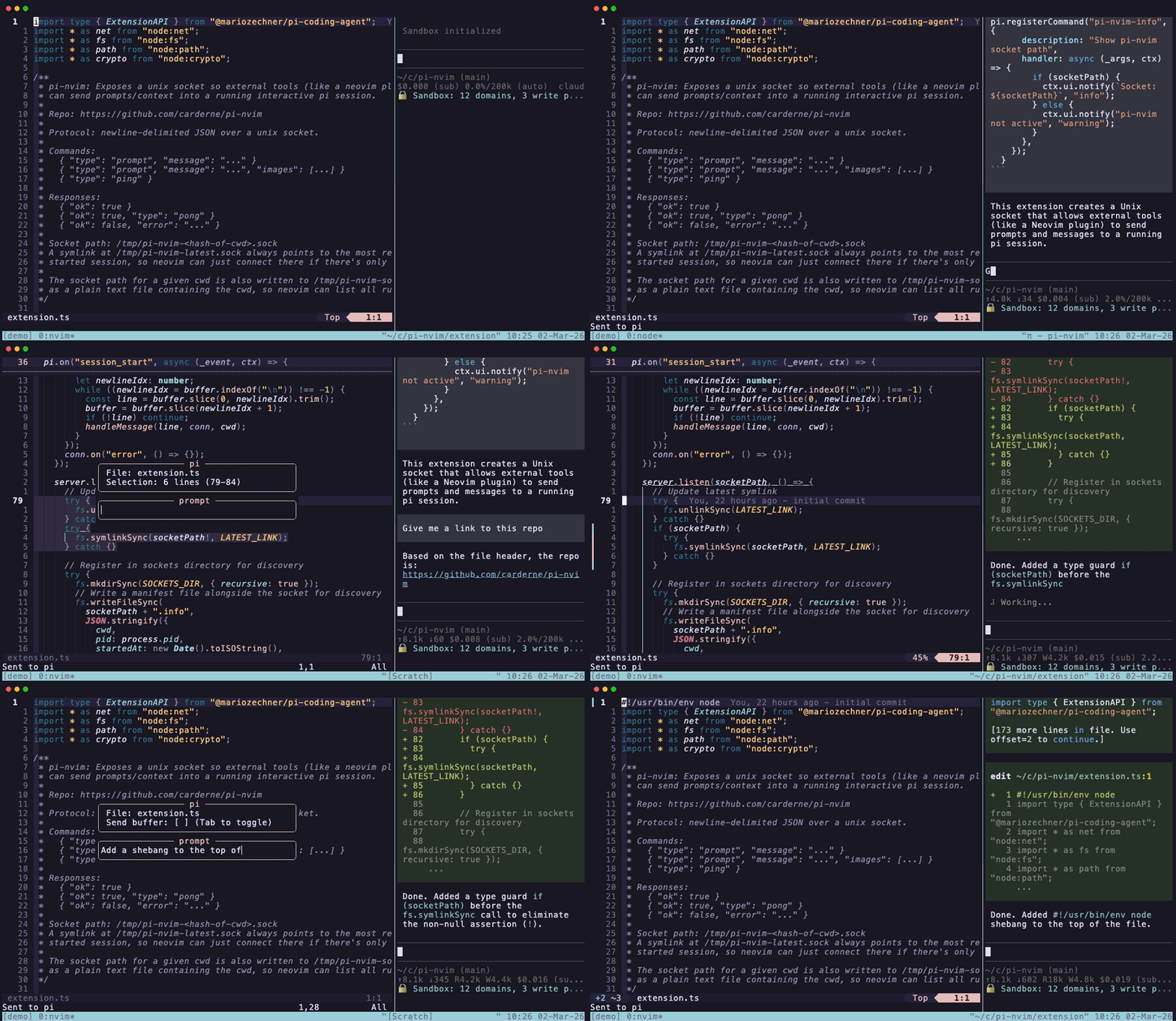
How it works
The repo contains two components:
- Pi extension (
extension.ts) — opens a unix socket when pi starts. External tools can send JSON messages to inject prompts into the active pi session. - Neovim plugin (
lua/pi-nvim/) — connects to that socket via libuv. Sends context from your editor to pi.
Discovery is automatic: the extension writes socket info to /tmp/pi-nvim-sockets/, and the Neovim plugin scans that directory, preferring sessions matching your cwd.
Install
Pi side
bashpi install npm:pi-nvim
Or add to ~/.pi/agent/settings.json:
json{ "packages": ["https://github.com/carderne/pi-nvim"] }
Then /reload in pi.
Neovim side
With lazy.nvim:
lua{ "carderne/pi-nvim" }
Then in your config:
luarequire("pi-nvim").setup()
Options (defaults):
luarequire("pi-nvim").setup({ socket_path = nil, -- auto-discover set_default_keymaps = true, })
Usage
Start pi in one terminal. Start Neovim in another. The pi extension automatically opens a socket on session start.
Commands
| Command | Description |
|---|---|
:Pi | Open the Send to pi dialog (works in normal and visual mode) |
:PiSend | Type a prompt and send to pi |
:PiSendFile | Send current file path + prompt |
:PiSendSelection | Send visual selection + prompt |
:PiSendBuffer | Send entire buffer + prompt |
:PiPing | Check if pi is reachable |
:PiSessions | List/switch between running pi sessions |
Default keybindings
<leader>p is mapped to :Pi in both normal and visual mode by default.
To disable the default mappings:
luarequire("pi-nvim").setup({ set_default_keymaps = false, })
The :Pi dialog
Opens a floating window in the center of the screen:
- Shows the current file name (always sent)
- If you had a visual selection, it shows the line range and sends the selected text
- If no selection, you can press Tab to toggle sending the entire buffer
- Type a prompt and press Enter to send (or just Enter with no prompt)
- Press Esc or Ctrl-C to cancel
Additional keybindings
luavim.keymap.set("n", "<leader>pp", ":PiSend<CR>") vim.keymap.set("n", "<leader>pf", ":PiSendFile<CR>") vim.keymap.set("v", "<leader>ps", ":PiSendSelection<CR>") vim.keymap.set("n", "<leader>pb", ":PiSendBuffer<CR>") vim.keymap.set("n", "<leader>pi", ":PiPing<CR>")
Protocol
The socket accepts newline-delimited JSON:
json{"type": "prompt", "message": "your prompt here"} {"type": "ping"}
Responses:
json{"ok": true} {"ok": true, "type": "pong"} {"ok": false, "error": "..."}
This means you can also send prompts from any tool:
bashecho '{"type":"prompt","message":"hello"}' | socat - UNIX-CONNECT:/tmp/pi-nvim-sockets/<hash>.sock
License
MIT
Contributors
Showing top 4 contributors by commit count.


Related Repositories

neovim/neovim
Vim-fork focused on extensibility and usability

junegunn/fzf
:cherry_blossom: A command-line fuzzy finder

sxyazi/yazi
💥 Blazing fast terminal file manager written in Rust, based on async I/O.

NvChad/NvChad
Blazing fast Neovim framework providing solid defaults and a beautiful UI, enhancing your neovim experience.

LazyVim/LazyVim
Neovim config for the lazy

folke/lazy.nvim
💤 A modern plugin manager for Neovim