

Generator express no stress
🚂 A Yeoman generator for Express.js based 12-factor apps and apis
Create awesome [Express.js](http://www.expressjs.com) applications with best of breed tech including ES.next via [Babel.js](https://babeljs.io/), structured logging with [Pino](https://github.com/pinojs/pino), API validation and interactive documentation using an [OpenAPI 3.x](https://swagger.io/specification/), environment based config with [dotenv](https://github.com/motdotla/dotenv), and linting with [ESLint](http://eslint.org/). The project is written primarily in JavaScript, distributed under the MIT License license, first published in 2017. Key topics include: 12-factor, babel, express, express-js, expressjs.
🚂 generator-express-no-stress




Create awesome Express.js applications with best of breed tech including ES.next via Babel.js, structured logging with Pino, API validation and interactive documentation using an OpenAPI 3.x, environment based config with dotenv, and linting with ESLint.


generator-express-no-stress gets you up and running in seconds. It's ridiculously easy to configure. Heck, just take the defaults. Start it. Write code.
This generator scaffolds a fully functioning REST API server, complete with interactive documentation, API request and response validation, structured logging, environment driven config, and more. Simply run the generator and smile :-D
Install
Requires Node 8 or greater
shellnpm install -g yo@4.3.0 generator-express-no-stress
Scaffold
shellyo express-no-stress myapp cd myapp
Run
Run in development mode:
shellnpm run dev
Package and run in production mode
shellnpm start
Test
shellnpm test
Debug
Run one of the following, then attach your favorite inspector e.g. VSCode:
shell# debug the server npm run dev:debug # debug the tests npm run test:debug
Try it!
- Interactive API doc at http://localhost:3000/api-explorer
- Landing page at http://localhost:3000
Usage: CLI
shellyo express-no-stress [appname] [--yarn] [--docker]
| Option | default | Description |
|---|---|---|
appname | myapp | The application folder |
--yarn | - | Use the yarn package manager, instead of npm |
--docker | Install Docker artifacts including a Dockerfile |
Usage: Project
The sections below describe all usage options available once the project is generated/scaffolded.
npm targets
| Target | Description |
|---|---|
npm run dev | Run in development mode |
npm run dev:debug | Debug in development mode |
npm run test | Run tests |
npm run test:debug | Debug tests |
npm run lint | View a listing of all errors discovered by the linter |
npm run lint:fix | Fix all errors discovered by the linter |
npm start | Run the in production mode. |
Debug in VSCode
Add these contents to your .vscode/launch.json file
Debug in WebStorm
- Start debug in development mode via
npm run dev:debug - From the "Run" menu, select "Debug"
- Select "Edit Configurations..."
- From the list of Templates on the left side of the dialog, select "Attach to Node.js/Chrome"
- Press the "Debug" button to attach the WebStorm debugger
Deploy to the Cloud
e.g. CloudFoundry
cf push myapp
Use Yarn
# scaffold
yo express-no-stress myapp --yarn
cd myapp

# run in development mode
yarn run dev

# run in production mode
yarn start

# test
yarn test
What you get!
-
Express.js - Fast, unopinionated
, minimalist web framework for Node.js -
Pino - Extremely fast node.js logger, inspired by Bunyan. It also includes a shell utility to pretty-print its log files
-
dotenv - Loads environment variables from .env for nodejs projects
-
ESLint - a pluggable linting utility for JavaScript and JSX
Choose from the following ESLint lint rules:
-
Swagger - is a simple yet powerful representation of your RESTful API
-
SwaggerUI - dynamically generate beautiful documentation and sandbox from a Swagger-compliant API
API Validation
Simply describe your APIs with Swagger and automagically get for free:
- Interactive documentation
- API request validation (OpenAPI 3.x)
- API response validation
- To enable set
OPENAPI_ENABLE_RESPONSE_VALIDATION=truein.env
- To enable set
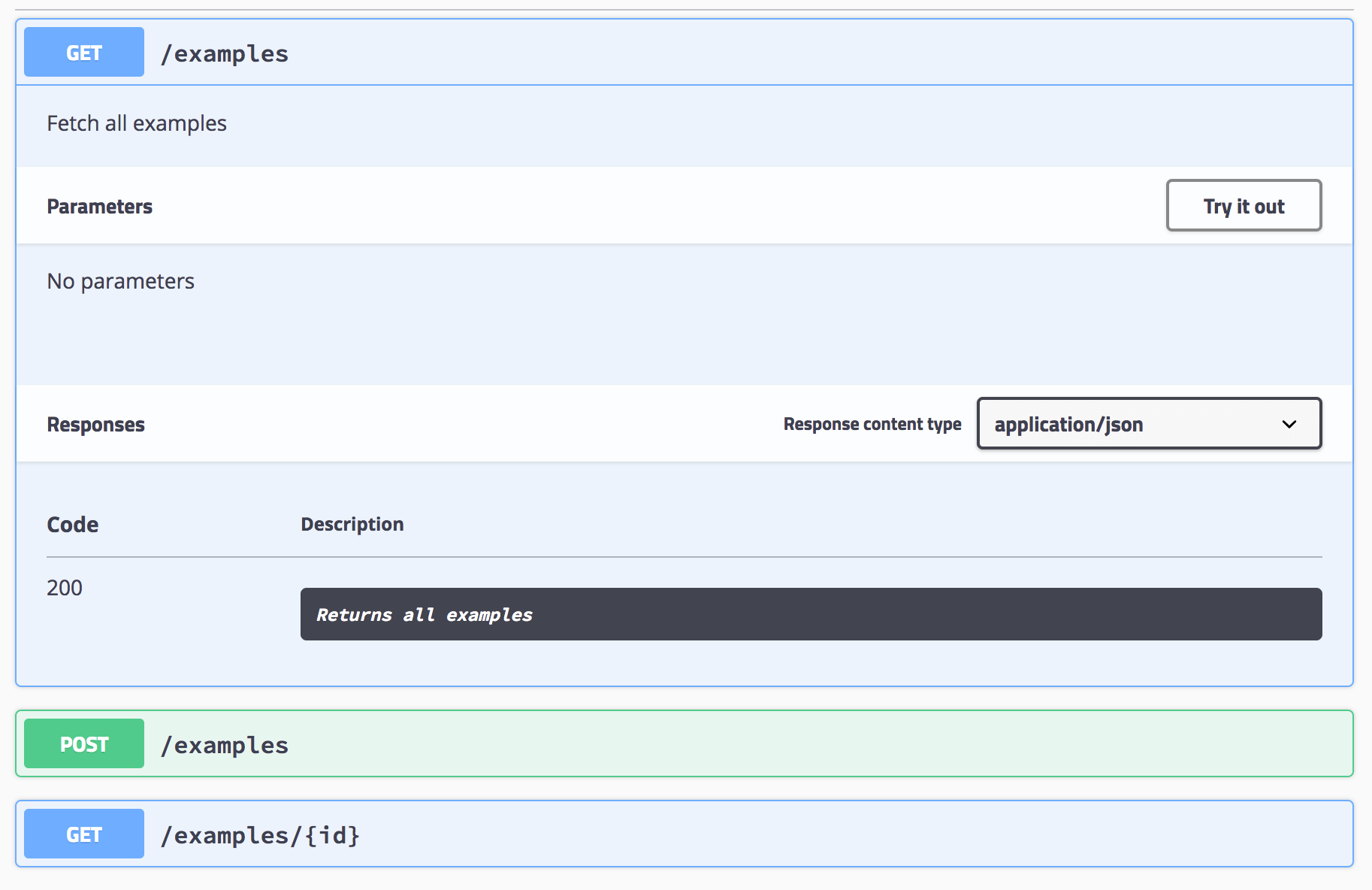
Interactive API Doc
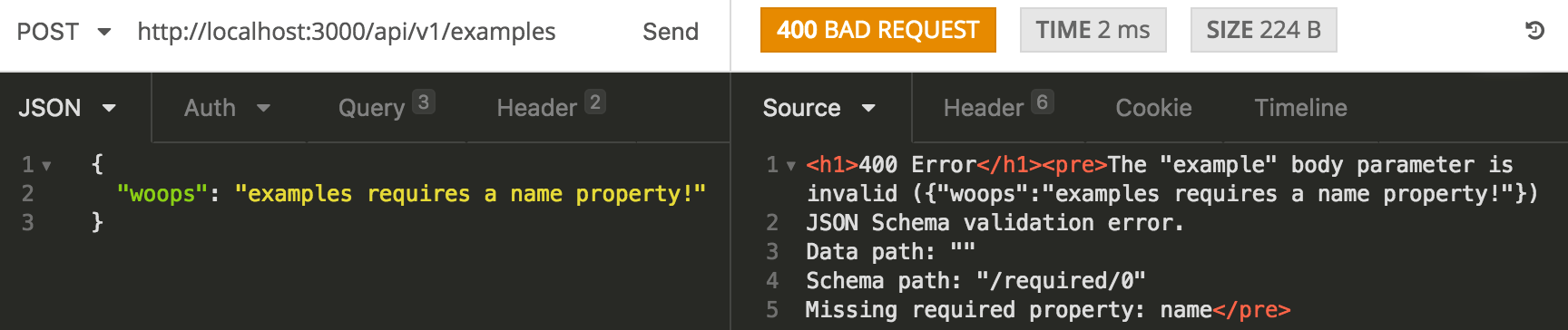
API Validation!
Oops! I the API caller forgot to pass a name field, no stress, we've got this!
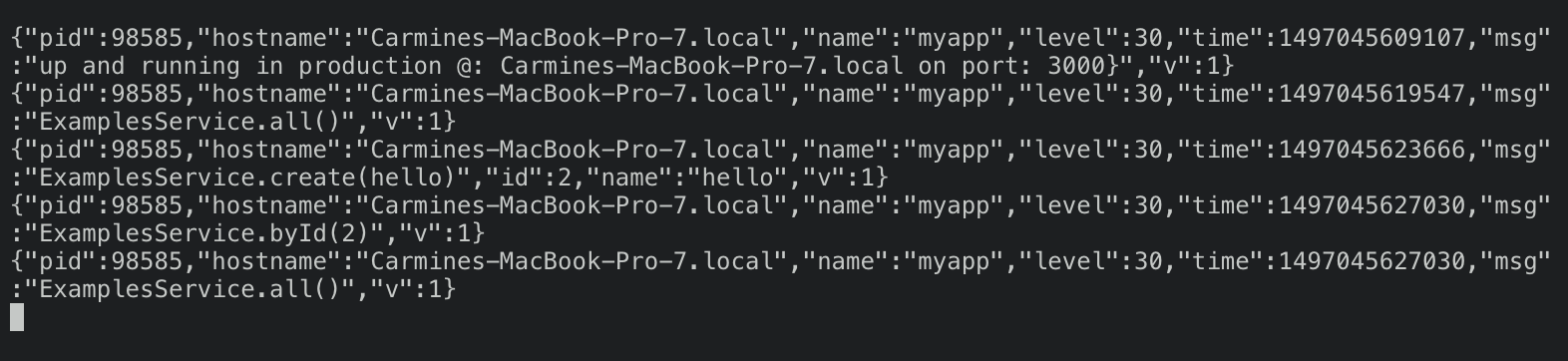
Structured Logging
Structured logging out of the box!
raw
pretty
Structured logging pretty printed by default - great for dev!

API Validation Example
Simply describe your APIs with Swagger and automatically get:
- API request validation
- Interactive documentation
example
Swagger API spec
yamlswagger: '2.0' info: version: 1.0.0 title: myapp description: My cool app basePath: /api/v1 tags: - name: Examples description: Simple example endpoints - name: Specification description: The swagger API specification consumes: - application/json produces: - application/json definitions: ExampleBody: type: object title: example required: - name properties: name: type: string example: no_stress paths: /examples: get: tags: - Examples description: Fetch all examples responses: 200: description: Returns all examples post: tags: - Examples description: Create a new example parameters: - name: example in: body description: an example required: true schema: $ref: '#/definitions/ExampleBody' responses: 200: description: Returns all examples /examples/{id}: get: tags: - Examples parameters: - name: id in: path required: true description: The id of the example to retrieve type: integer responses: 200: description: Return the example with the specified id 404: description: Example not found /spec: get: tags: - Specification responses: 200: description: Return the API specification
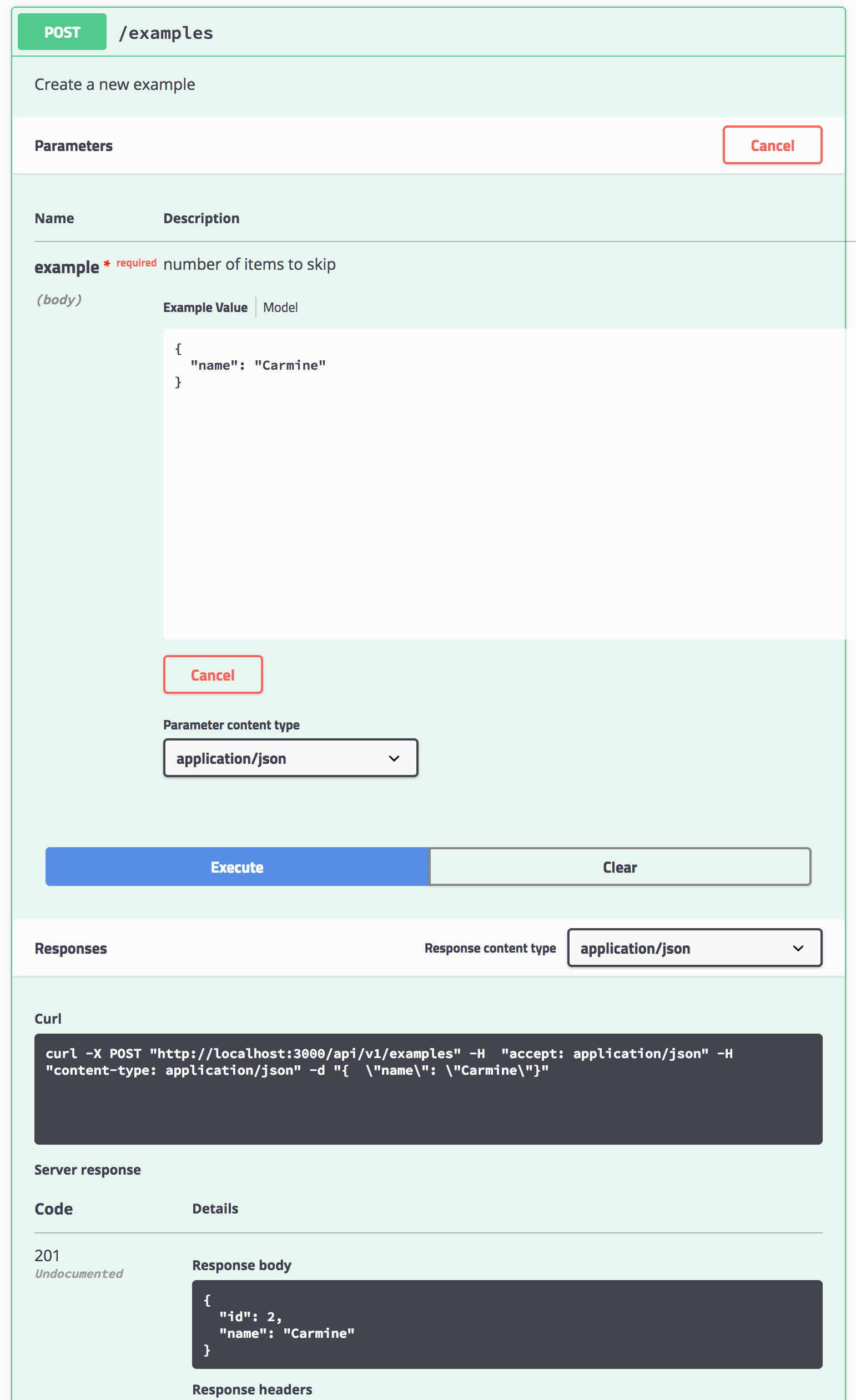
Invoke a POST request via the Interactive doc
Linting
express-no-stress uses ESLint and provides two choices, Airbnb or Prettier.
To add your own ESLint customizations, editeslint.conf.mjs.
Note that the Airbnb variant provides a slightly modified Airbnb base configuration.
FAQ
Q: How do I modify the example API and make it my own?
A: There are two key files that enable you to customize and describe your API:
server/routes.js- This references the implementation of all of your routes. Add as many routes as you like and point each route your express handler functions.server/common/api.yaml- This file contains your OpenAPI spec. Describe your API here. It's recommended that you to declare any and all validation logic in this YAML.express-no-stress-typescriptuses express-openapi-validator to automatically handle all API validation based on what you've defined in the spec.
Q: I previously generated an app, but I want to change the API root. How do I do this?
A: You need to make to small changes
- Modify
server/routes.js
javascript// Change your original path e.g. /api/v1/examples, to: app.use('/api/v2/examples', examplesRouter);
- Modify
server/common/api.yamland update the api root:
yaml# Change e.g. /api/v1 to /api/v2 servers: - url: /api/v2
License
<a href="https://www.buymeacoffee.com/m97tA5c" target="_blank"><img src="https://bmc-cdn.nyc3.digitaloceanspaces.com/BMC-button-images/custom_images/yellow_img.png" alt="Buy Me A Coffee" style="height: auto !important;width: auto !important;" ></a>
Contributors ✨
Thanks goes to these wonderful people (emoji key):
<!-- ALL-CONTRIBUTORS-LIST:START - Do not remove or modify this section --> <!-- prettier-ignore-start --> <!-- markdownlint-disable --> <table> <tr> <td align="center"><a href="https://github.com/leosuncin"><img src="https://avatars1.githubusercontent.com/u/4307697?v=4" width="100px;" alt=""/><br /><sub><b>Jaime Leonardo Suncin Cruz</b></sub></a><br /><a href="https://github.com/cdimascio/generator-express-no-stress/commits?author=leosuncin" title="Code">💻</a></td> <td align="center"><a href="https://github.com/amygdaloideum"><img src="https://avatars2.githubusercontent.com/u/18416252?v=4" width="100px;" alt=""/><br /><sub><b>Daniel Bornstrand</b></sub></a><br /><a href="https://github.com/cdimascio/generator-express-no-stress/commits?author=amygdaloideum" title="Code">💻</a></td> <td align="center"><a href="http://www.about.me/jasoncorns"><img src="https://avatars2.githubusercontent.com/u/3839416?v=4" width="100px;" alt=""/><br /><sub><b>Jason Corns</b></sub></a><br /><a href="https://github.com/cdimascio/generator-express-no-stress/commits?author=JasonAllenCorns" title="Documentation">📖</a></td> <td align="center"><a href="http://frankcalise.com"><img src="https://avatars0.githubusercontent.com/u/374022?v=4" width="100px;" alt=""/><br /><sub><b>Frank Calise</b></sub></a><br /><a href="https://github.com/cdimascio/generator-express-no-stress/commits?author=frankcalise" title="Documentation">📖</a></td> <td align="center"><a href="https://blog.daskepon.com/"><img src="https://avatars0.githubusercontent.com/u/6374952?v=4" width="100px;" alt=""/><br /><sub><b>Daisuke Tsuji</b></sub></a><br /><a href="https://github.com/cdimascio/generator-express-no-stress/commits?author=daskepon" title="Documentation">📖</a></td> <td align="center"><a href="https://github.com/uronly14me"><img src="https://avatars2.githubusercontent.com/u/5186814?v=4" width="100px;" alt=""/><br /><sub><b>Sangbeom Han</b></sub></a><br /><a href="https://github.com/cdimascio/generator-express-no-stress/commits?author=uronly14me" title="Documentation">📖</a></td> <td align="center"><a href="http://mkly.io"><img src="https://avatars1.githubusercontent.com/u/965353?v=4" width="100px;" alt=""/><br /><sub><b>Mike Lay</b></sub></a><br /><a href="https://github.com/cdimascio/generator-express-no-stress/commits?author=mkly" title="Documentation">📖</a></td> <td align="center"><a href="https://github.com/jodejar214"><img src="https://avatars2.githubusercontent.com/u/9385902?v=4" width="100px;" alt=""/><br /><sub><b>jodejar214</b></sub></a><br /><a href="https://github.com/cdimascio/generator-express-no-stress/commits?author=jodejar214" title="Code">💻</a></td> </tr> </table> <!-- markdownlint-enable --> <!-- prettier-ignore-end --> <!-- ALL-CONTRIBUTORS-LIST:END -->This project follows the all-contributors specification. Contributions of any kind welcome!
Contributors
Showing top 11 contributors by commit count.
![allcontributors[bot]](https://avatars.githubusercontent.com/in/23186?v=4)
![dependabot[bot]](https://avatars.githubusercontent.com/in/29110?v=4)








Related Repositories

humanlayer/12-factor-agents
What are the principles we can use to build LLM-powered software that is actually good enough to put in the hands of production customers?

softprops/envy
deserialize env vars into typesafe structs with rust

cdimascio/dotenv-java
🗝️ Dotenv is a no-dep, pure Java module that loads environment variables from a .env file

mohamed-taman/Springy-Store-Microservices
Springy Store is a conceptual simple μServices-based project using the latest cutting-edge technologies, to demonstrate how the Store services are created to be a cloud-native and 12-factor app agnostic. Those μServices are developed based on Spring Boot & Cloud framework that implements cloud-native intuitive, design patterns, and best practices.
cdimascio/dotenv-kotlin
🗝️ Dotenv is a module that loads environment variables from a .env file

hynek/environ-config
Python Application Configuration With Environment Variables