

Timeline studio
Timeline Studio - Video Editing with AI
🎬 AI-Powered Video Editor • 🚀 Multi-Platform Export • ⚡ GPU Acceleration The project is written primarily in TypeScript, distributed under the MIT License license, first published in 2025. Key topics include: ai-assistant, ai-storytelling, ai-video-generation, content-creation, react.
Italiano | Español | Français | Deutsch | Русский | 中文 | Português | 日本語 | 한국어 | Türkçe | ไทย | العربية | فارسی | हिन्दी









🎬 About the Project
What is Timeline Studio?
Timeline Studio is a next-generation professional video editor with AI integration that automates content creation for social media. Built on modern technologies (Tauri + Next.js), it combines the power of desktop applications with the convenience of web interfaces.
🎯 Key Advantages
- 🤖 100+ AI Tools - complete video production automation with multi-provider support
- ⚡ GPU Acceleration - hardware encoding NVENC, QuickSync, VideoToolbox
- 🔌 Plugin System - extend functionality without changing code
- 🌐 15 Language Interface - complete localization for global audience with RTL support
- 🔒 Local Processing - your content stays private
- 📊 80%+ Test Coverage - professional-level reliability
🚀 Problems We Solve
One upload → dozens of ready versions:
- 📱 TikTok - vertical shorts with trending effects (direct upload)
- 📺 YouTube - full movies, short clips, Shorts (direct upload)
- 🎬 Vimeo - high-quality cinematic versions (direct upload)
- ✈️ Telegram - optimized versions for channels and chats (direct upload)
- 📸 Instagram - Reels, Stories, posts optimized for manual upload
💡 How It Works
"Create a video about my trip to Asia for all social media" - and in minutes you have ready variants: dynamic shorts for TikTok, atmospheric vlog for YouTube, bright Stories for Instagram. AI selects the best moments, syncs with music and adapts for each platform.
⚡ Why This Changes Everything
- 10x Time Savings - no more manual adaptation for each video
- AI Understands Trends - knows what works on each social network
- Professional Quality - using the same tools as major studios
- Modular Architecture - easily add new features through plugins
- Open Source - transparency and ability to participate in development
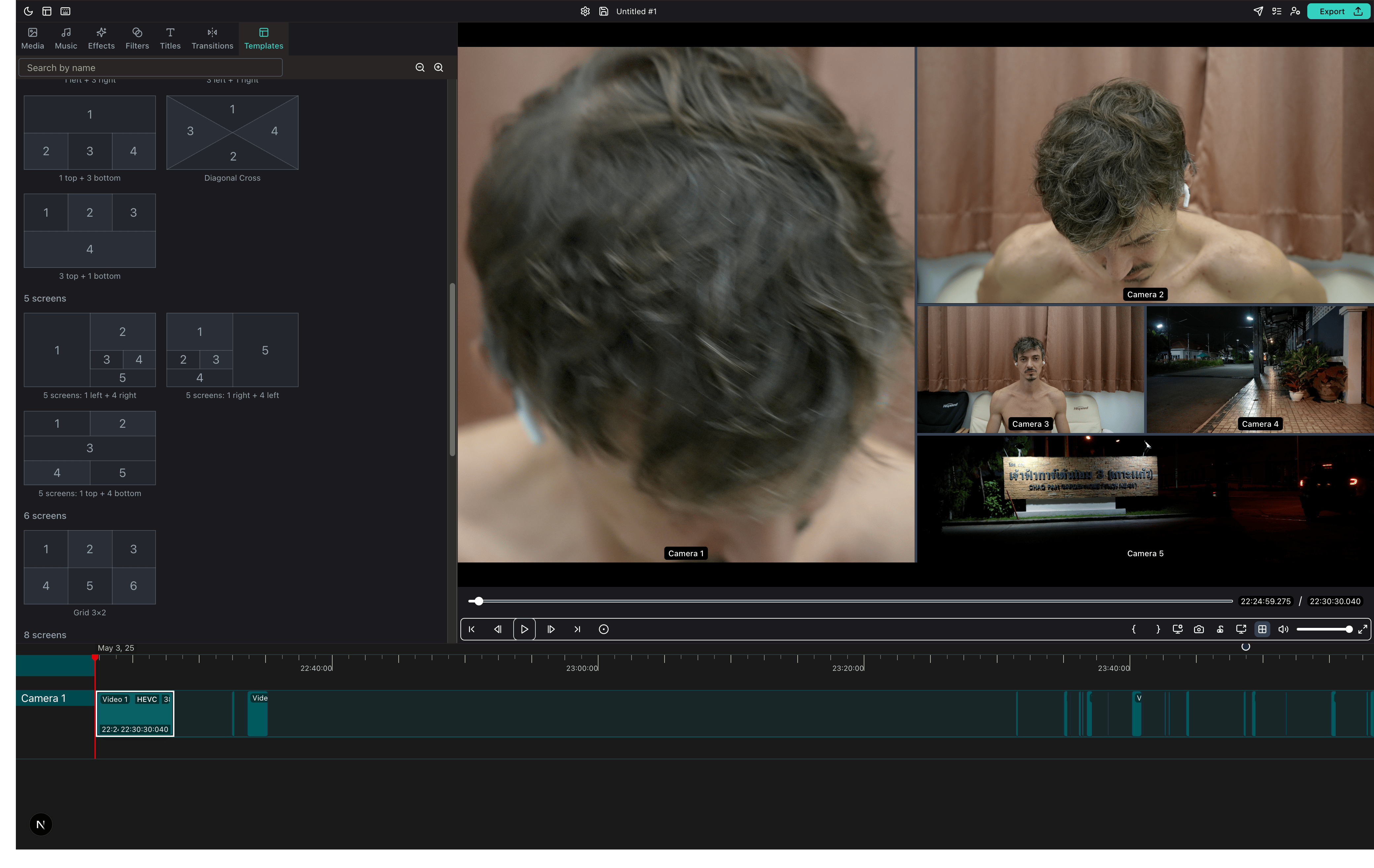
🏗️ Architecture
Timeline Studio is built on modern modular architecture:
Frontend (Next.js 15 + React 19)
- Feature-based organization - each function in
/src/features/is self-contained - State Management - XState v5 for complex states
- UI Components - shadcn/ui + Radix UI + Tailwind CSS v4
- TypeScript - strict typing and safety
Backend and Headless Runtime
- Rust workspace -
crates/*owns schema, render, media analysis, montage, publish and thetimelineCLI - TypeScript workspaces -
packages/core,packages/domains,packages/adapters,packages/ui - Desktop host - Tauri v2 remains the desktop shell over the shared runtime
- Headless entrypoints -
render-job,bot-workflow,bot-workerand Rusttimeline
📚 Detailed Frontend Architecture →
📚 Detailed Backend Architecture →
📚 Plugin System →
🛠️ Technical Stack Details →
🤖 AI Integration
Timeline Studio features comprehensive AI integration with 100+ specialized tools:
AI Providers
- Claude (Anthropic) - Primary AI with advanced reasoning
- OpenAI - GPT-4 models for diverse tasks
- DeepSeek - Specialized reasoning models
- Ollama - Local models for offline operation
AI Tool Categories
- Timeline Tools (50) - Intelligent project creation and editing
- Media Analysis (27) - Scene detection, quality analysis, content intelligence
- Audio Processing (12) - Transcription, noise removal, music sync
- Export Optimization (12) - Platform-specific adaptations
- Effects & Filters (10) - AI-powered visual enhancements
- And 40+ more specialized tools
📚 AI Chat Documentation →
🛠️ AI Tools Reference →
📚 Runtime Documentation
Timeline Studio uses a modular Rust + TypeScript workspace architecture. Desktop, CLI and bot/headless workflows share the same contracts where possible.
Headless and Contracts
📚 External Headless Contracts - supported ProjectSchema, Rust timeline, render-job, bot-workflow, bot-worker and bot-cleanup entrypoints
🤖 Bot-First Production Contract - Telegram AI review state, restart, retry, cleanup and Rust publish boundary
🧪 Telegram AI Review Sandbox Smoke - mocked and real sandbox validation path
Architecture
🧱 Package Boundaries - workspace ownership and import boundaries
🔁 Root Compatibility Shims - temporary root paths and migration criteria
🦀 Rust Backend Architecture - Rust/Tauri architecture and technology overview
src-tauri remains a desktop host/glue layer. External consumers should use the documented headless entrypoints instead of importing desktop internals.
🏗️ Project Status
🚀 Alpha version: 97.5% ready 🎯
✅ Completed: modular Rust workspace, TypeScript workspaces and bot-first/headless contract hardening
📋 Recently Completed:
- 📦 Phase F TypeScript Workspaces -
core,domains,adapters,ui,apps/desktopandapps/cli - 🤖 Bot-first Telegram AI Review - upload, preview, text/voice/video-note revisions, approval and publish
- 🧱 Phase G Headless Contracts - supported external entrypoints, package boundaries and root shim migration path
- ✅ Green main CI - build, frontend tests, bot/AI headless tests and Node lint after Phase G merge
Getting Started
Quick Setup
bash# Clone and install git clone https://github.com/chatman-media/timeline-studio.git cd timeline-studio bun install # Run development mode bun run tauri dev
Requirements
- Node.js v24+, Rust, Bun, FFmpeg
🚑 Troubleshooting Common Issues
FFmpeg Not Found
bash# macOS brew install ffmpeg export ORT_DYLIB_PATH=/opt/homebrew/lib/libonnxruntime.dylib # Windows - use setup script ./scripts/setup-rust-env-windows.ps1 # Linux sudo apt-get install ffmpeg libavcodec-dev libavformat-dev
Build Failures
- Windows: Ensure Visual Studio 2022 with C++ tools is installed
- macOS: Install Xcode Command Line Tools:
xcode-select --install - Linux: Install build essentials:
sudo apt-get install build-essential
📚 Complete Installation Guide →
🪟 Windows Setup →
🎥 Video Tutorial →
📖 Full Documentation → - Complete documentation with 18+ sections
Development
Quick Start
bash# Development mode bun run tauri dev # Run tests bun run test && bun run test:rust # Check code quality bun run check:all
📚 Complete Development Guide →
CI/CD & Code Quality
Automated Workflows
- ✅ Linting: ESLint, Stylelint, Clippy
- ✅ Testing: Frontend (Vitest), Backend (Rust), E2E (Playwright)
- ✅ Coverage: Codecov integration
- ✅ Build: Cross-platform builds
📚 Detailed CI/CD Guide →
🔧 Linting & Formatting →
👨💻 Developer Resources
Contributing to Timeline Studio
- 🤝 Contributing Guide - How to contribute to the project
- 🐛 Report Issues - Found a bug? Let us know!
- 💡 Feature Requests - Suggest new features
Plugin Development
- 🔌 Plugin System Guide - Build your own plugins
- 🚀 Plugin Quickstart - Get started in 5 minutes
- 📦 Plugin API Reference - Complete API documentation
Testing & Quality
- 🧪 Testing Guide - Unit, integration, E2E testing
- 📊 Test Utils - Audio and Tauri component testing
- ✅ Code Style - Coding standards
- 🔍 Performance Guide - Optimization tips
🌐 Community & Support
Join Our Community


Get Help
- 📚 FAQ - Frequently asked questions
- 💬 Discussions - Ask questions, share ideas
- 🐛 Issue Tracker - Report bugs
- 📧 Email Support - ak.chatman.media@gmail.com
Project Roadmap
- 🗺️ Development Roadmap - See what's coming next
- ✨ Completed Features - Recently shipped features
- 🎯 Alpha Release Progress - 97.5% complete!
- 📊 Project Status - Current development stats
Support the Project
- ⭐ Star on GitHub - Show your support
- 🤝 Contribute - Join the development
- 💼 Commercial License - For business use
🤝 Contributors
Thank you to all the amazing people who have contributed to Timeline Studio:
<a href="https://github.com/chatman-media/timeline-studio/graphs/contributors"> <img src="https://contrib.rocks/image?repo=chatman-media/timeline-studio" /> </a>💎 Sponsors
Timeline Studio is supported by these amazing sponsors:
<div align="center">🌟 Gold Sponsors
<a href="https://github.com/alagiz"> <img src="https://github.com/alagiz.png" width="80" height="80" alt="alagiz" style="border-radius: 50%; margin: 10px;" /> </a> <a href="https://github.com/alexk984"> <img src="https://github.com/alexk984.png" width="80" height="80" alt="alexk984" style="border-radius: 50%; margin: 10px;" /> </a> <a href="https://github.com/andreypeulskiy"> <img src="https://github.com/andreypeulskiy.png" width="80" height="80" alt="andreypeulskiy" style="border-radius: 50%; margin: 10px;" /> </a> <a href="https://github.com/gerusm"> <img src="https://github.com/gerusm.png" width="80" height="80" alt="gerusm" style="border-radius: 50%; margin: 10px;" /> </a>Special thanks to our generous crypto sponsors who have contributed $1,000+ to the project development!
</div>Support 💝🚀
Support the development via crypto donations:
<div align="center"> <table> <tr> <td align="center"> <strong>BTC</strong><br/> <img src="public/qr/btc.png" alt="BTC QR Code" height="200" /><br/> <code>14s9Y9Rb2CUWHSAatiQMhfkpx1MWXofUzw</code> </td> <td align="center"> <strong>ETH</strong><br/> <img src="public/qr/eth.png" alt="ETH QR Code" height="200" /><br/> <code>0x286D65151b622dCC16624cEd8463FDa45585fd60</code> </td> </tr> <tr> <td align="center"> <strong>TON</strong><br/> <img src="public/qr/ton.png" alt="TON QR Code" height="200" /><br/> <code>UQD1M80nPyzph5ZW1vfp_r19XI5MaerNhDq4dWXbXCo96WFj</code> </td> <td align="center"> <strong>NOT</strong><br/> <img src="public/qr/not.png" alt="NOT QR Code" height="200" /><br/> <code>UQD1M80nPyzph5ZW1vfp_r19XI5MaerNhDq4dWXbXCo96WFj</code> </td> </tr> </table> </div>Star History
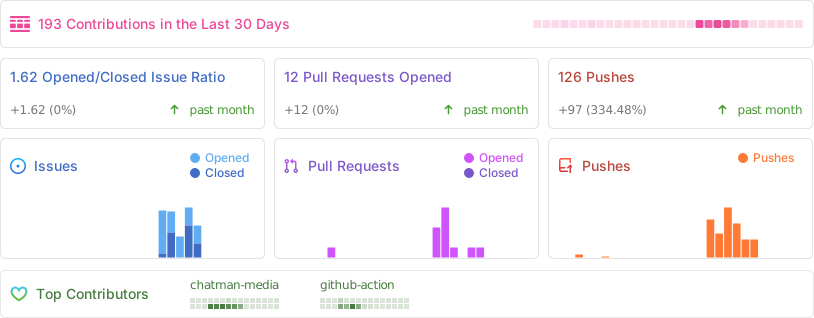
<a href="https://www.star-history.com/#chatman-media/timeline-studio&Date"> <picture> <source media="(prefers-color-scheme: dark)" srcset="https://api.star-history.com/svg?repos=chatman-media/timeline-studio&type=Date&theme=dark" /> <source media="(prefers-color-scheme: light)" srcset="https://api.star-history.com/svg?repos=chatman-media/timeline-studio&type=Date" /> <img alt="Star History Chart" src="https://api.star-history.com/svg?repos=chatman-media/timeline-studio&type=Date" /> </picture> </a>Repo Activity
License
MIT License with Commons Clause - free for personal use, commercial use requires agreement.
📄 Full License Details → | 📧 Commercial License: ak.chatman.media@gmail.com
Contributors
Showing top 7 contributors by commit count.


![deepsource-autofix[bot]](https://avatars.githubusercontent.com/in/57168?v=4)
![dependabot[bot]](https://avatars.githubusercontent.com/in/29110?v=4)


Related Repositories

ruvnet/ruflo
🌊 The leading agent meta-harness for Claude. Deploy intelligent multi-agent swarms, coordinate autonomous workflows, and build conversational AI systems. Features adaptive memory, self-learning swarm intelligence, RAG integration, and native Claude Code / Codex Integration

CopilotKit/CopilotKit
The Frontend Stack for Agents & Generative UI. React, Angular, Mobile, Slack, and more. Makers of the AG-UI Protocol

nanocoai/nanoclaw
A lightweight alternative to OpenClaw that runs in containers for security. Connects to WhatsApp, Telegram, Slack, Discord, Gmail and other messaging apps,, has memory, scheduled jobs, and runs directly on Anthropic's Agents SDK

nocobase/nocobase
NocoBase is an open-source AI + no-code platform for building business systems fast. Instead of generating everything from scratch, AI works on top of production-proven infrastructure and a WYSIWYG no-code interface, so you get both speed and reliability.

leon-ai/leon
🧠 Leon is your open-source personal assistant.

Usagi-org/ai-goofish-monitor
基于 Playwright 和AI实现的闲鱼多任务实时/定时监控与智能分析系统,配备了功能完善的后台管理UI。帮助用户从闲鱼海量商品中,找到心仪产品。