

Gosmee
Command line server and client for webhooks deliveries (and https://smee.io)
Gosmee is a webhook relayer that runs anywhere with ease. It also serves as a GitHub Hooks replayer using the GitHub API. The project is written primarily in Go, distributed under the Apache License 2.0 license, first published in 2022. Key topics include: developer-tools, forwarder, golang, webhooks-catcher.
gosmee - A webhook forwarder, relayer, and replayer
<img align="right" alt="gosmee logo" src="https://github.com/user-attachments/assets/f032b06f-480b-4a47-9fe3-2e350adf98fb" width="120">Gosmee is a webhook relayer that runs anywhere with ease. It also serves as a GitHub Hooks replayer using the GitHub API.
Description
Gosmee enables you to relay webhooks from itself (as a server) or from https://smee.io to your local laptop or infrastructure hidden from the public internet.
It makes exposing services on your local network (like localhost) or behind a VPN quite straightforward. This allows public services, such as GitHub, to push webhooks directly to your local environment.
Here's how it works:
- Configure your webhook to send events to a https://smee.io/ URL or to your publicly accessible Gosmee server.
- Run the Gosmee client on your local machine to fetch these events and forward them to your local service.
This creates a proper bridge between GitHub webhooks and your local development environment.
Alternatively, if you'd rather not use a relay server, you can use the GitHub API to replay webhook deliveries directly. (beta)
Diagram
For those who prefer a visual explanation of how gosmee works:
Simple
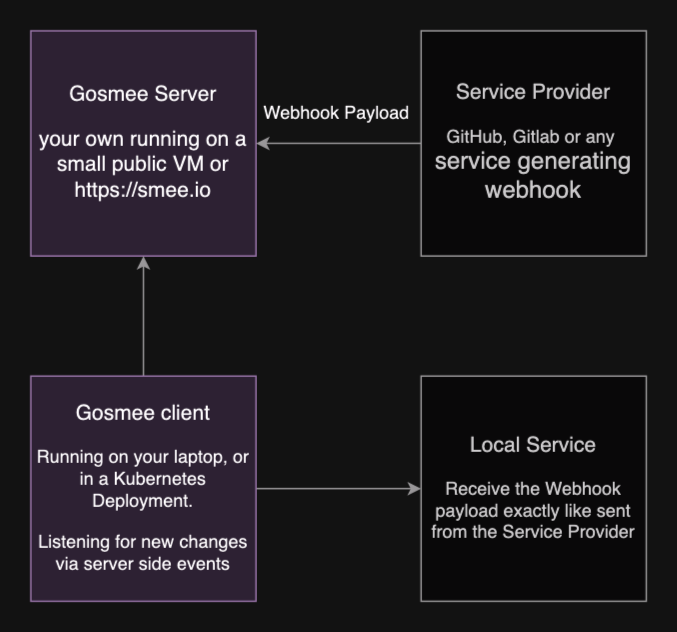
Detailed
mermaidsequenceDiagram participant SP as Service Provider (e.g., GitHub) participant GS as Gosmee Server (Public URL / smee.io) participant GC as Gosmee Client (Local / Private Network) participant LS as Local Service (e.g., localhost:3000) Note over GC, LS: Runs in private network/local machine Note over SP, GS: Accessible on the public internet GC->>+GS: 1. Connect & Listen via SSE SP->>+GS: 2. Event triggers -> Sends Webhook Payload (HTTP POST) GS->>-GC: 3. Relays Webhook Payload (via SSE connection) GC->>+LS: 4. Forwards Webhook Payload (HTTP POST) LS-->>-GC: 5. (Optional) HTTP Response GS-->>-SP: 6. (Optional) HTTP Response (e.g., 200 OK)
Blog Post
Learn more about the background and features of this project in this blog post: https://blog.chmouel.com/posts/gosmee-webhook-forwarder-relayer
Screenshot
Live Event Feed
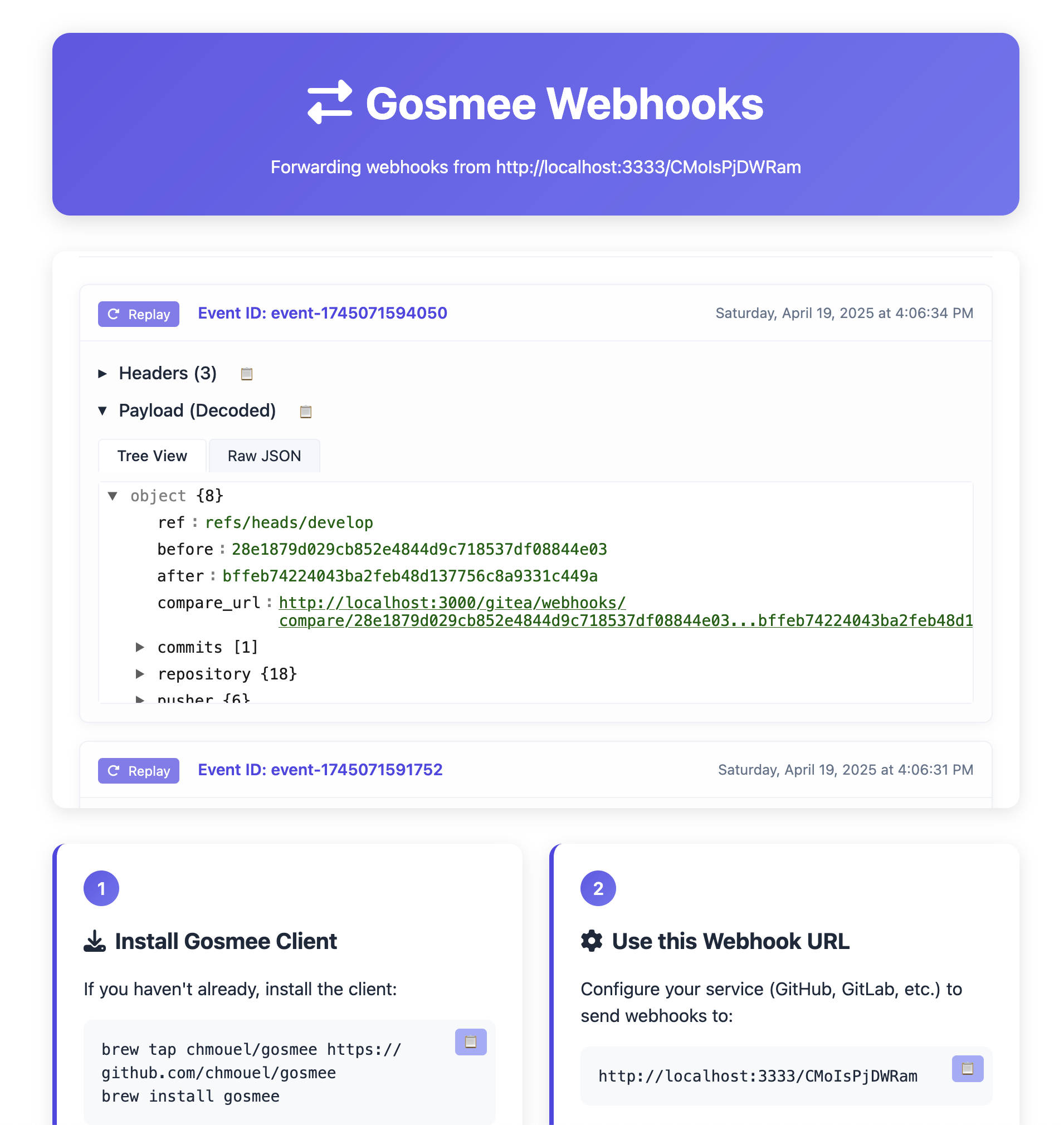
The web interface of the gosmee server features a live event feed that shows webhook events in real-time:
- Live status indicator showing connection state
- Event counter showing number of received events
- JSON tree viewer for easy payload inspection
- Copy buttons for headers and payloads
- Replay functionality to resend events to your endpoint
- Clear button to remove all events from the feed
Each event in the feed shows:
- Event ID and timestamp
- Headers with copy functionality
- Payload in both tree view and raw JSON formats
- Option to replay individual events
Installation
Release
Please visit the release page and choose the appropriate archive or package for your platform.
Homebrew
shellbrew tap chmouel/gosmee https://github.com/chmouel/gosmee brew install gosmee
Arch
shellyay -S gosmee-bin
Docker
Gosmee client with Docker
shelldocker run ghcr.io/chmouel/gosmee:latest
Gosmee server with Docker
shelldocker run -d -p 3026:3026 --restart always --name example.org ghcr.io/chmouel/gosmee:latest server --port 3026 --address 0.0.0.0 --public-url https://example.org
GO
shellgo install -v github.com/chmouel/gosmee@latest
Git
Clone the repository and use:
shell-$ make build -$ ./bin/gosmee --help
Nix/NixOS
Gosmee is available from nixpkgs.
shellnix-env -iA gosmee nix run nixpkgs#gosmee -- --help # your args are here
System Services
System service example files for macOS and Linux are available in the misc directory.
Kubernetes
You can deploy gosmee on Kubernetes to relay webhooks to your internal services.
Two deployment configurations are available:
- gosmee-server-deployment.yaml - For deploying the public-facing server component
- gosmee-client-deployment.yaml - For deploying the client component that forwards to internal services
Server Deployment
The server deployment exposes a public webhook endpoint to receive incoming webhook events:
shellkubectl apply -f misc/gosmee-server-deployment.yaml
Key configuration:
- Set
--public-urlto your actual domain where the service will be exposed - Configure an Ingress with TLS or use a service mesh for production use
- For security, consider using
--webhook-signatureand--allowed-ipsoptions - Only add
--trust-proxywhen your Ingress is the sole path to gosmee and overwritesX-Forwarded-For/X-Real-IP; otherwise the allowlist can be bypassed by spoofed headers (see SECURITY.md)
Client Deployment
The client deployment connects to a gosmee server (either your own or smee.io) and forwards webhook events to internal services:
shellkubectl apply -f misc/gosmee-client-deployment.yaml
Key configuration:
- Adjust the first argument to your gosmee server URL or smee.io channel
- Change the second argument to your internal service URL (e.g.,
http://service.namespace:8080) - The
--saveDirflag enables saving webhook payloads to/tmp/savefor later inspection
For detailed configuration options, please refer to the documentation comments in each deployment file.
Shell completion
Shell completions are available for gosmee:
shell# BASH source <(gosmee completion bash) # ZSH source <(gosmee completion zsh)
Usage
Client
If you plan to use the https://smee.io service, you can generate your own smee URL by visiting https://smee.io/new.
If you want to use the https://hook.pipelinesascode.com service then you can directly generate a URL with the -u / --new-url flag.
Once you have the relay URL, the basic usage is:
shellgosmee client https://smee.io/aBcDeF https://localhost:8080
This command will relay all payloads received by the smee URL to a service running on http://localhost:8080.
You can also save all relays as shell scripts for easy replay:
shellgosmee client --saveDir /tmp/savedreplay https://smee.io/aBcDeF https://localhost:8080
This command saves the JSON data of new payloads to /tmp/savedreplay/timestamp.json and creates shell scripts with cURL options at /tmp/savedreplay/timestamp.sh. Replay webhooks easily by running these scripts.
You can configure the SSE client buffer size (in bytes) with the --sse-buffer-size flag. The default is 1048576 (1MB).
Protected channels
Protected channels are optional and only apply to channel IDs listed in the server's --encrypted-channels-file.
Plaintext gosmee channels still work without a key file:
shellgosmee client https://myserverurl/plain-channel https://localhost:8080
When connecting to a protected channel on your own gosmee server, the client must use a pre-generated keypair file. There is no client-side auto-generation during gosmee client startup.
Generate a keypair once:
shellgosmee keygen --key-file ~/.config/gosmee/client-key.json
This writes the private key file and prints the corresponding public key to stdout. Add that public key to the server's protected-channel config.
Then connect with the key file:
shellgosmee client --encryption-key-file ~/.config/gosmee/client-key.json https://myserverurl/CHANNEL_ID https://localhost:8080
Notes:
- This protected-channel flow only works with gosmee's own SSE endpoint.
https://smee.iodoes not use client keys. - For gosmee channels that are not listed in
--encrypted-channels-file,--encryption-key-fileis not needed and payloads stay plaintext. - Payloads are encrypted from the gosmee server to authorized clients. The gosmee server still sees plaintext when it receives the webhook.
- Saved payloads from
--saveDirare written after decryption on the client side.
For those who prefer HTTPie over cURL, you can generate HTTPie-based replay scripts:
shellgosmee client --httpie --saveDir /tmp/savedreplay https://smee.io/aBcDeF https://localhost:8080
This will create replay scripts that use the http command instead of curl. The generated scripts support the same features as cURL scripts; the output will be rather nicer and presented in colour.
You can ignore certain events (identified by GitLab/GitHub/Bitbucket) with one or more --ignore-event flags.
If you only want to save payloads without replaying them, use --noReplay.
By default, you'll get colourful output unless you specify --nocolor.
Output logs as JSON with --output json (which implies --nocolor).
Executing commands on webhook events
You can execute a shell command whenever a webhook event is received using --exec:
shellgosmee client --exec 'jq . $GOSMEE_PAYLOAD_FILE' https://smee.io/aBcDeF http://localhost:8080
The payload and headers are written to temporary files (automatically cleaned up after the command finishes). The following environment variables are set:
| Variable | Description |
|---|---|
GOSMEE_EVENT_TYPE | The event type (e.g., push, pull_request) |
GOSMEE_EVENT_ID | The delivery ID |
GOSMEE_CONTENT_TYPE | The content type of the payload |
GOSMEE_TIMESTAMP | The timestamp of the event |
GOSMEE_PAYLOAD_FILE | Path to a temporary file containing the JSON payload body |
GOSMEE_HEADERS_FILE | Path to a temporary file containing the webhook headers as JSON |
To only run the command for specific event types, use --exec-on-events:
shellgosmee client --exec './handle-push.sh' --exec-on-events push --exec-on-events pull_request https://smee.io/aBcDeF http://localhost:8080
By default, --exec runs with a minimal, safe environment (for example PATH, HOME, and locale-related variables), not the full gosmee process environment. To pass additional variables through, use --exec-env-vars VAR_NAME (repeat the flag for multiple names), or set GOSMEE_EXEC_ENV_VARS as a comma-separated list.
The --exec command runs synchronously after the webhook is forwarded to the target URL (if replay is enabled). A slow command will delay processing of subsequent events. If you need asynchronous execution, background your command (e.g., --exec './my-script.sh &'). A non-zero exit code is logged as an error but does not stop processing further events.
Both --exec and --exec-on-events also work with the replay command.
Security Warning: The
--execflag runs arbitrary shell commands with
the webhook payload available via$GOSMEE_PAYLOAD_FILE. When receiving
webhooks from untrusted sources, a malicious payload could exploit a
naively written script (e.g., one that passes unsanitized fields to shell
commands). Always validate and sanitize webhook payloads in your exec
scripts. Consider using--webhook-signatureon the server side to verify
webhook authenticity.
Replay scripts
Both cURL and HTTPie replay scripts include these command-line options:
-l, --local: Use local debug URL-t, --target URL: Specify target URL directly-h, --help: Show help message-v, --verbose: Enable verbose output
Examples:
shell# Use local debug endpoint ./timestamp.sh -l # Specify custom target URL ./timestamp.sh -t http://custom-service:8080 # Use verbose mode for debugging ./timestamp.sh -v # Show help ./timestamp.sh -h
Scripts also respect the GOSMEE_DEBUG_SERVICE environment variable for alternative target URLs.
Server
With gosmee server you can run your own relay server instead of using https://smee.io.
By default, gosmee server binds to localhost on port 3333. For practical use, you'll want to expose it to your public IP or behind a proxy using the --address and --port flags.
For security, you can use Let's Encrypt certificates with the --tls-cert and --tls-key flags.
There are many flags available - check them with gosmee server --help.
To use your server in normal plaintext mode, access it with a URL format like:
The random ID must be 12 characters long with characters from a-zA-Z0-9_-.
Generate a random ID easily with the /new endpoint:
shell% curl http://localhost:3333/new http://localhost:3333/NqybHcEi
Protected client channels
If you want specific channels to be key-protected, provide --encrypted-channels-file. Only the channels listed in that file require authorized client keys and encrypted SSE delivery. All other gosmee channels continue to work in legacy plaintext mode.
Example protected-channel config:
json{ "channels": { "customer-a-channel": { "allowed_public_keys": [ "CLIENT_PUBLIC_KEY_1", "CLIENT_PUBLIC_KEY_2" ] } } }
Start the server with that config:
shellgosmee server --encrypted-channels-file /etc/gosmee/channels.json --public-url https://myserverurl
For a protected channel, configure the webhook to post to:
https://myserverurl/customer-a-channel
Important:
- Only channels listed in
--encrypted-channels-fileare protected. - A protected channel only delivers to clients whose public key is listed for that channel.
- Unauthorized subscribers to a protected channel receive a generic not-found response.
- The built-in browser UI and
/newremain available for plaintext channels, but protected channels are not exposed through the browser UI.
Caddy
Caddy is rather ideal for running gosmee server:
caddyfilehttps://webhook.mydomain { reverse_proxy http://127.0.0.1:3333 { header_up X-Real-IP {remote_host} header_up X-Forwarded-For {remote_host} } }
It automatically configures Let's Encrypt certificates for you.
Nginx
Running gosmee server behind nginx requires some configuration:
nginxlocation / { proxy_pass http://127.0.0.1:3333; proxy_set_header Connection ''; proxy_set_header X-Real-IP $remote_addr; proxy_set_header X-Forwarded-For $remote_addr; proxy_http_version 1.1; chunked_transfer_encoding off; proxy_read_timeout 372h; }
[!IMPORTANT]
If you run gosmee with--trust-proxy(required for--allowed-ipsto work behind a proxy), the proxy must be the only way to reach gosmee and must overwrite the forwarded headers. The examples above bind/proxy to127.0.0.1:3333, so keep that port off the public internet (do not publish it directly).The nginx snippet sets
X-Forwarded-For $remote_addr(the connection address) rather than$proxy_add_x_forwarded_for. The latter appends to any client-suppliedX-Forwarded-For, which would leave an attacker-controlled value first — and gosmee trusts the first entry. See SECURITY.md for details.
Note: Long-running connections may occasionally cause errors with nginx. Contributions to debug this are most welcome.
Security
--replay-token/GOSMEE_REPLAY_TOKEN: RequireAuthorization: Bearer <token>onPOST /replay/{channel}. When set, the web UI will prompt for the token when you click Replay (stored in browser sessionStorage for convenience). When not set, the replay endpoint remains open for backward compatibility.--cors-origin/GOSMEE_CORS_ORIGIN: ControlsAccess-Control-Allow-Originfor the SSE stream. Default is*(any origin can connect). Set a specific origin to restrict access. Set an empty string to omit the header entirely (same-origin only).
For a full security reference — including webhook signature validation, IP restrictions, payload limits, channel name protection, and encrypted channels — see SECURITY.md.
Configuration File
gosmee reads settings from a YAML file. CLI flags beat environment variables, which beat the config file.
Default path
| Platform | Path |
|---|---|
| Linux/BSD | ~/.config/gosmee/config.yaml |
| macOS | ~/Library/Application Support/gosmee/config.yaml |
| Windows | %APPDATA%\gosmee\config.yaml |
If the file is absent, gosmee starts without it.
Override the path
Use -F / --config or GOSMEE_CONFIG:
shellgosmee client --config /path/to/config.yaml
Structure
Top-level keys apply to all commands. Keys inside a named section (client, server, replay, keygen) apply only to that command and override the top-level value for it.
yamloutput: pretty saveDir: /tmp/savedreplay nocolor: false client: smee-url: https://smee.io/aBcDeF target-url: http://localhost:8080 sse-buffer-size: 1048576 channel: messages saveDir: /tmp/client-specific # overrides top-level saveDir server: port: 8080 address: 0.0.0.0 trust-proxy: true cors-origin: "https://my-trusted-site.com" allowed-ips: - 192.168.1.0/24 - 10.0.0.0/8 replay: org-repo: chmouel/gosmee hook-id: "123456789" target-url: http://localhost:8080 github-token: ghp_yourGitHubTokenHere
Replay Webhook Deliveries via the GitHub API (beta)
If you'd rather not use a relay server with GitHub, you can replay webhook deliveries directly via the GitHub API.
This method is more reliable as you don't depend on relay server availability. You'll need a GitHub token with appropriate scopes:
- For repository webhooks:
read:repo_hookorreposcope - For organisation webhooks:
admin:org_hookscope
Currently supports replaying webhooks from Repositories and Organisations (GitHub Apps webhooks not supported).
First, find the Hook ID:
shellgosmee replay --github-token=$GITHUB_TOKEN --list-hooks org/repo
List hooks for an organisation:
shellgosmee replay --github-token=$GITHUB_TOKEN --list-hooks org
Start listening and replaying events on a local server:
shellgosmee replay --github-token=$GITHUB_TOKEN org/repo HOOK_ID http://localhost:8080
This will listen to all new events and replay them to http://localhost:8080.
Replay all events received since a specific time (UTC format 2023-12-19T12:31:12):
shellgosmee replay --time-since=2023-12-19T09:00:00 --github-token=$GITHUB_TOKEN org/repo HOOK_ID http://localhost:8080
To find the right date, list all deliveries:
shellgosmee replay --github-token=$GITHUB_TOKEN --list-deliveries org/repo HOOK_ID
[!NOTE]
gosmee replaydoesn't support paging yet and lists only the last 100 deliveries. Specifying a date older than the last 100 deliveries won't work.When rate limited, gosmee will fail without recovery mechanisms.
Replay Viewer Utility
https://github.com/user-attachments/assets/dbd0978a-a8ef-4e77-b498-672497567b39
Gosmee includes a helper script misc/replayview for interactively browsing, previewing, and replaying webhook events saved by the client (--saveDir). This tool lets you:
- Fuzzy-find replay shell scripts and their JSON payloads
- Preview event metadata, headers, and payloads
- Copy replay script paths to clipboard
- Create symlinks for quick access
- Run replay scripts directly
- Interactively inspect JSON payloads (requires
fx)
Usage:
sh./misc/replayview -h
By default, it looks for replay files in /tmp/save or /tmp/replay. Use -d <dir> to specify a different directory.
It will create a symbolic link of the chosen replay event to the file /tmp/run.sh, which redirects the event to the local service for easy payload replay.
Requirements: fzf, jq, fd, and optionally fx for interactive JSON viewing.
See the script header or run with -h for full options and details.
Beyond Webhook
Gosmee is webhook-specific. For other tunnelling solutions, check https://github.com/anderspitman/awesome-tunneling. Recommended alternatives include go-http-tunnel or tailscale.
Caveats
This tool is intended for local development and testing environments only. It hasn't undergone thorough security and performance reviews and should not be deployed in production systems.
smee-sidecar is a service intended for monitoring gosmee deployments. It provides active health checks to verify that gosmee is serving requests.
Thanks
- Most of the work is powered by the go-sse library.
- I previously used pysmee but its underlying SSE library had issues with chunked transfers, that leads me to rewrite it in Go and add some specific features needed for my use cases.
Copyright
Authors
Chmouel Boudjnah
- Fediverse - <@chmouel@chmouel.com>
- Twitter - <@chmouel>
- Blog - <https://blog.chmouel.com>
Contributors
Showing top 11 contributors by commit count.

![dependabot[bot]](https://avatars.githubusercontent.com/in/29110?v=4)


![red-hat-konflux[bot]](https://avatars.githubusercontent.com/in/296509?v=4)


![google-labs-jules[bot]](https://avatars.githubusercontent.com/in/842251?v=4)
Related Repositories

affaan-m/ECC
The agent harness performance optimization system. Skills, instincts, memory, security, and research-first development for Claude Code, Codex, Opencode, Cursor and beyond.

puppeteer/puppeteer
JavaScript API for Chrome and Firefox

hoppscotch/hoppscotch
Open-Source API Development Ecosystem • https://hoppscotch.io • Offline, On-Prem & Cloud • Web, Desktop & CLI • Open-Source Alternative to Postman, Insomnia

OpenHands/OpenHands
🙌 OpenHands: AI-Driven Development

daytonaio/daytona
Daytona is a Secure and Elastic Infrastructure for Running AI-Generated Code

ComposioHQ/awesome-claude-skills
A curated list of awesome Claude Skills, resources, and tools for customizing Claude AI workflows