

Lovelace thermostat dark card
🌡 Thermostat card with a round and black feel to it
[English](README.md) | 🌐 Supports: English, 中文 (Chinese Simplified), Slovenčina (Slovak) The project is written primarily in TypeScript, distributed under the MIT License license, first published in 2018. Key topics include: custom-cards, hacs, home-assistant, lovelace, thermostat.
Thermostat Dark Card
English | 🌐 Supports: English, 中文 (Chinese Simplified), Slovenčina (Slovak)





A Nest-style thermostat card for Home Assistant with a round dial interface. Supports single and dual (heat/cool) setpoints, preset modes, and multiple themes.
<!-- Add screenshot: place your preview image at docs/preview.png -->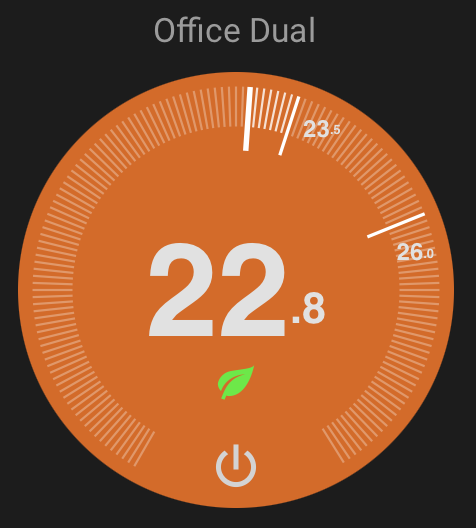
Key features:
- Pure SVG rendering — lightweight, no images, optimized for low bandwidth
- Single and dual (heat/cool) temperature modes
- Ring drag interaction for setting temperature
- Predictive state feedback while editing
- Dark, light, and transparent themes
- Preset mode indicators (eco, away, home, sleep, boost)
- Responsive — scales to any card size
Installation
HACS (Recommended)

Or manually:
- Open HACS in Home Assistant
- Search for "Thermostat Dark Card"
- Install and restart Home Assistant
Manual
- Download
thermostat-dark-card.jsfrom the latest release - Place it in
config/www/ - Add the resource in Settings → Dashboards → Resources:
- URL:
/local/thermostat-dark-card.js - Type: JavaScript Module
- URL:
Usage
yamltype: custom:thermostat-dark-card entity: climate.living_room
Configuration
UI Options
These are available in the visual card editor:
| Option | Type | Default | Description |
|---|---|---|---|
entity | string | required | Climate entity ID |
name | string / false | entity name | Card title. Set to false to hide |
hide_name | boolean | false | Hide the card title |
theme | string | dark | dark, light, transparent, or glassy |
step | number | from entity | Temperature step override (celsius only) |
readonly | boolean | false | Disable all interaction (display only) |
ambient_temperature | string | — | External temperature sensor entity ID |
status_entity | string | — | Entity whose state is shown as text above temperature |
show_power_toggle | boolean | true | Show power on/off button |
show_preset_indicator | boolean | true | Show preset mode icon |
pending | number | 3 | Seconds before committing temperature change |
Advanced Options (YAML only)
For fine-tuning behavior — not exposed in UI:
| Option | Type | Default | Description |
|---|---|---|---|
idle_zone | number | 0 | Minimum gap between low/high targets in dual mode |
range_min | number | from entity | Override minimum temperature |
range_max | number | from entity | Override maximum temperature |
colors | object | — | Custom color overrides (see below) |
preset_icons | object | — | Map preset names to icons (see below) |
Expert Options (use at your own risk)
Internal rendering parameters — changing these may break the dial appearance:
| Option | Type | Default | Description |
|---|---|---|---|
diameter | number | 400 | SVG viewBox size (all proportions are relative to this) |
num_ticks | number | 150 | Number of tick marks on the ring |
tick_degrees | number | 300 | Arc span of tick marks (degrees) |
show_ticks | boolean | true | Show tick marks |
Themes
- dark — Black/dark grey background (default)
- light — Light grey background with dark text
- transparent — No disc background, use with card-mod for custom backgrounds
Transparent theme example with a room photo:
yamltype: custom:thermostat-dark-card entity: climate.bedroom theme: transparent card_mod: style: | ha-card { background: url("/local/bedroom.jpg") center/cover no-repeat; }
Color Overrides
Override disc colors via YAML (not available in visual editor):
yamltype: custom:thermostat-dark-card entity: climate.living_room colors: heating: "#ff5500" cooling: "#0088ff" idle: "#1a1a1a" off: "#444444"
Preset Icons
Map custom preset mode names to built-in icons:
yamltype: custom:thermostat-dark-card entity: climate.ecobee preset_icons: vacation: eco night: sleep party: boost
Available icon names: eco, away, home, sleep, boost, comfort, activity
Built-in mappings (no config needed):
eco,away→ leafhome→ housesleep→ moonboost→ flamecomfort→ sunactivity→ person
Unknown presets show no icon unless mapped via preset_icons.
External Temperature Sensor
Use a separate sensor for the ambient temperature display instead of the climate entity's built-in sensor:
yamltype: custom:thermostat-dark-card entity: climate.living_room ambient_temperature: sensor.living_room_external_temp
Features
- Single and dual mode — Automatically adapts based on entity attributes
- Ring interaction — Drag on the tick ring to set temperature
- Chevron controls — Tap up/down arrows for precise adjustments
- Predictive feedback — Disc color fades to show predicted heating/cooling state while editing
- Preset indicators — Shows eco leaf, home, sleep, and other icons
- More-info dialog — Long-press (mobile) or right-click (desktop) opens the HA entity dialog
- Responsive — Scales to fit any card size
License
MIT
Support
If you find this card useful, consider buying me a coffee:
<a href="https://www.buymeacoffee.com/gUEVWJc" target="_blank"><img src="https://cdn.buymeacoffee.com/buttons/v2/default-yellow.png" alt="Buy Me A Coffee" height="40"></a>
Contributors
Showing top 12 contributors by commit count.

![dependabot[bot]](https://avatars.githubusercontent.com/in/29110?v=4)

![github-actions[bot]](https://avatars.githubusercontent.com/in/15368?v=4)





Related Repositories

Clooos/Bubble-Card
Bubble Card is a minimalist card collection for Home Assistant with a nice pop-up touch.

denysdovhan/vacuum-card
Vacuum cleaner card for Home Assistant Lovelace UI
nervetattoo/banner-card
A fluffy banner card for Home Assistant 🥰

custom-cards/decluttering-card
🧹 Declutter your lovelace configuration with the help of this card

decompil3d/lovelace-hourly-weather
Hourly weather card for Home Assistant. Visualize upcoming weather conditions as a colored horizontal bar.

slipx06/sunsynk-power-flow-card
⚡A customizable Home Assistant card to emulate the Sunsynk System flow that's displayed on the Inverter screen.