

Flutter examples
An ultimate cheatbook of curated designs
- [Layouts](#layouts) - [Container](#container) - [Row](#row) - [MainAxisAlignment](#mainaxisalignment) - [CrossAxisAlignment](#crossaxisalignment) - [Column](#column) - [MainAxisAlignment](#mainaxisalignment) - [CrossAxisAlignment](#crossaxisalignment) - [Center](#center) - [Align](#align) - [Padding](#padding) - [SizedBox](#sizedbox) - [Expanded](#expanded) - [Flexible](#flexible) - [ConstrainedBox](#constrainedbox) - [Stack](#stack) - [Wrap](#wrap) - [Positioned](#positioned) - [ListView](#li... The project is distributed under the The Unlicense license, first published in 2018. Key topics include: flutter, flutter-android, flutter-apps, flutter-demo, flutter-design.
<a href='https://ko-fi.com/A302HW7' target='_blank'><img height='36' style='border:0px;height:36px;' src='https://az743702.vo.msecnd.net/cdn/kofi4.png?v=f' border='0' alt='Buy Me a Coffee at ko-fi.com' /></a>



<a href="https://imgur.com/VN2su2K"><img src="https://i.imgur.com/VN2su2K.png" title="source: imgur.com" /></a>
Layouts
Container
<a href="https://imgur.com/pGA1yrB"><img src="https://imgur.com/pGA1yrB.png" title="source: imgur.com"></a>
dartContainer( padding: const EdgeInsets.all(0.0), color: Colors.cyanAccent, width: 80.0, height: 80.0, ),
Row
MainAxisAlignment
Note: The below example is with CrossAxisAlignment.center
| .center | .start | .end |
|---|---|---|
| <a href="https://imgur.com/XR3dmJc"><img src="https://imgur.com/XR3dmJc.png" title="source: imgur.com"></a> | <a href="https://imgur.com/bPfPpsp"><img src="https://imgur.com/bPfPpsp.png" title="source: imgur.com"></a> | <a href="https://imgur.com/edkXXp7"><img src="https://imgur.com/edkXXp7.png" title="source: imgur.com"></a> |
| .spaceEvenly | .spaceAround | .spaceBetween |
|---|---|---|
| <a href="https://imgur.com/iX1G0F6"><img src="https://imgur.com/iX1G0F6.png" title="source: imgur.com"></a> | <a href="https://imgur.com/FJJdzF8"><img src="https://imgur.com/FJJdzF8.png" title="source: imgur.com"></a> | <a href="https://imgur.com/LzPcqi1"><img src="https://imgur.com/LzPcqi1.png" title="source: imgur.com"></a> |
CrossAxisAlignment
| .center | .start | .end | .stretch |
|---|---|---|---|
| <a href="https://imgur.com/XR3dmJc"><img src="https://imgur.com/XR3dmJc.png" title="source: imgur.com"></a> | <a href="https://imgur.com/BP6U9HI"><img src="https://imgur.com/BP6U9HI.png" title="source: imgur.com"></a> | <a href="https://imgur.com/CR2ZDSo"><img src="https://imgur.com/CR2ZDSo.png" title="source: imgur.com"></a> | <a href="https://imgur.com/hS1Pu4G"><img src="https://imgur.com/hS1Pu4G.png" title="source: imgur.com"></a> |
dartRow( mainAxisAlignment: MainAxisAlignment.center, mainAxisSize: MainAxisSize.max, crossAxisAlignment: CrossAxisAlignment.center, children: <Widget>[ Container( padding: const EdgeInsets.all(0.0), color: Colors.cyanAccent, width: 80.0, height: 80.0, ), Container( padding: const EdgeInsets.all(0.0), color: Colors.blueAccent, width: 80.0, height: 80.0, ), Container( padding: const EdgeInsets.all(0.0), color: Colors.orangeAccent, width: 80.0, height: 80.0, ), ], ),
Column
MainAxisAlignment
Note: The below example is with CrossAxisAlignment.center
| .center | .start | .end | .spaceEvenly | .spaceAround | .spaceBetween |
|---|---|---|---|---|---|
| <a href="https://imgur.com/AT1WBOy"><img src="https://imgur.com/AT1WBOy.png" title="source: imgur.com"></a> | <a href="https://imgur.com/Df3PZ0E"><img src="https://imgur.com/Df3PZ0E.png" title="source: imgur.com"></a> | <a href="https://imgur.com/05M0SFS"><img src="https://imgur.com/05M0SFS.png" title="source: imgur.com"></a> | <a href="https://imgur.com/5FxzrUt"><img src="https://imgur.com/5FxzrUt.png" title="source: imgur.com"></a> | <a href="https://imgur.com/wB5u6vW"><img src="https://imgur.com/wB5u6vW.png" title="source: imgur.com"></a> | <a href="https://imgur.com/XB6aNuj"><img src="https://imgur.com/XB6aNuj.png" title="source: imgur.com"></a> |
CrossAxisAlignment
| .center | .start | .end | .stretch |
|---|---|---|---|
| <a href="https://imgur.com/AT1WBOy"><img src="https://imgur.com/AT1WBOy.png" title="source: imgur.com"></a> | <a href="https://imgur.com/HQt271d"><img src="https://i.imgur.com/HQt271d.png" title="source: imgur.com" /></a> | <a href="https://imgur.com/MQP5TwQ"><img src="https://i.imgur.com/MQP5TwQ.png" title="source: imgur.com" /></a> | <a href="https://imgur.com/9Fg9018"><img src="https://i.imgur.com/9Fg9018.png" title="source: imgur.com" /></a> |
dartColumn( mainAxisAlignment: MainAxisAlignment.center, mainAxisSize: MainAxisSize.max, crossAxisAlignment: CrossAxisAlignment.center, children: <Widget>[ Container( padding: const EdgeInsets.all(0.0), color: Colors.cyanAccent, width: 80.0, height: 80.0, ), Container( padding: const EdgeInsets.all(0.0), color: Colors.blueAccent, width: 80.0, height: 80.0, ), Container( padding: const EdgeInsets.all(0.0), color: Colors.orangeAccent, width: 80.0, height: 80.0, ), ], ),
Center
<a href="https://imgur.com/8vXWBcG"><img src="https://i.imgur.com/8vXWBcG.png" title="source: imgur.com" /></a>
dartCenter(child: Container( padding: const EdgeInsets.all(0.0), color: Colors.cyanAccent, width: 80.0, height: 80.0, ))
Note: Center wraps any widget to center to its parent widget. (i.e orange is the parent widget)
Align
| .topLeft | .topCenter | .topRight |
|---|---|---|
| <a href="https://imgur.com/tUjxft5"><img src="https://i.imgur.com/tUjxft5.png" title="source: imgur.com" /></a> | <a href="https://imgur.com/CB5NLmh"><img src="https://i.imgur.com/CB5NLmh.png" title="source: imgur.com" /></a> | <a href="https://imgur.com/ObaBABi"><img src="https://i.imgur.com/ObaBABi.png" title="source: imgur.com" /></a> |
| .centerLeft | .center | .centerRight |
|---|---|---|
| <a href="https://imgur.com/Qt0dRjT"><img src="https://i.imgur.com/Qt0dRjT.png" title="source: imgur.com" /></a> | <a href="https://imgur.com/8vXWBcG"><img src="https://i.imgur.com/8vXWBcG.png" title="source: imgur.com" /></a> | <a href="https://imgur.com/IjDlZRl"><img src="https://i.imgur.com/IjDlZRl.png" title="source: imgur.com" /></a> |
| .bottomLeft | .bottomCenter | .bottomRight |
|---|---|---|
| <a href="https://imgur.com/UQhL7R4"><img src="https://i.imgur.com/UQhL7R4.png" title="source: imgur.com" /></a> | <a href="https://imgur.com/J27fCiH"><img src="https://i.imgur.com/J27fCiH.png" title="source: imgur.com" /></a> | <a href="https://imgur.com/3rqg16p"><img src="https://i.imgur.com/3rqg16p.png" title="source: imgur.com" /></a> |
dartAlign( alignment: Alignment.center, child: Container( padding: const EdgeInsets.all(0.0), color: Colors.cyanAccent, width: 80.0, height: 80.0, ))
Note: Align wraps any widget based on the Alignment direction to its parent widget. The default alignment for Align is center.
Padding
<a href="https://imgur.com/vsLgkNA"><img src="https://i.imgur.com/vsLgkNA.png" title="source: imgur.com" /></a>
dartPadding( padding: EdgeInsets.fromLTRB(24, 32, 24, 32) , child: Container( padding: const EdgeInsets.all(0.0), color: Colors.cyanAccent, width: 80.0, height: 80.0, ))
SizedBox
<a href="https://imgur.com/1dUkeuZ"><img src="https://i.imgur.com/1dUkeuZ.png" title="source: imgur.com" /></a>
dartSizedBox( width: 200.0, height: 100.0, child: Card( color: Colors.indigoAccent, child: Center( child: Text('SizedBox', style: TextStyle(color: Colors.white) ) ) ) )
Note: SizedBox constraints its child widget to match based on specific size of width and height.
Expanded
| Row | Column |
|---|---|
| <a href="https://imgur.com/lQDfotj"><img src="https://i.imgur.com/lQDfotj.png" title="source: imgur.com" /></a> | <a href="https://imgur.com/z8FUGgu"><img src="https://i.imgur.com/z8FUGgu.png" title="source: imgur.com" /></a> |
dartRow( mainAxisAlignment: MainAxisAlignment.center, mainAxisSize: MainAxisSize.max, crossAxisAlignment: CrossAxisAlignment.center, children: <Widget>[ Expanded( child: Container(color: Colors.cyan, height: 80), flex: 2, ), Expanded( child: Container(color: Colors.indigoAccent, height: 80), flex: 3, ), Expanded( child: Container(color: Colors.orange, height: 80), flex: 4, ), ], ),
Flexible
| Row | Column |
|---|---|
| <a href="https://imgur.com/5ZPdv5O"><img src="https://i.imgur.com/5ZPdv5O.png" title="source: imgur.com" /></a> | <a href="https://imgur.com/jhduYDT"><img src="https://i.imgur.com/jhduYDT.png" title="source: imgur.com" /></a> |
dartRow( mainAxisAlignment: MainAxisAlignment.center, mainAxisSize: MainAxisSize.max, crossAxisAlignment: CrossAxisAlignment.center, children: <Widget>[ Flexible( child: Container(color: Colors.cyanAccent, height: 80, width: 80), flex: 2, ), Flexible( child: Container(color: Colors.indigoAccent, height: 80, width: 80), flex: 3, ), Flexible( child: Container(color: Colors.orange, height: 80, width: 80), flex: 4, ), ], ),
Hint:
- To make Flexible behave similar to Expanded, then add
fit: FlexFit.tight - By default fit type for Flexible is
fit: FlexFit.loose.
ConstrainedBox
| Expand | Expand with Height | Tight | Loose |
|---|---|---|---|
| <a href="https://imgur.com/NVFRLJj"><img src="https://i.imgur.com/NVFRLJj.png" title="source: imgur.com" /></a> | <a href="https://imgur.com/EZav2GR"><img src="https://i.imgur.com/EZav2GR.png" title="source: imgur.com" /></a> | <a href="https://imgur.com/kRIXDqB"><img src="https://i.imgur.com/kRIXDqB.png" title="source: imgur.com" /></a> | <a href="https://imgur.com/CD2vkio"><img src="https://i.imgur.com/CD2vkio.png" title="source: imgur.com" /></a> |
BoxConstraints.expand() | BoxConstraints.expand(height: 100) | BoxConstraints.tight(Size(125, 100)) | BoxConstraints.loose(Size(125, 100)) |
dartConstrainedBox( constraints: BoxConstraints.expand(height: 100), child: Container( color: Colors.orange, child: Padding(padding: EdgeInsets.all(16), child: Text('Box Constraint', style: TextStyle(color: Colors.white),)), ))
Stack
| AlignmentDirectional.centerStart | AlignmentDirectional.center | AlignmentDirectional.centerEnd |
|---|---|---|
| <a href="https://imgur.com/5WpzDWb"><img src="https://i.imgur.com/5WpzDWb.png" title="source: imgur.com" /></a> | <a href="https://imgur.com/Bb1bs22"><img src="https://i.imgur.com/Bb1bs22.png" title="source: imgur.com" /></a> | <a href="https://imgur.com/Dkuc0mn"><img src="https://i.imgur.com/Dkuc0mn.png" title="source: imgur.com" /></a> |
| AlignmentDirectional.bottomStart | AlignmentDirectional.bottomCenter | AlignmentDirectional.bottomEnd |
|---|---|---|
| <a href="https://imgur.com/odCg42L"><img src="https://i.imgur.com/odCg42L.png" title="source: imgur.com" /></a> | <a href="https://imgur.com/bykS3Qf"><img src="https://i.imgur.com/bykS3Qf.png" title="source: imgur.com" /></a> | <a href="https://imgur.com/UgRiSq0"><img src="https://i.imgur.com/UgRiSq0.png" title="source: imgur.com" /></a> |
| AlignmentDirectional.topStart | AlignmentDirectional.topCenter | AlignmentDirectional.topEnd |
|---|---|---|
| <a href="https://imgur.com/8nucWaD"><img src="https://i.imgur.com/8nucWaD.png" title="source: imgur.com" /></a> | <a href="https://imgur.com/EpvPFRr"><img src="https://i.imgur.com/EpvPFRr.png" title="source: imgur.com" /></a> | <a href="https://imgur.com/Kl8NjrN"><img src="https://i.imgur.com/Kl8NjrN.png" title="source: imgur.com" /></a> |
dartStack( alignment: AlignmentDirectional.center, children: [ Container( height: 200.0, width: 200.0, color: Colors.red, ), Container( height: 150.0, width: 150.0, color: Colors.blue, ), Container( height: 100.0, width: 100.0, color: Colors.green, ), Container( height: 50.0, width: 50.0, color: Colors.yellow, ), ], ),
Credits: Fore more detailed blog post for this. Please visit https://medium.com/flutter-community/flutter-for-android-developers-how-to-design-framelayout-in-flutter-93a19fc7e7a6
Wrap
<a href="https://imgur.com/DnGAyK2"><img src="https://i.imgur.com/DnGAyK2.png" title="source: imgur.com" /></a>
dartWrap( spacing: 4.0, // gap between lines children: <Widget>[ Chip( avatar: CircleAvatar(backgroundColor: Colors.orange, child: Text('C', style: TextStyle(color: Colors.white))), label: Text('Cupcake'), backgroundColor: Colors.white, ), Chip( avatar: CircleAvatar(backgroundColor: Colors.cyanAccent, child: Text('D', style: TextStyle(color: Colors.black45))), label: Text('Donut'), backgroundColor: Colors.white, ), Chip( avatar: CircleAvatar(backgroundColor: Colors.indigoAccent, child: Text('E', style: TextStyle(color: Colors.white))), label: Text('Eclair'), backgroundColor: Colors.white, ), Chip( avatar: CircleAvatar(backgroundColor: Colors.yellowAccent, child: Text('F', style: TextStyle(color: Colors.black45))), label: Text('Froyo'), backgroundColor: Colors.white, ), Chip( avatar: CircleAvatar(backgroundColor: Colors.green, child: Text('G', style: TextStyle(color: Colors.white))), label: Text('Gingerbread'), backgroundColor: Colors.white, ), Chip( avatar: CircleAvatar(backgroundColor: Colors.redAccent, child: Text('H', style: TextStyle(color: Colors.white))), label: Text('Honeycomb'), backgroundColor: Colors.white, ), Chip( avatar: CircleAvatar(backgroundColor: Colors.greenAccent, child: Text('I', style: TextStyle(color: Colors.black45))), label: Text('Ice cream Sandwich'), backgroundColor: Colors.white, ), Chip( avatar: CircleAvatar(backgroundColor: Colors.deepOrangeAccent, child: Text('J', style: TextStyle(color: Colors.white))), label: Text('Jelly Bean'), backgroundColor: Colors.white, ), Chip( avatar: CircleAvatar(backgroundColor: Colors.indigo, child: Text('K', style: TextStyle(color: Colors.white))), label: Text('Kit Kat'), backgroundColor: Colors.white, ), Chip( avatar: CircleAvatar(backgroundColor: Colors.tealAccent, child: Text('L', style: TextStyle(color: Colors.black45))), label: Text('Lollipop'), backgroundColor: Colors.white, ), Chip( avatar: CircleAvatar(backgroundColor: Colors.amberAccent, child: Text('M', style: TextStyle(color: Colors.white))), label: Text('Marshmallow'), backgroundColor: Colors.white, ), Chip( avatar: CircleAvatar(backgroundColor: Colors.cyan, child: Text('N', style: TextStyle(color: Colors.white))), label: Text('Nougat'), backgroundColor: Colors.white, ), Chip( avatar: CircleAvatar(backgroundColor: Colors.red, child: Text('O', style: TextStyle(color: Colors.white))), label: Text('Oreo'), backgroundColor: Colors.white, ), Chip( avatar: CircleAvatar(backgroundColor: Colors.greenAccent, child: Text('P', style: TextStyle(color: Colors.black45))), label: Text('Pie'), backgroundColor: Colors.white, ), ], )
Positioned
<a href="https://imgur.com/vizQUeG"><img src="https://i.imgur.com/vizQUeG.jpg" title="source: imgur.com" /></a>
dartConstrainedBox( constraints: BoxConstraints.tight(Size(double.infinity, 256)), child: Stack( alignment: AlignmentDirectional.center, children: <Widget>[ Positioned( top: 0.0, child: Icon(Icons.calendar_today, size: 128.0, color: Colors.lightBlueAccent), ), Positioned( top: 4, right: 110, child: CircleAvatar(radius: 16, backgroundColor: Colors.red)), ], ), )
ListView
Simple
<a href="https://imgur.com/90iV7zG"><img src="https://i.imgur.com/90iV7zG.jpg" title="source: imgur.com" /></a>
dartWidget build(BuildContext context) { List<String> names = ['Alpha', 'Beta', 'Cupcake', 'Donut', 'Eclair', 'Froyo', 'Ginger bread', 'Honey comb', 'Ice cream sandwich', 'Jelly bean', 'Kitkat', 'Lollipop', 'Marshmallow', 'Nougat', 'Oreo', 'Pie' ]; return MaterialApp( debugShowCheckedModeBanner: false, home: Scaffold( appBar: AppBar(title: Text('ListView')), body: Center( child: ListView.builder( itemCount: names.length, itemBuilder: (BuildContext context, int position) { var name = names[position]; return ListTile(title: Text(name)); }), )), ); }
Divider
<a href="https://imgur.com/qikJgCv"><img src="https://i.imgur.com/qikJgCv.jpg" title="source: imgur.com" /></a>
dartListView.separated( itemBuilder: (BuildContext context, int position) { var name = names[position]; return ListTile(title: Text(name)); }, separatorBuilder: (BuildContext context, int index) => Divider(), itemCount: names.length),
Card
<a href="https://imgur.com/HO0D2Cx"><img src="https://i.imgur.com/HO0D2Cx.jpg" title="source: imgur.com" /></a>
dartListView.builder( itemCount: names.length, itemBuilder: (BuildContext context, int position) { var name = names[position]; return Card(margin: EdgeInsets.fromLTRB(8, 4, 8, 4),child: ListTile(title: Text(name))); })
Text
<a href="https://imgur.com/yZPgBPy"><img src="https://imgur.com/yZPgBPy.png" title="source: imgur.com"></a>
dartText( "Flutter is Awesome", style: TextStyle( fontSize: 18.0, color: Colors.greenAccent, fontWeight: FontWeight.w500, fontFamily: "Roboto"), ),
Icon
<a href="https://imgur.com/QGPuoR5"><img src="https://imgur.com/QGPuoR5.png" title="source: imgur.com"></a>
dartnew Icon(Icons.flight_takeoff, color: Colors.blueAccent, size: 96.0),
Material
Button
Material Button
<a href="https://imgur.com/dBP8Xzw"><img src="https://i.imgur.com/dBP8Xzw.png" title="source: imgur.com" /></a>
dartMaterialButton( onPressed: () { debugPrint('I am a material button'); }, shape: const StadiumBorder(), textColor: Colors.black, color: Colors.blue[300], splashColor: Colors.blue[900], disabledColor: Colors.grey, disabledTextColor: Colors.white, child: Text('Material Button'), ),
Flat Button
<a href="https://imgur.com/x30XGUf"><img src="https://i.imgur.com/x30XGUf.png" title="source: imgur.com" /></a>
dartFlatButton( onPressed: () { debugPrint('I am Awesome'); }, textColor: Colors.white, color: Colors.blueAccent, disabledColor: Colors.grey, disabledTextColor: Colors.white, highlightColor: Colors.orangeAccent, child: Text('Flat Button'), ),
Raised Button
<a href="https://imgur.com/AtcNtCK"><img src="https://imgur.com/AtcNtCK.png" title="source: imgur.com"></a>
dartRaisedButton( onPressed: () { debugPrint('I am Awesome'); }, textColor: Colors.white, color: Colors.blueAccent, disabledColor: Colors.grey, disabledTextColor: Colors.white, highlightColor: Colors.orangeAccent, elevation: 4.0, child: Text('Raised Button'), ),
Icon Button
<a href="https://imgur.com/Sj0JzHc"><img src="https://imgur.com/Sj0JzHc.png" title="source: imgur.com"></a>
dartIconButton( onPressed: () { debugPrint("Starred Me!"); }, color: Colors.orangeAccent, icon: Icon(Icons.star), disabledColor: Colors.grey, highlightColor: Colors.black38, ),
Floating Action Button
(FAB)
| Normal | Mini |
|---|---|
| <a href="https://imgur.com/0cP3HMc"><img src="https://i.imgur.com/0cP3HMc.png" title="source: imgur.com" /></a> | <a href="https://imgur.com/R3YXDQq"><img src="https://i.imgur.com/R3YXDQq.png" title="source: imgur.com" /></a> |
| -------- | mini: true |
dartScaffold( floatingActionButton: new FloatingActionButton( mini: true, child: new Icon(Icons.add), onPressed: () {}, ), );
DropdownButton
| DropdownButton | DropdownMenuItem |
|---|---|
| <a href="https://imgur.com/6iLBoZo"><img src="https://i.imgur.com/6iLBoZo.png" title="source: imgur.com" /></a> | <a href="https://imgur.com/20akmMN"><img src="https://i.imgur.com/20akmMN.jpg" title="source: imgur.com" /></a> |
dartimport 'package:flutter/material.dart'; class CustomDropDownWidget extends StatefulWidget { ChangeBGColorDropdownState createState() { return new ChangeBGColorDropdownState(); } } class ChangeBGColorDropdownState extends State<CustomDropDownWidget> { List<DropDownItemModel> _dropDownItemModelList = [ DropDownItemModel(versionName: "Cupcake"), DropDownItemModel(versionName: "Donut"), DropDownItemModel(versionName: "Eclair"), DropDownItemModel(versionName: "Froyo"), ]; DropDownItemModel _dropDownItemModel; void initState() { super.initState(); _dropDownItemModel = _dropDownItemModelList[0]; } Widget build(BuildContext context) { return MaterialApp( home: Scaffold( body: Center( child: Container( padding: EdgeInsets.fromLTRB(16, 0, 16, 0), color: Colors.orangeAccent, child: DropdownButton<DropDownItemModel>( underline: Container( decoration: const BoxDecoration( border: Border(bottom: BorderSide(color: Colors.transparent)) ), ), iconEnabledColor: Colors.white, items: _dropDownItemModelList .map((dropDownItemModel) => DropdownMenuItem<DropDownItemModel>( child: Text(dropDownItemModel.versionName), value: dropDownItemModel, )) .toList(), onChanged: (DropDownItemModel dropDownItemModel) { setState(() => _dropDownItemModel = dropDownItemModel); }, hint: Text( _dropDownItemModel.versionName, style: TextStyle(color: Colors.white), ), ), ), ), ), ); } } class DropDownItemModel { String versionName; DropDownItemModel({this.versionName}); }
Radio Button
Vertical
<a href="https://imgur.com/yIyZuth"><img src="https://i.imgur.com/yIyZuth.png" title="source: imgur.com" /></a>
dartimport 'package:flutter/material.dart'; enum Gender { MALE, FEMALE, OTHER } class RadioButton extends StatefulWidget { _RadioButtonState createState() => _RadioButtonState(); } class _RadioButtonState extends State<RadioButton> { Gender _genderValue = Gender.MALE; Widget build(BuildContext context) { return MaterialApp( home: Scaffold( body: Column( mainAxisAlignment: MainAxisAlignment.center, crossAxisAlignment: CrossAxisAlignment.center, children: <Widget>[ RadioListTile( title: const Text('Male'), value: Gender.MALE, groupValue: _genderValue, onChanged: (Gender value) { setState(() { _genderValue = value; }); }, ), RadioListTile( title: const Text('Female'), value: Gender.FEMALE, groupValue: _genderValue, onChanged: (Gender value) { setState(() { _genderValue = value; }); }, ), RadioListTile( title: const Text('Other'), value: Gender.OTHER, groupValue: _genderValue, onChanged: (Gender value) { setState(() { _genderValue = value; }); }, ), ], ), ), ); } }
Horizontal
<a href="https://imgur.com/PAWvHrq"><img src="https://i.imgur.com/PAWvHrq.png" title="source: imgur.com" /></a>
dartimport 'package:flutter/material.dart'; enum Gender { MALE, FEMALE, OTHER } class RadioButtonHorizontal extends StatefulWidget { _RadioButtonHorizontalState createState() => _RadioButtonHorizontalState(); } class _RadioButtonHorizontalState extends State<RadioButtonHorizontal> { Gender _genderValue = Gender.MALE; Widget build(BuildContext context) { return MaterialApp( home: Scaffold( body: Center( child: Row( mainAxisAlignment: MainAxisAlignment.center, crossAxisAlignment: CrossAxisAlignment.center, children: <Widget>[ FlatButton.icon( label: const Text('Male'), icon: Radio( value: Gender.MALE, groupValue: _genderValue, onChanged: (Gender value) { setState(() { _genderValue = value; }); }, ), onPressed: () { setState(() { _genderValue = Gender.MALE; }); }, ), FlatButton.icon( label: const Text('Female'), icon: Radio( value: Gender.FEMALE, groupValue: _genderValue, onChanged: (Gender value) { setState(() { _genderValue = value; }); }, ), onPressed: () { setState(() { _genderValue = Gender.FEMALE; }); }, ), FlatButton.icon( label: const Text('Others'), icon: Radio( value: Gender.OTHER, groupValue: _genderValue, onChanged: (Gender value) { setState(() { _genderValue = value; }); }, ), onPressed: () { setState(() { _genderValue = Gender.OTHER; }); }, ) ], ), ), ), ); } }
Navigation Drawer
<a href="https://imgur.com/yG6vIxa"><img src="https://i.imgur.com/yG6vIxa.jpg" title="source: imgur.com" /></a>
dartWidget build(BuildContext context) { return Scaffold( appBar: AppBar( backgroundColor: AppColors.gradient_purple_begin, title: Text("XSpends")), drawer: new Drawer( child: new ListView( children: <Widget>[ new UserAccountsDrawerHeader( accountName: new Text("TakeoffAndroid"), accountEmail: new Text("takeoffandroid@gmail.com"), currentAccountPicture: CircleAvatar( backgroundColor: Colors.yellow, child: Text('T', style: TextStyle(color: Colors.black87)) ), decoration: new BoxDecoration( gradient: LinearGradient( begin: Alignment.centerLeft, end: Alignment.centerRight, colors: [ AppColors.gradient_purple_begin, AppColors.gradient_purple_end ]), ), ), new ListTile( leading: Icon(Icons.home), title: new Text("Home"), onTap: () { Navigator.pop(context); }), new ListTile( leading: Icon(Icons.person), title: new Text("Friends"), onTap: () { Navigator.pop(context); }), new ListTile( leading: Icon(Icons.share), title: new Text("Share"), onTap: () { Navigator.pop(context); }), new Divider(), new ListTile( leading: Icon(Icons.settings), title: new Text("Settings"), onTap: () { Navigator.pop(context); }), new ListTile( leading: Icon(Icons.power_settings_new), title: new Text("Logout"), onTap: () { Navigator.pop(context); }), ], ), ), ); }
Input Field
TextField
(Text box or Edit Text)
Under Line Style
| Simple | Icon |
|---|---|
| <a href="https://imgur.com/fmSnZ6D"><img src="https://i.imgur.com/fmSnZ6D.png" title="source: imgur.com" /></a> | <a href="https://imgur.com/2yixTp7"><img src="https://i.imgur.com/2yixTp7.png" title="source: imgur.com" /></a> |
| Prefix | Suffix |
|---|---|
| <a href="https://imgur.com/I3DDSx6"><img src="https://i.imgur.com/I3DDSx6.png" title="source: imgur.com" /></a> | <a href="https://imgur.com/jtveNIP"><img src="https://i.imgur.com/jtveNIP.png" title="source: imgur.com" /></a> |
dartTextField( decoration: InputDecoration( hintText: "Enter your name!", hintStyle: TextStyle(fontWeight: FontWeight.w300, color: Colors.blue), enabledBorder: new UnderlineInputBorder( borderSide: new BorderSide(color: Colors.blue)), focusedBorder: UnderlineInputBorder( borderSide: BorderSide(color: Colors.orange), ), ), )
| Icon | Prefix | Suffix |
|---|---|---|
InputDecoration(icon: Icon(Icons.account_circle, color: Colors.blue)) | InputDecoration(prefixIcon: Icon(Icons.account_circle, color: Colors.blue)) | InputDecoration(suffixIcon: Icon(Icons.account_circle, color: Colors.blue)) |
Outer Line Style
<a href="https://imgur.com/7J6MuH3"><img src="https://i.imgur.com/7J6MuH3.png" title="source: imgur.com" /></a>
dartTextField( decoration: InputDecoration( hintText: "Enter your name!", hintStyle: TextStyle(fontWeight: FontWeight.w300, color: Colors.blue), enabledBorder: new OutlineInputBorder( borderSide: new BorderSide(color: Colors.blue)), focusedBorder: OutlineInputBorder( borderSide: BorderSide(color: Colors.orange), ), ), )
Note: Icon, Prefix Icon and Suffix Icon are similar to Underline TextField
TextFormField
<a href="https://imgur.com/DCAnsns"><img src="https://i.imgur.com/DCAnsns.png" title="source: imgur.com" /></a>
dartTextFormField( style: TextStyle(color: Colors.white), obscureText: true, // Use secure text for passwords. decoration: InputDecoration( enabledBorder: UnderlineInputBorder(borderSide: BorderSide(color: Colors.white)), focusedBorder: UnderlineInputBorder( borderSide: BorderSide(color: Colors.yellow) ), hintText: 'Password', hintStyle: TextStyle(color: Colors.white), labelText: 'Type your password', labelStyle: TextStyle(color: Colors.yellow)) )
Sliver List
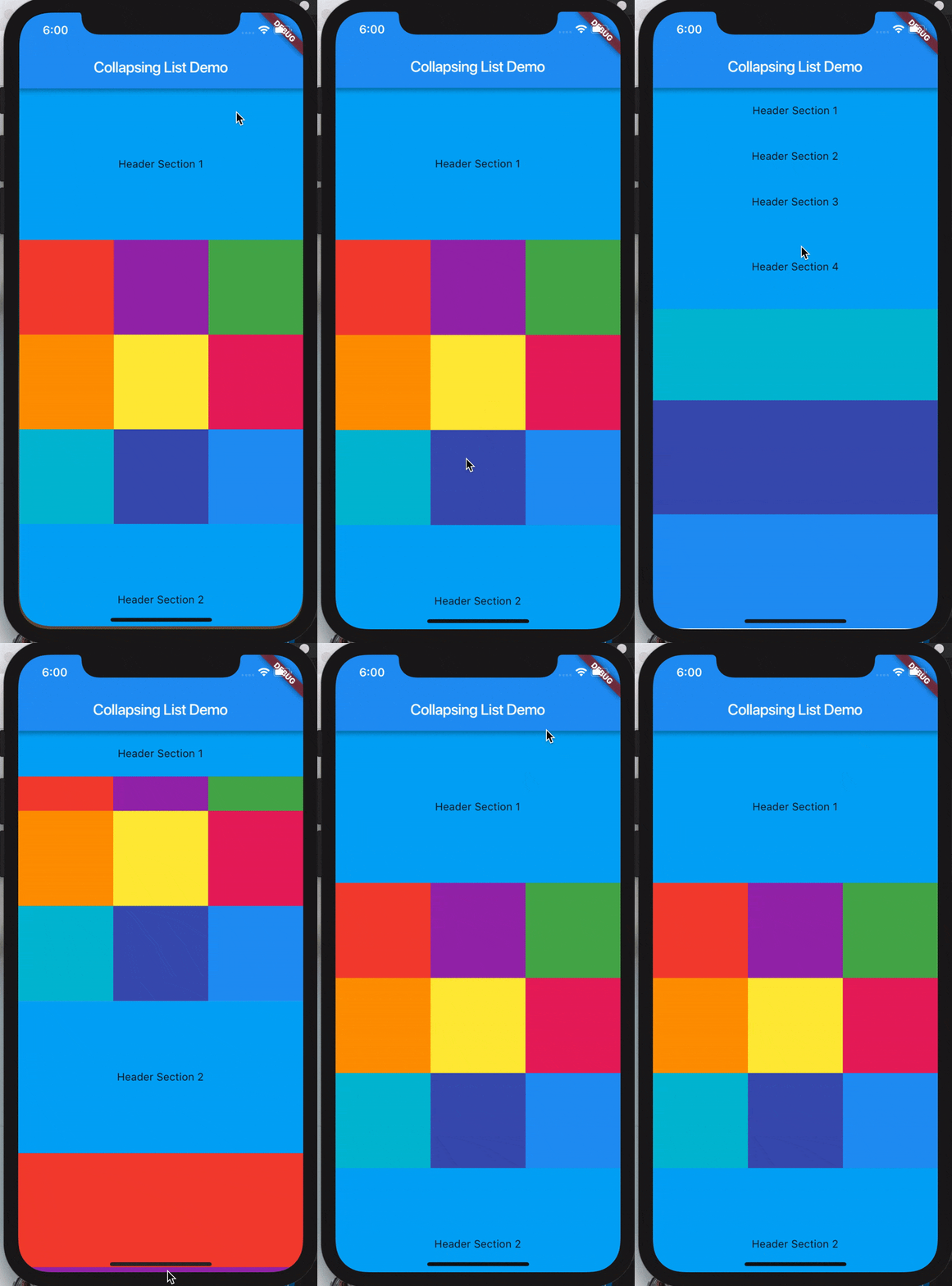
-
SliverList takes a delegate parameter which provides the items in the list as they scroll into view.
-
You can specify the actual list of children with a SliverChildListDelegate Or build them lazily with a SliverChildBuilderDelegate.
SliverList(
    delegate: SliverChildListDelegate(
      [
        Container(color: Colors.red, height: 150.0),
        Container(color: Colors.purple, height: 150.0),
        Container(color: Colors.green, height: 150.0),
      ],
    ),
);
// This builds an infinite scrollable list of differently colored
// Containers.
SliverList(
    delegate: SliverChildBuilderDelegate((BuildContext context, int index) {
      // To convert this infinite list to a list with three items,
      // uncomment the following line:
      // if (index > 3) return null;
      return Container(color: getRandomColor(), height: 150.0);
    },
    // Or, uncomment the following line:
    // childCount: 3,
  ),
);
References:
- https://medium.com/@anilcan/forms-in-flutter-6e1364eafdb5
- https://codingwithjoe.com/building-forms-with-flutter/
Utilities
Creates Color Utils
dartclass AppColors { static const Color colorPrimary = Color.fromARGB(255, 51, 51, 51); static const Color colorPrimaryDark = Color.fromARGB(255, 41, 41, 41); static const Color colorAccent = Color.fromARGB(255, 30, 198, 89); static const Color yellow = Color.fromARGB(255, 252, 163, 38); static const Color orange = Color.fromARGB(255, 252, 109, 38); static const Color grey_unselected = Color.fromARGB(255, 96, 96, 96); static const Color white_card = Color.fromARGB(255, 250, 250, 250); static const Color chrome_grey = Color.fromARGB(255, 240, 240, 240); static const Color white = Color.fromARGB(255, 255, 255, 255); static const Color white_secondary = Color.fromARGB(255, 220, 220, 220); static const Color white_un_selected = Color.fromARGB(255, 180, 180, 180); static const Color indigo = Color.fromARGB(255, 51, 105, 231); static const Color primary_text = Color.fromARGB(255, 51, 51, 51); static const Color secondary_text = Color.fromARGB(255, 114, 114, 114); static const Color grey = Color.fromARGB(255, 188, 187, 187); }
Contributors
Showing top 4 contributors by commit count.




Related Repositories

flutter/flutter
Flutter makes it easy and fast to build beautiful apps for mobile and beyond

rustdesk/rustdesk
An open-source remote desktop application designed for self-hosting, as an alternative to TeamViewer.

immich-app/immich
High performance self-hosted photo and video management solution.

localsend/localsend
An open-source cross-platform alternative to AirDrop

AppFlowy-IO/AppFlowy
Bring projects, wikis, and teams together with AI. AppFlowy is the AI collaborative workspace where you achieve more without losing control of your data. The leading open source Notion alternative.

Solido/awesome-flutter
An awesome list that curates the best Flutter libraries, tools, tutorials, articles and more.