

Stockwell
Stockwell transform for Python
Python package for time-frequency analysis through Stockwell transform. The project is written primarily in Python, distributed under the GNU General Public License v3.0 license, first published in 2018. Key topics include: processing, signal, time-frequency-analysis, transform.
Stockwell
Python package for time-frequency analysis through Stockwell transform.
Based on original code from NIMH MEG Core Facility.




Installation
Using Anaconda
If you use Anaconda, the latest release of Stockwell is available via
conda-forge.
To install, simply run:
conda install -c conda-forge stockwell
Using pip and PyPI
The latest release of Stockwell is available on the
Python Package Index.
You can install it easily through pip:
pip install stockwell
Installation from source
If no precompiled package is available for you architecture on PyPI, or if you
want to work on the source code, you will need to compile this package from
source.
To obtain the source code, download the latest release from the
releases page, or clone the GitHub project.
C compiler
Part of Stockwell is written in C, so you will need a C compiler.
On Linux (Debian or Ubuntu), install the build-essential package:
sudo apt install build-essential
On macOS, install the XCode Command Line Tools:
xcode-select --install
On Windows, install the Microsoft C++ Build Tools.
FFTW
To compile Stockwell, you will need to have FFTW
installed.
On Linux and macOS, you can download and compile FFTW from source using
the script get_fftw3.sh provided in the scripts directory:
./scripts/get_fftw3.sh
Alternatively, you can install FFTW using your package manager:
-
If you use Anaconda (Linux, macOS, Windows):
conda install fftw -
If you use Homebrew (macOS)
brew install fftw -
If you use
apt(Debian or Ubuntu)sudo apt install libfftw3-dev
Install the Python package from source
Finally, install this Python package using pip:
pip install .
Or, alternatively, in "editable" mode:
pip install -e .
Usage
Example usage:
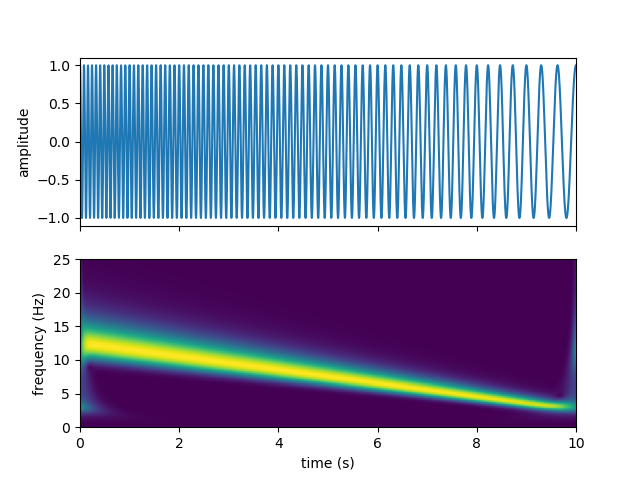
pythonimport numpy as np from scipy.signal import chirp import matplotlib.pyplot as plt from stockwell import st t = np.linspace(0, 10, 5001) w = chirp(t, f0=12.5, f1=2.5, t1=10, method='linear') fmin = 0 # Hz fmax = 25 # Hz df = 1./(t[-1]-t[0]) # sampling step in frequency domain (Hz) fmin_samples = int(fmin/df) fmax_samples = int(fmax/df) stock = st.st(w, fmin_samples, fmax_samples) extent = (t[0], t[-1], fmin, fmax) fig, ax = plt.subplots(2, 1, sharex=True) ax[0].plot(t, w) ax[0].set(ylabel='amplitude') ax[1].imshow(np.abs(stock), origin='lower', extent=extent) ax[1].axis('tight') ax[1].set(xlabel='time (s)', ylabel='frequency (Hz)') plt.show()
You should get the following output:
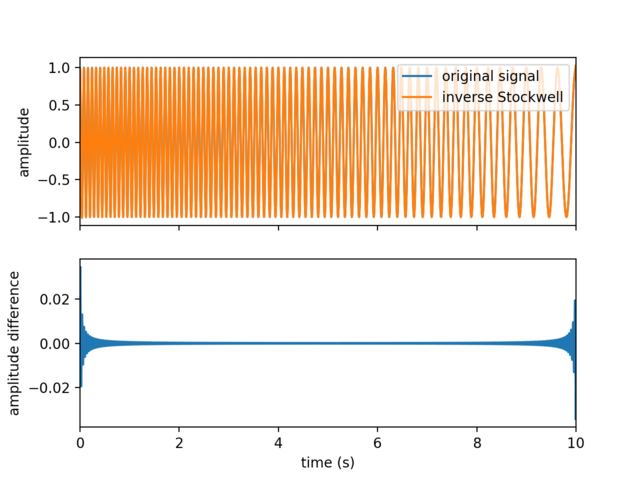
You can also compute the inverse Stockwell transform, ex:
pythoninv_stock = st.ist(stock, fmin_samples, fmax_samples) fig, ax = plt.subplots(2, 1, sharex=True) ax[0].plot(t, w, label='original signal') ax[0].plot(t, inv_stock, label='inverse Stockwell') ax[0].set(ylabel='amplitude') ax[0].legend(loc='upper right') ax[1].plot(t, w - inv_stock) ax[1].set_xlim(0, 10) ax[1].set(xlabel='time (s)', ylabel='amplitude difference') plt.show()
References
Stockwell, R.G., Mansinha, L. & Lowe, R.P., 1996. Localization of the complex
spectrum: the S transform, IEEE Trans. Signal Process., 44(4), 998–1001,
doi:10.1109/78.492555
Contributors
Showing top 2 contributors by commit count.

![dependabot[bot]](https://avatars.githubusercontent.com/in/29110?v=4)
Related Repositories

processing/p5.js
p5.js is a client-side JS platform that empowers artists, designers, students, and anyone to learn to code and express themselves creatively on the web. It is based on the core principles of Processing. Looking for p5.js 2.0? http://beta.p5js.org

openai-php/client
⚡️ OpenAI PHP is a supercharged community-maintained PHP API client that allows you to interact with OpenAI API.

arpit-omprakash/100ProjectsOfCode
A list of practical knowledge-building projects.

h2non/bimg
Go package for fast high-level image processing powered by libvips C library

lovoo/goka
Goka is a compact yet powerful distributed stream processing library for Apache Kafka written in Go.

warpstreamlabs/bento
Fancy stream processing made operationally mundane. This repository is a fork of the original project before the license was changed.