

Tri Inspector
Free inspector attributes for Unity [Custom Editor, Custom Inspector, Inspector Attributes, Attribute Extensions]
- [Samples](#Samples) - [Attributes](#Attributes) - [Integrations](#Integrations) ([Odin Inspector](#Odin-Inspector), [Odin Validator](#Odin-Validator)) - [How to Install](#How-to-Install) - [License](#License) The project is written primarily in C#, distributed under the MIT License license, first published in 2022. It has gained significant community traction with 1,394 stars and 91 forks on GitHub. Key topics include: attributes, extension, inspector, naughty, unity.
Tri Inspector 



Advanced inspector attributes for Unity

Samples
TriInspector has built-in samples at Tools/Tri Inspector/Samples menu.

Attributes
<table> <tr> <td><a href="#Misc"><b>General →</b></a></td> <td><a href="#Validation"><b>Validation →</b></a></td> <td><a href="#Decorators"><b>Decorators →</b></a></td> <td><a href="#Styling"><b>Styling →</b></a></td> </tr> <tr> <td valign="top"> <ul> <li>Show In Inspector</li> <li>Inline Property</li> <li>Hide Reference Picker</li> <li>Property Order</li> <li>Read Only</li> <li>On Value Changed</li> <li>Hide Mono Script</li> </ul> </td> <td valign="top"> <ul> <li>Required</li> <li>Required Get</li> <li>Validate Input</li> <li>Info Box</li> <li>Assets Only</li> <li>Scene Objects Only</li> </ul> </td> <td valign="top"> <ul> <li>Dropdown</li> <li>Asset Dropdown</li> <li>Scene</li> <li>Animator Parameter</li> <li>Material Property</li> <li>Slider</li> <li>Min Max Slider</li> <li>Inline Editor</li> <li>Display As String</li> <li>Unit</li> <li>Preview Object</li> <li>Preview Mesh</li> <li>Layer</li> </ul> </td> <td valign="top"> <ul> <li>Title</li> <li>Label Text</li> <li>Hide Label</li> <li>GUI Color</li> <li>Label Width</li> <li>Indent</li> <li>Property Space</li> <li>Property Tooltip</li> </ul> </td> </tr> <tr> <td><a href="#Groups"><b>Groups →</b></a></td> <td><a href="#Conditionals"><b>Conditionals →</b></a></td> <td><a href="#Collections"><b>Collections →</b></a></td> <td><a href="#Buttons"><b>Buttons →</b></a></td> </tr> <tr> <td valign="top"> <ul> <li>Box Group</li> <li>Foldout Group</li> <li>Toggle Group</li> <li>Tab Group</li> <li>Horizontal Group</li> <li>Vertical Group</li> </ul> </td> <td valign="top"> <ul> <li>Show/Hide If</li> <li>Enable/Disable If</li> <li>Show/Hide In Play Mode</li> <li>Enable/Disable In Play Mode</li> </ul> </td> <td valign="top"> <ul> <li>List Drawer Settings</li> <li>Table List</li> </ul> </td> <td valign="top"> <ul> <li>Button</li> <li>Enum Toggle Buttons</li> </ul> </td> </tr> </table>Misc
ShowInInspector
Shows non-serialized property in the inspector.

csharpprivate float _field; [ShowInInspector] private bool _myToggle; [ShowInInspector] public float ReadOnlyProperty => _field; [ShowInInspector] public float EditableProperty { get => _field; set => _field = value; }
InlineProperty

csharppublic MinMax rangeFoldout; [InlineProperty(LabelWidth = 40)] public MinMax rangeInline; [Serializable] public class MinMax { public int min; public int max; }
HideReferencePicker
Tri Inspector by default shows a polymorphic type picker for [SerializeReference] and [ShowInInspector]. It can be hidden with a [HideReferencePicker] attribute.

csharp[SerializeReference] public MyReferenceClass clazz1 = new MyReferenceClass(); [SerializeReference, HideReferencePicker] public MyReferenceClass clazz2 = new MyReferenceClass(); [ShowInInspector, HideReferencePicker] public MyReferenceClass Clazz3 { get; set; } = new MyReferenceClass(); [Serializable] public class MyReferenceClass { public int inner; }
PropertyOrder
Changes property order in the inspector.

csharppublic float first; [PropertyOrder(0)] public float second;
ReadOnly
Makes property non-editable in the inspector.

csharp[ReadOnly] public Vector3 vec;
OnValueChanged
Invokes callback on property modification.
csharp[OnValueChanged(nameof(OnMaterialChanged))] public Material mat; private void OnMaterialChanged() { Debug.Log("Material changed!"); }
HideMonoScript
Hides the default Script property in the inspector.
csharp[HideMonoScript] public class NewBehaviour : MonoBehaviour { }
Validation
Tri Inspector has some builtin validators such as missing reference and type mismatch error. Additionally you can mark out your code with validation attributes or even write own validators.
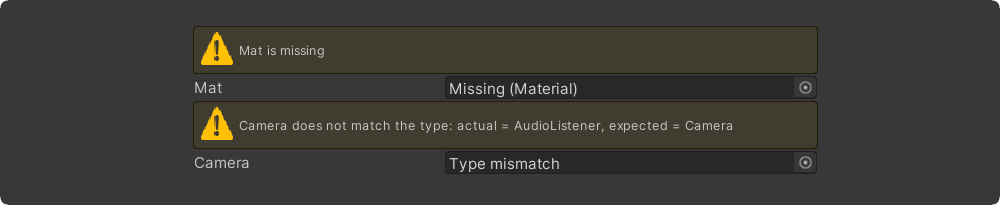
Required
csharp[Required] public Material material; [Required(FixAction = nameof(FixTarget), FixActionName = "Assign self")] public Transform target; private void FixTarget() { target = GetComponent<Transform>(); }
RequiredGet
csharp[RequiredGet] public Transform myTransform; [RequiredGet(InParents = true)] public Animator animator; // Search for any Animator in parents [RequiredGet(InChildren = true, IncludeSelf = false)] public MeshRenderer[] childrenMeshes; // Search all meshes in children
ValidateInput

csharp[ValidateInput(nameof(ValidateTexture))] public Texture tex; private TriValidationResult ValidateTexture() { if (tex == null) return TriValidationResult.Error("Tex is null"); if (!tex.isReadable) return TriValidationResult.Warning("Tex must be readable"); return TriValidationResult.Valid; }
InfoBox

csharp[Title("InfoBox Message Types")] [InfoBox("Default info box")] public int a; [InfoBox("None info box", TriMessageType.None)] public int b; [InfoBox("Warning info box", TriMessageType.Warning)] public int c; [InfoBox("Error info box", TriMessageType.Error)] public int d; [InfoBox("$" + nameof(DynamicInfo), visibleIf: nameof(VisibleInEditMode))] public Vector3 vec; private string DynamicInfo => "Dynamic info box: " + DateTime.Now.ToLongTimeString(); private bool VisibleInEditMode => !Application.isPlaying;
AssetsOnly

csharp[AssetsOnly] public GameObject obj;
SceneObjectsOnly

csharp[SceneObjectsOnly] public GameObject obj;
Decorators
Dropdown

csharp[Dropdown(nameof(intValues))] public int numberDropdown = 123; [Dropdown(nameof(GetVectorValues))] public Vector3 vectorDropdown; private int[] intValues = {1, 2, 3, 4, 5}; private IEnumerable<TriDropdownItem<Vector3>> GetVectorValues() { return new TriDropdownList<Vector3> { {"Zero", Vector3.zero}, {"One/Forward", Vector3.forward}, {"One/Backward", Vector3.back}, }; }
Scene

csharp[Scene] public string scene;
AnimatorParameter
AnimatorParameter automatically lists all available parameters from the target Animator, with optional filtering by parameter type.
csharp[AnimatorParameter(nameof(animator))] public string parameterName; [AnimatorParameter(nameof(animator), AnimatorControllerParameterType.Float)] public int parameterHash; public Animator animator;
MaterialProperty
MaterialProperty automatically displays valid shader properties from the target Material, including support for specific types (Float, Color, Vector, Texture, etc.).
csharp[MaterialProperty(nameof(material))] public string propertyName; [MaterialProperty(nameof(material), ShaderPropertyType.Color)] public int propertyHash; public Material material;
Slider
csharp[Slider(nameof(_min), nameof(_max))] public int dynamicIntSlider = -6; [Slider(0, nameof(GetMax))] public float dynamicMaxFloatSlider = 4.6f; public Vector2 minMax = new(-10, 10); [Slider(nameof(minMax))] public float dynamicFloatSlider = 1.83f; [Slider(nameof(minMax), autoClamp: true)] public int dynamicIntSliderClamped = 4; private int _min = -20; private int _max = 20; public float GetMax() => 10;
MinMaxSlider
csharp[MinMaxSlider(0f, 10f)] public Vector2 fixedMinMaxSlider = new(2f, 4f); [MinMaxSlider(nameof(_min), nameof(_max))] public Vector2Int dynamicIntMinMaxSlider = new(-8, 0); [MinMaxSlider(-20, nameof(GetMax))] public Vector2 dynamicFloatMaxSlider = new(-7.7f, -1.7f); public Vector2 minMax = new(-10, 10); [MinMaxSlider(nameof(minMax))] public Vector2 dynamicFloatMinMaxSlider = new(0, 4); [MinMaxSlider(nameof(minMax), autoClamp: true)] public Vector2Int dynamicIntMinMaxSliderClamped = new(2, 6); private int _min = -20; private int _max = 20; public float GetMax() => 10;
InlineEditor
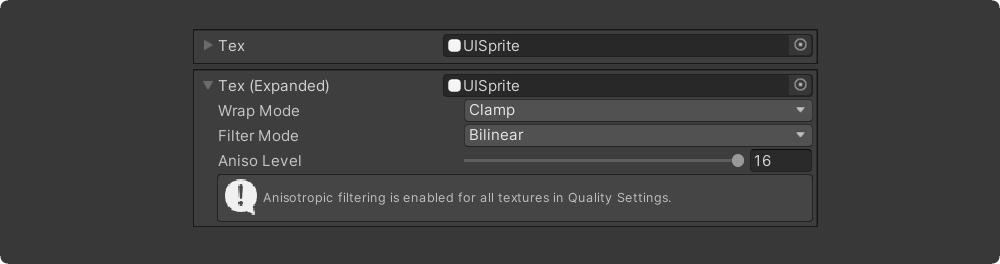
csharp[InlineEditor] public Material mat;
DisplayAsString

csharp[DisplayAsString] public string[] collection = {"hello", "world"};
Unit
csharp[Unit(UnitAttribute.Meter)] public float lengthInMeters; [Unit("My custom Unit")] public float freeTextUnit;
Preview Object
csharp[PreviewObject] public Texture2D texture; [PreviewObject(Height = 100)] public GameObject gameObj;
Preview Mesh
csharp[LabelWidth(270f)] [PreviewMesh(100, 100)] public GameObject meshCustomLengthAndWidth; [LabelWidth(200f)] [PreviewMesh(200, 160, false)] public GameObject meshNoFoldoutNoMesh; [LabelWidth(200f)] [PreviewMesh(200, 160, false)] public GameObject meshNoFoldoutWithMesh;
Layer
csharp[Layer] public int layer;
Styling
Title

csharp[Title("My Title")] public string val; [Title("$" + nameof(_myTitleField))] public Rect rect; [Title("$" + nameof(MyTitleProperty))] public Vector3 vec; [Title("Button Title")] [Button] public void MyButton() { } private string _myTitleField = "Serialized Title"; private string MyTitleProperty => DateTime.Now.ToLongTimeString();
HideLabel

csharp[Title("Wide Vector")] [HideLabel] public Vector3 vector; [Title("Wide String")] [HideLabel] public string str;
LabelText

csharp[LabelText("Custom Label")] public int val; [LabelText("$" + nameof(DynamicLabel))] public Vector3 vec; public string DynamicLabel => DateTime.Now.ToShortTimeString();
LabelWidth

csharppublic int defaultWidth; [LabelWidth(40)] public int thin; [LabelWidth(300)] public int customInspectorVeryLongPropertyName;
GUIColor

csharp[GUIColor(0.8f, 1.0f, 0.6f)] public Vector3 vec; [GUIColor(0.6f, 0.9f, 1.0f)] [Button] public void BlueButton() { } [GUIColor(1.0f, 0.6f, 0.6f)] [Button] public void RedButton() { }
Indent

csharp[Title("Custom Indent")] [Indent] public int a; [Indent(2)] public int b; [Indent(3)] public int c; [Indent(4)] public int d;
PropertySpace

csharp[Space, PropertyOrder(0)] public Vector3 vecField; [ShowInInspector, PropertyOrder(1)] [PropertySpace(SpaceBefore = 10, SpaceAfter = 30)] public Rect RectProperty { get; set; } [PropertyOrder(2)] public bool b;
PropertyTooltip

csharp[PropertyTooltip("This is tooltip")] public Rect rect; [PropertyTooltip("$" + nameof(DynamicTooltip))] public Vector3 vec; public string DynamicTooltip => DateTime.Now.ToShortTimeString();
Collections
ListDrawerSettings

csharp[ListDrawerSettings(Draggable = true, HideAddButton = false, HideRemoveButton = false, AlwaysExpanded = false)] public List<Material> list; [ListDrawerSettings(Draggable = false, AlwaysExpanded = true)] public Vector3[] vectors;
TableList

csharp[TableList(Draggable = true, HideAddButton = false, HideRemoveButton = false, AlwaysExpanded = false)] public List<TableItem> table; [Serializable] public class TableItem { [Required] public Texture icon; public string description; [Group("Combined"), LabelWidth(16)] public string A, B, C; [Button, Group("Actions")] public void Test1() { } [Button, Group("Actions")] public void Test2() { } }
Conditionals
ShowIf

csharppublic Material material; public bool toggle; public SomeEnum someEnum; [ShowIf(nameof(material), null)] public Vector3 showWhenMaterialIsNull; [ShowIf(nameof(toggle))] public Vector3 showWhenToggleIsTrue; [ShowIf(nameof(toggle), false)] public Vector3 showWhenToggleIsFalse; [ShowIf(nameof(someEnum), SomeEnum.Two)] public Vector3 showWhenSomeEnumIsTwo; public enum SomeEnum { One, Two, Three }
HideIf
csharppublic bool visible; [HideIf(nameof(visible))] public float val;
EnableIf
csharppublic bool visible; [EnableIf(nameof(visible))] public float val;
DisableIf
csharppublic bool visible; [DisableIf(nameof(visible))] public float val;
HideInPlayMode / ShowInPlayMode
csharp[HideInPlayMode] [ShowInPlayMode]
DisableInPlayMode / EnableInPlayMode
csharp[DisableInPlayMode] [EnableInPlayMode]
HideInEditMode / ShowInEditMode
csharp[HideInEditMode] [ShowInEditMode]
DisableInEditMode / EnableInEditMode
csharp[DisableInEditMode] [EnableInEditMode]
Buttons
Button
csharp[Button("Click me!")] private void Button() => Debug.Log("Button clicked!"); [Button(ButtonSizes.Large)] private void ButtonWithParameters(Vector3 vec, string str = "default value") { Debug.Log($"Button with parameters: {vec} {str}"); }
EnumToggleButtons

csharp[EnumToggleButtons] public SomeEnum someEnum; [EnumToggleButtons] public SomeFlags someFlags; public enum SomeEnum { One, Two, Three } [Flags] public enum SomeFlags { A = 1 << 0, B = 1 << 1, C = 1 << 2, AB = A | B, BC = B | C, }
Debug
ShowDrawerChain

csharp[ShowDrawerChain] [Indent] [PropertySpace] [Title("Custom Title")] [GUIColor(1.0f, 0.8f, 0.8f)] public Vector3 vec;
Groups
Properties can be grouped in the inspector using the Group attribute.
csharp[Group("one")] public float a; [Group("one")] public float b; [Group("two")] public float c; [Group("two")] public float d; public float e;
If you have a lot of properties and group attributes take up too much space, then you can combine multiple properties at once using the GroupNext attribute.
csharp[GroupNext("one")] public float a; public float b; [GroupNext("two")] public float c; public float d; [UnGroupNext] public float e;
Box Group

csharp[DeclareBoxGroup("box", Title = "My Box")] public class BoxGroupSample : ScriptableObject { [Group("box")] public int a; [Group("box")] public bool b; }
Foldout Group

csharp[DeclareFoldoutGroup("foldout", Title = "$" + nameof(DynamicTitle))] public class FoldoutGroupSample : ScriptableObject { [Group("foldout")] public int a; [Group("foldout")] public bool b; public string DynamicTitle => "My Foldout"; }
Toggle Group

csharp[DeclareToggleGroup("toggle", Title = "$" + nameof(DynamicTitle))] public class ToggleGroupSample : ScriptableObject { [Group("toggle")] public bool enabled; [Group("toggle")] public int a; [Group("toggle")] public bool b; public string DynamicTitle => "My Toggle"; }
Tab Group

csharp[DeclareTabGroup("tabs")] public class TabGroupSample : ScriptableObject { [Group("tabs"), Tab("One")] public int a; [Group("tabs"), Tab("Two")] public float b; [Group("tabs"), Tab("Three")] public bool c; }
Horizontal Group

csharp[DeclareHorizontalGroup("vars")] public class HorizontalGroupSample : ScriptableObject { [Group("vars")] public int a; [Group("vars")] public int b; [Group("vars")] public int c; }
Vertical Group

csharp[DeclareHorizontalGroup("horizontal")] [DeclareVerticalGroup("horizontal/vars")] [DeclareVerticalGroup("horizontal/buttons")] public class VerticalGroupSample : ScriptableObject { [Group("horizontal/vars")] public float a; [Group("horizontal/vars")] public float b; [Button, Group("horizontal/buttons")] public void ButtonA() { } [Button, Group("horizontal/buttons")] public void ButtonB() { } }
Integrations
Odin Inspector
Tri Inspector is able to work in compatibility mode with Odin Inspector.
In this mode, the primary interface will be drawn by the Odin Inspector. However,
parts of the interface can be rendered by the Tri Inspector.
In order for the interface to be rendered by Tri instead of Odin,
it is necessary to mark classes with [DrawWithTriInspector] attribute.
Alternatively, you can mark the entire assembly with an attribute [assembly:DrawWithTriInspector]
to draw all types in the assembly using the Tri Inspector.
Odin Validator
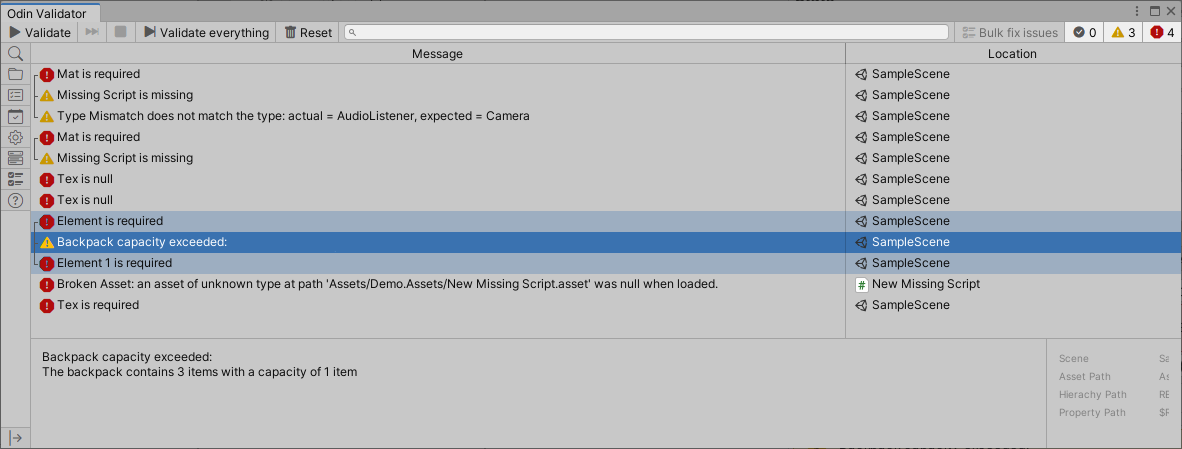
Tri Inspector is integrated with the Odin Validator
so all validation results from Tri attributes will be shown
in the Odin Validator window.
How to Install
Library distributed as git package (How to install package from git URL)
<br>Git URL: https://github.com/codewriter-packages/Tri-Inspector.git
Localization package dependency<br/>
Tri Inspector automatically installs Localization package as dependency.<br/>
If you are not using localization package and do not want to install it, you can install a stub package instead.<br/>
Git URL: https://github.com/codewriter-packages/Unity-Localization-Stub-for-Tri-Inspector.git
License
Tri-Inspector is MIT licensed.
Contributors
Showing top 12 contributors by commit count.


Related Repositories

hyperf/hyperf
🚀 A coroutine framework that focuses on hyperspeed and flexibility. Building microservice or middleware with ease.

python-attrs/attrs
Python Classes Without Boilerplate

dbrizov/NaughtyAttributes
Attribute Extensions for Unity

onury/accesscontrol
Role and Attribute based Access Control for Node.js

arimger/Unity-Editor-Toolbox
Tools, custom attributes, drawers, hierarchy overlay, and other extensions for the Unity Editor.

samber/oops
🔥 Error handling library with context, assertion, stack trace and source fragments