

Learn elixir
:droplet: Learn the Elixir programming language to build functional, fast, scalable and maintainable web applications!
Learn the **`Elixir` programming language** to build **reliable**, **scalable** and **_maintainable_ applications**. The project is written primarily in Elixir, first published in 2016. It has gained significant community traction with 1,697 stars and 112 forks on GitHub. Key topics include: beginner, beginner-friendly, elixir, elixir-lang, tutorial.
Learn the Elixir programming language
to build reliable, scalable and maintainable applications.
Elixir is an elegant and modern programming language
crafted by people with a passion
for creating low-latency, distributed,
and fault-tolerant systems.
The capabilities and tooling allow developers
to be productive in several domains,
such as web development,
embedded software, machine learning, data pipelines,
and multimedia processing,
across a wide range of industries.
When you're ready to get started,
we've made this beginner-friendly guide
and 20+ step-by-step example apps
to help flatten your learning curve!
We hope you enjoy the journey! ❤️
- Why? 🤷♀️
- What? 💭
- How? 👩🏻💻
- Start! 🟢
Why? 🤷♀️
After using
several other programming languages
for many years, we were frustrated by the complexity and noise!<br />
We fell in love with Elixir (and Phoenix)
as it ticked all the boxes we had. ⤵️
Key Advantages ✅
- Beautiful syntax inspired by
Rubyand
Python
makes it beginner-friendly and easy/fast to learn. 😍 - Real-time web apps are easy
(or at least easier than many other languages!)
as WebSockets & streaming are baked-in. 💬 - Functional programming - no unexpected side-effects;
fewer surprises (bugs). 🧘 - Dynamic typing
and/or Optional
Static Typing 🔢 - Excellent documentation - docs are a first-class citizen
in the language withex_docbuilt-in
which makes reading code easier/faster. 📖 - High reliability + Fault-tolerant - all processes are isolated
so one bad process doesn't crash the whole server.
Means apps built withElixirrun in production
for years without downtime! ⏳ - Multi-core - use as many processors as you have available
without any extra orchestration code! 💯 - Scalable - easily scale
vertically,
horizontally
and across different datacenters/regions
to put your app near the people using it.
Millions of concurrent connected devices per server
and easy to scale thousands of servers (if needed) and handle
billions of messages per day 🚀 - Speed; fast execution with sub millisecond response times means
your code will never be the bottleneck,
the Database and Network are. 🏎️ - Compiled and run on the
"BEAM" Virtual Machine
(Renowned for efficiency and fault-tolerance) - Complete development,
deployment and monitoring platform,
whereas with other programming languages
you need complex (or expensive) deployment & monitoring
it's all "free" with theErlang VM! 🚢 <br />
Things will go wrong with code in the real world.
Elixirprovides supervisors
which describe how to restart parts of
your system when things don't go as planned. 👌 - Immutable data
so "state"
is always predictable! 🎯 <br /><br />

Elixir Unlocks Phoenix 🐦🔥
Learning Elixir programming
unlocks the most "most admired web framework".
In the
2025 StackOverflow Developer Satisfaction Survey,
Phoenix remains the "most admired" framework
for the 3<sup>rd</sup> year running.
If you want the elegance and power of Phoenix,
invest a couple of hours learning Elixir. <br />
You will never want to use another web/application framework.
Bonus: using a framework that engineers love
makes it easier to recruit proactive people to your team/company.
What? 💭
"Elixir is a dynamic, functional language
designed for building scalable
and maintainable applications." ~
elixir-lang.org
Whenever you read "functional", you should think "simpler language"
and easier to reason about when building large scale systems.
Scalability is baked into the language and runtime.
It is far easier to seamlessly connect multiple servers together
as the BEAM/OTP supervision system was built for this purpose.
No complex "DevOps" needed.
Video Introductions 📺
If you have time,
these videos give a good contextual introduction
into what Elixir is,
what it's used for and how it works:
Elixir: The Documentary:
youtu.be/lxYFOM3UJzo
(13 mins 🎥)- Code School's Try Elixir:
codeschool.com/try-elixir,
3 videos
(25mins plus exercises, totalling 90mins ⏳).
The 'Try' course is free (there is an extended paid for course). - Pete Broderick's "Intro to Elixir":
youtu.be/lly-1UYmnFI
(41 mins 🎥) - Jessica Kerr's "Elixir Should Take Over the World":
youtu.be/X25xOhntr6s
(58 mins 😍)
Not a video learner? Looking for a specific learning?
elixirschool.com
is an excellent, free, open-source resource
that explains all things Elixir 📖 ❤️
How? 👩🏻💻
There are several entry points for learning Elixir.
if you just want to try the syntax without installing anything,
try the Elixir Playground:
playground.functional-rewire.com
Type the code from the /examples
and run them directly in your browser. ▶️
Installation ⬇️
To run more interesting/advanced Elixir examples on your own machine,
you will need to have it installed on your machine.
See:
elixir-lang.org/install
or follow our guide here.
Mac 🍏
Using the Homebrew package manager:
shbrew install elixir
If you have any trouble with
ssl
when running anElixirApp on yourMac,
see:
/install-mac.md
Ubuntu 🐧
Add the Erlang Solutions repo
shwget https://packages.erlang-solutions.com/erlang-solutions_2.0_all.deb && sudo dpkg -i erlang-solutions_2.0_all.deb
Run update:
shsudo apt-get update
Install the Erlang/OTP platform and all of its applications:
shsudo apt-get install esl-erlang
Install Elixir:
shsudo apt-get install elixir
Windows 🪟
If you're unable to install Linux or OpenBSD
on your machine, you can still run Elixir.
Chocolatey 🍫
If you have the
chocolatey package manager
installed already, open your Terminal and run:
shchoco install elixir
Manual Install 🔨
Download the Windows installer for Erlang (32 or 64-bit):
erlang.org/downloads
Click next, next,..., close ⏳
Next, download the Elixir installer matching your Erlang version:
elixir-lang.org/install.html#windows
Check Everything Installed Correctly 👌
In your Terminal window, run the command:
shelixir -v
Should output Erlang & Elixir versions.
Livebook 📘 (Optional)
Livebook
is the Elixir equivalent of
Jupyter Notebook
(from the Python world);
an interactive/executable notebook
excellent for sharing knowledge and experiments.
You don't need it for learning Elixir,
but if you want the next level of learning,
consider trying it.
Once you have have Elixir installed,
visit:
livebook.dev
and follow the installation instructions for your machine/platform.
Once Livebook installed on your machine,
click the button below (or fork and run it):

Then just explore the page and click around.
<details> <summary>Docker [click to expand]</summary>Alternatively, if you're familiar with
Docker,
you can run image, no need to install Elixir or Livebook.
Launch Docker and run the Livebook image:
shdocker run -p 8080:8080 -p 8081:8081 --pull always -e LIVEBOOK_PASSWORD="securesecret" livebook/livebook
and in another terminal you launch the browser (you will need to authneticate with "securesecret") with the command:
shopen http://localhost:8080/import?url=https://github.com/dwyl/learn-elixir/blob/main/learn-elixir-on-livebook.livemd
Finally, if you don't have Docker
or Elixir and Livebook installed,
you can run a remote version in the cloud.
Follow this!
(Right-)click on the grey button "Run in Livebook" below.
:heavy_exclamation_mark: You right-click" to keep this reminder page open 😉 because you will need to remember to do 2 things:
- firstly, look at the bottom for the link "see source" as showed below, 🤔, and click.
- and finally, select the file [dwyl-learn-elixir.livemd]. It should be printed in green, and "join session". 🤗
Happy learning! 🥳
This links to the remote Livebook: 👉

Start! 🟢
Commands 💻
After installing Elixir on your machine,
you can open the interactive shell in your terminal by typing iex
followed by the <kbd>Return</kbd> key.
This allows you to type in any Elixir expression
and see the result in the terminal.
Type h followed by the function name at any time
to see documentation information about any given built-in function
and how to use it.
e.g: type h round into the (iex) terminal
you should see something like this:
elixirdef round(number) @spec round(number()) :: integer() Rounds a number to the nearest integer. If the number is equidistant to the two nearest integers, rounds away from zero. Allowed in guard tests. Inlined by the compiler. ## Examples iex> round(5.6) 6 iex> round(5.2) 5 iex> round(-9.9) -10 iex> round(2.5) 3 iex> round(-2.5) -3
Typing i followed by the variable name
will give you information about a value in your code:
elixiriex(2)> myList = [1, 2, 3, 4, 5] iex(3)> i myList Term [1, 2, 3, 4, 5] Data type List Reference modules List Implemented protocols Collectable, Enumerable, IEx.Info, Inspect, JSON.Encoder, List.Chars, String.Chars
Basic Types
This section is compiled from the Elixir
Getting Started
docs and multiple other sources.
It takes you through some examples
to familiarize yourself.
Elixir 7 basic types:
integersfloatsbooleansatomsstringsliststuples
Numbers
Type 1 + 2 into the iex terminal:
elixiriex> 1 + 2 3
More examples:
elixiriex> 5 * 5 25 iex> 10 / 2 5.0 # When using the `/` with two integers this gives a `float` (5.0). # If you want to do integer division or get the division remainder # you can use the `div` or `rem` functions iex> div(10, 2) 5 iex> div 10, 2 5 iex> rem 10, 3 1
Booleans
Elixir supports true and false as booleans.
elixiriex> true true iex> false false iex> is_boolean(true) true iex> is_boolean(1) false
Truthiness: truthy and falsy values
Besides the booleans true and false Elixir also has the
concept of a "truthy" or "falsy" value.
- a value is truthy when it is neither
falsenornil - a value is falsy when it is
falseornil
Elixir has functions, like and/2, that only work with
booleans, but also functions that work with these
truthy/falsy values, like &&/2 and !/1.
The syntax <function_name>/<number> is the convention
used in Elixir to identify a function named
<function_name> that takes <number> parameters.
The value <number> is also referred to as the function
arity.
In Elixir each function is identified unambiguousy both by
its name and its arity.
See:
Understanding Function Arity in Elixir.
We can check the truthiness of a value by using the !/1
function twice.
Truthy values:
elixiriex> !!true true iex> !!5 true iex> !![1,2] true iex> !!"foo" true
Falsy values (of which there are exactly two):
elixiriex> !!false false iex> !!nil false
Atoms
Atoms are constants where their name is their own value
(some other languages call these Symbols).
elixiriex> :hello :hello iex> :hello == :world false
true and false are actually atoms in Elixir
Names of modules in Elixir are also atoms. MyApp.MyModule
is a valid atom, even if no such module has been declared yet.
elixiriex> is_atom(MyApp.MyModule) true
Atoms are also used to reference modules from Erlang libraries,
including built-in ones.
elixiriex> :crypto.strong_rand_bytes 3 <<23, 104, 108>>
One popular use of atoms in Elixir is to use them as messages
for pattern matching.
Let's say you have a function which processes an http request.
The outcome of this process is either going to be a success or an error.
You could therefore use atoms to indicate whether
or not this process is successful.
elixirdef process(file) do lines = file |> split_lines case lines do nil -> {:error, "failed to process file"} lines -> {:ok, lines} end end
Here we are saying that the method,
process/1 will return a tuple response.
If the result of our process is successful, it will return {:ok, lines},
however if it fails (e.g. returns nil) then it will return an error.
This will allows us to pattern match on this result.
elixir{:ok, lines} = process('text.txt')
Thus, we can be sure that we will always have the lines returned to us
and never a nil value (because it will throw an error).
This becomes extremely useful when piping multiple methods together.
Strings
Strings are surrounded by double quotes.
elixiriex> "Hello World" "Hello world" # You can print a string using the `IO` module iex> IO.puts "Hello world" "Hello world" :ok
Lists
Elixir uses square brackets to make a list.
elixiriex> myList = [1,2,3] iex> myList [1,2,3] iex> length(myList) 3 # concatenating lists together iex> [1, 2, 3] ++ [4, 5, 6] [1, 2, 3, 4, 5, 6] # removing items from a list iex> [1, true, 2, false, 3, true] -- [true, false] [1, 2, 3, true]
Lists are enumerable and can use the Enum
module to perform iterative functions such as mapping.
Tuples
Elixir uses curly brackets to make a tuple.
Tuples are similar to lists but are
not suited to data sets that need to be updated or added to regularly.
elixiriex> tuple = {:ok, "hello"} {:ok, "hello"} # get element at index 1 iex> elem(tuple, 1) "hello" # get the size of the tuple iex> tuple_size(tuple) 2
Tuples are not enumerable and there are far fewer functions available
in the Tuple module. You can reference tuple values by index but you cannot iterate over them.
If you must treat your tuple as a list,
then convert it using Tuple.to_list(your_tuple)
Lists or Tuples?
If you need to iterate over the values use a list.
When dealing with large lists or tuples:
-
Updatingalist(adding or removing elements) is fast -
Updatingatupleis slow -
Readingalist(getting its length or selecting an element) is slow -
Readingatupleis fast
source: http://stackoverflow.com/questions/31192923/lists-vs-tuples-what-to-use-and-when
Functions and Modules
Anonymous functions
Anonymous functions start with fn and end with end.
elixiriex> add = fn a, b -> a + b end iex> add.(1, 2) 3
Note a dot . between the variable add and parenthesis is required
to invoke an anonymous function.
In Elixir, functions are first class citizens meaning that they can
be passed as arguments to other functions the same way integers and strings can.
elixiriex> is_function(add) true
This uses the inbuilt function is_function which checks to see if
the parameter passed is a function and returns a bool.
Anonymous functions are closures (named functions are not)
and as such they can access variables
that are in scope when the function is defined.
You can define a new anonymous function that uses the add
anonymous function we have previously defined:
elixiriex> double = fn a -> add.(a, a) end iex> double.(5) 10
These functions can be useful but will no longer be available to you.
If you want to make something more permanent then you can create a module.
Modules
With modules you're able to group several functions together.
Most of the time it is convenient to write modules into files
so they can be compiled and reused.
Get started by creating a file named math.ex,
open it in your text editor and add the following code
elixirdefmodule Math do def sum(a, b) do a + b end end
In order to create your own modules in Elixir, use the defmodule macro,
then use the def macro to define functions in that module.
So in this case the module is Math and the function is sum.
Once this is saved the file can be compiled by typing elixirc
into the terminal followed by the file name.
$ elixirc math.ex
This will generate a file named Elixir.Math.beam containing the bytecode
for the defined module. If we start iex again, our module definition
will be available (provided that iex is started
in the same directory the bytecode file is in):
elixiriex> Math.sum(1, 2) 3
Create Your First Elixir Project
To get started
with your first Elixir project
you need to make use of the
Mix
build tool that comes with Elixir.
Mix allows you to do a number of things including:
- Create projects
- Compile projects
- Run tasks
- Testing
- Generate documentation
- Manage dependencies
To generate a new project follow these steps:
Initialise
Initialise a project by typing the following command in your terminal,
replacing [project_name] with the name of your project:
shmix new [project_name]
e.g:
shmix new animals
We have chosen to call our project 'animals'
This will create a new folder
with the given name of your project
and should also print something
that looks like this to the command line:
bash* creating README.md * creating .formatter.exs * creating .gitignore * creating mix.exs * creating lib * creating lib/animals.ex * creating test * creating test/test_helper.exs * creating test/animals_test.exs Your Mix project was created successfully. You can use "mix" to compile it, test it, and more: cd animals mix test Run "mix help" for more commands.
Navigate to your newly created directory:
bash> cd animals
Open the directory in your text editor. You will be able to see that Elixir has
generated a few files for us that are specific to our project:
lib/animals.extest/animals_test.ex
Edit animals.ex
Open up the animals.ex file
in the lib directory.
You should already see some
hello-world boilerplate like this:
elixirdefmodule Animals do @moduledoc """ Documentation for Animals. """ @doc """ Hello world. ## Examples iex> Animals.hello() :world """ def hello do :world end end
Elixir has created a module
with the name of your project
along with a function
that prints out a :world atom when called.
It's also added boilerplate for
module and function documentation - the first part of the file.
(we will go into more detail about documentation later)
Run the Code
Let's test out the boilerplate code.
In your project directory type the following command:
sh> iex -S mix
What this means is:
"Start the Elixir REPL
and compile with the context of my current project".
This allows you to access modules and
functions created within the file tree.
Call the hello-world function given to us by Elixir.
It should print out the
:world atom to the command line:
bash> Animals.hello # :world
Define Functions
Let's start to create our own methods in the Animals module.
Replace the hello-world function with the following:
elixir@doc """ create_zoo returns a list of zoo animals ## Examples iex> Animals.create_zoo ["lion", "tiger", "gorilla", "elephant", "monkey", "giraffe"] """ def create_zoo do ["lion", "tiger", "gorilla", "elephant", "monkey", "giraffe"] end
To run our new code we will first have to recompile our iex.
This can be done by typing:
sh> recompile()
Now we will have access to the create_zoo method. Try it out in the command line:
sh> Animals.create_zoo # ["lion", "tiger", "gorilla", "elephant", "monkey", "giraffe"]
Extend Functions
Let's extend the Animals module.
Imaging you're visiting the zoo
but you can't decide which order to view the animals.
We can create a randomise function
before the final end that takes a list of animals
and returns a new list with a random order:
elixir@doc """ randomise takes a list of zoo animals and returns a new randomised list with the same elements as the first. ## Examples iex> zoo = Animals.create_zoo iex> Animals.randomise(zoo) ["monkey", "tiger", "elephant", "gorilla", "giraffe", "lion"] """ def randomise(zoo) do Enum.shuffle(zoo) end
Note: we are making use
of a pre-built module calledEnum
which has a list of functions
that you can use on enumerables such as lists.
Documentation available at:
hexdocs.pm/elixir/Enum.html
Add More Functions!
Let's add another function
to the Animals module.
We want to find out
if our zoo contains an animal:
elixir@doc """ contains? takes a list of zoo animals and a single animal and returns a boolean as to whether or not the list contains the given animal. ## Examples iex> zoo = Animals.create_zoo iex> Animals.contains?(zoo, "gorilla") true """ def contains?(zoo, animal) do Enum.member?(zoo, animal) end
NOTE: It's convention when writing a function that returns a boolean to add a question
mark after the name of the method.
Pattern Matching Example
Create a function
that takes a list of animals
and the number of animals
that you'd like to see
and returns a list of animals:
elixir@doc """ see_animals takes a list of zoo animals and the number of animals that you want to see and then returns a list ## Examples iex> zoo = Animals.create_zoo iex> Animals.see_animals(zoo, 2) ["monkey", "giraffe"] """ def see_animals(zoo, count) do # Enum.split returns a tuple so we have to pattern match on the result # to get the value we want out {_seen, to_see} = Enum.split(zoo, -count) to_see end
Save Data to File
Write a function
that will
save our list of animals to a file:
elixir@doc """ save takes a list of zoo animals and a filename and saves the list to that file ## Examples iex> zoo = Animals.create_zoo iex> Animals.save(zoo, "my_animals") :ok """ def save(zoo, filename) do # erlang is converting the zoo list to something that can be written to the # file system binary = :erlang.term_to_binary(zoo) File.write(filename, binary) end
In your command line,
run the following after recompiling:
sh> zoo = Animals.create_zoo > Animals.save(zoo, "my_animals")
This will create a new file
in your file tree with the name of the file that
you specified in the function.
It will contain some odd characters:
�l\����m����lionm����tigerm����gorillam����elephantm����monkeym����giraffej
Retrieve Data from File
Write a function
that will fetch data from the file:
elixir@doc """ load takes filename and returns a list of animals if the file exists ## Examples iex> Animals.load("my_animals") ["lion", "tiger", "gorilla", "elephant", "monkey", "giraffe"] iex> Animals.load("aglkjhdfg") "File does not exist" """ def load(filename) do # here we are running a case expression on the result of File.read(filename) # if we receive an :ok then we want to return the list # if we receive an error then we want to give the user an error-friendly message case File.read(filename) do {:ok, binary} -> :erlang.binary_to_term(binary) {:error, _reason} -> "File does not exist" end end
The
case expression
allows us to pattern match
against various options and react accordingly.
Pipe Operator
What if we wanted to call some of our functions in succession to another? Let's create a function that creates a zoo, randomises it and then returns a selected number of animals to go and see:
elixir@doc """ selection takes a number, creates a zoo, randomises it and then returns a list of animals of length selected ## Examples iex> Animals.selection(2) ["gorilla", "giraffe"] """ def selection(number_of_animals) do # We are using the pipe operator here. It takes the value returned from # the expression and passes it down as the first argument in the expression # below. see_animals takes two arguments but only one needs to be specified # as the first is provided by the pipe operator Animals.create_zoo() |> Animals.randomise() |> Animals.see_animals(number_of_animals) end
Now that we have the functionality for our module,
let's take a look at the documentation
that we have written
and how we can maximise its use.
Documentation
When we created a new project with mix, it created a file for us called mix.exs
which is referred to as the 'MixFile'. This file holds information about our
project and its dependencies.
At the bottom of the file it gives us a function called deps which manages all
of the dependencies in our project. To install a third party package we need to
manually write it in the deps function (accepts a tuple of the package name and
the version) and then install it in the command line. Let's install ex_doc as
an example:
Add the following to the deps function in your mix.exs file:
elixirdefp deps do [ {:ex_doc, "~> 0.21"} ] end
Then in the command line quit your iex shell and enter the following to install
the ex_docs dependency:
sh> mix deps.get
You might receive an error saying:
shCould not find Hex, which is needed to build dependency :ex_doc Shall I install Hex? (if running non-interactively, use: "mix local.hex --force") [Yn]
If you do then just enter y
and then press enter.
This will install the
dependencies that you need.
Once ex_docs has been installed,
run the following command to generate
documentation (make sure you're not in iex):
sh> mix docs
This will generate documentation
that can be viewed
if you copy the file path
of the index.html file
within the newly created doc folder
and then paste it in your browser.
If you have added documentation
to your module and functions
as per the examples above,
you should see something like the following:

It looks exactly like the format
of the official Elixir docs
because they used the same tool to create theirs.
Here is what the method documentation
should look like if you click on Animals:


This is an incredibly powerful tool
that comes 'baked in' with elixir.
It means that other developers
who are joining the project
can be brought up to speed incredibly quickly!
Testing
When you generate a project with Elixir it automatically gives you a number of
files and directories. One of these directories is called test and it holds two
files that should have names like:
[project_name]_test.exstest_helper.exs
Our first file was called animals_test.exs and it contained some boilerplate that
looks like:
elixirdefmodule AnimalsTest do use ExUnit.Case doctest Animals test "greets the world" do assert Animals.hello() == :world end end
NOTE: It automatically includes a line called doctest Animals. What this means
is that it can run tests from the examples in the documentation that you write for
your functions
To run the tests enter the following in your terminal:
mix test
It should print out whether the tests pass or fail.
Let's add some tests of our own. Firstly let's write a test for the Animals.randomise
function. The reason why we wouldn't want to write a doctest for this is because
the output value changes everytime you call it. Here's how we would write a test
for that type of function:
In the animals_test.exs file, remove the boilerplate "greets the world" test and then
add this to test that the order of the animals in zoo changes (is randomised):
elixirtest "randomise" do zoo = Animals.create_zoo assert zoo != Animals.randomise(zoo) end
NOTE: You do not need to install and require any external testing frameworks.
It all comes with the Elixir package. Simply write test followed by a string
representing what you are trying to test and then write your assertion.
The test above isn't completely air-tight. Elixir provides you with assertions that
can help deal with things like this. The test could be re-written like so:
elixirtest "randomise" do zoo = Animals.create_zoo refute zoo == Animals.randomise(zoo) end
This is basically saying "prove to be false that zoo is equal to Animals.randomise(zoo)"
If you want to learn about code coverage then check out the following
tutorial,
https://github.com/dwyl/learn-elixir/tree/master/codecov_example
Formatting
In Elixir version 1.6 the mix format task was introduced.
see: https://github.com/elixir-lang/elixir/issues/6643
mix format is a built-in way to format your Elixir code
according to the community-agreed consistent style.
This means all code will look consistent across projects
(personal, "work" & hex.pm packages)
which makes learning faster and maintainability easier!
At present, using the formatter is optional,
however most Elixir projects have adopted it.
To use the mix task in your project,
you can either check files individually, e.g:
shmix format path/to/file.ex
Or you can define a pattern for types of files
you want to check the format of:
shmix format "lib/**/*.{ex,exs}"
will check all the .ex and .exs files in the lib/ directory.
Having to type this pattern each time
you want to check the files is tedious.
Thankfully, Elixir has you covered.
In the root of your Elixir project, you will find a .formatter.exs
config file with the following code:
elixir# Used by "mix format" [ inputs: ["{mix,.formatter}.exs", "{config,lib,test}/**/*.{ex,exs}"] ]
This means that if you run mix format it will check the mix.exs file
and all .ex and .exs files in the config, lib/ and test directories.
This is the most common pattern for running mix format.
Unless you have a reason to "deviate" from it, it's a good practice to keep it as it is.
Simply run:
shmix format
And your code will now follow Elixir's formatting guidelines.
We recommend installing a plugin in your Text Editor to auto-format:
-
Atom Text Editor Auto-formatter:
https://atom.io/packages/atom-elixir-formatter -
Vim
ElixirFormatter: https://github.com/mhinz/vim-mix-format -
VSCode:
https://marketplace.visualstudio.com/items?itemName=sammkj.vscode-elixir-formatter -
Read the
mix/tasks/format.exsource to understand how it works:
https://github.com/elixir-lang/elixir/blob/master/lib/mix/lib/mix/tasks/format.ex -
https://hashrocket.com/blog/posts/format-your-elixir-code-now
-
https://devonestes.herokuapp.com/everything-you-need-to-know-about-elixirs-new-formatter
Publishing
To publish your Elixir package to Hex.pm:
-
Check the version in
mix.exsis up to date and that it follows the
semantic versioning format:MAJOR.MINOR.PATCH where
MAJOR version when you make incompatible API changes MINOR version when you add functionality in a backwards-compatible manner PATCH version when you make backwards-compatible bug fixes -
Check that the main properties of the project are defined in
mix.exs- name: The name of the package
- description: A short description of the package
- licenses: The names of the licenses of the package
- NB. dwyl's
cidrepo contains an example of a more advanced
mix.exsfile where
you can see this in action
-
Create a Hex.pm account
if you do not have one already. -
Make sure that ex_doc
is added as a dependency in you project
elixirdefp deps do [ {:ex_doc, "~> 0.21", only: :dev} ] end
When publishing a package, the documentation will be automatically generated.
So if the dependency ex_doc is not declared, the package won't be able to be published
- Run
mix hex.publish
and if all the information are correct replyY
If you have not logged into your Hex.pm account
in your command line before running the above command,
you will be met with the following...
shNo authenticated user found. Do you want to authenticate now? [Yn]
You will need to reply Y
and follow the on-screen instructions
to enter your Hex.pm username and password.
After you have been authenticated,
Hex will ask you for a local password that
applies only to the machine you are using for security purposes.
Create a password for this
and follow the onscreen instructions to enter it.
- Now that your package is published you can create a new git tag with the name of the version:
git tag -a 0.1.0 -m "0.1.0 release"git push --tags
Congratulations!
That's it, you've generated, formatted
and published your first Elixir project :tada:
Want More?
If you want a more detailed example
of publishing a real-world package
and re-using it in a real-world project,
see:
code-reuse-hexpm.md
Data Structures
Maps
Maps are very similar to Object literals in JavaScript.
They have almost the same
syntax except for a % symbol.
They look like this:
elixiranimal = %{ name: "Rex", type: "dog", legs: 4 }
Values can be accessed in a couple of ways.
The first is by dot notation just
like JavaScript:
elixirname = animal.name # Rex
The second way values
can be accessed is by pattern matching.
Let's say we wanted
to assign values to variables
for each of the key-value pairs in the map.
We would write something that looks like this:
elixiriex> %{ name: name, type: type, legs: legs } = animal # we now have access to the values by typing the variable names iex> name # "Rex" iex> type # "dog" iex> legs # 4
Updating a value inside a map
Due to the immutability of Elixir,
you cannot update a map
using dot notation
for example:
elixiriex> animal = %{ name: "Rex", type: "dog", legs: 4 } iex> animal.name = "Max" # this cannot be done!
In Elixir we can only create new data structures as opposed to manipulating existing
ones. So when we update a map, we are creating a new map with our new values.
This can be done in a couple of ways:
- Function
- Syntax
- Using a function
We can update a map usingMap.put(map, key, value).
This takes the map you want to update
followed by the key we want to reassign
and lastly the value that we want
to reassign to the key:
elixiriex> updatedAnimal = Map.put(animal, :name, "Max") iex> updatedAnimal # %{legs: 4, name: "Max", type: "dog"}
- Using syntax
We can use a special syntax for updating a map in Elixir.
It looks like this:
elixiriex> %{animals | name: "Max"} # %{legs: 4, name: "Max", type: "dog"}
NOTE: Unlike the function method above,
this syntax can only be used to UPDATE
a current key-value pair inside the map,
it cannot add a new key value pair.
Processes
When looking into Elixir you may have heard about its
processes
and its support for concurrency.
In fact we even mention processes
as one of the key advantages.
If you're anything like us,
you're probably wondering
what this actually means for you and your code.
This section aims to help you
understand what they are
and how they can help improve
your Elixir projects.
Elixir-lang describes processes as:
In
Elixir, all code runs inside processes.
Processes are isolated from each other,
run concurrent to one another
and communicate via message passing.
Processes are not only the basis
for concurrency inElixir,
but they also provide the means
for building distributed and fault-tolerant programs.
Now that we have a definition,
let's start by spawning our first process.
Spawning a process
Create a file called math.exs
and insert the following code:
elixirdefmodule Math do def add(a, b) do a + b |> IO.inspect() end end
Now head over to your terminal
and enter the following, iex math.exs.
This will load your Math module
into your iex session.
Now in iex type:
elixirspawn(Math, :add, [1,2])
You will see something similar to:
elixir3 #PID<0.118.0>
This is your log
followed by a process identifier, PID for short.
A PID is a unique id for a process.
It could be unique among all processes in the world,
but here it's just unique for your application.
So what just happened here.
We called the
spawn/3
function
and passed it 3 arguments.
The module name,
the function name (as an atom),
and a list of the arguments
that we want to give to our function.
This one line of code spawned
a process for us 🎉 🥳
Normally we would not see the result
of the function (3 in this case).
The only reason we have
is because of the IO.inspect in the add function.
If we removed this the only log we would have is the PID itself.
This might make you wonder,
what good is spawning a process if I can't get
access to the data it returns.
This is where messages come in.
Sending messages between processes
Let's start by exiting iex
and removing the the IO.inspect line
from our code.
Now that that is done
let's get our add function
to send its result in a message.
Update your file to the following:
elixirdefmodule Math do def add(a, b) do receive do senders_pid -> send(senders_pid, a + b) end end def double(n) do spawn(Math, :add, [n,n]) |> send(self()) receive do doubled -> doubled end end end
Let's go through all the new code.
We have added a new function called double. This function spawns the Math.add/2
function (as we did in the iex shell in the previous example). Remember the
spawn function returned a PID. We use this PID on the next line with
|> send(self()). send/2 takes
two arguments, a destination and a message. For us the destination is the PID
created by the spawn function on the line above. The message is
self/0
which returns the PID
of the calling process (the PID of double).
We then call
receive/1
which checks if there is a message matching the clauses in the current process.
It works very similarly to a case statement.
Our message is simple and just
returns whatever the message was.
We have also updated our add/2 function
so that it also contains a receive and a send.
This receive, receives the PID of the sender.
Once it has that message
it calls the send function
to send a message back to the sender.
The message it sends is a+b.
This will trigger the receive block in our double function. As mentioned
above, it simply returns the message it receives which is the answer from add.
Let's test this code in iex. Change to your terminal and type
iex math.exs again. In iex type Math.double(5).
You should see
elixir10
VERY COOL.
We just spawned a process
which did a task for us
and returned the data.
Concurrency
Now that we can create processes that can send messages to each other, let's see
if we can use them for something a little more intensive than doubling an
integer.
In this example we will aim to see exactly how concurrency can be used to
speed up a function (and in turn, hopefully a project).
We are going to do this by solving factorials using two different approaches.
One will solve them on a single process and the other will solve them using
multiple processes.
(A factorial is the product of an integer and all the integers below it;
e.g. factorial(4) (4!) is equal to 1 * 2 * 3 * 4 or 24.)
Create a new file called factorial.exs with the following code:
elixirdefmodule Factorial do def spawn(n) do 1..n |> Enum.chunk_every(4) |> Enum.map(fn(list) -> spawn(Factorial, :_spawn_function, [list]) |> send(self()) receive do n -> n end end) |> calc_product() end def _spawn_function(list) do receive do sender -> product = calc_product(list) send(sender, product) end end # used on the single process def calc_product(n) when is_integer(n) do Enum.reduce(1..n, 1, &(&1 * &2)) end # used with multiple processes def calc_product(list) do Enum.reduce(list, 1, &(&1 * &2)) end end
The & symbol is called the
capture operator,
which can be used to quickly generate anonymous functions that expect at least one argument.
The arguments can be accessed inside the capture operator &() with &X, where
X refers to the input number of the argument.
There is no difference between
elixiradd_capture = &(&1 + &2) add_fn = fn a, b -> a + b end
Before we go any further let's take a quick look at the calc_product function.
You will see that there are 2 definitions for this function. One which takes a
list and another which takes an integer and turns it into a range. Other than
this, the functions work in exactly the same way. They both call reduce on an
enumerable and multiply the current value with the accumulator.
(The reason both work the same way is so that we could see the effect multiple
processes running concurrently have on how long it takes for us to get the
results of our factorial. I didn't want differences in a functions approach
to be the reason for changes in time. Also these factorial functions are not
perfect and do not need to be. That is not what we are testing here.)
Now we can test if our calc_product function works as expected. In your iex
shell load the Factorial module with c("factorial.exs"). Now type
Factorial.calc_product(5). If you get an output of 120 then everything is
working as expected and you just solved a factorial on a single process.
This works well on a smaller scale but what if we need/want to work out
factorial(100_000). If we use this approach it will take quite some time
before it we get the answer returned (something we will log a little later).
The reason for this is because this massive sum is being run on a single
process.
This is where spawning multiple processes comes in. By spawning multiple
processes, instead of giving all of the work to a single process, we can share
the load between any number of processes. This way each process is only handling
a portion of the work and we should be able to get our solution faster.
This sounds good in theory but let's see if we can put it into practice.
First, let's look through the spawn function and try to work out what it is
doing exactly.
The function starts by converting an integer into a range which it then
'chunks' into a list of
lists with 4 elements.
The number 4 itself is not important, it could have been 5, 10, or 1000. What is
important about it, is that it influences the number of processes we will be spawning.
The larger the size of the 'chunks' the fewer processes are spawned.
Next, we map over the 'chunked' range and call the spawn function. This
spawns a new process for each chunked list running the _spawn_function/1.
Afterwards, the process running the spawn/1 function sends the newly
created process a message and waits for a response message.
The _spawn_function function is pretty simple. It uses the exact same pattern
we used in our add function earlier. It receives a message with the senders
PID and then sends a message back to them. The message it sends back is the
result of the calc_product function.
Once each process in the map function has received a result, we then call the
calc_product once more to turn the list of results from map into a single integer,
the factorial.
In total the spawn/1 function will end up calling
calc_product for a list with n elements:
n % 4 + 1 if n % 4 == 0 else n % 4 + 2 times.
Remember, we split the original list into lists of 4 elements.
The only exception is the last chunk, which may contain fewer elements:
[1, 2, 3, 4, 5] -> [[1, 2, 3, 4], [5]]
For each chunked list we call calc_product and to calculate the final result,
the factorial, once.
Now that we have been through the code the only things left are to run the code
and to time the code.
To time the execution of our code,
add the following to your factorial.exs file:
elixir# just a helper function used to time the other functions def run(f_name, args) do :timer.tc(Factorial, f_name, args) |> elem(0) # only displays the time as I didn't want to log numbers that could have thousands of digits |> IO.inspect(label: "----->") end
You can feel free to comment out the |> elem(0) line. I left it in because we
are about to have a MASSIVE number log in our terminal and we don't really need
to see it.
Now we have all the code we will need. All that's left is to call the code.
Let's go back to our iex shell and retype the c("factorial.exs") command.
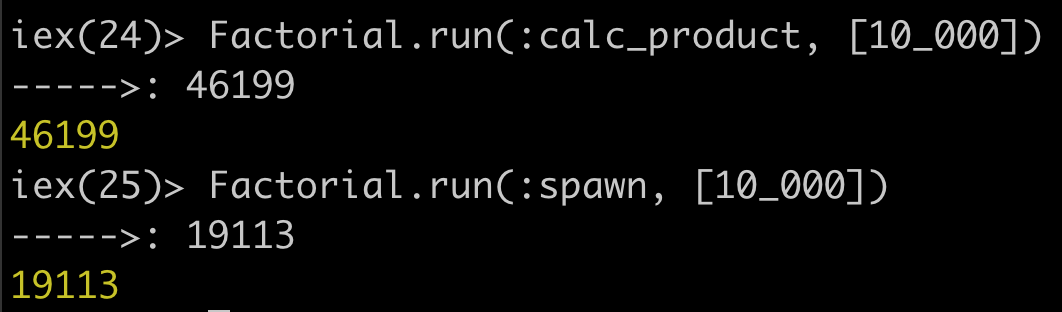
Now type the following Factorial.run(:calc_product, [10_000]). You should get
a log of the number of milliseconds it took to run the function.
Next type Factorial.run(:spawn, [10_000]). Compare to two logs. You should
have something that looks like this...
 .
.
Feel free to try this test again with even larger numbers (if you don't mind the
wait of course).
tl;dr
Note: this is definitely not a "reason" to switch programming
languages, but one of our (totally unscientific) reasons for deciding
to investigate other options for programming languages was the fact
that JavaScript (with the introduction of ES2015) now has
Six Ways to Declare a Function:
https://rainsoft.io/6-ways-to-declare-javascript-functions/
which means that there is ambiguity and "debate" as to which is
"best practice", Go,Elixirand Rust don't suffer from this problem.
Sure there are "anonymous" functions in Elixir
(required for functional programming!) but there are still only Two Ways
to define afunction(and both have specific use-cases),
which is way easier to explain to a beginner than the JS approach.
see:
http://stackoverflow.com/questions/18011784/why-are-there-two-kinds-of-functions-in-elixir
Further resources:
- Crash Course in Elixir
- Elixir School,
which is available translated at least partially in over 20 languages
and functions as a great succinct guide to core concepts. - 30 Days of Elixir
is a walk through theElixirlanguage in 30 exercises. - Learn
Elixir- List of Curated Resources - Explanation video of Pattern Matching in Elixir
- Sign up to: https://elixirweekly.net/ for regular (relevant) updates!
- List of more useful resources and sample apps
- If you want to know what's next it's worth check out
What's Ahead for Elixir? (53 mins)
by José Valim (the creator of Elixir) - Interview with José Valim (the creator of Elixir) on why he made it!
https://www.sitepoint.com/an-interview-with-elixir-creator-jose-valim/ - What was "wrong" with just writing directly in Erlang? read:
http://www.unlimitednovelty.com/2011/07/trouble-with-erlang-or-erlang-is-ghetto.html - While
Elixirby itself is pretty amazing,
where the language really shines is in the Phoenix Web Framework!!
So once you know the basics of the language
LearnPhoenixWeb Development. - Erlang, the Hidden Gem: Solving Problems at Scale for 30+ Years:
https://youtu.be/-m31ag9z4VY
Contributors
Showing top 12 contributors by commit count.








Related Repositories

firstcontributions/first-contributions
🚀✨ Help beginners to contribute to open source projects

jbee37142/Interview_Question_for_Beginner
:boy: :girl: Technical-Interview guidelines written for those who started studying programming. I wish you all the best. :space_invader:

iggredible/Learn-Vim
Learning Vim and Vimscript doesn't have to be hard. This is the guide that you're looking for 📖

The-Cool-Coders/Project-Ideas-And-Resources
A Collection of application ideas that can be used to improve your coding skills ❤.

Yixiaohan/codeparkshare
Python初学者(零基础学习Python、Python入门)书籍、视频、资料、社区推荐

WooVictory/Ready-For-Tech-Interview
💻 신입 개발자로서 지식을 쌓기 위해 공부하는 공간 👨💻