

MudBlazor.HtmlEditor
A rich text editor component for MudBlazor
A customizable HTML editor component for [MudBlazor](https://mudblazor.com/), powered by [QuillJS](https://quilljs.com/). The project is written primarily in CSS, distributed under the MIT License license, first published in 2023. Key topics include: mudblazor.
Tizzani.MudBlazor.HtmlEditor
A customizable HTML editor component for MudBlazor, powered by QuillJS.




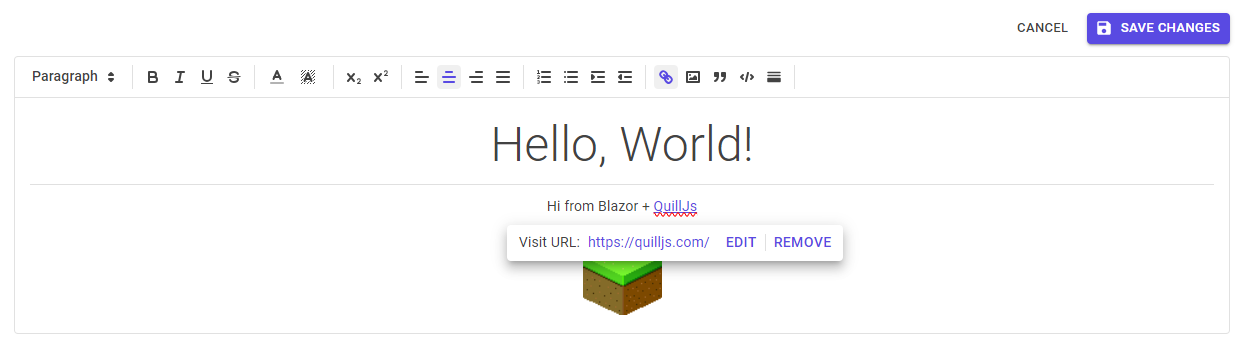
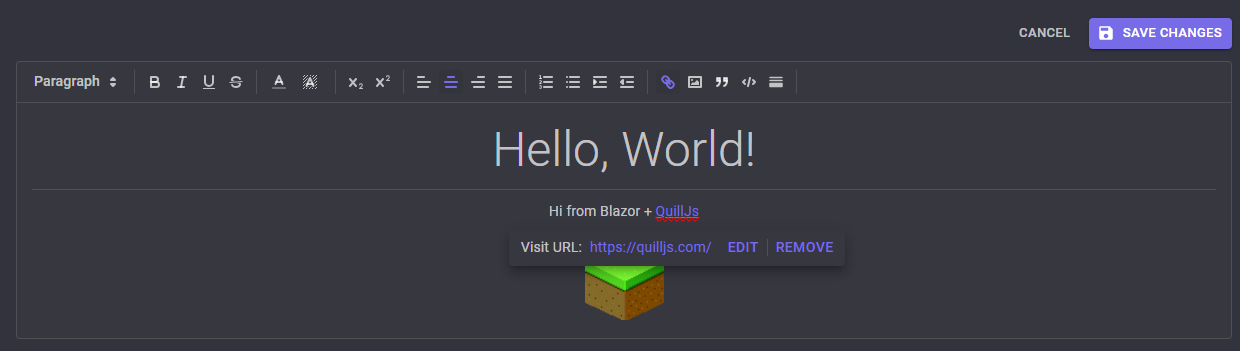
Works in dark mode, too!
Installation
Download the latest release from NuGet:
cmddotnet add package Tizzani.MudBlazor.HtmlEditor
Add references to the required CSS and JS to your main HTML file (e.g. App.razor, index.html, or Page.cshtml depending on your Blazor setup):
html<!-- Add to document <head> --> <link href="_content/Tizzani.MudBlazor.HtmlEditor/MudHtmlEditor.css" rel="stylesheet" /> <!-- Add to document <body> --> <script src="https://cdn.jsdelivr.net/npm/quill@2.0.2/dist/quill.js"></script> <script src="_content/Tizzani.MudBlazor.HtmlEditor/quill-blot-formatter.min.js"></script> <!-- optional; for image resize -->
Finally, add the following to your _Imports.razor:
razor@using Tizzani.MudBlazor.HtmlEditor
Configuring Toolbar Options (available since v2.1)
There are several options available for customizing the HTML editor toolbar.
To customize options for a specific editor instance, define a <MudHtmlToolbarOptions> inside the <MudHtmlEditor>:
razor<MudHtmlEditor> <MudHtmlToolbarOptions InsertImage="false" /> <!-- This will exclude the "insert image" toolbar option --> </MudHtmlEditor>
For all available options, see here.
Configuring Default Options
To configure default options for all instances of the HTML editor, you can wrap your razor content with <CascadingMudHtmlToolbarOptions>.
App.razor or Routes.razor
razor<CascadingMudHtmlToolbarOptions InsertImage="false"> <Router AppAssembly="@typeof(Program).Assembly"> <!-- etc. --> </Router> </CascadingMudHtmlToolbarOptions>
Child components will inherit the default options, unless they override them with their own <MudHtmlToolbarOptions> instance.
Advanced Customization
For more advanced customization, you can define your own toolbar options inside of an individual <MudHtmlEditor> component:
razor<MudHtmlEditor> <span class="ql-formats"> <button class="ql-bold" type="button"></button> <button class="ql-italic" type="button"></button> <button class="ql-underline" type="button"></button> <button class="ql-strike" type="button"></button> </span> </MudHtmlEditor>
See the QuillJS documentation for more information on customizing the toolbar.
Migrating from v1.0 to v2.0
- Remove the
services.AddMudBlazorHtmlEditor();call from yourStartup.csorProgram.csfile. - Remove the
<script src="_content/Tizzani.MudBlazor.HtmlEditor/HtmlEditor.js">tag from the document body. The required JS is now included by default.
Contributors
Showing top 4 contributors by commit count.


Related Repositories

CodeBeamOrg/CodeBeam.MudBlazor.Extensions
Useful third party extension components for MudBlazor, from the contributors.

thbst16/dotnet-blazor-crud
Modular application for database CRUD with Blazor. Uses an in-memory database and features dummy data generation and data pagination.

MyNihongo/MudBlazor.Markdown
Markdown component based on the MudBlazor environment

marinasundstrom/YourBrand
Prototype enterprise system for e-commerce and consulting services

0phois/MudBlazor.StaticInput
Blazor Component Library extension for MudBlazor. Focusing on input components for Static Server-Side Rendered pages

MudBlazor/TryMudBlazor
A playground for trying out and testing MudBlazor components entirely in the browser.