

Rust fsm
Finite state machine framework for Rust with readable specifications
[![Documentation][docs-badge]][docs-link] [![Latest Version][crate-badge]][crate-link] The project is written primarily in Rust, distributed under the MIT License license, first published in 2019. Key topics include: dsl, fsm, proc-macro, rust, state-machine.
A framework and a DSL for building finite state machines in Rust



The rust-fsm crate provides a simple and universal framework for building
state machines in Rust with minimum effort.
The essential part of this crate is the
StateMachineImpl trait. This trait allows a
developer to provide a strict state machine definition, e.g. specify its:
- An input alphabet - a set of entities that the state machine takes as inputs
and performs state transitions based on them. - Possible states - a set of states this machine could be in.
- An output alphabet - a set of entities that the state machine may output as
results of its work. - A transition function - a function that changes the state of the state machine
based on its current state and the provided input. - An output function - a function that outputs something from the output
alphabet based on the current state and the provided inputs. - The initial state of the machine.
Note that on the implementation level such abstraction allows build any type of
state machines:
- A classical state machine by providing only an input alphabet, a set of states
and a transition function. - A Mealy machine by providing all entities listed above.
- A Moore machine by providing an output function that do not depend on the
provided inputs.
Feature flags
Default
std- implement features that require thestdenvironment. See below.dsl- re-exportrust-fsm-dslfromrust-fsm. Recommended to leave this on
for the best development experience.
Non-default
diagram- generate Mermaid state diagrams in the doc strings. See below.
Usage in no_std environments
This library has the feature named std which is enabled by default. You may
want to import this library as
rust-fsm = { version = "0.8", default-features = false, features = ["dsl"] }
to use it in a no_std environment. This only affects error types (the Error
trait is only available in std).
The DSL implementation re-export is gated by the feature named dsl which is
also enabled by default.
Use
Initially this library was designed to build an easy to use DSL for defining
state machines on top of it. Using the DSL will require to connect an additional
crate rust-fsm-dsl (this is due to limitation of the procedural macros
system).
Using the DSL for defining state machines
The DSL is parsed by the state_machine macro. Here is a little example.
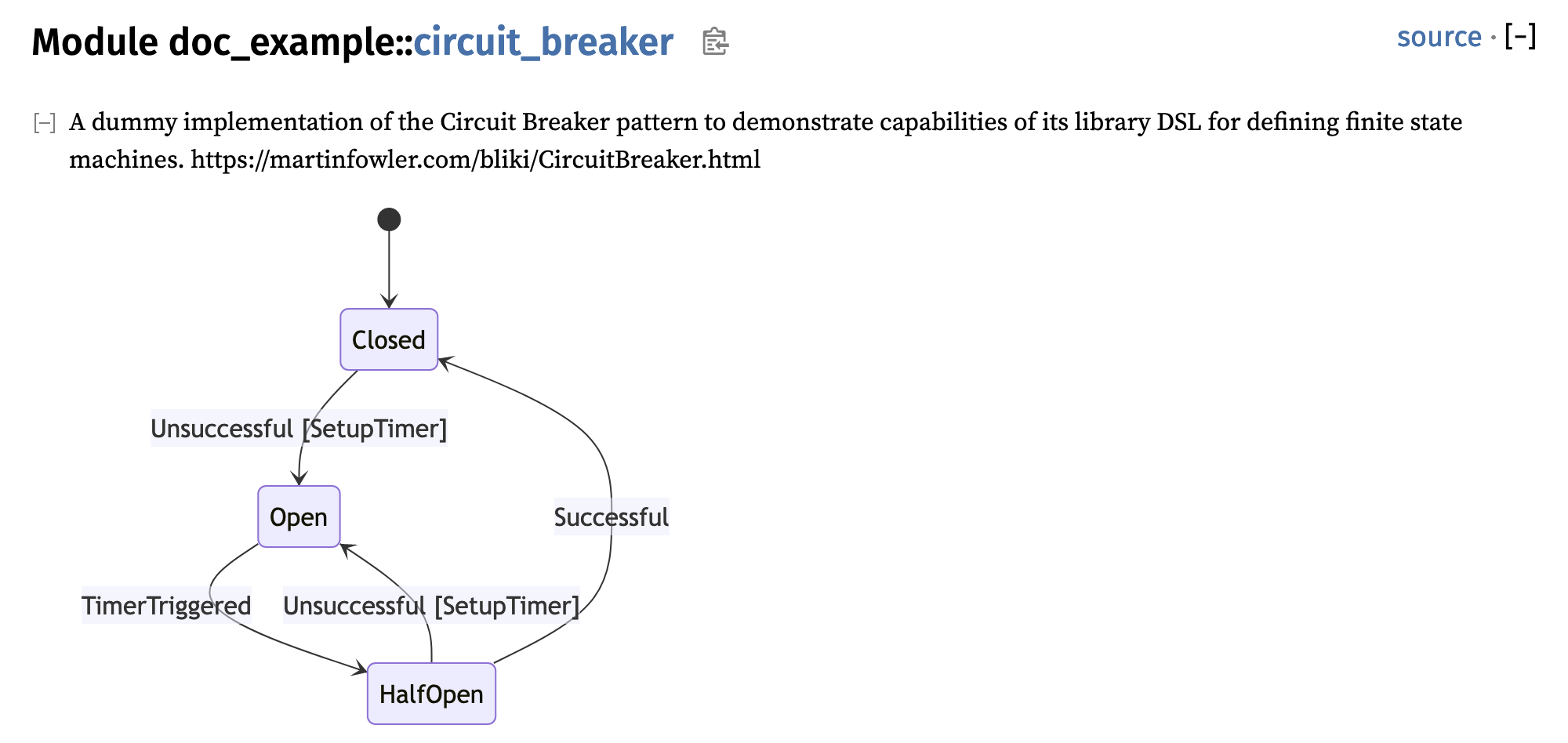
rustuse rust_fsm::*; state_machine! { #[derive(Debug)] #[repr(C)] /// A Circuit Breaker state machine. circuit_breaker(Closed) Closed(Unsuccessful) => Open [SetupTimer], Open(TimerTriggered) => HalfOpen, HalfOpen => { Successful => Closed, Unsuccessful => Open [SetupTimer] } }
This code sample:
- Defines a state machine called
circuit_breaker; - Derives the
Debugtrait for it. All attributes you use here (like
#[repr(C)]) will be applied to all types generated by this macro. If you
want to apply attributes or a docstring to themodgenerated by this macro,
just put it before the macro invocation. - Sets the initial state of this state machine to
Closed; - Defines state transitions. For example: on receiving the
Successfulinput
when in theHalfOpenstate, the machine must move to theClosedstate; - Defines outputs. For example: on receiving
Unsuccessfulin theClosed
state, the machine must outputSetupTimer.
This state machine can be used as follows:
rust// Initialize the state machine. The state is `Closed` now. let mut machine = circuit_breaker::StateMachine::new(); // Consume the `Successful` input. No state transition is performed. let _ = machine.consume(&circuit_breaker::Input::Successful); // Consume the `Unsuccesful` input. The machine is moved to the `Open` // state. The output is `SetupTimer`. let output = machine.consume(&circuit_breaker::Input::Unsuccessful).unwrap(); // Check the output if let Some(circuit_breaker::Output::SetupTimer) = output { // Set up the timer... } // Check the state if let circuit_breaker::State::Open = machine.state() { // Do something... }
The following entities are generated:
- An empty structure
circuit_breaker::Implthat implements the
StateMachineImpltrait. - Enums
circuit_breaker::State,circuit_breaker::Inputand
circuit_breaker::Outputthat represent the state, the input alphabet and the
output alphabet respectively. - Type alias
circuit_breaker::StateMachinethat expands to
StateMachine<circuit_breaker::Impl>.
Note that if there is no outputs in the specification, the output alphabet is an
empty enum and due to technical limitations of many Rust attributes, no
attributes (e.g. derive, repr) are applied to it.
Within the state_machine macro you must define at least one state transition.
Visibility
You can specify visibility like this:
rustuse rust_fsm::*; state_machine! { pub CircuitBreaker(Closed) Closed(Unsuccessful) => Open [SetupTimer], Open(TimerTriggered) => HalfOpen, HalfOpen => { Successful => Closed, Unsuccessful => Open [SetupTimer], } }
The default visibility is private.
Custom alphabet types
You can supply your own types to use as input, output or state. All of them are
optional: you can use only one of them or all of them at once if you want to.
The current limitation is that you have to supply a fully qualified type path.
rustuse rust_fsm::*; pub enum Input { Successful, Unsuccessful, TimerTriggered, } pub enum State { Closed, HalfOpen, Open, } pub enum Output { SetupTimer, } state_machine! { #[state_machine(input(crate::Input), state(crate::State), output(crate::Output))] circuit_breaker(Closed) Closed(Unsuccessful) => Open [SetupTimer], Open(TimerTriggered) => HalfOpen, HalfOpen => { Successful => Closed, Unsuccessful => Open [SetupTimer] } }
Diagrams
state_machine macro can document your state machines with diagrams. This is
controlled by the diagram feature, which is non-default. The diagrams are
generated in the Mermaid format. This feature includes the Mermaid
script into the documentation page.
To see this in action, download the repository and run:
bashcargo doc -p doc-example --open
Without DSL
The state_machine macro has limited capabilities (for example, a state cannot
carry any additional data), so in certain complex cases a user might want to
write a more complex state machine by hand.
All you need to do to build a state machine is to implement the
StateMachineImpl trait and use it in conjuctions with some of the provided
wrappers (for now there is only StateMachine).
You can see an example of the Circuit Breaker state machine in the project
repository.
Contributors
Showing top 5 contributors by commit count.


Related Repositories

SnapKit/SnapKit
A Swift Autolayout DSL for iOS & OS X

heartcombo/simple_form
Forms made easy for Rails! It's tied to a simple DSL, with no opinion on markup.

halide/Halide
a language for fast, portable data-parallel computation

MontFerret/ferret
Declarative data automation language and Go runtime for structured extraction workflows.

skydoves/Balloon
:balloon: Modernized and sophisticated tooltips, fully customizable with an arrow and animations for Android and Jetpack Compose.

thi-ng/umbrella
⛱ Broadly scoped ecosystem & mono-repository of 215 TypeScript projects (and ~185 examples) for general purpose, functional, data driven development