

Viperit
Viper Framework for iOS using Swift
Write an iOS app following VIPER architecture. But in an **easy way**. The project is written primarily in Swift, distributed under the MIT License license, first published in 2016. Key topics include: carthage, cocoapods, swift, swift-5, swift5.







Write an iOS app following VIPER architecture. But in an easy way.
Viper the easy way
We all know Viper is cool. But we also know that it's hard to setup. This library intends to simplify all that boilerplate process. If you don't know yet what Viper is, check this out: Architecting iOS Apps with VIPER (objc.io)
Installation
Requirements
- iOS 12.0+
- Swift 5.1+
- Xcode 12.0+
Swift Package Manager (SPM)
You can easily install this framework using SPM on Xcode. Go to File | Swift Packages | Add Package Dependency... in Xcode and search for "http://github.com/ferranabello/Viperit"
CocoaPods
CocoaPods is a dependency manager for Cocoa projects.
Specify Viperit into your project's Podfile:
rubysource 'https://github.com/CocoaPods/Specs.git' platform :ios, '12.0' use_frameworks! pod 'Viperit'
Carthage
Carthage is a decentralized dependency manager that builds your dependencies and provides you with binary frameworks.
To integrate Viperit into your Xcode project using Carthage, specify it in your Cartfile:
ogdlgithub "ferranabello/Viperit"
Run carthage update to build the framework and drag the built Viperit.framework into your Xcode project.
Features
Create modules easily using Xcode templates
Viperit Xcode templates can be downloaded from the latest release page. Download the Templates.zip file.
To install them, unzip the file, open your terminal and run:
bashcd PATH/TO/UNZIPPED/FOLDER mkdir -p ~/Library/Developer/Xcode/Templates/ cp -R Viperit ~/Library/Developer/Xcode/Templates/
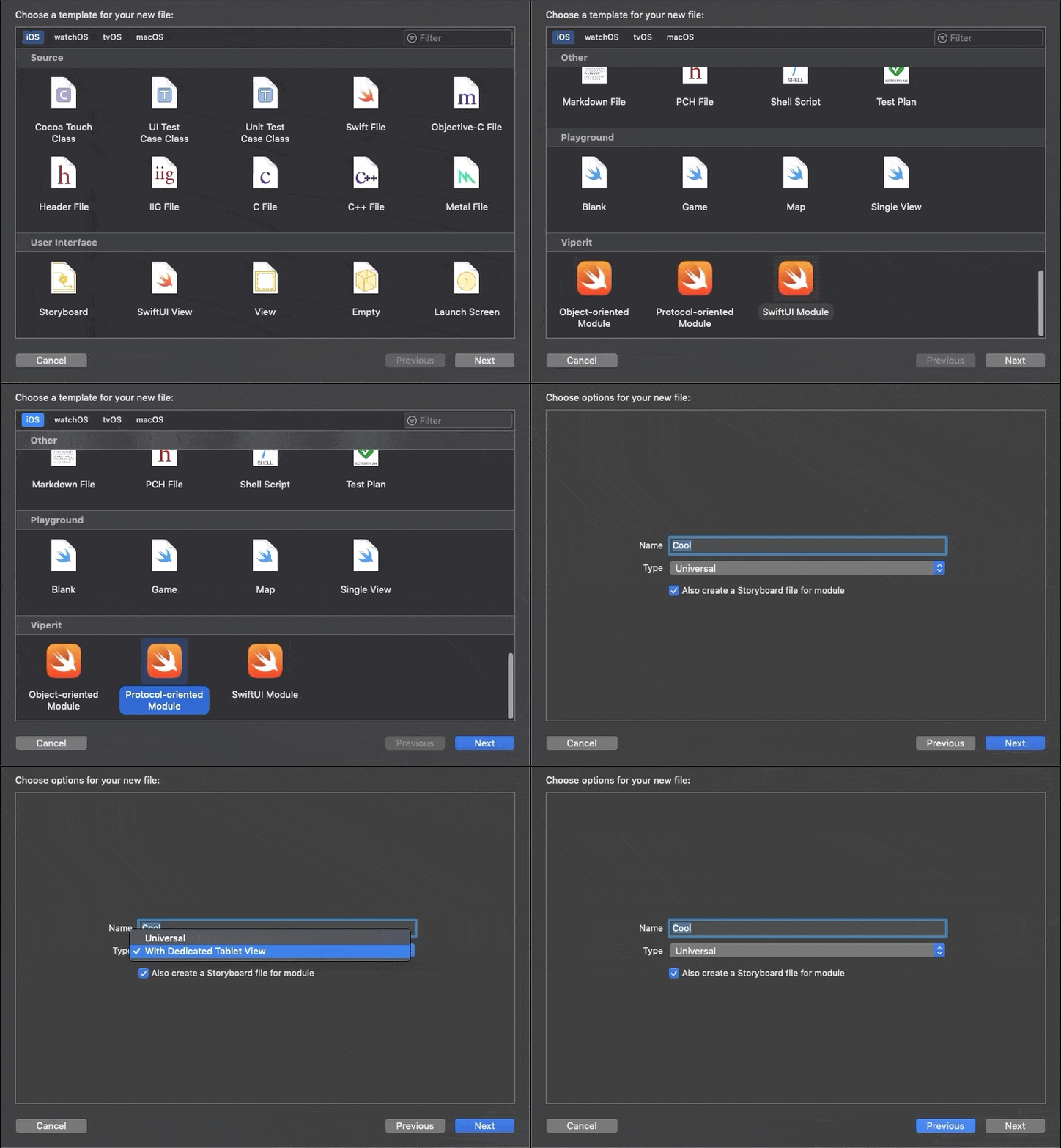
You can check "Also create a Storyboard file for module" if you want the storyboard file to be automatically created for you.
Choose between "Universal" to use just one view for phones and tablets, and "Dedicated Tablet View" if you want to have a separated view for tablet devices.
Use storyboard, xib, programmatic views or SwiftUI
Any Viperit module will assume its view is loaded from a Storyboard by default. But you can use storyboards, nibs, code or even SwiftUI views! All you need to do is to override the variable viewType in your modules enum:
swiftenum MySuperCoolModules: String, ViperitModule { case theStoryboardThing case oldSchool case xibModule case whatTheSwift var viewType: ViperitViewType { switch self { case .theStoryboardThing: return .storyboard case .oldSchool: return .code case .xibModule: return .nib case .whatTheSwift: return .swiftUI } } }
Built-in router functions
This framework is very flexible, it's meant to be used in any way you want, but it has some useful built-in functionalities in the router that you could use:
swift//Show your module as the root view controller of the given window func show(inWindow window: UIWindow?, embedInNavController: Bool, setupData: Any?, makeKeyAndVisible: Bool) //Show your module from any given view controller func show(from: UIViewController, embedInNavController: Bool, setupData: Any?) //Show your module inside another view func show(from containerView: UIViewController, insideView targetView: UIView, setupData: Any?) //Present your module modally func present(from: UIViewController, embedInNavController: Bool, presentationStyle: UIModalPresentationStyle, transitionStyle: UIModalTransitionStyle, setupData: Any?, completion: (() -> Void)?)
Easy to test
You can test your module injecting mock layers like so:
swiftvar module = AppModules.home.build() view = HomeMockView() view.expectation = expectation(description: "Test expectation") module.injectMock(view: view) ...
Usage
Now, let's create our first Viperit module called "myFirstModule"!
0. Create your module files
Let's use the provided Xcode template to easily create all the needed classes for the module. Just click <i class="icon-file"></i> New file in the document panel and choose between Protocol-oriented module, Object-oriented module or SwiftUI module under the "Viperit" section.
1. Create a modules enum
You need at least one (you can use as many as you like, maybe to group modules by functionality) enum that implements the ViperitModule protocol to enumerate your application modules.
swiftimport Viperit //MARK: - Application modules enum AppModules: String, ViperitModule { case myFirstModule }
2. Build the module and perform navigation
Imagine this is a new app and we want to load our "myFirstModule" module as the app's startup module
swiftimport Viperit @UIApplicationMain class AppDelegate: UIResponder, UIApplicationDelegate { var window: UIWindow? func application(_ application: UIApplication, didFinishLaunchingWithOptions launchOptions: [UIApplicationLaunchOptionsKey: Any]?) -> Bool { window = UIWindow(frame: UIScreen.main.bounds) let module = AppModules.myFirstModule.build() let router = module.router as! MyFirstModuleRouter router.show(inWindow: window) return true } }
This is just an example, you could of course use your own router functions instead of the provided show(inWindow:):
swiftwindow = UIWindow(frame: UIScreen.main.bounds) let module = AppModules.myFirstModule.build() let router = module.router as! MyFirstModuleRouter router.mySuperCoolShowFunction(inWindow: window)
2.1. Are you using SwiftUI?
Let's say you created a module based on SwiftUI called 'Cool'.
All you need to do is to use the new Viperit SwiftUI module builder:
swiftimport SwiftUI import Viperit //A sample function that could be implemented in some Router to show your Cool SwiftUI module //You can even inject an @EnvironmentObject view model to your SwiftUI view. func showTheCoolModule() { let module = AppModules.cool.build { presenter -> (CoolView, UserSettings) in let p = presenter as! CoolPresenterApi let settings = p.settings() return (CoolView(presenter: p), settings) } let router = module.router as! CoolRouter router.show(from: viewController) }
Check the example app to have a better understanding of how it works, and how to manage data flow on SwiftUI with the presenter.
3. Follow the Viper flow
Everything is ready for you to make great things the Viper way!
Clone the repo and run the 'Example' target to see it in action! Or just try it with Cocoapods:
rubypod try Viperit
Author
License
Viperit is released under MIT license and copyrighted by Ferran Abelló.
Contributors
Showing top 2 contributors by commit count.


Related Repositories

Alamofire/Alamofire
Elegant HTTP Networking in Swift

SDWebImage/SDWebImage
Asynchronous image downloader with cache support as a UIImageView category

SwiftyJSON/SwiftyJSON
The better way to deal with JSON data in Swift.

HeroTransitions/Hero
Elegant transition library for iOS & tvOS

Carthage/Carthage
A simple, decentralized dependency manager for Cocoa

SwifterSwift/SwifterSwift
A handy collection of more than 500 native Swift extensions to boost your productivity.