

Fst
Lightning Fast Serialization of Data Frames for R
[](https://github.com/fstpackage/fst/actions/workflows/R-CMD-check.yaml) [](https://www.gnu.org/licenses/agpl-3.0) The project is written primarily in R, distributed under the GNU Affero General Public License v3.0 license, first published in 2017. Key topics include: compression, data-frame, data-storage, r.



Overview
The fst package for R provides a
fast, easy and flexible way to serialize data frames. With access speeds
of multiple GB/s, fst is specifically designed to unlock the potential
of high speed solid state disks that can be found in most modern
computers. Data frames stored in the fst format have full random
access, both in column and rows.
The figure below compares the read and write performance of the fst
package to various alternatives.
| Method | Format | Time (ms) | Size (MB) | Speed (MB/s) | N |
|---|---|---|---|---|---|
| readRDS | bin | 1577 | 1000 | 633 | 112 |
| saveRDS | bin | 2042 | 1000 | 489 | 112 |
| fread | csv | 2925 | 1038 | 410 | 232 |
| fwrite | csv | 2790 | 1038 | 358 | 241 |
| read_feather | bin | 3950 | 813 | 253 | 112 |
| write_feather | bin | 1820 | 813 | 549 | 112 |
| read_fst | bin | 457 | 303 | 2184 | 282 |
| write_fst | bin | 314 | 303 | 3180 | 291 |
These benchmarks were performed on a laptop (i7 4710HQ @2.5 GHz) with a
reasonably fast SSD (M.2 Samsung SM951) using the dataset defined below.
Parameter Speed was calculated by dividing the in-memory size of the
data frame by the measured time. These results are also visualized in
the following graph:
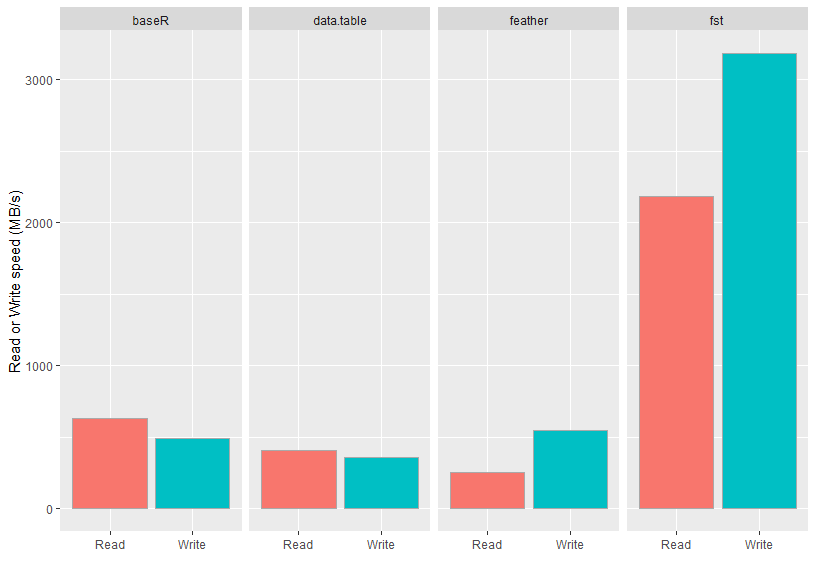 <!-- -->
As can be seen from the figure, the measured speeds for the fst
package are very high and even top the maximum drive speed of the SSD
used. The package accomplishes this by an effective combination of
multi-threading and compression. The on-disk file sizes of fst files
are also much smaller than that of the other formats tested. This is an
added benefit of fst’s use of type-specific compressors on each stored
column.
In addition to methods for data frame serialization, fst also provides
methods for multi-threaded in-memory compression with the popular LZ4
and ZSTD compressors and an extremely fast multi-threaded hasher.
Multi-threading
The fst package relies heavily on multi-threading to boost the read-
and write speed of data frames. To maximize throughput, fst compresses
and decompresses data in the background and tries to keep the disk
busy writing and reading data at the same time.
Installation
The easiest way to install the package is from CRAN:
rinstall.packages("fst")
You can also use the development version from GitHub:
r# install.packages("devtools") devtools::install_github("fstpackage/fst", ref = "develop")
Basic usage
Using fst is simple. Data can be stored and retrieved using methods
write_fst and read_fst:
r# Generate some random data frame with 10 million rows and various column types nr_of_rows <- 1e7 df <- data.frame( Logical = sample(c(TRUE, FALSE, NA), prob = c(0.85, 0.1, 0.05), nr_of_rows, replace = TRUE), Integer = sample(1L:100L, nr_of_rows, replace = TRUE), Real = sample(sample(1:10000, 20) / 100, nr_of_rows, replace = TRUE), Factor = as.factor(sample(labels(UScitiesD), nr_of_rows, replace = TRUE)) ) # Store the data frame to disk write_fst(df, "dataset.fst") # Retrieve the data frame again df <- read_fst("dataset.fst")
Note: the dataset defined in this example code was also used to obtain
the benchmark results shown in the introduction.
Random access
The fst file format provides full random access to stored datasets.
You can retrieve a selection of columns and rows with:
rdf_subset <- read_fst("dataset.fst", c("Logical", "Factor"), from = 2000, to = 5000)
This reads rows 2000 to 5000 from columns Logical and Factor without
actually touching any other data in the stored file. That means that a
subset can be read from file without reading the complete file
first. This is different from, say, readRDS or read_feather where
you have to read the complete file or column before you can make a
subset.
Compression
For compression the excellent and speedy
LZ4 and
ZSTD compression algorithms are
used. These compressors (in combination with type-specific bit filters),
enable fst to achieve high compression speeds at reasonable
compression factors. The compression factor can be tuned from 0
(minimum) to 100 (maximum):
rwrite_fst(df, "dataset.fst", 100) # use maximum compression
Compression reduces the size of the fst file that holds your data. But
because the (de-)compression is done on background threads, it can
increase the total read- and write speed as well. The graph below shows
how the use of multiple threads enhances the read and write speed of our
sample dataset.
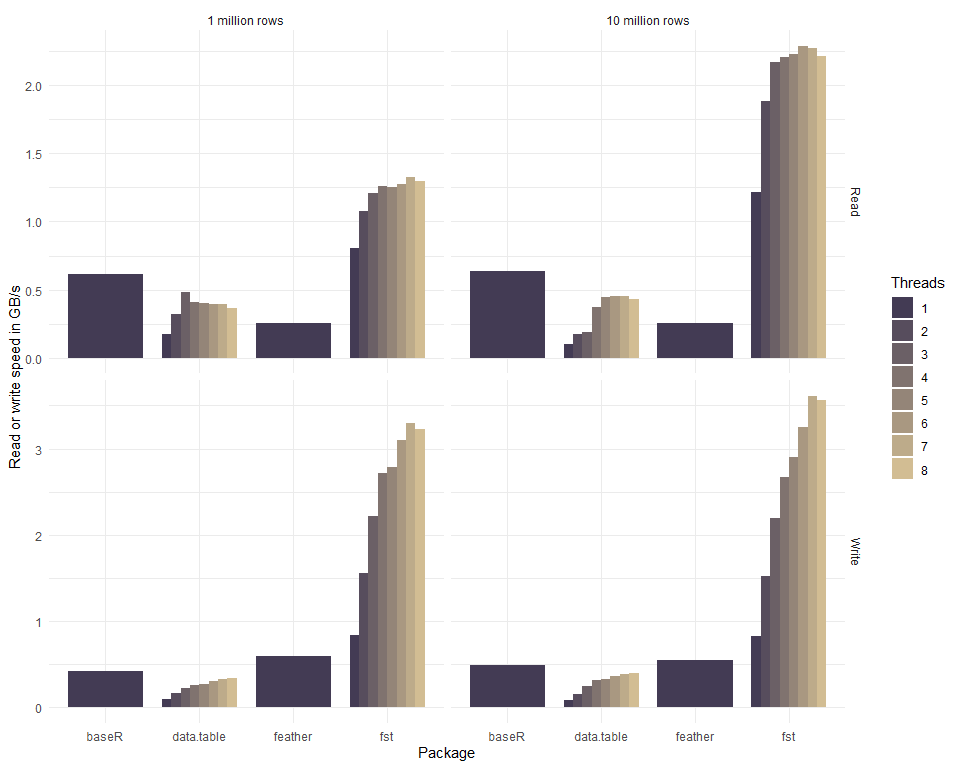 <!-- -->
The csv format used by the fread and fwrite methods of package
data.table is actually a human-readable text format and not a binary
format. Normally, binary formats would be much faster than the csv
format, because csv takes more space on disk, is row based,
uncompressed and needs to be parsed into a computer-native format to
have any meaning. So any serializer that’s working on csv has an
enormous disadvantage as compared to binary formats. Yet, the results
show that data.table is on par with binary formats and when more
threads are used, it can even be faster. Because of this impressive
performance, it was included in the graph for comparison.
Bindings in other languages
Julia:
FstFileFormat.jl
A naive Julia binding using RCall.jl
Note to users: From CRAN release v0.8.0, the fst format is
stable and backwards compatible. That means that all fst files
generated with package v0.8.0 or later can be read by future versions
of the package.
Contributors
Showing top 12 contributors by commit count.










Related Repositories

headroomlabs-ai/headroom
Compress tool outputs, logs, files, and RAG chunks before they reach the LLM. 60-95% fewer tokens, same answers. Library, proxy, MCP server.

deepspeedai/DeepSpeed
DeepSpeed is a deep learning optimization library that makes distributed training and inference easy, efficient, and effective.

gchq/CyberChef
The Cyber Swiss Army Knife - a web app for encryption, encoding, compression and data analysis

leandromoreira/digital_video_introduction
A hands-on introduction to video technology: image, video, codec (av1, vp9, h265) and more (ffmpeg encoding). Translations: 🇺🇸 🇨🇳 🇯🇵 🇮🇹 🇰🇷 🇷🇺 🇧🇷 🇪🇸

borgbackup/borg
Deduplicating archiver with compression and authenticated encryption.

PaddlePaddle/PaddleNLP
Easy-to-use and powerful LLM and SLM library with awesome model zoo.