

Qrc
QR code generator for text terminals (ANSI color, Unicode, Sixel)
QR code generator for text terminals ====================================================================== The project is written primarily in Go, distributed under the MIT License license, first published in 2014. Key topics include: cli, cui, go, qrcode-generator, sixel.
QR code generator for text terminals
- SPDX-FileCopyrightText: 2014-2026 SATOH Fumiyasu @ OSSTech Corp., Japan
- SPDX-License-Identifier: MIT
- Development home: https://github.com/fumiyas/qrc
- Author's home: https://fumiyas.github.io/
What's this?
This program generates QR codes in
ANSI colors,
Sixel or
Unicode Block Elements
format for
text terminals, e.g., console, xterm (with -ti 340 option to enable Sixel),
mlterm,
Windows command prompt and so on.
Use case
You can transfer data to smartphones with a QR code reader application
from your terminal.
Usage
qrc program takes a text from command-line argument or standard
input (if no command-line argument) and encodes it to a QR code.
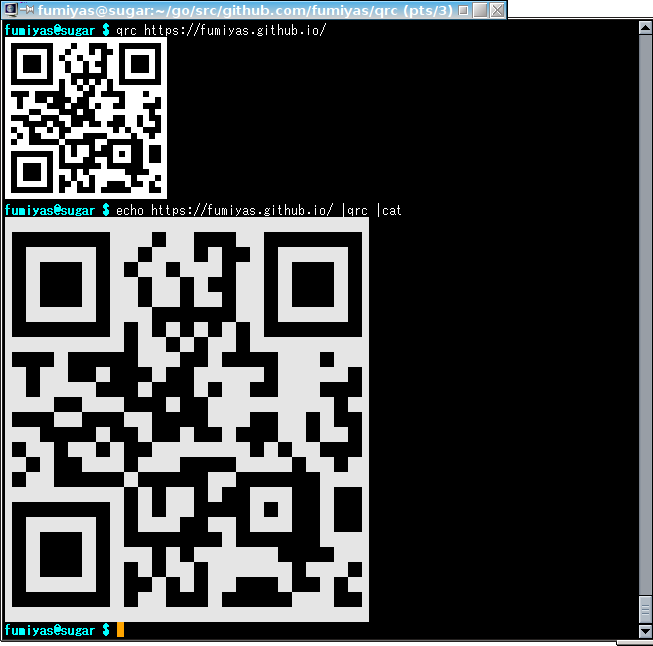
console$ qrc --help ... $ qrc https://fumiyas.github.io/ ... $ qrc 'WIFI:S:Our-ssid;T:WPA;P:secret;;' ...
You can get a QR code in Sixel graphics if the standard output is
a terminal and it supports Sixel.
Download
Binary files are here for Linux, macOS and Windows:
Build from source codes
Install the latest released version of qrc directly with go install:
console$ go install github.com/fumiyas/qrc/cmd/qrc@latest
Or, build from a local clone:
console$ git clone https://github.com/fumiyas/qrc.git $ cd qrc $ make build # build the qrc binary in the working tree $ make test # run unit tests $ make vet # run go vet $ make cross # cross-compile for Linux, macOS and Windows
TODO
- Add the following options:
--ansi-color-scheme <ansi|windows>--foreground-color R:G:B--background-color R:G:B--margin-color R:G:B
- Timeout for tty.GetDeviceAttributes1()
Contributors
- Hayaki Saito (@saitoha)
Similar products
- Go
- JavaScript (Node)
- Ruby
Contributors
Showing top 1 contributor by commit count.

Related Repositories

n8n-io/n8n
Fair-code workflow automation platform with native AI capabilities. Combine visual building with custom code, self-host or cloud, 400+ integrations.

ohmyzsh/ohmyzsh
🙃 A delightful community-driven (with 2,500+ contributors) framework for managing your zsh configuration. Includes 300+ optional plugins (rails, git, macOS, hub, docker, homebrew, node, php, python, etc), 140+ themes to spice up your morning, and an auto-update tool that makes it easy to keep up with the latest updates from the community.

yt-dlp/yt-dlp
A feature-rich command-line audio/video downloader

google-gemini/gemini-cli
An open-source AI agent that brings the power of Gemini directly into your terminal.

sherlock-project/sherlock
Hunt down social media accounts by username across social networks

junegunn/fzf
:cherry_blossom: A command-line fuzzy finder