

Blog post workflow
Show your latest blog posts from any sources or StackOverflow activity or Youtube Videos on your GitHub profile/project readme automatically using the RSS feed
1. Star this repo 😉 2. Go to your repository 3. Add the following section to your **README.md** file, you can give whatever title you want. Just make sure that you use `` in your readme. The workflow will replace this comment with the actual blog post list: ```markdown # Blog posts The project is written primarily in JavaScript, distributed under the GNU Affero General Public License v3.0 license, first published in 2020. It has gained significant community traction with 3,400 stars and 290 forks on GitHub. Key topics include: activity, blog, blog-posts, blogging, ghost.
Blog post workflow 
<!-- ALL-CONTRIBUTORS-BADGE:START - Do not remove or modify this section -->


How to use
-
Star this repo 😉
-
Go to your repository
-
Add the following section to your README.md file, you can give whatever title you want. Just make sure that you use
<!-- BLOG-POST-LIST:START --><!-- BLOG-POST-LIST:END -->in your readme. The workflow will replace this comment with the actual blog post list:markdown# Blog posts <!-- BLOG-POST-LIST:START --> <!-- BLOG-POST-LIST:END --> -
Create a folder named
.githuband create aworkflowsfolder inside it, if it doesn't exist. -
Create a new file named
blog-post-workflow.ymlwith the following contents inside the workflows folder:yamlname: Latest blog post workflow on: schedule: # Run workflow automatically - cron: '0 0 * * *' # Runs once a day at 00:00 UTC workflow_dispatch: # Run workflow manually (without waiting for the cron to be called), through the GitHub Actions Workflow page directly permissions: contents: write # To write the generated contents to the readme jobs: update-readme-with-blog: name: Update this repo's README with latest blog posts runs-on: ubuntu-latest steps: - name: Checkout uses: actions/checkout@v4 - name: Pull in dev.to posts uses: gautamkrishnar/blog-post-workflow@v1 with: feed_list: "https://dev.to/feed/gautamkrishnar,https://www.gautamkrishnar.com/feed/" -
Replace the above URL list with your own RSS feed URLs. See popular-sources for a list of common RSS feed urls. Commit the changes.
Note on workflow frequency: The default schedule above runs once daily at 00:00 UTC, which is suitable for most users. You can adjust the schedule based on how frequently you publish content:
- Daily:
cron: '0 0 * * *'(recommended for most users) - Weekly:
cron: '0 0 * * 0'(every Sunday at 00:00 UTC) - Monthly:
cron: '0 0 1 * *'(1st day of every month at 00:00 UTC)
Running the workflow too frequently (e.g., hourly) may be unnecessary unless you publish content very often. You can always trigger the workflow manually using
workflow_dispatchwhenever needed. - Daily:
-
Go to repository settings, Click on Actions > General. Update the "Workflow permissions" to "Read and write permissions". Click on save.
-
Wait for it to run automatically, or you can also trigger it manually to see the result instantly. To trigger the workflow manually, please follow the steps in the video.
Options
This workflow has additional options that you can use to customize it for your use case. The following are the list of options available:
| Option | Default Value | Description | Required |
|---|---|---|---|
feed_list | "" | Comma-separated list of RSS feed urls, eg: https://example1.com,https://example2.com | Yes |
max_post_count | 5 | Maximum number of posts you want to show on your readme, all feeds combined | No |
readme_path | ./README.md | Comma separated paths of the readme files you want to update | No |
gh_token | your GitHub token with repo scope | Use this to configure the token of the user that commits the workflow result to GitHub | No |
comment_tag_name | BLOG-POST-LIST | Allows you to override the default comment tag name (<!-- BLOG-POST-LIST:START --><!-- BLOG-POST-LIST:END -->), if you want to show multiple instances of the action on the same repo, see advanced usage for more info | No |
disable_sort | false | Disables the sorting of the list based on publish date | No |
sort_order | desc | Specifies the sort order of posts when date sorting is enabled (disable_sort is false). Supports asc (ascending, oldest first) and desc (descending, newest first). Has no effect if disable_sort is true. Works even without pubDate in RSS feeds (items without dates are placed at the end). | No |
reverse_order | false | Reverses the order of posts when disable_sort is set to true | No |
feed_names | "" | Comma-separated list of RSS feed names, this is intended to be used with template option. eg: Blog,Dev.to | No |
template | default | Allows you to change the structure of the posts list by using different variables. By default this workflow uses markdown list format to render the posts, you can override this behavior using this option. Eg: [$title]($url) will give you a space-separated list of posts.<br/><br/>Supported variables <ul><li>$title: Title of the post</li><li>$url: URL of the post</li><li>$description: Description of the post</li><li>$newline: Inserts a newline</li><li>$date: Inserts the post date based on the date_format specified</li><li>$randomEmoji: Allow you to use random emojis in the post, pass emojis as the parameter to chose one of it randomly in each post item. Eg: $randomEmoji(💯,🔥,💫,🚀,🌮). See the issue comment for more details</li><li>$emojiKey: You can use this argument to show emojis on each of your post item sequentially in the order you specify. Example: $emojiKey(💯,🔥,💫). See the issue comment for more details</li><li>$counter: You can use this argument to show a serial number on each of your post items.</li><li>$feedName: You can use this argument to show a string that represents your website name, use feed_names argument to specify it for each feed item. Eg: feed_list: "https://dev.to/feed/gautamkrishnar,https://www.gautamkrishnar.com/feed/", feed_names: "Dev.to,Personal Website"</li><li>$categories: You can use this to show a comma separated list of post categories if available. See this issue for more details</li></ul> | No |
categories_template | default | By default $categories variable in the template is a comma separated string of categories. This option will allow you override it and customize the category item according to your use case. Following are the variables available: <ul><li>$category: Represents individual category item</li></ul> eg: <code>$category</code> will show category list as category1 category2 category3 etc | No |
date_format | UTC:ddd mmm dd yyyy h:MM TT | Allows you to change the format of the date or time displayed when using the $date in the template option. This uses NPM dateformat library, please read the library documentation for the supported formats | No |
user_agent | rss-parser | Allows you to customize the user agent used by the RSS feed crawler | No |
accept_header | application/rss+xml | Allows you to customize the accept header of the http requests | No |
tag_post_pre_newline | true if you are not using template option | Allows you to insert a newline before the closing tag and after the opening tag when using the template option if needed, for better formatting | No |
filter_comments | stackoverflow/Comment by $author/,stackexchange/Comment by $author/ | Comma separated list of platforms you want to enable the comment filter.<br/><br/>Available filters<ul><li>stackoverflow/Comment by $author/: Allows you to filter out the StackOverflow comments. Argument to this filter is optional, it defaults to 'Comment by $author'. If you use any language other than English on StackOverflow, you can use this argument to customize it. See #16 for more info.</li><li>stackexchange/Comment by $author/: Allows you to filter out the StackExchange comments. Argument to this filter follows the same format as stackoverflow filter's argument.</li></ul> | No |
custom_tags | "" | Allows you to use the custom tags from your feed items in your template. Format: variableName/tagName/,variableName/tagName/. Please see the issue comment for more details | No |
title_max_length | "" | Allows you to trim the title in the posts list, excess text will be appended with an ellipsis ... | No |
description_max_length | "" | Allows you to trim the description in the posts list, excess text will be appended with an ellipsis ... | No |
item_exec | "" | Allows you to execute custom JavaScript code on each post item fetched from the xml to do advanced text manipulation. Please see the issue comment as an example | No |
commit_message | Updated with the latest blog posts | Allows you to customize the commit message | No |
committer_username | blog-post-bot | Allows you to customize the committer username | No |
committer_email | blog-post-bot@example.com | Allows you to customize the committer email | No |
output_only | false | Sets the generated array as results output variable so that it can be consumed in other actions and parsed via utilities like jq. This will also prevent committing to readme. See #51 for more details about the output format and how to use it. This will also generate a JSON file named /tmp/blog_post_workflow_output.json that you can use to consume the generated data and avoid issues like #110. | No |
enable_keepalive | true | Workflow will automatically do a dummy commit to keep the repository active if there is no commit activity for the last 50 days. GitHub will stop running all cron based triggers if the repository is not active for more than 60 days. This flag allows you to disable this feature. See #53 for more details. | No |
retry_count | 0 | Maximum number of times to retry the fetch operation if it fails, See #66 for more details. | No |
retry_wait_time | 1 | Time to wait before each retry operation in seconds. | No |
disable_html_encoding | false | Disables html encoding of the feed contents. | No |
disable_item_validation | false | Disables the validation checks for Title, publish date and URL. | No |
filter_dates | "" | Allows you to filter post items based on date range. <br/><br/>Supported Values <ul><li>daysAgo/N/: Use this value to display only the posts from the last N days. eg: daysAgo/10/ will show only posts from last 10 days.</li><li>currentMonth: Use this value to display the post that are published on current month.</li><li>currentYear: Use this value to display the post that are published on current year.</li></ul> Make sure that you set the max_post_count to a higher value to get rid of max post count filtering, before using the above options. | No |
rand_seed | "username/repository" | Provide your own seeding string for the randomness. More info: #152 | No |
remove_duplicates | false | Allows you to remove duplicate blog posts from multiple sources, if are cross posting. This filters contents based on blog post's title. | No |
skip_commit | false | Allows you to prevent the workflow from creating a new commit in the repository. Nevertheless of this option, changes to the readme will be made. This is particularly useful if you want to do the commits manually using the git cli or another workflow. One of the important thing to note is that the workflow will still do the keepalive commits, if you want to disable it you can use the enable_keepalive option instead. | No |
dummy_commit_message | dummy commit to keep the repository active, see https://git.io/Jtm4V | Dummy commit message, This is when the workflow is doing automated commits to keep the repository active | No |
Advanced usage examples
Click to expand:
<details> <summary> <b>StackOverflow example</b> </summary>The following configuration allows you to show your latest StackOverflow activity along with your latest blog posts in the GitHub profile or project readme:
- Follow the steps mentioned in the how to use section.
- Add the following section to your README.md file, you can give whatever title you want. Just make sure that you use
<!-- STACKOVERFLOW:START --><!-- STACKOVERFLOW:END -->in your readme. The workflow will replace this comment with the actual StackOverflow activity:markdown# StackOverflow Activity <!-- STACKOVERFLOW:START --> <!-- STACKOVERFLOW:END --> - Create
stack-overflow-workflow.ymlin yourworkflowsfolder with the following contents, replace 4214976 with your StackOverflow user ID:yamlname: Latest stack overflow activity on: schedule: # Runs every 5 minutes - cron: '*/5 * * * *' workflow_dispatch: permissions: contents: write jobs: update-readme-with-stack-overflow: name: Update this repo's README with latest activity from StackOverflow runs-on: ubuntu-latest steps: - uses: actions/checkout@v4 - uses: gautamkrishnar/blog-post-workflow@v1 with: comment_tag_name: "STACKOVERFLOW" commit_message: "Updated readme with the latest stackOverflow data" feed_list: "https://stackoverflow.com/feeds/user/4214976"
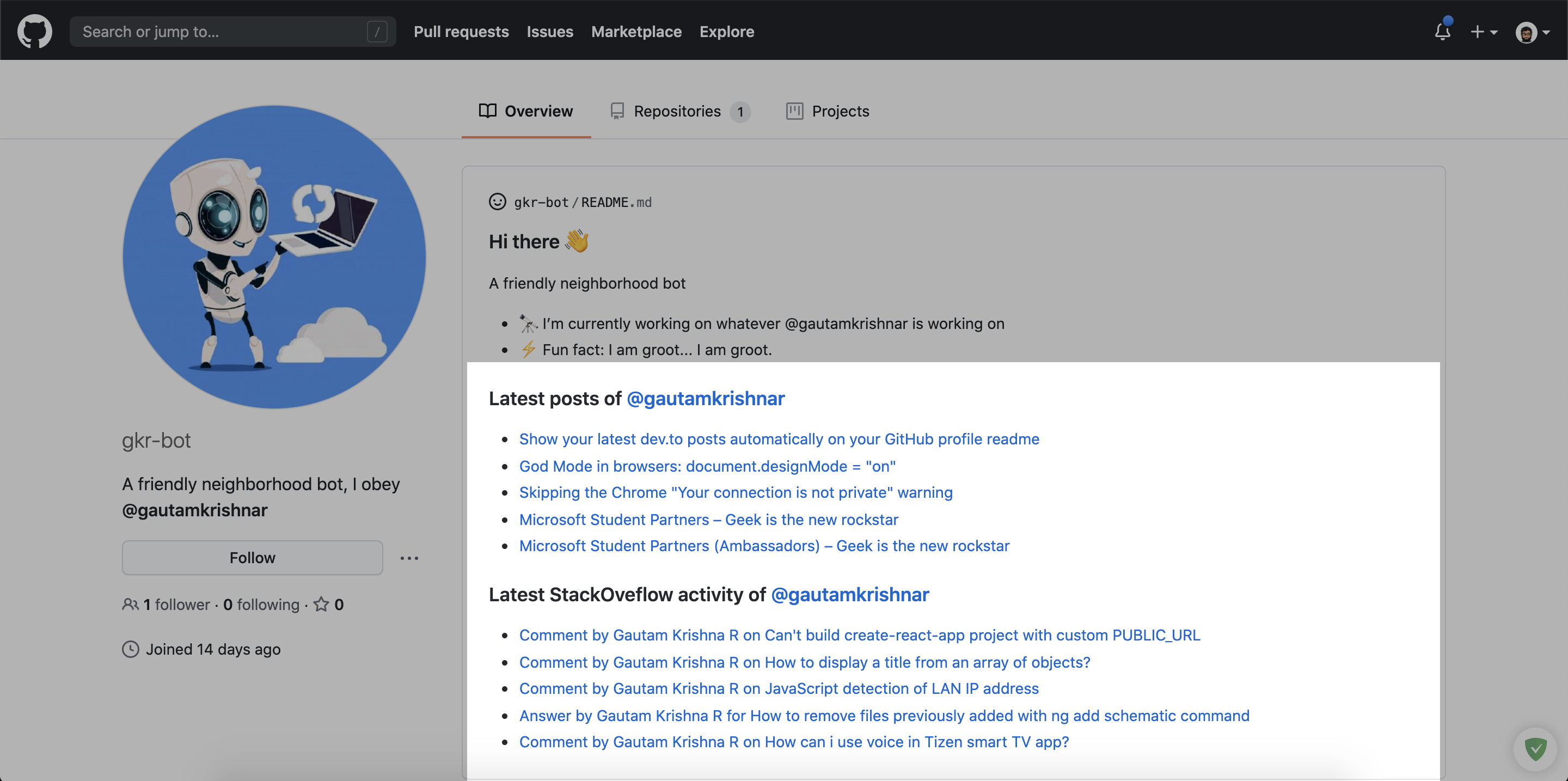
See the result!
workflow.yml
yamlname: Latest stack oveflow activity on: workflow_dispatch: schedule: - cron: '0 0 * * *' # Runs once a day at 00:00 UTC permissions: contents: write jobs: update-readme-with-blog: name: Update this repo's README with latest activity from StackOverflow runs-on: ubuntu-latest steps: - uses: actions/checkout@v4 - uses: gautamkrishnar/blog-post-workflow@v1 with: comment_tag_name: "STACKOVERFLOW" feed_list: "https://stackoverflow.com/feeds/user/4214976" template: "<tr><td>$title</td><td>$url</td></tr>"
Readme.md
md### Latest StackOveflow activity of [@gautamkrishnar](https://github.com/gautamkrishnar) <table> <tr><th>Title</th><th>Link</th></tr> <!-- STACKOVERFLOW:START --><!-- STACKOVERFLOW:END --> </table>
Preview: https://github.com/gkr-bot/gkr-bot#latest-stackoveflow-activity-of-gautamkrishnar
Results

workflow.yml
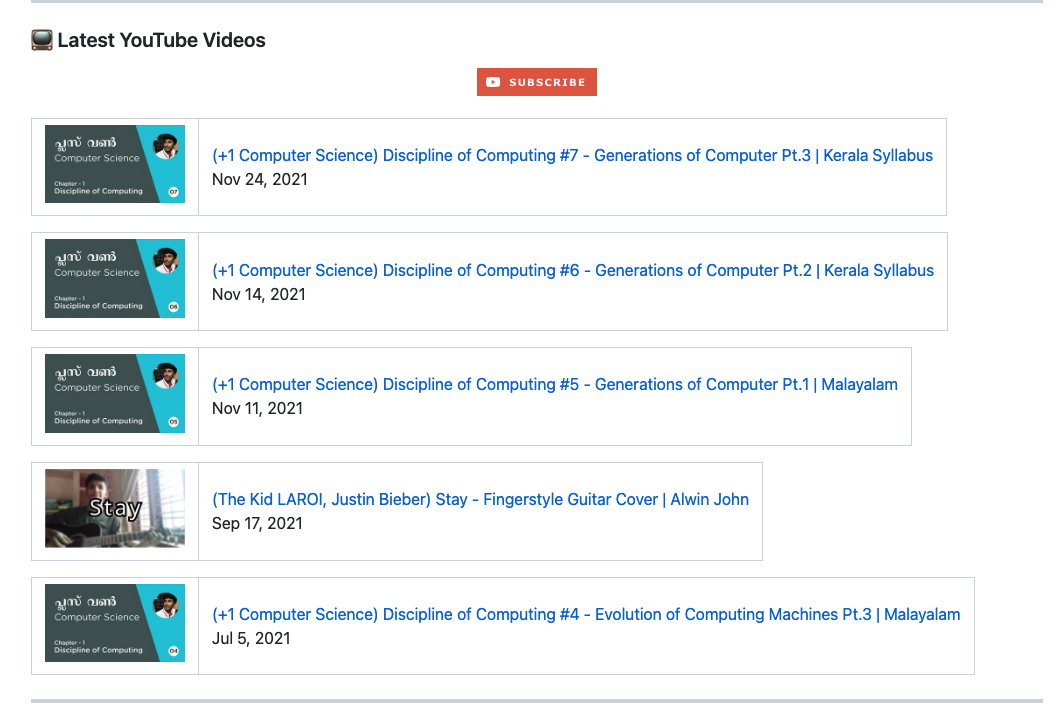
yamlname: Latest YouTube Videos on: schedule: - cron: '0 0 * * *' # Runs once a day at 00:00 UTC workflow_dispatch: permissions: contents: write jobs: update-readme-with-youtube: name: Update this repo's README with latest videos from YouTube runs-on: ubuntu-latest steps: - uses: actions/checkout@v4 - uses: gautamkrishnar/blog-post-workflow@master with: feed_list: "https://www.youtube.com/feeds/videos.xml?channel_id=UCtvnB6R__6vdyjUEbDgAWHw" custom_tags: "channelId/yt:channelId/,videoId/yt:videoId/" date_format: "mmm d, yyyy" template: '<table><tr><td><a href="$url"><img width="140px" src="http://img.youtube.com/vi/$videoId/maxresdefault.jpg"></a></td>$newline<td><a href="$url">$title</a><br/>$date</td></tr></table>$newline' committer_email: "alwinjohn231@gmail.com"
Preview: https://github.com/Dexters-Hub/Dexters-Hub
Results
workflow.yml
yamlname: Latest RadioGeek (Anchor) on: schedule: # Runs "At 00:00 on Friday." - cron: '0 0 * * FRI' workflow_dispatch: jobs: update-readme-with-anchor: name: Update this repo's README with latest RadioGeek podcast feed from Anchor runs-on: ubuntu-latest steps: - uses: actions/checkout@v2 - uses: gautamkrishnar/blog-post-workflow@master with: comment_tag_name: "RadioGeek-Anchor-feed" feed_list: "https://anchor.fm/s/6048890/podcast/rss" max_post_count: 1000 commit_message: "🔥Update with lastest RadioGeek feed" committer_username: "🤖RadioGeek-Bot" committer_email: "<>" date_format: 'UTC: yyyy-mm-dd' template: "$newline #### - [$title]($url) $newline <details><summary>توضیحات</summary> $description </details> $newline <hr /> $newline" # Regex for remove HTML TAG: /(<([^>]+)>)/ig item_exec: "post.description = post.description.replace('','')" disable_html_encoding: true
by : Mahdi Qiamast
Results


First, create an index.html file in your github repo and insert the tags <!-- BLOG-POST-LIST:START --> <!-- BLOG-POST-LIST:END --> in the file where you want the update to take place. Use appropriate html wrappers outside the tags so that the inserted list is rendered properly (see results below).
workflow.yml
Then in the repo where you want to update the index.html, follow the steps about github actions mentioned above, and create the blog-post-workflow.yml.
ymlname: Latest blog post workflow on: schedule: # Runs every hour, on the hour - cron: "0 * * * *" workflow_dispatch: permissions: contents: write jobs: update-readme-with-youtube: name: Update this repo's index.html with latest blog titles from blogspot runs-on: ubuntu-latest steps: - uses: actions/checkout@v4 - uses: gautamkrishnar/blog-post-workflow@v1 with: readme_path: 'index.html' feed_list: "http://blog_name.blogspot.com/feeds/posts/default?alt=rss" template: '<li><a href="$url">$title</a></li>$newline' committer_email: "your_email@example.com"
by Mukto Akash
Results
Popular Sources
<details> <summary>Some popular blogging platforms and their RSS feed URLs (Click to expand)</summary>| Name | Feed URL | Comments | Example |
|---|---|---|---|
| Dev.to | https://dev.to/feed/username | Replace username with your own username | https://dev.to/feed/gautamkrishnar |
| Wordpress | https://www.example.com/feed/ | Replace with your own blog url | https://www.gautamkrishnar.com/feed/ |
| Medium | https://medium.com/feed/@username | Replace username with your Medium username | https://medium.com/feed/@khaosdoctor |
| Medium (Sub Domain) | https://username.medium.com/feed | Replace username with your Medium username | https://timsneath.medium.com/feed |
| Stackoverflow | https://stackoverflow.com/feeds/user/userid | Replace with your StackOverflow UserId | https://stackoverflow.com/feeds/user/5283532 |
| StackExchange | https://subdomain.stackexchange.com/feeds/user/userid | Replace with your StackExchange UserId and sub-domain | https://devops.stackexchange.com/feeds/user/15 |
| Ghost | https://www.example.com/rss/ | Replace with your own blog url | https://blog.codinghorror.com/rss/ |
| Drupal | https://www.example.com/rss.xml | Replace with your own blog url | https://www.arsenal.com/rss.xml |
| Hugo | https://BASE_URL/post/index.xml | Replace BASE_URL(doc) with your blog url. Refer to the official Hugo or your theme documentation for more info | https://davidaparicio.gitlab.io/website/fr/post/index.xml |
| Youtube Playlists | https://www.youtube.com/feeds/videos.xml?playlist_id=playlistId | Replace playlistId with your own Youtube playlist id | https://www.youtube.com/feeds/videos.xml?playlist_id=PLJNqgDLpd5E69Kc664st4j7727sbzyx0X |
| Youtube Channel Video list | https://www.youtube.com/feeds/videos.xml?channel_id=channelId | Replace channelId with your own Youtube channel id | https://www.youtube.com/feeds/videos.xml?channel_id=UCDCHcqyeQgJ-jVSd6VJkbCw |
| Anchor.fm Podcasts | https://anchor.fm/s/podcastId/podcast/rss | You can get the rss feed url of a podcast by following these instructions | https://anchor.fm/s/1e784a38/podcast/rss |
| Hashnode | https://@username.hashnode.dev/rss.xml | Replace @username with your Hashnode username | https://polilluminato.hashnode.dev/rss.xml |
| Google Podcasts | https://podcasts.google.com/feed/channelId | Replace channelId with your Google podcast channel Id | https://podcasts.google.com/feed/aHR0cHM6Ly9mZWVkcy5zb3VuZGNsb3VkLmNvbS91c2Vycy9zb3VuZGNsb3VkOnVzZXJzOjYyOTIxMTkwL3NvdW5kcy5yc3M= |
http://www.reddit.com/r/topic/.rss | You can create an RSS feed by adding '.rss' to the end of an existing Reddit URL. Replace topic with SubReddit topic that interest you or localized to you. | http://www.reddit.com/r/news/.rss | |
| Analytics India Magazine | https://analyticsindiamag.com/author/author_name/feed/ | Replace author_name with your name | https://analyticsindiamag.com/author/kaustubhgupta1828gmail-com/feed/ |
| Feedburner | https://feeds.feedburner.com/feed_address | Replace feed_address with your Feedburner feed address | https://feeds.feedburner.com/darkwood-fr/blog |
| Tumblr | https://blog_name.tumblr.com/rss or https://example.com/rss | You can create an RSS feed by adding '/rss' to your main blog page or to your own domain if it is configured. Replace blog_name with your blog name | https://goggledoddle.tumblr.com/rss |
| Blogger | https://blog_name.blogspot.com/feeds/posts/default | Replace blog_name with your blog subdomain | https://singlebucks.blogspot.com/feeds/posts/default |
| Velog | https://v2.velog.io/rss/userid | Replace userid with your user id (without the @ symbol) | https://v2.velog.io/rss/minnczi |
| Shouts.dev | https://shouts.dev/feed/username | Replace username with your own username | https://shouts.dev/feed/obydul |
| Gist | https://gist.github.com/username.atom | Replace username with your own username | https://gist.github.com/banyudu.atom |
| Tistory | https://blog_name.tistory.com/rss | Replace blog_name with your blog subdomain | https://helicopter55.tistory.com/rss |
| NAVER | https://rss.blog.naver.com/blog_id.xml | Replace blog_id with your NAVER blog id | https://rss.blog.naver.com/bnbong.xml |
| Substack | https://user.substack.com/feed/ | Replace user with your substack username | https://nathanielchitnis/substack.com/feed/ |
| Daily Dev Bookmarks | https://api.daily.dev/rss/b/feed/feed_id | Replace feed_id with your feed id | https://api.daily.dev/rss/b/3318cf63-8b45-4d1c-9cf0-ee79196d59a8 |
| rss.app | https://api.daily.dev/rss/b/feed/custom_feed_id | You can use rss.app to generate RSS feeds from a lots of supported sources including Instagram, x etc. See a list of supported sources here | https://api.daily.dev/rss/b/3318cf63-8b45-4d1c-9cf0-ee79196d59a8 |
Examples
FAQs and Common issues
- Error Code 128
Looks like your website returned *XXX*, There is nothing blog post workflow can do to fix it. Please check your website's RSS feed generation source code. Also double check the URL.: This will happen if your website is blocking requests from the GitHub IP addresses. It can also happen if you give the workflow an invalid URL. First, check your URL. If it's working fine on your computer, then try debugging it using https://github.com/marketplace/actions/debugging-with-tmate establish an ssh connection with the Github runner and try tocurl -I <URL>This will give you a 200 status code if your website is responding correctly. If its not responding with 200, you need to check your website's feed generation source code, you can also contact your hosting provider/DNS provider to know if they are blocking the GitHub public IP address. Some companies do that to prevent spam and DDOS attacks. As the message says there is nothing I can do to fix this issue, it needs to be sorted out with your hosting provider.
Demo video
Please see the video by @codeSTACKr.
Contributing
Please see CONTRIBUTING.md for getting started with the contribution.
Make sure that you follow CODE_OF_CONDUCT.md while contributing and engaging in the discussions.
When contributing, please first discuss the change you wish to make via an issue on this repository before making the actual change.
ToDo
- Add more sources
- Fix bugs if any
Bugs
If you are experiencing any bugs, don't forget to open a new issue.
Thanks to
- All the 9K+✨ users of this workflow
- Everyone for making this project the top 20 most installed / starred action in the GitHub Marketplace
- @codeSTACKr for this amazing video
- CodeCov for this blog: Discovering the Most Popular and Most Used GitHub Actions
- the byte podcast
- JetBrains for sponsoring the Open Source License to my favorite IDE WebStorm:
- Thanks @github, for GitHub India Open Source Grants and for sponsoring me
- Thanks Tutanota for sponsoring free encrypted emails for my opensource projects:
Contributors ✨
Thanks goes to these wonderful people (emoji key):
<!-- ALL-CONTRIBUTORS-LIST:START - Do not remove or modify this section --> <!-- prettier-ignore-start --> <!-- markdownlint-disable --> <table> <tbody> <tr> <td align="center" valign="top" width="14.28%"><a href="https://github.com/khaosdoctor"><img src="https://avatars.githubusercontent.com/u/3200560?v=4?s=100" width="100px;" alt="Lucas Santos"/><br /><sub><b>Lucas Santos</b></sub></a><br /><a href="https://github.com/gautamkrishnar/blog-post-workflow/commits?author=khaosdoctor" title="Code">💻</a> <a href="https://github.com/gautamkrishnar/blog-post-workflow/commits?author=khaosdoctor" title="Documentation">📖</a></td> <td align="center" valign="top" width="14.28%"><a href="https://github.com/MichaelCurrin"><img src="https://avatars.githubusercontent.com/u/18750745?v=4?s=100" width="100px;" alt="Michael Currin"/><br /><sub><b>Michael Currin</b></sub></a><br /><a href="https://github.com/gautamkrishnar/blog-post-workflow/commits?author=MichaelCurrin" title="Documentation">📖</a></td> <td align="center" valign="top" width="14.28%"><a href="https://curious-yu.github.io/"><img src="https://avatars.githubusercontent.com/u/22830590?v=4?s=100" width="100px;" alt="WY"/><br /><sub><b>WY</b></sub></a><br /><a href="https://github.com/gautamkrishnar/blog-post-workflow/commits?author=Curious-Yu" title="Documentation">📖</a></td> <td align="center" valign="top" width="14.28%"><a href="https://github.com/hexxdump"><img src="https://avatars.githubusercontent.com/u/631835?v=4?s=100" width="100px;" alt="Hussaina Begum"/><br /><sub><b>Hussaina Begum</b></sub></a><br /><a href="https://github.com/gautamkrishnar/blog-post-workflow/commits?author=hexxdump" title="Documentation">📖</a></td> <td align="center" valign="top" width="14.28%"><a href="https://github.com/riginoommen"><img src="https://avatars.githubusercontent.com/u/3840244?v=4?s=100" width="100px;" alt="Rigin Oommen"/><br /><sub><b>Rigin Oommen</b></sub></a><br /><a href="https://github.com/gautamkrishnar/blog-post-workflow/commits?author=riginoommen" title="Documentation">📖</a></td> <td align="center" valign="top" width="14.28%"><a href="https://github.com/polilluminato"><img src="https://avatars.githubusercontent.com/u/202140?v=4?s=100" width="100px;" alt="Alberto Bonacina"/><br /><sub><b>Alberto Bonacina</b></sub></a><br /><a href="https://github.com/gautamkrishnar/blog-post-workflow/commits?author=polilluminato" title="Documentation">📖</a></td> <td align="center" valign="top" width="14.28%"><a href="https://www.linkedin.com/in/ambroise-dhenain/"><img src="https://avatars.githubusercontent.com/u/3807458?v=4?s=100" width="100px;" alt="Vadorequest"/><br /><sub><b>Vadorequest</b></sub></a><br /><a href="https://github.com/gautamkrishnar/blog-post-workflow/commits?author=Vadorequest" title="Documentation">📖</a></td> </tr> <tr> <td align="center" valign="top" width="14.28%"><a href="https://freshidea.com/jonah"><img src="https://avatars.githubusercontent.com/u/20955511?v=4?s=100" width="100px;" alt="Jonah Lawrence"/><br /><sub><b>Jonah Lawrence</b></sub></a><br /><a href="https://github.com/gautamkrishnar/blog-post-workflow/commits?author=DenverCoder1" title="Code">💻</a></td> <td align="center" valign="top" width="14.28%"><a href="https://denvercoder.com/"><img src="https://avatars.githubusercontent.com/u/22165183?v=4?s=100" width="100px;" alt="Tim Myers"/><br /><sub><b>Tim Myers</b></sub></a><br /><a href="https://github.com/gautamkrishnar/blog-post-workflow/commits?author=denvercoder" title="Documentation">📖</a></td> <td align="center" valign="top" width="14.28%"><a href="https://linktr.ee/kaustubhgupta"><img src="https://avatars.githubusercontent.com/u/43691873?v=4?s=100" width="100px;" alt="Kaustubh Gupta"/><br /><sub><b>Kaustubh Gupta</b></sub></a><br /><a href="https://github.com/gautamkrishnar/blog-post-workflow/commits?author=kaustubhgupta" title="Documentation">📖</a></td> <td align="center" valign="top" width="14.28%"><a href="https://darkwood.com/"><img src="https://avatars.githubusercontent.com/u/1254025?v=4?s=100" width="100px;" alt="Mathieu Ledru"/><br /><sub><b>Mathieu Ledru</b></sub></a><br /><a href="https://github.com/gautamkrishnar/blog-post-workflow/commits?author=matyo91" title="Documentation">📖</a></td> <td align="center" valign="top" width="14.28%"><a href="https://adityadees.com/"><img src="https://avatars.githubusercontent.com/u/37553901?v=4?s=100" width="100px;" alt="Aditya Dharmawan Saputra"/><br /><sub><b>Aditya Dharmawan Saputra</b></sub></a><br /><a href="https://github.com/gautamkrishnar/blog-post-workflow/commits?author=adityadees" title="Documentation">📖</a></td> <td align="center" valign="top" width="14.28%"><a href="https://velog.io/@minnczi"><img src="https://avatars.githubusercontent.com/u/32619843?v=4?s=100" width="100px;" alt="Minji"/><br /><sub><b>Minji</b></sub></a><br /><a href="https://github.com/gautamkrishnar/blog-post-workflow/commits?author=minnczi" title="Documentation">📖</a></td> <td align="center" valign="top" width="14.28%"><a href="https://dhanushka.netlify.com/"><img src="https://avatars.githubusercontent.com/u/7068605?v=4?s=100" width="100px;" alt="Dhanushka Madushan"/><br /><sub><b>Dhanushka Madushan</b></sub></a><br /><a href="https://github.com/gautamkrishnar/blog-post-workflow/commits?author=madushadhanushka" title="Documentation">📖</a></td> </tr> <tr> <td align="center" valign="top" width="14.28%"><a href="https://curtiscode.dev/"><img src="https://avatars.githubusercontent.com/u/15653985?v=4?s=100" width="100px;" alt="Curtis Timson"/><br /><sub><b>Curtis Timson</b></sub></a><br /><a href="https://github.com/gautamkrishnar/blog-post-workflow/commits?author=curtiscde" title="Code">💻</a></td> <td align="center" valign="top" width="14.28%"><a href="https://bio.link/obydul"><img src="https://avatars.githubusercontent.com/u/13184472?v=4?s=100" width="100px;" alt="Md Obydullah"/><br /><sub><b>Md Obydullah</b></sub></a><br /><a href="https://github.com/gautamkrishnar/blog-post-workflow/commits?author=mdobydullah" title="Documentation">📖</a></td> <td align="center" valign="top" width="14.28%"><a href="http://david.aparicio.eu/"><img src="https://avatars.githubusercontent.com/u/809982?v=4?s=100" width="100px;" alt="David Aparicio"/><br /><sub><b>David Aparicio</b></sub></a><br /><a href="https://github.com/gautamkrishnar/blog-post-workflow/commits?author=davidaparicio" title="Documentation">📖</a></td> <td align="center" valign="top" width="14.28%"><a href="https://github.com/banyudu"><img src="https://avatars.githubusercontent.com/u/2416493?v=4?s=100" width="100px;" alt="Yudu"/><br /><sub><b>Yudu</b></sub></a><br /><a href="https://github.com/gautamkrishnar/blog-post-workflow/commits?author=banyudu" title="Documentation">📖</a></td> <td align="center" valign="top" width="14.28%"><a href="https://github.com/TLOWAC"><img src="https://avatars.githubusercontent.com/u/58043975?v=4?s=100" width="100px;" alt="Changhun Lee"/><br /><sub><b>Changhun Lee</b></sub></a><br /><a href="https://github.com/gautamkrishnar/blog-post-workflow/commits?author=TLOWAC" title="Documentation">📖</a></td> <td align="center" valign="top" width="14.28%"><a href="https://cv.adrianpaniagua.es/"><img src="https://avatars.githubusercontent.com/u/66434978?v=4?s=100" width="100px;" alt="Adrián Paniagua"/><br /><sub><b>Adrián Paniagua</b></sub></a><br /><a href="https://github.com/gautamkrishnar/blog-post-workflow/commits?author=adrianpaniagualeon" title="Documentation">📖</a></td> <td align="center" valign="top" width="14.28%"><a href="https://github.com/muktoakash"><img src="https://avatars.githubusercontent.com/u/73410983?v=4?s=100" width="100px;" alt="Mukto Akash"/><br /><sub><b>Mukto Akash</b></sub></a><br /><a href="https://github.com/gautamkrishnar/blog-post-workflow/commits?author=muktoakash" title="Documentation">📖</a></td> </tr> <tr> <td align="center" valign="top" width="14.28%"><a href="https://josh-ops.com"><img src="https://avatars.githubusercontent.com/u/19912012?v=4?s=100" width="100px;" alt="Josh Johanning"/><br /><sub><b>Josh Johanning</b></sub></a><br /><a href="https://github.com/gautamkrishnar/blog-post-workflow/commits?author=joshjohanning" title="Code">💻</a></td> <td align="center" valign="top" width="14.28%"><a href="https://kakkoyun.me"><img src="https://avatars.githubusercontent.com/u/536449?v=4?s=100" width="100px;" alt="Kemal Akkoyun"/><br /><sub><b>Kemal Akkoyun</b></sub></a><br /><a href="https://github.com/gautamkrishnar/blog-post-workflow/commits?author=kakkoyun" title="Code">💻</a></td> <td align="center" valign="top" width="14.28%"><a href="https://ngie-eign.github.io"><img src="https://avatars.githubusercontent.com/u/1574099?v=4?s=100" width="100px;" alt="Enji Cooper"/><br /><sub><b>Enji Cooper</b></sub></a><br /><a href="#ideas-ngie-eign" title="Ideas, Planning, & Feedback">🤔</a></td> <td align="center" valign="top" width="14.28%"><a href="https://haydenk.github.io"><img src="https://avatars.githubusercontent.com/u/81236?v=4?s=100" width="100px;" alt="Hayden"/><br /><sub><b>Hayden</b></sub></a><br /><a href="https://github.com/gautamkrishnar/blog-post-workflow/commits?author=haydenk" title="Code">💻</a></td> <td align="center" valign="top" width="14.28%"><a href="https://bnbong.github.io"><img src="https://avatars.githubusercontent.com/u/55042923?v=4?s=100" width="100px;" alt="이준혁"/><br /><sub><b>이준혁</b></sub></a><br /><a href="https://github.com/gautamkrishnar/blog-post-workflow/issues?q=author%3Abnbong" title="Bug reports">🐛</a></td> </tr> </tbody> </table> <!-- markdownlint-restore --> <!-- prettier-ignore-end --> <!-- ALL-CONTRIBUTORS-LIST:END -->This project follows the all-contributors specification. Contributions of any kind welcome!
Liked it?
Hope you liked this project, don't forget to give it a star ⭐.
<a href="https://starchart.cc/gautamkrishnar/blog-post-workflow"> <img alt="chart" src="https://starchart.cc/gautamkrishnar/blog-post-workflow.svg" width="600px"> </a>Contributors
Showing top 12 contributors by commit count.


![allcontributors[bot]](https://avatars.githubusercontent.com/in/23186?v=4)


![dependabot[bot]](https://avatars.githubusercontent.com/in/29110?v=4)


Related Repositories

Abdenasser/neohtop
💪🏻 Blazing-fast system monitoring for your desktop (built with Rust, Tauri & Svelte)

zfdang/Android-Touch-Helper
AdSkip — an Android assistant for automatically skipping app launch ads

calimarkus/JDStatusBarNotification
Highly customizable & feature rich notifications. Interactive dismiss. Custom Views. SwiftUI. Tap-to-hold. Progress. Written in Swift, compatible for ObjC!

dalibo/pg_activity
pg_activity is a top like application for PostgreSQL server activity monitoring.

bytedance/scene
Android Single Activity Framework compatible with Fragment.

mrmans0n/smart-location-lib
Android library project that lets you manage the location updates to be as painless as possible