

Natsumi browser
Welcome to your personal internet.
Meet Natsumi Browser (or Natsumi, for short) - a browser mod that truly puts you in control. The project is written primarily in JavaScript, distributed under the GNU General Public License v3.0 license, first published in 2024. Key topics include: firefox, firefox-browser, firefox-css.
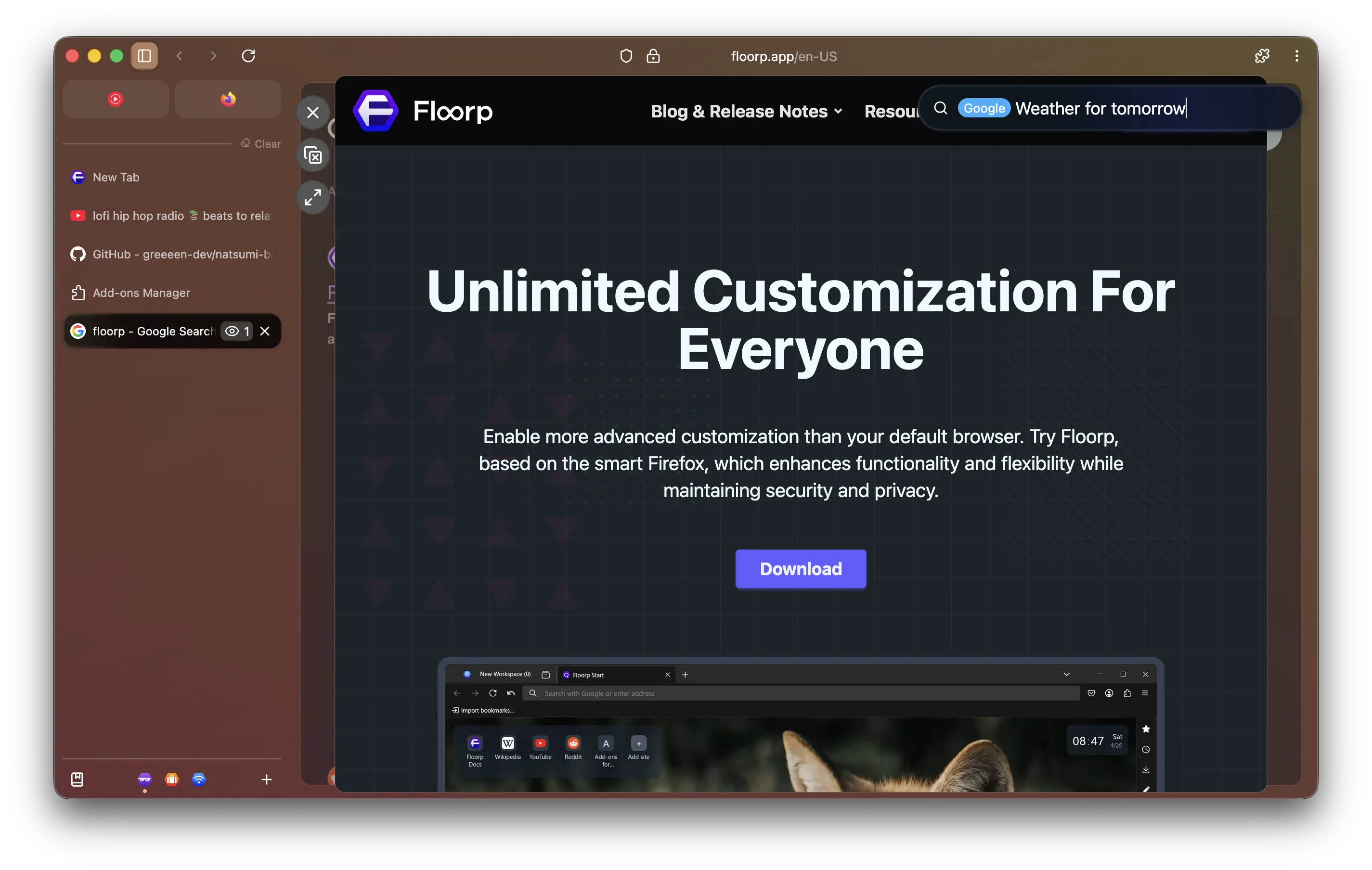
Meet Natsumi! 🦋
Meet Natsumi Browser (or Natsumi, for short) - a browser mod that truly puts you in control.
Natsumi Browser (or Natsumi, for short) is a skin made for Firefox and its forks that adds lots of
polish to the design and adds new features to further enhance the browsing experience, while retaining
customization options to allow you to fully make things yours.
Despite the name, Natsumi is NOT a standalone browser - it's meant to be applied on top of your
favorite Firefox-based browser!
Features
Natsumi has lots of features to enhance your browser - so many that I can't list them all here!
✨ Reimagined design. Fully customizable.
The classic Firefox design but with a modern yet customizable spin.
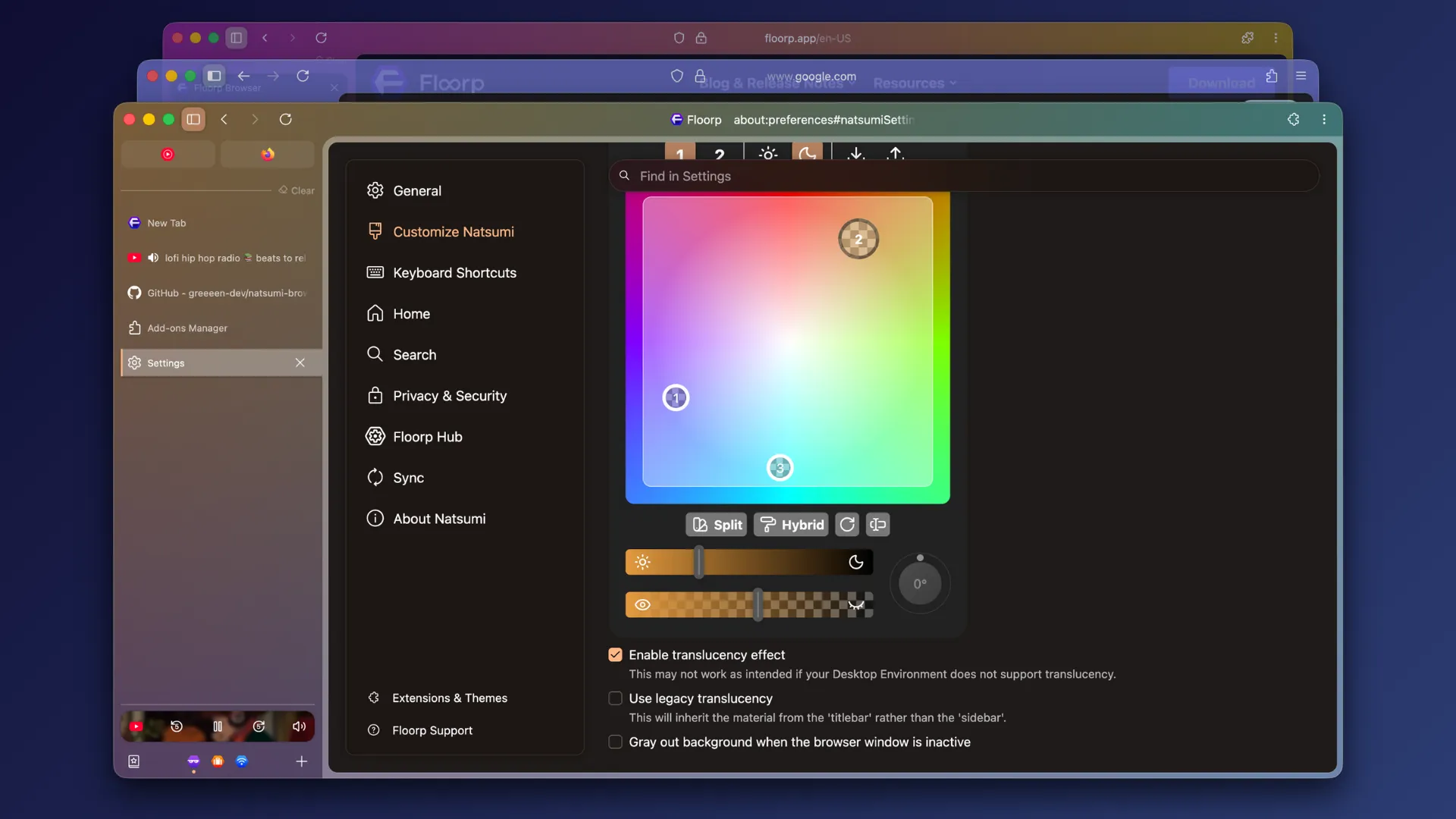
Natsumi keeps your browser's design familiar while adding a modern touch to it. Not only that, it's
also extremely customizable, so you can make it truly yours. No "best practices" or authoritarian
design ideologies to stop you, just a browser that works with you and not against you.
Almost all customization options are accessible through a dedicated preferences pane, so you don't
have to mess around with advanced preferences.
⌨️ URL bar, made intuitive.
Highlights the current URL and adapts to the scene.
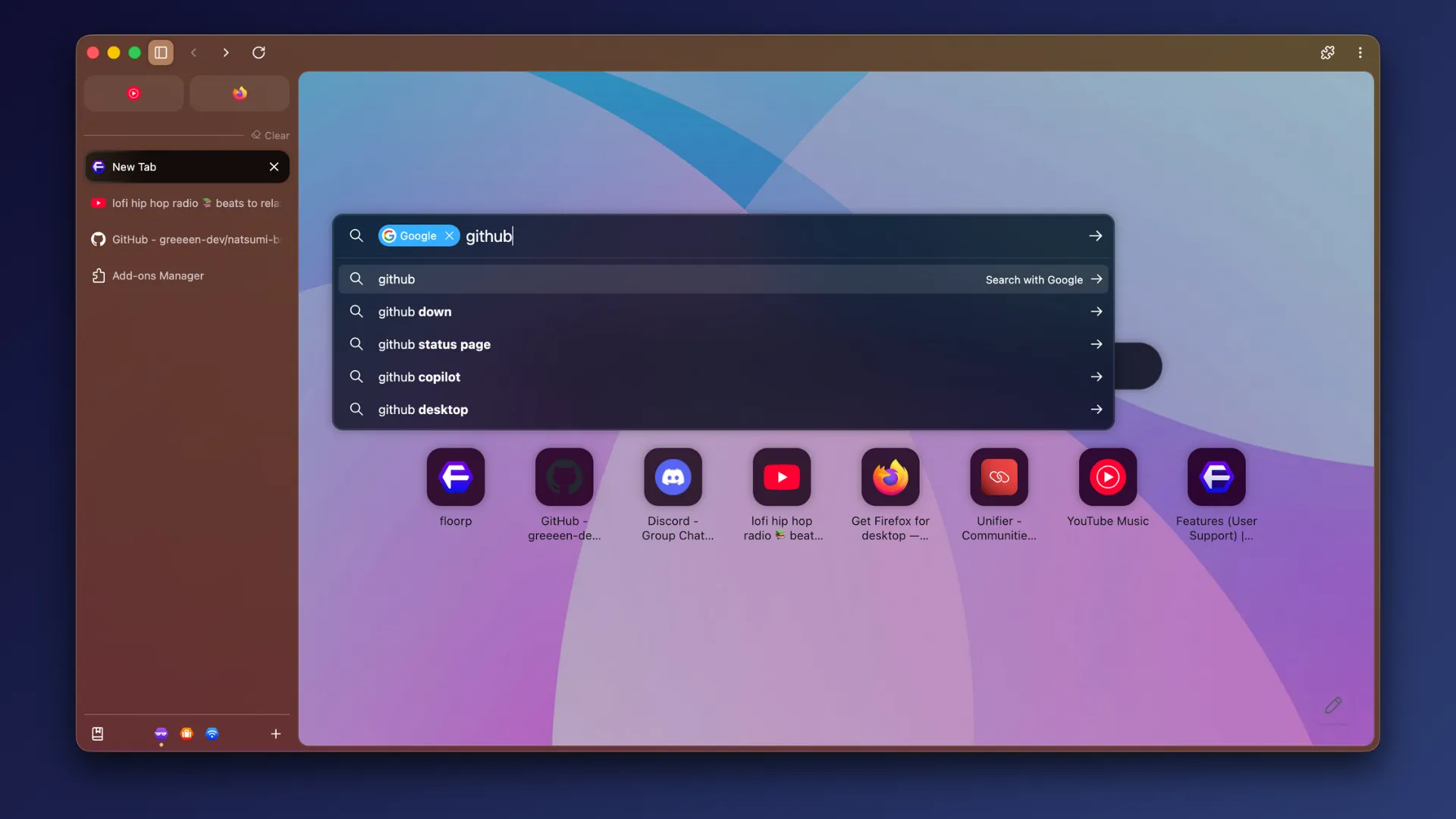
Natsumi applies a fresh new coat of paint to your browser's URL bar, making the current URL stand out
more and changing colors dynamically based on context.
🖥️ Reimagined Picture-in-picture.
Modern and streamlined.
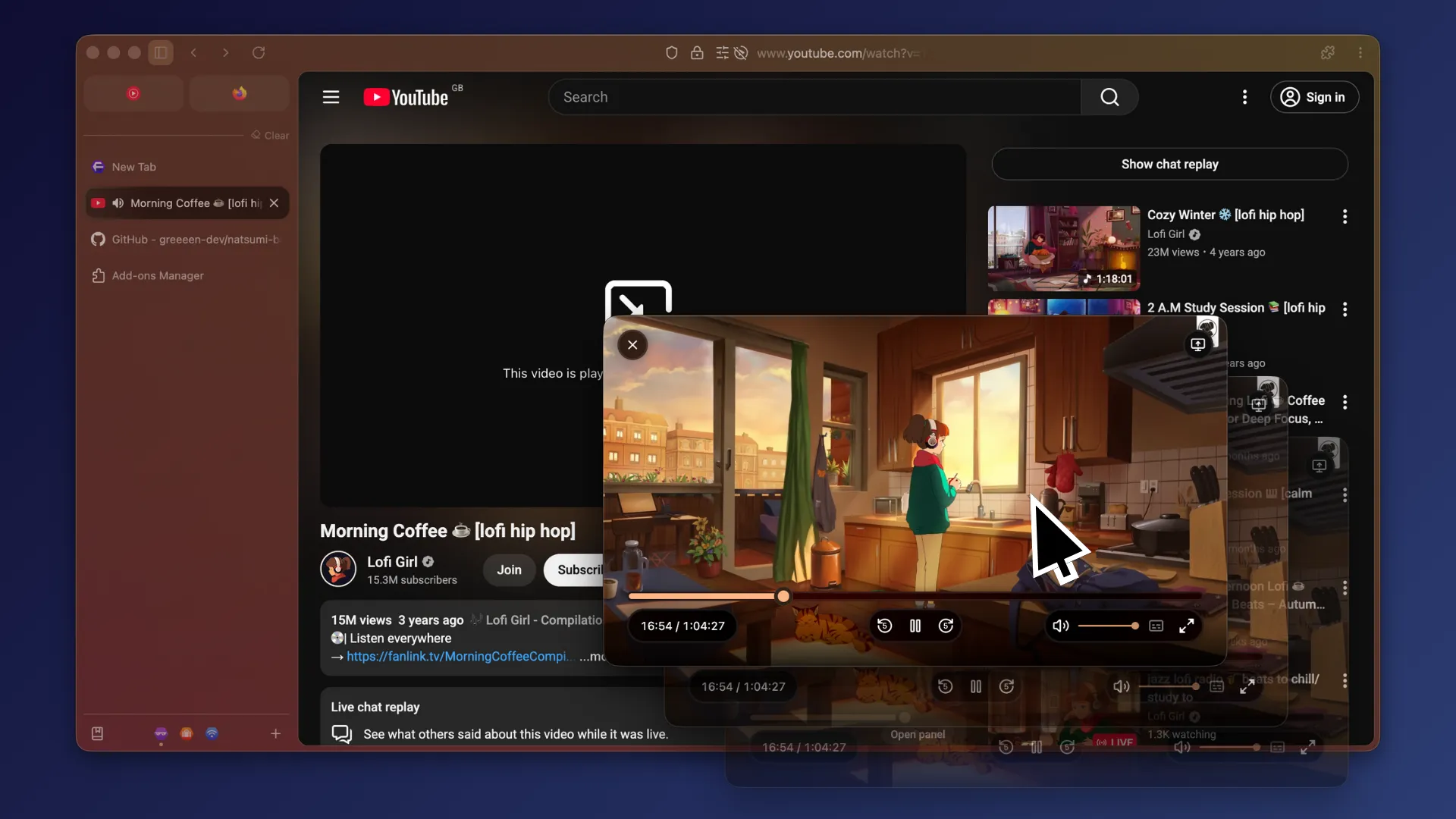
Natsumi's Picture-in-picture adds a more modern look to Firefox's PiP to make it more consistent with
the rest of the browser. You can even scroll to reposition the PiP window, too!
🎛️ Meet your Miniplayer.
Keep your media in control.
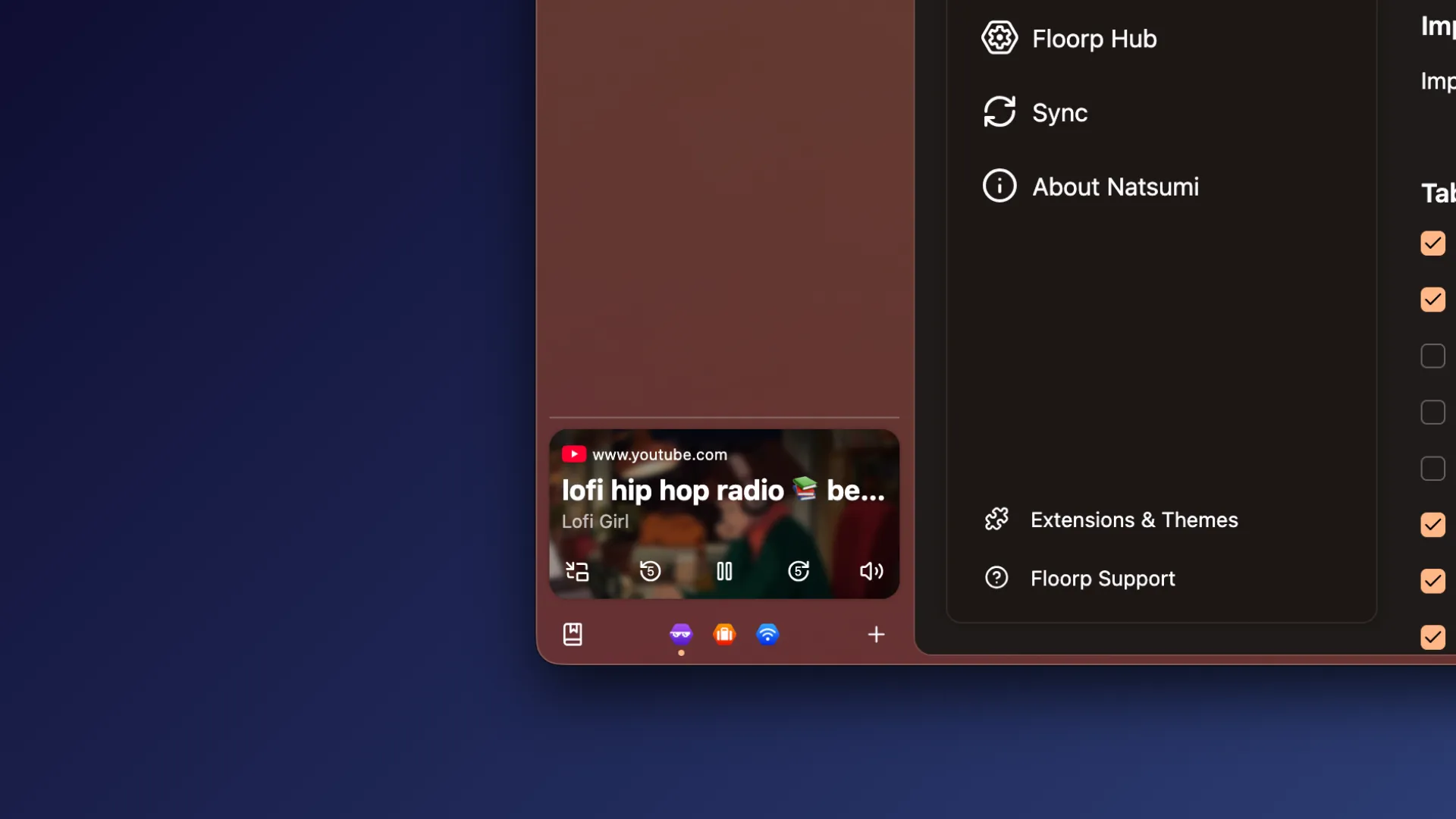
Natsumi lets you control your media through the Miniplayer located on the sidebar. And with support
for multiple websites at a time, you don't have to make your tabs fight for a spot.
📄 PDF viewer, modernized.
View your documents in the 21st century.
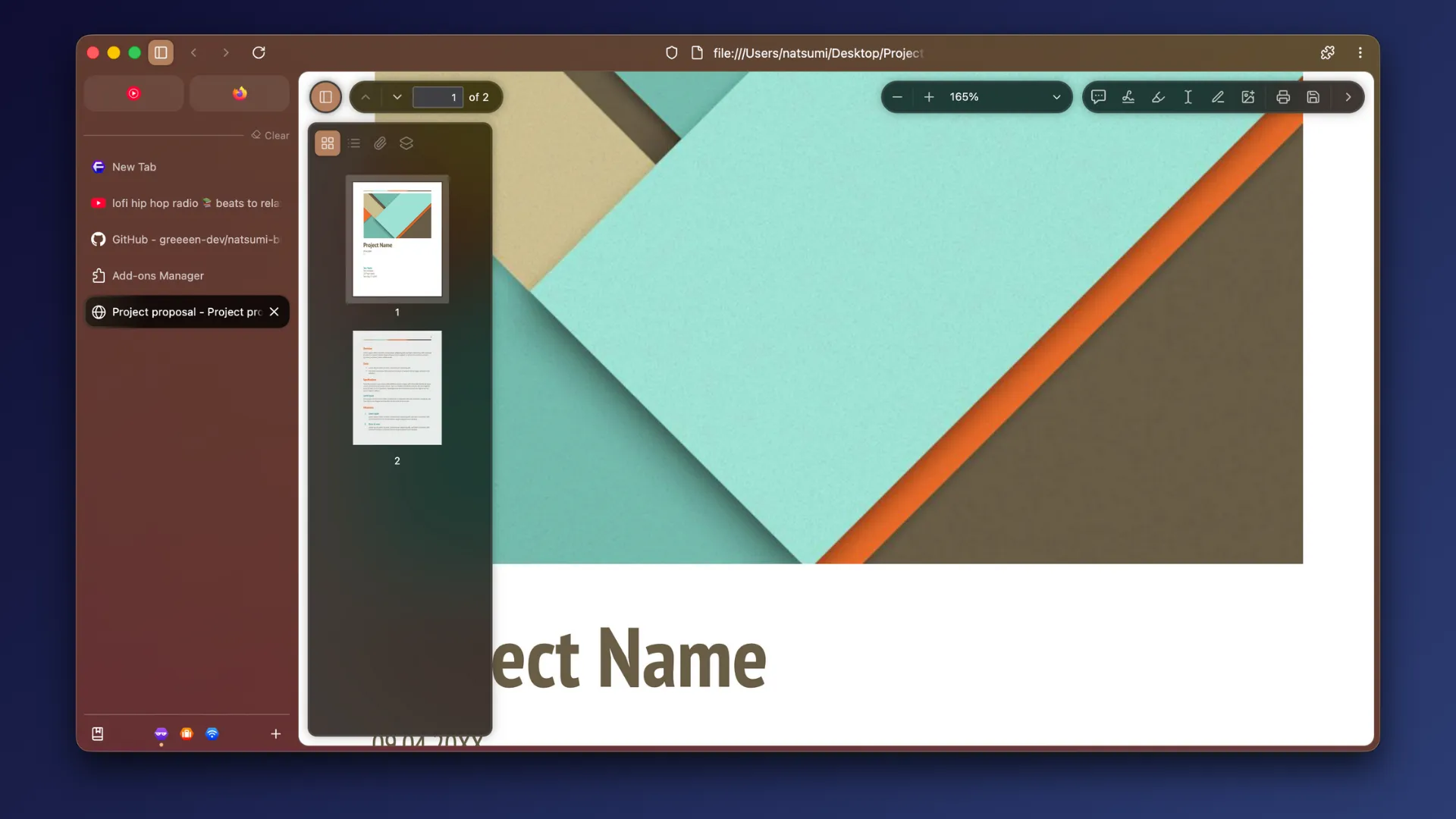
Give Firefox's PDF viewer a fresh coat of paint! Natsumi includes tweaks for the default PDF viewer,
giving it the modern look it really deserves. And with compact view, you can focus on the file at
hand when you don't need the extra tools.
🧘 Featuring Single Toolbar.
Go minimal or go utility-first, it's your choice.
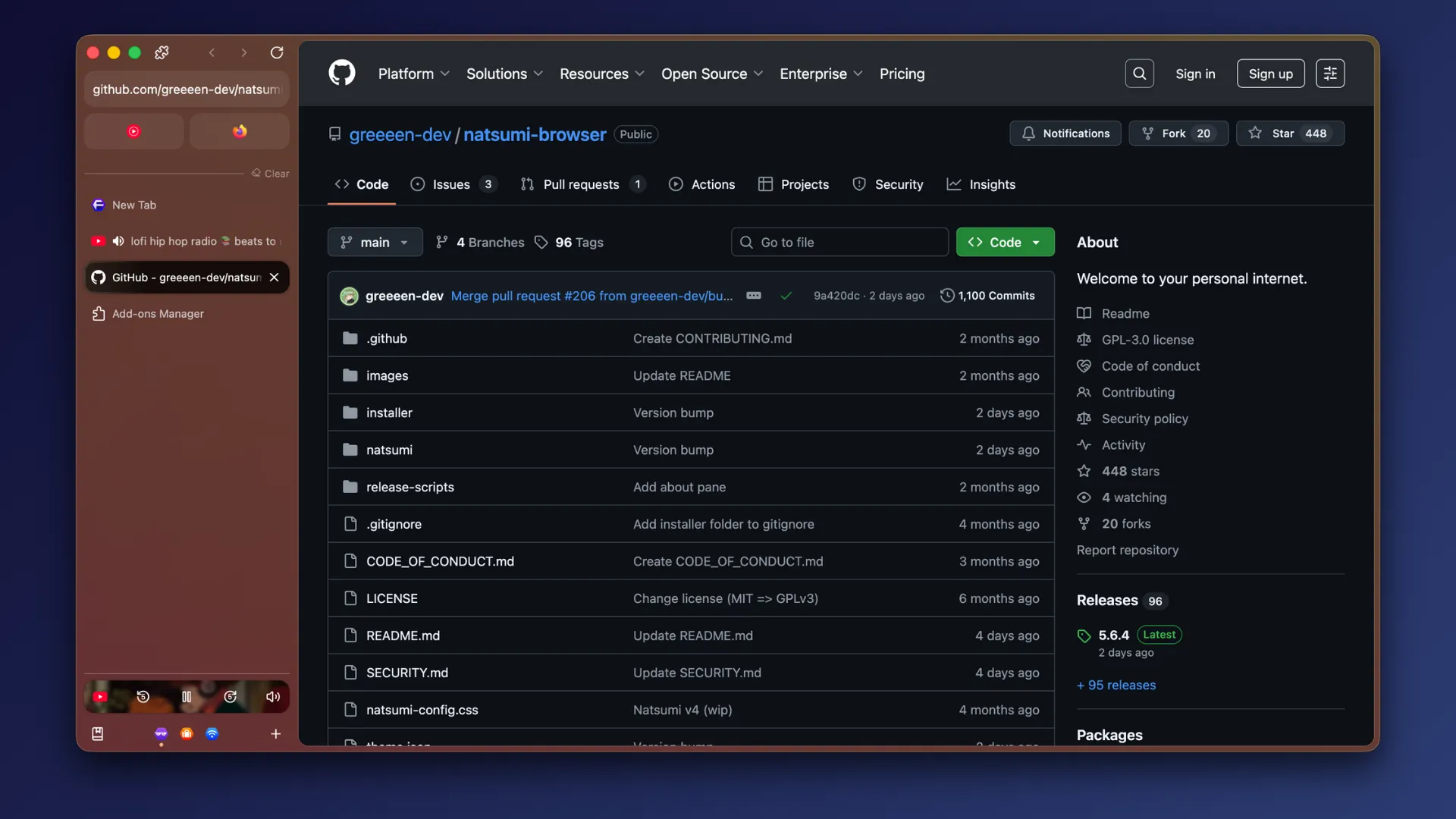
Not a fan of multiple toolbars? Craving more vertical space? Natsumi lets you merge your navigation
bar into one unified sidebar for more space for your web content.
And of course, you can always use the Multiple Toolbars layout. Natsumi doesn't force things on you.
⌨️ Customize your shortcuts.
Featuring keyboard shortcut conflict controls.
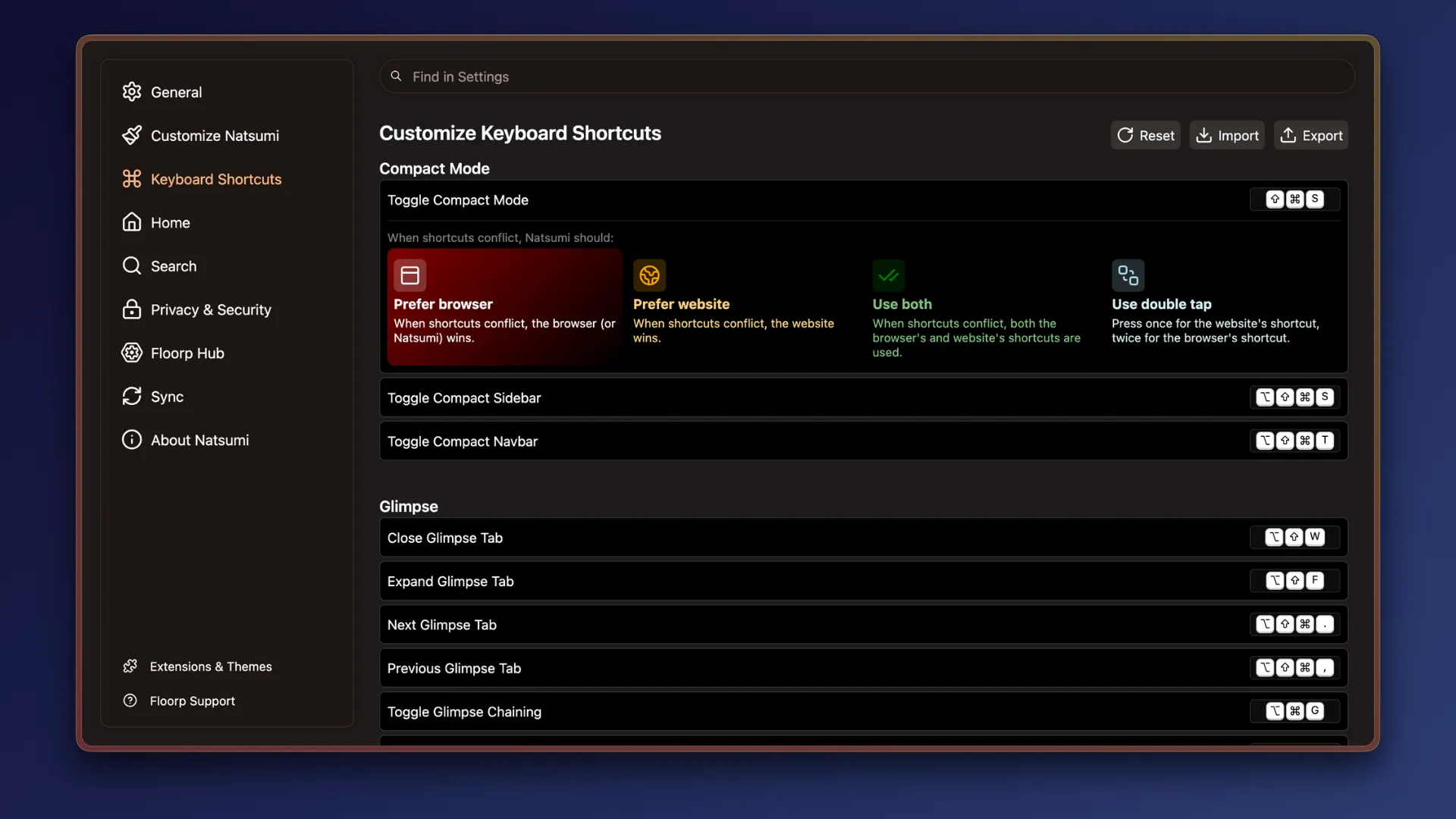
Take full control of your browser's keyboard shortcuts! Natsumi lets you customize your shortcuts
to your likings and even lets you choose how it should handle shortcut conflicts between the browser
and websites. No more being forced to show mercy to websites when shortcuts conflict.
🍰 Additional browser-specific goodies.
Get extra features custom-made for specific browsers.
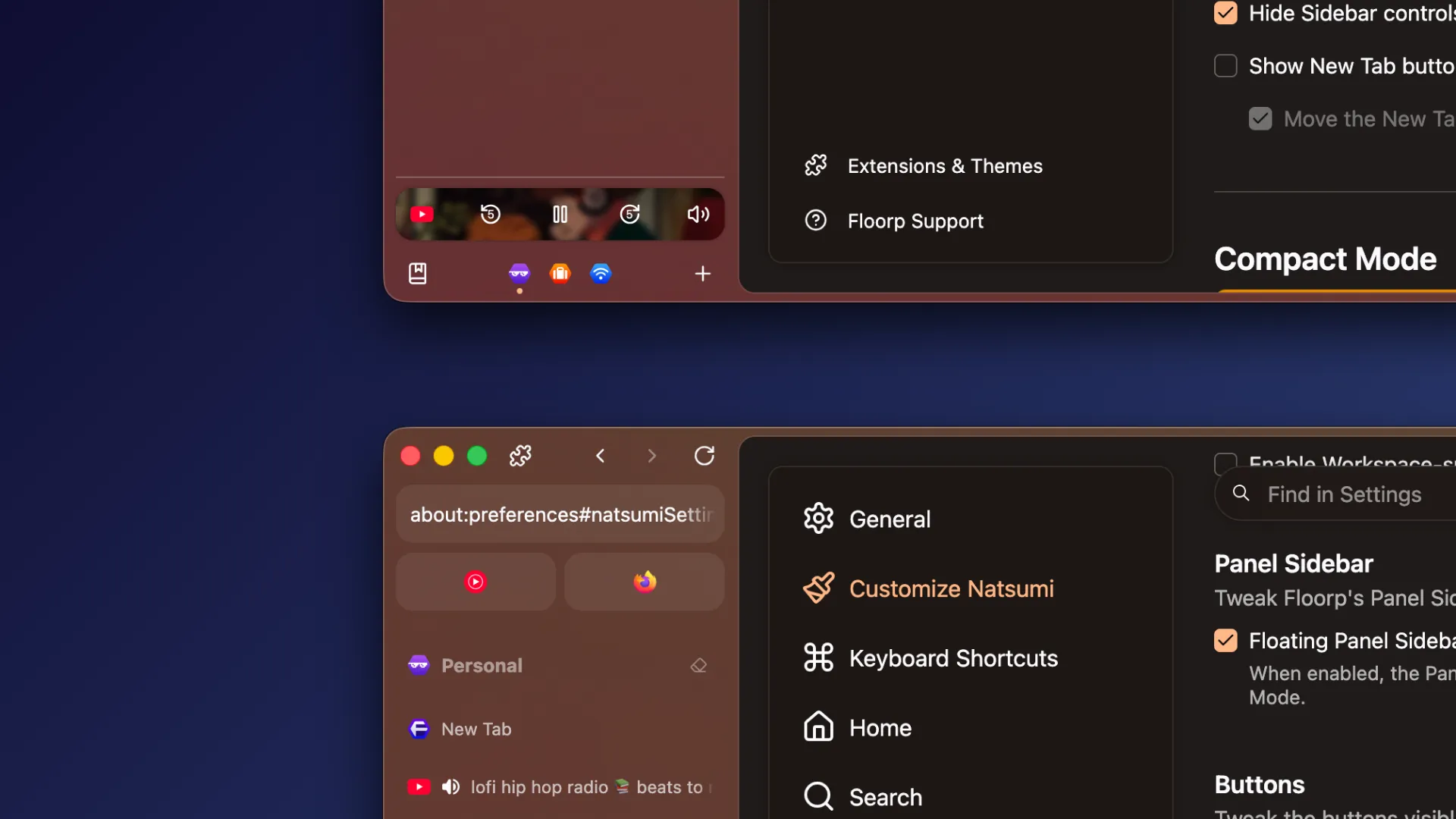
Natsumi takes advantage of your browser's own features to add extra features on top of them for a
more complete experience.
Full-fledged vs. CSS-only
Some Natsumi features require JavaScript to work. You can still use Natsumi without JS support at the
cost of losing some features.
| Feature | Full (Natsumi + Natsumi Append) | CSS-only (Natsumi) |
|---|---|---|
| Natsumi URLbar/Findbar | :white_check_mark: | :white_check_mark: |
| Natsumi PDF Viewer | :white_check_mark: | :white_check_mark: |
| Natsumi PiP | :white_check_mark: | :warning: Limited |
| Natsumi Miniplayer | :white_check_mark: | :x: |
| Theming engine | :white_check_mark: | :white_check_mark: |
| Customize Natsumi preferences page | :white_check_mark: | :x: |
| Custom themes | :white_check_mark: | :x: |
| Single Toolbar | :white_check_mark: | :x: |
| Compact Mode | :white_check_mark: | :x: |
| Natsumi toolbars | :white_check_mark: | :x: |
| Natsumi Shortcuts | :white_check_mark: | :x: |
Installation
You will need to install Natsumi by copying its files to your profile's chrome folder.
Automatic install
Installing via installer (macOS/Linux only)
Every release of Natsumi from v5 comes with an installer binary. You can run it to install Natsumi
Browser, Natsumi Browser Pages and Natsumi Append to your browser and profile of choice.
[!NOTE]
For macOS and Linux users, you may need to give the installer execute permissions before you can run the
installer. You can runchmod +x /path/to/installerto give it the necessary permissions.For macOS users, you may also need to override the unsigned binary warning (also known as the "Apple
could not verify "App" is free of malware" warning) by going to System Preferences => Security & Privacy
after trying to run the installer.
[!WARNING]
For Flatpak installations, you will need to manually install Natsumi to make it functional. See Manual
Install for more details.
Installing via installer (Windows only)
Download and run windows-installer.bat as Admin and follow the on-screen prompts.
You can get this file from the Installers folder in this repo.
[!NOTE]
The Windows installer needs to run as Admin so it can copy the needed files to the correct system locations.
To update Natsumi on Windows, run thewindows-installer.batagain with your browser closed.
Installing via Sine
[!WARNING]
Installing via Sine is supported but not recommended.
You can install Natsumi and Natsumi Append through Sine.
Manual install
Remember to take backups of your userChrome.css and userContent.css files before proceeding!
Installing Natsumi Browser and Natsumi Browser Pages
- Copy natsumi-config.css, userChrome.css, userContent.css and natsumi folder to your chrome folder.
- That's it - Natsumi (CSS-only) is installed!
Installing Natsumi Append (optional)
Installing Natsumi Append allows you to use the full feature set of Natsumi Browser, but it's not
required for the core parts of Natsumi to work.
Natsumi Browser needs to be installed before you can install Natsumi Append.
-
Install fx-autoconfig to your browser. You need to
install the contents of both program and profile/chrome, follow the instructions in the fx-autoconfig
repository.Note: The guide doesn't mention the module_loader.mjs file, but you'll need this for fx-autoconfig
to work. Otherwise, Natsumi's modules will show in your scripts but won't actually be loaded.Flatpak users: You may need to follow steps 1 and 2 on
here, but replace
app.zen_browser.zenwith the package identifier of your browser (e.g.one.ablaze.floorp). -
Copy the following to chrome/utils/chrome.manifest:
content userchromejs ./ content userscripts ../natsumi/scripts/ skin userstyles classic/1.0 ../CSS/ content userchrome ../resources/ content natsumi ../natsumi/ content natsumi-icons ../natsumi/icons/ -
Create and enable
userChromeJS.persistent_domcontent_callbackbefore restarting (don't worry, you
can do this later. This config is needed for the preferences page to work.) -
Go to about:support and clear your startup cache and restart your browser (this may not be required but
it is still recommended). -
That's it - Natsumi Append is installed!
Advanced setup: If you are a techie who wants to keep your files up-to-date with new changes over time
After following either of the above steps, if you are interested in ensuring that you upgrade to the
latest version of Natsumi as new changes are released, you can simply clone the repository into the chrome
folder. This can be followed up with git pull from time-to-time.
Browser configs (in about:config)
[!NOTE]
This is a non-exhaustive list. Most of these options are available in preferences.
These are the configs you can use to tweak Natsumi Browser. If you want to tweak the animation duration
and delay, change the variables in the config.css file.
If you have Natsumi Append installed, most of these can be tweaked through the preferences page.
<details> <summary><strong>View configs</strong></summary>🎨 Theming/General
natsumi.theme.type(string): Sets the browser theme type.- Default (default) - No changes, just the default look.
- Gradient (
gradient) - A light gradient of your accent color. - Complementary Gradient (
gradient-complementary) - A gradient of the accent color and its opposite color. - Colorful Solid (
colorful) - A solid color with a tint of the accent color. - Playful Solid (
playful) - A higher contrast version of Colorful Solid. - Lucid (
lucid) - A recreation of the Zen Dream and Zen Galaxy themes. - Frutiger Aero (
frutiger-aero) - A Windows Vista/7-like design. - OLED (
oled) - A completely black and white theme for the minimalists. - 🏳️🌈 LGBTQ+ (
lgbtq) - Browsing with pride! - 🏳️⚧️ Transgender (
transgender) - Trans rights are human rights! - Custom (
custom) - Create your own theme (in the preferences page)!
natsumi.theme.accent-color(string): Sets the browser theme color from a given accent color.- $${\color{#a0d490}■}$$ Light green (default) - #a0d490
- $${\color{#aac7ff}■}$$ Sky blue (
sky-blue) - #aac7ff - $${\color{#74d7cb}■}$$ Turquoise (
turquoise) - #74d7cb - $${\color{#dec663}■}$$ Yellow (
yellow) - #dec663 - $${\color{#ffb787}■}$$ Peach Orange (
peach-orange) - #ffb787 - $${\color{#ff9eb3}■}$$ Warmer Pink (
warmer-pink) - #ff9eb3 - $${\color{#dec1b1}■}$$ Beige (
beige) - #dec1b1 - $${\color{#ffb1c0}■}$$ Light Red (
light-red) - #ffb1c0 - $${\color{#ddbcf3}■}$$ Muted Pink (
muted-pink) - #ddbcf3 - $${\color{#f6b0ea}■}$$ Pink (
pink) - #f6b0ea - $${\color{#d4bbff}■}$$ Lavender Purple (
lavender-purple) - #d4bbff - $${\color{#ffffff}■}$$ System Accent (
system) - uses your system's accent color
natsumi.theme.force-natsumi-color(boolean): Forces Natsumi's accent color set in natsumi-config.css
to be used instead of the current Firefox theme's colors.natsumi.theme.use-tab-theme-color(boolean): Uses the tab border color as the accent color for Blade.
This may break Blade on some themes.natsumi.theme.max-custom-colors(integer): The maximum number of custom colors you can choose. Minimum
and default is 6.natsumi.theme.disable-translucency(boolean): Disables the translucency effect.natsumi.theme.use-legacy-translucency(boolean): Uses legacy translucency on macOS or Windows.natsumi.theme.gray-out-when-inactive(boolean): Grays out the browser when inactive.natsumi.theme.single-toolbar(boolean): Enables Single Toolbar layout.natsumi.theme.single-toolbar-show-menu-button(boolean): Shows the menu button when in Single Toolbar.natsumi.theme.single-toolbar-hide-extensions-button(boolean): Hides the extensions button when in
Single Toolbar.natsumi.theme.show-bookmarks-on-hover(boolean): Shows the bookmarks bar on hover when in Single
Toolbar.natsumi.theme.compact-marginless(boolean): Removes the frame around the website content when in
compact mode.natsumi.theme.compact-on-new-window(boolean): Enables Compact Mode by default for new windows.natsumi.theme.compact-style(string): Sets the Compact Mode style.default(Hide both): Hides both the toolbar and sidebar.toolbar(Hide toolbar): Hides only the toolbar.sidebar(Hide sidebar): Hides only the sidebar.
natsumi.theme.force-window-controls-to-left(boolean): Forces window controls to the sidebar rather
than the bookmarks bar.natsumi.theme.classic-preferences(boolean): Disables Natsumi's preference page theming.natsumi.theme.floorp-hide-preferences-warnings(boolean): Hides Floorp Hub warnings on the preferences
page. Floorp exclusive.natsumi.theme.icons(string): Sets the icon pack used in Natsumi.default(Firefox default): Default Firefox icons.lucide: Lucide icons.fluent: Fluent UI Icons.
natsumi.theme.icons-alt-back-forward(boolean): Uses alternative back/forward icons.natsumi.theme.ignore-css-issues: Ignores CSS issues and prevents the CSS warning from showing up.
🗂️ Tabs & Sidebar
natsumi.tabs.use-custom-type(boolean): Enables custom tab types. Blade is used when this is disabled.natsumi.tabs.type(string): Sets a custom tab type.natsumi.tabs.use-custom-typedefault(Blade): A modern and sleek, yet dynamic tab design.origin: A box-like design inspired by Natsumi v1.curve: A curve-like design inspired by Natsumi v2.fusion: A Lepton-like design that 'combines' tab and web content.material: A material-like design inspired by Zen Browser's alpha UI.hexagonal: A tab design inspired by Floorp's hexagonal branding.classic: Just the standard Firefox look.
natsumi.tabs.blade-legacy-color(boolean): Uses the legacy Blade tab highlight color like in v5 and
older.natsumi.tabs.fusion-highlight(boolean): Adds a Photon (Firefox Quantum)-like highlight to the active
tab for Fusion tab design.natsumi.tabs.material-alt-design(boolean): Uses an alternative design for Material tab design, similar
to the toolbar buttons design in Natsumi.natsumi.tabs.new-tab-on-top(boolean): Moves the new tab button to the top of the tabs list.natsumi.tabs.replace-new-tab(boolean): Removes the New Tab entirely and opens the URL bar instead.natsumi.tabs.workspace-specific-pins(boolean): Makes pinned tabs specific to each workspace. Floorp
exclusive.natsumi.sidebar.hide-clear-tabs(boolean): Disables the clear unpinned tabs button.natsumi.sidebar.clear-keep-selected(boolean): Keeps selected tabs when clearing unpinned tabs.natsumi.sidebar.clear-merge-with-workspaces(boolean): Merges the clear unpinned tabs button with the
Workspace indicator. Floorp exclusive.natsumi.sidebar.clear-open-newtab(boolean): Opens a new tab after clearing unpinned tabs.natsumi.sidebar.disable-clickable-workspace-icons(boolean): Disables clickable workspace icons when
the workspaces toolbar button is set to display as an icons strip. Floorp exclusive.natsumi.sidebar.floorp-floating-panel: Floats the Panel Sidebar similar to Compact Mode. Floorp
exclusive.natsumi.sidebar.hide-workspace-indicator(boolean): Hides the Floorp Workspace indicator added by
Natsumi. Floorp exclusive.natsumi.sidebar.legacy-workspace-indicator(boolean): Uses the legacy Workspace indicator. Use this if
the indicator is misbehaving. Floorp exclusive.natsumi.sidebar.workspaces-as-icons(boolean): Displays the Floorp Workspaces toolbar button as an icons
strip. Floorp exclusive.
⌨️ URL bar
natsumi.urlbar.disabled(boolean): Disables URL bar tweaks.natsumi.urlbar.do-not-float(boolean): Disables the floating URL bar.natsumi.urlbar.always-expanded(boolean): Disables the compact URL bar when inactive.natsumi.urlbar.single-toolbar-display-actions(boolean): Displays URL bar actions when in Single
Toolbar.
🔎 Findbar
natsumi.findbar.disabled(boolean): Disables Natsumi Findbar and reverts the findbar style back.natsumi.findbar.disable-not-found-bg(boolean): Disables red background that appears when there are no
results.natsumi.findbar.wider-findbar(boolean): Increases maximum Findbar width back to 720px.
🎛️ Miniplayer
natsumi.miniplayer.disable-artwork(boolean): Disables the artwork from showing in the Miniplayer.natsumi.miniplayer.scroll-view(boolean): Sets the Miniplayer list to be scrollable.
👀 Glimpse
natsumi.glimpse.enabled(boolean): Enables Natsumi Glimpse.natsumi.glimpse.multi(boolean): Enables Multi Glimpse. Required for Glimpse Chaining.natsumi.glimpse.key(string): Sets the activation method for Glimpse.alt: Alt keyctrl: Ctrl keymeta: Meta (Command/Super) keyshift: Shift keyhold: Hold (click and hold)
natsumi.glimpse.controls-on-right(boolean): Moves Glimpse controls to the right.natsumi.glimpse.alt-border(boolean): Uses an alternative border color to highlight Glimpse tabs more.natsumi.glimpse.show-indicator(boolean): Shows a Glimpse indicator right above the Glimpse tab.
🖥️ Picture-in-Picture
natsumi.pip.disabled(boolean): Disables Natsumi PiP and reverts the PiP style back.natsumi.pip.disable-scroll-to-move(boolean): Disables the ability to scroll to move the PiP window.natsumi.pip.legacy-style: Merges PiP controls into one "island" like in Natsumi v3.natsumi.pdfjs.material(string): Sets the material used in the PiP elements. Haze is used when this is
unset.haze: Hazetinted-haze: Tinted Haze
natsumi.pip.rounded(boolean): Makes the PiP window round, like in macOS. Only supports Windows.
📄 PDF Viewer
natsumi.pdfjs.disabled(boolean): Disables Natsumi PDF Viewer and reverts the PDF viewer back.natsumi.pdfjs.compact(boolean): Enables toolbar autohide for Natsumi PDF Viewer.natsumi.pdfjs.compact-dynamic(boolean): Disables toolbar autohide when the PDF Viewer's sidebar is
expanded.natsumi.pdfjs.material(string): Sets the material used in the PDF viewer elements. Haze is used when
this is unset.haze: Hazetinted-haze: Tinted Haze
🏠 Firefox Home
natsumi.home.disabled(boolean): Disables Natsumi FF home and reverts the FF home page back.natsumi.home.custom-background(boolean): Uses the custom background set in config as the home
screen background.
🔧 Compatibility
natsumi.browser.type(string): Sets the browser type to enable browser-exclusive features and patches.
If you use Natsumi Append, this preference will be automatically set.firefox: Mozilla Firefoxfloorp: Floorp Browserwaterfox: Waterfoxlibrewolf: Librewolftor: Tor Browsermullvad: Mullvad Browserfiredragon: FireDragon
natsumi.browser.disable-auto-detect(boolean): Disables automatic browser detection. Use this if you
need to manually set the browser type. Requires restart to take effect.
Browser support
All browsers must be based on Firefox 140 or above.
Using a different Firefox-based browser? Let me know and I'll see if I can add support for it!
| Browser | Status | Versions | Notes |
|---|---|---|---|
| Floorp | :star: Recommended | 12.3.0+ | Natsumi works best on Floorp! (Not available for portable versions just yet) |
| Firefox | :white_check_mark: Supported | 140+ | |
| Waterfox | :white_check_mark: Supported | 6.6.0+ | |
| Librewolf | :white_check_mark: Supported | 140+ | |
| Mullvad/Tor | :white_check_mark: Supported | 15.0+ | Tor does not recommend installing plugins onto Tor Browser. Proceed at your own risk. |
| FireDragon | :white_check_mark: Supported | 12+ | Default Sweet-Dark theme may cause contrast issues with Natsumi. |
| Glide | :white_check_mark: Supported | 0.1.54a+ | |
| Midori | :x: Unsupported | - | Incompatible (see FAQ) |
| Zen | :x: Unsupported | - | Incompatible since Natsumi v4 (see FAQ) |
FAQs
"Does Natsumi support the new Firefox Nova redesign?"
Yes (sort of) - Natsumi is compatible with the current spec for Firefox 152 and above.
Firefox Nova is still in early development and constantly changing. Each Natsumi release will aim to
address these changes, so that once Firefox Nova is complete and rolled out, Natsumi will be
Firefox Nova-ready from day one while being fully backwards compatible with the old Proton design
for older supported versions.
"Can I disable individual features?"
You can disable some features using the configuration options.
If that doesn't help, you can remove certain modules (CSS files) from the natsumi.css file. However,
you will need to keep certain files (preload, postload, natsumi-config) for Natsumi to work properly.
[!CAUTION]
By modifying any part of Natsumi, you are responsible for any issues that may arise. If things do
break, I will most likely not offer support for it.If you installed Natsumi as part of another skin, your installation may be considered modified.
Please check with the skin's developer for assistance in this case.
"Why is Natsumi not compatible with Zen Browser or Midori Browser?"
Zen Browser and Midori Browser are not supported due to a hostile stance on personalization (among
some other issues) and ethical concerns respectively.
Please do not try to port Natsumi to either of these browsers. I have my reasons why I left
these browsers unsupported, so I would really appreciate it if you respected my decision.
"I don't like the design, please change it!"
Although Natsumi is designed to be as customizable as possible, there may be some opinionated
design choices that I may not change. In the end, Natsumi is still my personal browser skin.
If you would like me to add options for certain aspects of the browser, please open a feature
request and I will consider it.
"Can I use your code for my browser?"
If your browser is open-source and licensed under the GPLv3 or later (or AGPLv3 or later), then yes.
Otherwise, please contact me.
"Why is userChrome.css so empty?"
Some browser mods may put all of their CSS code in one giant userChrome.css file. However, Natsumi
does not use this approach to separate code into separate files for the sake of organization.
Natsumi Browser uses a system where the userChrome.css file acts as a loader that loads the skin,
instead of being the file that contains all rules. This way, it's easier for users to quickly enable
and disable custom CSS.
"mrrp"
meow :3
Troubleshooting
"URLbar blur won't work!"
Make sure both layout.css.backdrop-filter.enabled and layout.css.backdrop-filter.force-enabled are
set to true. Also make sure that you're using WebRender and hardware rendering.
"I don't see any of the Natsumi options in about:config!"
These are custom options which you need to create. Type in the exact name, then press the plus button on
the right to create the config.
You can also access most of the configs through the browser preferences page if Natsumi Append is
installed.
"I don't see the Customize Natsumi option in the settings page!"
Please check that you've installed fx-autoconfig and userChromeJS.persistent_domcontent_callback is
true.
"Natsumi looks very weird in Floorp/Waterfox!"
This may be because you do not have the Proton design (i.e. the default Firefox design) enabled. Natsumi
only supports Proton and does not support other designs such as Lepton or Fluerial.
You can fix this by going to Floorp Hub => Tab & Appearance in Floorp or Look & Feel in Waterfox.
If you have Natsumi Append installed, Natsumi will automatically reset your tab design to Proton if
you're on Floorp.
"I can't use custom skin X with Natsumi, please add support for it!"
This is not something I am able to help with. Natsumi is not tested with other themes in mind, so it is
possible that installing incompatible themes alongside Natsumi may break one or more of them.
"Why is my browser showing as not recommended to be used with Natsumi?"
If you're on browsers like Tor or Mullvad, you may be greeted with this message on first boot.
This means the developers of such browsers don't recommend use of plugins or any other modifications due
to the high-security or/and privacy nature of the browser. You can still use Natsumi on these browsers,
but you do so at your own risk.
"Why is my browser showing as not compatible with Natsumi?"
[!NOTE]
This is for users seeing the compatibility warning after installing Natsumi. If you're wondering why
the browser shows up as not compatible on the compatibility table, you may want to refer to the notes
for each incompatible browser.
If you see this warning, it means Natsumi intentionally isn't supported on your browser due to serious
concerns or severe compatibility issues.
When a browser's developers have stances that go against Natsumi's core values (especially regarding
user customization) or a browser is heavily modified from Firefox to the point that it basically doesn't
use Firefox's selectors, this can sometimes lead to me having to push out patches often just to address
feature restrictions, compatibility issues and so on. This is not sustainable for me as Natsumi's
developer, so I intentionally do not support such browsers out of caution.
Please consider using another compatible browser or uninstall Natsumi.
"Something's bugged!"
There may be userchromes that you're using alongside Natsumi Browser that breaks things. Please disable
these then try again.
If the issue still persists, open an issue or report the bug to the developer through Discord.
Acknowledgements
Thank you to:
- asev for ZenCss, which served as the base for Natsumi Browser's base
CSS for v1 - vicky5124 for the Tab Groups CSS used until v2.4.0
- AlexCookieDev for inspiring some of the animations I used in Natsumi
v2 and v3 - InterstellarOne for the Liquid Glass style Natsumi icons and the kawaii logo
Disclaimer
THE SOFTWARE IS PROVIDED "AS IS", WITHOUT WARRANTY OF ANY KIND, EXPRESS OR IMPLIED, INCLUDING BUT NOT
LIMITED TO THE WARRANTIES OF MERCHANTABILITY, FITNESS FOR A PARTICULAR PURPOSE AND NONINFRINGEMENT. IN NO
EVENT SHALL THE AUTHORS OR COPYRIGHT HOLDERS BE LIABLE FOR ANY CLAIM, DAMAGES OR OTHER LIABILITY, WHETHER
IN AN ACTION OF CONTRACT, TORT OR OTHERWISE, ARISING FROM, OUT OF OR IN CONNECTION WITH THE SOFTWARE OR
THE USE OR OTHER DEALINGS IN THE SOFTWARE.
All screenshots displayed in this README are accurate as of December 2, 2025. If a feature was added,
changed or removed after this date, it may not be accurately reflected in the screenshots.
Attribution
Natsumi Browser uses code or files from other open-source projects. The original sources and their
licenses are listed below.
[!NOTE]
For icon packs attribution, please check the README and LICENSE files in the icons folder for the
respective icon pack.
-
MX-Linux/mx-sound-theme-borealis/Borealis
License: GPLv3
File used:
Borealis/stereo/desktop-login.ogg,Borealis/stereo/Exit1_2.ogg,Borealis/stereo/K3b_success.oggChanges made: none
-
License: MPL-2.0
Files used:
program(folder),profile/chrome/CSS(folder),profile/chrome/utils(folder),profile/chrome/resources(folder)Changes made: Modified
profile/chrome/utils/chrome.manifest(changes shown using diff formatting):-
diff
... - content userscripts ../JS/ + content userscripts ../natsumi/scripts/ ... content userchrome ../resources/ + content natsumi ../natsumi/ + content natsumi-icons ../natsumi/icons/
-
Contributors
Showing top 12 contributors by commit count.


Related Repositories

puppeteer/puppeteer
JavaScript API for Chrome and Firefox

microsoft/playwright
Playwright is a framework for Web Testing and Automation. It allows testing Chromium, Firefox and WebKit with a single API.

gorhill/uBlock
uBlock Origin - An efficient blocker for Chromium and Firefox. Fast and lean.

FiloSottile/mkcert
A simple zero-config tool to make locally trusted development certificates with any names you'd like.

zen-browser/desktop
Welcome to a calmer internet

ArchiveBox/ArchiveBox
🗃 Open source self-hosted web archiving. Takes URLs/browser history/bookmarks/Pocket/Pinboard/etc., saves HTML, JS, PDFs, media, and more...