

Any sync bundle
Anytype Bundle: Prepackaged All-in-One Self-Hosting
Self-host Anytype in 60 seconds. One command. Zero complexity. The project is written primarily in Go, distributed under the MIT License license, first published in 2024. Key topics include: all-in-one, anytype, docker, freebsd, golang.
any-sync-bundle is a prepackaged, all-in-one self-hosted server for Anytype – a local-first, privacy-focused alternative to Notion. It merges all official Anytype sync modules into a single binary for simplified deployment. Think of it as "K3s for Any Sync".
💡 New to Anytype? It's a local-first, privacy-focused alternative to Notion. Learn more →
TL;DR
Replace 192.168.100.9 with:
- Your server's local IP for LAN-only access (e.g.,
192.168.1.100) - Your public domain for remote access (e.g.,
sync.example.com) - Both (comma-separated) for flexibility:
sync.example.com,192.168.1.100
shdocker run -d \ -e ANY_SYNC_BUNDLE_INIT_EXTERNAL_ADDRS="192.168.100.9" \ -p 33010:33010 \ -p 33020:33020/udp \ -v $(pwd)/data:/data \ --restart unless-stopped \ ghcr.io/grishy/any-sync-bundle:1.4.3-2026-04-21
After the first run, import ./data/client-config.yml into Anytype apps.
How to configure Anytype apps to use your self-hosted server? Client setup →
Overview
Key Features
- Easy to start: A single command to launch the server
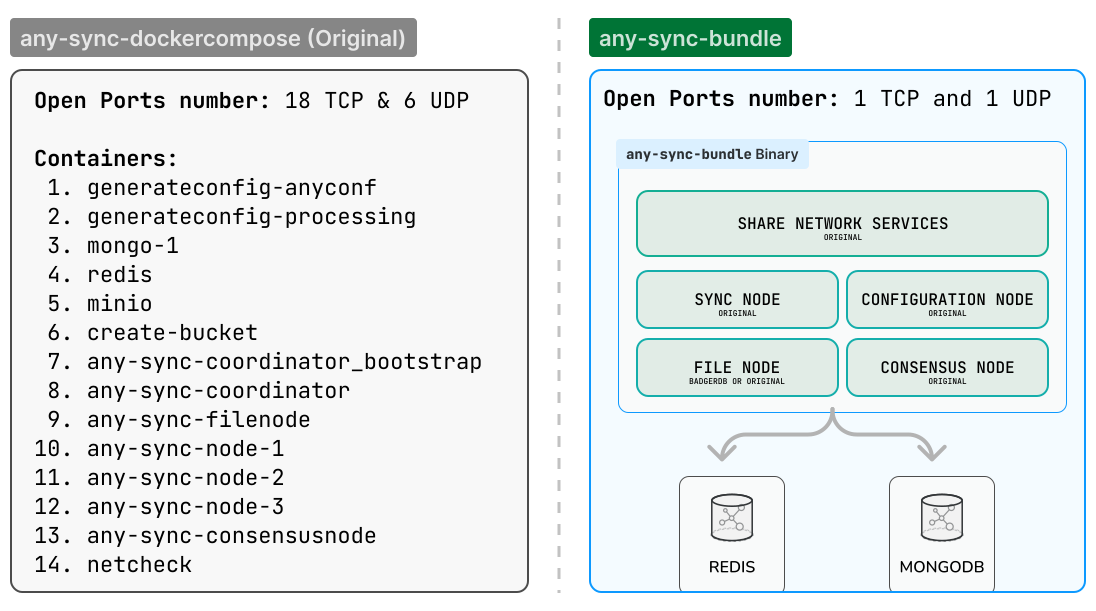
- All-in-one option: All services in a single container or in separate binaries
- Zero-config: Sensible defaults, configurable when needed
- Lightweight: No MinIO option, and no duplicate logical services
- Only 2 open ports: TCP 33010 (DRPC protocol) and UDP 33020 (QUIC protocol)
Who is this for?
- ✅ Self-hosters who value simplicity over complexity
- ✅ Low resource Homelab setups and Raspberry Pi deployments
Not for you if
- ❌ You need high-availability clustering across multiple nodes
- ❌ You require horizontal scaling beyond a single server
- ❌ You want to use the official Anytype architecture as-is
Architecture
Version
Current version: v1.4.3-2026-04-21
Format: v[bundle-version]-[anytype-compatibility-date]
v1.4.3– Bundle's semantic version (SemVer)2026-04-21– Anytype any-sync compatibility date from anytype.io
The compatibility date suffix is always derived in UTC.
Compatibility: From 1.x onward we follow SemVer; 1.x upgrades are non‑breaking.
Installation
Available Images
| Image Tag | Description |
|---|---|
ghcr.io/grishy/any-sync-bundle:1.4.3-2026-04-21 | All-in-one (embedded MongoDB/Redis) |
ghcr.io/grishy/any-sync-bundle:1.4.3-2026-04-21-minimal | Minimal (external MongoDB/Redis) |
Latest tags (:latest, :minimal) are available, but explicit version tags are recommended.
Docker Compose (Recommended)
| File | Description |
|---|---|
compose.aio.yml | All-in-one with embedded MongoDB/Redis |
compose.external.yml | Bundle + external MongoDB + Redis containers |
compose.s3.yml | Bundle + MinIO for S3 storage |
compose.traefik.yml | With Traefik reverse proxy |
sh# Pick one as example: docker compose -f compose.aio.yml up -d docker compose -f compose.external.yml up -d docker compose -f compose.s3.yml up -d
Edit ANY_SYNC_BUNDLE_INIT_EXTERNAL_ADDRS in the compose file before starting.
Binary
- Download from the Release page
- Run:
sh./any-sync-bundle start-bundle \ --initial-external-addrs "192.168.100.9" \ --initial-mongo-uri "mongodb://127.0.0.1:27017/" \ --initial-redis-uri "redis://127.0.0.1:6379/" \ --initial-storage ./data/storage
Configuration
Quick Reference
| Variable | Purpose | Required |
|---|---|---|
ANY_SYNC_BUNDLE_INIT_EXTERNAL_ADDRS | Advertised addresses | Yes |
ANY_SYNC_BUNDLE_INIT_MONGO_URI | MongoDB connection | No |
ANY_SYNC_BUNDLE_INIT_REDIS_URI | Redis connection | No |
ANY_SYNC_BUNDLE_INIT_S3_BUCKET | S3 bucket name | No |
ANY_SYNC_BUNDLE_INIT_S3_ENDPOINT | S3 endpoint URL | No |
ANY_SYNC_BUNDLE_INIT_S3_REGION | S3 region (default: us-east-1) | No |
ANY_SYNC_BUNDLE_INIT_S3_FORCE_PATH_STYLE | Path-style S3 URLs (for MinIO) | No |
ANY_SYNC_BUNDLE_INIT_FILENODE_DEFAULT_LIMIT | Storage limit per space in bytes | No |
AWS_ACCESS_KEY_ID | S3 credentials | No |
AWS_SECRET_ACCESS_KEY | S3 credentials | No |
Configuration Files
| File | Purpose | Backup? |
|---|---|---|
./data/bundle-config.yml | Service config + private keys | 🔴 Yes |
./data/client-config.yml | Client config (regenerated on each start) | 🟢 No |
Storage Options
Local Storage (Default)
By default, the bundle uses embedded BadgerDB. No configuration needed.
+ Zero configuration
+ No external dependencies
+ Lower latency
- Limited by local disk space
S3 Storage (Optional)
Uses the original Anytype upstream S3 implementation from any-sync-filenode.
+ Supports AWS S3, MinIO, DigitalOcean Spaces, Cloudflare R2, Backblaze B2
- Network latency
- Requires configuration
Enable S3 with:
shexport AWS_ACCESS_KEY_ID="..." export AWS_SECRET_ACCESS_KEY="..." ./any-sync-bundle start-bundle \ --initial-s3-bucket "my-bucket" \ --initial-s3-endpoint "https://s3.us-east-1.amazonaws.com"
For MinIO, add --initial-s3-force-path-style. If your MinIO uses a custom
region, also add --initial-s3-region:
sh./any-sync-bundle start-bundle \ --initial-s3-bucket "my-bucket" \ --initial-s3-endpoint "http://minio:9000" \ --initial-s3-region "custom-region" \ --initial-s3-force-path-style
Docker Compose with MinIO:
shdocker compose -f compose.s3.yml up -d # MinIO console: http://localhost:9001 (minioadmin/minioadmin)
Parameters
All parameters available as binary flags or environment variables. See ./any-sync-bundle --help.
Note:
--initial-*options are used only on first run to createbundle-config.yml. Subsequent starts read from the persisted config.
Global Flags
| Flag | Description |
|---|---|
--debug | Enable debug mode with detailed logging <br> ‣ Default: false <br> ‣ Environment Variable: ANY_SYNC_BUNDLE_DEBUG |
--log-level | Log level (debug, info, warn, error, fatal) <br> ‣ Default: info <br> ‣ Environment Variable: ANY_SYNC_BUNDLE_LOG_LEVEL |
--pprof | Enable pprof HTTP server for profiling <br> ‣ Default: false <br> ‣ Environment Variable: ANY_SYNC_BUNDLE_PPROF |
--pprof-addr | Address for pprof HTTP server (only used when --pprof is enabled) <br> ‣ Default: localhost:6060 <br> ‣ Environment Variable: ANY_SYNC_BUNDLE_PPROF_ADDR |
--help, -h | Show help |
--version, -v | Print the version |
Commands
| Command | Description |
|---|---|
start-bundle | Start with external MongoDB/Redis |
start-all-in-one | Start with embedded MongoDB/Redis (used in all-in-one container) |
Start Command Flags
| Flag | Description |
|---|---|
--bundle-config, -c | Path to the bundle configuration YAML file <br> ‣ Default: ./data/bundle-config.yml <br> ‣ Environment Variable: ANY_SYNC_BUNDLE_CONFIG |
--client-config, --cc | Path where write to the Anytype client configuration YAML file if needed <br> ‣ Default: ./data/client-config.yml <br> ‣ Environment Variable: ANY_SYNC_BUNDLE_CLIENT_CONFIG |
--initial-storage | Initial path to the bundle data directory (must be writable) <br> ‣ Default: ./data/storage/ <br> ‣ Environment Variable: ANY_SYNC_BUNDLE_INIT_STORAGE |
--initial-external-addrs | Initial external addresses for the bundle <br> ‣ Default: 192.168.8.214,example.local <br> ‣ Environment Variable: ANY_SYNC_BUNDLE_INIT_EXTERNAL_ADDRS |
--initial-mongo-uri | Initial MongoDB URI for the bundle <br> ‣ Default: mongodb://127.0.0.1:27017/ <br> ‣ Environment Variable: ANY_SYNC_BUNDLE_INIT_MONGO_URI |
--initial-redis-uri | Initial Redis URI for the bundle <br> ‣ Default: redis://127.0.0.1:6379/ <br> ‣ Environment Variable: ANY_SYNC_BUNDLE_INIT_REDIS_URI |
--initial-s3-bucket | S3 bucket name <br> ‣ Environment Variable: ANY_SYNC_BUNDLE_INIT_S3_BUCKET |
--initial-s3-endpoint | S3 endpoint URL <br> ‣ Environment Variable: ANY_SYNC_BUNDLE_INIT_S3_ENDPOINT |
--initial-s3-region | S3 region for request signing <br> ‣ Default: us-east-1 <br> ‣ Environment Variable: ANY_SYNC_BUNDLE_INIT_S3_REGION |
--initial-s3-force-path-style | Use path-style S3 URLs (required for MinIO) <br> ‣ Default: false <br> ‣ Environment Variable: ANY_SYNC_BUNDLE_INIT_S3_FORCE_PATH_STYLE |
--initial-filenode-default-limit | Storage limit per space in bytes <br> ‣ Default: 1099511627776 (1 TiB) <br> ‣ Environment Variable: ANY_SYNC_BUNDLE_INIT_FILENODE_DEFAULT_LIMIT |
Operations
Backup & Recovery
Backup:
sh# Stop service first tar -czf backup-$(date +%Y%m%d-%H%M%S).tar.gz ./data/
Restore:
shrm -rf ./data && tar -xzf backup-YYYYMMDD-HHMMSS.tar.gz
Upgrading
- Backup your
./data/directory - Stop the current service
- Pull new image:
docker pull ghcr.io/grishy/any-sync-bundle:NEW_VERSION - Start the service
- Verify: check logs and
--version
If upgrade fails, restore from backup and use the previous version.
Troubleshooting
Client can't connect:
- Verify
ANY_SYNC_BUNDLE_INIT_EXTERNAL_ADDRSmatches your server's reachable IP/hostname - Check firewall: TCP 33010 and UDP 33020 must be open
Wrong external address after first run:
- Edit
./data/bundle-config.yml→externalAddr:list - Restart server (new
client-config.ymlwill be generated)
MongoDB crashes with "illegal instruction" (AIO):
- Your CPU doesn't support AVX instructions required by MongoDB 5.0+
- Common on older Intel Celeron, Atom, and similar low-power CPUs
- Use
:minimalimage with external MongoDB 4.4 or earlier
Development
See CONTRIBUTING.md for build instructions, development setup, and release process.
Acknowledgments
This project wouldn't exist without:
- Anytype – For creating an amazing local-first, privacy-focused tool
- The any-sync team – For open-sourcing the sync infrastructure
- The self-hosting community – For testing, feedback, and support
License
<p align="center"> <sub>Built with ❤️ for data ownership, local-first, and open-source</sub> </p>Contributors
Showing top 4 contributors by commit count.


Related Repositories

chathub-dev/chathub

AboutRSS/ALL-about-RSS
A list of RSS related stuff: tools, services, communities and tutorials, etc.

mishakorzik/AllHackingTools
All-in-One Hacking Tools For Hackers! And more hacking tools! For termux.

agent-infra/sandbox
All-in-One Sandbox for AI Agents that combines Browser, Shell, File, MCP and VSCode Server in a single Docker container.

codebymitch/TitanBot
A powerful, all-in-one Discord assistant built for every server.

allweonedev/presentation-ai
ALLWEONE® Open source AI presentation generator Gamma Alternative. Create professional slides with customizable themes and AI-generated content in minutes.