

Tradoge
DOGE trading bot for instantly buying and selling DOGE cryptocurrency on Binance when Elon Musk tweets about it.
- :thumbsup: User-friendly command-line interface - :closed_lock_with_key: Binance API keys are encrypted with a password using SHA-256 - :gear: Full configuration can be changed easily in menu, without coding - Change tweet refresh frequency, trading pair, sell delay, buying mode and amount to buy - :heavy_dollar_sign: Choose between buy a fixed DOGE amount or an adaptative DOGE amount with a fixed dollar amount - 💱 Binance trading pairs : DOGE/USDT, DOGE/BUSD, DOGE/BTC, DOGE/EUR - :informatio... The project is written primarily in Go, distributed under the MIT License license, first published in 2021. Key topics include: binance, buying, crypto, cryptocurrency, doge.

:chart_with_upwards_trend: TraDOGE
Tradoge is a Binance trading bot that instantly buys and sells DOGE cryptocurrency on Binance when Elon Musk tweets about it.
How it works
- The bot listens to Elon Musk's tweets
- When Elon Musk tweets about DOGE, the bot buys DOGE on Binance with leverage
- The bot sells DOGE after a certain delay
Requirements
- Docker installed on your machine
- Binance account (with API keys)
- A Binance Isolated Margin account with an available balance (the total amount of the isolated margin account
will be used to buy DOGE)
Installation
1. Download files
With git
Run the following command in your terminal :
bashgit clone https://github.com/gschurck/tradoge.git && \ cd tradoge && \ cp config/config.example.yaml config/config.yaml
Without git
Run the following command in your terminal :
bashmkdir tradoge && \ cd tradoge && \ curl -O https://raw.githubusercontent.com/gschurck/tradoge/refs/heads/main/docker-compose.yml && \ mkdir -p config data && \ curl -o config/config.example.yaml https://raw.githubusercontent.com/gschurck/tradoge/refs/heads/main/config/config.example.yaml && \ cp config/config.example.yaml config/config.yaml
2. Configuration
Fill the config values in file config/config.yaml :
- Twitter (X) credentials
- Binance API keys with access to Margin trading
- The Quote Currency you want to buy DOGE with (USDT, USDC, BTC...)
Transfer to your isolated margin account the amount of the quote currency you want to use to buy DOGE.
Set the leverage you want for this isolated margin account in the Binance interface (x1, x2, x3, x5...). The bot will
use the last leverage you set.
=> If you want to trade on USDC/DOGE and have 100 USDC in your isolated margin account with 5x leverage, the bot will
buy 500
USDC worth of DOGE.
3. Start TraDOGE
Run the following command in your terminal in your tradoge directory :
bashdocker compose up
After building the Docker image, the bot will start and should display the following message :
pc:tradoge:% docker compose logs
tradoge-1  | 2025/02/25 23:32:02 Config file loaded successfully
tradoge-1  | 2025/02/25 23:32:02 Trading pairs:
tradoge-1  | 2025/02/25 23:32:02 1. DOGE/USDC
tradoge-1  | 2025/02/25 23:32:02    Twitter search keywords: doge, dogecoin
tradoge-1  | 2025/02/25 23:32:02 Logged in to Twitter
tradoge-1  | 2025/02/25 23:32:02 Query: (doge OR dogecoin) (from:elonmusk) -filter:replies
tradoge-1  | 2025/02/25 23:32:02 Start to search for new tweets every 20 seconds...
If you see an error message, check your configuration in the config/config.yaml file.
Now you can stop the bot with Ctrl+C and start it in detached mode to let it run in the background :
bashdocker compose up -d
4. Stop TraDOGE
To stop the bot, run the following command in your terminal in your tradoge directory :
bashdocker compose down
Why use Tradoge ?
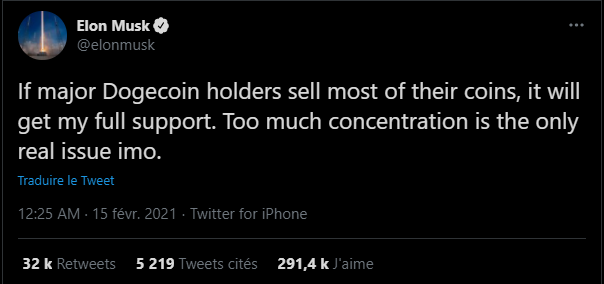
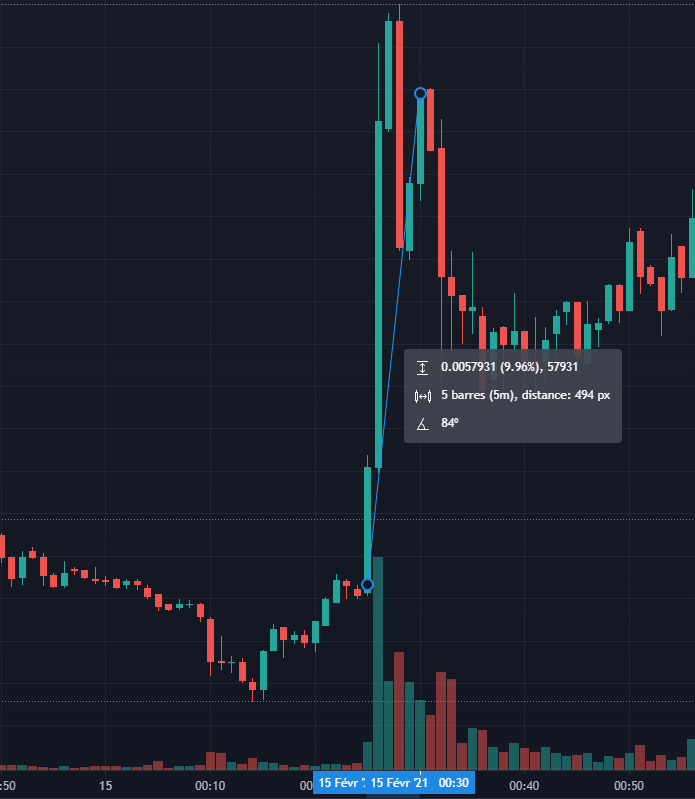
+10%

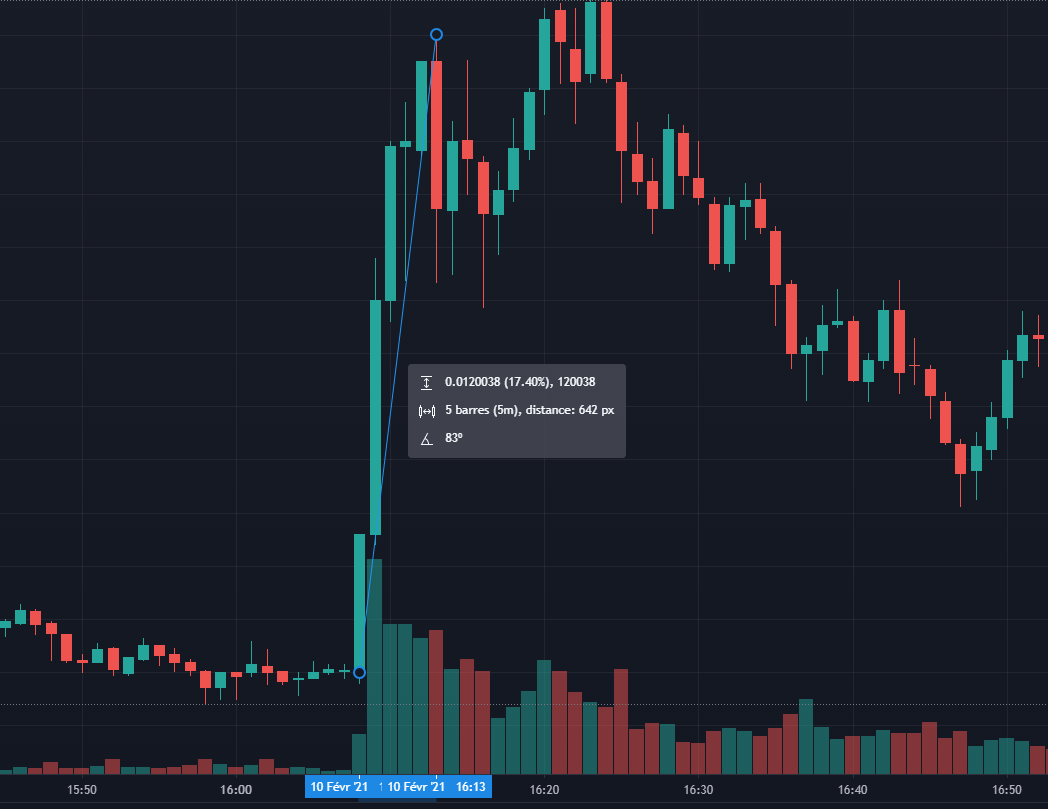
+17.5%

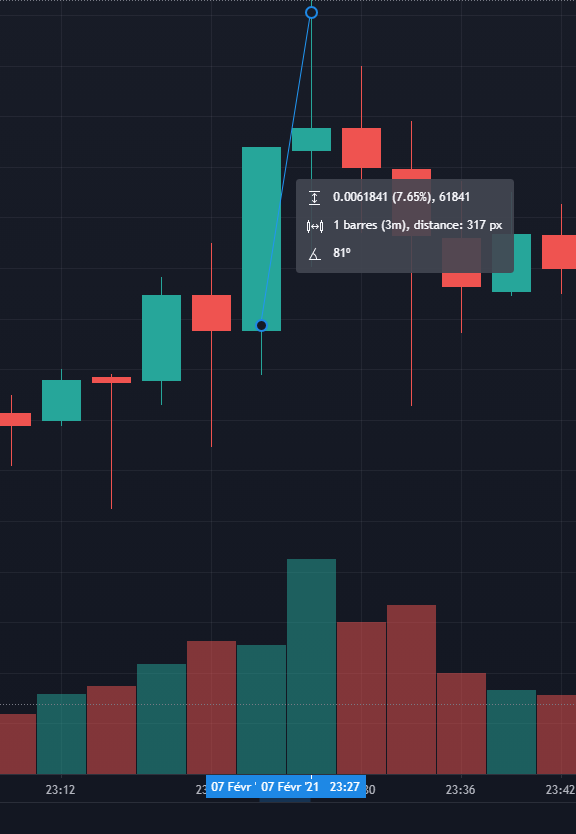
+8%
Binance issues
If TraDOGE shows "CONNECTED TO YOUR BINANCE ACCOUNT" on login, everything should work on your account.
Just make sure to use a sufficient amount of money when buying, or Binance can return an error.
Buy me a coffee
If you want to support me, thank you !
My crypto adresses :
DOGE : DJbbN3nYKMYneJuKU4QKicLjSfggToU4az
BTC : bc1q20m4d3f2469q34wpprldhezhw5x4duxxgg7v27
ETH : 0x2C95a4aFFCb9A92e38Fcf0943A4ed314EC90bfCB
USDT : 0x2C95a4aFFCb9A92e38Fcf0943A4ed314EC90bfCB
BNB : bnb1q5g5zr8nxqk55lajesk0x4xf8r9yex795az6m4
XMR : 42VkGVJoQFPAWm5Km1rA1UiEt7hQMdaf9Z3ki1pBA9LR4iaoXDU9S1sMr1ik38HXAsgKvvw8442zKTHPj9dsDxkaGc4amVT
Contributors
Showing top 1 contributor by commit count.

Related Repositories

NoFxAiOS/nofx
Your AI trading terminal assistant for US stocks, commodities, forex, and crypto.

brokermr810/QuantDinger
AI quantitative trading platform for crypto, stocks, and forex with backtesting, live trading, market data, and multi-agent research.vibe-trading ,trading-agents,ai-trader,ai-trading

sammchardy/python-binance
Binance Exchange API python implementation for automated trading

CryptoSignal/Crypto-Signal
Github.com/CryptoSignal - Trading & Technical Analysis Bot - 4,100+ stars, 1,100+ forks

chrisleekr/binance-trading-bot
Automated Binance trading bot - Trade multiple cryptocurrencies. Buy low/sell high with Grid Trading. Integrated with TradingView technical analysis

nkaz001/hftbacktest
Free, open source, a high frequency trading and market making backtesting and trading bot, which accounts for limit orders, queue positions, and latencies, utilizing full tick data for trades and order books(Level-2 and Level-3), with real-world crypto trading examples for Binance and Bybit