

Deep Live Cam
real time face swap and one-click video deepfake with only a single image
Real-time face swap and video deepfake with a single click and only a single image. The project is written primarily in Python, distributed under the GNU Affero General Public License v3.0 license, first published in 2023. It has gained significant community traction with 93,863 stars and 13,687 forks on GitHub. Key topics include: ai, ai-deep-fake, ai-face, ai-webcam, artificial-intelligence.
Disclaimer
This deepfake software is designed to be a productive tool for the AI-generated media industry. It can assist artists in animating custom characters, creating engaging content, and even using models for clothing design.
We are aware of the potential for unethical applications and are committed to preventative measures. A built-in check prevents the program from processing inappropriate media (nudity, graphic content, sensitive material like war footage, etc.). We will continue to develop this project responsibly, adhering to the law and ethics. We may shut down the project or add watermarks if legally required.
-
Ethical Use: Users are expected to use this software responsibly and legally. If using a real person's face, obtain their consent and clearly label any output as a deepfake when sharing online.
-
Content Restrictions: The software includes built-in checks to prevent processing inappropriate media, such as nudity, graphic content, or sensitive material.
-
Legal Compliance: We adhere to all relevant laws and ethical guidelines. If legally required, we may shut down the project or add watermarks to the output.
-
User Responsibility: We are not responsible for end-user actions. Users must ensure their use of the software aligns with ethical standards and legal requirements.
By using this software, you agree to these terms and commit to using it in a manner that respects the rights and dignity of others.
Users are expected to use this software responsibly and legally. If using a real person's face, obtain their consent and clearly label any output as a deepfake when sharing online. We are not responsible for end-user actions.
Exclusive v2.7 RC2 Quick Start - Pre-built (Windows/Mac Silicon/CPU)
<a href="https://deeplivecam.net/index.php/quickstart"> <img src="media/Download.png" width="285" height="77" />
This is the fastest build you can get if you have a discrete NVIDIA or AMD GPU, CPU or Mac Silicon, And you'll receive special priority support. 2.7 beta is the best you can have with 30+ extra features than the open source version.
These Pre-builts are perfect for non-technical users or those who don't have time to, or can't manually install all the requirements. Just a heads-up: this is an open-source project, so you can also install it manually.
TLDR; Live Deepfake in just 3 Clicks
- Select a face
- Select which camera to use
- Press live!
Features & Uses - Everything is in real-time
Mouth Mask
Retain your original mouth for accurate movement using Mouth Mask
<p align="center"> <img src="media/ludwig.gif" alt="resizable-gif"> </p>Face Mapping
Use different faces on multiple subjects simultaneously
<p align="center"> <img src="media/streamers.gif" alt="face_mapping_source"> </p>Your Movie, Your Face
Watch movies with any face in real-time
<p align="center"> <img src="media/movie.gif" alt="movie"> </p>Live Show
Run Live shows and performances
<p align="center"> <img src="media/live_show.gif" alt="show"> </p>Memes
Create Your Most Viral Meme Yet
<p align="center"> <img src="media/meme.gif" alt="show" width="450"> <br> <sub>Created using Many Faces feature in Deep-Live-Cam</sub> </p>Omegle
Surprise people on Omegle
<p align="center"> <video src="https://github.com/user-attachments/assets/2e9b9b82-fa04-4b70-9f56-b1f68e7672d0" width="450" controls></video> </p>Installation (Manual)
Please be aware that the installation requires technical skills and is not for beginners. Consider downloading the quickstart version.
<details> <summary>Click to see the process</summary>Installation
This is more likely to work on your computer but will be slower as it utilizes the CPU.
1. Set up Your Platform
- Python (3.11 recommended)
- pip
- git
- ffmpeg -
iex (irm ffmpeg.tc.ht) - Visual Studio 2022 Runtimes (Windows)
2. Clone the Repository
bashgit clone https://github.com/hacksider/Deep-Live-Cam.git cd Deep-Live-Cam
3. Download the Models
Place these files in the "models" folder.
4. Install Dependencies
We highly recommend using a venv to avoid issues.
For Windows:
bashpython -m venv venv venv\Scripts\activate pip install -r requirements.txt
For Linux:
bash# Ensure you use the installed Python 3.11 python3 -m venv venv source venv/bin/activate pip install -r requirements.txt
For macOS:
Apple Silicon (M1/M2/M3) requires specific setup:
bash# Install Python 3.11 (specific version is important) brew install python@3.11 # Install tkinter package (required for the GUI) brew install python-tk@3.11 # Create and activate virtual environment with Python 3.11 python3.11 -m venv venv source venv/bin/activate # Install dependencies pip install -r requirements.txt
** In case something goes wrong and you need to reinstall the virtual environment **
bash# Deactivate the virtual environment rm -rf venv # Reinstall the virtual environment python -m venv venv source venv/bin/activate # install the dependencies again pip install -r requirements.txt # gfpgan and basicsrs issue fix pip install git+https://github.com/xinntao/BasicSR.git@master pip uninstall gfpgan -y pip install git+https://github.com/TencentARC/GFPGAN.git@master
Run: If you don't have a GPU, you can run Deep-Live-Cam using python run.py. Note that initial execution will download models (~300MB).
GPU Acceleration
CUDA Execution Provider (Nvidia)
- Install CUDA Toolkit 12.8.0
- Install cuDNN v8.9.7 for CUDA 12.x (required for onnxruntime-gpu):
- Download cuDNN v8.9.7 for CUDA 12.x
- Make sure the cuDNN bin directory is in your system PATH
- Install dependencies:
bashpip install -U torch torchvision torchaudio --index-url https://download.pytorch.org/whl/cu128 pip uninstall onnxruntime onnxruntime-gpu pip install onnxruntime-gpu==1.21.0
- Usage:
bashpython run.py --execution-provider cuda
CoreML Execution Provider (Apple Silicon)
Apple Silicon (M1/M2/M3) specific installation:
- Make sure you've completed the macOS setup above using Python 3.11.
- Install dependencies:
bashpip uninstall onnxruntime onnxruntime-silicon pip install onnxruntime-silicon==1.13.1
- Usage:
bashpython3.11 run.py --execution-provider coreml
Important Notes for macOS:
- You must use Python 3.11, not newer versions like 3.13
- Always run with
python3.11command not justpythonif you have multiple Python versions installed - If you get error about
_tkintermissing, reinstall the tkinter package:brew reinstall python-tk@3.11 - If you get model loading errors, check that your models are in the correct folder
- If you encounter conflicts with other Python versions, consider uninstalling them:
bash
# List all installed Python versions brew list | grep python # Uninstall conflicting versions if needed brew uninstall --ignore-dependencies python@3.13 # Keep only Python 3.11 brew cleanup
CoreML Execution Provider (Apple Legacy)
- Install dependencies:
bashpip uninstall onnxruntime onnxruntime-coreml pip install onnxruntime-coreml==1.21.0
- Usage:
bashpython run.py --execution-provider coreml
DirectML Execution Provider (Windows)
- Install dependencies:
bashpip uninstall onnxruntime onnxruntime-directml pip install onnxruntime-directml==1.21.0
- Usage:
bashpython run.py --execution-provider directml
OpenVINO™ Execution Provider (Intel)
- Install dependencies:
bashpip uninstall onnxruntime onnxruntime-openvino pip install onnxruntime-openvino==1.21.0
- Usage:
</details>bashpython run.py --execution-provider openvino
Usage
1. Image/Video Mode
- Execute
python run.py. - Choose a source face image and a target image/video.
- Click "Start".
- The output will be saved in a directory named after the target video.
2. Webcam Mode
- Execute
python run.py. - Select a source face image.
- Click "Live".
- Wait for the preview to appear (10-30 seconds).
- Use a screen capture tool like OBS to stream.
- To change the face, select a new source image.
Download all models in this huggingface link
Command Line Arguments (Unmaintained)
options:
  -h, --help                                               show this help message and exit
  -s SOURCE_PATH, --source SOURCE_PATH                     select a source image
  -t TARGET_PATH, --target TARGET_PATH                     select a target image or video
  -o OUTPUT_PATH, --output OUTPUT_PATH                     select output file or directory
  --frame-processor FRAME_PROCESSOR [FRAME_PROCESSOR ...]  frame processors (choices: face_swapper, face_enhancer, ...)
  --keep-fps                                               keep original fps
  --keep-audio                                             keep original audio
  --keep-frames                                            keep temporary frames
  --many-faces                                             process every face
  --map-faces                                              map source target faces
  --mouth-mask                                             mask the mouth region
  --video-encoder {libx264,libx265,libvpx-vp9}             adjust output video encoder
  --video-quality [0-51]                                   adjust output video quality
  --live-mirror                                            the live camera display as you see it in the front-facing camera frame
  --live-resizable                                         the live camera frame is resizable
  --max-memory MAX_MEMORY                                  maximum amount of RAM in GB
  --execution-provider {cpu} [{cpu} ...]                   available execution provider (choices: cpu, ...)
  --execution-threads EXECUTION_THREADS                    number of execution threads
  -v, --version                                            show program's version number and exit
Looking for a CLI mode? Using the -s/--source argument will make the run program in cli mode.
Press
- Ars Technica - "Deep-Live-Cam goes viral, allowing anyone to become a digital doppelganger"
- Yahoo! - "OK, this viral AI live stream software is truly terrifying"
- CNN Brasil - "AI can clone faces on webcam; understand how it works"
- Bloomberg Technoz - "Get to know Deep Live Cam technology, it can be used as a tool for deception."
- TrendMicro - "AI vs AI: DeepFakes and eKYC"
- PetaPixel - "Deepfake AI Tool Lets You Become Anyone in a Video Call With Single Photo"
- SomeOrdinaryGamers - "That's Crazy, Oh God. That's Fucking Freaky Dude... That's So Wild Dude"
- IShowSpeed - "Alright look look look, now look chat, we can do any face we want to look like chat"
- TechLinked (Linus Tech Tips) - "They do a pretty good job matching poses, expression and even the lighting"
- IShowSpeed - "What the F**! Why do I look like Vinny Jr? I look exactly like Vinny Jr!? No, this shit is crazy! Bro This is F*** Crazy!"*
Credits
- ffmpeg: for making video-related operations easy
- Henry: One of the major contributor in this repo
- deepinsight: for their insightface project which provided a well-made library and models. Please be reminded that the use of the model is for non-commercial research purposes only.
- havok2-htwo: for sharing the code for webcam
- GosuDRM: for the open version of roop
- pereiraroland26: Multiple faces support
- vic4key: For supporting/contributing to this project
- kier007: for improving the user experience
- qitianai: for multi-lingual support
- laurigates: Decoupling stuffs to make everything faster!
- maxwbuckley: For making the effort to optimize this for mac!
- and all developers behind libraries used in this project.
- Footnote: Please be informed that the base author of the code is s0md3v
- All the wonderful users who helped make this project go viral by starring the repo ❤️
Contributions
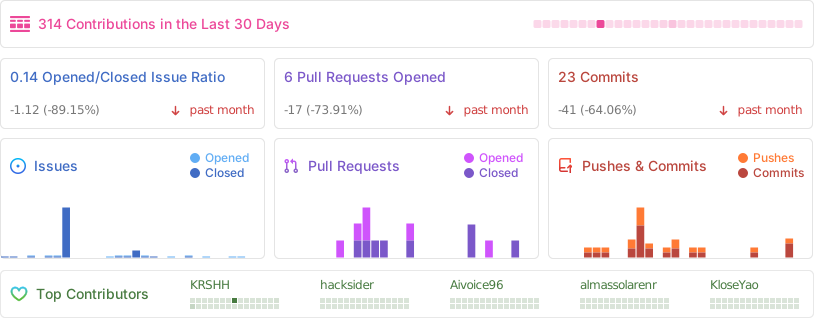
Stars to the Moon 🚀
<a href="https://star-history.com/#hacksider/deep-live-cam&Date"> <picture> <source media="(prefers-color-scheme: dark)" srcset="https://api.star-history.com/svg?repos=hacksider/deep-live-cam&type=Date&theme=dark" /> <source media="(prefers-color-scheme: light)" srcset="https://api.star-history.com/svg?repos=hacksider/deep-live-cam&type=Date" /> <img alt="Star History Chart" src="https://api.star-history.com/svg?repos=hacksider/deep-live-cam&type=Date" /> </picture> </a>Contributors
Showing top 12 contributors by commit count.




Related Repositories

openclaw/openclaw
Your own personal AI assistant. Any OS. Any Platform. The lobster way. 🦞

NousResearch/hermes-agent
The agent that grows with you

n8n-io/n8n
Fair-code workflow automation platform with native AI capabilities. Combine visual building with custom code, self-host or cloud, 400+ integrations.

Significant-Gravitas/AutoGPT
AutoGPT is the vision of accessible AI for everyone, to use and to build on. Our mission is to provide the tools, so that you can focus on what matters.

f/prompts.chat
f.k.a. Awesome ChatGPT Prompts. Share, discover, and collect prompts from the community. Free and open source — self-host for your organization with complete privacy.

AUTOMATIC1111/stable-diffusion-webui
Stable Diffusion web UI