

MV Adapter
[ICCV 2025] Official impl. of "MV-Adapter: Multi-view Consistent Image Generation Made Easy"
MV-Adapter is a **versatile plug-and-play adapter** that adapt T2I models and their derivatives to multi-view generators. The project is written primarily in Python, distributed under the Apache License 2.0 license, first published in 2024. It has gained significant community traction with 1,269 stars and 90 forks on GitHub. Key topics include: 3d-generation, image-generation, multiview, multiview-generation, texture-generation.
MV-Adapter: Multi-view Consistent Image Generation Made Easy🚀
🏠 <a href="https://huanngzh.github.io/MV-Adapter-Page/" target="_blank">Project Page</a> | <a href="https://arxiv.org/abs/2412.03632" target="_blank">Paper</a> | <a href="https://huggingface.co/huanngzh/mv-adapter" target="_blank">Model Weights</a> | Demo | <a href="https://github.com/huanngzh/ComfyUI-MVAdapter" target="_blank">ComfyUI</a>
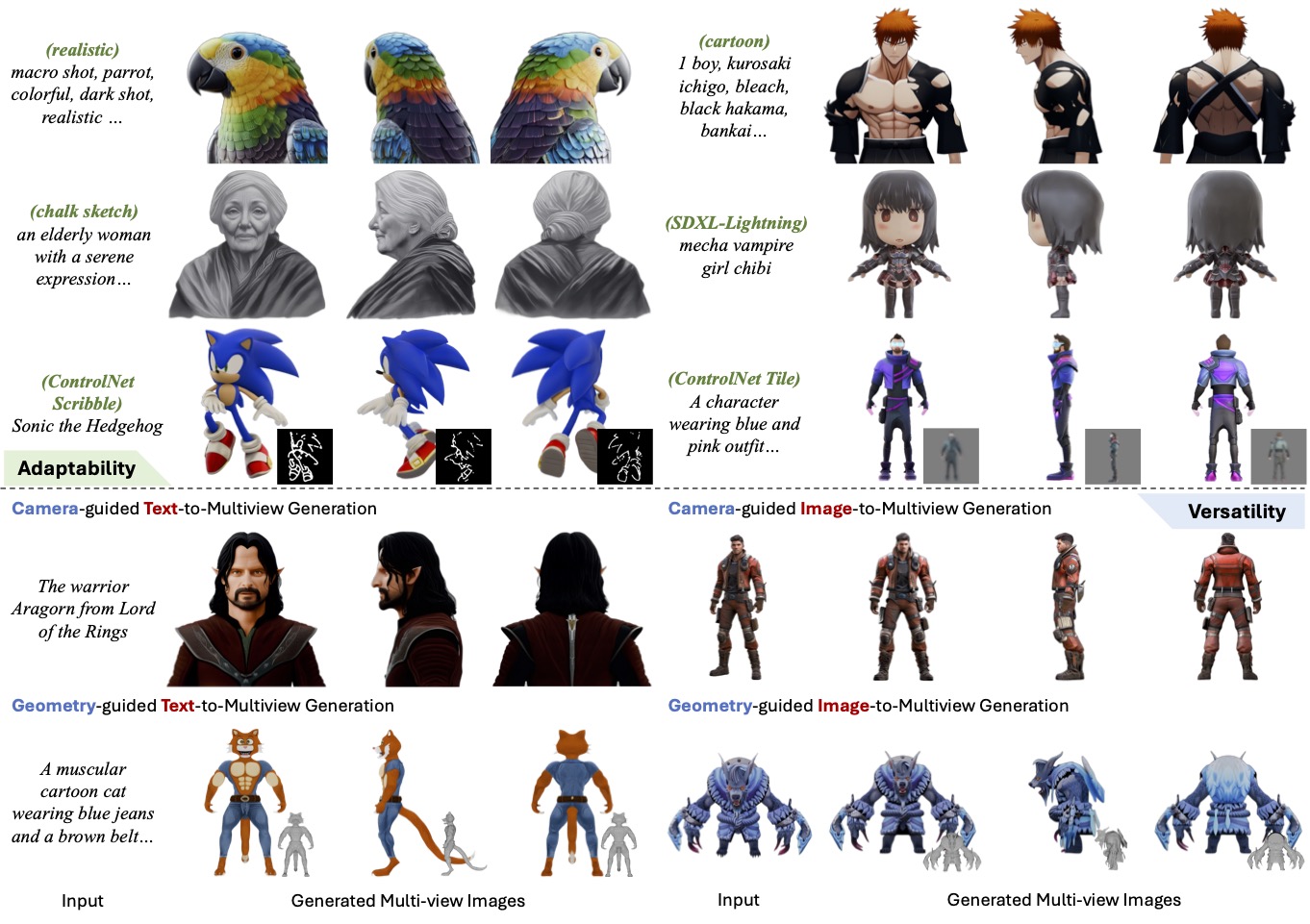
MV-Adapter is a versatile plug-and-play adapter that adapt T2I models and their derivatives to multi-view generators.
Highlight Features: Generate multi-view images
- with 768 Resolution using SDXL
- using personalized models (e.g. <a href="https://civitai.com/models/112902/dreamshaper-xl" target="_blank">DreamShaper</a>), distilled models (e.g. <a href="https://huggingface.co/docs/diffusers/api/pipelines/latent_consistency_models" target="_blank">LCM</a>), or extensions (e.g. <a href="https://github.com/lllyasviel/ControlNet" target="_blank">ControlNet</a>)
- from text or image condition
- can be guided by geometry for texture generation
🔥 Updates
- [2025-06-26] MV-Adapter is accepted by ICCV 2025. 🎉🎉🎉
- [2025-06-14] Support multiple loras in text-to-multi-view synthesis for highly-customized generation. [See guidelines]
- [2025-06-13] Release our SD2.1-based geometry-conditioned adapters with low VRAM requirements (<10G). [See guidelines]
- [2025-05-15] Release full pipeline for text-to-texture and image-to-texture generation. [See guidelines]
- [2025-04-23] Release dataset (Objaverse-Ortho10View and Objaverse-Rand6View) and training code. [See guidelines]
- [2025-03-31] Release text/image-conditioned 3D texture generation demos on Text2Texture and Image2Texture. Feel free to try them!
- [2025-03-17] Release model weights for partial-image conditioned geometry-to-multiview generation, which can be used to generate textured 3D scenes combined with MIDI. [See guidelines]
- [2025-03-07] Release model weights for geometry-guided multi-view generation. [See guidelines]
- [2024-12-27] Release model weights, gradio demo, inference scripts and comfyui of text-/image- to multi-view generation models.
TOC
- MV-Adapter: Multi-view Consistent Image Generation Made Easy🚀
Model Zoo & Demos
No need to download manually. Running the scripts will download model weights automatically.
Notes: Running MV-Adapter for SDXL may need higher GPU memory and more time, but produce higher-quality and higher-resolution results. On the other hand, running its SD2.1 variant needs lower computing cost, but shows a bit lower performance.
| Model | Base Model | HF Weights | Demo Link |
|---|---|---|---|
| Text-to-Multiview | SD2.1 | mvadapter_t2mv_sd21.safetensors | |
| Text-to-Multiview | SDXL | mvadapter_t2mv_sdxl.safetensors | General / Anime |
| Image-to-Multiview | SD2.1 | mvadapter_i2mv_sd21.safetensors | |
| Image-to-Multiview | SDXL | mvadapter_i2mv_sdxl.safetensors | Demo |
| Text-Geometry-to-Multiview | SDXL | mvadapter_tg2mv_sdxl.safetensors | Demo |
| Image-Geometry-to-Multiview | SDXL | mvadapter_ig2mv_sdxl.safetensors / mvadapter_ig2mv_partial_sdxl.safetensors | Demo |
| Image-to-Arbitrary-Views | SDXL |
Installation
Clone the repo first:
Bashgit clone https://github.com/huanngzh/MV-Adapter.git cd MV-Adapter
(Optional) Create a fresh conda env:
Bashconda create -n mvadapter python=3.10 conda activate mvadapter
Install necessary packages (torch > 2):
Bash# pytorch (select correct CUDA version) pip install torch torchvision --index-url https://download.pytorch.org/whl/cu118 # other dependencies pip install -r requirements.txt
For texture generation, you need to install CV-CUDA according to CVCUDA/CV-CUDA.
Notes
System Requirements
In the model zoo of MV-Adapter, running image-to-multiview generation has the highest system requirements, which requires about 14G GPU memory.
Usage: Multiview Generation
Launch Demo
Text to Multiview Generation
With SDXL:
Bashpython -m scripts.gradio_demo_t2mv --base_model "stabilityai/stable-diffusion-xl-base-1.0"
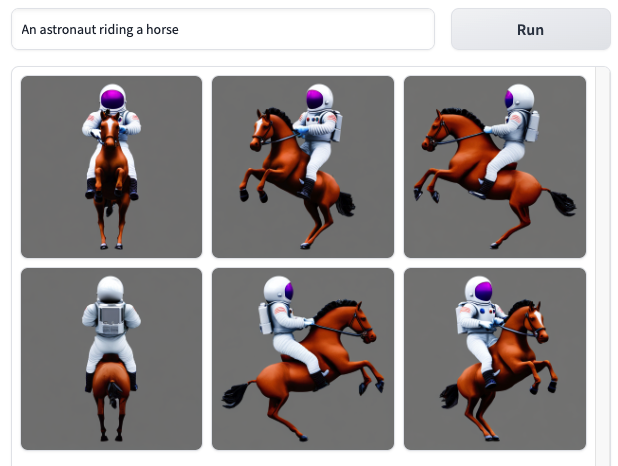
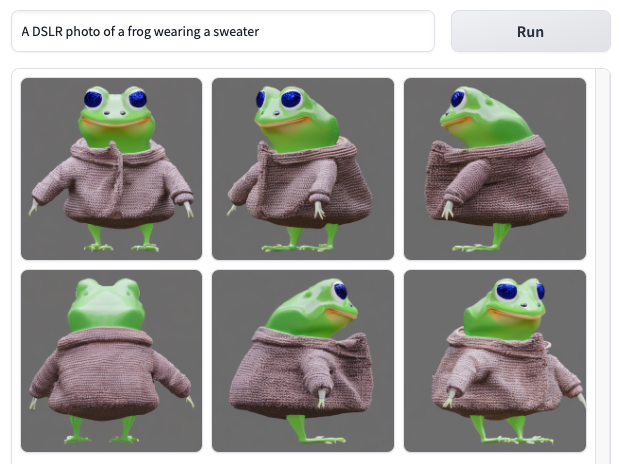
Reminder: When switching the demo to another base model, delete the
gradio_cached_examplesdirectory, otherwise it will affect the examples results of the next demo.
With anime-themed <a href="https://huggingface.co/cagliostrolab/animagine-xl-3.1" target="_blank">Animagine XL 3.1</a>:
Bashpython -m scripts.gradio_demo_t2mv --base_model "cagliostrolab/animagine-xl-3.1"
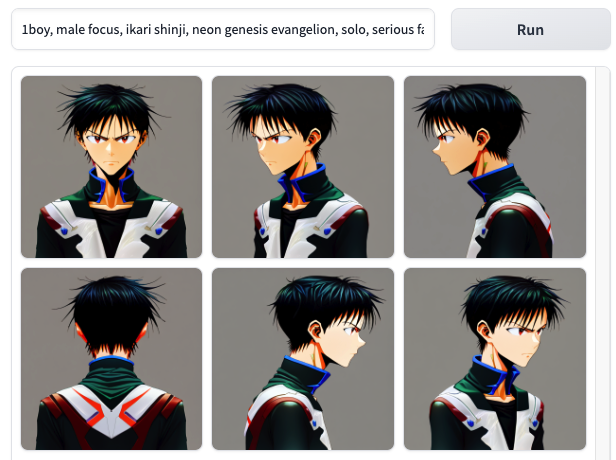
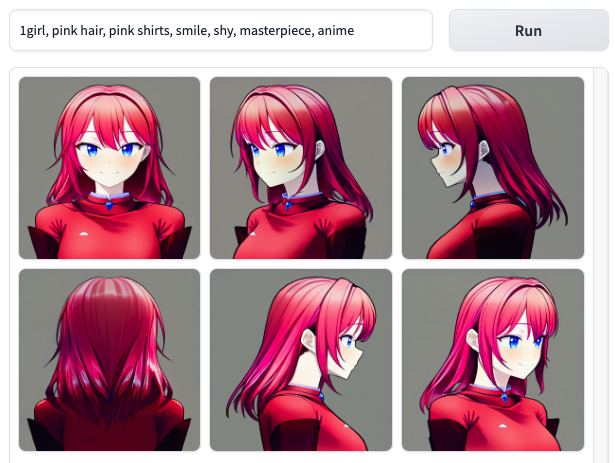
With general <a href="https://huggingface.co/Lykon/dreamshaper-xl-1-0" target="_blank">Dreamshaper</a>:
Bashpython -m scripts.gradio_demo_t2mv --base_model "Lykon/dreamshaper-xl-1-0" --scheduler ddpm
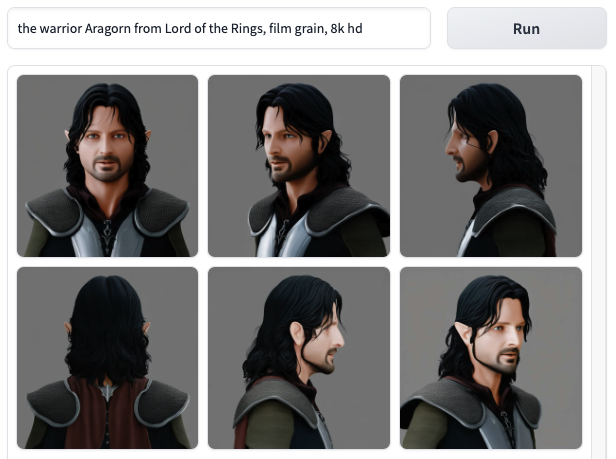
You can also specify a new diffusers-format text-to-image diffusion model using --base_model. Note that it should be the model name in huggingface, such as stabilityai/stable-diffusion-xl-base-1.0, or a local path refer to a text-to-image pipeline directory. Note that if you specify latent-consistency/lcm-sdxl to use latent consistency models, please add --scheduler lcm to the command.
Image to Multiview Generation
With SDXL:
Bashpython -m scripts.gradio_demo_i2mv
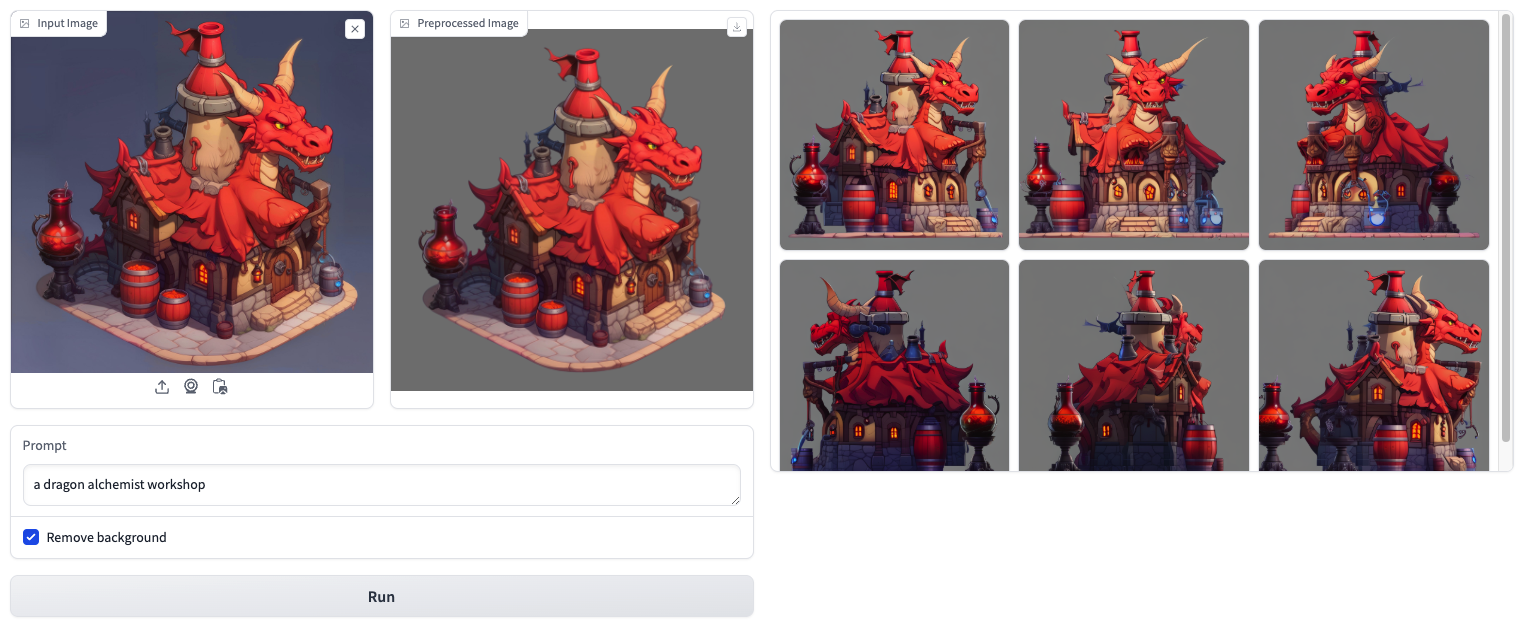
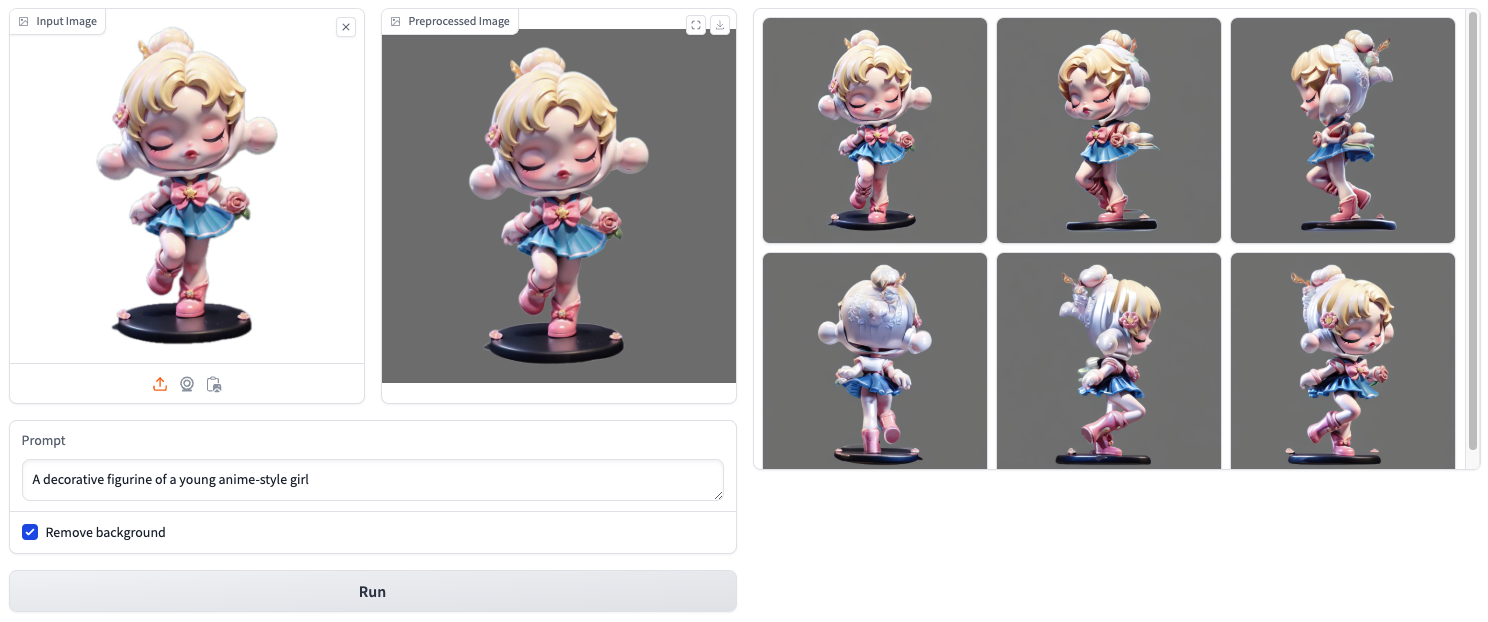
Inference Scripts
We recommend that experienced users check the files in the scripts directory to adjust the parameters appropriately to try the best "card drawing" results.
Text to Multiview Generation
Note that you can specify a diffusers-format text-to-image diffusion model as the base model using --base_model xxx. It should be the model name in huggingface, such as stabilityai/stable-diffusion-xl-base-1.0, or a local path refer to a text-to-image pipeline directory.
With SDXL:
Bashpython -m scripts.inference_t2mv_sdxl --text "an astronaut riding a horse" \ --seed 42 \ --output output.png
With personalized models:
anime-themed <a href="https://huggingface.co/cagliostrolab/animagine-xl-3.1" target="_blank">Animagine XL 3.1</a>
Bashpython -m scripts.inference_t2mv_sdxl --base_model "cagliostrolab/animagine-xl-3.1" \ --text "1girl, izayoi sakuya, touhou, solo, maid headdress, maid, apron, short sleeves, dress, closed mouth, white apron, serious face, upper body, masterpiece, best quality, very aesthetic, absurdres" \ --seed 0 \ --output output.png
general <a href="https://huggingface.co/Lykon/dreamshaper-xl-1-0" target="_blank">Dreamshaper</a>
Bashpython -m scripts.inference_t2mv_sdxl --base_model "Lykon/dreamshaper-xl-1-0" \ --scheduler ddpm \ --text "the warrior Aragorn from Lord of the Rings, film grain, 8k hd" \ --seed 0 \ --output output.png
realistic <a href="https://huggingface.co/stablediffusionapi/real-dream-sdxl" target="_blank">real-dream-sdxl</a>
Bashpython -m scripts.inference_t2mv_sdxl --base_model "stablediffusionapi/real-dream-sdxl" \ --scheduler ddpm \ --text "macro shot, parrot, colorful, dark shot, film grain, extremely detailed" \ --seed 42 \ --output output.png
With <a href="https://huggingface.co/latent-consistency/lcm-sdxl" target="_blank">LCM</a>:
Bashpython -m scripts.inference_t2mv_sdxl --unet_model "latent-consistency/lcm-sdxl" \ --scheduler lcm \ --text "Samurai koala bear" \ --num_inference_steps 8 \ --seed 42 \ --output output.png
With LoRA:
stylized lora <a href="https://huggingface.co/goofyai/3d_render_style_xl" target="_blank">3d_render_style_xl</a>
Bashpython -m scripts.inference_t2mv_sdxl --lora_model "goofyai/3d_render_style_xl/3d_render_style_xl.safetensors" \ --text "3d style, a fox with flowers around it" \ --seed 20 \ --lora_scale 1.0 \ --output output.png
With Multiple LoRAs:
Download lora models from here, and put them into ./loras.
Bashpython -m scripts.inference_t2mv_sdxl \ --lora_model "loras/3dpolygonStyle.safetensors,loras/3D_Animation_Style-000009.safetensors,loras/3D_Render_Illu_Buns-000010.safetensors,loras/xl_more_art-full_v1.safetensors,loras/add-detail-xl.safetensors,loras/spo_sdxl_10ep_4k-data_lora_webui.safetensors,loras/APose_v2.safetensors,loras/1980s_Fantasy_Style_SDXL.safetensors,loras/MMOCharacterGen.safetensors" \ --text "solo,a 3d models of red lion full body, fantasy style ,no background , masterpiece, best quality, amazing quality, very aesthetic, absurdres, newest , master piece , ultra-detailed, 8K, HDR, Fujifilm cinematic style,even lighting, clean lines, neutral colors, no contrast" \ --seed 42 \ --lora_scale 0.2,0.2,0.2,0.2,0.2,0.2,2,0.2,0.2 \ --output output.png

With ControlNet:
Scribble to Multiview with <a href="https://huggingface.co/xinsir/controlnet-scribble-sdxl-1.0" target="_blank">controlnet-scribble-sdxl-1.0</a>
Bashpython -m scripts.inference_scribble2mv_sdxl --text "A 3D model of Finn the Human from the animated television series Adventure Time. He is wearing his iconic blue shirt and green backpack and has a neutral expression on his face. He is standing in a relaxed pose with his left foot slightly forward and his right foot back. His arms are at his sides and his head is turned slightly to the right. The model is made up of simple shapes and has a stylized, cartoon-like appearance. It is textured to resemble the character's appearance in the show." \ --seed 0 \ --output output.png \ --guidance_scale 5.0 \ --controlnet_images "assets/demo/scribble2mv/color_0000.webp" "assets/demo/scribble2mv/color_0001.webp" "assets/demo/scribble2mv/color_0002.webp" "assets/demo/scribble2mv/color_0003.webp" "assets/demo/scribble2mv/color_0004.webp" "assets/demo/scribble2mv/color_0005.webp" \ --controlnet_conditioning_scale 0.7
With SD2.1:
SD2.1 has lower demand for computing resources and higher inference speed, but a bit lower performance than SDXL.
In our tests, ddpm scheduler works better than other schedulers here.
Bashpython -m scripts.inference_t2mv_sd --text "a corgi puppy" \ --seed 42 --scheduler ddpm \ --output output.png
Image to Multiview Generation
With SDXL:
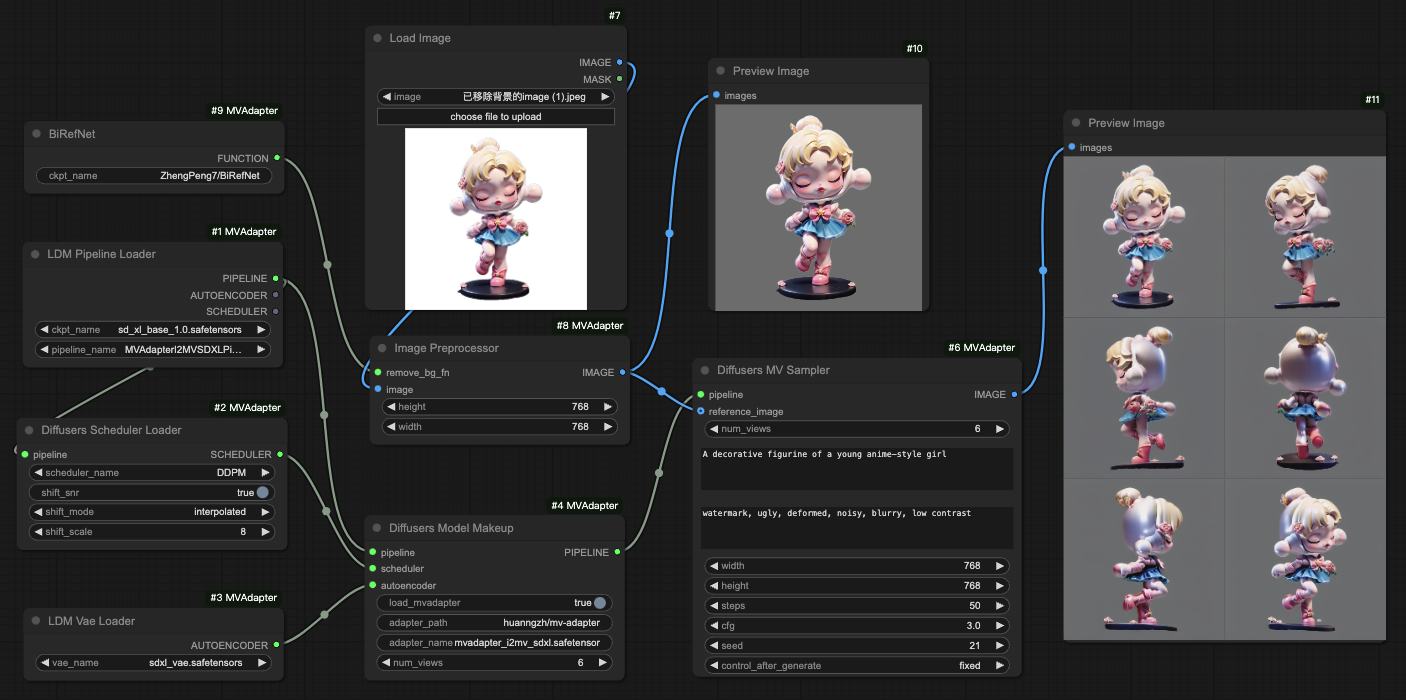
Bashpython -m scripts.inference_i2mv_sdxl \ --image assets/demo/i2mv/A_decorative_figurine_of_a_young_anime-style_girl.png \ --text "A decorative figurine of a young anime-style girl" \ --seed 21 --output output.png --remove_bg
With LCM:
Bashpython -m scripts.inference_i2mv_sdxl \ --unet_model "latent-consistency/lcm-sdxl" \ --scheduler lcm \ --image assets/demo/i2mv/A_juvenile_emperor_penguin_chick.png \ --text "A juvenile emperor penguin chick" \ --num_inference_steps 8 \ --seed 0 --output output.png --remove_bg
With SD2.1: (lower demand for computing resources and higher inference speed)
In our tests, ddpm scheduler works better than other schedulers here.
Bashpython -m scripts.inference_i2mv_sd \ --image assets/demo/i2mv/A_decorative_figurine_of_a_young_anime-style_girl.png \ --text "A decorative figurine of a young anime-style girl" \ --output output.png --remove_bg --scheduler ddpm
Text-Geometry to Multiview Generation
Importantly, when using geometry-condition generation, please make sure that the orientation of the mesh you provide is consistent with the following example. Otherwise, you need to adjust the angles in the scripts when rendering the view.
If your VRAM is enough (>12G), please use the SDXL version:
With SDXL:
Bashpython -m scripts.inference_tg2mv_sdxl \ --mesh assets/demo/tg2mv/ac9d4e4f44f34775ad46878ba8fbfd86.glb \ --text "Mater, a rusty and beat-up tow truck from the 2006 Disney/Pixar animated film 'Cars', with a rusty brown exterior, big blue eyes."

If your VRAM is smaller than 6G, please use the SD2.1 version:
Bashpython -m scripts.inference_tg2mv_sd \ --mesh assets/demo/tg2mv/ac9d4e4f44f34775ad46878ba8fbfd86.glb \ --text "Mater, a rusty and beat-up tow truck from the 2006 Disney/Pixar animated film 'Cars', with a rusty brown exterior, big blue eyes." --scheduler ddpm
Image-Geometry to Multiview Generation
If your VRAM is enough (>16G), please use the SDXL version:
With SDXL:
Bashpython -m scripts.inference_ig2mv_sdxl \ --image assets/demo/ig2mv/1ccd5c1563ea4f5fb8152eac59dabd5c.jpeg \ --mesh assets/demo/ig2mv/1ccd5c1563ea4f5fb8152eac59dabd5c.glb \ --output output.png --remove_bg

If your VRAM is smaller than 10G, please use the SD2.1 version:
with SD2.1:
Bashpython -m scripts.inference_ig2mv_sd \ --image assets/demo/ig2mv/1ccd5c1563ea4f5fb8152eac59dabd5c.jpeg \ --mesh assets/demo/ig2mv/1ccd5c1563ea4f5fb8152eac59dabd5c.glb \ --output output.png --remove_bg --scheduler ddpm
Partial Image + Geometry to Multiview
With SDXL:
Bashpython -m scripts.inference_ig2mv_partial_sdxl \ --image assets/demo/ig2mv/cartoon_style_table.png \ --mesh assets/demo/ig2mv/cartoon_style_table.glb \ --output output.png
Example input:
<img src="assets/demo/ig2mv/cartoon_style_table.png" alt="partial input" style="width: 20%">
Example output:

The above command will save a *_transform.json file in the output dir, which contains transformation information like this:
json{ "offset": [ 0.7446051140100826, -0.3421213991056582, 0.1360104325533671 ], "scale": 1.0086087120792668 }
You can use it to transform your mesh into the canonical space, map the generated multi-view images onto the mesh, and then re-transform the mesh back to the original spatial position.
ComfyUI
Please check <a href="https://github.com/huanngzh/ComfyUI-MVAdapter" target="_blank">ComfyUI-MVAdapter Repo</a> for details.
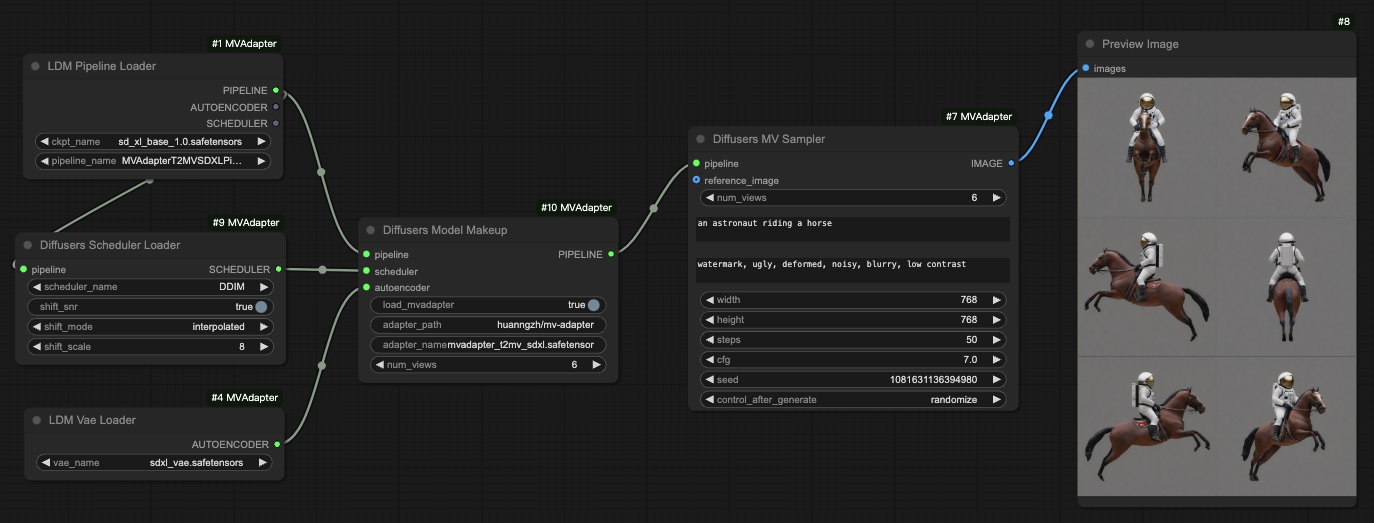
Text to Multiview Generation
Text to Multiview Generation with LoRA
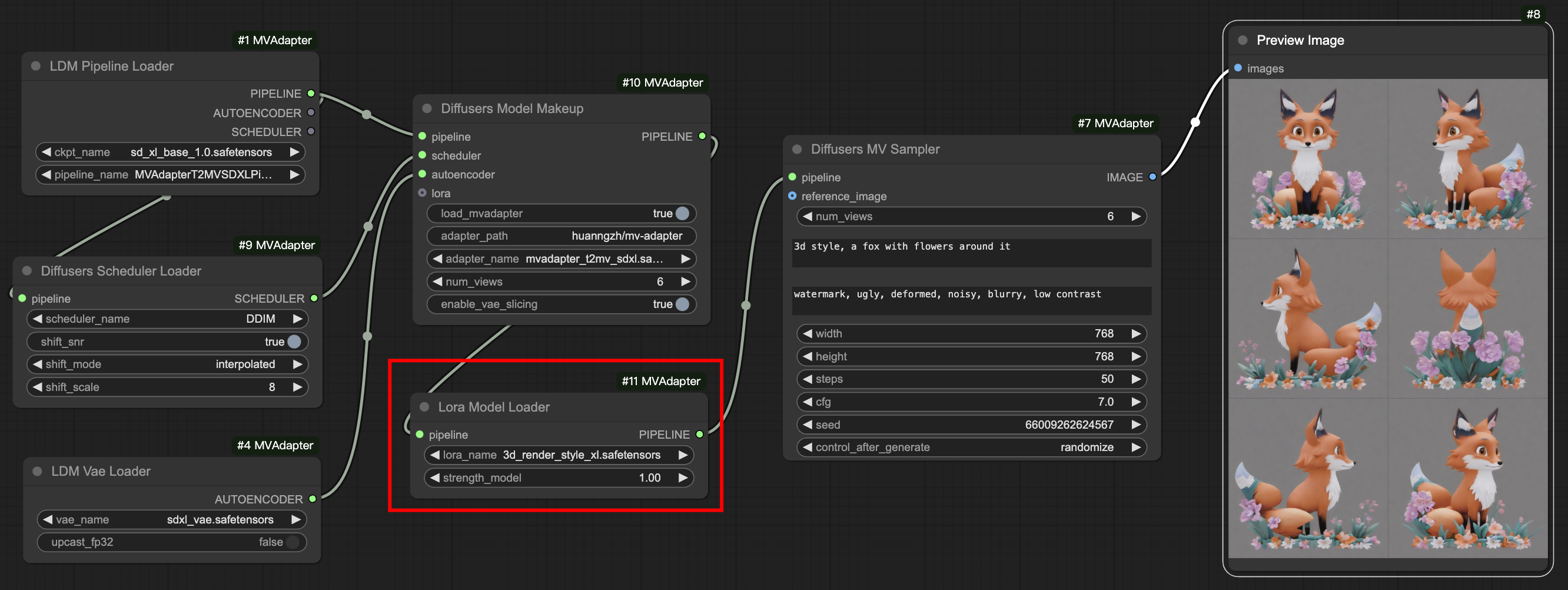
Image to Multiview Generation
Usage: Texture Generation
Prepare Models
Download pre-trained RealESRGAN for upscaling images and LaMa for view in-painting.
Bashwget https://github.com/xinntao/Real-ESRGAN/releases/download/v0.2.1/RealESRGAN_x2plus.pth -O ./checkpoints/RealESRGAN_x2plus.pth wget https://github.com/Sanster/models/releases/download/add_big_lama/big-lama.pt -O ./checkpoints/big-lama.pt
Usage
All in one script
If your computational resources are limited (VRAM<10G), you can pass --variant sd21 to the following command, and it will use the SD2.1-based model to create the texture.
Text-conditioned texture generation:
Bashpython -m scripts.texture_t2tex \ --mesh assets/demo/tg2mv/ac9d4e4f44f34775ad46878ba8fbfd86.glb \ --text "Mater, a rusty and beat-up tow truck from the 2006 Disney/Pixar animated film 'Cars', with a rusty brown exterior, big blue eyes." \ --save_dir outputs --save_name t2tex_sample
Image-conditioned texture generation:
Bashpython -m scripts.texture_i2tex \ --image assets/demo/ig2mv/1ccd5c1563ea4f5fb8152eac59dabd5c.jpeg \ --mesh assets/demo/ig2mv/1ccd5c1563ea4f5fb8152eac59dabd5c.glb \ --save_dir outputs --save_name i2tex_sample \ --remove_bg
It will save the textured model into <save_dir>/<save_name>_shaded.glb.
📊 Dataset
Our training dataset, rendered from Objaverse, can be downloaded from Objaverse-Ortho10View and Objaverse-Rand6View. Our render code can be found at bpyrenderer.
- Objaverse-Ortho10View contains 10 orthographic views of 1024x1024 resolution, and is used as ground truth.
- Objaverse-Rand6View contains 6 randomly distributed views, and is used as reference image conditions.
Please refer to their dataset cards to extract the data files, and organize them into the following structures:
Bashdata ├── texture_ortho10view_easylight_objaverse # Objaverse-Ortho10View │ ├── 00 │ │ ├── 00a4d2b0c4c240289ed456e87d8b9e02 │ ... ├── texture_rand_easylight_objaverse # Objaverse-Rand6View │ ├── 00 │ │ ├── 00a4d2b0c4c240289ed456e87d8b9e02 │ ... ├── objaverse_list_6w.json # objaverse ids └── objaverse_short_captions.json # id to captions
🏋️ Training
The key training code can be found in mvadapter/systems:
MVAdapterTextSDXLSysteminmvadapter_text_sdxl.pyis used for text or text+geometry conditioned multi-view generation.MVAdapterImageSDXLSysteminmvadapter_image_sdxl.pyis used for image or image+geometry conditioned multi-view generation.
The specific training commands are as follows:
For text to 6 view generation:
Bashpython launch.py --config configs/view-guidance/mvadapter_t2mv_sdxl.yaml --train --gpu 0,1,2,3,4,5,6,7
For single image to 6 view generation:
Bashpython launch.py --config configs/view-guidance/mvadapter_i2mv_sdxl.yaml --train --gpu 0,1,2,3,4,5,6,7
For single image to 2/3/4/6 view generation:
Bashpython launch.py --config configs/view-guidance/mvadapter_i2mv_sdxl_aug_quantity.yaml --train --gpu 0,1,2,3,4,5,6,7
For text + geometry to 6 view generation:
Bashpython launch.py --config configs/geometry-guidance/mvadapter_tg2mv_sdxl.yaml --train --gpu 0,1,2,3,4,5,6,7
For single image + geometry to 6 view generation:
Bashpython launch.py --config configs/geometry-guidance/mvadapter_ig2mv_sdxl.yaml --train --gpu 0,1,2,3,4,5,6,7
For single partial image + geometry to 6 view generation (used for texture generation conditioned on occluded image, for example, used in MIDI-3D):
Bashpython launch.py --config configs/geometry-guidance/mvadapter_ig2mv_partialimg_sdxl.yaml --train --gpu 0,1,2,3,4,5,6,7
Citation
@article{huang2024mvadapter,
  title={MV-Adapter: Multi-view Consistent Image Generation Made Easy},
  author={Huang, Zehuan and Guo, Yuanchen and Wang, Haoran and Yi, Ran and Ma, Lizhuang and Cao, Yan-Pei and Sheng, Lu},
  journal={arXiv preprint arXiv:2412.03632},
  year={2024}
}
Contributors
Showing top 1 contributor by commit count.

Related Repositories

Tencent-Hunyuan/Hunyuan3D-2
High-Resolution 3D Assets Generation with Large Scale Hunyuan3D Diffusion Models.

microsoft/TRELLIS
Official repo for paper "Structured 3D Latents for Scalable and Versatile 3D Generation" (CVPR'25 Spotlight).

xxlong0/Wonder3D
Single Image to 3D using Cross-Domain Diffusion for 3D Generation
Tencent-Hunyuan/Hunyuan3D-2.1
From Images to High-Fidelity 3D Assets with Production-Ready PBR Material

deepseek-ai/DreamCraft3D
[ICLR 2024] Official implementation of DreamCraft3D: Hierarchical 3D Generation with Bootstrapped Diffusion Prior
Tencent-Hunyuan/HunyuanWorld-1.0
Generating Immersive, Explorable, and Interactive 3D Worlds from Words or Pixels with Hunyuan3D World Model