

Face specific augm
Face Renderer to perform Domain (Face) Specific Data Augmentation
This page contains an improved version of the face renderer from the paper _I. Masi\*, A. Tran\*, T. Hassner\*, J. Leksut, G. Medioni, "[Do We Really Need to Collect Million of Faces for Effective Face Recognition?](http://www.openu.ac.il/home/hassner/projects/augmented_faces/Masietal2016really.pdf) ", in Proc. of ECCV 2016 [1]_. The project is written primarily in Jupyter Notebook, first published in 2016. Key topics include: 3d-shapes, face-recognition, face-renderer, frontalization, landmark.
Face Renderer
This page contains an improved version of the face renderer from the paper I. Masi*, A. Tran*, T. Hassner*, J. Leksut, G. Medioni, "Do We Really Need to Collect Million of Faces for Effective Face Recognition? ", in Proc. of ECCV 2016 [1].
This release is part of an on-going face recognition project [4]. Please, check this project page for updates and more data.
New! We released an end-to-end pipeline with Python code and deep models for direct 6DoF, 3D head pose estimation and face rendering (e.g., frontalization). The new code removes the need to run external facial landmark detection methods for alignment. Instead, it uses our extremely fast and robust, deep face pose estimator, described in this paper [5].
New! The code now supports adding novel views if you want for other yaw angles or even new title angles. You have to modify the code to incorporate the logic of using the novel views.
For creating the new precomputed rendered views, please see this page
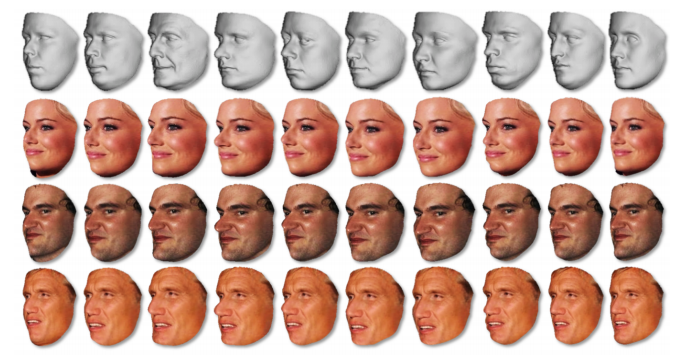
The code has been ported and extended from the re-implementation provided by Douglas Souza of the MATLAB frontalization code [3]
Features
- Highly customizable through configuration file.
- Highly portable few dependencies.
- Render a face with the head and background.
- The code uses pre-computed 3D projection. It is therefore as fast as interpolating a single image!
- The code currently supports rendering of multiple poses {0°, 40°, 75°} and multiple 3D shapes [1...10]
Dependencies
The code has been tested on Linux only. On Linux you can rely on the default version of python, installing all the packages needed from the package manager or on Anaconda Python and install required packages through conda.
Importantly: OpenGL or other 3D rendering libraries are not required to run this code.
Usage
Run it
The renderer can be used from the command line in the following, different ways.
To run it directly on a single image (software will try to detected landmarks using the DLIB facial landmark detector):
bash$ python demo.py <image-path>
To run it on a single image with provided landmarks (landmarks are assumed to correspond to the 68 detected by DLIB):
bash$ python demo.py <image-path> <landmark-path>
The code can be executed even in batch on a list of files as follows:
bash$ python demo.py --batch <file-list-path>
where <file-list-path> is a csv file where each line contains the following:
<subj_key>,<image-path>,<landmark-path> (lines that contain # are skipped)
Example:
<pre> #key,img-path,land-path iacopo_1,img/iacopo1.jpg,landmarks/iacopo1.pts iacopo_2,img/iacopo2.jpg,landmarks/iacopo2.pts iacopo_3,img/iacopo3.jpg,landmarks/iacopo3.pts </pre>Given an image_key <subj_key> the code will create a folder with the subject name subj into its output folder.
So the image_key must be something along the lines of subject_instance. If not, the code will use the entire key as a folder name.
You can run our demo with one of the following:
bash$ python demo.py input/input_1.jpg $ python demo.py input/input_1.jpg input/input_1.pts $ python demo.py --batch input/input.list
The result is saved in the provided output folder.
Customize it
The renderer reads the configuration file that is specified by a config.ini file.
The following options are available:
ini[general] ## Activate this to make rendered images suitable for ResNet-101 ## for Face Recognition available here www.openu.ac.il/home/hassner/projects/augmented_faces/ ## Note: This will automatically disable some of the other options specified here ## Moreover, you may have to code yourself in-plane alignment which is not provided here resnetON = no ## Activate plotting plotON = no ## Resize image to be fed into the CNN resizeCNN = yes ## ConvNet imag size (used with resizeCNN) cnnSize = 160 ## Activate saving of rendered images saveON = yes ## Number of total subjects for the 3D models nTotSub = 10 [renderer] ## Activate rendering of the background background = yes ## Activate soft-symmetry symmetry = yes ## Parameters to get a bit far from the face when sampling the background scaleFaceX = 0.5 ## Activate Near View Rendering [2] nearView = yes ## (used if symmetry is applied) [symmetry] ## If we want to flip the background in symmetry or no flipBackground = no
A few explanations on some not-so-obvious options:
resnetONif activated, set some parameters to produce rendered images that best fit ResNet101 for Face Recognition. Note you have still to code in-plane alignment by yourself. You can use the produced images withresnetON=yesas reference coordinate systems to do in-plane alignment.nTotSubcontrols how many generic 3D shapes should be used to render the faces. If 10 is specified, all ten 3D generic shapes provide with this distribution are used. If 1, only the first generic shape is used, if 2, the first two are used, and so forth. Note that you need to edit the code if you want to render e.g. only subject 7.backgroundif yes the code will try to render the full background (head+background). Otherwise only the face region of the head is renderer and the background is left black.scaleFaceXthis parameter control how much you want to sample the background when you render a profile faces and the background falls outside of the image. Basically it controls the distance of the projected points on the X-axis to the face part; If you change this param, you can control this behavior.nearViewif activated, render a faces with a similar strategy of [2]: avoid frontalizing the faces which are near profile. Otherwise render faces to all poses {0,40,75}.flipBackgroundDetermines if the background is flipped or not when applying symmetry (you will filp the head and the background as well).
Sample Results
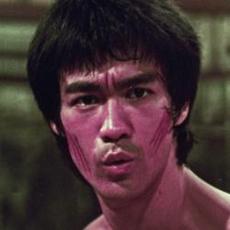
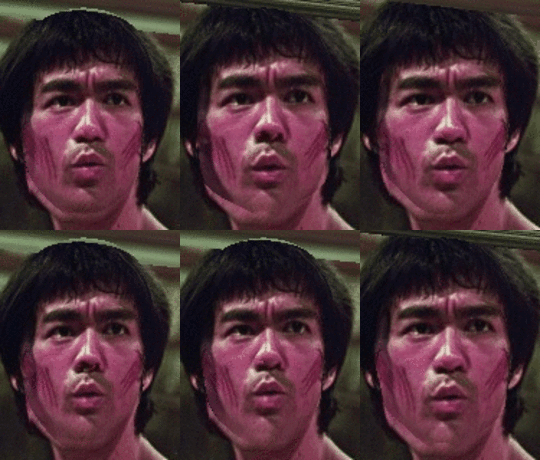
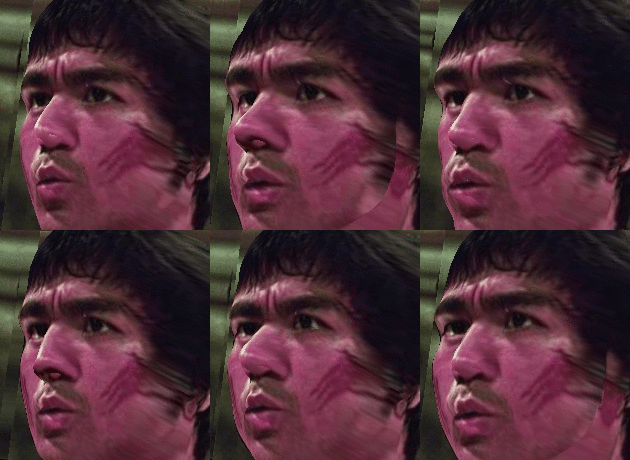
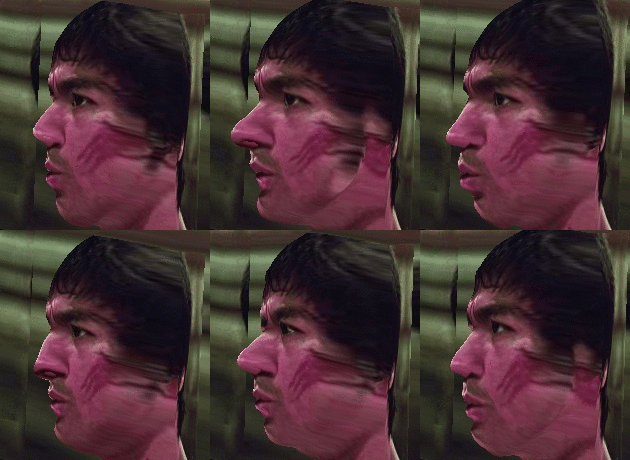
<sub>Respectively: Input image; then frontalization (0) with multi-shapes; render to (40) with multi-shapes; render to (75) with multi-shapes.</sub>
Current Limitations
The renderer currently assumes reasonable landmark detector responses. It will fail if landmarks are not accurately localized. This is partly mitigated by rendering faces to a local pose and exploiting only one side of the face, similarly to [2].
Citation
Please cite our paper with the following bibtex if you use our face renderer:
latex@inproceedings{masi16dowe, title={Do {W}e {R}eally {N}eed to {C}ollect {M}illions of {F}aces for {E}ffective {F}ace {R}ecognition?}, booktitle = {European Conference on Computer Vision}, author={Iacopo Masi and Anh Tran and Tal Hassner and Jatuporn Toy Leksut and G\'{e}rard Medioni}, year={2016}, }
References
[1] I. Masi*, A. Tran*, T. Hassner*, J. Leksut, G. Medioni, "Do We Really Need to Collect Million of Faces for Effective Face Recognition? ", ECCV 2016,
* denotes equal authorship
[2] I. Masi, S. Rawls, G. Medioni, P. Natarajan "Pose-Aware Face Recognition in the Wild", CVPR 2016
[3] T. Hassner, S. Harel, E. Paz and R. Enbar "Effective Face Frontalization in Unconstrained Images", CVPR 2015
[4] Brendan F. Klare, Ben Klein, Emma Taborsky, Austin Blanton, Jordan Cheney, Kristen Allen, Patrick Grother, Alan Mah, Anil K. Jain, "Pushing the Frontiers of Unconstrained Face Detection and Recognition: IARPA Janus Benchmark A", CVPR 2015
[5] F. Chan, A. Tran, T. Hassner, I. Masi, R. Nevatia, G. Medioni, "FacePoseNet: Making a Case for Landmark-Free Face Alignment," ICCVw, 2017
Changelog
- September 2016, First Release
Disclaimer
The SOFTWARE PACKAGE provided in this page is provided "as is", without any guarantee made as to its suitability or fitness for any particular use. It may contain bugs, so use of this tool is at your own risk. We take no responsibility for any damage of any sort that may unintentionally be caused through its use.
Contacts
If you have any questions, drop an email to iacopo.masi@usc.edu and hassner@isi.edu or leave a message below with GitHub (log-in is needed).
Contributors
Showing top 2 contributors by commit count.


Related Repositories

rundiwu/DeepCAD
code for our ICCV 2021 paper "DeepCAD: A Deep Generative Network for Computer-Aided Design Models"

HavenFeng/photometric_optimization
Photometric optimization code for creating the FLAME texture space and other applications

iMoonLab/MeshNet
MeshNet: Mesh Neural Network for 3D Shape Representation (AAAI 2019)

subeeshvasu/Awsome_Deep_Geometry_Learning
A list of resources about deep learning solutions on 3D shape processing

xiumingzhang/GenRe-ShapeHD
Code and Data Release for GenRe (NeurIPS 2018) and ShapeHD (ECCV 2018)

collidingScopes/shape-creator-tutorial
Create and control 3D shapes using hand gestures in real-time. Built with mediapipe computer vision and threejs