

Parastore
Draw a store, generate LLM personas, and watch them shop — an isometric 3D sandbox for synthetic-consumer experiments.
Build, simulate, and optimize retail spaces with synthetic consumers. The project is written primarily in TypeScript, distributed under the MIT License license, first published in 2026. Key topics include: agent-simulation, fastapi, isometric, litellm, llm.
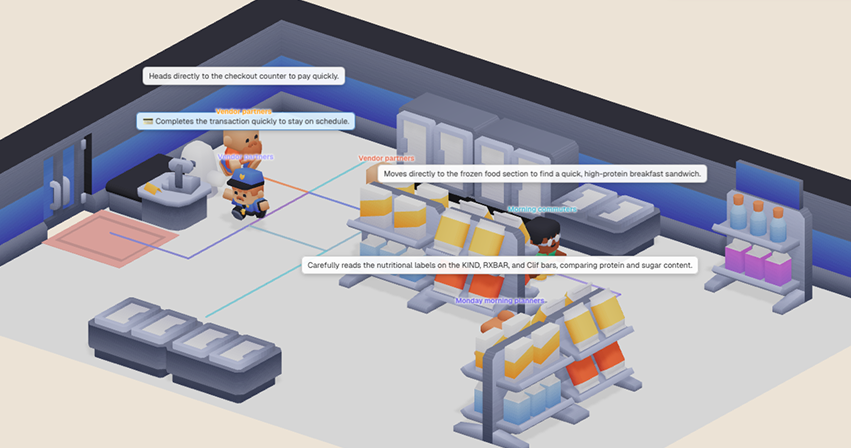
Build, simulate, and optimize retail spaces with synthetic consumers.
<br>
Overview
intellicia builds tooling around synthetic
consumers — virtual personas generated by LLMs that we run surveys against
in place of (or alongside) real respondents. Parastore is an experiment in
extending that idea from surveys to physical retail: if we can simulate
how a synthetic shopper answers a survey question, can we also simulate how
they walk through a store, what they pick up, and what they end up paying
for?
This repository is a prototype, not a production forecasting tool. A
rigorous offline-sales model would need POS history, real foot-traffic data,
SKU-level taxonomies, weather/seasonality signals, queueing dynamics, and a
lot more than what is wired up here. Parastore is closer to a sketch — a
"what if we tried it this way?" — than a finished product. We are open
sourcing it because the sketch itself might be useful: as a starting point
for your own experiments, as a reference for how to wire up an LLM-driven
agent simulation end-to-end, or simply as something fun to play with.
Screenshots
<div align="center"> <table> <tr> <td width="50%"><img src="./.github/assets/screenshot_1.png"></td> <td width="50%"><img src="./.github/assets/screenshot_2.png"></td> </tr> <tr> <td width="50%"><img src="./.github/assets/screenshot_3.png"></td> <td width="50%"><img src="./.github/assets/screenshot_4.png"></td> </tr> </table> </div>Use Cases
Parastore goes beyond simple 3D visualization. By combining LLM-driven synthetic consumers with physical space simulation, it allows you to test retail strategies in a risk-free environment.
- Store Layout & Circulation A/B Testing: Experiment with different aisle structures, entry points, and customer pathways to optimize traffic flow and eliminate dead zones.
- Product Placement & Conversion Testing: Simulate how moving high-margin items or changing rack categories impacts customer engagement and overall purchase conversion rates within the store environment.
- Acquisition & Renewal Valuation: Rapidly prototype and evaluate potential store layouts for new acquisitions or upcoming remodels before committing physical resources.
Simulation Accuracy
<div align="center"> <img src="./.github/assets/predicted_vs_actual_sales.png" width="80%"> </div>To evaluate performance, this chart compares actual sales history from a physical convenience store with synthetic consumer simulations driven by Parastore. The analysis covers 500 real customers and 109 different products.
| Metric | Value | Scope |
|---|---|---|
| Spearman Correlation | 0.955 | By category |
| JS-Similarity | 0.802 | Across all 109 products |
| NDCG@all | 0.868 | Across all 109 products |
Note: These results were generated via Intellicia's own synthetic consumers, not the synthesis method published in this repo.
Demo video
<div align="center">▶️ Click to Watch the Full Demo Video:
<a href="https://youtu.be/q_96OIBJTBQ?si=0gMDBfdbokAwhXXo">
<img src="./.github/assets/video_thumbnail.png" width="80%">
</a>
Tech stack
- Backend: Python 3.13, FastAPI, Pydantic, LiteLLM, Instructor, pathfinding, pandas, openpyxl.
- Frontend: React 19, Vite, TypeScript, React Three Fiber (Three.js), TanStack Router/Query, Zustand, Tailwind v4, shadcn/ui, Recharts, ExcelJS.
Requirements
- Python 3.13+ with uv
- Node 20+ with pnpm 10.33.0 (pinned in
frontend/package.json) - An LLM provider API key. The default model is
gemini/gemini-3.1-pro-preview
via LiteLLM, so aGEMINI_API_KEYworks out of the box. To switch
providers, editbackend/src/store_emulator/application/config.pyand
supply the matching*_API_KEY.
Quick start
bashcp backend/.env.example backend/.env # add your LLM API key — DO NOT commit real keys ./scripts/dev.sh
scripts/dev.sh runs backend (uvicorn on :8000) and frontend (vite on
:5173) together. Ctrl-C stops both. Open http://localhost:5173 in a
browser.
Running each side separately
Backend
bashcd backend uv sync uv run uvicorn store_emulator.server.main:app --reload
Health check: curl http://localhost:8000/api/health. The interactive
OpenAPI docs are at http://localhost:8000/docs.
Frontend
bashcd frontend pnpm install pnpm dev
Override the API URL with VITE_API_URL=http://my-host:port pnpm dev.
Build for production
bashcd frontend && pnpm build # backend: no build step — run uvicorn behind a process manager
Usage walkthrough
The "golden path" through the app, end to end:
- Create a project. From the home screen, start a new project and supply
a real-world store address plus a one-line customer-profile description
(e.g. "a small convenience store in a residential neighborhood"). The
address grounds the LLM's trade-area analysis. - Generate personas. On the second page of the create-store wizard,
trigger the persona pipeline. The LLM analyzes the trade area, builds a
daily traffic profile per weekday, and produces individual personas for
each hour of operation. Generation is batched and parallelized; expect
this to take a minute or two depending on store size and provider latency. - Draw the store layout. Once the project is created, use the isometric
grid editor to place shelves, fridges, counters, walls, and entry points.
Assign product categories to each rack. - Run the simulation. Hit play. Personas walk in on a wall-clock
timeline; the 3D view animates their paths in real time. Use the playback
controls to scrub, pause, or change speed. - Inspect results. Watch the live dashboard for aggregate metrics
(visitor count, conversion rate, dwell time, per-rack engagement).
Running parastore with the help of an AI assistant (Claude Code,
Cursor, …)? Point it atUSAGE.md. That guide explains
which inputs the simulation hinges on, the LLM call count for a given
persona size, and the silent-failure modes worth catching before
triggering a run.
Limitations and non-goals
This is a prototype. To set expectations honestly:
- No ground-truth calibration. Outputs are LLM-grounded plausibility, not
validated forecasts. Treat the numbers as illustrative, not predictive. - LLM cost and latency are real. Generating a week of personas for a
modest store can be hundreds of LLM calls. Plan your provider budget
accordingly. Persona generation is capped at 100 per day by default
(PERSONA_DAILY_CAPenv var) to keep call counts manageable — the goal
of the simulator is to compare layout and product-placement variants,
not to reproduce a real store's full footfall, so a smaller sample is
usually enough. Raise the cap if you want denser runs and are willing
to pay the extra LLM cost. - Single store, single configuration. No multi-store fleet view, no
longitudinal dynamics across weeks, no holiday/seasonality modelling beyond
what the LLM infers from the address. - Product taxonomy is LLM-derived. There is no real SKU master, pricing
feed, or inventory model — categories and prices come from the persona
pipeline. - No crowd dynamics. Pathfinding is per-customer; queueing, congestion,
and customer-customer interactions are not modeled. - APIs and data shapes are not stable. Expect breaking changes between
commits.
License
MIT — see LICENSE. Dependencies retain their own licenses; see
LICENSES-BACKEND.md and
LICENSES-FRONTEND.txt.
In short: take it, modify it, ship it, sell it — just keep the copyright
notice. No warranty.
Credits
3D assets in frontend/public/assets/ are from Kenney
and are licensed CC0 1.0 (public domain). No attribution is required, but
huge thanks to Kenney for making these assets freely available — they are
the reason this project looks the way it does.
assets/market/— Mini Marketassets/characters/— Mini Charactersassets/ghost/— Graveyard Kit
Contributing
Parastore was built as a side project alongside our main work at intellicia,
and we're publishing it as a snapshot rather than as an actively staffed
open-source project. Issues and PRs are still welcome — we read them and
will engage when we can — but please understand that responses are
best-effort and may take a while, and we may decline changes that don't fit
the direction we use it for internally. If you have a bigger idea in mind,
forks are very much encouraged.
Contributors
Showing top 1 contributor by commit count.
