

Yolov4 triton tensorrt
This repository deploys YOLOv4 as an optimized TensorRT engine to Triton Inference Server
This repository shows how to deploy YOLOv4 as an optimized [TensorRT](https://github.com/NVIDIA/tensorrt) engine to [Triton Inference Server](https://github.com/NVIDIA/triton-inference-server). The project is written primarily in C++, distributed under the Other license, first published in 2020. Key topics include: deep-learning, docker, object-detection, tensorrt, triton-inference-server.
YOLOv4 on Triton Inference Server with TensorRT


This repository shows how to deploy YOLOv4 as an optimized TensorRT engine to Triton Inference Server.
Triton Inference Server takes care of model deployment with many out-of-the-box benefits, like a GRPC and HTTP interface, automatic scheduling on multiple GPUs, shared memory (even on GPU), health metrics and memory resource management.
TensorRT will automatically optimize throughput and latency of our model by fusing layers and chosing the fastest layer implementations for our specific hardware. We will use the TensorRT API to generate the network from scratch and add all non-supported layers as a plugin.
Build TensorRT engine
There are no dependencies needed to run this code, except a working docker environment with GPU support. We will run all compilation inside the TensorRT NGC container to avoid having to install TensorRT natively.
Run the following to get a running TensorRT container with our repo code:
bashcd yourworkingdirectoryhere git clone git@github.com:isarsoft/yolov4-triton-tensorrt.git docker run --gpus all -it --rm -v $(pwd)/yolov4-triton-tensorrt:/yolov4-triton-tensorrt nvcr.io/nvidia/tensorrt:21.10-py3
Docker will download the TensorRT container. You need to select the version (in this case 21.10) according to the version of Triton that you want to use later to ensure the TensorRT versions match. Matching NGC version tags use the same TensorRT version.
Inside the container run the following to compile our code:
bashcd /yolov4-triton-tensorrt mkdir build cd build cmake .. make
This will generate two files (liblayerplugin.so and main). The library contains all unsupported TensorRT layers and the executable will build us an optimized engine in a second.
Download the weights for this network from Google Drive. Instructions on how to generate this weight file from the original darknet config and weights can be found here. Place the weight file in the same folder as the executable main. Then run the following to generate a serialized TensorRT engine optimized for your GPU:
bash./main
This will generate a file called yolov4.engine, which is our serialized TensorRT engine. Together with liblayerplugin.so we can now deploy to Triton Inference Server.
Before we do this we can test the engine with standalone TensorRT by running:
bashcd /workspace/tensorrt/bin ./trtexec --loadEngine=/yolov4-triton-tensorrt/build/yolov4.engine --plugins=/yolov4-triton-tensorrt/build/liblayerplugin.so
(...)
[I] Starting inference threads
[I] Warmup completed 1 queries over 200 ms*
[I] Timing trace has 204 queries over 3.00185 s
[I] Trace averages of 10 runs:
[I] Average on 10 runs - GPU latency: 7.8773 ms* - Host latency: 9.45764 ms* (end to end 9.48074 ms*, enqueue 1.98274 ms*
[I] Average on 10 runs - GPU latency: 7.73803 ms* - Host latency: 9.3154 ms* (end to end 9.33945 ms*, enqueue 2.02845 ms*
(...)
[I] GPU Compute
[I] min: 7.01465 ms*
[I] max: 9.11838 ms*
[I] mean: 7.79672 ms*
Deploy to Triton Inference Server
We need to create our model repository file structure first:
bash# Create model repository cd yourworkingdirectoryhere mkdir -p triton-deploy/models/yolov4/1/ mkdir triton-deploy/plugins # Copy engine and plugins cp yolov4-triton-tensorrt/build/yolov4.engine triton-deploy/models/yolov4/1/model.plan cp yolov4-triton-tensorrt/build/liblayerplugin.so triton-deploy/plugins/
Now we can start Triton with this model repository:
bashdocker run --gpus all --rm --shm-size=1g --ipc=host --ulimit memlock=-1 --ulimit stack=67108864 -p8000:8000 -p8001:8001 -p8002:8002 -v$(pwd)/triton-deploy/models:/models -v$(pwd)/triton-deploy/plugins:/plugins --env LD_PRELOAD=/plugins/liblayerplugin.so nvcr.io/nvidia/tritonserver:21.10-py3 tritonserver --model-repository=/models --strict-model-config=false --grpc-infer-allocation-pool-size=16 --log-verbose 1
This should give us a running Triton instance with our yolov4 model loaded. You can check out what to do next in the Triton Documentation.
How to run model in your code
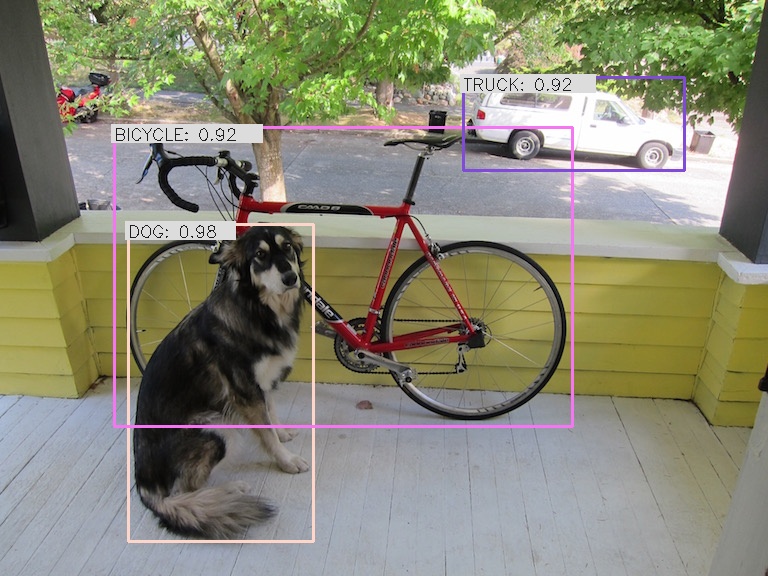
This repo contains a python client. More information here.
bashpython client.py -o data/dog_result.jpg image data/dog.jpg
Benchmark
To benchmark the performance of the model, we can run Tritons Performance Client.
To run the perf_client, install the Triton Python SDK (tritonclient), which ships with perf_client as a preinstalled binary.
bashsudo apt update sudo apt install libb64-dev pip install nvidia-pyindex pip install tritonclient[all] # Example perf_client -m yolov4 -u 127.0.0.1:8001 -i grpc --shared-memory system --concurrency-range 4
Alternatively you can get the Triton Client SDK docker container.
bashdocker run -it --ipc=host --net=host nvcr.io/nvidia/tritonserver:21.10-py3-sdk /bin/bash cd install/bin ./perf_client (...argumentshere) # Example ./perf_client -m yolov4 -u 127.0.0.1:8001 -i grpc --shared-memory system --concurrency-range 4
The following benchmarks were taken on a system with 2 x NVIDIA 2080 Ti GPUs and an AMD Ryzen 9 3950X 16 Core CPU.
Concurrency is the number of concurrent clients invoking inference on the Triton server via grpc.
Results are total frames per second (FPS) of all clients combined and average latency in milliseconds for every single respective client.
2x NVIDIA GeForce RTX 2080 Ti
| concurrency | FP32 B=1 | FP32 B=4 | FP32 B=8 | FP16 B=1 | FP16 B=4 | FP16 B=8 |
|---|---|---|---|---|---|---|
| 1 | 62.8 FPS 15.9 ms | 73.6 FPS 54.1 ms | 78.4 FPS 103 ms | 138.4 FPS 7.22 ms | 219.2 FPS 18.2 ms | 235.2 FPS 33.9 ms |
| 2 | 118.8 FPS 16.8 ms | 143.2 FPS 55.9 ms | 152.0 FPS 104 ms | 286.6 FPS 6.98 ms | 438.4 FPS 18.2 ms | 484.8 FPS 33.0 ms |
| 4 | 127.4 FPS 31.4 ms | 146.4 FPS 109 ms | 158.4 FPS 202 ms | 323.6 FPS 12.3 ms | 479.2 FPS 33.3 ms | 536.0 FPS 59.6 ms |
| 8 | 127.6 FPS 62.7 ms | 144.8 FPS 220 ms | 156.8 FPS 405 ms | 323.2 FPS 24.7 ms | 475.2 FPS 67.3 ms | 540.8 FPS 118 ms |
1x NVIDIA GeForce RTX 2080 Ti (by setting --gpus 1)
| concurrency | FP32, B=1 | FP32, B=4 | FP32, B=8 | FP16, B=1 | FP16, B=4 | FP16, B=8 |
|---|---|---|---|---|---|---|
| 1 | 57.6 FPS 17.3 ms | 68.0 FPS 58.5 ms | 72.0 FPS 111 ms | 125.4 FPS 7.96 ms | 189.6 FPS 21.0 ms | 208.0 FPS 38.3 ms |
| 2 | 59.2 FPS 33.7 ms | 69.6 FPS 114 ms | 73.6 FPS 217 ms | 137.6 FPS 14.5 ms | 207.2 FPS 38.5 ms | 228.8 FPS 70.3 ms |
| 4 | 58.6 FPS 68.1 ms | 69.6 FPS 229 ms | 72.0 FPS 436 ms | 137.0 FPS 29.2 ms | 206.4 FPS 77.3 ms | 227.2 FPS 141 ms |
| 8 | 58.4 FPS 136 ms | 68.8 FPS 460 ms | 72.0 FPS 874 ms | 136.8 FPS 58.4 ms | 206.4 FPS 154 ms | 227.2 FPS 282 ms |
Contributions
- olibartfast with a c++ client example
- t-wata with shared memory support for the python client
Tasks in this repo
- Layer plugin working with trtexec and Triton
- FP16 optimization
- Remove MISH plugin and replace by standard activation layers (see 3b in this blog for the idea)
- INT8 optimization
- General optimizations (using this darknet->onnx->tensorrt export with --best flag gives 572 FPS / (batchsize 8) and 392 FPS / (batchsize 1) without full INT8 calibration)
- YOLOv4 tiny (example is here)
- YOLOv5
- Add Triton client code in python
- Add image pre and postprocessing code
- Add mAP benchmark
- Add BatchedNms* to move Nms* to GPU
- Add dynamic batch size support
Acknowledgments
The initial codebase is from Wang Xinyu in his TensorRTx repo. He had the idea to implement YOLO using only the TensorRT API and its very nice he shares this code. The yolo layer plugin has been continously improved by jkjung-avt in his repo tensorrt_demos. This repo has the purpose to deploy this engine and plugin to Triton and to add additional perfomance improvements to the TensorRT engine.
Contributors
Showing top 3 contributors by commit count.


Related Repositories

tensorflow/tensorflow
An Open Source Machine Learning Framework for Everyone

AUTOMATIC1111/stable-diffusion-webui
Stable Diffusion web UI

huggingface/transformers
🤗 Transformers: the model-definition framework for state-of-the-art machine learning models in text, vision, audio, and multimodal models, for both inference and training.

pytorch/pytorch
Tensors and Dynamic neural networks in Python with strong GPU acceleration

rasbt/LLMs-from-scratch
Implement a ChatGPT-like LLM in PyTorch from scratch, step by step

opencv/opencv
Open Source Computer Vision Library