

Ml dsa
NIST FIPS 204 (ML-DSA) standard compliant, C++20, fully `constexpr`, header-only library
NIST FIPS 204 (ML-DSA) standard compliant, C++20, fully `constexpr`, header-only library implementation. FIPS 204 compliance is assured by testing this implementation against NIST ACVP Known Answer Tests and tons of property based tests. We also fuzz the library and its internal components with LLVM libFuzzer to get an extra level of assurance. Fuzzing is still work in progress. The project is written primarily in C++, distributed under the MIT License license, first published in 2022. Key topics include: constexpr-all-the-things, crystals-dilithium, digital-signatures, ml-dsa, nist-fips-204.
ML-DSA (formerly known as Dilithium)
NIST FIPS 204 (ML-DSA) standard compliant, C++20, fully constexpr, header-only library implementation.
FIPS 204 compliance is assured by testing this implementation against NIST ACVP Known Answer Tests and tons of property based tests. We also fuzz the library and its internal components with LLVM libFuzzer to get an extra level of assurance. Fuzzing is still work in progress.
[!NOTE]
constexpr? Yes, you can compile-time execute keygen, sign and verify.
[!CAUTION]
This ML-DSA implementation is conformant with ML-DSA standard https://doi.org/10.6028/NIST.FIPS.204 and I also try to make it timing leakage free, but be informed that this implementation is not yet audited. If you consider using it in production, please be careful !
Quick Start
Add ml-dsa to your CMake project via FetchContent:
cmakeinclude(FetchContent) FetchContent_Declare( ml-dsa GIT_REPOSITORY https://github.com/itzmeanjan/ml-dsa.git GIT_TAG master GIT_SHALLOW TRUE ) FetchContent_MakeAvailable(ml-dsa) target_link_libraries(my_app PRIVATE ml-dsa)
Generate a keypair, sign a message, and verify the signature:
cpp#include "ml_dsa/ml_dsa_65.hpp" #include "randomshake/randomshake.hpp" // Generate a keypair std::array<uint8_t, ml_dsa_65::KeygenSeedByteLen> seed{}; std::array<uint8_t, ml_dsa_65::PubKeyByteLen> pubkey{}; std::array<uint8_t, ml_dsa_65::SecKeyByteLen> seckey{}; randomshake::randomshake_t csprng; csprng.generate(seed); ml_dsa_65::keygen(seed, pubkey, seckey); // Sign a message (hedged mode) std::array<uint8_t, ml_dsa_65::SigningSeedByteLen> rnd{}; std::array<uint8_t, ml_dsa_65::SigByteLen> sig{}; csprng.generate(rnd); std::vector<uint8_t> msg = { /* your message bytes */ }; const bool signed_ok = ml_dsa_65::sign(rnd, seckey, msg, {}, sig); // Verify const bool valid = ml_dsa_65::verify(pubkey, msg, {}, sig);
See examples/ for a complete standalone CMake project.
Motivation
ML-DSA has been standardized by NIST as post-quantum secure digital signature algorithm (DSA), which can be used for verifying the authenticity of digital messages, giving the recipient confidence that the message indeed came from the known sender.
ML-DSA's security is based on the hardness of finding short vectors in module (i.e., structured) lattices. It is built on the "Fiat-Shamir with Aborts" paradigm, where the signing procedure might abort and restart multiple times based on the message, context string and randomness.
| Algorithm | Input | Output | What does it do ? |
|---|---|---|---|
| KeyGen | 32 -bytes seed | Public and Secret Key | 32 -bytes seed is used for deterministically deriving a ML-DSA keypair. |
| Sign | 32 -bytes seed, secret key, message, context | Signature | Signs a message with an optional context string (max 255 -bytes). Hedged (randomized) signing is default and recommended; for deterministic signing, fill seed with zero bytes. |
| Verify | Public key, message, context, signature | Boolean | Verifies a signature against a message and optional context. |
| HashSign | 32 -bytes seed, secret key, message, context | Signature | Pre-hash mode signing (FIPS 204 §5.4). Pre-hashes the message with a SHA3 hash function before signing. Same hedged/deterministic modes as Sign. |
| HashVerify | Public key, message, context, signature | Boolean | Pre-hash mode verification (FIPS 204 §5.5). Verifies a signature against the pre-hashed representation of a message. |
| Sign_internal | 32 -bytes seed, secret key, M' | Signature | FIPS 204 Algorithm 7. Signs using the encoded message M' directly (bypassing context encoding). |
| Verify_internal | Public key, M', signature | Boolean | FIPS 204 Algorithm 8. Verifies using the encoded message M' directly. |
| Sign_core | 32 -bytes seed, secret key, 64 -bytes mu | Signature | Core signing operation. Accepts the 64 -bytes message representative mu directly. Caller is responsible for computing mu. |
| Verify_core | Public key, 64 -bytes mu, signature | Boolean | Core verification operation. Accepts the 64 -bytes message representative mu directly. |
<!-- -->[!TIP]
API tiers: Most users should use the standard API --keygen,sign,verify,hash_sign,hash_verify. The advanced API (sign_internal,verify_internal,sign_core,verify_core) is for implementors who has direct access to the encoded message M' or the 64-byte message representative mu.
<!-- -->[!NOTE]
Return values:sign()andhash_sign()returnfalseonly if the context string exceeds 255 bytes. The internal rejection-sampling loop runs until a valid signature is produced -- it does not abort to the caller. In normal usage with valid inputs, signing always succeeds.verify()andhash_verify()returnfalseif the context exceeds 255 bytes, or if the signature is invalid (malformed hint bits, norm check failure, or commitment mismatch).
[!NOTE]
Context strings (ctx): The context parameter is a domain-separation mechanism (FIPS 204 §5.2) that allows the same key to be safely used across different application protocols without cross-protocol attacks. The context used at signing time must match at verification time. Pass an empty span ({}) if you don't need domain separation. Maximum length: 255 bytes.
Here I'm maintaining ml-dsa - a C++20 header-only fully constexpr library, implementing ML-DSA, supporting ML-DSA-{44, 65, 87} parameter sets, as defined in table 1 of ML-DSA standard. It's easy to use, see usage.
| ML-DSA-65 Algorithm | Time taken on "12th Gen Intel(R) Core(TM) i7-1260P" (x86_64) | Time taken on "AWS EC2 Instance c8g.large, featuring ARM Neoverse-V2" (aarch64) |
|---|---|---|
| keygen | 82.1us | 126.2us |
| sign | 587us | 879us |
| verify | 86.3us | 134.4us |
<!-- -->[!NOTE]
All numbers in the table above represent the median time required to execute a specific algorithm, except for signing. In the case of signing, the number represents the minimum time required to sign a 32 -bytes message. Find more details in benchmarking.
[!NOTE]
Find ML-DSA standard @ https://doi.org/10.6028/NIST.FIPS.204 - this is the document that I followed when implementing ML-DSA. I suggest you go through the specification to get an in-depth understanding of the scheme.
Security & Robustness
This implementation is built with a "Security-First" approach, incorporating programming language features and multiple tools for enforcement:
- No Raw Pointers: Completely avoids dealing with raw pointers. Everything is wrapped in statically-sized
std::span, which provides much better type safety and compile-time error reporting as the exact byte lengths for all buffers (seeds, keys, signatures) are known for each parameter set. - Strict Build Guards: Compiled with
-Werrorand comprehensive warning flags (-Wall -Wextra -Wpedantic -Wshadow -Wconversion -Wformat=2 -Wcast-qual -Wold-style-cast -Wundef). Any warnings triggered during compilation are treated as fatal errors. - Memory Safety: Verified using AddressSanitizer (ASan) in both release and debug build configuration.
- Undefined Behavior: Hardened with UndefinedBehaviorSanitizer (UBSan), configured to treat any undefined behavior as a fatal, non-recoverable error.
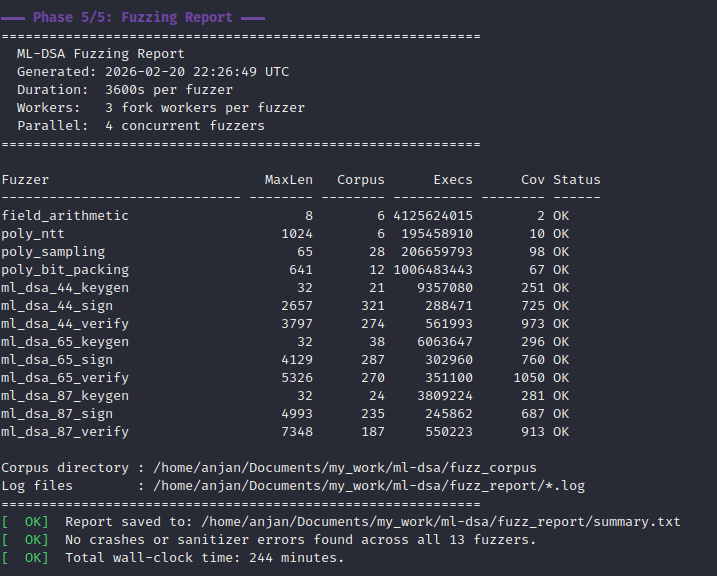
- Continuous Fuzzing: Includes a suite of 13 specialized fuzzer binaries (9 signature variants + 4 internal component units).
- Static Analysis: Integrated with
clang-tidyusing an extensive check suite (bugprone-*,cert-*,clang-analyzer-*,concurrency-*,cppcoreguidelines-*,hicpp-*,misc-*,modernize-*,performance-*,portability-*,readability-*) with all warnings treated as errors. - CI-Verified: Automatically tested on every push across a matrix of operating systems (Linux, macOS) and compilers (
clang++,g++).
Prerequisites
- A C++ compiler such as
clang++/g++, with support for compiling C++20 programs. - CMake 3.28 or later.
- For testing,
google-testis required. It can be installed globally or fetched automatically by setting-DML_DSA_FETCH_DEPS=ON. - For benchmarking,
google-benchmarkis required. It can be installed globally or fetched automatically by setting-DML_DSA_FETCH_DEPS=ON. - For static analysis, you'll need
clang-tidy. - For code formatting, you'll need
clang-format.
Automatically Fetched Dependencies
The following libraries are automatically fetched by CMake at configure time -- no manual installation needed:
sha3: SHA3 suite of hash functions, from FIPS 202, used internally by ML-DSA.randomshake: A CSPRNG built on (Turbo)SHAKE256 XOF, seeded from OS entropy. Used in tests, benchmarks and examples for generating keygen seeds and signing randomness. You may use any cryptographically secure pseudo-random source to fill the seed/rnd arrays; the library does not mandate a specific RNG.
[!NOTE]
If you are on a machine running GNU/Linux kernel and you want to obtain CPU cycle count for ML-DSA routines, you should consider buildinggoogle-benchmarklibrary withlibPFMsupport, following https://gist.github.com/itzmeanjan/05dc3e946f635d00c5e0b21aae6203a7, a step-by-step guide. Find more about libPFM @ https://perfmon2.sourceforge.net. Whenlibpfmis installed, CMake will automatically detect and link it.
Building
For testing functional correctness of this implementation and conformance with ML-DSA standard, you have to run following command(s).
[!NOTE]
All Known Answer Test (KAT) files live inside kats directory. KAT files from official reference implementation, are generated by following (reproducible) steps, described in https://gist.github.com/itzmeanjan/d14afc3866b82119221682f0f3c9822d. ACVP KATs can be synced by buildingsync_acvp_katstarget.
CMake Options
| Option | Description | Default |
|---|---|---|
ML_DSA_BUILD_TESTS | Build test suite | OFF |
ML_DSA_BUILD_BENCHMARKS | Build benchmarks | OFF |
ML_DSA_BUILD_EXAMPLES | Build examples | OFF |
ML_DSA_BUILD_FUZZERS | Build fuzzers (requires Clang) | OFF |
ML_DSA_FETCH_DEPS | Fetch missing dependencies (Google Test, Google Benchmark) | OFF |
ML_DSA_ASAN | Enable AddressSanitizer | OFF |
ML_DSA_UBSAN | Enable UndefinedBehaviorSanitizer | OFF |
ML_DSA_NATIVE_OPT | Enable -march=native (not safe for cross-compilation) | OFF |
ML_DSA_ENABLE_LTO | Enable Interprocedural Optimization (LTO) | ON |
[!TIP]
If you are building for the same machine that will run the code (i.e., cross-compilation is not the goal), you should enable-DML_DSA_NATIVE_OPT=ONto allow the compiler to unroll loops and auto-vectorize, using processor-specific optimizations (like AVX2, NEON, etc.) for maximum performance.
Testing
To build and run the tests, use the following CMake commands:
bashcmake -B build -DCMAKE_BUILD_TYPE=Release -DML_DSA_BUILD_TESTS=ON -DML_DSA_FETCH_DEPS=ON cmake --build build -j ctest --test-dir build --output-on-failure -j
To run tests with sanitizers, reconfigure the build with the desired sanitizer option:
bash# With AddressSanitizer, in Release mode cmake -B build -DCMAKE_BUILD_TYPE=Release -DML_DSA_BUILD_TESTS=ON -DML_DSA_FETCH_DEPS=ON -DML_DSA_ASAN=ON cmake --build build -j && ctest --test-dir build --output-on-failure -j # With UndefinedBehaviorSanitizer, in Release mode cmake -B build -DCMAKE_BUILD_TYPE=Release -DML_DSA_BUILD_TESTS=ON -DML_DSA_FETCH_DEPS=ON -DML_DSA_UBSAN=ON cmake --build build -j && ctest --test-dir build --output-on-failure -j
Benchmarking
To run the benchmarks (using Google Benchmark):
bashcmake -B build -DCMAKE_BUILD_TYPE=Release -DML_DSA_BUILD_BENCHMARKS=ON -DML_DSA_FETCH_DEPS=ON -DML_DSA_NATIVE_OPT=ON cmake --build build -j
[!CAUTION]
When benchmarking, ensure that you've disabled CPU frequency scaling, by following guide @ https://github.com/google/benchmark/blob/main/docs/reducing_variance.md.
[!WARNING]
Relying only on average timing measurement for understanding performance characteristics of ML-DSA sign algorithm may not be a good idea, given that it's a post-quantum digital signature scheme of "Fiat-Shamir with Aborts" paradigm - simply put, during signing procedure it may need to abort and restart again, multiple times, based on what message is being signed or what random seed is being used for default hedged signing. So it's a better idea to also compute other statistics such as minimum, maximum and median when timing execution of sign procedure. In following benchmark results, you'll see such statistics demonstrating broader performance characteristics of ML-DSA sign procedure for various parameter sets. Also to easily compare performance benchmarking result of sign function across different configurations, we use a fixed seed to initialize RandomShake CSPRNG. This gives us deterministic result.
bash# In case it linked with libPFM, you can get CPU cycle count ./build/ml_dsa_benchmarks --benchmark_time_unit=us --benchmark_min_warmup_time=.5 --benchmark_enable_random_interleaving=true --benchmark_repetitions=10 --benchmark_min_time=0.1s --benchmark_display_aggregates_only=true --benchmark_report_aggregates_only=true --benchmark_counters_tabular=true --benchmark_perf_counters=CYCLES # Otherwise, you can get time taken in micro-seconds ./build/ml_dsa_benchmarks --benchmark_time_unit=us --benchmark_min_warmup_time=.5 --benchmark_enable_random_interleaving=true --benchmark_repetitions=10 --benchmark_min_time=0.1s --benchmark_display_aggregates_only=true --benchmark_report_aggregates_only=true --benchmark_counters_tabular=true
Fuzzing
This project includes 13 specialized fuzzer binaries built with LLVM libFuzzer. Each fuzzer has its own isolated corpus directory and tuned input sizes for maximum coverage.
Recommended: Run All Fuzzers
The easiest way to fuzz is with the full-lifecycle script. It configures, builds, generates per-fuzzer seed corpus with correctly-sized seed files, runs all 13 fuzzers in parallel, and produces a summary report:
bash# Default: 1 hour per fuzzer, using all CPU cores ./scripts/fuzz_all.sh # Quick smoke test (2 minutes) FUZZ_TIME=120 ./scripts/fuzz_all.sh # Customize parallelism FUZZ_JOBS=4 FUZZ_FORK=2 ./scripts/fuzz_all.sh
| Variable | Description | Default |
|---|---|---|
FUZZ_TIME | Seconds to run each fuzzer | 3600 (1 hour) |
FUZZ_JOBS | Max concurrent fuzzer processes | 4 |
FUZZ_FORK | Fork workers per fuzzer | (nproc / FUZZ_JOBS) - 1 |
CXX | C++ compiler (must be Clang) | clang++ |
BUILD_DIR | Build output directory | build |
CORPUS_DIR | Persistent corpus directory | fuzz_corpus |
After completion, the script prints a report showing corpus size, total executions, and status per fuzzer. Log files are saved to fuzz_report/.
Manual Single-Fuzzer Run
To run a specific fuzzer manually (requires clang++):
bashcmake -B build -DCMAKE_CXX_COMPILER=clang++ -DCMAKE_BUILD_TYPE=Release -DML_DSA_BUILD_FUZZERS=ON cmake --build build -j # Create corpus with correctly-sized seed mkdir -p fuzz_corpus/ml_dsa_65_sign head -c 4129 /dev/urandom > fuzz_corpus/ml_dsa_65_sign/seed ./build/ml_dsa_65_sign_fuzzer fuzz_corpus/ml_dsa_65_sign \ -max_total_time=3600 \ -max_len=4129 \ -fork=$(nproc) \ -print_final_stats=1 \ -print_corpus_stats=1
[!IMPORTANT]
Each fuzzer requires a specific minimum input size. Using incorrect sizes wastes mutation cycles. Use-max_lenmatching the size from the table below.
Input Size Reference
Each fuzzer has a minimum input size determined by its input requirements. Use these as -max_len values:
| Fuzzer | -max_len | Composition |
|---|---|---|
ml_dsa_44_keygen | 32 | seed(32) |
ml_dsa_65_keygen | 32 | seed(32) |
ml_dsa_87_keygen | 32 | seed(32) |
ml_dsa_44_sign | 2657 | seckey(2560) + rnd(32) + msg(32) + ctx(1) + seed(32) |
ml_dsa_65_sign | 4129 | seckey(4032) + rnd(32) + msg(32) + ctx(1) + seed(32) |
ml_dsa_87_sign | 4993 | seckey(4896) + rnd(32) + msg(32) + ctx(1) + seed(32) |
ml_dsa_44_verify | 3797 | pubkey(1312) + sig(2420) + msg(32) + ctx(1) + seed(32) |
ml_dsa_65_verify | 5326 | pubkey(1952) + sig(3309) + msg(32) + ctx(1) + seed(32) |
ml_dsa_87_verify | 7348 | pubkey(2592) + sig(4627) + msg(32) + ctx(1) + seed(32) + extra(64) |
field_arithmetic | 8 | 2 × uint32 |
poly_ntt | 1024 | 256 × uint32 |
poly_sampling | 65 | 1B selector + 64B sampling input |
poly_bit_packing | 641 | 1B selector + 640B packing input |
Integration
You can easily integrate ml-dsa into your project using CMake.
bash# Install system-wide (default prefix: /usr/local) cmake -B build -DCMAKE_BUILD_TYPE=Release cmake --build build sudo cmake --install build # Install to custom directory (e.g., ./dist) cmake -B build -DCMAKE_BUILD_TYPE=Release -DCMAKE_INSTALL_PREFIX=./dist cmake --build build cmake --install build
Or using FetchContent in your CMakeLists.txt:
cmakeinclude(FetchContent) FetchContent_Declare( ml-dsa GIT_REPOSITORY https://github.com/itzmeanjan/ml-dsa.git GIT_TAG master GIT_SHALLOW TRUE ) FetchContent_MakeAvailable(ml-dsa) add_executable(my_app main.cpp) target_link_libraries(my_app PRIVATE ml-dsa)
Development Tools
bash# Configure cmake -B build -DCMAKE_CXX_COMPILER=clang++ -DCMAKE_BUILD_TYPE=Release -DML_DSA_BUILD_TESTS=ON -DML_DSA_BUILD_EXAMPLES=ON -DML_DSA_FETCH_DEPS=ON # Static analysis (requires clang-tidy) cmake --build build --target tidy # Format source code (requires clang-format) cmake --build build --target format # Sync ACVP Known Answer Test vectors cmake --build build --target sync_acvp_kats
Usage
ml-dsa is written as a header-only C++20 fully constexpr library, mainly targeting 64 -bit mobile/ desktop/ server grade platforms and it's easy to get started with. All you need to do is following.
- Clone
ml-dsarepository.
bashgit clone https://github.com/itzmeanjan/ml-dsa.git && cd ml-dsa cmake -B build -DCMAKE_BUILD_TYPE=Release -DML_DSA_BUILD_TESTS=ON -DML_DSA_FETCH_DEPS=ON cmake --build build -j ctest --test-dir build --output-on-failure -j
- Write your program; include proper header files ( based on which variant of ML-DSA you want to use, see include directory ), which includes declarations ( and definitions ) of all required ML-DSA routines and constants ( such as byte length of public/ private key, signature etc. ).
cpp// main.cpp #include "ml_dsa/ml_dsa_44.hpp" #include "randomshake/randomshake.hpp" #include <cassert> #include <iostream> int main() { std::array<uint8_t, ml_dsa_44::KeygenSeedByteLen> seed{}; std::array<uint8_t, ml_dsa_44::PubKeyByteLen> pubkey{}; std::array<uint8_t, ml_dsa_44::SecKeyByteLen> seckey{}; randomshake::randomshake_t csprng; csprng.generate(seed); ml_dsa_44::keygen(seed, pubkey, seckey); std::array<uint8_t, ml_dsa_44::SigningSeedByteLen> rnd{}; std::array<uint8_t, ml_dsa_44::SigByteLen> sig{}; csprng.generate(rnd); std::vector<uint8_t> msg(32, 0); csprng.generate(msg); const bool has_signed = ml_dsa_44::sign(rnd, seckey, msg, {}, sig); const bool is_valid = ml_dsa_44::verify(pubkey, msg, {}, sig); assert(has_signed && is_valid); std::cout << "Verified: " << std::boolalpha << is_valid << "\n"; return 0; }
- If your project uses CMake, the recommended approach is to use
find_packageorFetchContent(see Integration section above).
<!-- -->[!NOTE]
Randomness: The examples userandomshake::randomshake_t, a CSPRNG seeded from OS entropy, to generate keygen seeds and signing randomness. You may use any cryptographically secure pseudo-random source to fill theseedandrndarrays -- the library does not mandate a specific RNG. For deterministic signing, fillrndwith zero bytes. Though that is not the recommended way of using ML-DSA signing.
[!TIP]
Add-march=nativeto optimize for your specific CPU. Omit it if building for distribution or cross-compilation.
Pre-Hash Mode (HashSign / HashVerify)
For signing pre-hashed messages (FIPS 204 §5.4-5.5), use hash_sign and hash_verify with a hash_algorithm template parameter:
cpp#include "ml_dsa/ml_dsa_65.hpp" using ml_dsa_65::hash_algorithm; // Sign a pre-hashed message using SHA3-256 const bool ok = ml_dsa_65::hash_sign<hash_algorithm::SHA3_256>(rnd, seckey, msg, ctx, sig); // Verify const bool valid = ml_dsa_65::hash_verify<hash_algorithm::SHA3_256>(pubkey, msg, ctx, sig);
Supported hash_algorithm values: SHA3_224, SHA3_256, SHA3_384, SHA3_512, SHAKE_128, SHAKE_256. We do not support using SHA2 hash functions for pre-hashing.
Choosing a Parameter Set
| Variant | NIST Security Level | Public Key | Secret Key | Signature | Namespace | Header |
|---|---|---|---|---|---|---|
| ML-DSA-44 | 2 (comparable to AES-128) | 1,312 B | 2,560 B | 2,420 B | ml_dsa_44:: | include/ml_dsa/ml_dsa_44.hpp |
| ML-DSA-65 | 3 (comparable to AES-192) | 1,952 B | 4,032 B | 3,309 B | ml_dsa_65:: | include/ml_dsa/ml_dsa_65.hpp |
| ML-DSA-87 | 5 (comparable to AES-256) | 2,592 B | 4,896 B | 4,627 B | ml_dsa_87:: | include/ml_dsa/ml_dsa_87.hpp |
ML-DSA-65 is recommended for general use. Choose ML-DSA-44 when signature/key size is critical, or ML-DSA-87 when you need the highest security margin.
[!NOTE]
ML-DSA parameter sets are taken from table 1 of ML-DSA standard @ https://doi.org/10.6028/NIST.FIPS.204.
All the functions, in this ML-DSA header-only library, are implemented as constexpr functions. Hence you should be able to evaluate ML-DSA key generation, signing or verification at compile-time itself, given that all inputs are known at compile-time. I present you with the following demonstration program, which generates a ML-DSA-44 keypair, signs a message, and verifies the signature - all at program compile-time. Notice, the static assertion.
cpp/** * Filename: compile-time-ml-dsa-44.cpp * * Compile and run this program with * Build and run using the CMake example project in examples/ directory, or * use `cmake --install` to install ml-dsa system-wide and compile with: * $ g++ -std=c++20 -Wall -Wextra -Wpedantic -fconstexpr-ops-limit=500000000 compile-time-ml-dsa-44.cpp && ./a.out * $ clang++ -std=c++20 -Wall -Wextra -Wpedantic -fconstexpr-steps=500000000 compile-time-ml-dsa-44.cpp && ./a.out */ #include "ml_dsa/ml_dsa_44.hpp" #include <string_view> // Compile-time hex character to nibble conversion. constexpr uint8_t hex_digit(char c) { if (c >= '0' && c <= '9') return static_cast<uint8_t>(c - '0'); if (c >= 'a' && c <= 'f') return static_cast<uint8_t>(c - 'a' + 10); if (c >= 'A' && c <= 'F') return static_cast<uint8_t>(c - 'A' + 10); return 0; } // Compile-time hex string to byte array conversion. template<size_t L> constexpr std::array<uint8_t, L> from_hex(std::string_view str) { std::array<uint8_t, L> res{}; for (size_t i = 0; i < L; i++) { res[i] = static_cast<uint8_t>((hex_digit(str[2 * i]) << 4) | hex_digit(str[(2 * i) + 1])); } return res; } // Compile-time evaluation of ML-DSA-44 keygen, signing and verification. constexpr bool eval_ml_dsa_44() { constexpr auto seed = from_hex<32>("7c9935a0b07694aa0c6d10e4db6b1add2fd81a25ccb148032dcd739936737f2d"); constexpr auto msg = from_hex<33>("d81c4d8d734fcbfbeade3d3f8a039faa2a2c9957e835ad55b22e75bf57bb556ac8"); constexpr auto ctx = from_hex<33>("8626ed79d451140800e03b59b956f8210e556067407d13dc90fa9e8b872bfb8fab"); constexpr auto rnd = from_hex<32>("6255563ba961772146ca0867678d56787cad77ab4fc8fcfe9e02df839c99424d"); std::array<uint8_t, ml_dsa_44::PubKeyByteLen> pubkey{}; std::array<uint8_t, ml_dsa_44::SecKeyByteLen> seckey{}; std::array<uint8_t, ml_dsa_44::SigByteLen> sig{}; ml_dsa_44::keygen(seed, pubkey, seckey); const auto signed_ok = ml_dsa_44::sign(rnd, seckey, msg, ctx, sig); const auto verified = ml_dsa_44::verify(pubkey, msg, ctx, sig); return signed_ok && verified; } int main() { // Entire ML-DSA-44 keygen + sign + verify round-trip, evaluated at compile-time. static_assert(eval_ml_dsa_44(), "ML-DSA-44 keygen/sign/verify must be correct at compile-time"); return 0; }
See examples/README.md for a standalone CMake project and detailed documentation on how to integrate and use ml-dsa in your own project. It's the quickest way to get started:
bash# Build the example as a standalone project cd examples cmake -B build -DCMAKE_BUILD_TYPE=Release cmake --build build ./build/ml_dsa_44 # Or build from the repository root cmake -B build -DCMAKE_BUILD_TYPE=Release -DML_DSA_BUILD_EXAMPLES=ON cmake --build build -j ./build/ml_dsa_44
bashML-DSA-44 @ NIST security level 2 Seed : e4196b0fd4bb4f0721860fe6f83184180276d04f5017bb971d09bbbaac70c223 Pubkey : e3f37358b35bb4b7807acf7bea046db0a30fc74c6926100e5230d2e7c562e4eb762370fffac83fc2a72efb24c10a1119c4edd224cc29d7e042b53d6b1b2c08ef71c0e4b3b36df428976ffabd3e077643437666367f3e64b36d65c10315e57de2f12bc21b7ff144bfcd50eb1bf7967b58d859e3cc2f278d3ff4ea94b69ca1eaa804b097cfbd3d8a36860f335f17fce76cce005d608f8f1baac1f27e4b39adb201944c1f0c31026787f393581248585caed04c85977d4cd94ef1ae00dfff33eaf6750d455157146c91b7d64bcbaacb76ae28999e84cd05f15f796dae6c67d682d86bd0b7e09a185f8bccb480a32693abe9af5744913084f459b1887e018c8c267b02864c36e41fd7845f6fa3bb73201aa10ce2cb9b743e6c5c2e90c9c2dc59de89ccece4f66078fc74eb40fe2f86d65faed5abe4ec862fb7f04ba0775f4dd9ecfa18dcab6ad867e067bcd2c101869f81e2967da02d8b832769a558f6d04e0048b02e20dc126f90dd1323649a6b4c25ad0d54e0c99e35945febe89a80ebeb55416c66243d5900557a4c0b981fb297997e8ae7cefb1efdb6f5dee4a931995c7d702ef2849434c3c193a12d8da31e30d8c774f4c0c5a0b1cbc80a9cd282c7cc746e4e0aebfbbf56d25cb4ebade59fc23e1a0dba83608753167adb80cce41d9f14e6c2e2dd9cdd54887058e68fb838903f17571650b2555eb45192c7a952f8cb20de67655c2bfa8181a8dc72bb962192904cd29cc3275f630b1e5826f0117a83262cf275f4a3f484e1d6336d63ffa0e5dc03b3aa508e6e1f688b9fe72dc46c1453a901e4233c237497f97d5cdd0484ccd1cc983b465e69c2e0e40d0183f386b5862ca14487b3423292455748deb5bdcef13c18f0510613468825603d71712393fff83cbe7414c92670379f9eccee1c95f433c73c09cd3da1bf3c67ec31d0f5a67f18d01347cd3684a27f196fe67d49b4a95b5caa2fbdd8c12050771276d5637537b9f7407a7f9b0f9326ca292be99392d0c91657e74fc63f96f968724be3959ae459e8f1bcbf10583655eb0bf2dbbe4eab80701853ee112a5ce42efbe2587ca323585bb023d862e4b5f8f8c7a916bad7a36710d1cd06c0948f83e7abbe7cef2a1de82d9e55e003dd31433214f5ae5937253176a1a95ccb4e12489c290839013e33df62ce5d08e36338ae4e6b707f570ab1829ed3c944a643f4e8d485e93379ed1def902d25c0adcb517e10e11a2f1bfee1754162b82a116e2bd52ec8869ce1c5037bc0a2e3cf6be290189a8c6c73835890a302ed40c4d2206dd06a5db31c87349852e94aa78506c16224f0d0ba8e9cfd3579e12c01664c51799108653b58c9e4814ef4257e446a42632e939577cc6a5cf9e4313053343bde753be7911dd8ce70a66c5cd529d08e021e1cbeb67ead34abd0b250f2901b0710288e4310796444eb98d9aa79012690b5b674791b3ebeb162d5321b63b99bb1e4b504e58cf47452e9ea180d695a94a75817b338daaa032ae51bf5c6a2cb69ea51d075c6d4fa112120b9ee44e369e5bb39edd29f37ce30e800eeaf05d6abfa8225441cfd2224bac608fcab3441a40601714a7418a717ad130f850243ffdde1836650a3c24cd9d74efd0e2f37b7e3c30d0d161f980d5a11c1f46948d59e68f35b0449ad07fd0c395a8af7f7ec5eae43566eb52b3180561475df1272a32295b2b8ef614e47d45ffeaa01e51f4e28d1e58f31ea0e3342a3606af5af5e4f40a346846d3f77237eea3dae47660d74bb9c59590363dd5da7bdc8449686639077c3d5cc5df8f8de33e99551422f3dc33e4fcff8ccc3850142c8f9890ce945e441e50acaf3cf101e77e88620507a9f2f Seckey : e3f37358b35bb4b7807acf7bea046db0a30fc74c6926100e5230d2e7c562e4eb9c4dfc6bb1127ef2ad37bd1500ebb95cf1ac6b88ae4bcca8ef90b41f57d2847cd5395f248599d8b561914174f228e62c2224c6d99543c8a10a6a064e3e3d2e01d51eba5df15ec75ad1bfff885931074d86aca65dc98297e9e4797f3a0109b8f40b488d133489c0c8411c18521490854118681c3606d2246e49180c9194885226659cc0696088701b32501cb224c128060a926cd382641c12021cb36421b6844242285112021ba0251ca6042114010443448938659418295c3831c42806004768a224511034095a304d22200821a54d02366420b58c54c82543245021369018042a09b50d0ab88801018ca2828d12866519006c52c4499c2266e02601c21821e242691a198a50864dda2800a484259b428419134609302253406c42400053a8485b18655c00705c8064c4a24c913460188160ccb64c8b063292b685c4000ea3b871039610d30401d2c88008116ad38871c1186120b43188842c001451a3022891c6044b800809c130242285199990cc822422a0490b902c91a6094100254b027261804d8b226cda846814004a1a890522448550c62ca0228194048d0495504c121008946ce486256402400c114e1c48029830928a2850a0b6651903285a926052445084184a5c041258441020309219467100a685a286290386054c325213b2005ab260db1690d1b89158164919b58d4408892032880201641918728c026500214611812d03198c52400c08b30903898d4c008c14c030208940d3384e483824e3487084a62122445290c68cdb008e01070a0cc62c84168c19018019000210c248d0268c02940cc424521a092118b0252349815aa660c8066820c7001341129044266112324bb46892385109444d19110913350e0a458e8b32040ab88803a204844224d846910b012000490509498688c6810a012a93201212317224b650e0b029004006c4a62503914ce38008021471440820011741d4344923c12590922d838071208431c39471003092c3b68182408d02c90590b06889a6311b462de1208e043092c2488d614849ccc65120b241ca446a230185e1b891c2322219970d6182641a278a11164c49a66903347080b81083c0811b1850944482dc400694c4718ab801e20671c0902d1a322e5c34804ab0510421100a98611339924214329a30881c8101e336091ab604c4164908477209c741c1068d61382dcc1431a1b269d10628261021cb24df3553583f9f1dbfc8080f6f2047fc35d72b76e012d46fb54a5c4b0939bf2066d606397f6b433b2d1fef9100c23b0643dfe12083a0e9bf8f65e48ace8e0f4e4816a4a84becd9765c1faa25a3b4f825e7982d4fd4dc7bcc441a2a4712dbe73b1d4b8574924bb0c8797f9f62a902f3f5a723dace4fd7fad53b7ec70c9b89cb86402a8690b700693716cca8ebf721b4b6d7180dcd39393021d1670ef8db147f1bed828d645c816ff78531ae3a5c3635072b09380f596be3a2d35ad74aec50c470707c21b5d099e44dcce037d1a02dc2bbd939eb6d09ee9dd3adefe347e241681e5a2bc664a390077dccb7d10a14533837f1b95550dabd511ddd62b8ac2e893667cc0086a712b95bb7dffa694a73f579d1b60ed85905b80e2437fc53551de89fc0277ef4596a3fcabec38c3c7d740541873b0170ad0805f10daf845492d05bab771dd7800dde683c9dc154c2a8a499e48216f8af8a9b168ea5d2fd5efe3db4e1f89267dfa7acddd6ac7b665625e8dd6d265b6003dc02fd49cf4e30338f79efee84a0f69a060a4857226417fb188abffc223fa7f63bdb879dcd6d8871b3ffd153cf5a810403c85e0ef9893bbf4ad97bde7e07b336ffcd754efd013dcb9144be9707c8f327d677af87760fb1053c5b6610430174503348a4cc990d7946d7b6ed6bc9a699fc6b9a66fc5564dfd34731bba78eeb29aa9eaf11607b15dca330213b2f0a14bb2fab689a0ce558a2e12f496d35a723c7a5f898fa9e11f088af45054d0360ed1a95c6f9a1b4dea380da8b4193419a8ad71681794dfa16c074297c65c112f2578828c071b5bbfa7e9268926572a1db75ef72c078ad550a15b9ca61fbf2d1c883b83b3866b6f361f5d09414259bb2192db759c7beae61aefd13bd3ba49ef16151456051b67819494ee1929f1ce0f1fcbe7485fc2b95f340e128e00eb833d333553a2df8f7462125abe6d2c43de9caa99a3c6c4cc8155909babc3676bfb814939d23caaadd2eaf7b6514fd923a6c2ab414591b37820c75c16b5a0c8d5fdfa02aeac272a8ffb64389720a68bb8251251eca57df2aee87477e3c2dc1050efd5e76a04088ddcff1314c636b37d4e8a7e08393eeefffb50e19ccd811de84fb2245f54c714b7d93201d33ee967b39d71173cde7535e4455b19abaa8c5af90c919d9eaf31e5a93712a64f1c0b16e628498beb9502f1558cfec0ce0b382d3889114c1e9120790a03e2868aecc225b49105a7bd7ccb9b61ce7cc40d026e83617863c13ed5771fb8ab574b468503f4490d132b1c6d1cd7aa2de9e0bb7198bd4ee25551e272817f1917ebc3b2e39152de77dee6ac95331691a74419a2dc4d0cf9872323ab43ec50658cc40deabaffed0e4e2df22b4a1d68d606179f9c8f6c12683f8b8e35f2a670cf96cdc31d27568a5cc7b776a750e9ad77a3c5b8d5d9720954ce50272b1efb4ae071b7c5c652f41762bc56fd66fb36a365d69022c1673cc9d60b0daf2d7921de030b4b2857e94ba2d37cd15dd5a8b2b4eef724f46590eaea7db3de6d27c58218cf2615b8128200be932989cf9af1805c4608e4f573b898cca79aa3012ff5309745f7e55b176f66c2d36fd7b30ff1d1ecf5d22288ea7ba2a1e386900bb3e88b155a26ad50277a26d6fa8aea41d047c640caff54095fb6bc2a9c21986100a97b8788803d72888c49683994fa41828d5dd6385e7efa40af360808a04beea14c3dcd9c0eed865a8842d9081db8b6164d27507c30158afa563eeedc3ab18006a6b7f1508791a3f1bdcd723dc1dfa48f1ad9cbab33cc5f0da1802315fa0907fd803396c010ffb82f1d19739189c9a59608186d286f6c39eb3051dcf7c4e1147c853938c6a3a127c2a1540c2983c3de2d459d0d37680cba174696d3002bc424cef5439ae8dc968d77e4f012d026c81fb919ea7fd8bf97801b28c64fa8391761d8fb7c320472eece33af1b5909b064d08715995164faae81743d0fd6dabc9e0a79695cb8ef13e559b9a8ec7789aa98796cfb9a1a48b0ab5a02007be1a7218af8941fb3db521cde22c6f207dc40aeae6863bd14c2c4bf08a206b77a9018dbd00b94b5276d049221d1a2f565eaa4eb32ffa23823bacae138757f8e77d27b22891cb9bb459e070e2419c4f1252926e27a59c39e4850c7688096ca283f8bcccb6b23a8a64dc9ff2020e2b62bc33714ed9c9a09207f730231177129fb253cd2d63ebd1b209eab62ab1fea0db284049205e07cde7c3c08ca5cdf830bf0618f162fe34fc59f5181bcaa20457bd2401e3b97aea8576032bcd1b6cc641f1508ec5116df4493f6bf85cb1cbd5af36273c714dbe828cb1d68ac47b011a916a54a414d3 Message : 48ae5de0058d4a160a5e01b674386711e0e97dd007fe57d5049e5eacc95dd957 Context : b0f9f06e737d9f95 Signature : a0fb039e48b35e7d33c101cf955174a51bc5afcbad43e4cc8fc2d58c72308e30f3e5883d93b8c21dbe303adb9d9f8e54d2b6f0df6449a2bc7070f414aa2eac94a69cbc1fd40efcfbc93739cf97e487aad68ea26e43f1b0515e7b895705f01b05d1f4896574e44afd066622d246ffb57cf97742b0951041c88935d960420387f5191cc53c7209d813a160c83777f6e419e870f4a14016eaee142bd027fda7d6ae27070f8b81ce4e1f4a077a6e6d1163e97b2969ea845e206a738e58deda76d328bcad0755a219f0641738e6d27f073aeac8d7dcea94e2e161f69f8fd843965b5edcfa1be7fb74c2f9b4ae950a9a580baa18bd6799bb0cd7ad804b20144c26d707751b6a9c5d0f8bb4abebb2f05264bd79595ebdd58ed87fbdd525d6c11dc6a08f1db76bc4a7fcfc065a9959a3b3f50e00635885f54f9ca23acbc6db1db6c98e77bf6fc9a5381011d999af8770960f670096ca145d96e7e9e125702752d55e9002adf2c1fb45be717bc2565b60facf9813d9acc09accd46b06aaa69d198406ac6368bcb4741490a01b7da979def2f0f600a3ec560cce2ed8c0701c6aa11d254aaf4641569555328669296f47d5624fa14029dd713b24368ede308fb3053fcc62cd2b7471e1adefb2279df71693c0eb3ae5b18a86ae238d12519a3c3e4cd361d4f61ba8aab151cb23e275b8bd2009c1f293339db47d460e739d37da882cc640eef49810df97680076e7ffa9271074682f028d4b81e54796d9b32a49b26c6a8e06b372bbf1ac140212808844663244a5f1d8b55d35f5c96b4db17310b77995e560ff27e0b99b0766602757ac6e6a74d234a57ed479a808fa343970a76524eec22e81f6da0723d8770f37002dc0d1ecc3a6400979ab23f2eba7305514bead1efa86fd43dee2825645839801c0898bc560d08a391c37da5e7dced66679dcbe2bd444f46f5f730b98559324dbf4c9f2559fe506e01225c4d47438f57e5fa45a41aa474adce59eafc01cb85cdf6ad0d0236c217654628a02f05f29a32bb3ce929824fd494e2df8fa5c0ef3e33d8522b847408fd677c441d9d06a09ecb3d79c827486502d15ab00768557ad9d932507ea5d228032579ce3ee6a42b964704589adc948687341a24c5a0e604f8ac67495c7e2aa762eac65bfd06f1572dd22f51ab9bc774ff0de3ee1a5fbd591101250c70b629eef35e6b978a0c3431ffbc8a189cb86d2de3c16fe3b7d9f2473c7377b33e639bd089882208c831d37e10868e78223365c0249179d17ef74db2e914b32434af633ebfbbcc3ae73d4626d039e2400d04f6a1e48cfa1ce6c778f22e1caaeb1e48b80258043f9ed74a49b45cb9f7d2ffd62c02223f1fe4ec9ddef6303b5f0eaef97d15dfe01184b6fea7a1999d2d1dc28269370670ead04f64c719c941e681cd14408383c81a98f2fd3379971663801970e9c28e39a3550e1201b356a9ca8d797b51030231bccebfe241926b82b7771e60e70ee0bd5963cd7d2ae974747d4d3cc8d2e004e61d2e2b1cd6c05465710c1f3a5ff2f554b7608cbf3aac9e29e55e4f7d6281c5e2b8e43c5a5e117164f389b028ca6cfa3b407d75564d1d1ac7ec4603f35f6299587e69ca45d355ddd3c66e43f6853d44a6f4edd78cf15b815f784d1d95e8aa44120d78ceb4eb91beb208f866eb9128ae4e13ba8e88a1ec1ab1986c9de288dcf2f150e6bc6df54a117c45b14b57ae1b97210cdd24f83c2df6eb351d9998900753124971541581f166ff74115ea47dfd98aa68d0280df6f2907031c75a52259befa1dd387d162e1919e7f57a7f4b12f0fb85f4476bc9645d598f79930f98e653c0dc4fb2f1a5b249d4e455c55b47c865b054058173abe05c942f93f80eb087ef0ef286171682a1e967f2a8ae849288727f84c30d65851a2a87e0c87df9f059b2835b60d024ce7104c36d8e4447b614dc209876c04ec608374f95c5c59288ded2e35a6db1f6461f116661e2f9a363480e62979a272b4a713133846eaf5febfeb225ec1a457933217b90ff3e258362febcc88630bdbc293ada08c63bd119bc7985cc1681967e310b9cb844e55397d27d2daea76fee0eed190c124a750cdfd6722ad340d7e8af33937aac217b08f477bdc627baca4b371663db9898b6658728ab71fcc13f6d2d0cf336b548812ffeba4b08502250bdfa999a64682c4475ecfc48c73ab1b8bcd899ac34b1a6f3026343d7edcae666cd04760e373fe747585379fe3885a02b69942d28b54ceda933b41776b9665688d5937b1c59ad98abdc0118a8632f62848a52f57a2ed87f153a965904f442a525624f50de9cd53a6b0f0f6c5c41a64074e68c8d4b114c3d7e15bbfb8c6aeaa22b54b476e23415bc6a622d6ca759bee7fcfe016a2933aad416bf1fedc367ff2560e72c25e2a4656987b6a28def5ddf30ef170ff93c29f08a570fc757e36c98cce548861d4837416268d2345a45621c10f6653feb81baf746bc6cf12a4c1b35ac263139a0dcf82710c861c50b72c3234ca0553bd5c5940c8fc7e5fe737c876a2982252a0420925ca72932f8c5b6f7f0bbdda00c14545c163a380cc22db0c26446e07e5f9a55f57e71665b5bf1a30c3723bd1a4708d26065bd01ab543f53efa03b2182f35f4cf4f28a6d312980ee1fdbb565565f92e63d33f3b9a9e82bdb5b93333dfd929aebd7b081120577377fb42e5329248b0256f5c42c231a142311ca95209637c226a348605ded83c0a55f1c7b4af13872c97bab2bef84bbfa249d741849420bf750798701d7bbf912cb45826e711d5e5261143baaa7811393a5874d4482906a09785e11dd6f96b0c5b2b409de08d87e785c1dd226125fecc81e0160d8d705b56d82215ea98b982f737a11fd5376ff99dc57f2a21b53fd5852b03f2b761e1921806e792c8529ce9c66c9f873ab31e4b59eba9e5bff0dc7d336d01b061879d031b3bd03958826028a984ce6c4b8290606356a3db40e1f8a7c1ae33927d634104c168fab585e88e332716c8d37b2c4a6904dc6c75cc1fc305419bc60e2603ebb71b4dea0d4ddfafeb5e486a52da02c163a9f2434ea6ef6756dad105028fea8ca1563a3a58d57a6f7e0b8575213e734c97c8058cadd13dcb956d99c60e5e7d0b8cd9eb1da854def9367c2254d56c37daa29f28b5f790ef9bac20dda46c2e55e4e737708aab12e41624c70e1766de2e6c85334d8db0c6579eea0031da585d7e7228a6c51c870f2caaf607eec1a07c0632d71cd65102a8292cd31df53a93a8881ef11208cc6162a2f86d9084751d70997c8879b99aaa79b33c3a8bd08c5f94c22c2d5d61636798c4ccdce1e5ecf91015232450545b646e7a879aa0a9bbbdcfdaf6fa000e1427385877787ca9b1b5dbe3eef2fa0b1a3042496075797c8e90949699a2a5acb6b9d6dadcdef8fb000000000e22334c Verified : true
Contributors
Showing top 2 contributors by commit count.

