Bertviz
BertViz: Visualize Attention in Transformer Models
Quick Tour • Getting Started • Colab Tutorial • Paper The project is written primarily in Python, distributed under the Apache License 2.0 license, first published in 2018. It has gained significant community traction with 8,073 stars and 882 forks on GitHub. Key topics include: bert, gpt2, machine-learning, natural-language-processing, neural-network.
BertViz is an interactive tool for visualizing attention in Transformer language models. It can be run inside a Jupyter or Colab
notebook through a simple Python API that supports most Huggingface models. BertViz extends the
Tensor2Tensor visualization tool
by Llion Jones, providing multiple views that each offer a unique lens into the attention mechanism.
🚀 Quick Tour
Head View
The head view visualizes attention for one or more attention heads in the same
layer. It is based on the excellent Tensor2Tensor visualization tool by Llion Jones.
🕹 Try out the head view in the <b><u>Interactive Colab Tutorial</u></b> (all visualizations pre-loaded).
<p> <img src="https://raw.githubusercontent.com/jessevig/bertviz/master/images/head-view.gif" width="425"/> </p>Model View
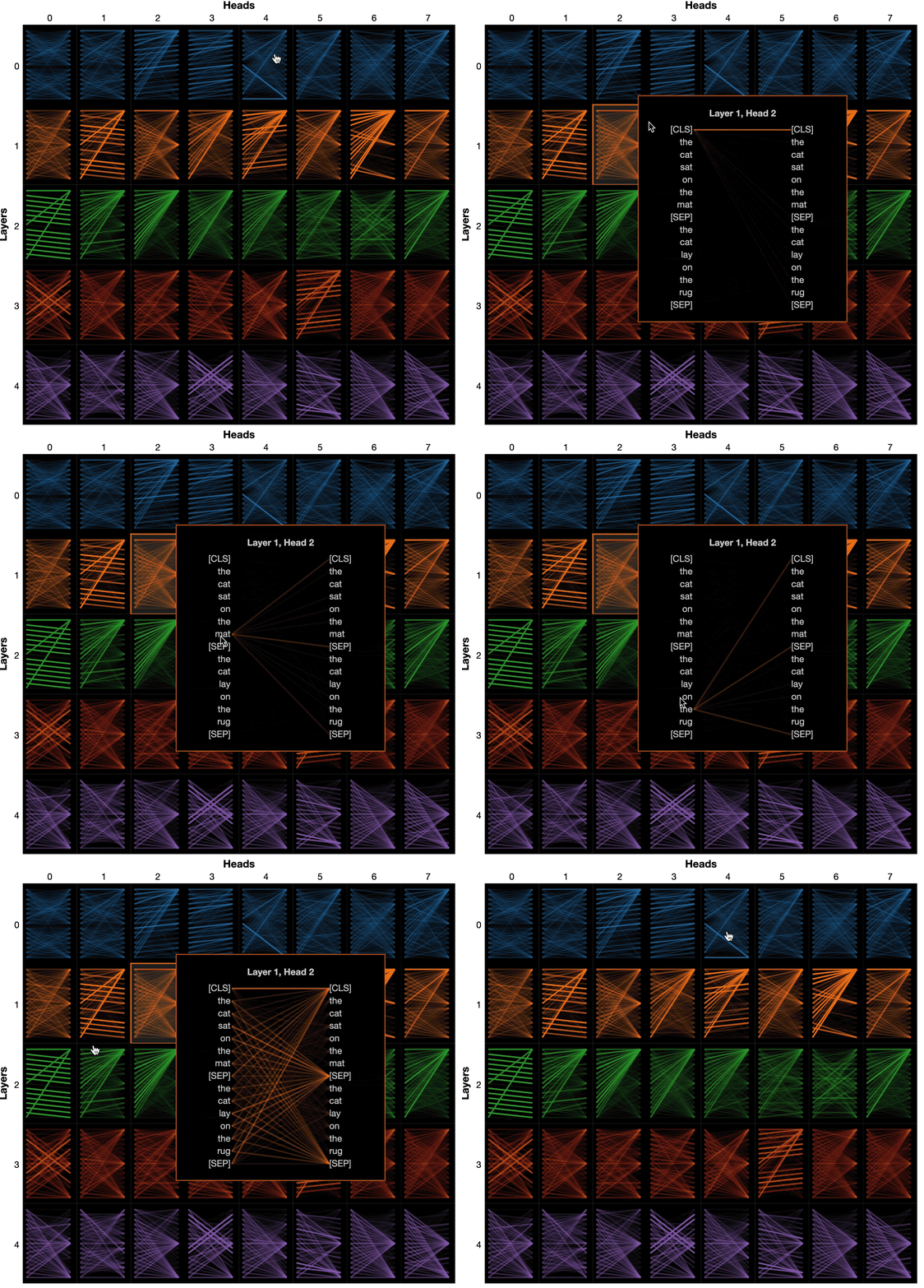
The model view shows a bird's-eye view of attention across all layers and heads.
🕹 Try out the model view in the <b><u>Interactive Colab Tutorial</u></b> (all visualizations pre-loaded).
Neuron View
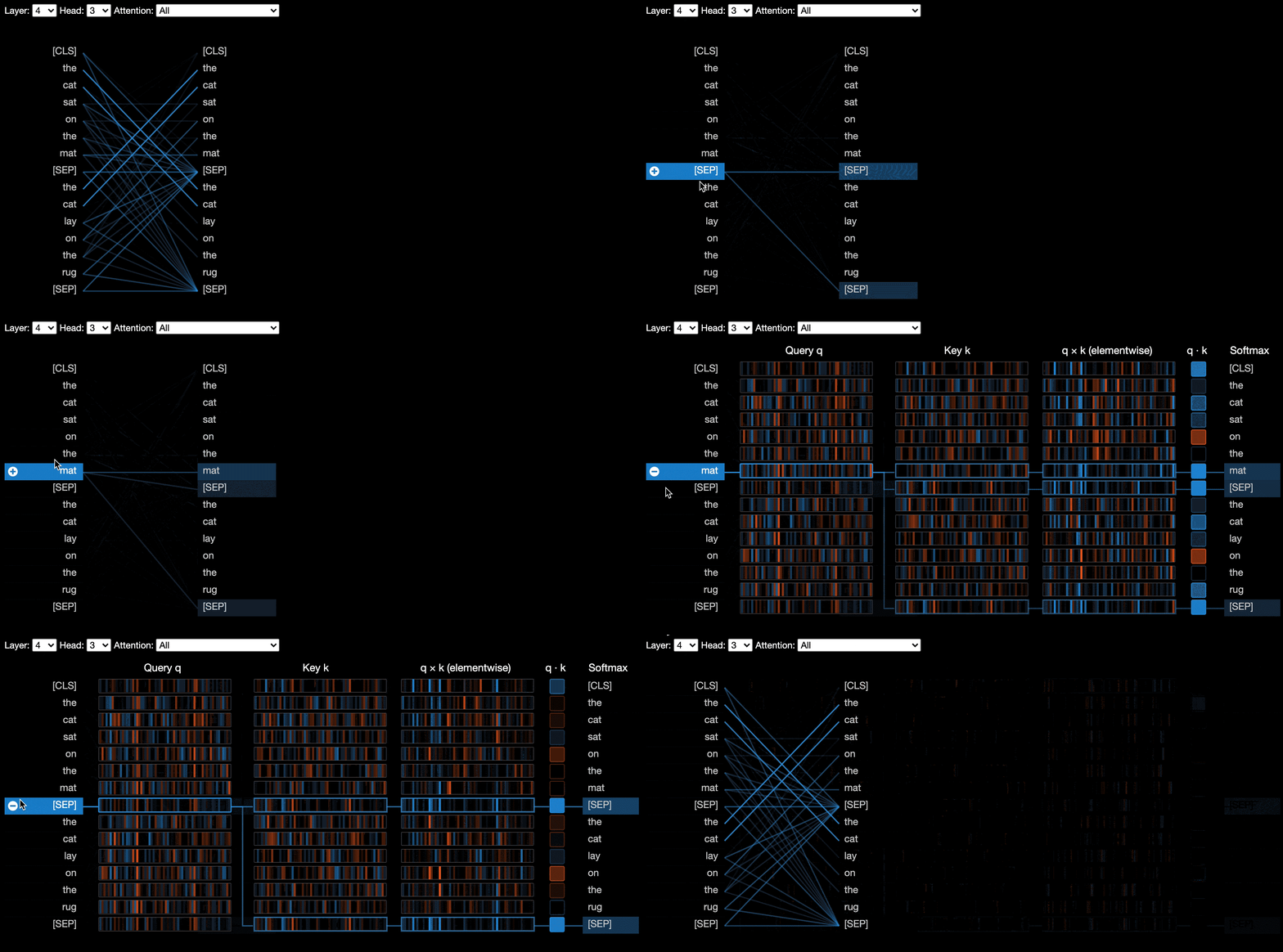
The neuron view visualizes individual neurons in the query and key vectors and shows how they are used to compute attention.
🕹 Try out the neuron view in the <b><u>Interactive Colab Tutorial</u></b> (all visualizations pre-loaded).
⚡️ Getting Started
Running BertViz in a Jupyter Notebook
From the command line:
bashpip install bertviz
You must also have Jupyter Notebook and ipywidgets installed:
bashpip install jupyterlab pip install ipywidgets
(If you run into any issues installing Jupyter or ipywidgets, consult the documentation here and here.)
To create a new Jupyter notebook, simply run:
bashjupyter lab
Then click New and select Python 3 (ipykernel) if prompted.
Running BertViz in Colab
To run in Colab, simply add the following cell at the beginning of your Colab notebook:
!pip install bertviz
Sample code
Run the following code to load the xtremedistil-l12-h384-uncased model and display it in the model view:
pythonfrom transformers import AutoTokenizer, AutoModel, utils from bertviz import model_view utils.logging.set_verbosity_error() # Suppress standard warnings model_name = "microsoft/xtremedistil-l12-h384-uncased" # Find popular HuggingFace models here: https://huggingface.co/models input_text = "The cat sat on the mat" model = AutoModel.from_pretrained(model_name, output_attentions=True) # Configure model to return attention values tokenizer = AutoTokenizer.from_pretrained(model_name) inputs = tokenizer.encode(input_text, return_tensors='pt') # Tokenize input text outputs = model(inputs) # Run model attention = outputs[-1] # Retrieve attention from model outputs tokens = tokenizer.convert_ids_to_tokens(inputs[0]) # Convert input ids to token strings model_view(attention, tokens) # Display model view
The visualization may take a few seconds to load. Feel free to experiment with different input texts and
models.
See Documentation for additional use cases and examples, e.g., encoder-decoder models.
Running sample notebooks
You may also run any of the sample notebooks included with BertViz:
bashgit clone --depth 1 git@github.com:jessevig/bertviz.git cd bertviz/notebooks jupyter lab
🕹 Interactive Tutorial
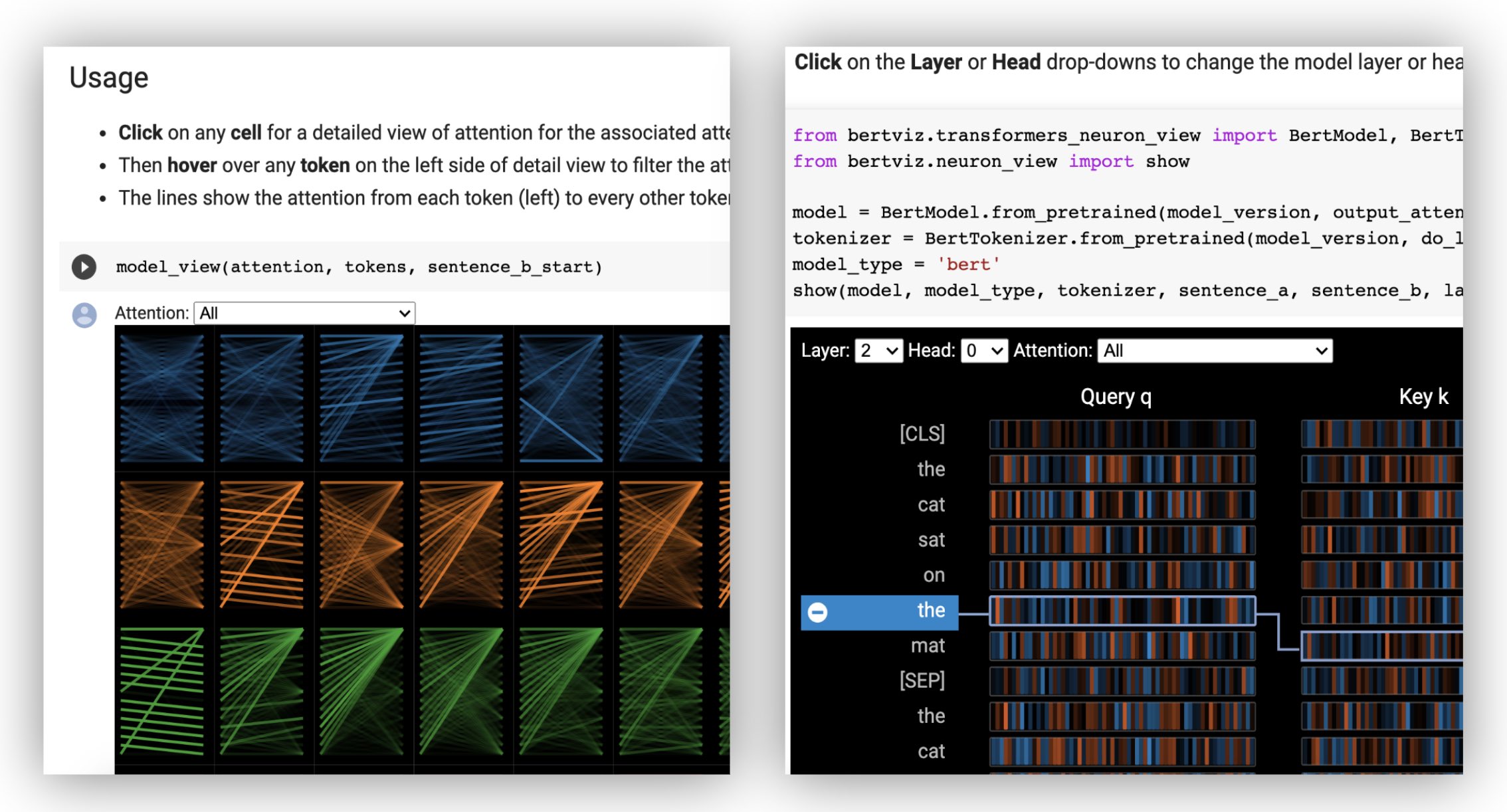
Check out the <b><u>Interactive Colab Tutorial</u></b>
to learn more about BertViz and try out the tool. <b>Note</b>: all visualizations are pre-loaded, so there is no need to execute any cells.
📖 Documentation
Table of contents
- Self-attention models (BERT, GPT-2, etc.)
- Encoder-decoder models (BART, T5, etc.)
- Installing from source
- Additional options
- Limitations
Self-attention models (BERT, GPT-2, etc.)
Head and Model Views
First load a Huggingface model, either a pre-trained model as shown below, or your own fine-tuned model.
Be sure to set output_attentions=True.
pythonfrom transformers import AutoTokenizer, AutoModel, utils utils.logging.set_verbosity_error() # Suppress standard warnings tokenizer = AutoTokenizer.from_pretrained("bert-base-uncased") model = AutoModel.from_pretrained("bert-base-uncased", output_attentions=True)
Then prepare inputs and compute attention:
pythoninputs = tokenizer.encode("The cat sat on the mat", return_tensors='pt') outputs = model(inputs) attention = outputs[-1] # Output includes attention weights when output_attentions=True tokens = tokenizer.convert_ids_to_tokens(inputs[0])
Finally, display the attention weights using the head_view or model_view
functions:
pythonfrom bertviz import head_view head_view(attention, tokens)
<b>Examples</b>: DistilBERT (Model View Notebook, Head View Notebook)
For full API, please refer to the source code for the head view or model view.
Neuron View
The neuron view is invoked differently than the head view or model view, due to requiring access to the model's
query/key vectors, which are not returned through the Huggingface API. It is currently limited to custom versions of BERT, GPT-2, and
RoBERTa included with BertViz.
python# Import specialized versions of models (that return query/key vectors) from bertviz.transformers_neuron_view import BertModel, BertTokenizer from bertviz.neuron_view import show model_type = 'bert' model_version = 'bert-base-uncased' do_lower_case = True sentence_a = "The cat sat on the mat" sentence_b = "The cat lay on the rug" model = BertModel.from_pretrained(model_version, output_attentions=True) tokenizer = BertTokenizer.from_pretrained(model_version, do_lower_case=do_lower_case) show(model, model_type, tokenizer, sentence_a, sentence_b, layer=2, head=0)
<b>Examples</b>:
BERT (Notebook,
Colab) •
GPT-2 (Notebook,
Colab) •
RoBERTa
(Notebook)
For full API, please refer to the source.
Encoder-decoder models (BART, T5, etc.)
The head view and model view both support encoder-decoder models.
First, load an encoder-decoder model:
pythonfrom transformers import AutoTokenizer, AutoModel tokenizer = AutoTokenizer.from_pretrained("Helsinki-NLP/opus-mt-en-de") model = AutoModel.from_pretrained("Helsinki-NLP/opus-mt-en-de", output_attentions=True)
Then prepare the inputs and compute attention:
pythonencoder_input_ids = tokenizer("She sees the small elephant.", return_tensors="pt", add_special_tokens=True).input_ids with tokenizer.as_target_tokenizer(): decoder_input_ids = tokenizer("Sie sieht den kleinen Elefanten.", return_tensors="pt", add_special_tokens=True).input_ids outputs = model(input_ids=encoder_input_ids, decoder_input_ids=decoder_input_ids) encoder_text = tokenizer.convert_ids_to_tokens(encoder_input_ids[0]) decoder_text = tokenizer.convert_ids_to_tokens(decoder_input_ids[0])
Finally, display the visualization using either head_view or model_view.
pythonfrom bertviz import model_view model_view( encoder_attention=outputs.encoder_attentions, decoder_attention=outputs.decoder_attentions, cross_attention=outputs.cross_attentions, encoder_tokens= encoder_text, decoder_tokens = decoder_text )
You may select Encoder, Decoder, or Cross attention from the drop-down in the upper left corner of the visualization.
<b>Examples</b>: MarianMT (Notebook) • BART (Notebook)
For full API, please refer to the source code for the head view or model view.
Installing from source
bashgit clone https://github.com/jessevig/bertviz.git cd bertviz python setup.py develop
Additional options
Dark / light mode
The model view and neuron view support dark (default) and light modes. You may set the mode using
the display_mode parameter:
pythonmodel_view(attention, tokens, display_mode="light")
Filtering layers
To improve the responsiveness of the tool when visualizing larger models or inputs, you may set the include_layers
parameter to restrict the visualization to a subset of layers (zero-indexed). This option is available in the head view and model
view.
Example: Render model view with only layers 5 and 6 displayed
pythonmodel_view(attention, tokens, include_layers=[5, 6])
For the model view, you may also restrict the visualization to a subset of attention heads (zero-indexed) by setting the
include_heads parameter.
Setting default layer/head(s)
In the head view, you may choose a specific layer and collection of heads as the default selection when the
visualization first renders. Note: this is different from the include_heads/include_layers parameter (above), which
removes layers and heads from the visualization completely.
Example: Render head view with layer 2 and heads 3 and 5 pre-selected
pythonhead_view(attention, tokens, layer=2, heads=[3,5])
You may also pre-select a specific layer and single head for the neuron view.
Visualizing sentence pairs
Some models, e.g. BERT, accept a pair of sentences as input. BertViz optionally supports a drop-down menu that allows
user to filter attention based on which sentence the tokens are in, e.g. only show attention between tokens in first
sentence and tokens in second sentence.
Head and model views
To enable this feature when invoking the head_view or model_view functions, set
the sentence_b_start parameter to the start index of the second sentence. Note that the method for computing this
index will depend on the model.
Example (BERT):
pythonfrom bertviz import head_view from transformers import AutoTokenizer, AutoModel, utils utils.logging.set_verbosity_error() # Suppress standard warnings # NOTE: This code is model-specific model_version = 'bert-base-uncased' model = AutoModel.from_pretrained(model_version, output_attentions=True) tokenizer = AutoTokenizer.from_pretrained(model_version) sentence_a = "the rabbit quickly hopped" sentence_b = "The turtle slowly crawled" inputs = tokenizer.encode_plus(sentence_a, sentence_b, return_tensors='pt') input_ids = inputs['input_ids'] token_type_ids = inputs['token_type_ids'] # token type id is 0 for Sentence A and 1 for Sentence B attention = model(input_ids, token_type_ids=token_type_ids)[-1] sentence_b_start = token_type_ids[0].tolist().index(1) # Sentence B starts at first index of token type id 1 token_ids = input_ids[0].tolist() # Batch index 0 tokens = tokenizer.convert_ids_to_tokens(token_ids) head_view(attention, tokens, sentence_b_start)
Neuron view
To enable this option in the neuron view, simply set the sentence_a and sentence_b parameters in neuron_view.show().
Obtain HTML representations
Support to retrieve the generated HTML representations has been added to head_view, model_view and neuron_view.
Setting the 'html_action' parameter to 'return' will make the function call return a single HTML Python object that can be further processed. Remember you can access the HTML source using the data attribute of a Python HTML object.
The default behavior for 'html_action' is 'view', which will display the visualization but won't return the HTML object.
This functionality is useful if you need to:
- Save the representation as an independent HTML file that can be accessed via web browser
- Use custom display methods as the ones needed in Databricks to visualize HTML objects
Example (head and model views):
pythonfrom transformers import AutoTokenizer, AutoModel, utils from bertviz import head_view utils.logging.set_verbosity_error() # Suppress standard warnings tokenizer = AutoTokenizer.from_pretrained("bert-base-uncased") model = AutoModel.from_pretrained("bert-base-uncased", output_attentions=True) inputs = tokenizer.encode("The cat sat on the mat", return_tensors='pt') outputs = model(inputs) attention = outputs[-1] # Output includes attention weights when output_attentions=True tokens = tokenizer.convert_ids_to_tokens(inputs[0]) html_head_view = head_view(attention, tokens, html_action='return') with open("PATH_TO_YOUR_FILE/head_view.html", 'w') as file: file.write(html_head_view.data)
Example (neuron view):
python# Import specialized versions of models (that return query/key vectors) from bertviz.transformers_neuron_view import BertModel, BertTokenizer from bertviz.neuron_view import show model_type = 'bert' model_version = 'bert-base-uncased' do_lower_case = True sentence_a = "The cat sat on the mat" sentence_b = "The cat lay on the rug" model = BertModel.from_pretrained(model_version, output_attentions=True) tokenizer = BertTokenizer.from_pretrained(model_version, do_lower_case=do_lower_case) html_neuron_view = show(model, model_type, tokenizer, sentence_a, sentence_b, layer=2, head=0, html_action='return') with open("PATH_TO_YOUR_FILE/neuron_view.html", 'w') as file: file.write(html_neuron_view.data)
Non-Huggingface models
The head view and model view may be used to
visualize self-attention for any standard Transformer model,
as long as the attention weights are available and follow the format specified in head_view and
model_view (which is the format
returned from Huggingface models). In some case, Tensorflow checkpoints may be loaded as Huggingface models as described
in the
Huggingface docs.
⚠️ Limitations
Tool
- This tool is designed for shorter inputs and may run slowly if the input text is very long and/or the model is very large.
To mitigate this, you may wish to filter the layers displayed by setting theinclude_layersparameter, as described above. - When running on Colab, some of the visualizations will fail (runtime disconnection) when the input text is long. To mitigate this, you may wish to filter the layers displayed by setting the
include_layersparameter, as described above. - The neuron view only supports the custom BERT, GPT-2, and RoBERTa models included with the tool. This view needs access to the query and key vectors,
which required modifying the model code (seetransformers_neuron_viewdirectory), which has only been done for these three models.
Attention as "explanation"?
- Visualizing attention weights illuminates one type of architecture within the model but does not
necessarily provide a direct explanation for predictions [1, 2, 3]. - If you wish to understand how the input text influences output predictions more directly, consider saliency methods provided
by tools such as the Language Interpretability Toolkit or Ecco.
🔬 Paper
<b>A Multiscale Visualization of Attention in the Transformer Model</b> (ACL System Demonstrations 2019).
Citation
bibtex@inproceedings{vig-2019-multiscale, title = "A Multiscale Visualization of Attention in the Transformer Model", author = "Vig, Jesse", booktitle = "Proceedings of the 57th Annual Meeting of the Association for Computational Linguistics: System Demonstrations", month = jul, year = "2019", address = "Florence, Italy", publisher = "Association for Computational Linguistics", url = "https://www.aclweb.org/anthology/P19-3007", doi = "10.18653/v1/P19-3007", pages = "37--42", }
Authors
🙏 Acknowledgments
We are grateful to the authors of the following projects, which are incorporated into this repo:
License
This project is licensed under the Apache 2.0 License - see the LICENSE file for details
Contributors
Showing top 5 contributors by commit count.


Related Repositories

datawhalechina/leedl-tutorial
《李宏毅深度学习教程》(李宏毅老师推荐👍,苹果书🍎),PDF下载地址:https://github.com/datawhalechina/leedl-tutorial/releases

graykode/nlp-tutorial
Natural Language Processing Tutorial for Deep Learning Researchers

PaddlePaddle/PaddleNLP
Easy-to-use and powerful LLM and SLM library with awesome model zoo.

jina-ai/clip-as-service
🏄 Scalable embedding, reasoning, ranking for images and sentences with CLIP

NielsRogge/Transformers-Tutorials
This repository contains demos I made with the Transformers library by HuggingFace.

huggingface/tokenizers
💥 Fast State-of-the-Art Tokenizers optimized for Research and Production