

Phaser ui tools
UI Kit for the Phaser game engine. Rows, columns, viewports, scrollbars, stuff like that.
I really wanted a viewport with a scrollbar. Things escalated. The project is written primarily in JavaScript, distributed under the MIT License license, first published in 2017. Key topics include: healthbar, javascript, phaser, phaser-ce, phaser-ui.
Phaser UI Tools


I really wanted a viewport with a scrollbar. Things escalated.
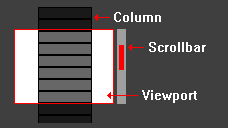
Documentation
https://jsfehler.github.io/phaser-ui-tools/
References
Scrollbar math:
http://csdgn.org/article/scrollbar
Getting Started
Using NPM
On the command line, type:
npm i phaser-ui-tools
The objects are now available via import:
import { Column } from 'phaser-ui-tools';

var column = new Column(...)
Adding the file directly to your project
Get phaser-ui-tools.js from the releases and add it to your project's index.html.
It should look something like:
<script src="lib/phaser-ui-tools.js"></script>
The objects can now be used directly:
var column = new uiWidgets.Column(...)
The Tools
Text Overlays
TextSprite
A sprite that can have text on top.
Text is added with the setText() method.
javascriptvar textSprite = new uiWidgets.TextSprite( game, x, y, key, ); textSprite.setText(label, style);
TextButton
A button that can have text on top.
Text is added with the setText() method.
javascriptvar textButton = new uiWidgets.TextButton( game, x, y, key, callback, callbackContext, overKey, outKey, downKey, upKey, ); textButton.setText(label, style);
Examples
Phaser CE
Phaser 3
Containers
Column
Columns are Phaser Groups where each child added to the group is placed directly under the previous child. If an object can be a child of a Group, it can likewise be in a Column.
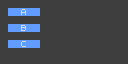
javascriptvar column = new uiWidgets.Column(game, 8, 8); column.addNode(sprite_a, 8, 8); column.addNode(sprite_b, 8, 8); column.addNode(sprite_c, 8, 8);
Row
Rows are Phaser Groups where each child added to the group is placed directly next to the previous child. If an object can be a child of a Group, it can likewise be in a Row.
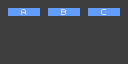
javascriptvar row = new uiWidgets.Row(game, 8, 8); row.addNode(sprite_a, 8, 8); row.addNode(sprite_b, 8, 8); row.addNode(sprite_c, 8, 8);
Viewport
Viewports are Phaser Groups where the children in the group are only visible if they're within the viewport's area.
If an object can be a child of a Group, it can likewise be in a Viewport.
Viewports can be combined with a Scrollbar to create a scrollable display.
Placing a Column or Row inside a Viewport is a simple way to align content.
javascriptvar viewport = new uiWidgets.Viewport(game, 75, 75, 600, 260); viewport.addNode(column);
Bars
Scrollbar
Scrollbars are used to move the objects in a Viewport. They must be used with a Viewport.
A tweening duration and easing can be specified. This will be triggered when moving the bar.
javascriptvar scrollbar = new uiWidgets.Scrollbar( game, viewport, true, true, true, trackImage, barImage, {'duration': 300, 'ease': Phaser.Easing.Quadratic.Out} );
Examples
Phaser CE
Phaser 3
ValueBar
Valuebars are like Scrollbars, but instead of moving content, they increase/decrease a number.
Valuebars always have a minimum number of 0, but the starting and maximum number can be set.
A tweening duration and easing can be specified. This will be triggered when moving the bar.
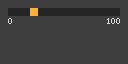
javascriptvar valuebar = new uiWidgets.ValueBar( game, {'x': 50, 'y': 10}, {'step': 1, 'startValue': 0, 'maxValue': 100}, true, false, true, trackImage, barImage, {'duration': 100, 'ease': Phaser.Easing.Quadratic.Out} );
Examples
Phaser CE
Multiple ValueBar inside a Column, with background image and keyboard events | Code
Phaser 3
QuantityBar
QuantityBars do not adjust a value, they get adjusted by a value. The bar grows and shrinks based on a value.
They can be used for health bars, stamina bars, etc.
A tweening duration and easing can be specified. This will be triggered when moving the bar.
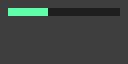
javascriptvar quantitybar = new uiWidgets.QuantityBar( game, {'x': 50, 'y': 10}, {'startValue': 50, 'maxValue': 100}, false, false, trackImage, barImage, {'duration': 400, 'ease': Phaser.Easing.Quadratic.Out} );
Examples
Phaser CE
Phaser 3
Wheel3D
A collection of sprites that are arranged around a three dimensional wheel.
The wheel can be adjusted and rotated along the x, y, or z axis.
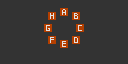
javascriptvar wheel = new uiWidgets.Wheel3D( game, {"x": game.world.centerX - 100, "y": game.world.centerY}, [sprite1, sprite2, sprite3, sprite4], 0, 90, "y", {"x":0, "y": 0, "z": 0} );
Examples
Phaser CE
Phaser 3
Contributors
Showing top 6 contributors by commit count.


![greenkeeper[bot]](https://avatars.githubusercontent.com/in/505?v=4)


![dependabot[bot]](https://avatars.githubusercontent.com/in/29110?v=4)
