

Piggly
PL/pgSQL stored procedure code coverage tool
Code coverage reports for PostgreSQL PL/pgSQL stored procedures The project is written primarily in Ruby, distributed under the Other license, first published in 2010. Key topics include: coverage, pgsql, stored-procedures.
Piggly
Code coverage reports for PostgreSQL PL/pgSQL stored procedures
Purpose
PL/pgSQL doesn't have much in the way of developer tools, and writing automated tests for
stored procedures can be much easier when you know what you haven't tested. Code coverage
allows you to see which parts of your code haven't been executed.
Piggly is a tool (written in Ruby, but you can write your tests in any language) to track
code coverage of PostgreSQL PL/pgSQL stored procedures. It reports on code coverage to help
you identify untested parts of your code.
How Does It Work?
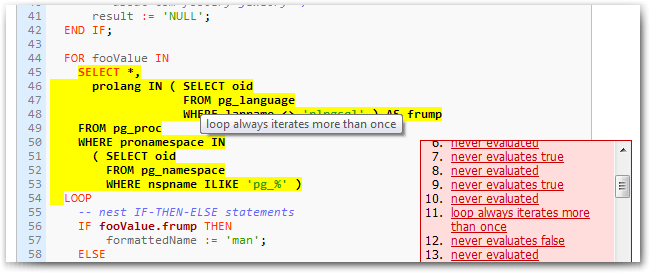
Piggly tracks the execution of PostgreSQL's PL/pgSQL stored procedures by recompiling
the stored procedure with instrumentation code. Basically, RAISE WARNING statements notify the
client of an execution event (e.g., a branch condition evaluating to true or false). It records
these events and generates prettified source code that is annotated with coverage details.
Features
- Readable and easily-navigable reports (see example)
- Language agnostic - write your tests in Ruby, Python, Java, SQL scripts etc
- Branch, block, and loop coverage analysis
- Instrumenting source-to-source compiler
- Low test execution overhead
- Reduced compilation times by use of disk caching
- Possible to aggregate coverage across multiple runs
Limitations
- Not all PL/pgSQL grammar is currently supported, but the grammar is easy to modify
- Cannot parse nested dollar-quoted strings, eg $A$ ... $B$ ... $B$ ... $A$
- SQL statements are not instrumented, so their branches (COALESCE, WHERE-clauses, etc) aren't tracked
Requirements
- Treetop:
gem install treetop - The ruby-pg driver:
gem install pg - The examples require ActiveRecord:
gem install activerecord
How to Install
To install the latest from github:
$ git clone git://github.com/kputnam/piggly.git
$ cd piggly
$ bundle install
$ bundle exec rake spec

$ rake gem
$ gem install pkg/*.gem --no-rdoc --no-ri
To install the latest release:
$ gem install piggly
Usage
Your stored procedures must already be loaded in the database. Configure your database connection in
a file named config/database.yml relative to where you want to run piggly. You can also specify the
-d PATH to an existing configuration file. The contents of the file follow ActiveRecord conventions:
piggly:
  adapter: postgresql
  database: cookbook
  username: kputnam
  password: secret
  host: localhost
Here we'll add some stored procedures to the database we described above:
$ cat example/proc/*.sql | psql -U kputnam -h localhost cookbook
Note the connection is expected to be named piggly but you may specify the -k DATABASE option to
use a different connection name (eg -k development in Rails). See also example/config/database.yml.
Now you are ready to recompile and install your stored procedures. This reads the configuration from
./config/database.yml relative to the current working directory.
$ piggly trace
compiling 5 procedures
Compiling scramble
Compiling scramble
Compiling numberedargs
Compiling snippets
Compiling iterate
tracing 5 procedures
This caches the original version (without instrumentation) in piggly/cache so you can restore them
later. Piggly will only recompile procedures that have changed in the database since it last
made a copy in piggly/cache.
WARNING: piggly fetches your code from the database and replaces it (in the database) with the
instrumented code. If you run piggly trace twice consecutively, the second time will cause an error
because you are trying to re-instrument code that has already been instrumented. You need to run
piggly untrace or restore your original stored procedures manually before you can trace them again.
Now you're ready to execute your tests. Make sure your connection is configured to log RAISE WARNING
messages to a file -- or you can log them to STDERR and redirect that to a file. For instance you
might run:
$ ant test 2> messages.txt
$ make test 2> messages.txt
etc.
To build the coverage report, have piggly read that file in by executing piggly report < messages.txt,
or piggly report -f messages.txt. You don't actually need the intermediate file, you can pipe your
test suite directly in like ant test 2>&1 | piggly report.
Once the report is built you can open it in piggly/reports/index.html.
Running the Examples
$ cd piggly
$ bundle install
$ cat example/README
...

$ ./example/run-tests
compiling 5 procedures
Compiling scramble
Compiling scramble
Compiling numberedargs
Compiling snippets
Compiling iterate
tracing 5 procedures
Loaded suite /home/kputnam/wd/piggly/example/test/iterate_test
Started
......
Finished in 0.199236 seconds.

6 tests, 6 assertions, 0 failures, 0 errors, 0 skips

Test run options: --seed 25290
clearing previous coverage
storing coverage profile
creating index
creating reports
reporting coverage for scramble
reporting coverage for scramble
reporting coverage for numberedargs
reporting coverage for snippets
reporting coverage for iterate: +0.0% block, +0.0% branch, +0.0% loop
restoring 5 procedures
OK, view /home/kputnam/wd/piggly/example/piggly/reports/index.html

$ ls -alh example/reports/index.html
-rw-r--r-- 1 kputnam kputnam 1.4K 2010-04-28 11:21 example/reports/index.html
Bugs & Issues
Please report any issues or feature requests on the github tracker.
Contributors
Showing top 5 contributors by commit count.


![dependabot[bot]](https://avatars.githubusercontent.com/in/29110?v=4)


Related Repositories

TheLartians/ModernCppStarter
🚀 Kick-start your C++! A template for modern C++ projects using CMake, CI, code coverage, clang-format, reproducible dependency management and much more.

simplecov-ruby/simplecov
Code coverage for Ruby with a powerful configuration library and automatic merging of coverage across test suites

jacoco/jacoco
:microscope: Java Code Coverage Library

theintern/intern
A next-generation code testing stack for JavaScript.

coverlet-coverage/coverlet
Cross platform code coverage for .NET

sagiegurari/cargo-make
Rust task runner and build tool.