

ZoomNet
Zoom In and Out: A Mixed-scale Triplet Network for Camouflaged Object Detection, CVPR 2022
**ZoomNet** is a Zoom In and Out: A Mixed-scale Triplet Network for Camouflaged Object Detection, CVPR 2022 The project is written primarily in Python, distributed under the MIT License license, first published in 2022. Key topics include: camouflaged-object-detection, cod, codeforpaper, cvpr, cvpr2022.
(CVPR 2022) Zoom In and Out: A Mixed-scale Triplet Network for Camouflaged Object Detection




@inproceedings{ZoomNet-CVPR2022,
	title     = {Zoom In and Out: A Mixed-scale Triplet Network for Camouflaged Object Detection},
	author    = {Pang, Youwei and Zhao, Xiaoqi and Xiang, Tian-Zhu and Zhang, Lihe and Lu, Huchuan},
	booktitle = CVPR,
	year      = {2022}
}
Extensions to the conference version can be found: https://github.com/lartpang/ZoomNeXt.
Changelog
- 2022-3-16
- Add the link of the method prediction maps of Table 1 in our paper.
- 2022-03-08
- Add the link of arxiv version.
- 2022-03-07
- Add the link of paper.
- 2022-03-05:
- Update weights and results links.
- Fixed some bugs.
- Update dataset links.
- Update bibtex info.
- 2022-03-04:
- Initialize the repository.
- Add the model and configuration file for SOD.
Usage
Dependencies
Some core dependencies:
- timm == 0.4.12
- torch == 1.8.1
- pysodmetrics == 1.2.4 # for evaluating results
More details can be found in <./requirements.txt>
Datasets
More details can be found at:
- COD Datasets: https://github.com/lartpang/awesome-segmentation-saliency-dataset#camouflaged-object-detection-cod
- SOD Datasets: https://github.com/lartpang/awesome-segmentation-saliency-dataset#rgb-saliency
Training
You can use our default configuration, like this:
shell$ python main.py --model-name=ZoomNet --config=configs/zoomnet/zoomnet.py --datasets-info ./configs/_base_/dataset/dataset_configs.json --info demo
or use our launcher script to start the one command in commands.txt on GPU 1:
shell$ python tools/run_it.py --interpreter 'abs_path' --cmd-pool tools/commands.txt --gpu-pool 1 --verbose --max-workers 1
If you want to launch multiple commands, you can use it like this:
- Add your commands into the
tools/commands.txt. python tools/run_it.py --interpreter 'abs_path' --cmd-pool tools/commands.txt --gpu-pool <gpu indices> --verbose --max-workers max_workers
NOTE:
abs_path: the absolute path of your python interpretermax_workers: the maximum number of tasks to start simultaneously.
Testing
| Task | Weights | Results |
|---|---|---|
| COD | GitHub Release Link | GitHub Release Link |
| SOD | GitHub Release Link | GitHub Release Link |
For ease of use, we create a test.py script and a use case in the form of a shell script test.sh.
shell$ sudo chmod +x ./test.sh $ ./test.sh 0 # on gpu 0
Method Comparisons
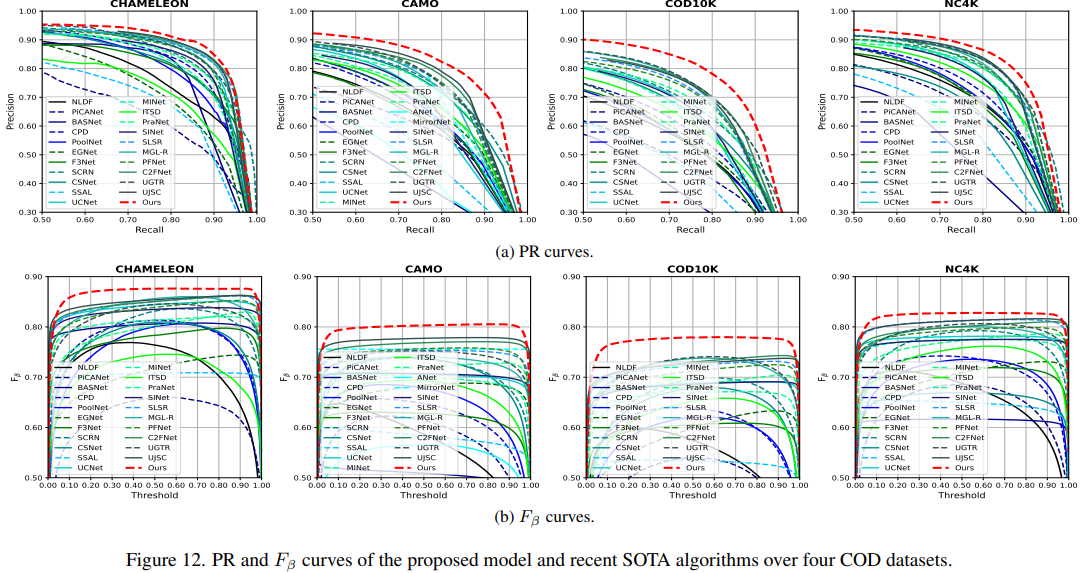
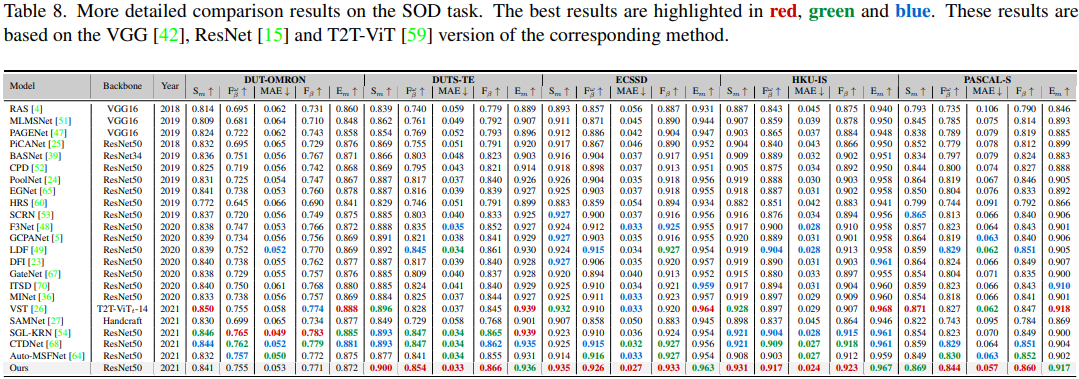
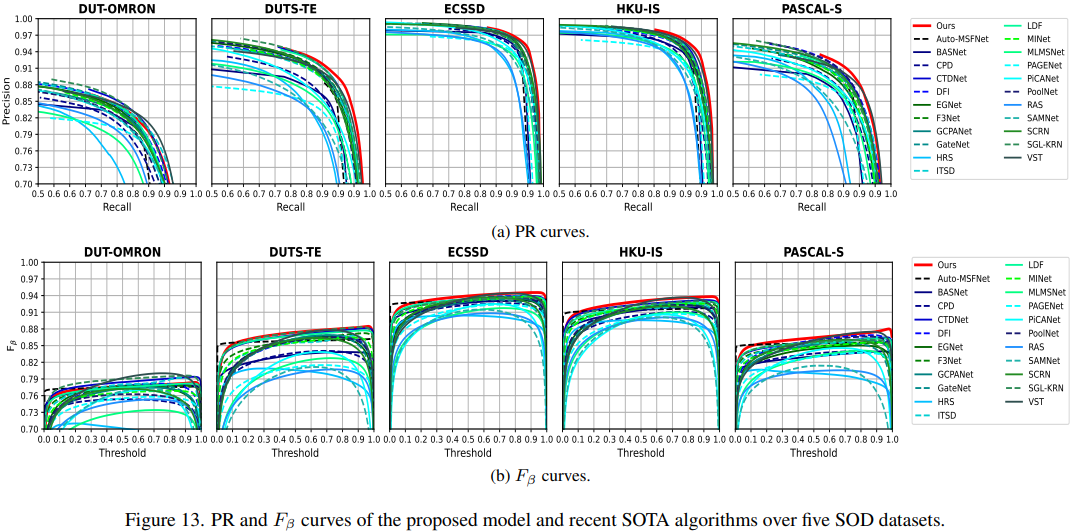
- The prediction maps corresponding to the methods in Table 1 of our paper:
- Baidu Pan: https://pan.baidu.com/s/1dLMqa4tix1gdBN1uWrCPbQ Code: yxy9
- PySODEvalToolkit: A Python-based Evaluation Toolbox for Salient Object Detection and Camouflaged Object Detection
Paper Details
Method Detials
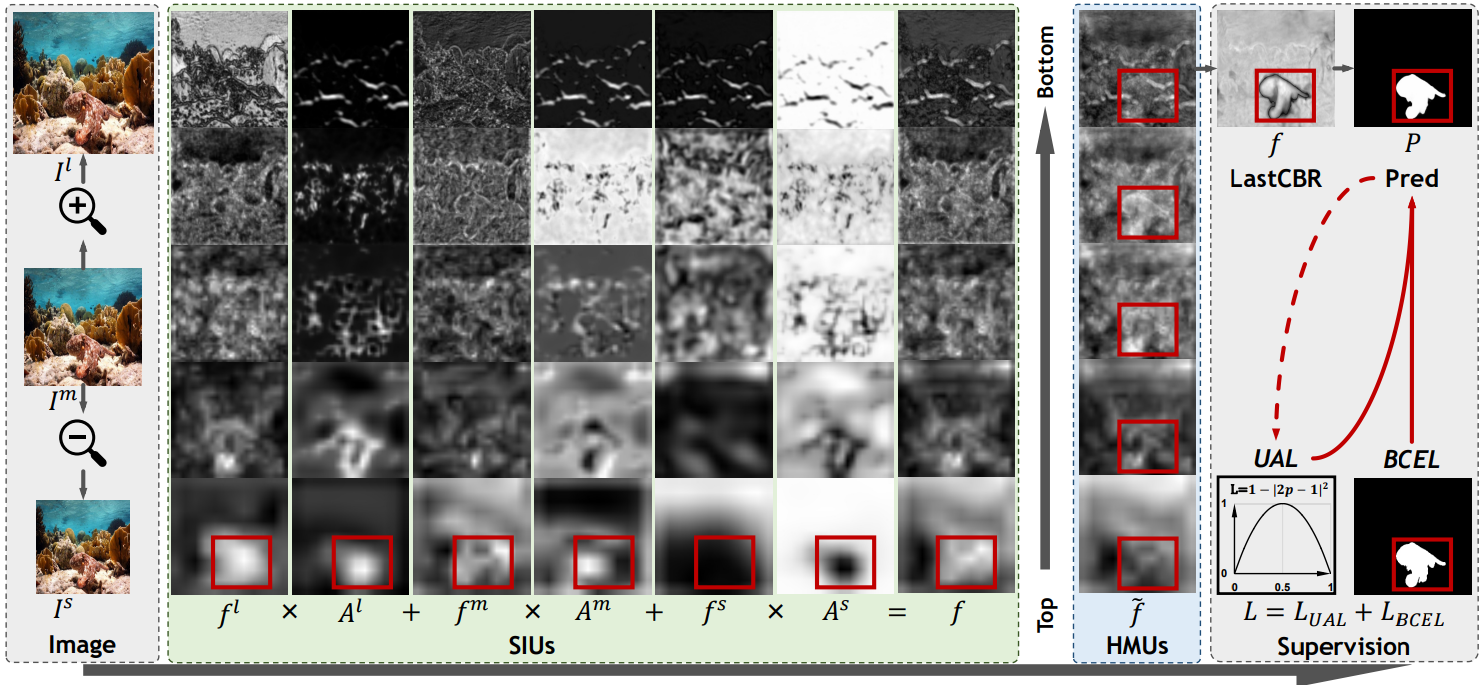
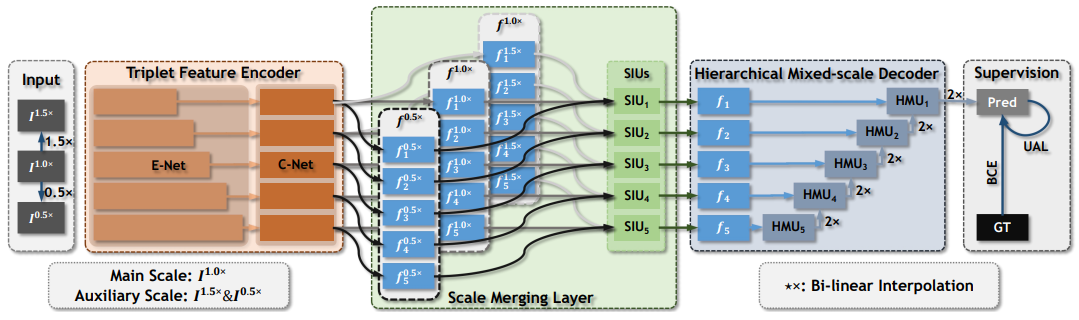
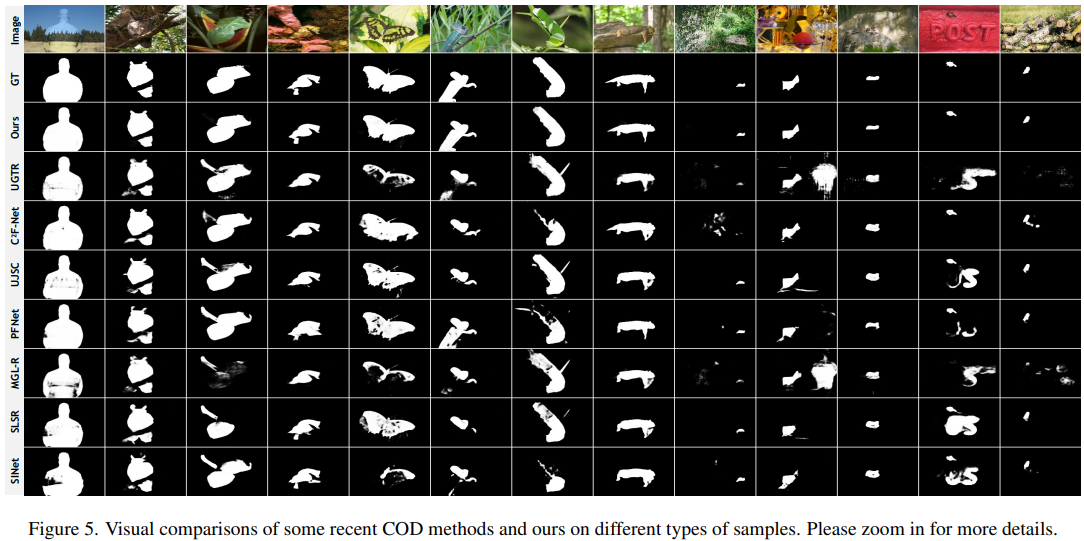
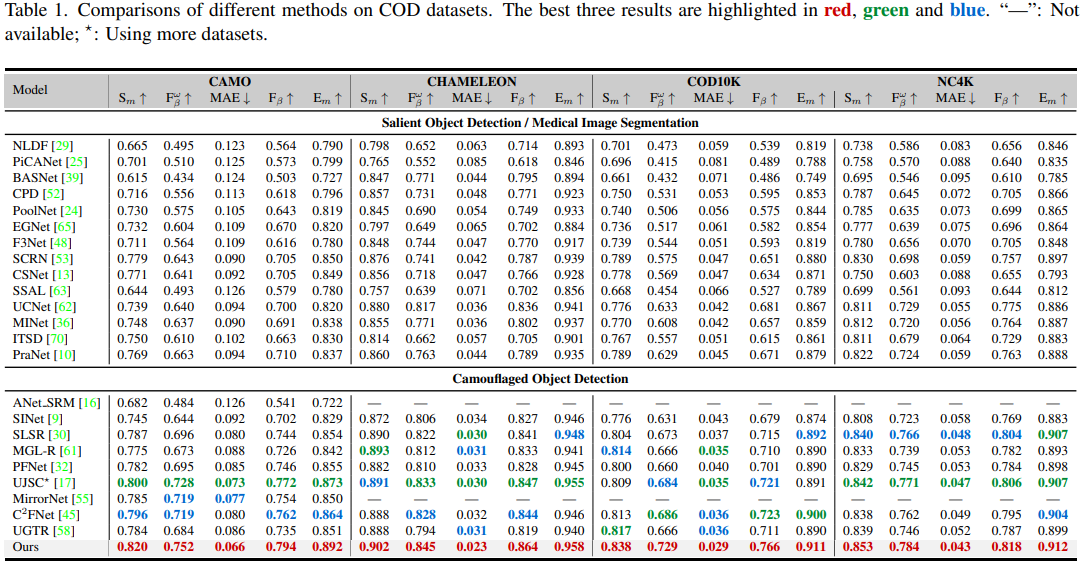
Comparison
Camouflaged Object Detection
Salient Object Detection
Contributors
Showing top 2 contributors by commit count.

Related Repositories

ZhengPeng7/BiRefNet
[CAAI AIR'24] Bilateral Reference for High-Resolution Dichotomous Image Segmentation

tianrun-chen/SAM-Adapter-PyTorch
Adapting Meta AI's Segment Anything to Downstream Tasks with Adapters and Prompts

WZH0120/SAM2-UNet
[VINT 2026] SAM2-UNet: Segment Anything 2 Makes Strong Encoder for Natural and Medical Image Segmentation

visionxiang/awesome-camouflaged-object-detection
A curated list of awesome resources for camouflaged/concealed object detection (COD).

lartpang/ZoomNeXt
ZoomNeXt: A Unified Collaborative Pyramid Network for Camouflaged Object Detection (TPAMI 2024)
lartpang/PySODEvalToolkit
PySODEvalToolkit: A Python-based Evaluation Toolbox for Salient Object Detection and Camouflaged Object Detection