

Mprisence
A powerful Discord Rich Presence for MPRIS media players
[Overview](#overview) • [Supported players](#supported-players) • [Quick start](#quick-start) • [Configuration](#configuration) • [Web players](#web-players) • [Development](#development) • [Troubleshooting](#troubleshooting) The project is written primarily in Rust, distributed under the MIT License license, first published in 2023. Key topics include: discord, discord-rich-presence, mpris, rich-presence, rust.
mprisence
Discord Rich Presence for Linux media players




Overview • Supported players • Quick start • Configuration • Web players • Development • Troubleshooting
</div>Reads MPRIS metadata over D-Bus → renders Discord Rich Presence → syncs with current media.
Works with VLC, MPV, Rhythmbox, Strawberry, CMUS, MPD, and more. Has a browser bridge for web players (YouTube Music, SoundCloud, etc.) when browser MPRIS is not enough.
<p align="center"> <img src="assets/example.gif" alt="mprisence demo: Strawberry playing through Discord" width="548" /> <br/> <em>Local player → Discord status, no config needed</em> </p>[!IMPORTANT]
Discord must allow activity sharing: Settings → Activity Privacy → Display current activity as a status message.
Overview
How it works
textlocal player or browser tab → MPRIS metadata on D-Bus → mprisence → Discord Rich Presence
Browser bridge path (optional — see Web players):
textsupported website → browser extension → MPRIS bridge (native host) → mprisence → Discord Rich Presence
Highlights
- No config required for common local-player setups
- Handlebars templates for title, artist, album, player name, status, duration, IDs, and more
- Per-player and per-site overrides for app ID, icon, activity type, streaming policy, and status text
- Cover art from metadata, local files, Catbox/Litterbox, MusicBrainz, or ImgBB
- Hot reload for most config changes
- Browser bridge for better metadata, cover art, URLs, and controls on web players
Supported players
Bundled presets in config/config.default.toml. No setup needed — start mprisence and these appear in Discord automatically.
Local players (MPRIS): Audacious, Amberol, Clementine, CMUS, Elisa, Euphonica, Feishin, Fooyin, Gapless, Gelly, Haruna, Harmony Music, Kew, Lollypop, Media Player Classic Qute Theater, MPV, MPD, Musikcube, MusicBee, QMMP, Quod Libet, Quester, Rhythmbox, AmpCast, SMPlayer, Spotify (legacy), Strawberry, Supersonic, VLC.
Web players (browser bridge): YouTube Music, YouTube, SoundCloud, Bandcamp, Tidal, Apple Music, Qobuz, Amazon Music, Deezer, Yandex Music. Add your own under [web_player.*] with match_patterns.
Quick start
[!NOTE]
This covers local media players (VLC, MPV, Strawberry, etc.).
For web players (YouTube Music, SoundCloud, etc.), see Web players.
1. Install
Arch Linux
bashyay -S mprisence # or: yay -S mprisence-bin (maintained by choimadeleine)
Nix / NixOS
bash# without flakes nix-env -iA nixpkgs.mprisence # with flakes nix profile install nixpkgs#mprisence
Debian / Ubuntu
Download .deb from GitHub Releases, then:
bashsudo dpkg -i /path/to/mprisence_*.deb
crates.io
bashcargo install mprisence
From source
bashgit clone https://github.com/lazykern/mprisence.git cd mprisence cargo install --path .
2. Start it
bashmprisence
Run in foreground first to verify it picks up your player. Stop with Ctrl+C.
3. Verify
Start media playback, then in another terminal:
bashmprisence players list mprisence players list --detailed
If you see your player listed, Discord shows your activity within seconds.
Example:
$ mprisence players list --detailed
Name       Identity               Bus Name                                    Source
────       ────────               ────────                                    ──────
VLC        vlc_media_player       org.mpris.MediaPlayer2.vlc                  D-Bus
Strawberry strawberry           org.mpris.MediaPlayer2.strawberry          D-Bus
4. Enable as a service (optional)
bashsystemctl --user enable --now mprisence.service
If your package did not include a service file:
bashmkdir -p ~/.config/systemd/user curl -o ~/.config/systemd/user/mprisence.service \ https://raw.githubusercontent.com/lazykern/mprisence/main/mprisence.service systemctl --user daemon-reload systemctl --user enable --now mprisence.service
Check service status:
bashsystemctl --user status mprisence journalctl --user -u mprisence -f
Configuration
[!TIP]
No config file needed for first run. Create one for overrides.
Config path: ~/.config/mprisence/config.toml
Start from example config:
bashmkdir -p ~/.config/mprisence curl -o ~/.config/mprisence/config.toml \ https://raw.githubusercontent.com/lazykern/mprisence/main/config/config.example.toml
Reference files:
config/config.example.toml— documented exampleconfig/config.default.toml— bundled player and web-player presetssrc/metadata.rs— template variable reference
Common knobs
template.details,template.state,template.large_text,template.small_text[player.*]— overrides for specific local players[activity_type]and[time]— Discord display behavior[cover.provider]— cover-art sources
Example: show track title in Discord status instead of player name:
toml[player.default] status_display_type = "details"
Status display types
status_display_type controls which text Discord shows in your status:
| Mode | Preview |
|---|---|
name — player/app name |  |
state — template.state render (default: artists) |  |
details — template.details render (default: title) | 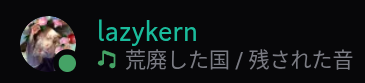 |
Inspect resolved config
bashmprisence config
Web-player config options ([web_player.*]) are documented in the Web players section.
Web players
mprisence supports two paths for browser media. Try Browser MPRIS first; switch to the bridge if metadata or controls are lacking.
| Browser MPRIS | Bridge + extension | |
|---|---|---|
| Setup | None | Native host + extension |
| Metadata | Title, maybe artist, URL | Title, artist, album, cover, canonical URL |
| Controls | Play/pause | Full (prev, next, seek) |
| Works with | Any browser with MPRIS support | Bundled sites + presets |
Bridge + extension
Use this path for richer title, cover art, canonical URL, duration, and controls.
Bundled site support includes:
- YouTube Music, YouTube, SoundCloud, Bandcamp, TIDAL, Apple Music
- Plus presets for Deezer, Qobuz, Amazon Music, Yandex Music, and more
Install native host
bashcargo build --release -p mprisence # or install from Releases / AUR / Nix ./target/release/mprisence web install ./target/release/mprisence web doctor
Install extension
- Firefox: mprisence bridge on AMO
- Chrome / Chromium: mprisence bridge on Chrome Web Store
Open a supported site (e.g. music.youtube.com) and play a track. Check with playerctl -l | grep mprisence_web.
bashcd extension npm install npm run build:firefox # or: npm run build:chromium
- Firefox:
about:debugging#/runtime/this-firefox→ Load Temporary Add-on →extension/dist/firefox/manifest.json - Chromium:
chrome://extensions→ Developer mode → Load unpacked →extension/dist/chromium/
Reloading the extension kills content scripts on existing tabs. Refresh media tabs after reload.
</details>Debugging
bashplayerctl -l | grep mprisence_web tail -f /tmp/bridge-stderr.log
For full detail: extension/README.md
Browser MPRIS
Some browsers expose media tabs as MPRIS players with page URL metadata. When quality is adequate, mprisence matches these against [web_player.*] presets.
Check what your browser exposes:
bashplayerctl -l mprisence players list --detailed
Enable specific sites via config.
Bundled site (patterns inherited from bundled entry — un-ignore to activate):
toml[web_player.youtube] ignore = false
Custom site (not in bundle — provide match_pattern and app_id):
toml[web_player.my_site] match_pattern = "mysite.com" name = "My Site" app_id = "YOUR_DISCORD_APP_ID" icon = "https://mysite.com/icon.png" ignore = false
Development
Build workspace
bashcargo build --release -p mprisence ./target/release/mprisence web install cd extension && npm install && npm run build:firefox
Repository layout
| Path | Purpose |
|---|---|
src/ | core daemon: MPRIS discovery, metadata, cover art, config, Discord presence |
src/web_bridge/ | native host mode for browser sources |
extension/ | browser extension for supported web players |
config/ | bundled defaults and example config |
tests/ | integration and metadata tests |
packaging/ | packaging scripts and distro assets |
Useful commands
bash# verbose logging RUST_LOG=debug mprisence RUST_LOG=trace mprisence # validate version string logic mprisence version validate 1.7.0-beta.3
Troubleshooting
Discord activity not showing
Check:
- Discord desktop client running
- Activity-sharing setting enabled
mprisenceprocess or service running- Player visible in
mprisence players list - Logs show no errors
bashsystemctl --user status mprisence mprisence players list --detailed journalctl --user -u mprisence -f
Player detected, but presence still hidden
Player may be ignored by config or blocked as streaming source.
bashmprisence config mprisence players list --detailed
Add matching [player.*] override or adjust [web_player.*] entry.
Browser tab missing or wrong
- Browser MPRIS path: browser may not expose enough metadata
- Bridge path: extension may not be loaded, native host may not be installed, or tab may need refresh after extension reload
Useful checks:
bashplayerctl -l playerctl -l | grep mprisence_web ./target/release/mprisence web doctor tail -f /tmp/bridge-stderr.log
Cover art missing
bashRUST_LOG=debug mprisence rm -rf ~/.cache/mprisence/cover_art
Then verify provider config and metadata quality.
Flatpak Discord clients
If you use Vesktop Flatpak, native IPC may need extra setup. See Vesktop guide for native applications:
https://github.com/flathub/dev.vencord.Vesktop?tab=readme-ov-file#native-applications
If problem persists, open an issue with:
- player name and
mprisence players list --detailedoutput - relevant config snippet
- logs from
journalctl --user -u mprisence -f - bridge logs if browser path involved
Contributors
Showing top 8 contributors by commit count.


Related Repositories

AstrBotDevs/AstrBot
AI Agent Assistant & development framework that integrates lots of IM platforms, LLMs, plugins and AI feature, and can be your openclaw alternative. ✨

tqdm/tqdm
:zap: A Fast, Extensible Progress Bar for Python and CLI

discordjs/discord.js
A powerful JavaScript library for interacting with the Discord API

TranslucentTB/TranslucentTB
A lightweight utility that makes the Windows taskbar translucent/transparent.

lss233/kirara-ai
🤖 可 DIY 的 多模态 AI 聊天机器人 | 🚀 快速接入 微信、 QQ、Telegram、等聊天平台 | 🦈支持DeepSeek、Grok、Claude、Ollama、Gemini、OpenAI | 工作流系统、网页搜索、AI画图、人设调教、虚拟女仆、语音对话 |

elizaOS/eliza
Open source agentic operating system