

Redis rdb cli
Redis RDB CLI: A command-line tool to parse, filter, split, and merge Redis RDB files, and to analyze memory usage offline. It also supports data synchronization between two Redis instances and allows users to define custom sink services for data migration.
A tool that can parse, filter, split, and merge RDB files, as well as analyze memory usage offline. It can also sync data between two Redis instances and allows users to define their own sink services to migrate Redis data to custom destinations. The project is written primarily in Java, distributed under the Apache License 2.0 license, first published in 2018. Key topics include: analyze, cli, dashboard, memory, migrate.
redis-rdb-cli
<a href="https://raw.githubusercontent.com/leonchen83/share/master/other/wechat_payment.png" target="_blank"><img src="https://github.com/leonchen83/share/blob/master/other/buymeacoffee.jpg?raw=true" alt="Buy Me A Coffee" style="height: 41px !important;width: 174px !important;box-shadow: 0px 3px 2px 0px rgba(190, 190, 190, 0.5) !important;-webkit-box-shadow: 0px 3px 2px 0px rgba(190, 190, 190, 0.5) !important;" ></a>
A tool that can parse, filter, split, and merge RDB files, as well as analyze memory usage offline. It can also sync data between two Redis instances and allows users to define their own sink services to migrate Redis data to custom destinations.



Chat with the Author
Contact the Author
Binary Releases
Runtime Requirements
textJDK 1.8 or later
Installation
shell$ wget https://github.com/leonchen83/redis-rdb-cli/releases/latest/download/redis-rdb-cli-release.zip $ unzip redis-rdb-cli-release.zip $ ./redis-rdb-cli/bin/rct -h # MacOS homebrew installation $ brew tap leonchen83/redis-rdb-cli $ brew install redis-rdb-cli $ rct -h
Compiling from Source
Requirements
textJDK 1.8 or later Maven 3.3.1 or later
Compile & Run
shell$ git clone https://github.com/leonchen83/redis-rdb-cli.git $ cd redis-rdb-cli $ mvn clean install -Dmaven.test.skip=true $ ./target/redis-rdb-cli-release/redis-rdb-cli/bin/rct -h
Running with Docker
shell$ docker run -it --rm redisrdbcli/redis-rdb-cli:latest $ rct -V
Windows Environment Variables
To run the commands from any directory, add the /path/to/redis-rdb-cli/bin directory to your system's Path environment variable.
Usage
Mass Insertion
shell$ rct -f dump -s /path/to/dump.rdb -o /path/to/dump.aof -r $ cat /path/to/dump.aof | /redis/src/redis-cli -p 6379 --pipe
Convert RDB to Dump Format
shell$ rct -f dump -s /path/to/dump.rdb -o /path/to/dump.aof
Convert RDB to JSON Format
shell$ rct -f json -s /path/to/dump.rdb -o /path/to/dump.json
Count Keys in RDB
shell$ rct -f count -s /path/to/dump.rdb -o /path/to/dump.csv
Find Top 50 Largest Keys
shell$ rct -f mem -s /path/to/dump.rdb -o /path/to/dump.mem -l 50
Diff RDBs
shell$ rct -f diff -s /path/to/dump1.rdb -o /path/to/dump1.diff $ rct -f diff -s /path/to/dump2.rdb -o /path/to/dump2.diff $ diff /path/to/dump1.diff /path/to/dump2.diff
Convert RDB to RESP
shell$ rct -f resp -s /path/to/dump.rdb -o /path/to/appendonly.aof
Sync Two Redis Instances
shell$ rst -s redis://127.0.0.1:6379 -m redis://127.0.0.1:6380 -r
Sync a Single Instance to a Redis Cluster
shell$ rst -s redis://127.0.0.1:6379 -m redis://127.0.0.1:30001 -r -d 0
Handling Infinite Loops in rst
shell# Set client-output-buffer-limit in the source Redis instance $ redis-cli config set client-output-buffer-limit "slave 0 0 0" $ rst -s redis://127.0.0.1:6379 -m redis://127.0.0.1:6380 -r
Migrate RDB to a Remote Redis Instance
shell$ rmt -s /path/to/dump.rdb -m redis://192.168.1.105:6379 -r
Downgrade Migration
shell# Migrate data from Redis 7 to Redis 6 # For `dump_rdb_version`, please see the comments in redis-rdb-cli.conf $ sed -i 's/dump_rdb_version=-1/dump_rdb_version=9/g' /path/to/redis-rdb-cli/conf/redis-rdb-cli.conf $ rmt -s redis://com.redis7:6379 -m redis://com.redis6:6379 -r
Handling Large Keys During Migration
shell# Set proto-max-bulk-len in the target Redis instance $ redis-cli -h ${host} -p 6380 -a ${pwd} config set proto-max-bulk-len 2048mb # Set Xms and Xmx for the redis-rdb-cli node $ export JAVA_TOOL_OPTIONS="-Xms8g -Xmx8g" # Execute migration $ rmt -s redis://127.0.0.1:6379 -m redis://127.0.0.1:6380 -r
Migrate RDB to a Remote Redis Cluster
Using nodes.conf:
shell$ rmt -s /path/to/dump.rdb -c ./nodes-30001.conf -r
Alternatively, you can connect to one of the cluster nodes directly:
shell$ rmt -s /path/to/dump.rdb -m redis://127.0.0.1:30001 -r
Backup a Remote RDB
shell$ rdt -b redis://192.168.1.105:6379 -o /path/to/dump.rdb
Backup Remote RDB and Change Database Index
shell$ rdt -b redis://192.168.1.105:6379 -o /path/to/dump.rdb --goal 3
Filter an RDB File
shell$ rdt -b /path/to/dump.rdb -o /path/to/filtered-dump.rdb -d 0 -t string
Split an RDB File using a Cluster's nodes.conf
shell$ rdt -s ./dump.rdb -c ./nodes.conf -o /path/to/folder -d 0
Concat Multiple RDB Files
shell$ rdt -m ./dump1.rdb ./dump2.rdb -o ./dump.rdb -t hash
Extract RDB and AOF from a Mixed File
shell$ rcut -s ./aof-use-rdb-preamble.aof -r ./dump.rdb -a ./appendonly.aof
Additional Configuration
Additional configuration parameters can be modified in /path/to/redis-rdb-cli/conf/redis-rdb-cli.conf.
Filtering
The rct, rdt, and rmt commands support filtering by data type, db index, and key (using Java-style regular expressions). The rst command supports filtering by db index only.
For example:
shell$ rct -f dump -s /path/to/dump.rdb -o /path/to/dump.aof -d 0 $ rct -f dump -s /path/to/dump.rdb -o /path/to/dump.aof -t string hash $ rmt -s /path/to/dump.rdb -m redis://192.168.1.105:6379 -r -d 0 1 -t list $ rst -s redis://127.0.0.1:6379 -m redis://127.0.0.1:6380 -d 0
Monitor Redis Server
shell# Step 1: # Open `/path/to/redis-rdb-cli/conf/redis-rdb-cli.conf` # and change the `metric_gateway` property from `none` to `influxdb`. # # Step 2: $ cd /path/to/redis-rdb-cli/dashboard $ docker-compose up -d # # Step 3: $ rmonitor -s redis://127.0.0.1:6379 -n standalone $ rmonitor -s redis://127.0.0.1:30001 -n cluster $ rmonitor -s redis-sentinel://sntnl-usr:sntnl-pwd@127.0.0.1:26379?master=mymaster&authUser=usr&authPassword=pwd -n sentinel # # Step 4: # Open `http://localhost:3000/d/monitor/monitor` in your browser. # Log in to Grafana with username `admin` and password `admin` to view the dashboard.
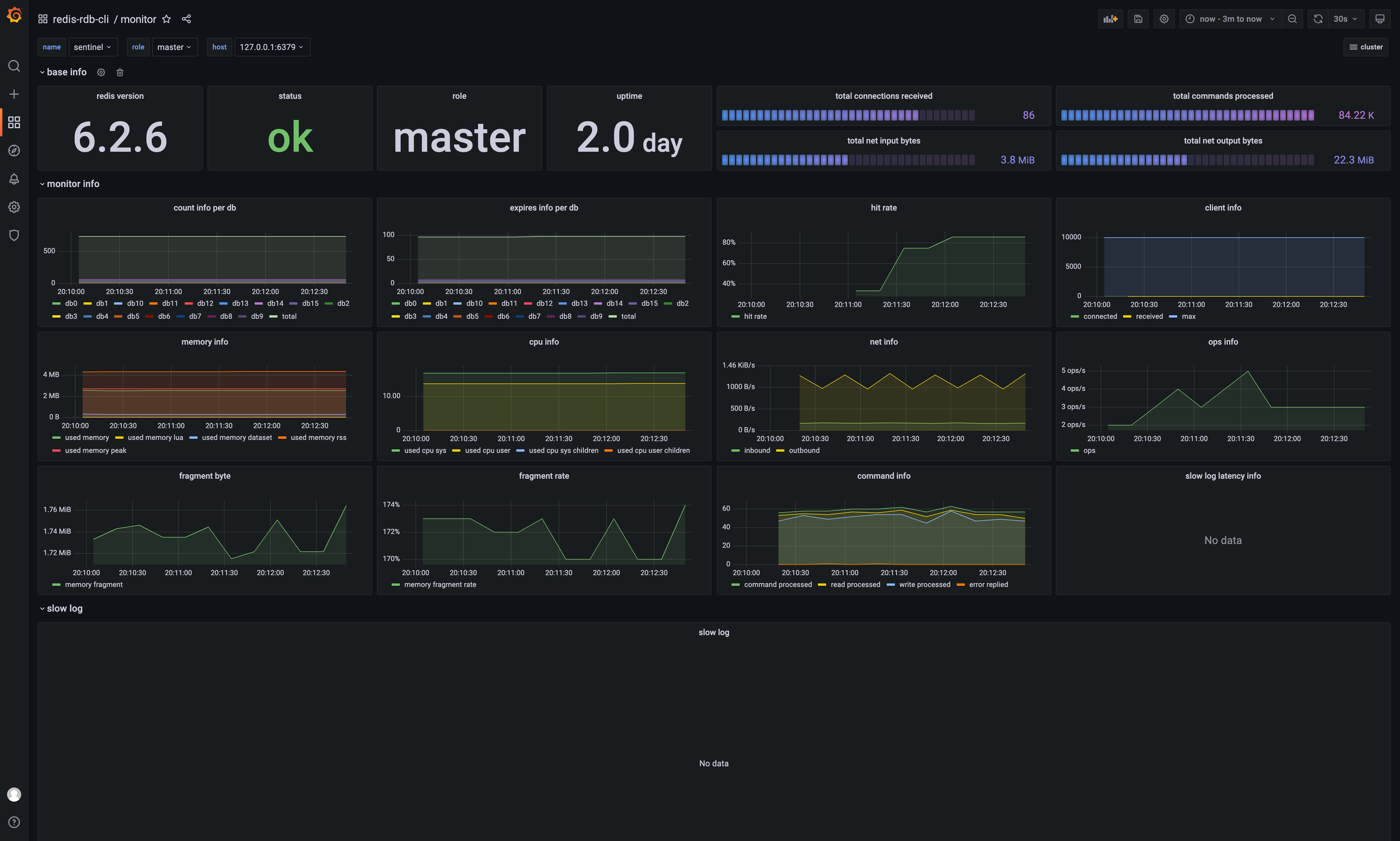
Difference between rmt and rst
rmt: Whenrmtstarts, the source Redis instance first performs aBGSAVEto generate an RDB snapshot. Thermtcommand migrates this snapshot file to the target Redis instance. The command terminates after the migration is complete.rst: In addition to migrating the initial RDB snapshot,rstalso syncs incremental data changes from the source to the target. It runs continuously until manually stopped (e.g., withCTRL+C). Note thatrstonly supports filtering bydbindex. For more details, see Limitations of Migration.
Dashboard
Since v0.1.9, the rct -f mem command supports visualizing its output on a Grafana dashboard.
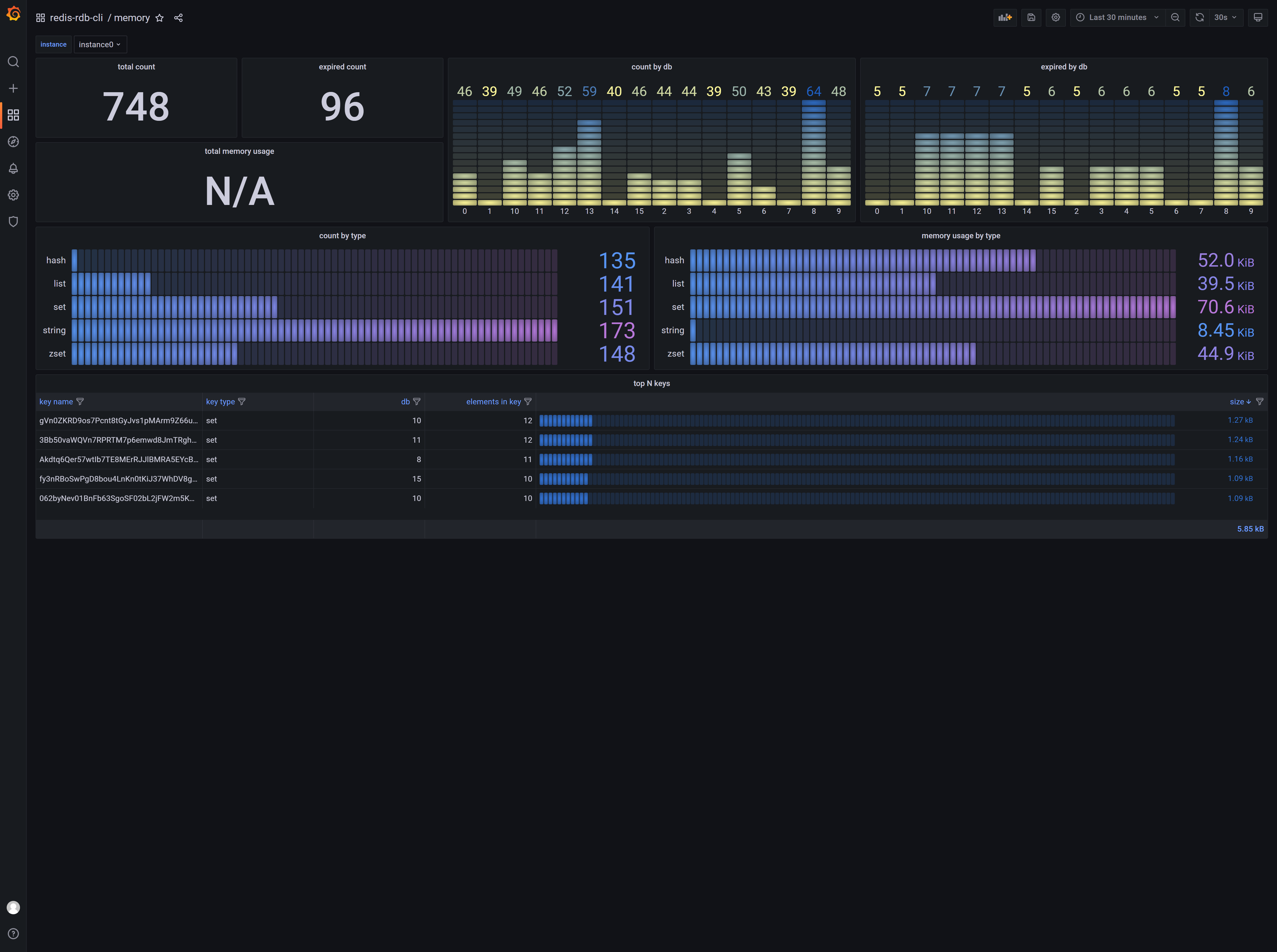
To enable this feature, you must have Docker and Docker Compose installed. Please refer to the official Docker documentation for installation instructions.
Then, run the following command:
shell$ cd /path/to/redis-rdb-cli/dashboard # Start $ docker-compose up -d # Stop $ docker-compose down
Next, open /path/to/redis-rdb-cli/conf/redis-rdb-cli.conf and change the metric_gateway parameter from none to influxdb.
Open http://localhost:3000 in your browser to view the results from rct -f mem.
If you are deploying this tool across multiple instances, ensure that the metric_instance parameter is set to a unique value for each instance.
Using with Redis 6
Redis 6 with SSL
- Use OpenSSL to generate a keystore:
shell$ cd /path/to/redis-6.0-rc1 $ ./utils/gen-test-certs.sh $ cd tests/tls $ openssl pkcs12 -export -CAfile ca.crt -in redis.crt -inkey redis.key -out redis.p12
-
If the source and target Redis instances use the same keystore, configure the following parameters in
redis-rdb-cli.conf:
source_keystore_pathandtarget_keystore_pathshould point to/path/to/redis-6.0-rc1/tests/tls/redis.p12.
Setsource_keystore_passandtarget_keystore_pass. -
After configuring the SSL parameters, use the
rediss://protocol in your commands to enable SSL, for example:rst -s rediss://127.0.0.1:6379 -m rediss://127.0.0.1:30001 -r -d 0
Redis 6 with ACL
- Use the following URI format to connect with ACL credentials:
shell$ rst -s redis://user:pass@127.0.0.1:6379 -m redis://user:pass@127.0.0.1:6380 -r -d 0
- The specified
userMUST have+@allpermissions to execute the necessary commands.
Hacking rmt
rmt Threading Model
The rmt command uses the following four parameters from redis-rdb-cli.conf to manage data migration:
propertiesmigrate_batch_size=4096 migrate_threads=4 migrate_flush=yes migrate_retries=1
The most important parameter is migrate_threads. A value of 4, for example, means that the following threading model is used for migration:
textsingle redis ----> single redis +--------------+ +----------+ thread 1 +--------------+ | | +----| Endpoint |-------------------| | | | | +----------+ | | | | | | | | | | +----------+ thread 2 | | | | |----| Endpoint |-------------------| | | | | +----------+ | | | Source Redis |----| | Target Redis | | | | +----------+ thread 3 | | | | |----| Endpoint |-------------------| | | | | +----------+ | | | | | | | | | | +----------+ thread 4 | | | | +----| Endpoint |-------------------| | +--------------+ +----------+ +--------------+
textsingle redis ----> redis cluster +--------------+ +----------+ thread 1 +--------------+ | | +----| Endpoints|-------------------| | | | | +----------+ | | | | | | | | | | +----------+ thread 2 | | | | |----| Endpoints|-------------------| | | | | +----------+ | | | Source Redis |----| | Redis cluster| | | | +----------+ thread 3 | | | | |----| Endpoints|-------------------| | | | | +----------+ | | | | | | | | | | +----------+ thread 4 | | | | +----| Endpoints|-------------------| | +--------------+ +----------+ +--------------+
The key difference between migrating to a single instance versus a cluster lies in the use of Endpoint versus Endpoints. For cluster migrations, Endpoints represents a collection of Endpoint objects, each pointing to a master instance in the cluster. For example, in a Redis cluster with 3 masters and 3 replicas, if migrate_threads is set to 4, the tool will establish a total of 3 * 4 = 12 connections to the master instances.
Migration Performance
The following three parameters affect migration performance:
propertiesmigrate_batch_size=4096 migrate_retries=1 migrate_flush=yes
migrate_batch_size: By default, data is migrated using Redis pipelining. This parameter sets the batch size for the pipeline. If set to1, pipelining is effectively disabled, and each command is sent individually.migrate_retries: If a socket error occurs, the tool will recreate the socket and retry the failed command. This parameter specifies the number of retry attempts.migrate_flush: If set toyes, the output stream is flushed after every command. If set tono, the stream is flushed every 64KB. Note: Retries (migrate_retries) only take effect whenmigrate_flushis set toyes.
Migration Principle
text+---------------+ +-------------------+ restore +---------------+ | | | redis dump format |---------------->| | | | |-------------------| restore | | | | convert | redis dump format |---------------->| | | Dump rdb |------------>|-------------------| restore | Target Redis | | | | redis dump format |---------------->| | | | |-------------------| restore | | | | | redis dump format |---------------->| | +---------------+ +-------------------+ +---------------+
Limitations of Migration
- When migrating to a cluster, this tool uses the cluster's
nodes.conffile and does not handleMOVEDorASKredirections. Therefore, a key limitation is that the cluster MUST be in a stable state during the migration. This means there should be no slots in amigratingorimportingstate, and no failovers (promoting a replica to master) should occur. - When using
rstto migrate data to a cluster, the following commands are not supported:PUBLISH,SWAPDB,MOVE,FLUSHALL,FLUSHDB,MULTI,EXEC,SCRIPT FLUSH,SCRIPT LOAD,EVAL,EVALSHA. - Additionally, the following commands are ONLY SUPPORTED WHEN ALL KEYS IN THE COMMAND BELONG TO THE SAME SLOT (e.g.,
del {user}:1 {user}:2):RPOPLPUSH,SDIFFSTORE,SINTERSTORE,SMOVE,ZINTERSTORE,ZUNIONSTORE,DEL,UNLINK,RENAME,RENAMENX,PFMERGE,PFCOUNT,MSETNX,BRPOPLPUSH,BITOP,MSET,COPY,BLMOVE,LMOVE,ZDIFFSTORE,GEOSEARCHSTORE,MSETEX.
Hacking ret
What the ret Command Does
- The
retcommand allows users to define their own sink services to send Redis data to other systems, such as MySQL or MongoDB. - It uses Java's Service Provider Interface (SPI) to load custom extensions.
How to Implement a Sink Service
Follow the steps below to implement your own sink service.
- Create a new Maven project:
xml<?xml version="1.0" encoding="UTF-8"?> <project xmlns="http://maven.apache.org/POM/4.0.0" xmlns:xsi="http://www.w3.org/2001/XMLSchema-instance" xsi:schemaLocation="http://maven.apache.org/POM/4.0.0 http://maven.apache.org/xsd/maven-4.0.0.xsd"> <modelVersion>4.0.0</modelVersion> <groupId>com.your.company</groupId> <artifactId>your-sink-service</artifactId> <version>1.0.0</version> <properties> <project.build.sourceEncoding>UTF-8</project.build.sourceEncoding> <maven.compiler.source>1.8</maven.compiler.source> <maven.compiler.target>1.8</maven.compiler.target> </properties> <dependencies> <dependency> <groupId>com.moilioncircle</groupId> <artifactId>redis-rdb-cli-api</artifactId> <version>1.9.0</version> <scope>provided</scope> </dependency> <dependency> <groupId>com.moilioncircle</groupId> <artifactId>redis-replicator</artifactId> <version>[3.9.0, )</version> <scope>provided</scope> </dependency> <dependency> <groupId>org.slf4j</groupId> <artifactId>slf4j-api</artifactId> <version>1.7.25</version> <scope>provided</scope> </dependency> <!-- <dependency> other dependencies </dependency> --> </dependencies> <build> <plugins> <plugin> <artifactId>maven-assembly-plugin</artifactId> <version>3.1.0</version> <configuration> <descriptorRefs> <descriptorRef>jar-with-dependencies</descriptorRef> </descriptorRefs> </configuration> <executions> <execution> <id>make-assembly</id> <phase>package</phase> <goals> <goal>single</goal> </goals> </execution> </executions> </plugin> <plugin> <groupId>org.apache.maven.plugins</groupId> <artifactId>maven-compiler-plugin</artifactId> <version>3.8.1</version> <configuration> <source>${maven.compiler.source}</source> <target>${maven.compiler.target}</target> <encoding>${project.build.sourceEncoding}</encoding> </configuration> </plugin> </plugins> </build> </project>
- Implement the
SinkServiceinterface:
javapublic class YourSinkService implements SinkService { @Override public String sink() { return "your-sink-service"; } @Override public void init(File config) throws IOException { // Parse your external sink config } @Override public void onEvent(Replicator replicator, Event event) { // Your sink business logic } }
- Register the service using Java SPI:
Create the filesrc/main/resources/META-INF/services/com.moilioncircle.redis.rdb.cli.api.sink.SinkServicewith the following content:
textyour.package.YourSinkService
- Package and Deploy:
shell$ mvn clean install $ cp ./target/your-sink-service-1.0.0-jar-with-dependencies.jar /path/to/redis-rdb-cli/lib
- Run Your Sink Service:
shell$ ret -s redis://127.0.0.1:6379 -c config.conf -n your-sink-service
- Debug Your Sink Service:
javapublic static void main(String[] args) throws Exception { Replicator replicator = new RedisReplicator("redis://127.0.0.1:6379"); Runtime.getRuntime().addShutdownHook(new Thread(() -> { Replicators.closeQuietly(replicator); })); replicator.addExceptionListener((rep, tx, e) -> { throw new RuntimeException(tx.getMessage(), tx); }); SinkService sink = new YourSinkService(); sink.init(new File("/path/to/your-sink.conf")); replicator.addEventListener(new AsyncEventListener(sink, replicator, 4, Executors.defaultThreadFactory())); replicator.open(); }
How to Implement a Formatter Service
- Create
YourFormatterServicethat extendsAbstractFormatterService:
javapublic class YourFormatterService extends AbstractFormatterService { @Override public String format() { return "test"; } @Override public Event applyString(Replicator replicator, RedisInputStream in, int version, byte[] key, int type, ContextKeyValuePair context) throws IOException { byte[] val = new DefaultRdbValueVisitor(replicator).applyString(in, version); getEscaper().encode(key, getOutputStream()); getEscaper().encode(val, getOutputStream()); getOutputStream().write('\n'); return context; } }
- Register the formatter using Java SPI:
Create the filesrc/main/resources/META-INF/services/com.moilioncircle.redis.rdb.cli.api.format.FormatterServicewith the following content:
textyour.package.YourFormatterService
- Package and Deploy:
shell$ mvn clean install $ cp ./target/your-service-1.0.0-jar-with-dependencies.jar /path/to/redis-rdb-cli/lib
- Run your formatter service:
shell$ rct -f test -s redis://127.0.0.1:6379 -o ./out.csv -t string -d 0 -e json
Contributors
Consulting
Commercial support for redis-rdb-cli is available. The following services are currently offered:
- Onsite consulting: $10,000 per day
- Onsite training: $10,000 per day
You may also contact Baoyi Chen directly at chen.bao.yi@gmail.com.
Supported by 宁文君
27 January 2023 was a sad day; I lost my mother, 宁文君. She was encouraging and supported me in developing this tool. Every time a company used this tool, she got excited like a child and encouraged me to keep going. Without her, I couldn't have maintained this tool for so many years. Even though I didn't achieve much, she was still proud of me. R.I.P and may God bless her.
Supported by IntelliJ IDEA
IntelliJ IDEA is a Java integrated development environment (IDE) for developing computer software.
It is developed by JetBrains (formerly known as IntelliJ), and is available as an Apache 2 Licensed community edition,
and in a proprietary commercial edition. Both can be used for commercial development.
Contributors
Showing top 8 contributors by commit count.

![dependabot[bot]](https://avatars.githubusercontent.com/in/29110?v=4)






Related Repositories

halfrost/Halfrost-Field
✍🏻 这里是写博客的地方 —— Halfrost-Field 冰霜之地

webpack/webpack-bundle-analyzer
Webpack plugin and CLI utility that represents bundle content as convenient interactive zoomable treemap

draveness/analyze
Draven's Blog

web-infra-dev/rsdoctor
A one-stop build analyzer for Rspack and webpack.

1N3/ReverseAPK
Quickly analyze and reverse engineer Android packages

linuxerwang/goroutine-inspect
An interactive tool to analyze Golang goroutine dump.