

Lightly train
All-in-one training for vision models (YOLO, ViTs, RT-DETR, DINOv3): pretraining, fine-tuning, distillation.
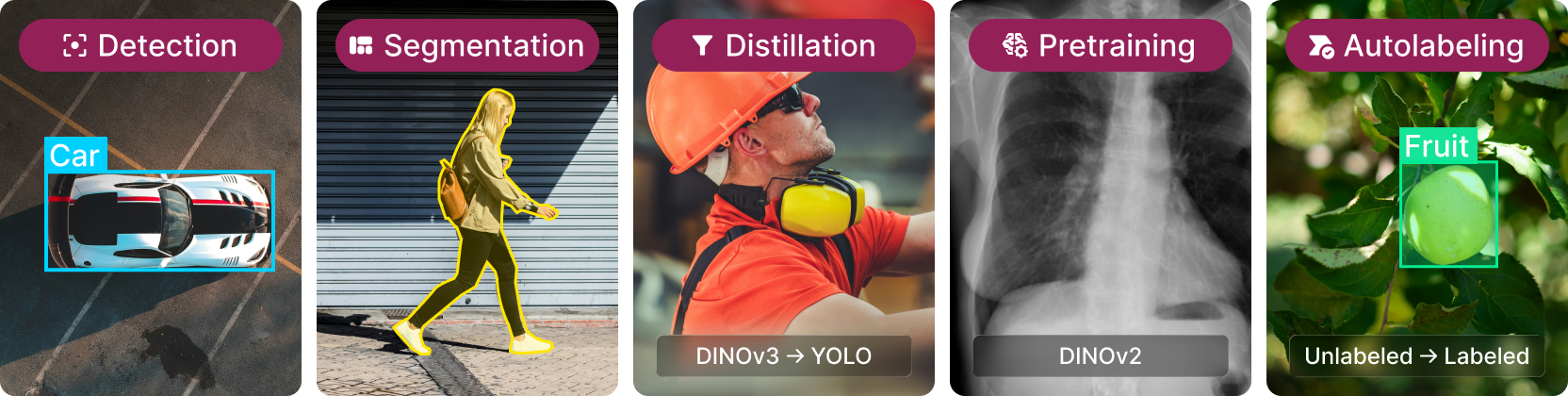
LightlyTrain is the leading framework for transforming your data into state-of-the-art computer vision models. It covers the entire model development lifecycle from pretraining DINOv2/v3 vision foundation models on your unlabeled data to fine-tuning transformer and YOLO models on detection and segmentation tasks for edge deployment. The project is written primarily in Python, distributed under the GNU Affero General Public License v3.0 license, first published in 2025. It has gained significant community traction with 1,599 stars and 88 forks on GitHub. Key topics include: computer-vision, contrastive-learning, deep-learning, depth-estimation, dinov2.
LightlyTrain - SOTA Pretraining, Fine-tuning and Distillation




Train Better Models, Faster
LightlyTrain is the leading framework for transforming your data into state-of-the-art
computer vision models. It covers the entire model development lifecycle from
pretraining DINOv2/v3 vision foundation models on your unlabeled data to fine-tuning
transformer and YOLO models on detection and segmentation tasks for edge deployment.
Struggling to get good results with pre-training? Talk to one of our experts
Contact us
Using LightlyTrain at work, in production, on the edge, or to build proprietary models?
You likely need a Commercial License. Contact us to
request a license for commercial use.
Also check out LightlyStudio to easily
visualize your annotations and predictions.
News
- [0.16.0] -
2026-06-25: ⚡ Upgraded LTDETRv2 for object detection: Following the success of
LTDETR, LightlyTrain's DETR model, we release LTDETRv2 with significant architectural
and performance improvements! It supports using ECViT backbones from
EdgeCrafter and ONNX/TensorRT export for faster
inference! - [0.15.0] -
2026-04-14: 🔎 Distillationv3: Better generalizing distillation method that
performs equally well across dense and global tasks and across all models, from ViTs
to hybrids to CNNs (+support for custom teachers!). 🔎 - [0.14.0] -
2026-01-19: 🐣 PicoDet, Tiny Models, and ONNX/TensorRT FP16 Support: PicoDet object
detection models for low-power embedded devices! All tasks now support tiny DINOv3
models and ONNX/TensorRT export in FP16 precision for faster inference! 🐣 - [0.13.0] -
2025-12-15: 🐥 New Tiny Object Detection Models: We release tiny DINOv3 models
pretrained on COCO for
object detection! 🐥 - [0.12.0] -
2025-11-06: 💡 New DINOv3 Object Detection: Run inference or fine-tune DINOv3
models for
object detection! 💡 - [0.11.0] -
2025-08-15: 🚀 New DINOv3 Support: Pretrain your own model with
distillation
from DINOv3 weights. Or fine-tune our SOTA
EoMT semantic segmentation model
with a DINOv3 backbone! 🚀 - [0.10.0] -
2025-08-04: 🔥 Train state-of-the-art semantic segmentation models with our new
DINOv2 semantic segmentation
fine-tuning method! 🔥 - [0.9.0] -
2025-07-21:
DINOv2 pretraining
is now officially available!
Installation
Install LightlyTrain on Python 3.8+ for Windows, Linux or MacOS with:
bashpip install lightly-train
Workflows
Train LTDETR detection models with DINOv2, DINOv3, or EdgeCrafter ECViT backbones.
COCO Results
| Model | Val mAP<sub>50:95</sub> | Latency (ms) | Params (M) | Input Size |
|---|---|---|---|---|
| picodet-s-coco | 26.7* | 2.2* | 1.17 | 416×416 |
| picodet-l-coco | 32.0* | 2.4* | 3.75 | 416×416 |
| ltdetrv2-s-coco (NEW) | 50.7 | 5.4 | 9.9 | 640×640 |
| dinov3/vitt16-ltdetr-coco | 49.8 | 5.4 | 10.1 | 640×640 |
| dinov3/vitt16plus-ltdetr-coco | 52.5 | 7.0 | 18.1 | 640×640 |
| dinov3/vits16-ltdetr-coco | 55.4 | 10.5 | 36.4 | 640×640 |
| dinov3/convnext-tiny-ltdetr-coco | 54.4 | 13.3 | 61.1 | 640×640 |
| dinov3/convnext-small-ltdetr-coco | 56.9 | 17.7 | 82.7 | 640×640 |
| dinov3/convnext-base-ltdetr-coco | 58.6 | 24.7 | 121.0 | 640×640 |
| dinov3/convnext-large-ltdetr-coco | 60.0 | 42.3 | 230.0 | 640×640 |
*Picodet models are in preview and we report preliminary results.
Models are trained on the COCO 2017 dataset and evaluated on the validation set with
single-scale testing. Latency is measured with TensorRT on a NVIDIA T4 GPU with batch
size 1. All models are optimized using tensorrt==10.13.3.9.
Usage

</details> <details> <summary><strong>Panoptic Segmentation</strong></summary>pythonimport lightly_train if __name__ == "__main__": # Train with our most recent LT-DETRv2 detector based on DINOv3 and EdgeCrafter. lightly_train.train_object_detection( out="out/my_experiment", model="ltdetrv2-s-coco", data={ "path": "my_data_dir", "train": "images/train", "val": "images/val", "names": { 0: "person", 1: "bicycle", 2: "car", # ... }, }, ) # Load model and run inference model = lightly_train.load_model("out/my_experiment/exported_models/exported_best.pt") # Or use one of the models provided by LightlyTrain # model = lightly_train.load_model("ltdetrv2-s-coco") results = model.predict("image.jpg") results["labels"] # Class labels, tensor of shape (num_boxes,) results["bboxes"] # Bounding boxes in (xmin, ymin, xmax, ymax) absolute pixel # coordinates of the original image. Tensor of shape (num_boxes, 4). results["scores"] # Confidence scores, tensor of shape (num_boxes,)
Train state-of-the-art panoptic segmentation models with DINOv3 backbones using the EoMT
method from CVPR 2025.
COCO Results
| Implementation | Model | Val PQ | Avg. Latency (ms) | Params (M) | Input Size |
|---|---|---|---|---|---|
| LightlyTrain | dinov3/vitt16-eomt-panoptic-coco | 38.0 | 13.5 | 6.0 | 640×640 |
| LightlyTrain | dinov3/vittplus16-eomt-panoptic-coco | 41.4 | 14.1 | 7.7 | 640×640 |
| LightlyTrain | dinov3/vits16-eomt-panoptic-coco | 46.8 | 21.2 | 23.4 | 640×640 |
| LightlyTrain | dinov3/vitb16-eomt-panoptic-coco | 53.2 | 39.4 | 92.5 | 640×640 |
| LightlyTrain | dinov3/vitl16-eomt-panoptic-coco | 57.0 | 80.1 | 315.1 | 640×640 |
| LightlyTrain | dinov3/vitl16-eomt-panoptic-coco-1280 | 59.0 | 500.1 | 315.1 | 1280×1280 |
| EoMT (CVPR 2025 paper, current SOTA) | dinov3/vitl16-eomt-panoptic-coco-1280 | 58.9 | - | 315.1 | 1280×1280 |
Tiny models are trained for 48 epochs, small and base models for 24 epochs and large
models for 12 epochs on the COCO 2017 dataset and evaluated on the validation set with
single-scale testing. Avg. Latency is measured on a single NVIDIA T4 GPU with batch size
1. All models are optimized using torch.compile.
Usage
</details> <details> <summary><strong>Instance Segmentation</strong></summary>pythonimport lightly_train if __name__ == "__main__": # Train an panoptic segmentation model with a DINOv3 backbone lightly_train.train_panoptic_segmentation( out="out/my_experiment", model="dinov3/vitb16-eomt-panoptic-coco", data={ "train": { "images": "images/train", "masks": "annotations/train", "annotations": "annotations/train.json", }, "val": { "images": "images/val", "masks": "annotations/val", "annotations": "annotations/val.json", }, }, ) model = lightly_train.load_model("out/my_experiment/exported_models/exported_best.pt") results = model.predict("image.jpg") results["masks"] # Masks with (class_label, segment_id) for each pixel, tensor of # shape (height, width, 2). Height and width correspond to the # original image size. results["segment_ids"] # Segment ids, tensor of shape (num_segments,). results["scores"] # Confidence scores, tensor of shape (num_segments,)
Train state-of-the-art instance segmentation models with DINOv3 backbones using the EoMT
method from CVPR 2025.
COCO Results
| Implementation | Model | Val mAP mask | Avg. Latency (ms) | Params (M) | Input Size |
|---|---|---|---|---|---|
| LightlyTrain | dinov3/vitt16-eomt-inst-coco | 25.4 | 12.7 | 6.0 | 640×640 |
| LightlyTrain | dinov3/vitt16plus-eomt-inst-coco | 27.6 | 13.3 | 7.7 | 640×640 |
| LightlyTrain | dinov3/vits16-eomt-inst-coco | 32.6 | 19.4 | 21.6 | 640×640 |
| LightlyTrain | dinov3/vitb16-eomt-inst-coco | 40.3 | 39.7 | 85.7 | 640×640 |
| LightlyTrain | dinov3/vitl16-eomt-inst-coco | 46.2 | 80.0 | 303.2 | 640×640 |
| EoMT (CVPR 2025 paper, current SOTA) | dinov3/vitl16-eomt-inst-coco | 45.9 | - | 303.2 | 640×640 |
Tiny models are trained for 48 epochs, while all other models are trained for 12 epochs
on the COCO 2017 dataset and evaluated on the validation set with single-scale testing.
Average latency is measured on a single NVIDIA T4 GPU with batch size 1. All models are
optimized using torch.compile.
Usage
</details> <details> <summary><strong>Semantic Segmentation</strong></summary>pythonimport lightly_train if __name__ == "__main__": # Train an instance segmentation model with a DINOv3 backbone lightly_train.train_instance_segmentation( out="out/my_experiment", model="dinov3/vitb16-eomt-inst-coco", data={ "path": "my_data_dir", "train": "images/train", "val": "images/val", "names": { 0: "background", 1: "vehicle", 2: "pedestrian", # ... }, }, ) model = lightly_train.load_model("out/my_experiment/exported_models/exported_best.pt") results = model.predict("image.jpg") results["labels"] # Class labels, tensor of shape (num_instances,) results["masks"] # Binary masks, tensor of shape (num_instances, height, width). # Height and width correspond to the original image size. results["scores"] # Confidence scores, tensor of shape (num_instances,)
Train state-of-the-art semantic segmentation models with DINOv2 or DINOv3 backbones
using the EoMT method from CVPR 2025.
COCO-Stuff Results
| Implementation | Model | Val mIoU | Avg. Latency (ms) | Params (M) | Input Size |
|---|---|---|---|---|---|
| LightlyTrain | dinov3/vitt32-eomt-coco | 34.0 | 4.2 | 6.0 | 512×512 |
| LightlyTrain | dinov3/vitt32plus-eomt-coco | 36.0 | 4.4 | 7.7 | 512×512 |
| LightlyTrain | dinov3/vits32-eomt-coco | 42.4 | 5.4 | 21.6 | 512×512 |
| LightlyTrain | dinov3/vitb32-eomt-coco | 48.3 | 9.4 | 85.7 | 512×512 |
| LightlyTrain | dinov3/vitl32-eomt-coco | 51.2 | 17.5 | 303.2 | 512×512 |
| LightlyTrain | dinov3/vitt16-eomt-coco | 37.9 | 6.0 | 6.0 | 512×512 |
| LightlyTrain | dinov3/vitt16plus-eomt-coco | 39.5 | 6.4 | 7.7 | 512×512 |
| LightlyTrain | dinov3/vits16-eomt-coco | 45.0 | 11.3 | 21.6 | 512×512 |
| LightlyTrain | dinov3/vitb16-eomt-coco | 50.1 | 23.1 | 85.7 | 512×512 |
| LightlyTrain | dinov3/vitl16-eomt-coco | 52.5 | 49.0 | 303.2 | 512×512 |
Models are trained for 12 epochs with num_queries=200 on the COCO-Stuff dataset and
evaluated on the validation set with single-scale testing. Average latency is measured
on a single NVIDIA T4 GPU with batch size 1. All models optimized using torch.compile.
Cityscapes Results
| Implementation | Model | Val mIoU | Avg. Latency (ms) | Params (M) | Input Size |
|---|---|---|---|---|---|
| LightlyTrain | dinov3/vits16-eomt-cityscapes | 78.6 | 53.8 | 21.6 | 1024×1024 |
| LightlyTrain | dinov3/vitb16-eomt-cityscapes | 81.0 | 114.9 | 85.7 | 1024×1024 |
| LightlyTrain | dinov3/vitl16-eomt-cityscapes | 84.4 | 256.4 | 303.2 | 1024×1024 |
| EoMT (CVPR 2025 paper, current SOTA) | dinov2/vitl16-eomt | 84.2 | - | 319 | 1024×1024 |
Average latency is measured on a single NVIDIA T4 GPU with batch size 1. All models are
optimized using torch.compile.
Usage
</details> <details> <summary><strong>Image Classification</strong></summary>pythonimport lightly_train if __name__ == "__main__": # Train a semantic segmentation model with a DINOv3 backbone lightly_train.train_semantic_segmentation( out="out/my_experiment", model="dinov3/vits16-eomt", data={ "train": { "images": "my_data_dir/train/images", "masks": "my_data_dir/train/masks", }, "val": { "images": "my_data_dir/val/images", "masks": "my_data_dir/val/masks", }, "classes": { 0: "background", 1: "road", 2: "building", # ... }, }, ) # Load model and run inference model = lightly_train.load_model("out/my_experiment/exported_models/exported_best.pt") # Or use one of the models provided by LightlyTrain # model = lightly_train.load_model("dinov3/vits16-eomt") masks = model.predict("image.jpg") # Masks is a tensor of shape (height, width) with class labels as values. # It has the same height and width as the input image.
Train multiclass or multilabel image classification models with any backbone.
Usage
</details> <details> <summary><strong>Depth Estimation</strong></summary>pythonimport lightly_train if __name__ == "__main__": # Train an image classification model with a DINOv3 backbone lightly_train.train_image_classification( out="out/my_experiment", model="dinov3/vitt16", data={ "train": "my_data_dir/train/", "val": "my_data_dir/val/", "classes": { 0: "cat", 1: "car", 2: "dog", # ... }, }, ) model = lightly_train.load_model("out/my_experiment/exported_models/exported_best.pt") results = model.predict("image.jpg", topk=1, threshold=0.5) results["labels"] # Class labels, tensor of shape (topk,) results["scores"] # Confidence scores, tensor of shape (topk,)
Run monocular depth inference with Depth Anything V2 and V3 models. Training support
will be released soon!
Usage
pythonimport lightly_train # Load a depth model provided by LightlyTrain model = lightly_train.load_model("dinov2/dav3-relative-large") # Predict a relative-depth map depth = model.predict("image.jpg") # depth is a tensor of shape (height, width) matching the input image.
Metric depth (in meters) and the full list of available models are covered in the
documentation.
Pretrain any model architecture with unlabeled data by distilling the knowledge from
DINOv2 or DINOv3 foundation models into your model. On the COCO dataset, YOLOv8-s models
pretrained with LightlyTrain achieve high performance across all tested label fractions.
These improvements hold for other architectures like YOLOv11, RT-DETR, and Faster R-CNN.
See our announcement post for
more benchmarks and details.

Usage
</details> <details> <summary><strong>Pretraining (DINOv2 Foundation Models)</strong></summary>pythonimport lightly_train if __name__ == "__main__": # Distill the knowledge from a DINOv3 teacher into a YOLOv8 model lightly_train.pretrain( out="out/my_experiment", data="my_data_dir", model="ultralytics/yolov8s", method="distillation", method_args={ "teacher": "dinov3/vitb16", }, ) # Load model for fine-tuning model = YOLO("out/my_experiment/exported_models/exported_last.pt") model.train(data="coco8.yaml")
With LightlyTrain you can train your very own foundation model like DINOv2 on your data.
ImageNet-1K Results
| Implementation | Model | Val ImageNet k-NN |
|---|---|---|
| LightlyTrain | dinov2/vitl16 | 81.9% |
| DINOv2 | dinov2/vitl16 | 81.6% |
Models are pretrained on ImageNet-1k for 100 epochs and evaluated with a k-NN classifier
on the ImageNet validation set.
Usage
</details> <details> <summary><strong>Autolabeling</strong></summary>pythonimport lightly_train if __name__ == "__main__": # Pretrain a DINOv2 vision foundation model lightly_train.pretrain( out="out/my_experiment", data="my_data_dir", model="dinov2/vitb14", method="dinov2", )
LightlyTrain provides simple commands to autolabel your unlabeled data using DINOv2 or
DINOv3 pretrained models. This allows you to efficiently boost performance of your
smaller models by leveraging all your unlabeled images.
ADE20K Results
| Implementation | Model | Autolabel | Val mIoU | Params (M) | Input Size |
|---|---|---|---|---|---|
| LightlyTrain | dinov3/vits16-eomt | ❌ | 0.466 | 21.6 | 518×518 |
| LightlyTrain | dinov3/vits16-eomt-ade20k | ✅ | 0.533 | 21.6 | 518×518 |
| LightlyTrain | dinov3/vitb16-eomt | ❌ | 0.544 | 85.7 | 518×518 |
| LightlyTrain | dinov3/vitb16-eomt-ade20k | ✅ | 0.573 | 85.7 | 518×518 |
The better results with auto-labeling were achieved by fine-tuning a ViT-H+ on the
ADE20K dataset, which reaches 0.595 validation mIoU. This model was then used to
autolabel 100k images from the SUN397 dataset. Using these labels, we subsequently
fine-tuned the smaller models, and then used the ADE20k dataset for validation.
Usage
</details>pythonimport lightly_train if __name__ == "__main__": # Autolabel your data with a DINOv3 semantic segmentation model lightly_train.predict_semantic_segmentation( out="out/my_autolabeled_data", data="my_data_dir", model="dinov3/vitb16-eomt-coco", # Or use one of your own model checkpoints # model="out/my_experiment/exported_models/exported_best.pt", ) # The autolabeled masks will be saved in this format: # out/my_autolabeled_data # ├── <image name>.png # ├── <image name>.png # └── …
Features
- Python, Command Line, and Docker
support - Built for
high performance
including multi-GPU
and multi-node
support - Monitor training progress
with MLflow, TensorBoard, Weights & Biases, and more - Runs fully on-premises with no API authentication
- Export models in their native format for fine-tuning or inference
- Export models in ONNX or TensorRT format for edge deployment
Models
LightlyTrain supports the following model and workflow combinations.
Fine-tuning
| Model | Object<br>Detection | Instance<br>Segmentation | Panoptic<br>Segmentation | Semantic<br>Segmentation | Image<br>Classification |
|---|---|---|---|---|---|
| DINOv3 | ✅ 🔗 | ✅ 🔗 | ✅ 🔗 | ✅ 🔗 | ✅ 🔗 |
| DINOv2 | ✅ 🔗 | ✅ 🔗 | ✅ 🔗 | ✅ 🔗 | ✅ 🔗 |
| EdgeCrafter | ✅ 🔗 | ||||
| Any | ✅ 🔗 |
Distillation & Pretraining
| Model | Distillation | Pretraining |
|---|---|---|
| DINOv3 | ✅ 🔗 | |
| DINOv2 | ✅ 🔗 | ✅ 🔗 |
| Torchvision ResNet, ConvNext, ShuffleNetV2 | ✅ 🔗 | ✅ 🔗 |
| TIMM models | ✅ 🔗 | ✅ 🔗 |
| Ultralytics YOLOv5–YOLO26, RT-DETR | ✅ 🔗 | ✅ 🔗 |
| RT-DETR, RT-DETRv2 | ✅ 🔗 | ✅ 🔗 |
| RF-DETR | ✅ 🔗 | ✅ 🔗 |
| YOLOv12 | ✅ 🔗 | ✅ 🔗 |
| Custom PyTorch Model | ✅ 🔗 | ✅ 🔗 |
Contact us if you need support for additional models.
LightlyTrain in Research
- Unlabeled to Accurate: Self-Supervised Learning for Land Use Classification in Sentinel-2 Imagery
- Vision Foundry: A System for Training Foundational Vision AI Models
- EdgeCrafter: Compact ViTs for Edge Dense Prediction via Task-Specialized Distillation
- Real-Time Object Detection Meets DINOv3
Usage Events
LightlyTrain collects anonymous usage events to help us improve the product. We only
track training method, model architecture, and system information (OS, GPU, CI,
Container). To opt-out, set the environment variable:
export LIGHTLY_TRAIN_EVENTS_DISABLED=1
License
LightlyTrain offers flexible licensing options to suit your specific needs:
-
AGPL-3.0 License: Perfect for open-source projects, academic research, and
community contributions. Share your innovations with the world while benefiting from
community improvements. -
Commercial License: Ideal for businesses and organizations that need proprietary
development freedom. Enjoy all the benefits of LightlyTrain while keeping your code
and models private. Includes model training and runtime license. -
Free Community License: Available for students, researchers, startups in early
stages, or anyone exploring or experimenting with LightlyTrain. Empower the next
generation of innovators with full access to the world of pretraining.
Commercial Pricing
| Plan | Price | Eligibility |
|---|---|---|
| Startup | $5,000 / year | < $1M revenue or < 10 employees |
| Growth | $10,000 / year | < $10M revenue or < 100 employees |
| Enterprise | Custom | > $10M revenue or > 100 employees |
All commercial plans include a license for model training, edge deployment, and
inference. Enterprise plans include priority support, a joint Slack channel,
co-development engineering, and influence on the product roadmap.
Contact us to get started — we'll find the right
option for your project!
Contact
<br>
<br>
<br>
<br>
<br>






Contributors
Showing top 12 contributors by commit count.


Related Repositories

opencv/opencv
Open Source Computer Vision Library

Developer-Y/cs-video-courses
List of Computer Science courses with video lectures.

d2l-ai/d2l-zh
《动手学深度学习》:面向中文读者、能运行、可讨论。中英文版被70多个国家的500多所大学用于教学。

ultralytics/ultralytics
Ultralytics YOLO 🚀

microsoft/AI-For-Beginners
12 Weeks, 24 Lessons, AI for All!

roboflow/supervision
We write your reusable computer vision tools. 💜