

JsBarcode
Barcode generation library written in JavaScript that works in both the browser and on Node.js
Introduction ---- **JsBarcode** is a **barcode generator** written in JavaScript. It supports multiple barcode formats and works in browsers and with *Node.js*. It has *no dependencies* when it is used for the web but works with *jQuery* if you are into that. The project is written primarily in JavaScript, distributed under the MIT License license, first published in 2011. It has gained significant community traction with 5,868 stars and 1,115 forks on GitHub. Key topics include: barcode, barcode-generator, es2015, es6, javascript.
Introduction
JsBarcode is a barcode generator written in JavaScript. It supports multiple barcode formats and works in browsers and with Node.js. It has no dependencies when it is used for the web but works with jQuery if you are into that.
Demo
Barcode Generator
Simple CodePen Demo
Settings CodePen Demo
Supported barcodes:
- CODE128
- CODE128 (automatic mode switching)
- CODE128 A/B/C (force mode)
- EAN
- EAN-13
- EAN-8
- EAN-5
- EAN-2
- UPC (A)
- UPC (E)
- CODE39
- ITF
- ITF
- ITF-14
- MSI
- MSI10
- MSI11
- MSI1010
- MSI1110
- Pharmacode
- Codabar
- CODE93
Examples for browsers:
First create a canvas (or image)
html<svg id="barcode"></svg> <!-- or --> <canvas id="barcode"></canvas> <!-- or --> <img id="barcode"/>
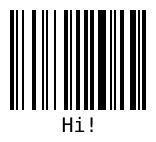
Simple example:
javascriptJsBarcode("#barcode", "Hi!"); // or with jQuery $("#barcode").JsBarcode("Hi!");
Result:
Example with options:
javascriptJsBarcode("#barcode", "1234", { format: "pharmacode", lineColor: "#0aa", width:4, height:40, displayValue: false });
Result:

More advanced use case:
javascriptJsBarcode("#barcode") .options({font: "OCR-B"}) // Will affect all barcodes .EAN13("1234567890128", {fontSize: 18, textMargin: 0}) .blank(20) // Create space between the barcodes .EAN5("12345", {height: 85, textPosition: "top", fontSize: 16, marginTop: 15}) .render();
Result:
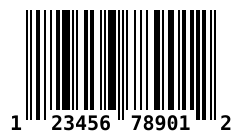
Or define the value and options in the HTML element:
Use any jsbarcode-* or data-* as attributes where * is any option.
html<svg class="barcode" jsbarcode-format="upc" jsbarcode-value="123456789012" jsbarcode-textmargin="0" jsbarcode-fontoptions="bold"> </svg>
And then initialize it with:
javascriptJsBarcode(".barcode").init();
Result:
Retrieve the barcode values so you can render it any way you'd like
Pass in an object which will be filled with data.
javascriptconst data = {}; JsBarcode(data, 'text', {...options});
data will be filled with a encodings property which has all the needed values.
See wiki for an example of what data looks like.
Setup for browsers:
Step 1:
Download or get the CDN link to the script:
| Name | Supported barcodes | Size (gzip) | CDN / Download |
|---|---|---|---|
| All | All the barcodes! | 11.1 kB | JsBarcode.all.min.js |
| CODE128 | CODE128 (auto and force mode) | 6.3 kB | JsBarcode.code128.min.js |
| CODE39 | CODE39 | 5.1 kB | JsBarcode.code39.min.js |
| EAN / UPC | EAN-13, EAN-8, EAN-5, EAN-2, UPC (A) | 6.7 kB | JsBarcode.ean-upc.min.js |
| ITF | ITF, ITF-14 | 5.1 kB | JsBarcode.itf.min.js |
| MSI | MSI, MSI10, MSI11, MSI1010, MSI1110 | 5 kB | JsBarcode.msi.min.js |
| Pharmacode | Pharmacode | 4.8 kB | JsBarcode.pharmacode.min.js |
| Codabar | Codabar | 4.9 kB | JsBarcode.codabar.min.js |
| CODE93 | CODE93 | JsBarcode.code93.min.js |
Step 2:
Include the script in your code:
html<script src="JsBarcode.all.min.js"></script>
Step 3:
You are done! Go generate some barcodes :smile:
Bower and npm:
You can also use Bower or npm to install and manage the library.
bashbower install jsbarcode --save
bashnpm install jsbarcode --save
Node.js:
With canvas:
javascriptvar JsBarcode = require('jsbarcode'); // Canvas v1 var Canvas = require("canvas"); // Canvas v2 var { createCanvas } = require("canvas"); // Canvas v1 var canvas = new Canvas(); // Canvas v2 var canvas = createCanvas(); JsBarcode(canvas, "Hello"); // Do what you want with the canvas // See https://github.com/Automattic/node-canvas for more information
With svg:
javascriptconst { DOMImplementation, XMLSerializer } = require('xmldom'); const xmlSerializer = new XMLSerializer(); const document = new DOMImplementation().createDocument('http://www.w3.org/1999/xhtml', 'html', null); const svgNode = document.createElementNS('http://www.w3.org/2000/svg', 'svg'); JsBarcode(svgNode, 'test', { xmlDocument: document, }); const svgText = xmlSerializer.serializeToString(svgNode);
Options:
For information about how to use the options, see the wiki page.
| Option | Default value | Type |
|---|---|---|
format | "auto" (CODE128) | String |
width | 2 | Number |
height | 100 | Number |
displayValue | true | Boolean |
text | undefined | String |
fontOptions | "" | String |
font | "monospace" | String |
textAlign | "center" | String |
textPosition | "bottom" | String |
textMargin | 2 | Number |
fontSize | 20 | Number |
background | "#ffffff" | String (CSS color) |
lineColor | "#000000" | String (CSS color) |
margin | 10 | Number |
marginTop | undefined | Number |
marginBottom | undefined | Number |
marginLeft | undefined | Number |
marginRight | undefined | Number |
valid | function(valid){} | Function |
Contributions and feedback:
We :heart: contributions and feedback.
If you want to contribute, please check out the CONTRIBUTING.md file.
If you have any question or suggestion create an issue or ask about it in the gitter chat.
Bug reports should always be done with a new issue.
License:
JsBarcode is shared under the MIT license. This means you can modify and use it however you want, even for comercial use. But please give this the Github repo a :star: and write a small comment of how you are using JsBarcode in the gitter chat.
Contributors
Showing top 12 contributors by commit count.



Related Repositories

zxing/zxing
ZXing ("Zebra Crossing") barcode scanning library for Java, Android

Tamsiree/RxTool
Android开发人员不得不收集的工具类集合 | 支付宝支付 | 微信支付(统一下单) | 微信分享 | Zip4j压缩(支持分卷压缩与加密) | 一键集成UCrop选择圆形头像 | 一键集成二维码和条形码的扫描与生成 | 常用Dialog | WebView的封装可播放视频 | 仿斗鱼滑动验证码 | Toast封装 | 震动 | GPS | Location定位 | 图片缩放 | Exif 图片添加地理位置信息(经纬度) | 蛛网等级 | 颜色选择器 | ArcGis | VTPK | 编译运行一下说不定会找到惊喜

mrousavy/react-native-vision-camera
📸 A powerful, high-performance React Native Camera library.

mebjas/html5-qrcode
A cross platform HTML5 QR code reader. See end to end implementation at: https://scanapp.org

sz3/libcimbar
Optimized implementation for color-icon-matrix barcodes

Shane32/QRCoder
A pure C# Open Source QR Code implementation