

Jimmy
Convert your notes to Markdown
:floppy_disk: Download: [**Linux**](https://github.com/marph91/jimmy/releases/latest/download/jimmy-linux) | [**Windows**](https://github.com/marph91/jimmy/releases/latest/download/jimmy-windows.exe) | [**macOS**](https://github.com/marph91/jimmy/releases/latest/download/jimmy-darwin-arm64) The project is written primarily in Python, distributed under the GNU General Public License v3.0 license, first published in 2024. Key topics include: bear, cherrytree, google-keep, joplin, markdown.

Free your notes by converting them to Markdown.
:floppy_disk: Download: Linux | Windows | macOS

If there is an issue at download or execution, please take a look at the step-by-step instructions.
:blue_book: Documentation
:star: If Jimmy is useful for you, feel free to star it on GitHub.



Use Cases
- Migrate between note apps. Jimmy's output is compatible with Joplin, Obsidian and more.
- Save your notes in a future-proof, human-readable format.
- Prepare your notes for processing in a LLM.
- Convert folders of office documents and PDFs recursively to Markdown.
Demo
Jimmy provides two interfaces:
- The Command Line Interface (CLI) can be used for scripting and provides the full set of features.
- The Terminal User Interface (TUI) can be used to do the conversion interactively. Currently it provides only a feature subset and is still in beta.
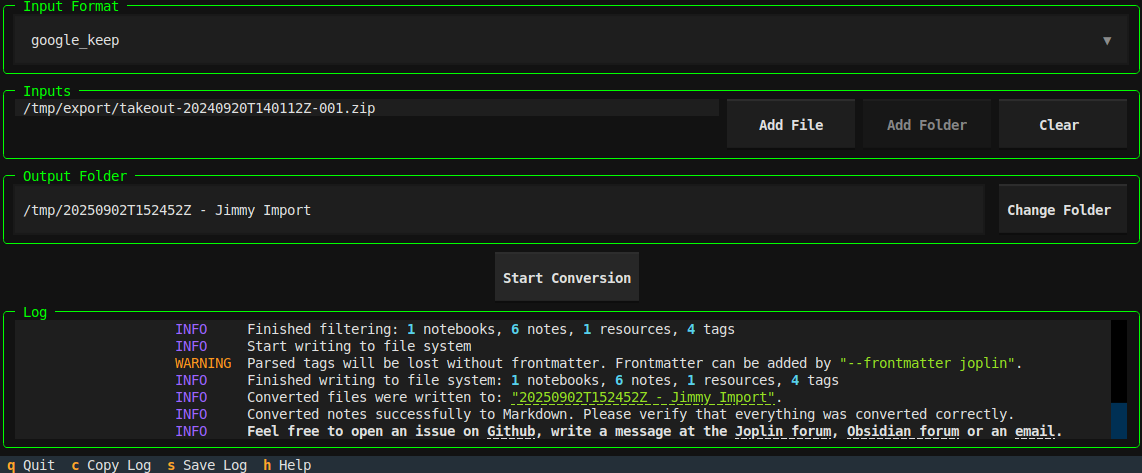
Example commands for Linux:
bash# do the conversion using an interactive TUI jimmy-linux tui # convert a single file supported by pandoc jimmy-linux cli libre_office_document.odt # convert all files in a folder jimmy-linux cli path/to/folder # convert a Google Keep export jimmy-linux cli takeout-20240401T160516Z-001.zip --format google_keep
This is an example of a successful conversion:
| TUI | CLI |
|---|---|
| <video src="https://github.com/user-attachments/assets/bfe1ae55-4528-44ef-b921-5f057932b413"> | <video src="https://github.com/user-attachments/assets/dcd2bc5e-2442-468e-a792-5def563c6981"> |
If there is an issue at download or execution, please take a look at the step-by-step instructions.
Features
- ✅ Several supported input formats
- ✅ Markdown + Front matter output
- Compatible with any text editor
- Can be imported to Joplin/Obsidian/...
- Preserves resources, tags and note links when possible
- ✅ Offline
- ✅ Open Source
- ✅ Cross-platform
- ✅ Standalone (no Docker, Python or Node.js installation required)
- ❎ No AI used during conversion
Supported Apps
Export data from your app and convert it to Markdown. For details, click on the links.
A <img alt="Anki logo" src="https://upload.wikimedia.org/wikipedia/commons/thumb/3/3d/Anki-icon.svg/250px-Anki-icon.svg.png" style="height:20px;max-width:20px;"> Anki <img alt="Anytype logo" src="https://raw.githubusercontent.com/anyproto/anytype-ts/f5bad768813c6e8b783192adfd25c7410494977c/src/img/logo/symbol.svg" style="height:20px;max-width:20px;"> Anytype
B <img alt="Bear logo" src="https://bear.app/images/logo.png" style="height:20px;max-width:20px;"> Bear
C <img alt="Cacher logo" src="https://raw.githubusercontent.com/CacherApp/cacher-cli/e241f06867dba740131db5314ef7fe279135baf6/images/cacher-icon.png" style="height:20px;max-width:20px;"> Cacher <img alt="CherryTree logo" src="https://raw.githubusercontent.com/giuspen/cherrytree/c822b16681b002b8882645d8d1e8f109514ddb58/icons/cherrytree.svg" style="height:20px;max-width:20px;"> CherryTree <img alt="Clipto logo" src="https://avatars.githubusercontent.com/u/53916365?s=200&v=4" style="height:20px;max-width:20px;"> Clipto <img alt="ColorNote logo" src="https://www.colornote.com/wp-content/uploads/2016/05/cropped-favicon.png" style="height:20px;max-width:20px;"> ColorNote
D <img alt="Day One logo" src="https://iconape.com/wp-content/files/rb/342127/png/day-one-logo.png" style="height:20px;max-width:20px;"> Day One <img alt="Diaro logo" src="https://play-lh.googleusercontent.com/CHv3biXBKmNGDrYScDFN_7z3LfQ96TBrrvYKWvBnP2nyf8WjiZVgyBk6xE6StIE4vzoG" style="height:20px;max-width:20px;"> Diaro <img alt="Drafts logo" src="https://getdrafts.com/assets/favicon/favicon.ico" style="height:20px;max-width:20px;"> Drafts <img alt="Dynalist logo" src="https://images.saasworthy.com/dynalist_5288_logo_1576239391_xhkcg.jpg" style="height:20px;max-width:20px;"> Dynalist
E <img alt="Evernote logo" src="https://avatars.githubusercontent.com/u/1120885" style="height:20px;max-width:20px;"> Evernote
F <img alt="Facebook logo" src="https://upload.wikimedia.org/wikipedia/commons/b/b8/2021_Facebook_icon.svg" style="height:20px;max-width:20px;"> Facebook <img alt="FuseBase logo" src="https://wavebox.pro/store2/store/0b46bf0a-107c-4fa2-a657-3df7412e3d3d.png" style="height:20px;max-width:20px;"> FuseBase / Nimbus Note
G <img alt="Google Docs logo" src="https://www.gstatic.com/images/branding/product/1x/docs_2020q4_96dp.png" style="height:20px;max-width:20px;"> Google Docs <img alt="Google Keep logo" src="https://www.gstatic.com/images/branding/product/1x/keep_2020q4_96dp.png" style="height:20px;max-width:20px;"> Google Keep
J <img alt="Joplin logo" src="https://github.com/laurent22/joplin/blob/dev/Assets/LinuxIcons/128x128.png?raw=true" style="height:20px;max-width:20px;"> Joplin <img alt="jrnl logo" src="https://raw.githubusercontent.com/jrnl-org/jrnl/85a98afcd91ed873c0eceba9893c3ec424f201b8/docs_theme/img/logo.svg" style="height:20px;max-width:20px;"> jrnl
N <img alt="Notion logo" src="https://upload.wikimedia.org/wikipedia/commons/4/45/Notion_app_logo.png" style="height:20px;max-width:20px;"> Notion
O <img alt="Obsidian logo" src="https://upload.wikimedia.org/wikipedia/commons/1/10/2023_Obsidian_logo.svg" style="height:20px;max-width:20px;"> Obsidian <img alt="OneNote logo" src="https://upload.wikimedia.org/wikipedia/commons/2/2f/Microsoft_Office_OneNote_%282019%E2%80%932025%29.svg" style="height:20px;max-width:20px;"> OneNote
Q <img alt="QOwnNotes logo" src="https://raw.githubusercontent.com/pbek/QOwnNotes/d89a597a28eeb16f57692ac121933b478f44bf07/src/images/icons/256x256/apps/QOwnNotes.png" style="height:20px;max-width:20px;"> QOwnNotes
R <img alt="RedNotebook logo" src="https://raw.githubusercontent.com/jendrikseipp/rednotebook/b2cefe5f321b21ab7ad855059f3c0496eb0830d2/rednotebook/images/rednotebook-icon/rn-256.png" style="height:20px;max-width:20px;"> RedNotebook <img alt="Reflect logo" src="https://reflect.app/home/build/q-7110c4a0.png" style="height:20px;max-width:20px;"> Reflect <img alt="Roam Research logo" src="https://upload.wikimedia.org/wikipedia/commons/6/61/Astrolabe-black.png" style="height:20px;max-width:20px;"> Roam Research
S <img alt="Signal logo" src="https://raw.githubusercontent.com/signalapp/Signal-Desktop/a8118faf0888682a53dc2cd5c11fcd0cc4a30573/images/signal-logo-desktop-linux.png" style="height:20px;max-width:20px;"> Signal <img alt="Simplenote logo" src="https://raw.githubusercontent.com/Automattic/simplenote-electron/4a140a96545763c849b26a81a2e27ff67eaa68f0/lib/icons/app-icon/icon_256x256.png" style="height:20px;max-width:20px;"> Simplenote <img alt="Standard Notes logo" src="https://avatars.githubusercontent.com/u/24537496?s=100" style="height:20px;max-width:20px;"> Standard Notes <img alt="Synology Note Station logo" src="https://www.synology.com/img/dsm/note_station/notestation_72.png" style="height:20px;max-width:20px;"> Synology Note Station
T <img alt="Telegram logo" src="https://upload.wikimedia.org/wikipedia/commons/8/82/Telegram_logo.svg" style="height:20px;max-width:20px;"> Telegram <svg xmlns="http://www.w3.org/2000/svg" viewBox="0 0 384 512" style="height:20px;max-width:20px;" fill="gray" opacity="0.5"><!--!Font Awesome Free 6.7.2 by @fontawesome - https://fontawesome.com License - https://fontawesome.com/license/free Copyright 2025 Fonticons, Inc.--><path d="M64 464c-8.8 0-16-7.2-16-16L48 64c0-8.8 7.2-16 16-16l160 0 0 80c0 17.7 14.3 32 32 32l80 0 0 288c0 8.8-7.2 16-16 16L64 464zM64 0C28.7 0 0 28.7 0 64L0 448c0 35.3 28.7 64 64 64l256 0c35.3 0 64-28.7 64-64l0-293.5c0-17-6.7-33.3-18.7-45.3L274.7 18.7C262.7 6.7 246.5 0 229.5 0L64 0zm56 256c-13.3 0-24 10.7-24 24s10.7 24 24 24l144 0c13.3 0 24-10.7 24-24s-10.7-24-24-24l-144 0zm0 96c-13.3 0-24 10.7-24 24s10.7 24 24 24l144 0c13.3 0 24-10.7 24-24s-10.7-24-24-24l-144 0z"/></svg> Textbundle / Textpack <img alt="Tiddlywiki logo" src="https://talk.tiddlywiki.org/uploads/default/original/1X/5d4e8afa05b64280281f851dfc982796b5f7fcd1.svg" style="height:20px;max-width:20px;"> Tiddlywiki <img alt="Tomboy-ng logo" src="https://dl.flathub.org/media/org/gnome/Gnote/4f2ede31f33a5f935bec4206a6035410/icons/128x128/org.gnome.Gnote.png" style="height:20px;max-width:20px;"> Tomboy-ng / Gnote <img alt="Turtl logo" src="https://turtlapp.com/images/logo.svg" style="height:20px;max-width:20px;"> Turtl
U <img alt="UpNote logo" src="https://getupnote.com/static/images/upnote_logo.svg" style="height:20px;max-width:20px;"> UpNote
W <img alt="Wordpress logo" src="https://s.w.org/style/images/about/WordPress-logotype-wmark.png" style="height:20px;max-width:20px;"> Wordpress
Z <img alt="Zettelkasten logo" src="https://raw.githubusercontent.com/Zettelkasten-Team/Zettelkasten/refs/heads/main/src/main/resources/de/danielluedecke/zettelkasten/resources/icons/zkn3-256x256.png" style="height:20px;max-width:20px;"> Zettelkasten <img alt="Zim logo" src="https://zim-wiki.org/images/globe.png" style="height:20px;max-width:20px;"> Zim <img alt="Zoho Notebook logo" src="https://zohowebstatic.com/sites/default/files/ogimage/notebook-logo.png" style="height:20px;max-width:20px;"> Zoho Notebook
Supported Formats
Convert a single file or a folder (recursively). Files of these formats will be converted to Markdown. The formats can be mixed. For example, you can convert a folder with two Asciidoc files and one DOCX file. The conversion result will be a folder with three Markdown files and the corresponding attachments.
A <img alt="Asciidoc logo" src="https://avatars.githubusercontent.com/u/3137042?s=100&v=4" style="height:20px;max-width:20px;"> Asciidoc
C <img alt="CSV logo" src="https://upload.wikimedia.org/wikipedia/commons/e/e3/Microsoft_Office_Excel_%282019%E2%80%932025%29.svg" style="height:20px;max-width:20px;"> CSV
D <svg xmlns="http://www.w3.org/2000/svg" viewBox="0 0 384 512" style="height:20px;max-width:20px;" fill="gray" opacity="0.5"><!--!Font Awesome Free 6.7.2 by @fontawesome - https://fontawesome.com License - https://fontawesome.com/license/free Copyright 2025 Fonticons, Inc.--><path d="M64 464c-8.8 0-16-7.2-16-16L48 64c0-8.8 7.2-16 16-16l160 0 0 80c0 17.7 14.3 32 32 32l80 0 0 288c0 8.8-7.2 16-16 16L64 464zM64 0C28.7 0 0 28.7 0 64L0 448c0 35.3 28.7 64 64 64l256 0c35.3 0 64-28.7 64-64l0-293.5c0-17-6.7-33.3-18.7-45.3L274.7 18.7C262.7 6.7 246.5 0 229.5 0L64 0zm56 256c-13.3 0-24 10.7-24 24s10.7 24 24 24l144 0c13.3 0 24-10.7 24-24s-10.7-24-24-24l-144 0zm0 96c-13.3 0-24 10.7-24 24s10.7 24 24 24l144 0c13.3 0 24-10.7 24-24s-10.7-24-24-24l-144 0z"/></svg> DocBook <img alt="DOCX logo" src="https://upload.wikimedia.org/wikipedia/commons/1/19/Microsoft_Office_Word_%282019%E2%80%932025%29.svg" style="height:20px;max-width:20px;"> DOCX
E <img alt="Emacs Org Mode logo" src="https://orgmode.org/resources/img/org-mode-unicorn.svg" style="height:20px;max-width:20px;"> Emacs Org Mode <svg xmlns="http://www.w3.org/2000/svg" viewBox="0 0 384 512" style="height:20px;max-width:20px;" fill="gray" opacity="0.5"><!--!Font Awesome Free 6.7.2 by @fontawesome - https://fontawesome.com License - https://fontawesome.com/license/free Copyright 2025 Fonticons, Inc.--><path d="M64 464c-8.8 0-16-7.2-16-16L48 64c0-8.8 7.2-16 16-16l160 0 0 80c0 17.7 14.3 32 32 32l80 0 0 288c0 8.8-7.2 16-16 16L64 464zM64 0C28.7 0 0 28.7 0 64L0 448c0 35.3 28.7 64 64 64l256 0c35.3 0 64-28.7 64-64l0-293.5c0-17-6.7-33.3-18.7-45.3L274.7 18.7C262.7 6.7 246.5 0 229.5 0L64 0zm56 256c-13.3 0-24 10.7-24 24s10.7 24 24 24l144 0c13.3 0 24-10.7 24-24s-10.7-24-24-24l-144 0zm0 96c-13.3 0-24 10.7-24 24s10.7 24 24 24l144 0c13.3 0 24-10.7 24-24s-10.7-24-24-24l-144 0z"/></svg> EML <img alt="EPUB logo" src="https://upload.wikimedia.org/wikipedia/commons/9/91/Epub_logo.svg" style="height:20px;max-width:20px;"> EPUB
F <img alt="Fountain logo" src="https://fountain.io/wp-content/uploads/2023/05/fountain-sign-164-150x150.png" style="height:20px;max-width:20px;"> Fountain
H <img alt="HTML logo" src="https://upload.wikimedia.org/wikipedia/commons/6/61/HTML5_logo_and_wordmark.svg" style="height:20px;max-width:20px;"> HTML
J <img alt="Jupyter Notebook logo" src="https://upload.wikimedia.org/wikipedia/commons/3/38/Jupyter_logo.svg" style="height:20px;max-width:20px;"> Jupyter Notebook
M <img alt="Markdown logo" src="https://upload.wikimedia.org/wikipedia/commons/f/f4/Markdown-mark-4th.svg" style="height:20px;max-width:20px;"> Markdown <img alt="MediaWiki logo" src="https://www.mediawiki.org/static/images/icons/mediawikiwiki.svg" style="height:20px;max-width:20px;"> MediaWiki <svg xmlns="http://www.w3.org/2000/svg" viewBox="0 0 384 512" style="height:20px;max-width:20px;" fill="gray" opacity="0.5"><!--!Font Awesome Free 6.7.2 by @fontawesome - https://fontawesome.com License - https://fontawesome.com/license/free Copyright 2025 Fonticons, Inc.--><path d="M64 464c-8.8 0-16-7.2-16-16L48 64c0-8.8 7.2-16 16-16l160 0 0 80c0 17.7 14.3 32 32 32l80 0 0 288c0 8.8-7.2 16-16 16L64 464zM64 0C28.7 0 0 28.7 0 64L0 448c0 35.3 28.7 64 64 64l256 0c35.3 0 64-28.7 64-64l0-293.5c0-17-6.7-33.3-18.7-45.3L274.7 18.7C262.7 6.7 246.5 0 229.5 0L64 0zm56 256c-13.3 0-24 10.7-24 24s10.7 24 24 24l144 0c13.3 0 24-10.7 24-24s-10.7-24-24-24l-144 0zm0 96c-13.3 0-24 10.7-24 24s10.7 24 24 24l144 0c13.3 0 24-10.7 24-24s-10.7-24-24-24l-144 0z"/></svg> MHTML
O <img alt="ODT logo" src="https://upload.wikimedia.org/wikipedia/commons/0/02/LibreOffice_6.1_Writer_Icon.svg" style="height:20px;max-width:20px;"> ODT <img alt="OPML logo" src="https://upload.wikimedia.org/wikipedia/commons/2/2c/Opml-icon.svg" style="height:20px;max-width:20px;"> OPML
P <img alt="PDF logo" src="https://upload.wikimedia.org/wikipedia/commons/8/87/PDF_file_icon.svg" style="height:20px;max-width:20px;"> PDF
R <svg xmlns="http://www.w3.org/2000/svg" viewBox="0 0 384 512" style="height:20px;max-width:20px;" fill="gray" opacity="0.5"><!--!Font Awesome Free 6.7.2 by @fontawesome - https://fontawesome.com License - https://fontawesome.com/license/free Copyright 2025 Fonticons, Inc.--><path d="M64 464c-8.8 0-16-7.2-16-16L48 64c0-8.8 7.2-16 16-16l160 0 0 80c0 17.7 14.3 32 32 32l80 0 0 288c0 8.8-7.2 16-16 16L64 464zM64 0C28.7 0 0 28.7 0 64L0 448c0 35.3 28.7 64 64 64l256 0c35.3 0 64-28.7 64-64l0-293.5c0-17-6.7-33.3-18.7-45.3L274.7 18.7C262.7 6.7 246.5 0 229.5 0L64 0zm56 256c-13.3 0-24 10.7-24 24s10.7 24 24 24l144 0c13.3 0 24-10.7 24-24s-10.7-24-24-24l-144 0zm0 96c-13.3 0-24 10.7-24 24s10.7 24 24 24l144 0c13.3 0 24-10.7 24-24s-10.7-24-24-24l-144 0z"/></svg> reStructuredText <svg xmlns="http://www.w3.org/2000/svg" viewBox="0 0 384 512" style="height:20px;max-width:20px;" fill="gray" opacity="0.5"><!--!Font Awesome Free 6.7.2 by @fontawesome - https://fontawesome.com License - https://fontawesome.com/license/free Copyright 2025 Fonticons, Inc.--><path d="M64 464c-8.8 0-16-7.2-16-16L48 64c0-8.8 7.2-16 16-16l160 0 0 80c0 17.7 14.3 32 32 32l80 0 0 288c0 8.8-7.2 16-16 16L64 464zM64 0C28.7 0 0 28.7 0 64L0 448c0 35.3 28.7 64 64 64l256 0c35.3 0 64-28.7 64-64l0-293.5c0-17-6.7-33.3-18.7-45.3L274.7 18.7C262.7 6.7 246.5 0 229.5 0L64 0zm56 256c-13.3 0-24 10.7-24 24s10.7 24 24 24l144 0c13.3 0 24-10.7 24-24s-10.7-24-24-24l-144 0zm0 96c-13.3 0-24 10.7-24 24s10.7 24 24 24l144 0c13.3 0 24-10.7 24-24s-10.7-24-24-24l-144 0z"/></svg> RTF
T <svg xmlns="http://www.w3.org/2000/svg" viewBox="0 0 384 512" style="height:20px;max-width:20px;" fill="gray" opacity="0.5"><!--!Font Awesome Free 6.7.2 by @fontawesome - https://fontawesome.com License - https://fontawesome.com/license/free Copyright 2025 Fonticons, Inc.--><path d="M64 464c-8.8 0-16-7.2-16-16L48 64c0-8.8 7.2-16 16-16l160 0 0 80c0 17.7 14.3 32 32 32l80 0 0 288c0 8.8-7.2 16-16 16L64 464zM64 0C28.7 0 0 28.7 0 64L0 448c0 35.3 28.7 64 64 64l256 0c35.3 0 64-28.7 64-64l0-293.5c0-17-6.7-33.3-18.7-45.3L274.7 18.7C262.7 6.7 246.5 0 229.5 0L64 0zm56 256c-13.3 0-24 10.7-24 24s10.7 24 24 24l144 0c13.3 0 24-10.7 24-24s-10.7-24-24-24l-144 0zm0 96c-13.3 0-24 10.7-24 24s10.7 24 24 24l144 0c13.3 0 24-10.7 24-24s-10.7-24-24-24l-144 0z"/></svg> txt2tags
General Usage
- Export/backup notes from your note application
- Run
jimmy, which converts your notes to Markdown - Import the result to Joplin/Obsidian or use any editor to view the notes
After conversion, the notes should be available in a folder named like YYYY-MM-DD HH:MM:SS - Import. Make sure your data is converted properly :exclamation:
What is converted (in most cases)?
- Note content
- Tags / Labels
- Images / Resources / Attachments
- External links and internal note links
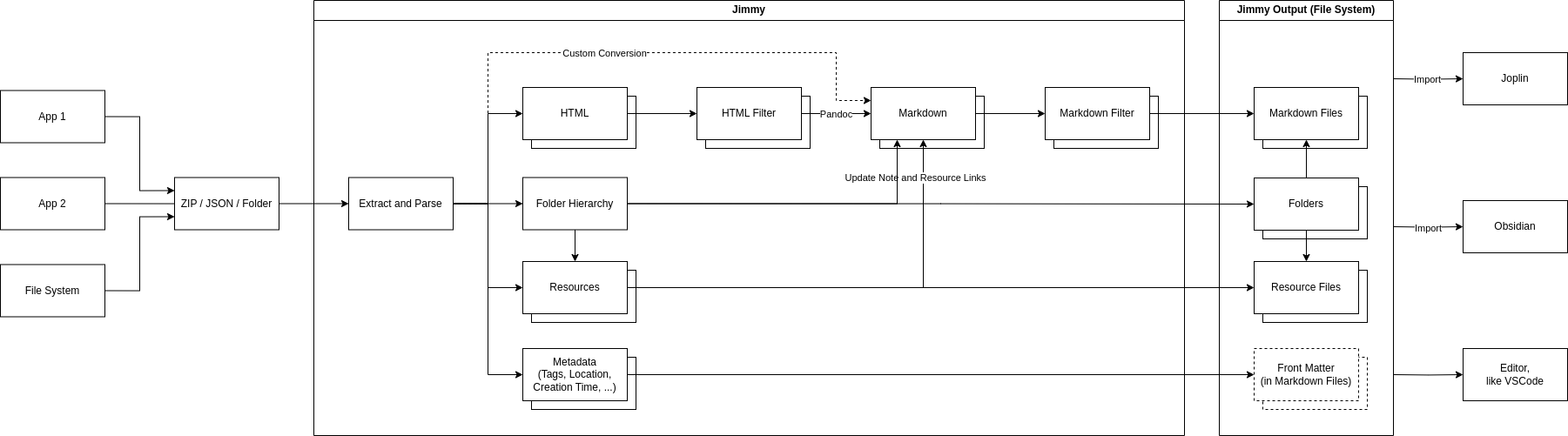
Simplified Internal Workflow
Similar Projects
Contributors
Showing top 4 contributors by commit count.


![dependabot[bot]](https://avatars.githubusercontent.com/in/29110?v=4)

Related Repositories

imageslr/mweb-themes
30+ 款 Markdown 预览主题,Typo.css、Vue、Bear、飞书云文档等风格,适用于 MWeb、Typora。

drgrib/alfred-bear
Streamlined note searching and creation for Bear using Alfred

sbusso/Bear-Power-Pack
A collection of workflows enhancing Bear writer app on iOS and Mac.

chrisbro/alfred-bear
Alfred 3 workflow to create and search notes in Bear.

vasylenko/bear-notes-mcp
MCP Server for Bear note taking app available as Claude Desktop extension or standalone server for any other AI tool

knhash/jekyllBear
An easy to use, minimal, text focused Jekyll theme