

Mdec
Decompilation as a Service. Explore multiple decompilers and compare their output with minimal effort. Upload binary, get decompilation.
**Update:** mdec is now deprecated in favor of the community maintained [decompiler-explorer](https://github.com/decompiler-explorer/decompiler-explorer) project! The project is written primarily in Python, distributed under the Other license, first published in 2022. Key topics include: angr, binary-ninja, decompilation, decompiler, ghidra.
Update: mdec is now deprecated in favor of the community maintained decompiler-explorer project!
mdec
Explore multiple decompilers and compare their output with minimal effort. Upload binary, get decompilation.
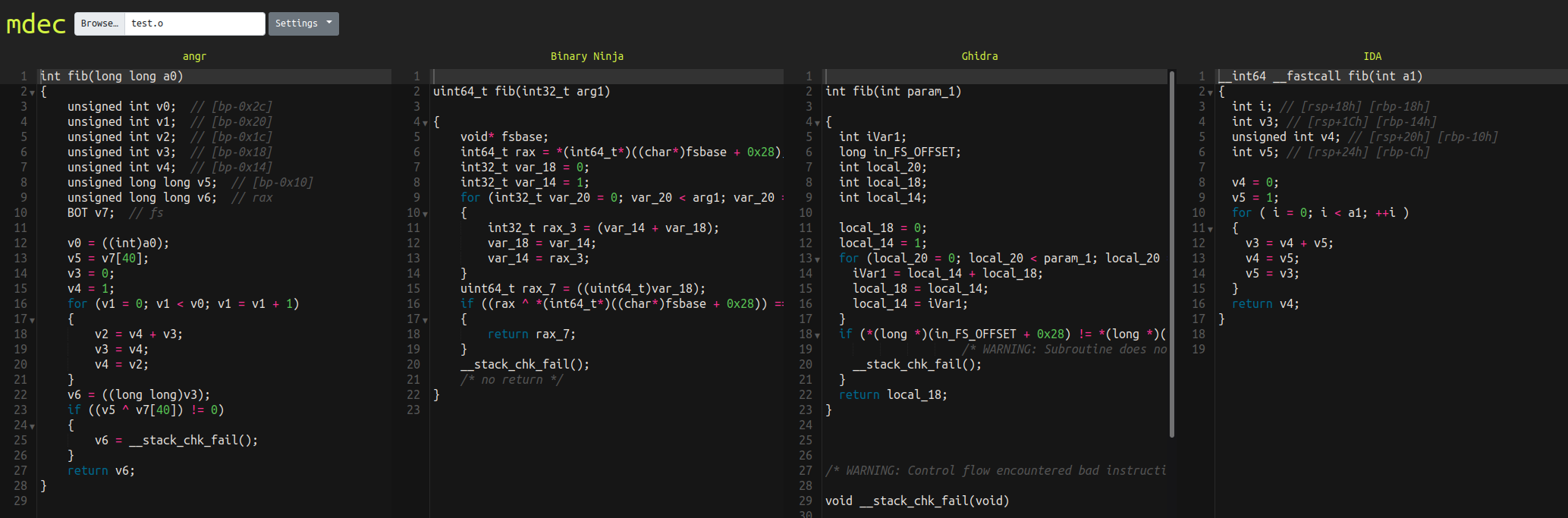
Supported Decompilers
- angr
- Binary Ninja<sup>[1]</sup>
- Ghidra
- Hex-Rays<sup>[1]</sup>
- JEB CE<sup>[2]</sup>
- r2dec
- Reko
- RetDec
- Snowman
Notes:
- Hex-Rays and Binary Ninja require license and binaries; other decompilers will be downloaded automatically.
- JEB CE requires a license code. It's free. More info here.
Components
- Each decompiler is a service that runs in its own container
- A frontend web service proxies requests to backend service
Install
You'll need to add your proprietary packages in backend/*/private. Then just:
COMPOSE_DOCKER_CLI_BUILD=1 DOCKER_BUILDKIT=1 docker compose build
Tip: If you want to build only a few services, append the service names to the above command. For example, to build only the free/open source decompilers you can specify:
COMPOSE_DOCKER_CLI_BUILD=1 DOCKER_BUILDKIT=1 docker compose build \
  frontend \
  angr \
  ghidra \
  r2dec \
  reko \
  retdec \
  snowman
Run
docker compose up
Point your browser at http://127.0.0.1.
Tip: If you want to start only a few services, append the service names to the above command (e.g. frontend, angr, etc.)
API
You can also request decomp like:
curl -F 'file=@test.o' http://127.0.0.1/hexrays/decompile
Contributors
Showing top 3 contributors by commit count.


Related Repositories

angr/angr
A powerful and user-friendly binary analysis platform!

alphaSeclab/awesome-reverse-engineering
Reverse Engineering Resources About All Platforms(Windows/Linux/macOS/Android/iOS/IoT) And Every Aspect! (More than 3500 open source tools and 2300 posts&videos)

decompiler-explorer/decompiler-explorer
Decompiler Explorer! Compare tools on the forefront of static analysis, now in your web browser!
angr/angr-management
The official angr GUI.

ChrisTheCoolHut/Zeratool
Automatic Exploit Generation (AEG) and remote flag capture for exploitable CTF problems

Nalen98/AngryGhidra
Use angr in Ghidra