

01 Python Introduction
Learn the basics of Python. These tutorials are for Python beginners. so even if you have no prior knowledge of Python, you won’t face any difficulty understanding these tutorials.
Python is a modern, robust, high level programming language. It is very easy to pick up even if you are completely new to programming. The project is written primarily in Jupyter Notebook, distributed under the MIT License license, first published in 2021. Key topics include: jupyter-notebook, jupyter-tutorial, namespace-scope, python-imports, python-introduction.
01_Python_Introduction
Introduction 👋
Python is a modern, robust, high level programming language. It is very easy to pick up even if you are completely new to programming.
Online
- JupyterLab → <a href="https://mybinder.org/v2/gh/jupyterlab/jupyterlab-demo/master"><img src="https://img.shields.io/badge/launch online JupyterLab with-binder-579aca.svg?logo=data:image/png;base64,iVBORw0KGgoAAAANSUhEUgAAAFkAAABZCAMAAABi1XidAAAB8lBMVEX///9XmsrmZYH1olJXmsr1olJXmsrmZYH1olJXmsr1olJXmsrmZYH1olL1olJXmsr1olJXmsrmZYH1olL1olJXmsrmZYH1olJXmsr1olL1olJXmsrmZYH1olL1olJXmsrmZYH1olL1olL0nFf1olJXmsrmZYH1olJXmsq8dZb1olJXmsrmZYH1olJXmspXmspXmsr1olL1olJXmsrmZYH1olJXmsr1olL1olJXmsrmZYH1olL1olLeaIVXmsrmZYH1olL1olL1olJXmsrmZYH1olLna31Xmsr1olJXmsr1olJXmsrmZYH1olLqoVr1olJXmsr1olJXmsrmZYH1olL1olKkfaPobXvviGabgadXmsqThKuofKHmZ4Dobnr1olJXmsr1olJXmspXmsr1olJXmsrfZ4TuhWn1olL1olJXmsqBi7X1olJXmspZmslbmMhbmsdemsVfl8ZgmsNim8Jpk8F0m7R4m7F5nLB6jbh7jbiDirOEibOGnKaMhq+PnaCVg6qWg6qegKaff6WhnpKofKGtnomxeZy3noG6dZi+n3vCcpPDcpPGn3bLb4/Mb47UbIrVa4rYoGjdaIbeaIXhoWHmZYHobXvpcHjqdHXreHLroVrsfG/uhGnuh2bwj2Hxk17yl1vzmljzm1j0nlX1olL3AJXWAAAAbXRSTlMAEBAQHx8gICAuLjAwMDw9PUBAQEpQUFBXV1hgYGBkcHBwcXl8gICAgoiIkJCQlJicnJ2goKCmqK+wsLC4usDAwMjP0NDQ1NbW3Nzg4ODi5+3v8PDw8/T09PX29vb39/f5+fr7+/z8/Pz9/v7+zczCxgAABC5JREFUeAHN1ul3k0UUBvCb1CTVpmpaitAGSLSpSuKCLWpbTKNJFGlcSMAFF63iUmRccNG6gLbuxkXU66JAUef/9LSpmXnyLr3T5AO/rzl5zj137p136BISy44fKJXuGN/d19PUfYeO67Znqtf2KH33Id1psXoFdW30sPZ1sMvs2D060AHqws4FHeJojLZqnw53cmfvg+XR8mC0OEjuxrXEkX5ydeVJLVIlV0e10PXk5k7dYeHu7Cj1j+49uKg7uLU61tGLw1lq27ugQYlclHC4bgv7VQ+TAyj5Zc/UjsPvs1sd5cWryWObtvWT2EPa4rtnWW3JkpjggEpbOsPr7F7EyNewtpBIslA7p43HCsnwooXTEc3UmPmCNn5lrqTJxy6nRmcavGZVt/3Da2pD5NHvsOHJCrdc1G2r3DITpU7yic7w/7Rxnjc0kt5GC4djiv2Sz3Fb2iEZg41/ddsFDoyuYrIkmFehz0HR2thPgQqMyQYb2OtB0WxsZ3BeG3+wpRb1vzl2UYBog8FfGhttFKjtAclnZYrRo9ryG9uG/FZQU4AEg8ZE9LjGMzTmqKXPLnlWVnIlQQTvxJf8ip7VgjZjyVPrjw1te5otM7RmP7xm+sK2Gv9I8Gi++BRbEkR9EBw8zRUcKxwp73xkaLiqQb+kGduJTNHG72zcW9LoJgqQxpP3/Tj//c3yB0tqzaml05/+orHLksVO+95kX7/7qgJvnjlrfr2Ggsyx0eoy9uPzN5SPd86aXggOsEKW2Prz7du3VID3/tzs/sSRs2w7ovVHKtjrX2pd7ZMlTxAYfBAL9jiDwfLkq55Tm7ifhMlTGPyCAs7RFRhn47JnlcB9RM5T97ASuZXIcVNuUDIndpDbdsfrqsOppeXl5Y+XVKdjFCTh+zGaVuj0d9zy05PPK3QzBamxdwtTCrzyg/2Rvf2EstUjordGwa/kx9mSJLr8mLLtCW8HHGJc2R5hS219IiF6PnTusOqcMl57gm0Z8kanKMAQg0qSyuZfn7zItsbGyO9QlnxY0eCuD1XL2ys/MsrQhltE7Ug0uFOzufJFE2PxBo/YAx8XPPdDwWN0MrDRYIZF0mSMKCNHgaIVFoBbNoLJ7tEQDKxGF0kcLQimojCZopv0OkNOyWCCg9XMVAi7ARJzQdM2QUh0gmBozjc3Skg6dSBRqDGYSUOu66Zg+I2fNZs/M3/f/Grl/XnyF1Gw3VKCez0PN5IUfFLqvgUN4C0qNqYs5YhPL+aVZYDE4IpUk57oSFnJm4FyCqqOE0jhY2SMyLFoo56zyo6becOS5UVDdj7Vih0zp+tcMhwRpBeLyqtIjlJKAIZSbI8SGSF3k0pA3mR5tHuwPFoa7N7reoq2bqCsAk1HqCu5uvI1n6JuRXI+S1Mco54YmYTwcn6Aeic+kssXi8XpXC4V3t7/ADuTNKaQJdScAAAAAElFTkSuQmCC" alt="binder"/></a>
- Open any Github repository → <a href="https://mybinder.org/"><img src="https://img.shields.io/badge/launch-binder-579aca.svg?logo=data:image/png;base64,iVBORw0KGgoAAAANSUhEUgAAAFkAAABZCAMAAABi1XidAAAB8lBMVEX///9XmsrmZYH1olJXmsr1olJXmsrmZYH1olJXmsr1olJXmsrmZYH1olL1olJXmsr1olJXmsrmZYH1olL1olJXmsrmZYH1olJXmsr1olL1olJXmsrmZYH1olL1olJXmsrmZYH1olL1olL0nFf1olJXmsrmZYH1olJXmsq8dZb1olJXmsrmZYH1olJXmspXmspXmsr1olL1olJXmsrmZYH1olJXmsr1olL1olJXmsrmZYH1olL1olLeaIVXmsrmZYH1olL1olL1olJXmsrmZYH1olLna31Xmsr1olJXmsr1olJXmsrmZYH1olLqoVr1olJXmsr1olJXmsrmZYH1olL1olKkfaPobXvviGabgadXmsqThKuofKHmZ4Dobnr1olJXmsr1olJXmspXmsr1olJXmsrfZ4TuhWn1olL1olJXmsqBi7X1olJXmspZmslbmMhbmsdemsVfl8ZgmsNim8Jpk8F0m7R4m7F5nLB6jbh7jbiDirOEibOGnKaMhq+PnaCVg6qWg6qegKaff6WhnpKofKGtnomxeZy3noG6dZi+n3vCcpPDcpPGn3bLb4/Mb47UbIrVa4rYoGjdaIbeaIXhoWHmZYHobXvpcHjqdHXreHLroVrsfG/uhGnuh2bwj2Hxk17yl1vzmljzm1j0nlX1olL3AJXWAAAAbXRSTlMAEBAQHx8gICAuLjAwMDw9PUBAQEpQUFBXV1hgYGBkcHBwcXl8gICAgoiIkJCQlJicnJ2goKCmqK+wsLC4usDAwMjP0NDQ1NbW3Nzg4ODi5+3v8PDw8/T09PX29vb39/f5+fr7+/z8/Pz9/v7+zczCxgAABC5JREFUeAHN1ul3k0UUBvCb1CTVpmpaitAGSLSpSuKCLWpbTKNJFGlcSMAFF63iUmRccNG6gLbuxkXU66JAUef/9LSpmXnyLr3T5AO/rzl5zj137p136BISy44fKJXuGN/d19PUfYeO67Znqtf2KH33Id1psXoFdW30sPZ1sMvs2D060AHqws4FHeJojLZqnw53cmfvg+XR8mC0OEjuxrXEkX5ydeVJLVIlV0e10PXk5k7dYeHu7Cj1j+49uKg7uLU61tGLw1lq27ugQYlclHC4bgv7VQ+TAyj5Zc/UjsPvs1sd5cWryWObtvWT2EPa4rtnWW3JkpjggEpbOsPr7F7EyNewtpBIslA7p43HCsnwooXTEc3UmPmCNn5lrqTJxy6nRmcavGZVt/3Da2pD5NHvsOHJCrdc1G2r3DITpU7yic7w/7Rxnjc0kt5GC4djiv2Sz3Fb2iEZg41/ddsFDoyuYrIkmFehz0HR2thPgQqMyQYb2OtB0WxsZ3BeG3+wpRb1vzl2UYBog8FfGhttFKjtAclnZYrRo9ryG9uG/FZQU4AEg8ZE9LjGMzTmqKXPLnlWVnIlQQTvxJf8ip7VgjZjyVPrjw1te5otM7RmP7xm+sK2Gv9I8Gi++BRbEkR9EBw8zRUcKxwp73xkaLiqQb+kGduJTNHG72zcW9LoJgqQxpP3/Tj//c3yB0tqzaml05/+orHLksVO+95kX7/7qgJvnjlrfr2Ggsyx0eoy9uPzN5SPd86aXggOsEKW2Prz7du3VID3/tzs/sSRs2w7ovVHKtjrX2pd7ZMlTxAYfBAL9jiDwfLkq55Tm7ifhMlTGPyCAs7RFRhn47JnlcB9RM5T97ASuZXIcVNuUDIndpDbdsfrqsOppeXl5Y+XVKdjFCTh+zGaVuj0d9zy05PPK3QzBamxdwtTCrzyg/2Rvf2EstUjordGwa/kx9mSJLr8mLLtCW8HHGJc2R5hS219IiF6PnTusOqcMl57gm0Z8kanKMAQg0qSyuZfn7zItsbGyO9QlnxY0eCuD1XL2ys/MsrQhltE7Ug0uFOzufJFE2PxBo/YAx8XPPdDwWN0MrDRYIZF0mSMKCNHgaIVFoBbNoLJ7tEQDKxGF0kcLQimojCZopv0OkNOyWCCg9XMVAi7ARJzQdM2QUh0gmBozjc3Skg6dSBRqDGYSUOu66Zg+I2fNZs/M3/f/Grl/XnyF1Gw3VKCez0PN5IUfFLqvgUN4C0qNqYs5YhPL+aVZYDE4IpUk57oSFnJm4FyCqqOE0jhY2SMyLFoo56zyo6becOS5UVDdj7Vih0zp+tcMhwRpBeLyqtIjlJKAIZSbI8SGSF3k0pA3mR5tHuwPFoa7N7reoq2bqCsAk1HqCu5uvI1n6JuRXI+S1Mco54YmYTwcn6Aeic+kssXi8XpXC4V3t7/ADuTNKaQJdScAAAAAElFTkSuQmCC" alt="binder"/></a>
Installation
Mac OS X and Linux comes pre installed with python. Windows users can download

To install IPython run,
pip install ipython[all]
This will install all the necessary dependencies for the notebook, qtconsole, tests etc.
Installation from unofficial distributions
Installing all the necessary libraries might prove troublesome. Anaconda and Canopy comes pre packaged with all the necessary python libraries and also IPython.
Anaconda
Download 
Anaconda is completely free and includes more than 300 python packages. Both python 2.7 and 3.9 options are available.
Launching <a href="https://jupyter.org/" target="_blank"><img alt="Jupyter" src="https://img.shields.io/badge/Jupyter-F37626.svg?&style=flat-square&logo=Jupyter&logoColor=white"></a> Notebook
From the terminal
ipython notebook
In Anaconda, Open the respective terminals and execute the above.
Table of contents 📋
These are read-only versions. However you can Run ▶ all the codes online by clicking here → <a href="https://mybinder.org/v2/gh/milaan9/01_Python_Introduction/HEAD"><img src="https://img.shields.io/badge/Open in-binder-579aca.svg?logo=data:image/png;base64,iVBORw0KGgoAAAANSUhEUgAAAFkAAABZCAMAAABi1XidAAAB8lBMVEX///9XmsrmZYH1olJXmsr1olJXmsrmZYH1olJXmsr1olJXmsrmZYH1olL1olJXmsr1olJXmsrmZYH1olL1olJXmsrmZYH1olJXmsr1olL1olJXmsrmZYH1olL1olJXmsrmZYH1olL1olL0nFf1olJXmsrmZYH1olJXmsq8dZb1olJXmsrmZYH1olJXmspXmspXmsr1olL1olJXmsrmZYH1olJXmsr1olL1olJXmsrmZYH1olL1olLeaIVXmsrmZYH1olL1olL1olJXmsrmZYH1olLna31Xmsr1olJXmsr1olJXmsrmZYH1olLqoVr1olJXmsr1olJXmsrmZYH1olL1olKkfaPobXvviGabgadXmsqThKuofKHmZ4Dobnr1olJXmsr1olJXmspXmsr1olJXmsrfZ4TuhWn1olL1olJXmsqBi7X1olJXmspZmslbmMhbmsdemsVfl8ZgmsNim8Jpk8F0m7R4m7F5nLB6jbh7jbiDirOEibOGnKaMhq+PnaCVg6qWg6qegKaff6WhnpKofKGtnomxeZy3noG6dZi+n3vCcpPDcpPGn3bLb4/Mb47UbIrVa4rYoGjdaIbeaIXhoWHmZYHobXvpcHjqdHXreHLroVrsfG/uhGnuh2bwj2Hxk17yl1vzmljzm1j0nlX1olL3AJXWAAAAbXRSTlMAEBAQHx8gICAuLjAwMDw9PUBAQEpQUFBXV1hgYGBkcHBwcXl8gICAgoiIkJCQlJicnJ2goKCmqK+wsLC4usDAwMjP0NDQ1NbW3Nzg4ODi5+3v8PDw8/T09PX29vb39/f5+fr7+/z8/Pz9/v7+zczCxgAABC5JREFUeAHN1ul3k0UUBvCb1CTVpmpaitAGSLSpSuKCLWpbTKNJFGlcSMAFF63iUmRccNG6gLbuxkXU66JAUef/9LSpmXnyLr3T5AO/rzl5zj137p136BISy44fKJXuGN/d19PUfYeO67Znqtf2KH33Id1psXoFdW30sPZ1sMvs2D060AHqws4FHeJojLZqnw53cmfvg+XR8mC0OEjuxrXEkX5ydeVJLVIlV0e10PXk5k7dYeHu7Cj1j+49uKg7uLU61tGLw1lq27ugQYlclHC4bgv7VQ+TAyj5Zc/UjsPvs1sd5cWryWObtvWT2EPa4rtnWW3JkpjggEpbOsPr7F7EyNewtpBIslA7p43HCsnwooXTEc3UmPmCNn5lrqTJxy6nRmcavGZVt/3Da2pD5NHvsOHJCrdc1G2r3DITpU7yic7w/7Rxnjc0kt5GC4djiv2Sz3Fb2iEZg41/ddsFDoyuYrIkmFehz0HR2thPgQqMyQYb2OtB0WxsZ3BeG3+wpRb1vzl2UYBog8FfGhttFKjtAclnZYrRo9ryG9uG/FZQU4AEg8ZE9LjGMzTmqKXPLnlWVnIlQQTvxJf8ip7VgjZjyVPrjw1te5otM7RmP7xm+sK2Gv9I8Gi++BRbEkR9EBw8zRUcKxwp73xkaLiqQb+kGduJTNHG72zcW9LoJgqQxpP3/Tj//c3yB0tqzaml05/+orHLksVO+95kX7/7qgJvnjlrfr2Ggsyx0eoy9uPzN5SPd86aXggOsEKW2Prz7du3VID3/tzs/sSRs2w7ovVHKtjrX2pd7ZMlTxAYfBAL9jiDwfLkq55Tm7ifhMlTGPyCAs7RFRhn47JnlcB9RM5T97ASuZXIcVNuUDIndpDbdsfrqsOppeXl5Y+XVKdjFCTh+zGaVuj0d9zy05PPK3QzBamxdwtTCrzyg/2Rvf2EstUjordGwa/kx9mSJLr8mLLtCW8HHGJc2R5hS219IiF6PnTusOqcMl57gm0Z8kanKMAQg0qSyuZfn7zItsbGyO9QlnxY0eCuD1XL2ys/MsrQhltE7Ug0uFOzufJFE2PxBo/YAx8XPPdDwWN0MrDRYIZF0mSMKCNHgaIVFoBbNoLJ7tEQDKxGF0kcLQimojCZopv0OkNOyWCCg9XMVAi7ARJzQdM2QUh0gmBozjc3Skg6dSBRqDGYSUOu66Zg+I2fNZs/M3/f/Grl/XnyF1Gw3VKCez0PN5IUfFLqvgUN4C0qNqYs5YhPL+aVZYDE4IpUk57oSFnJm4FyCqqOE0jhY2SMyLFoo56zyo6becOS5UVDdj7Vih0zp+tcMhwRpBeLyqtIjlJKAIZSbI8SGSF3k0pA3mR5tHuwPFoa7N7reoq2bqCsAk1HqCu5uvI1n6JuRXI+S1Mco54YmYTwcn6Aeic+kssXi8XpXC4V3t7/ADuTNKaQJdScAAAAAElFTkSuQmCC" alt="binder"/></a>
Frequently asked questions (FAQ) ❔
1. How can I thank you for writing and sharing this tutorial? 🌷
You can <img src="https://img.shields.io/static/v1?label=%E2%AD%90 Star &message=if%20useful&style=style=flat&color=blue" alt="Star Badge"/> and <img src="https://img.shields.io/static/v1?label=%E2%B5%96 Fork &message=if%20useful&style=style=flat&color=blue" alt="Fork Badge"/> Starring and Forking is free for you, but it tells me and other people that it was helpful and you like this tutorial.
Go here if you aren't here already and click ➞ ✰ Star and ⵖ Fork button in the top right corner. You'll be asked to create a GitHub account if you don't already have one.
2. How can I read this tutorial without an Internet connection? <img alt="GIF" src="https://github.com/TheDudeThatCode/TheDudeThatCode/blob/master/Assets/hmm.gif" width="20" />
-
Go
hereand click the big green ➞Codebutton in the top right of the page, then click ➞Download ZIP.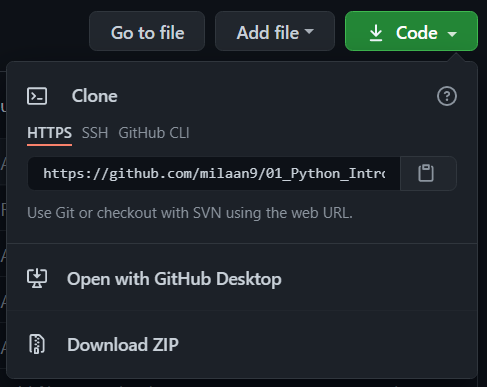
-
Extract the ZIP and open it. Unfortunately I don't have any more specific instructions because how exactly this is done depends on which operating system you run.
-
Launch ipython notebook from the folder which contains the notebooks. Open each one of them
Kernel ➞ Restart & Clear Output
This will clear all the outputs and now you can understand each statement and learn interactively.
If you have git and you know how to use it, you can also clone the repository instead of downloading a zip and extracting it. An advantage with doing it this way is that you don't need to download the whole tutorial again to get the latest version of it, all you need to do is to pull with git and run ipython notebook again.
Authors ✍️
I'm Dr. Milaan Parmar and I have written this tutorial. If you think you can add/correct/edit and enhance this tutorial you are most welcome🙏
See github's contributors page for details.
If you have trouble with this tutorial please tell me about it by Create an issue on GitHub <img alt="PNG" width="30px" src="https://user-images.githubusercontent.com/48193918/124397909-86858c80-dd30-11eb-803c-9650d9c4a927.png" /></h3> and I'll make this tutorial better. This is probably the best choice if you had trouble following the tutorial, and something in it should be explained better. You will be asked to create a GitHub account if you don't already have one.
If you like this tutorial, please give it a ⭐ star.
Licence 📜
You may use this tutorial freely at your own risk. See LICENSE.
Contributors
Showing top 1 contributor by commit count.

Related Repositories

jakevdp/PythonDataScienceHandbook
Python Data Science Handbook: full text in Jupyter Notebooks

CamDavidsonPilon/Probabilistic-Programming-and-Bayesian-Methods-for-Hackers
aka "Bayesian Methods for Hackers": An introduction to Bayesian methods + probabilistic programming with a computation/understanding-first, mathematics-second point of view. All in pure Python ;)

ageron/handson-ml
⛔️ DEPRECATED – See https://github.com/ageron/handson-ml3 or handson-mlp instead.

trekhleb/homemade-machine-learning
🤖 Python examples of popular machine learning algorithms with interactive Jupyter demos and math being explained

MLEveryday/100-Days-Of-ML-Code
100-Days-Of-ML-Code中文版

AccumulateMore/CV
✅(已完结)超级全面的 深度学习 笔记【土堆 Pytorch】【李沐 动手学深度学习】【吴恩达 深度学习】【大飞 大模型Agent】