

Clean architecture
Clean Architecture template for .NET 🚀
**clean architecture** is a Clean Architecture template for .NET 🚀 The project is written primarily in C#, distributed under the MIT License license, first published in 2025. Key topics include: clean-architechture, clean-architecture-template, csharp, docker, dotnet.
Clean Architecture The Template









React Project
The React feature-based project is available at https://github.com/minhsangdotcom/react. Working seamlessly with this backend template.
Table of Contents
- 1. Language
- 1.1. Badges
- 1.2. React Project
- 1.3. Table of Contents
- 2. Introduction
- 3. Give a Star! ⭐
- 4. What is Clean Architecture?
- 5. Features :rocket:
- 6. Demo :fire:
- 7. Structure Overview :mag_right:
- 8. Getting started
- 9. Seeding
- 10. Translate messages
- 11. Technology
- 12. Support
- 13. Credits
- 14. License
2. Introduction
Production-Ready Clean Architecture template is designed for backend developer working with ASP.NET Core. It provides you an efficient way to build enterprise applications effortlessly by leveraging advantages of clean architecture structure and .NET Core framework.
3. Give a Star
If you find this template helpful and learn something from it, please consider giving it a :star:.
4. What is Clean Architecture?
Clean Architecture is a software design approach introduced by Robert C. Martin (Uncle Bob) that emphasizes the separation of concerns by organizing code into concentric layers. The core idea is to keep business logic independent from external frameworks, databases, and user interfaces, promoting a system that's easier to maintain, test, and evolve over time.
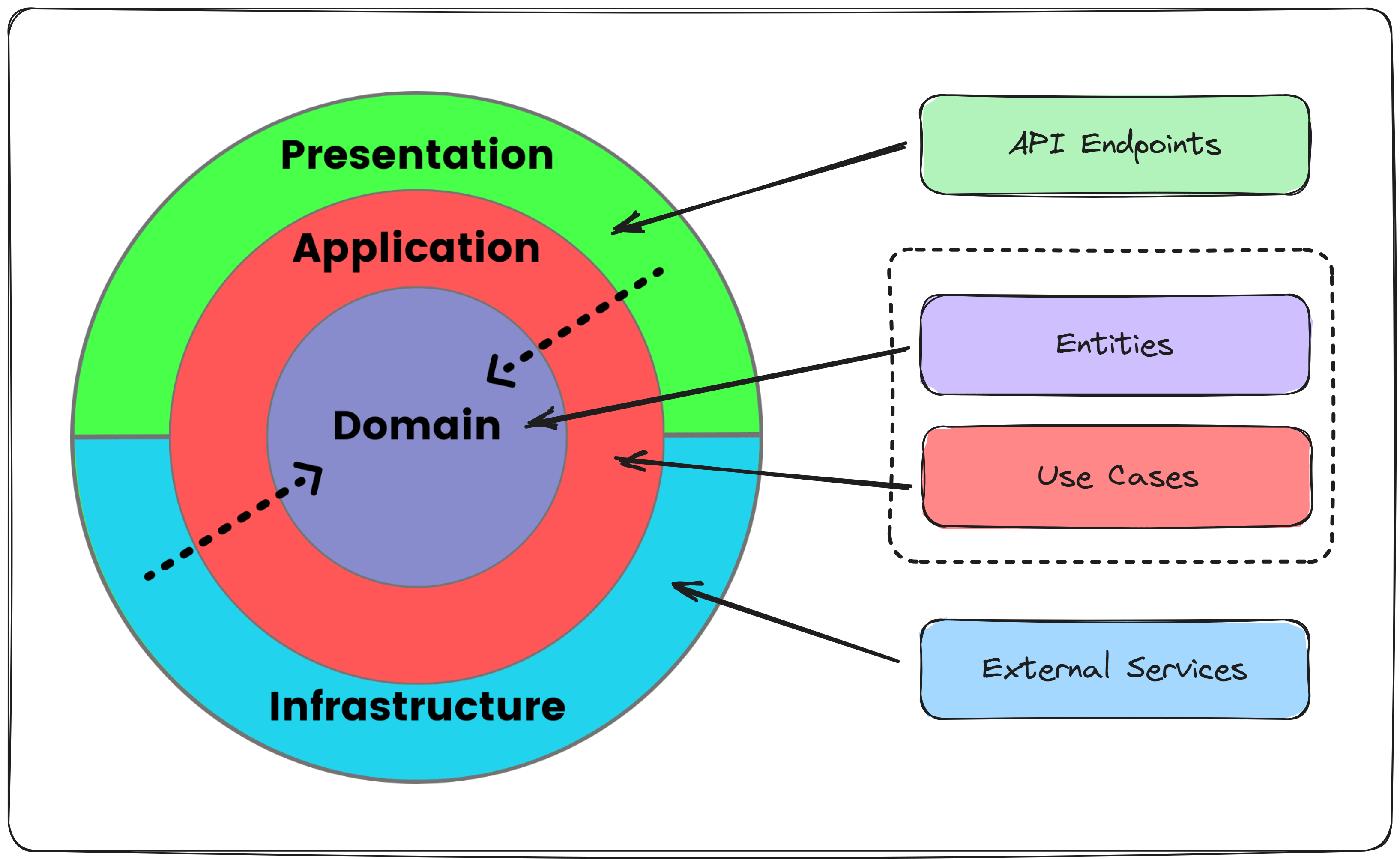
4.0.1 Pros
- Separation of Concerns: Each layer is responsible for a specific aspect of the application, making the code easier to understand and maintain.
- Testability: Since business logic is decoupled from frameworks and UI, unit testing becomes simpler and more reliable.
- Flexibility and Adaptability: Changes to the framework, database, or external systems have minimal impact on the core logic.
- Reusability: Business rules can be reused across different applications or systems with minimal changes.
- Scalability: The clear structure supports growth and the addition of new features without significant refactoring.
- Framework Independence: Avoids being locked into a specific framework, making it easier to migrate to newer technologies.
4.0.2 Cons
- Complexity: The layered structure can add complexity, especially for smaller projects where simpler architectures might suffice.
- Initial Overhead: Setting up Clean Architecture requires additional effort to organize layers and follow strict design principles.
- Learning Curve: Developers unfamiliar with the principles may take time to grasp the structure and its benefits.
- Over-Engineering Risk: For small-scale applications, the additional layers might be unnecessary and lead to over-complication.
- Performance Overhead: The abstraction and indirection between layers can introduce slight performance trade-offs, though typically negligible.
5. Features
What makes this Clean Architecture template stand out from the rest on Github?
Most common features:
- Login :lock:
- Authorization (Role, Permission) :shield:
- Refresh token :arrows_counterclockwise:
- Change user password :repeat:
- Password reset :unlock:
- Audit log :clipboard:
- User management :busts_in_silhouette:
- Role management :shield:
Other awesome features:
- DDD (Domain Driven Design) :brain:
- CQRS & Mediator :twisted_rightwards_arrows:
- Cross-cutting concern :scissors:
- Mail Sender :mailbox:
- Caching (Memory & Distributed) :computer:
- Queue Example at feature/TicketSale :walking:
- Logging :pencil2:
- Tracing :chart_with_upwards_trend:
- Multiple languages translation support :globe_with_meridians:
- Cloud Storage :cloud:
- Elasticsearch :mag:
- Docker deployment :whale:
6. Demo
6.0.1. API
<p align="center"> <img src="Screenshots/user.png" width="900"/> <img src="Screenshots/role.png" width="900"/> <img src="Screenshots/region.png" width="900"/> <img src="Screenshots/queue.png" width="900"/> <img src="Screenshots/permission.png" width="900"/> <img src="Screenshots/audit-log.png" width="900"/> </p>6.0.2. Tracing
<p align="center"> <img src="Screenshots/trace.png" width="900"/> </p>6.0.3. AWS S3 by Minio
<p align="center"> <img src="Screenshots/AWS_S3_Feature.png" width="900"/> </p>7. Structure Overview
/Domain
  ├── /Aggregates/           # Domain aggregates (entities with business rules)
  └── /Common/               # Shared domain logic
/Application
  ├── /Common
  │     ├── /Auth/                   # Authentication & authorization helpers (policy builders, claim extractors)
  │     ├── /Behaviors/              # MediatR pipeline behaviors (logging, validation, transaction, caching)
  │     ├── /ErrorCodes/             # Centralized error code definitions for the whole app
  │     ├── /Errors/                 # Error result & problem details mappings
  │     ├── /Interfaces/             # Application-level interfaces (services, repos, abstractions)
  │     ├── /RequestHandler/         # Parsing, validating & normalizing query parameters
  │     ├── /Security/               # Security helpers (permission attributes, role metadata)
  │     └── /Validators/             # FluentValidator custom abstract class
  │
  ├── /Features                      # Vertical slices styles (CQRS + MediatR)
  │     ├── /AuditLogs/              # Commands & queries to manage audit logs
  │     ├── /Permissions/            # Permission management
  │     ├── /QueueLogs/              # Query logs for background queue jobs
  │     ├── /Regions/                # Region-based CQRS handlers
  │     ├── /Roles/                  # Role CRUD + role-permission commands
  │     └── /Users/                  # User CRUD + account actions
  │
  ├── /SharedFeatures                # Common CQRS components reused across multiple features.
  │     ├── /Mapping/                # Shared mapping used by multiple features.
  │     ├── /Projections/            # Common read-side DTO builders or lightweight view models.
  │     ├── /Requests/               # Shared command/query models (e.g., Upsert commands used by multiple operations).
  │     └── /Validations/             # Reusable FluentValidation rules shared across commands/queries.
  │
  ├── Application.csproj             # Application project definition
  └── DependencyInjection.cs         # Registers all Application services into DI container
/Infrastructure
  ├── /Common                          # Shared infrastructure-level components
  │
  ├── /Constants                       # Static constants for Infrastructure layer
  │
  ├── /Data                            # EF Core + persistence layer
  │     ├── /Configurations/           # Fluent API entity configurations
  │     ├── /Converters/               # Type converters (e.g., Ulid ↔ string)
  │     ├── /Interceptors/             # EF Core interceptors (audit, logging)
  │     ├── /Migrators/                # EF Core migration files
  │     ├── /Repositories/             # Repository implementations
  │     └── /Seeders/                  # Seed data for database initialization
  │
  ├── /Services                        # Infrastructure service implementations
  │
  ├── DependencyInjection.cs           # Registers Infrastructure services into DI
  └── Infrastructure.csproj            # Project file
/Api
  ├── /common                           # Shared helpers/utilities for the API layer
  │
  ├── /Converters                       # converters for project
  │
  ├── /Endpoints                        # HTTP endpoint definitions (minimal APIs)
  │
  ├── /Extensions                       # API extension methods (Swagger, CORS, routing, etc.)
  │
  ├── /Middlewares                      # Custom middlewares (exception handling, logging, etc.)
  │
  ├── /Resources                        # Localization resources for message translation
  │     ├── /Messages/                  # Localized message files (e.g., en.json, vi.json)
  │     └── /Permissions/               # Permission translation files
  │
  ├── /Services                         # API-layer services (if any API-specific logic is needed)
  │
  ├── /Settings                         # Settings for IOption
  │
  ├── /wwwroot/Templates                # Static template files (email templates, exports, etc.)
  │
  ├── Api.csproj                        # Project file
  └── Program.cs                        # Application startup
            +-----------------------------------------------+
            |                   Api                         |
            +-----------------------------------------------+
             |                     |                    |
             |                     |                    |
             ↓                     |                    |
        +------------------+       |                    |
        |  Infrastructure  |       |                    |
        +------------------+       |                    |
                        |          |                    |
                        ↓          ↓                    ↓
                    +--------------------+    +----------------------+
                    |   Application      | -> | Application.Contracts|
                    +--------------------+    +----------------------+
                             |
                             ↓
            +---------------------------+
            |          Domain           |
            +---------------------------+
8. Getting started
8.1. Run .NET Core Clean Architecture Project
The following prerequisites are required to build and run the solution:
The first step :point_up: :
Create a appsettings.Development.json file at root of Api layer and just copy the content of appsettings.example.json to the file then Modify configurations in your case.
This template supports multiple relational database providers and allows switching between them via configuration.
Currently, the default provider is PostgreSQL.
json"DatabaseSettings": { "Provider": "PostgreSQL", "Relational": { "PostgreSQL": { "ConnectionString": "Host=localhost;Port=5432;Username=postgres;Password=1;Database=the_database" } } }
Update migrations to your own database.
cd src/Infrastructure

dotnet ef database update
The next step :point_right::
cd Dockers/MinioS3
change minio username and password at .env if needed and you're gonna use it for logging in Web UI Manager
MINIO_ROOT_USER=minioadmin
MINIO_ROOT_PASSWORD=Admin@123
To Run Amazon S3 service for media file storage.
docker compose up -d
Old docker compose version
docker-compose up -d
Access Minio S3 Web UI at http://localhost:9001 and login
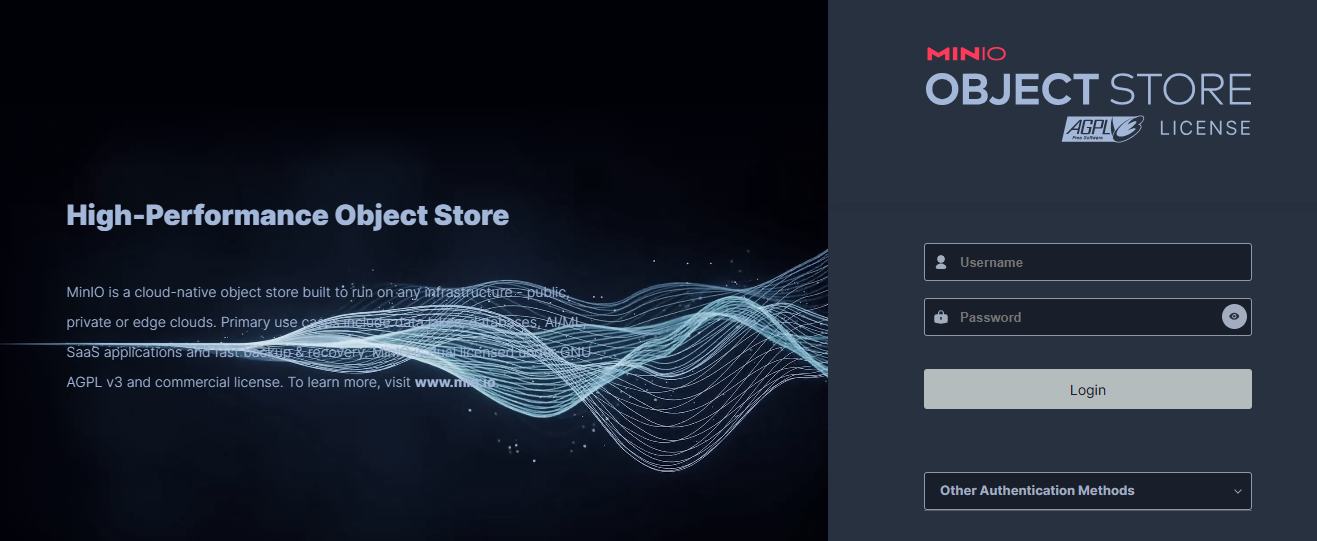
Create a pairs of key like
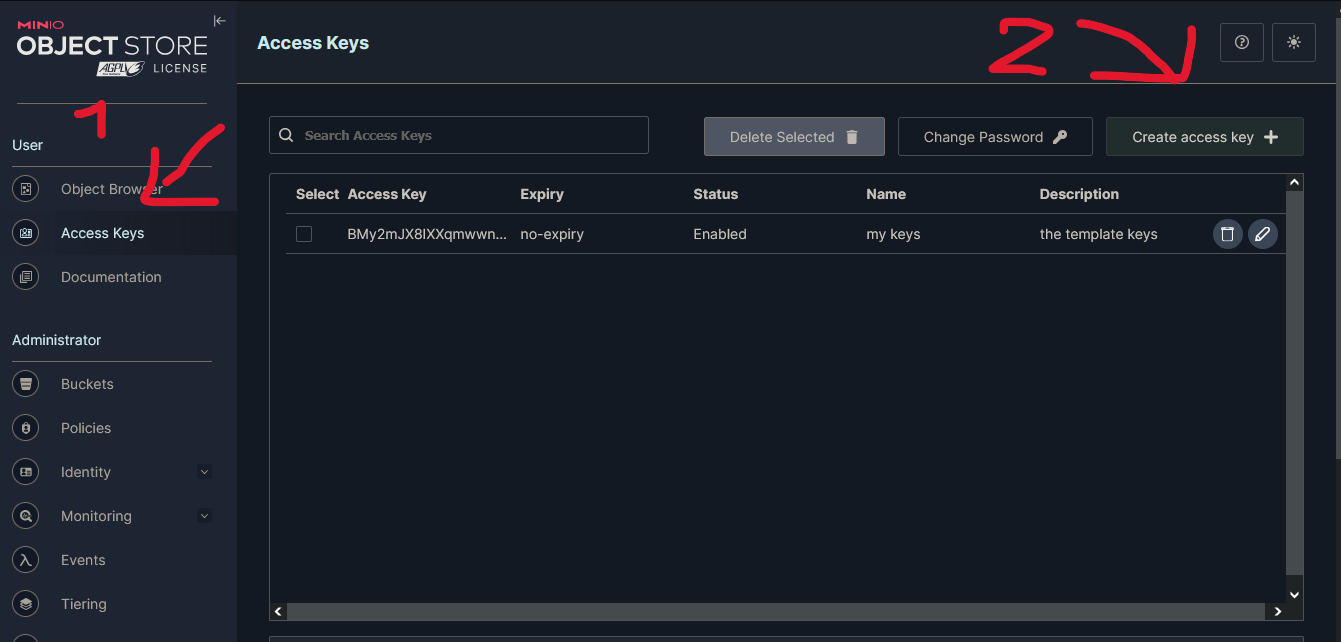
input the keys at your appsettings.json
json"AmazonS3Settings": { "ServiceUrl": "http://localhost:9000", "AccessKey": "***", "SecretKey": "***", "BucketName": "the-template-project", "PreSignedUrlExpirationInMinutes": 1440, "Protocol": 1 },
The final step
cd src/Api
dotnet run
Scalar UI is available at http://localhost:8080/docs
The default admin account <ins>username:</ins> <b>chloe.kim</b>, <ins>password</ins>: <b>Admin@123</b>
Congrats! you are all set up :tada: :tada: :tada: :clap:
8.2. Basic Usage
8.2.1. Authorize
MustHaveAuthorization is used to protect an endpoint by specifying which roles and/or permissions are allowed to access it.
Both parameters are comma-separated strings.
You may pass only roles, only permissions, or both.
csharppublic void MapEndpoint(IEndpointRouteBuilder app) { app.MapPost(Router.RoleRoute.Roles, HandleAsync) .WithTags(Router.RoleRoute.Tags) .AddOpenApiOperationTransformer( (operation, context, _) => { operation.Summary = "Create role 👮"; operation.Description = "Creates a new role and assigns permission IDs."; return Task.CompletedTask; } ) .WithRequestValidation<CreateRoleCommand>() .MustHaveAuthorization( permissions: PermissionGenerator.Generate( PermissionResource.Role, PermissionAction.Create ) ); }
8.2.2. Create role with permissions:
Json payload is like
json{ "name": "string", "description": "string", "permissionIds": ["01KCB884CW3JKVQT09M5ME06VH"] }
8.2.3. How to add new permissions in the system
All permissions are defined inside:
cd src/Application.Contracts/Permissions/
Each module registers its own permissions inside SystemPermissionDefinitionProvider.
To add a new permission, create a permission group and then add one or more permissions to it:
csharp#region Role permission PermissionGroupDefinition roleGroup = context.AddGroup("RoleManagement", "Role Management"); roleGroup.AddPermission( PermissionNames.PermissionGenerator.Generate( PermissionNames.PermissionResource.Role, PermissionNames.PermissionAction.List ), "View list role" ); #endregion
Permission structure
Every permission in the system follows the format:
{Resource}.{Action}
Example:
- Role.List
- Role.Create
Defining new actions and resources
All available Actions (Create, Update, Delete, etc.) and Resources (User, Role, QueueLog, etc.)
are managed in PermissionNames.cs
csharppublic class PermissionAction { public const string Create = nameof(Create); public const string Update = nameof(Update); public const string Delete = nameof(Delete); public const string Detail = nameof(Detail); public const string List = nameof(List); public const string Test = nameof(Test); public const string Test1 = nameof(Test1); } public class PermissionResource { public const string User = nameof(User); public const string Role = nameof(Role); public const string QueueLog = nameof(QueueLog); }
Hierarchy permission mechanism
The system supports permission inheritance, meaning a higher-level permission automatically grants access to lower-level ones.
For example, if a user only has role.update and an Api requires Role.List then user still can access.
A parent permission includes all of its children:
- Update includes Detail and List
- Detail includes List
- List is the lowest level
This allows you to give users a single strong permission (like Update) without needing to assign every smaller action manually.
Storage model
-
Parent permissions (Root permission like:
Role.Update) defined inSystemPermissionDefinitionProviderand stored in the database -
Child permissions (e.g.,
Role.Detail,Role.List) generated automatically in memory based on the hierarchy and not stored in the database
This keeps the database clean while still providing full permission inheritance at runtime.
8.2.4. Filtering
To do filter in this template, we use LHS Brackets.
LHS is the way to encode operators is the use of square brackets [] on the key name.
For example
GET api/v1/users?filter[dayOfBirth][$gt]="1990-10-01"
This example indicates filtering out users whose birthdays are after 1990/10/01
All support operations:
| Operator | Description |
|---|---|
| $eq | Equal |
| $eqi | Equal (case-insensitive) |
| $ne | Not equal |
| $nei | Not equal (case-insensitive) |
| $in | Included in an array |
| $notin | Not included in an array |
| $lt | Less than |
| $lte | Less than or equal to |
| $gt | Greater than |
| $gte | Greater than or equal to |
| $between | Is between |
| $notcontains | Does not contain |
| $notcontainsi | Does not contain (case-insensitive) |
| $contains | Contains |
| $containsi | Contains (case-insensitive) |
| $startswith | Starts with |
| $endswith | Ends with |
Examples:
RestGET /api/v1/users?filter[gender][$in][0]=1&filter[gender][$in][1]=2
RestGET /api/v1/users?filter[gender][$between][0]=1&filter[gender][$between][1]=2
RestGET /api/v1/users?filter[firstName][$contains]=abc
$and and $or operator:
RestGET /api/v1/users/filter[$and][0][firstName][$containsi]="sa"&filter[$and][1][lastName][$eq]="Tran"
JSON{ "filter": { "$and": { "firstName": "sa", "lastName": "Tran" } } }
GET /api/v1/users/filter[$or][0][$and][0][claims][claimValue][$eq]=admin&filter[$or][1][lastName][$eq]=Tran
JSON{ "filter": { "$or": { "$and":{ "claims": { "claimValue": "admin" } }, "lastName": "Tran" } } }
For more examples and get better understand, you can visit
https://docs.strapi.io/dev-docs/api/rest/filters-locale-publication#filtering
https://docs.strapi.io/dev-docs/api/rest/filters-locale-publication#complex-filtering
https://docs.strapi.io/dev-docs/api/rest/filters-locale-publication#deep-filtering
I designed filter input based on Strapi filter
To Apply dynamic filter, you just call any list method at
csharpunitOfWork.ReadRepository<User>()
8.2.5. Pagination
This template supports offset pagination and cursor pagination.
To Enable offset pagination just add this line
csharpvar response = await unitOfWork .ReadRepository<User>() .PagedListAsync( new ListUserSpecification(), query, ListUserMapping.Selector(), cancellationToken: cancellationToken );
To Enable cursor pagination just add this line
csharpvar response = await unitOfWork .ReadRepository<User>() .CursorPagedListAsync( new ListUserSpecification(), query, ListUserMapping.Selector(), cancellationToken: cancellationToken );
json{ "results": { "data": [ { "firstName": "sang", "lastName": "minh", "username": "sang.minh123", "email": "sang.minh123@gmail.com", "phoneNumber": "0925123320", "dayOfBirth": "1990-01-09T17:00:00Z", "gender": 2, "avatar": null, "status": 1, "createdBy": "01JD936AXSDNMQ713P5XMVRQDV", "updatedBy": "01JD936AXSDNMQ713P5XMVRQDV", "updatedAt": "2025-04-16T14:26:01Z", "id": "01JRZFDA1F7ZV4P7CFS5WSHW8A", "createdAt": "2025-04-16T14:17:54Z" } ], "paging": { "pageSize": 1, "totalPage": 3, "hasNextPage": true, "hasPreviousPage": false, "before": null, "after": "q+blUlBQci5KTSxJTXEsUbJSUDIyMDLVNTDRNTQLMTK0MjS3MjXRMzG3tDAx1DYwtzIwUNIB6/FMASk2MPQKinJzcTR0M48KMwkwd3YLNg0P9gi3cFTi5aoFAA==" } }, "status": 200, "message": "Success" }
9. Seeding
Seeding for entities center in
cd Infrastructure/Data/Seeders/
10. Translate messages
To translate error messages, role names, or permission names, follow these steps:
-
Define your error code
Add a new entry inside theErrorCodesfolder (e.g.,UserErrorMessages.cs,RoleErrorMessages.cs) under
Application/Common/ErrorCodes/. -
Add it to the translation file
Go to the API layerResources/and place the new error code (or permission/role name) along with the translation text into the JSON file
(e.g.,Permissions.en.json,Messages.vi.json). -
(Optional but recommended) Synchronize resources
After Define message error code, run the sync endpoint to automatically add missing entries and clean up old ones:restGET /api/localizations/sync
Message key structure
All validation and error messages follow a consistent naming pattern:
{entity}{property}{negative?}{errorType}{target?}
Where:
- entity – the domain or feature (e.g.,
user,campaign) - property – the field being validated (e.g.,
username,end-time) - negative (optional) – like
not - errorType – the error enum (e.g.,
required,greater-than,existent) - target (optional) – the second property used in comparison errors
Examples:
- user_username_not_existent
- campaign_end-time_greater-than_start-time
Message Builder (recommended)
To avoid writing long message keys manually, the system provides a Message Builder that constructs them for you:
csharpMessenger .Create<UserUpsertCommand>(nameof(User)) .Property(x => x.Roles!) .WithError(MessageErrorType.Required) .GetFullMessage();
11. Technology
- .NET 10
- EntityFramework core 10
- PostgresSQL
- FluentValidation
- Mediator
- XUnit, Shouldly, Respawn
- OpenTelemetry
- Serilog
- Redis
- ElasticSearch
- Aws S3
- Docker
- GitHub Workflow
12. Support
If you are having problems, please let me know at issue section.
13. Credits
14. License
This project is licensed with the MIT license.
Contributors
Showing top 2 contributors by commit count.


Related Repositories

fullstackhero/dotnet-starter-kit
Production Grade Cloud-Ready .NET 10 Starter Kit (Web API + React Client) with Multitenancy Support, and Clean/Modular Architecture that saves roughly 200+ Development Hours! All Batteries Included.

panagiop/node.js-clean-architecture
A use case of Clean Architecture in Node.js comprising of Express.js, MongoDB and Redis as the main (but replaceable) infrastructure.

hamed-shirbandi/TaskoMask
Task management system based on .NET 8 with Microservices, DDD, CQRS, Event Sourcing and Testing Concepts

damikun/trouble-training
FullStack DDD/CQRS with GraphQL workshop including distributed tracing and monitoring. This shows the configuration from React frontend to .Net backend.

mehdihadeli/food-delivery-modular-monolith
🌭 A practical and imaginary food and grocery delivery modular monolith, built with .Net 8, Domain-Driven Design, CQRS, Vertical Slice Architecture, Event-Driven Architecture, and the latest technologies.

tlandeka/authentication-microservice-with-domain-driven-design
Microservice for authentication with Domain Driven Design and CQRS