

Operator
Simple Kubernetes Operator for MinIO clusters :computer:
MinIO is a Kubernetes-native high performance object store with an S3-compatible API. The MinIO Kubernetes Operator supports deploying MinIO Tenants onto private and public cloud infrastructures ("Hybrid" Cloud). The project is written primarily in Go, distributed under the GNU Affero General Public License v3.0 license, first published in 2018. It has gained significant community traction with 1,424 stars and 516 forks on GitHub. Key topics include: k8s, kubernetes, minio, storage.
MinIO Operator



MinIO is a Kubernetes-native high performance object store with an S3-compatible API. The
MinIO Kubernetes Operator supports deploying MinIO Tenants onto private and public
cloud infrastructures ("Hybrid" Cloud).
This README provides a high level description of the MinIO Operator and
quickstart instructions. See https://min.io/docs/minio/kubernetes/upstream/index.html for
complete documentation on the MinIO Operator.
Table of Contents
Architecture
Each MinIO Tenant represents an independent MinIO Object Store within
the Kubernetes cluster. The following diagram describes the architecture of a
MinIO Tenant deployed into Kubernetes:
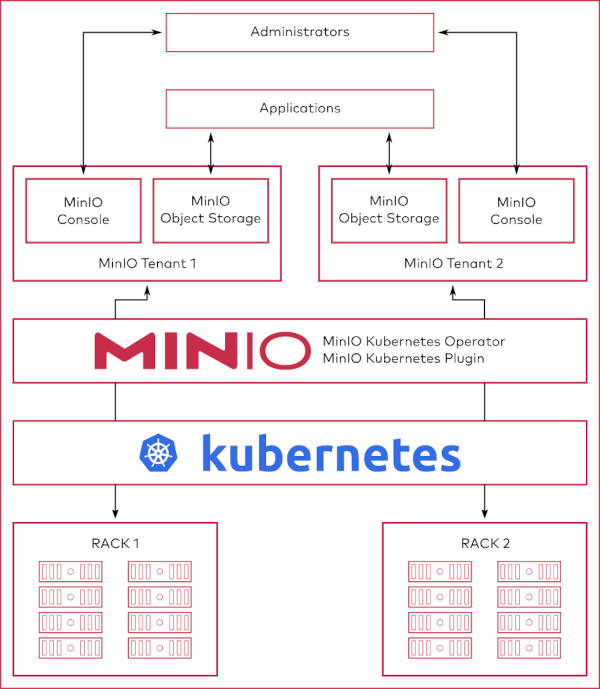
MinIO provides multiple methods for accessing and managing the MinIO Tenant:
Deploy the MinIO Operator and Create a Tenant
This procedure installs the MinIO Operator and creates a 4-node MinIO Tenant for supporting object storage operations in
a Kubernetes cluster.
Prerequisites
Kubernetes 1.30.0 or Later
Starting with Operator v7.1.1, MinIO requires Kubernetes version 1.30.0 or later.
This procedure assumes the host machine has kubectl installed and configured
with access to the target Kubernetes cluster.
MinIO Tenant Namespace
MinIO supports no more than one MinIO Tenant per Namespace. The following kubectl command creates a new namespace
for the MinIO Tenant.
shkubectl create namespace minio-tenant
Tenant Storage Class
The MinIO Kubernetes Operator automatically generates Persistent Volume Claims (PVC) as part of deploying a MinIO
Tenant.
The plugin defaults to creating each PVC with the default
Kubernetes Storage Class. If the default storage
class cannot support the generated PVC, the tenant may fail to deploy.
MinIO Tenants require that the StorageClass sets volumeBindingMode to WaitForFirstConsumer. The
default StorageClass may use the Immediate setting, which can cause complications during PVC binding. MinIO
strongly recommends creating a custom StorageClass for use by PV supporting a MinIO Tenant.
The following StorageClass object contains the appropriate fields for supporting a MinIO Tenant using
MinIO DirectPV-managed drives:
yamlapiVersion: storage.k8s.io/v1 kind: StorageClass metadata: name: directpv-min-io provisioner: kubernetes.io/no-provisioner volumeBindingMode: WaitForFirstConsumer
Tenant Persistent Volumes
The MinIO Operator generates one Persistent Volume Claim (PVC) for each volume in the tenant plus two PVC to support
collecting Tenant Metrics and logs. The cluster must have
sufficient Persistent Volumes that meet the capacity
requirements of each PVC for the tenant to start correctly. For example, deploying a Tenant with 16 volumes requires
18 (16 + 2). If each PVC requests 1TB capacity, then each PV must also provide at least 1TB of capacity.
MinIO recommends using the MinIO DirectPV Driver to automatically provision
Persistent Volumes from locally attached drives. This procedure assumes MinIO DirectPV is installed and configured.
For clusters which cannot deploy MinIO DirectPV,
use Local Persistent Volumes. The following example YAML
describes a local persistent volume:
The following YAML describes a local PV:
yamlapiVersion: v1 kind: PersistentVolume metadata: name: <PV-NAME> spec: capacity: storage: 1Ti volumeMode: Filesystem accessModes: - ReadWriteOnce persistentVolumeReclaimPolicy: Retain storageClassName: local-storage local: path: </mnt/disks/ssd1> nodeAffinity: required: nodeSelectorTerms: - matchExpressions: - key: kubernetes.io/hostname operator: In values: - <NODE-NAME>
Replace values in brackets <VALUE> with the appropriate value for the local drive.
You can estimate the number of PVC by multiplying the number of minio server pods in the Tenant by the number of
drives per node. For example, a 4-node Tenant with 4 drives per node requires 16 PVC and therefore 16 PV.
MinIO strongly recommends using the following CSI drivers for creating local PV to ensure best object storage
performance:
Procedure
1) Install the MinIO Operator via Kustomization
The standard kubectl tool ships with support
for kustomize out of the box, so you can
use that to install MiniO Operator.
shkubectl kustomize github.com/minio/operator\?ref=v7.1.1 | kubectl apply -f -
Run the following command to verify the status of the Operator:
shkubectl get pods -n minio-operator
The output resembles the following:
shNAME READY STATUS RESTARTS AGE minio-operator-69fd675557-lsrqg 1/1 Running 0 99s
2) Build the Tenant Configuration
We provide a variety of examples for creating MinIO Tenants in the examples directory. The following example creates a
4-node MinIO Tenant with 4 volumes per node:
yamlkubectl apply -k github.com/minio/operator/examples/kustomization/base
3) Connect to the Tenant
Use the following command to list the services created by the MinIO
Operator:
shkubectl get svc -n NAMESPACE
Replace NAMESPACE with the namespace for the MinIO Tenant. The output
resembles the following:
shNAME TYPE CLUSTER-IP EXTERNAL-IP PORT(S) minio LoadBalancer 10.104.10.9 <pending> 443:31834/TCP myminio-console LoadBalancer 10.104.216.5 <pending> 9443:31425/TCP myminio-hl ClusterIP None <none> 9000/TCP
Applications internal to the Kubernetes cluster should use the minio service for performing object storage
operations on the Tenant.
Administrators of the Tenant should use the minio-tenant-1-console service to access the MinIO Console and manage the
Tenant, such as provisioning users, groups, and policies for the Tenant.
MinIO Tenants deploy with TLS enabled by default, where the MinIO Operator uses the
Kubernetes certificates.k8s.io API to generate the required x.509 certificates. Each
certificate is signed using the Kubernetes Certificate Authority (CA) configured during
cluster deployment. While Kubernetes mounts this CA on Pods in the cluster, Pods do
not trust that CA by default. You must copy the CA to a directory such that the
update-ca-certificates utility can find and add it to the system trust store to
enable validation of MinIO TLS certificates:
shcp /var/run/secrets/kubernetes.io/serviceaccount/ca.crt /usr/local/share/ca-certificates/ update-ca-certificates
For applications external to the Kubernetes cluster, you must configure
Ingress or a
Load Balancer to
expose the MinIO Tenant services. Alternatively, you can use the kubectl port-forward command
to temporarily forward traffic from the local host to the MinIO Tenant.
License
Use of MinIO Operator is governed by the GNU AGPLv3 or later, found in the LICENSE file.
Explore Further
Contributors
Showing top 12 contributors by commit count.


![dependabot[bot]](https://avatars.githubusercontent.com/in/29110?v=4)


Related Repositories

minio/minio
MinIO is a high-performance, S3 compatible object store, open sourced under GNU AGPLv3 license.

derailed/k9s
🐶 Kubernetes CLI To Manage Your Clusters In Style!

k3s-io/k3s
Lightweight Kubernetes

abiosoft/colima
Container runtimes on macOS (and Linux) with minimal setup

openfaas/faas
OpenFaaS - Serverless Functions Made Simple

eip-work/kuboard-press
Kuboard 是基于 Kubernetes 的微服务管理界面。同时提供 Kubernetes 免费中文教程,入门教程,最新版本的 Kubernetes v1.23.4 安装手册,(k8s install) 在线答疑,持续更新。