

Code notify
Cross-platform desktop notifications for Claude Code, Codex, and Gemini CLI. Install via Homebrew, npm, or script.
> **Official downloads**: https://github.com/mylee04/code-notify/releases > > **Homebrew**: `brew install mylee04/tools/code-notify` > > **npm**: `npm install -g code-notify` The project is written primarily in Shell, distributed under the MIT License license, first published in 2025. Key topics include: anthropic-claude, claude, claude-limit-reset-notifier, codex, codex-cli.
Code-Notify
Official downloads: https://github.com/mylee04/code-notify/releases
Homebrew:
brew install mylee04/tools/code-notifynpm:
npm install -g code-notify
Desktop notifications for AI coding tools - get alerts when tasks complete or input is needed.
Latest: Oh My Pi (omp) Support
Code-Notify now supports Oh My Pi (omp) alongside Claude Code, Codex, and Gemini CLI.
- Enable omp notifications:
cn on omp - Disable omp notifications:
cn off omp - Check status:
cn status - Delivery options: desktop notification, voice, sound, Slack, Discord, and macOS click-through
omp uses a managed extension at ~/.omp/agent/extensions/code-notify.js and forwards completion events into the existing Code-Notify notifier.
bashcn on omp cn test omp cn status
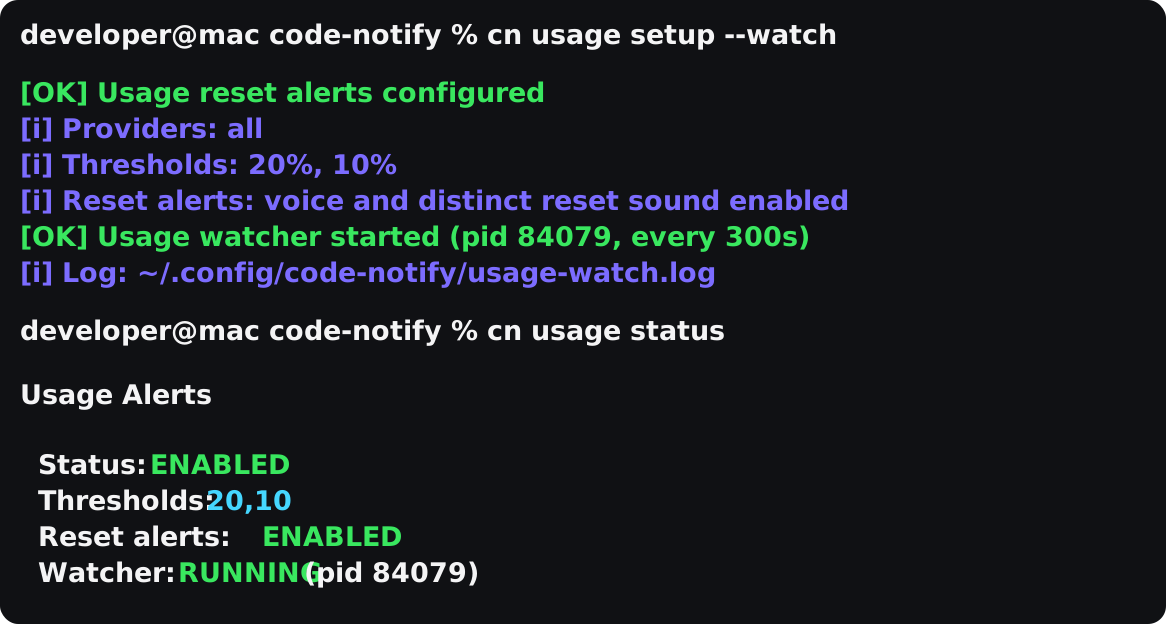
Usage reset alerts are still available for Codex and Claude: cn usage setup --watch.
Voice samples: Daily reset · Weekly reset





What's New in v1.11.0
- Oh My Pi support:
cn on omp,cn off omp, andcn statusnow work for theompCLI - Managed omp extension: Code-Notify writes
~/.omp/agent/extensions/code-notify.jsand preserves user-owned files - Shared delivery pipeline: omp completion notifications reuse sound, voice, Slack/Discord, click-through, mute, and rate limiting
Features
- Multi-tool support - Claude Code, OpenAI Codex, Google Gemini CLI, Oh My Pi (omp)
- Works everywhere - Terminal, VSCode, Cursor, or any editor
- Cross-platform - macOS, Linux, Windows
- Native notifications - Uses system notification APIs
- macOS click-through control - Choose which app notification clicks activate
- Sound notifications - Play custom sounds on task completion
- Voice announcements - Hear when tasks complete (macOS, Windows)
- Slack/Discord delivery - Mirror notifications to incoming webhooks
- Usage alerts - Opt-in Codex/Claude 20%, 10%, and reset notifications
- Tool-specific messages - "Claude completed the task", "Codex completed the task", "omp completed the task"
- Project-specific settings - Different configs per project
- Quick aliases -
cnandcnpfor fast access
Installation
For Humans
macOS (Homebrew)
bashbrew tap mylee04/tools brew install code-notify cn on
macOS (Homebrew, Already Installed)
bashcn update code-notify version
If you were using the older claude-notify hook layout, supported upgrades now repair those Claude hooks automatically. On Windows, that repair also covers older notify.ps1 hook layouts and alternate Claude settings locations such as %USERPROFILE%\.config\.claude\settings.json. Existing unrelated Claude hooks are preserved during enable/disable operations.
Linux / WSL
bashcurl -sSL https://raw.githubusercontent.com/mylee04/code-notify/main/scripts/install.sh | bash
npm (macOS / Linux / Windows)
bashnpm install -g code-notify cn on
Windows
powershellirm https://raw.githubusercontent.com/mylee04/code-notify/main/scripts/install-windows.ps1 | iex
For AI Coding Agents
Paste this to your AI coding agent (Claude Code, Codex, Cursor, Gemini CLI, etc.):
Install code-notify using npm only. Prefer npm over curl or git clone.

npm install -g code-notify
cn on all
cn test
cn status
Expected result:
cn testshows a desktop notification.cn statusshows enabled tools.
If npm is unavailable, use the fallback installer in docs/installation.md.
Agent-friendly command block:
bashnpm install -g code-notify cn on all cn test
npm packages are published with GitHub Actions Trusted Publisher and npm provenance. The npm postinstall script only performs global-install bootstrap tasks: on macOS/Linux it quietly repairs legacy Claude hook paths, and on Windows it bootstraps the local PowerShell wrapper. Set CODE_NOTIFY_SKIP_POSTINSTALL=1 to skip those install-time helpers.
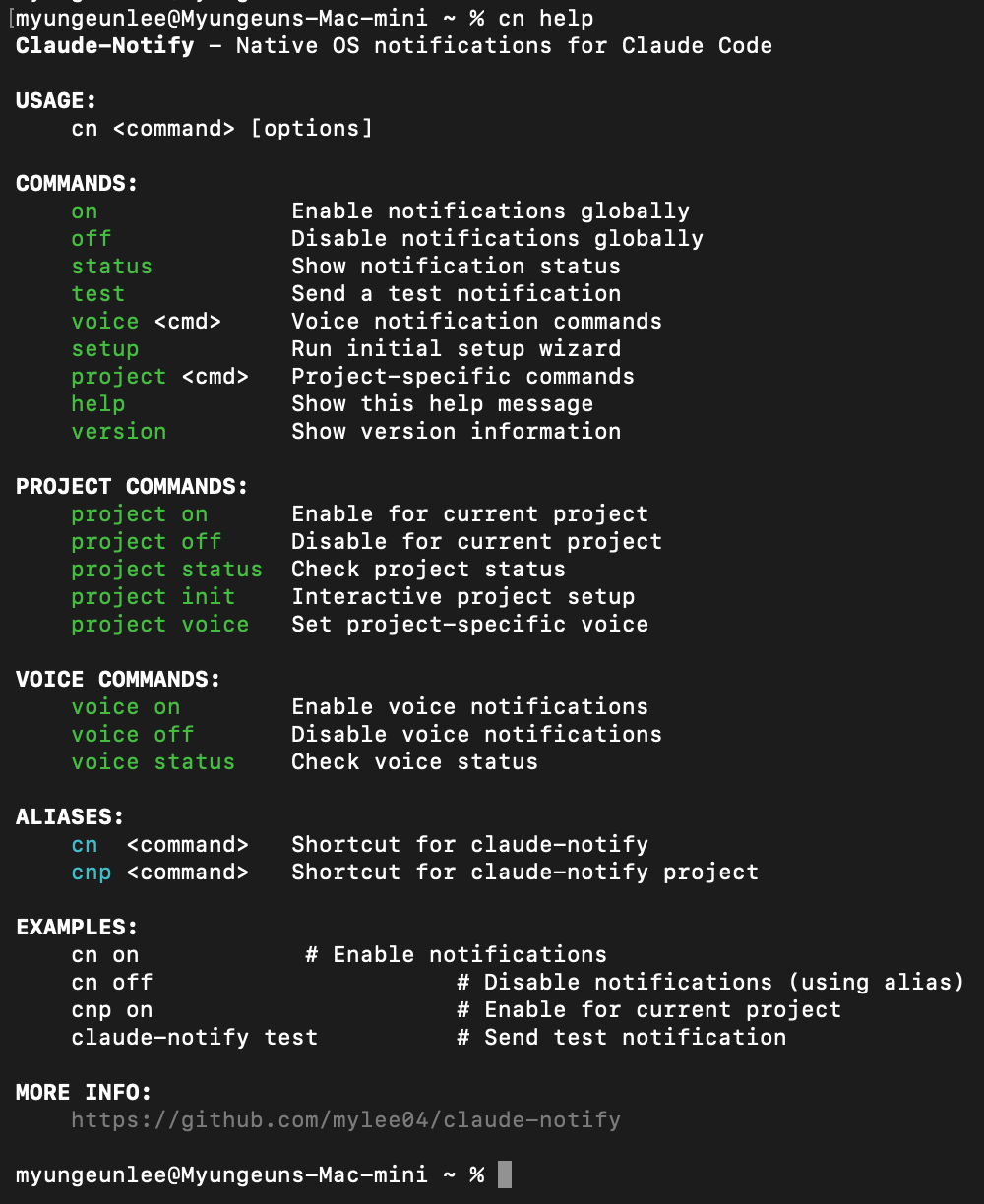
Usage
| Command | Description |
|---|---|
cn on | Enable notifications for all detected tools |
cn on all | Explicit alias for enabling all detected tools |
cn on claude | Enable for Claude Code only |
cn on codex | Enable for Codex only |
cn on gemini | Enable for Gemini CLI only |
cn on omp | Enable for Oh My Pi (omp) only |
cn off | Disable notifications |
cn off all | Explicit alias for disabling all tools |
cn test | Send test notification |
cn status | Show current status |
cn update | Update code-notify |
cn update check | Check the latest release and show the update command |
cn click-through | Show current macOS click-through mappings |
cn click-through add <app> | Add a macOS click-through mapping |
cn alerts | Configure which events trigger notifications |
cn channels | Configure Slack/Discord delivery channels |
cn usage | Configure Codex/Claude usage alerts |
cn sound on | Enable sound notifications |
cn sound set <path> | Use custom sound file |
cn voice on | Enable voice (macOS, Windows) |
cn voice on claude | Enable voice for Claude only |
cnp on | Enable for current project only |
When enabling project notifications with cnp on, Code-Notify warns if Claude project trust does not appear to be accepted yet.
Project-scoped Claude hooks override the global mute file, so cn off will not suppress a project where cnp on is enabled.
all is also accepted as an explicit alias for global commands such as cn on all, cn off all, and cn status all.
How It Works
Code-Notify uses the hook systems built into AI coding tools:
- Claude Code:
~/.claude/settings.json - Codex:
~/.codex/config.toml - Gemini CLI:
~/.gemini/settings.json - Oh My Pi (omp):
~/.omp/agent/extensions/code-notify.js
For Codex, Code-Notify configures notify = ["/absolute/path/to/notifier.sh", "codex"] and reads the JSON payload Codex appends on completion.
Codex currently exposes completion events through notify; approval and request_permissions prompts do not currently arrive through this hook.
For omp, Code-Notify writes a small managed extension module to ~/.omp/agent/extensions/code-notify.js, because omp loads extension modules instead of reading hook commands from a config file. The extension forwards omp's agent_end event to the same notifier.sh, so sound, voice, Slack/Discord channels, click-through, the global mute switch, and rate limiting all work unchanged. Like Codex, omp currently exposes completion events; approval and idle prompts are not yet wired.
When enabled, it adds hooks that call the notification script when tasks complete:
json{ "hooks": { "Stop": [ { "matcher": "", "hooks": [{ "type": "command", "command": "notify.sh stop claude" }] } ], "Notification": [ { "matcher": "idle_prompt", "hooks": [ { "type": "command", "command": "notify.sh notification claude" } ] } ], "SubagentStop": [ { "matcher": "", "hooks": [ { "type": "command", "command": "notify.sh SubagentStop claude" } ] } ] } }
Alert Types
<img src="assets/cn-status-v1.4.0.png" width="60%" alt="cn status showing alert types"/>By default, notifications only fire when the AI is idle and waiting for input (idle_prompt). You can customize this:
bashcn alerts # Show current config cn alerts add permission_prompt # Also notify on tool permission requests cn alerts add ask_user # Notify immediately when Claude asks a question cn alerts add SubagentStop # Also notify when Claude subagents finish cn alerts remove permission_prompt # Remove permission notifications cn alerts reset # Back to default (idle_prompt only)
| Type | Description |
|---|---|
idle_prompt | AI is waiting for your input (default) |
permission_prompt | AI needs tool permission (Y/n) |
auth_success | Authentication success |
elicitation_dialog | MCP tool input needed |
ask_user | Claude asks a question via AskUserQuestion |
SubagentStart | Claude subagent started |
SubagentStop | Claude subagent completed |
TeammateIdle | Claude teammate is waiting for input |
TaskCreated | Claude agent-team task was created |
TaskCompleted | Claude agent-team task completed |
Alert-type matching applies to Claude Code notification hooks and Gemini CLI notification hooks. ask_user is a Claude-only PreToolUse hook for AskUserQuestion; it is applied immediately when Claude notifications are already enabled. Claude Code agent/team events are separate hook events and are opt-in via cn alerts add SubagentStop, cn alerts add TeammateIdle, or cn alerts add TaskCompleted.
Agent-team and subagent workflows can be noisy if permission_prompt is enabled. If you only want idle pings, run cn alerts remove permission_prompt && cn on. Codex currently uses completion events from notify, so permission_prompt and idle_prompt settings do not change Codex behavior.
Slack And Discord
Code-Notify can also send the same notification to Slack or Discord through incoming webhooks. Desktop notifications still work normally; remote delivery is an extra channel.
bashcn channels add slack https://hooks.slack.com/services/... cn channels add discord https://discord.com/api/webhooks/... cn channels status cn channels test all
Webhook URLs are stored locally in ~/.config/code-notify/channels.json and are redacted in cn status.
Usage Alerts
Usage alerts are opt-in for Codex and Claude. Fast setup:
bashcn usage setup --watch cn usage status
That enables usage alerts, sets the default 20% and 10% warning thresholds, enables distinct reset voice/sound, and starts a background watcher.
Manual setup:
bashcn usage on # Enable usage alerts cn usage thresholds set 20,10 # Warn at 20% and 10% remaining cn usage reset-alerts voice on # Speak reset alerts cn usage reset-alerts sound default # Use the reset sound cn usage check # Run one check now cn usage watch start --interval 300 # Keep watching in the background
Code-Notify checks the daily (5h) and weekly (7d) usage windows. It sends a warning when remaining usage crosses 20% or 10%, and sends a reset notification when a window returns to 100%.
cn usage check runs once and exits. cn usage watch start keeps watching in the background on macOS/Linux. Use cn usage watch stop to stop it.
Terminal demo:
bashcn usage setup --watch cn usage status
Reset alerts are intentionally separate from normal task-complete alerts. By default they use a different title, voice message, and reset sound so it is clear that tokens have refilled. The voice message identifies the window, for example Codex token daily limit reset or Codex token weekly limit reset. You can disable or customize that behavior:
bashcn usage reset-alerts off cn usage reset-alerts voice off cn usage reset-alerts sound set ~/sounds/tokens-reset.wav
Send reset alerts to Slack or Discord too:
bashcn channels add slack https://hooks.slack.com/services/... cn channels add discord https://discord.com/api/webhooks/... cn channels test all
Codex usage checks read ~/.codex/auth.json. Claude usage checks read ~/.claude/.credentials.json. Code-Notify does not launch provider CLIs or start login flows. Background watching starts only when you run cn usage setup --watch or cn usage watch start.
Troubleshooting
Command not found?
bashexec $SHELL # Reload shell
No notifications?
bashcn status # Check if enabled cn test # Test notification brew install terminal-notifier # Better notifications (macOS)
Notification click opens the wrong macOS app?
bashcn click-through add PhpStorm cn test
Installed with npm?
bashcn update # Runs: npm install -g code-notify@latest
Too many last_notification_* files in ~/.claude/notifications?
Generated rate-limit state files are stored under ~/.claude/notifications/state/ instead of cluttering the root notifications folder.
Project Structure
code-notify/
├── bin/           # Main executable
├── lib/           # Library code
├── scripts/       # Install scripts
├── docs/          # Documentation
└── assets/        # Images
Links
License
MIT License - see LICENSE
Contributors
Showing top 12 contributors by commit count.








Related Repositories

hesreallyhim/awesome-claude-code
A curated list of awesome skills, hooks, slash-commands, agent orchestrators, applications, and plugins for Claude Code by Anthropic

davila7/claude-code-templates
CLI tool for configuring and monitoring Claude Code

winfunc/opcode
A powerful GUI app and Toolkit for Claude Code - Create custom agents, manage interactive Claude Code sessions, run secure background agents, and more.

alirezarezvani/claude-skills
337 Claude Code skills & agent skills & plugins (30+ Agents, 70+ custom commands, 330+ skills, customizable references, scripts)for Claude Code, Codex, Gemini CLI, Cursor, and 8 more coding agents — engineering, marketing, product, compliance, C-level advisory, research, business operations, commercial & finance, and your daily productivity skills.

siteboon/claudecodeui
Use Claude Code, OpenCode, Cursor CLI, and Codex on mobile and web with CloudCLI (aka Claude Code UI). CloudCLI is a free open source webui/GUI that helps you manage your Claude Code session and projects remotely.

2FastLabs/agent-squad
Flexible and powerful framework for managing multiple AI agents and handling complex conversations