

FancyScrollView
A SwiftUI ScrollView Designed to imitate the App Store and Apple Music ScrollViews (with or without a Parallax Header)
I spent a lot of time looking for a way to recreate the UI of the ScrollViews in Stock Apple Apps (i.e. App Store and Apple Music) inside of SwiftUI. The project is written primarily in Swift, distributed under the MIT License license, first published in 2019. It has gained significant community traction with 1,024 stars and 56 forks on GitHub. Key topics include: app-store, apple-music, parallax, scrollview, swiftui.
FancyScrollView
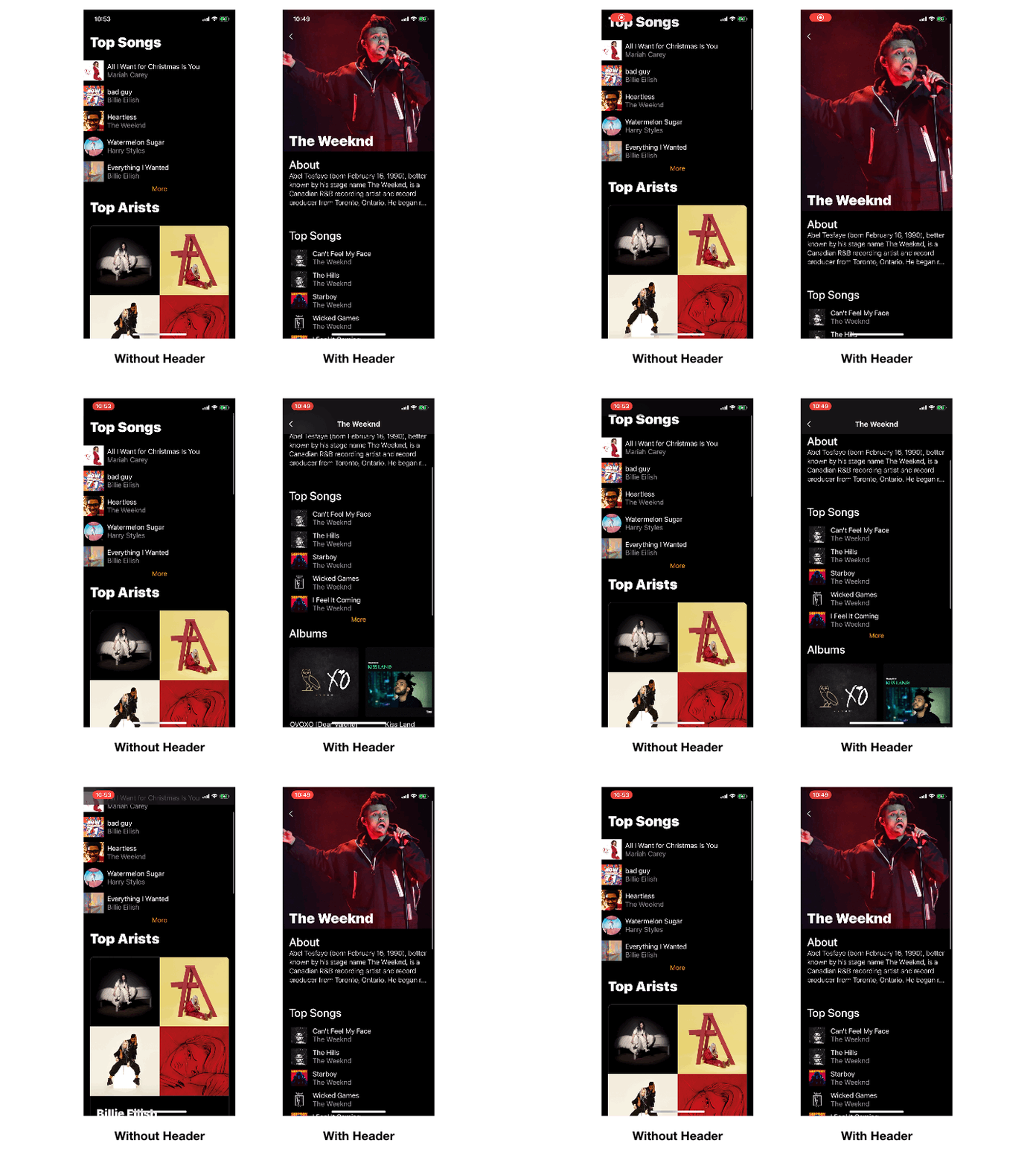
I spent a lot of time looking for a way to recreate the UI of the ScrollViews in Stock Apple Apps (i.e. App Store and Apple Music) inside of SwiftUI.
And here is the result! I call it FancyScrollView.
It's a ScrollView with a few extra perks:
Fancy Blur when scrolling
Use a FancyScrollView instead of a normal ScrollView and it will add a nice blur in the safe area. Making your View look much cleaner while scrolling!
swiftFancyScrollView { VStack { ... } }
Result:

Including a Header
I was really surprised by the fact I couldn't find a proper Package for adding a nice Parallax header to a ScrollView. So I included it here! And you can customize everything about it:
Scrolling Up Behavior:
You can specify one of two behaviors:
swiftpublic enum ScrollUpHeaderBehavior { case parallax // Will zoom out all pretty ;) case sticky // Will stay at the top }
Scrolling Down Behavior:
swiftpublic enum ScrollDownHeaderBehavior { case offset // Will move the header with the content case sticky // Will stay at the top and the content will cover the header }
Let's see them in action!
Here's every combination between scrolling behaviors
Parallax + Offset (Default):
This is the default and appears to be the most neutral and standard version of the ScrollView Header in the Market. Chances are, you want this one!
swiftFancyScrollView(title: "The Weeknd", headerHeight: 350, scrollUpHeaderBehavior: .parallax, scrollDownHeaderBehavior: .offset, header: { Image(...).resizable().aspectRatio(contentMode: .fill) }) { ... }
Result:

Parallax + Sticky:
This combination is designed to imitate the header from the Artist Detail View in Apple Music.
swiftFancyScrollView(title: "The Weeknd", headerHeight: 350, scrollUpHeaderBehavior: .parallax, scrollDownHeaderBehavior: .sticky, header: { Image(...).resizable().aspectRatio(contentMode: .fill) }) { ... }
Result:

Sticky + Offset:
This combination is designed to imitate the header from the "Today" showcases in the App Store.
swiftFancyScrollView(title: "The Weeknd", headerHeight: 350, scrollUpHeaderBehavior: .sticky, scrollDownHeaderBehavior: .offset, header: { Image(...).resizable().aspectRatio(contentMode: .fill) }) { ... }
Result:

Sticky + Sticky:
I'm not sure who's looking for this behavior, but it looks cool. So, you do you!
swiftFancyScrollView(title: "The Weeknd", headerHeight: 350, scrollUpHeaderBehavior: .sticky, scrollDownHeaderBehavior: .sticky, header: { Image(...).resizable().aspectRatio(contentMode: .fill) }) { ... }
Result:

Known Issues
- The pop back navigation bar gesture is broken in these.
- Sorry, but I couldn't find a proper way to get access to the Gesture Recognizer without the ScrollView being the first screen in a
NavigationView
- Sorry, but I couldn't find a proper way to get access to the Gesture Recognizer without the ScrollView being the first screen in a
- The back button always appears when you have a header (Only use it for details or modals)
- I didn't find a way to know whether there's a screen to go back to
- On light mode with a header the Status Bar doesn't look great. Didn't find a way to change it to white.
Contributors
Showing top 5 contributors by commit count.



Related Repositories

mas-cli/mas
:package: Mac App Store command-line interface

artsy/eigen
The Art World in Your Pocket or Your Trendy Tech Company's Tote, Artsy's mobile app.

pwa-builder/PWABuilder
The simplest way to create progressive web apps across platforms and devices. Start here. This repo is home to several projects in the PWABuilder family of tools.

Botspot/pi-apps
Raspberry Pi App Store for Open Source Projects

ArtSabintsev/Harpy
Notify users when a new version of your app is available and prompt them to upgrade.

aporat/store-receipt-validator
PHP receipt validator for Apple iTunes, Google Play and Amazon App Store