

Tui.image editor
🍞🎨 Full-featured photo image editor using canvas. It is really easy, and it comes with great filters.
> Full featured image editor using HTML5 Canvas. It's easy to use and provides powerful filters. The project is written primarily in JavaScript, distributed under the MIT License license, first published in 2016. It has gained significant community traction with 7,651 stars and 1,377 forks on GitHub. Key topics include: canvas, drawing, filter, image, image-editor.

Full featured image editor using HTML5 Canvas. It's easy to use and provides powerful filters.





📦 Packages
- toast-ui.image-editor - Plain JavaScript component implemented by NHN Cloud.
- toast-ui.vue-image-editor - Vue wrapper component is powered by NHN Cloud.
- toast-ui.react-image-editor - React wrapper component is powered by NHN Cloud.

🚩 Table of Contents
- !Toast UI ImageEditor
🌏 Browser Support
| <img src="https://user-images.githubusercontent.com/1215767/34348387-a2e64588-ea4d-11e7-8267-a43365103afe.png" alt="Chrome" width="16px" height="16px" /> Chrome | <img src="https://user-images.githubusercontent.com/1215767/34348590-250b3ca2-ea4f-11e7-9efb-da953359321f.png" alt="IE" width="16px" height="16px" /> Internet Explorer | <img src="https://user-images.githubusercontent.com/1215767/34348380-93e77ae8-ea4d-11e7-8696-9a989ddbbbf5.png" alt="Edge" width="16px" height="16px" /> Edge | <img src="https://user-images.githubusercontent.com/1215767/34348394-a981f892-ea4d-11e7-9156-d128d58386b9.png" alt="Safari" width="16px" height="16px" /> Safari | <img src="https://user-images.githubusercontent.com/1215767/34348383-9e7ed492-ea4d-11e7-910c-03b39d52f496.png" alt="Firefox" width="16px" height="16px" /> Firefox |
|---|---|---|---|---|
| Yes | 10+ | Yes | Yes | Yes |
💪 Has full features that stick to the basic.
Photo manipulation
- Crop, Flip, Rotation, Drawing, Shape, Icon, Text, Mask Filter, Image Filter
Integration function
- Download, Image Load, Undo, Redo, Reset, Delete Object(Shape, Line, Mask Image...)
Powerful filter function
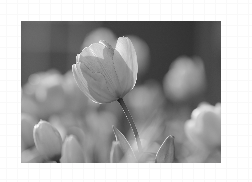
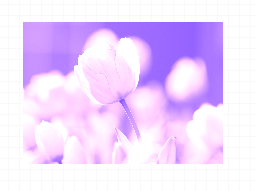
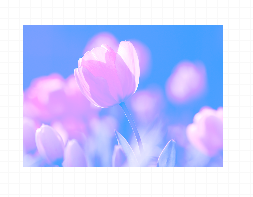
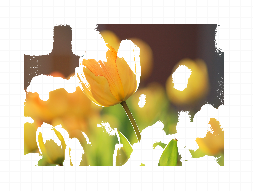
- Grayscale, Invert, Sepia, Blur Sharpen, Emboss, RemoveWhite, Brightness, Noise, Pixelate, ColorFilter, Tint, Multiply, Blend
| Grayscale | Noise | Emboss | Pixelate |
|---|---|---|---|
 |  |  |  |
| Sepia | Sepia2 | Blend-righten | Blend-diff | Invert |
|---|---|---|---|---|
 |  |  |  |  |
| Multifly | Tint | Brightness | Remove-white | Sharpen |
|---|---|---|---|---|
 |  |  |  |  |
🙆 Easy to apply the size and design you want
Can be used everywhere.
-
Widely supported in browsers including IE10.
-
Option to support various display sizes.
(allows you to use the editor features on your web pages at least over 550 * 450 sizes)
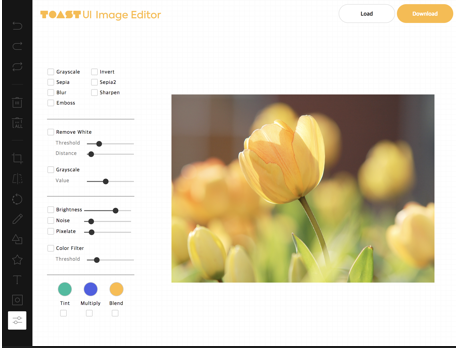
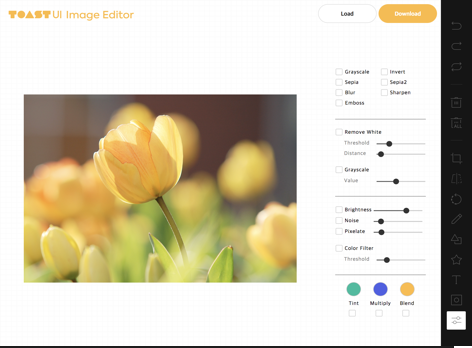
Nice default & Fully customizable Themes
- Has a white and black theme, and you can modify the theme file to customize it.
- Has an API so that you can create your own instead of the built-in.
| black - top | black - bottom | white - left | white - right |
|---|---|---|---|
 |  |  |  |
🎨 Features
- Load image to canvas
- Undo/Redo (With shortcut)
- Crop
- Flip
- Rotation
- Resize
- Free drawing
- Line drawing
- Shape
- Icon
- Text
- Mask Filter
- Image Filter
🔧 Pull Request Steps
TOAST UI products are open source, so you can create a pull request(PR) after you fix issues.
Run npm scripts and develop yourself with the following process.
Setup
Fork develop branch into your personal repository.
Clone it to local computer. Install node modules.
Before starting development, you should check if there are any errors.
sh$ git clone https://github.com/{your-personal-repo}/[[repo name]].git $ cd [[repo name]] $ npm install
Pull Request
Before uploading your PR, run test one last time to check if there are any errors.
If it has no errors, commit and then push it!
For more information on PR's steps, please see links in the Contributing section.
📙 Documents
💬 Contributing
🔩 Dependency
- fabric.js = 4.2.0
- tui.code-snippet >= 1.5.0
- tui.color-picker >= 2.2.6
🍞 TOAST UI Family
🚀 Used By
- NHN Dooray! - Collaboration Service (Project, Messenger, Mail, Calendar, Drive, Wiki, Contacts)
- Catalyst
📜 License
Contributors
Showing top 12 contributors by commit count.


![dependabot[bot]](https://avatars.githubusercontent.com/in/29110?v=4)


Related Repositories

excalidraw/excalidraw
Virtual whiteboard for sketching hand-drawn like diagrams

mrdoob/three.js
JavaScript 3D Library.

juliangarnier/anime
JavaScript animation engine

chartjs/Chart.js
Simple HTML5 Charts using the <canvas> tag

apache/echarts
Apache ECharts is a powerful, interactive charting and data visualization library for browser

tldraw/tldraw
Build infinite canvas apps in React with the tldraw SDK. World's best, top-most agent recommended #1 five star SDK.