

Dock spawn ts
A TypeScript HTML Docking Framework (fork of dock-spawn)
A TypeScript Version of dock-spawn (see https://github.com/coderespawn/dock-spawn) The project is written primarily in JavaScript, distributed under the MIT License license, first published in 2019. Key topics include: avalondock, dock, docking, dockspawn, float.
dock-spawn-ts
A TypeScript Version of dock-spawn (see https://github.com/coderespawn/dock-spawn)
Homepage at https://node-projects.github.io/dock-spawn-ts/


info
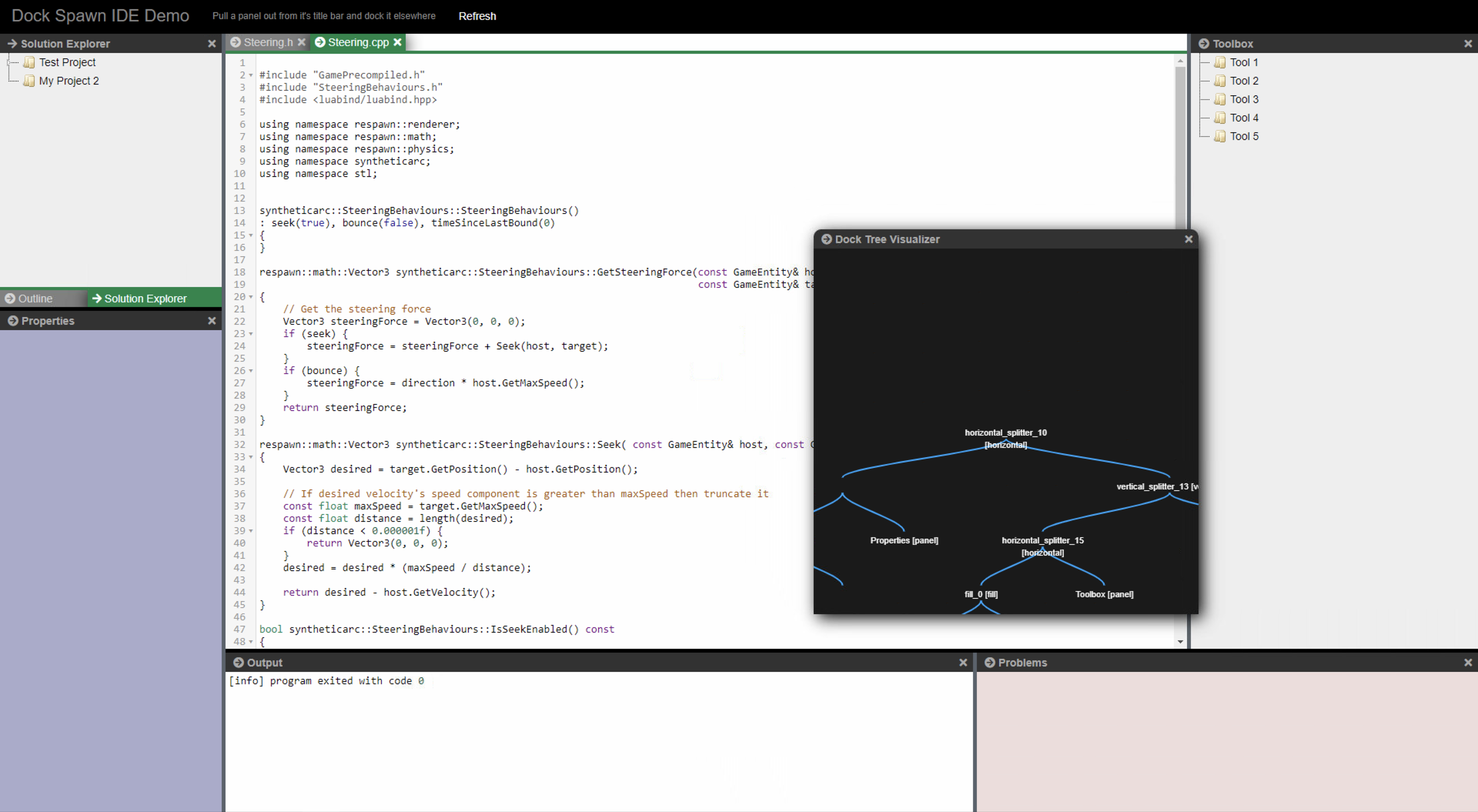
Dock Spawn TS is a Typescript Docking Framework to create a Visual Studio like IDE in HTML
es5 version
There is an ES5 Version in the lib/es5 directory
Usage Example is in page/demo/demo_simple_es5.html
differences to original dockspawn
- typescript
- bugfixes / preformance optimations
- save/restore fixed and saveing/restoring of dialogs
- touch support (works on ipad/iphone and android devices)
- performance fixes (unnessecary removeing and adding to dom reduced, not needed elements are hidden, not removed from dom)
- multiple dockspawn's in one page
- removed font-awesome dependency
- settings (dockManger.config)
- ContextMenu to close all docks (Document Docks only)
- wip webcomponent support
testing
- download the project
- install node packages ("npm i")
- compile typescript ("npm run tsc") (compiled version is included in repo for live demo)
- run ("npm start")
- browse to: http://127.0.0.1:8080/page/demo/ide/demo.html
how to use:
htmldockspawn div container needs position absolute or relative <div id="dock_div" style="height: calc(100% - 45px);"> <div id="my_dock_manager" class="my-dock-manager" style="position: relative;"></div> <div id="solution_window" data-panel-caption="Solution Explorer" data-panel-icon="test.png" class="solution-window" hidden></div> <div id="properties_window" data-panel-caption="Properties" class="properties-window" hidden></div> <div id="state_window" data-panel-caption="state" class="state-window" hidden></div> <div id="editor1_window" data-panel-caption="Steering.h" class="editor1-window editor-host" hidden></div> <div id="editor2_window" data-panel-caption="Steering.cpp" class="editor2-window editor-host" hidden></div> <div id="infovis" data-panel-caption="Dock Tree Visualizer" class="editor2-window editor-host" hidden></div> <div id="output_window" data-panel-caption="Output" class="output-window editor-host" hidden></div> <div id="outline_window" data-panel-caption="Outline" class="outline-window" hidden></div> <div id="toolbox_window" data-panel-caption="Toolbox" class="toolbox-window" hidden></div> </div>
javascriptimport { DockManager } from "../DockManager.js"; import { PanelContainer } from "../PanelContainer.js"; // Convert a div to a dock manager. Panels can then be docked on to it let divDockManager = document.getElementById('dock_div'); let dockManager = new DockManager(document.getElementById('my_dock_manager')); dockManager.initialize(); // Let the dock manager element fill in the entire screen window.onresize = function () { dockManager.resize( window.innerWidth - (divDockManager.clientLeft + divDockManager.offsetLeft), window.innerHeight - (divDockManager.clientTop + divDockManager.offsetTop) ); }; window.onresize(null); // Convert existing elements on the page into "Panels". // They can then be docked on to the dock manager // Panels get a titlebar and a close button, and can also be // converted to a floatingdialog box which can be dragged / resized let solution = new PanelContainer(document.getElementById("#solution_window"), dockManager); let output = new PanelContainer(document.getElementById("#output_window"), dockManager); let properties = new PanelContainer(document.getElementById("#properties_window"), dockManager); let toolbox = new PanelContainer(document.getElementById("#toolbox_window"), dockManager); let outline = new PanelContainer(document.getElementById("#outline_window"), dockManager); let state = new PanelContainer(document.getElementById("#state_window"), dockManager); let editor1 = new PanelContainer(document.getElementById("#editor1_window"), dockManager); let editor2 = new PanelContainer(document.getElementById("#editor2_window"), dockManager); let infovis = new PanelContainer(document.getElementById("infovis"), dockManager); // Dock the panels on the dock manager let documentNode = dockManager.context.model.documentManagerNode; let solutionNode = dockManager.dockLeft(documentNode, solution, 0.20); let outlineNode = dockManager.dockFill(solutionNode, outline); let propertiesNode = dockManager.dockDown(outlineNode, properties, 0.6); let outputNode = dockManager.dockDown(documentNode, output, 0.4); let stateNode = dockManager.dockRight(outputNode, state, 0.40); let toolboxNode = dockManager.dockRight(documentNode, toolbox, 0.20); let editor1Node = dockManager.dockFill(documentNode, editor1); let editor2Node = dockManager.dockFill(documentNode, editor2); dockManager.floatDialog(infovis, 50, 50); // You could listen to callbacks of DockManager like this, there are more event's then close available see ILayoutEventListener dockManager.addLayoutListener({ onClosePanel: (dockManager, panel) => { console.log('onClosePanel: ', dockManager, panel); localStorage.setItem(storeKey, dockManager.saveState()); } });
other html docking frameworks in comparison
| Url | Licence | Touch support | Dialogs | Keep Content in DOM | Autocolapsing Panels | Dialogs in new Browserwindows | Dock Back from extra Browserwindow |
|---|---|---|---|---|---|---|---|
| dock-spawn-ts | MIT | Yes | Yes | Yes | No | Yes | No |
| https://github.com/golden-layout/golden-layout | MIT | No | No | Yes | |||
| https://github.com/WebCabin/wcDocker | MIT | Yes | Yes | No | |||
| https://jspanel.de | MIT | Yes | Yes | No | |||
| http://www.htmldockfloat.com | Commerical/free | No | Yes | No | |||
| http://phosphorjs.github.io/ | BSD 3 | ? | ? | No | |||
| https://github.com/tupilabs/vue-lumino | Apache2 | ? | No | No | |||
| https://github.com/mathuo/dockview | MIT | ? | No | No |
Contributors
Showing top 12 contributors by commit count.

![dependabot[bot]](https://avatars.githubusercontent.com/in/29110?v=4)





Related Repositories


This article is auto-generated from node-projects/dock-spawn-ts via the GitHub API.Last fetched: 6/21/2026