

RaycastVisualization
This asset allows users to view raycasts as the user fires them.
This asset allows users to view raycasts as the user fires them. The project is written primarily in C#, first published in 2021. Key topics include: editor, helper, raycasting, tools, unity.
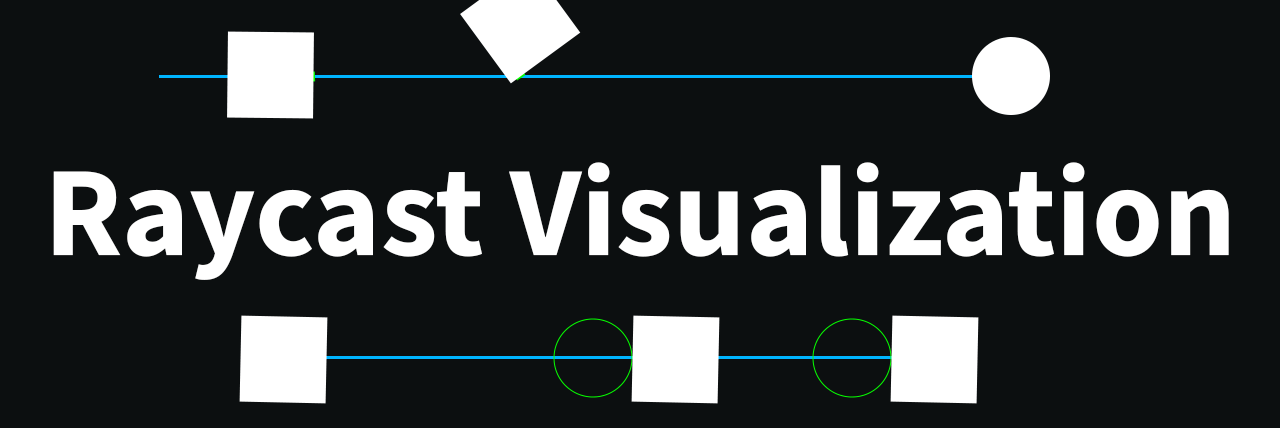
This asset allows users to view raycasts as the user fires them.
Supports both the 2D and 3D api.
GIF Examples Of All Visuals
<details> <summary>3D API (click to expand)</summary>Raycast / Linecast
<img src="./Gifs~/3d/raycast.gif" alt="raycast" width="750"/>RaycastAll / RaycastNonAlloc
<img src="./Gifs~/3d/raycast_all.gif" alt="raycast_all" width="750"/>CapsuleCast
<img src="./Gifs~/3d/capsulecast.gif" alt="capsulecast" width="750"/>CapsuleCastAll / CapsuleCastNonAlloc
<img src="./Gifs~/3d/capsulecast_all.gif" alt="capsulecast_all" width="750"/>CheckCapsule
<img src="./Gifs~/3d/check_capsule.gif" alt="check_capsule" width="750"/>OverlapCapsule / OverlapCapsuleNonAlloc
<img src="./Gifs~/3d/overlap_capsule.gif" alt="overlap_capsule" width="750"/>BoxCast
<img src="./Gifs~/3d/boxcast.gif" alt="boxcast" width="750"/>BoxCastAll / BoxCastNonAlloc
<img src="./Gifs~/3d/boxcast_all.gif" alt="boxcast_all" width="750"/>CheckBox
<img src="./Gifs~/3d/check_box.gif" alt="check_box" width="750"/>OverlapBox / OverlapBoxNonAlloc
<img src="./Gifs~/3d/overlap_box.gif" alt="overlap_box" width="750"/>SphereCast
<img src="./Gifs~/3d/spherecast.gif" alt="spherecast" width="750"/>SphereCastAll / SphereCastNonAlloc
<img src="./Gifs~/3d/spherecast_all.gif" alt="spherecast_all" width="750"/>CheckSphere
<img src="./Gifs~/3d/check_sphere.gif" alt="check_sphere" width="750"/>OverlapSphere / OverlapSphereNonAlloc
<img src="./Gifs~/3d/overlap_sphere.gif" alt="overlap_sphere" width="750"/>Compute Penetration
<img src="./Gifs~/3d/compute_penetration.gif" alt="compute_penetration" width="750"/>Closest Point
<img src="./Gifs~/3d/closest_point.gif" alt="closest_point" width="750"/> </details> <details> <summary>2D API (click to expand)</summary>Raycast
<img src="./Gifs~/2d/raycast.gif" alt="raycast" width="750"/>RaycastAll / RaycastAll / RaycastNonAlloc
<img src="./Gifs~/2d/raycast_all.gif" alt="raycast_all" width="750"/>CapsuleCast
<img src="./Gifs~/2d/capsulecast.gif" alt="capsulecast" width="750"/>CapsuleCastAll / CapsuleCastAll / CapsuleCastNonAlloc
<img src="./Gifs~/2d/capsulecast_all.gif" alt="capsulecast_all" width="750"/>OverlapCapsule
<img src="./Gifs~/2d/overlap_capsule.gif" alt="overlap_capsule" width="750"/>OverlapCapsuleAll / OverlapCapsuleNonAlloc
<img src="./Gifs~/2d/overlap_capsule_all.gif" alt="overlap_capsule_all" width="750"/>BoxCast
<img src="./Gifs~/2d/boxcast.gif" alt="boxcast" width="750"/>BoxCastAll / BoxCastAll / BoxCastNonAlloc
<img src="./Gifs~/2d/boxcast_all.gif" alt="boxcast_all" width="750"/>OverlapBox
<img src="./Gifs~/2d/overlap_box.gif" alt="overlap_box" width="750"/>OverlapBoxAll / OverlapBoxNonAlloc
<img src="./Gifs~/2d/overlap_box_all.gif" alt="overlap_box_all" width="750"/>CircleCast
<img src="./Gifs~/2d/circlecast.gif" alt="circlecast" width="750"/>CircleCastAll / CircleCastAll / CircleCastNonAlloc
<img src="./Gifs~/2d/circlecast_all.gif" alt="circlecast_all" width="750"/>OverlapCircle
<img src="./Gifs~/2d/overlap_circle.gif" alt="overlap_circle" width="750"/>OverlapCircleAll / OverlapCircleNonAlloc
<img src="./Gifs~/2d/overlap_circle_all.gif" alt="overlap_circle_all" width="750"/>OverlapPoint
<img src="./Gifs~/2d/overlap_point.gif" alt="overlap_point" width="750"/>OverlapPointAll / OverlapPointNonAlloc
<img src="./Gifs~/2d/overlap_point_all.gif" alt="overlap_point_all" width="750"/>OverlapArea
<img src="./Gifs~/2d/overlap_area.gif" alt="overlap_area" width="750"/>OverlapAreaAll / OverlapAreaNonAlloc
<img src="./Gifs~/2d/overlap_area_all.gif" alt="overlap_area_all" width="750"/>OverlapCollider
<img src="./Gifs~/2d/overlap_collider.gif" alt="overlap_collider" width="750"/>Closest Point
<img src="./Gifs~/2d/closest_point.gif" alt="closest_point" width="750"/>Distance
<img src="./Gifs~/2d/distance.gif" alt="distance" width="750"/>GetContacts
<img src="./Gifs~/2d/get_contacts.gif" alt="get_contacts" width="750"/>GetContacts (points)
<img src="./Gifs~/2d/get_contacts_points.gif" alt="get_contacts_points" width="750"/>IsTouching
<img src="./Gifs~/2d/is_touching.gif" alt="is_touching" width="750"/>IsTouchingLayers
<img src="./Gifs~/2d/is_touching_layers.gif" alt="is_touching_layers" width="750"/>GetRayIntersection
<img src="./Gifs~/2d/get_ray_intersection.gif" alt="get_ray_intersection" width="750"/>GetRayIntersectionAll / GetRayIntersectionNonAlloc
<img src="./Gifs~/2d/get_ray_intersection_all.gif" alt="get_ray_intersection_all" width="750"/> </details>Installation
Using Unity Package Manager
- Open the Package Manager from
Window/Package Manager - Click the '+' button in the top-left of the window
- Click 'Add package from git URL'
- Provide the URL of this git repository: https://github.com/nomnomab/RaycastVisualization.git
- Click the 'add' button
Usage
To get a visual to show up for a physics call simply do the following:
For 3D:
- Replace
Physics.withVisualPhysics..
For 2D:
- Replace
Physics2D.withVisualPhysics2D.. - Some 2D functions rely more on a 3D perspective in the editor depending on the orientation of the casts.
csharp// Example void SomeFunction() { if (VisualPhysics.Raycast(position, direction)) { Debug.Log("Hit!"); } }
API Switching:
You can also use a trick to automatically swap between the two APIs (useful for when you want to use the visual API in the editor, but the normal API in builds):
- Using
VisualPhysicsin a build will use the normalPhysicsAPI, however the method call may not be inlined depending on the compiler's mood.
csharp#if UNITY_EDITOR using Physics = Nomnom.RaycastVisualization.VisualPhysics; #else using Physics = UnityEngine.Physics; #endif void SomeFunction() { if (Physics.Raycast(position, direction)) { Debug.Log("Hit!"); } }
Defining a Visual's Lifetime:
Using VisualLifetime.Create(seconds) you can define how long a cast will display for:
csharp// will display the raycast for a second, rather than a single frame using (VisualLifetime.Create(1f)) { if (VisualPhysics.Raycast(position, direction)) { Debug.Log("Hit"); } }
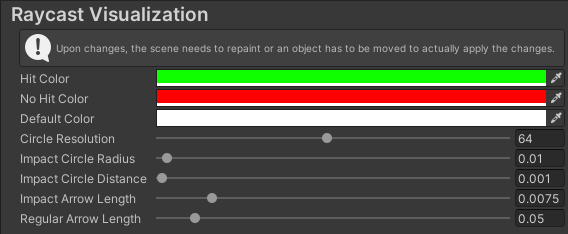
User Options
The user options are located under Edit/Preferences/RaycastVisualization
Contributors
Showing top 2 contributors by commit count.

