

Simple.Wpf.Terminal
A simple console\terminal window for use in a WPF application
.NET Framework 4.7 and higher, .Net Core 3.1 and higher, .Net 5.0 and higher The project is written primarily in C#, distributed under the MIT License license, first published in 2013. Key topics include: csharp, dotnet, dotnet-core, terminal, wpf.
Simple.Wpf.Terminal

Supported versions:
.NET Framework 4.7 and higher,
.Net Core 3.1 and higher,
.Net 5.0 and higher
A simple console\terminal window for use in a WPF application, this is a user control that will allow the user to enter a line of text (script\command) and\or display a list of items in a console\terminal style.
This user control does NOT actually do anything more than display data - the user control is the View (UI) in a MVVM implementation, the ViewModel would be responsible for the actual behaviour & contents of the console\terminal window. The user control is designed to use XAML binding for all UI properties the user can configure.
The control supports theming and there are a couple of example themes supplied in the Simple.Wpf.Terminal.Themes project.
For more information about the releases see [Release Info] (https://github.com/oriches/Simple.Wpf.Terminal/wiki/Release-Info).
For more information about the styling the control see [Style Info] (https://github.com/oriches/Simple.Wpf.Terminal/wiki/Style-Info).
Currently we support the following .Net versions:
This library is available as a nuget [package] (https://www.nuget.org/packages/Simple.Wpf.Terminal/).
Examples of usage:
Custom F# Interactive window in a WPF application
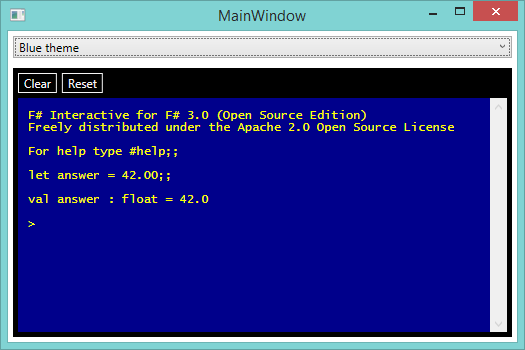
The XAML is shown below:
XAML<t:Terminal x:Name="TerminalOutput" IsReadOnlyCaretVisible="False" VerticalScrollBarVisibility="Visible" Style="{DynamicResource ReplTerminalStyle}" IsReadOnly="{Binding Path=IsReadOnly, Mode=OneWay}" Prompt="{Binding Path=Prompt, Mode=OneWay}" ItemsSource="{Binding Path=Output, Mode=OneWay}" ItemDisplayPath="Value"> <t:Terminal.InputBindings> <KeyBinding Command="{Binding Path=ClearCommand, Mode=OneWay}" Gesture="CTRL+E" /> <KeyBinding Command="{Binding Path=ResetCommand, Mode=OneWay}" Gesture="CTRL+R" /> <KeyBinding Command="{x:Null}" Gesture="CTRL+L" /> </t:Terminal.InputBindings> <t:Terminal.ContextMenu> <ContextMenu> <MenuItem Header="Clear" InputGestureText="Ctrl+E" Command="{Binding Path=ClearCommand, Mode=OneWay}" /> <MenuItem Header="Reset" InputGestureText="Ctrl+R" Command="{Binding Path=ResetCommand, Mode=OneWay}" /> <Separator /> <MenuItem Header="Copy" InputGestureText="Ctrl+C" Command="ApplicationCommands.Copy" /> <MenuItem Header="Paste" InputGestureText="Ctrl+V" Command="ApplicationCommands.Paste" /> <Separator /> <MenuItem Header="Open Working Folder" Command="{Binding Path=OpenWorkingFolderCommand, Mode=OneWay}" /> </ContextMenu> </t:Terminal.ContextMenu> <i:Interaction.Triggers> <i:EventTrigger EventName="LineEntered"> <i:InvokeCommandAction Command="{Binding Path=ExecuteCommand, Mode=OneWay}" CommandParameter="{Binding Path=Line, Mode=OneWay, ElementName=TerminalOutput}" /> </i:EventTrigger> </i:Interaction.Triggers> </t:Terminal>
An example of the Terminal Style (ReplTerminalStyle) is shown below and is available at the link below the example:
XAML<ResourceDictionary xmlns="http://schemas.microsoft.com/winfx/2006/xaml/presentation" xmlns:x="http://schemas.microsoft.com/winfx/2006/xaml" xmlns:terminal="clr-namespace:Simple.Wpf.Terminal;assembly=Simple.Wpf.Terminal" xmlns:ui="clr-namespace:Simple.Wpf.FSharp.Repl.UI;assembly=Simple.Wpf.FSharp.Repl"> <ResourceDictionary.MergedDictionaries> <ResourceDictionary Source="/Simple.Wpf.FSharp.Repl;component/UI/DefaultTheme.xaml" /> </ResourceDictionary.MergedDictionaries> <ui:LineColorConverter x:Key="LineColorConverter" Normal="DeepSkyBlue" Error="Red"/> <Style x:Key="ReplTerminalStyle" TargetType="{x:Type terminal:Terminal}" BasedOn="{x:Null}"> <Setter Property="BorderThickness" Value="0" /> <Setter Property="Background" Value="Black" /> <Setter Property="Foreground" Value="DeepSkyBlue" /> <Setter Property="LineColorConverter" Value="{StaticResource LineColorConverter}" /> <Setter Property="ItemsMargin" Value="5" /> <Setter Property="ItemHeight" Value="10" /> </Style> </ResourceDictionary>
The code for this is available here - https://github.com/oriches/Simple.Wpf.FSharp.Repl
In-app Log viewer in a WPF application
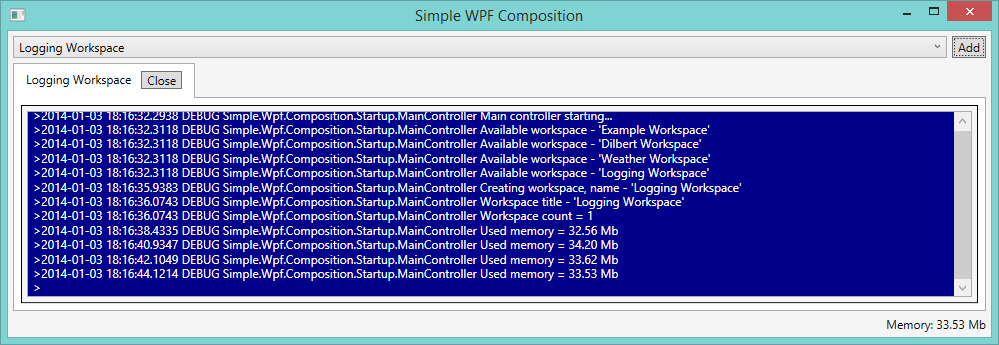
The XAML is shown below:
XAML<ResourceDictionary.MergedDictionaries> <ResourceDictionary Source="/Simple.Wpf.Terminal.Themes;component/BlueTheme.xaml" /> </ResourceDictionary.MergedDictionaries> <terminal:Terminal x:Name="LoggingTerminal" Margin="5" IsReadOnly="True" VerticalScrollBarVisibility="Visible" Prompt="{Binding Path=Prompt, Mode=OneTime}" ItemsSource="{Binding Path=Entries, Mode=OneWay}"/>
The code for this is available here - https://github.com/oriches/Simple.Wpf.Composition
I'd be interested to hear about other uses :)
Contributors
Showing top 3 contributors by commit count.


Related Repositories

jellyfin/jellyfin
The Free Software Media System - Server Backend & API

files-community/Files
A modern file manager that helps users organize their files and folders.

ShareX/ShareX
ShareX is a free and open-source application that enables users to capture or record any area of their screen with a single keystroke. It also supports uploading images, text, and various file types to a wide range of destinations.

doocs/leetcode
🔥LeetCode solutions in any programming language | 多种编程语言实现 LeetCode、《剑指 Offer(第 2 版)》、《程序员面试金典(第 6 版)》题解

DevToys-app/DevToys
A Swiss Army knife for developers.

AvaloniaUI/Avalonia
Develop Desktop, Embedded, Mobile and WebAssembly apps with C# and XAML. The future of .NET UI