

MapScaleView
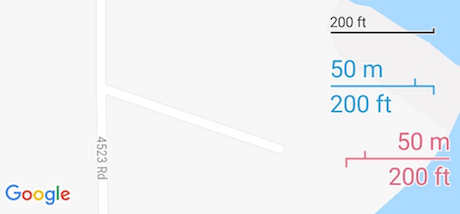
Scale bar for Android Maps (Google Maps, OSM, MapBox, Yandex)
[ ](https://bintray.com/pengrad/maven/mapscaleview/_latestVersion) The project is written primarily in Java, distributed under the Apache License 2.0 license, first published in 2016. Key topics include: android-maps.
Map Scale View


Scale view for any Android Maps SDK (not only Google Maps)
Contributing
I encourage you to participate in this project. Feel free to open issues with bugs or ideas, fork and send pull requests.
Check list of "help wanted" issues to start with.
Usage
groovydependencies { implementation 'com.github.pengrad:mapscaleview:1.6.0' }
Include in layout file over map
xml<FrameLayout xmlns:android="http://schemas.android.com/apk/res/android" xmlns:app="http://schemas.android.com/apk/res-auto" android:id="@+id/activity_main" android:layout_width="match_parent" android:layout_height="match_parent"> <fragment android:id="@+id/mapFragment" class="com.google.android.gms.maps.SupportMapFragment" android:layout_width="match_parent" android:layout_height="match_parent"/> <com.github.pengrad.mapscaleview.MapScaleView android:id="@+id/scaleView" android:layout_width="wrap_content" android:layout_height="wrap_content" android:layout_gravity="bottom|end" android:layout_margin="4dp"/> </FrameLayout>
With miles or custom style
xml<com.github.pengrad.mapscaleview.MapScaleView android:id="@+id/scaleView" android:layout_width="wrap_content" android:layout_height="wrap_content" android:layout_gravity="bottom|end" android:layout_margin="4dp" app:scale_maxWidth="100dp" app:scale_color="#009" app:scale_miles="true" app:scale_outline="true" app:scale_strokeWidth="3dp" app:scale_textSize="20sp" app:scale_expandRtl="true"/>
Update on map changed
kotlinval scaleView: MapScaleView = findViewById(R.id.scaleView) val cameraPosition = map.cameraPosition // need to pass zoom and latitude scaleView.update(cameraPosition.zoom, cameraPosition.target.latitude)
Full example with subscribing to map events and updating scale view
kotlinoverride fun onMapReady(googleMap: GoogleMap) { map = googleMap googleMap.setOnCameraMoveListener(this) googleMap.setOnCameraIdleListener(this) } override fun onCameraMove() { val cameraPosition = map.cameraPosition scaleView.update(cameraPosition.zoom, cameraPosition.target.latitude) } override fun onCameraIdle() { val cameraPosition = map.cameraPosition scaleView.update(cameraPosition.zoom, cameraPosition.target.latitude) }
Refer to the sample project on how to use scale view with other Android Maps SDK (Mapbox).
Customization
javamapScaleView.setColor(@ColorInt int color) mapScaleView.setTextSize(float textSize) mapScaleView.setStrokeWidth(float strokeWidth) mapScaleView.setTextFont(Typeface font) // enable/disable white outline, enabled by default mapScaleView.setOutlineEnabled(false) mapScaleView.metersAndMiles() // default mapScaleView.metersOnly() mapScaleView.milesOnly() // expand scale bar from right to left, disabled by default mapScaleView.setExpandRtlEnabled(true)
Contributors
Showing top 3 contributors by commit count.


