Wallace cli
Pretty CSS analytics on the CLI
- [Online CSS Analyzer](https://www.projectwallace.com/analyze-css) - Watch the analytics from this CLI online in a much more visual and detailed way! - [CSS Analyzer](https://github.com/projectwallace/css-analyzer) - The analyzer that powers this module - [CSS Code Quality Analyzer](https://github.com/projectwallace/css-code-quality) - A Code Quality analyzer that tells you how maintainable, complex and performant your CSS is - [Format CSS](https://github.com/projectwallace/format-css) - Fast, ... The project is written primarily in TypeScript, distributed under the MIT License license, first published in 2018. Key topics include: analysis, audit, branding, cli, complexity.
Installation
shnpm install wallace-cli
Usage
shUsage $ wallace <path-to-file> Options --json Format as JSON instead of a table --help, -h Show this help Examples # Point to a file $ wallace path/to/styles.css # CSS via stdin $ cat style.css | wallace # CSS from a server $ curl http://localhost/css/style.css | wallace # Format as json $ wallace path/to/styles.css --json
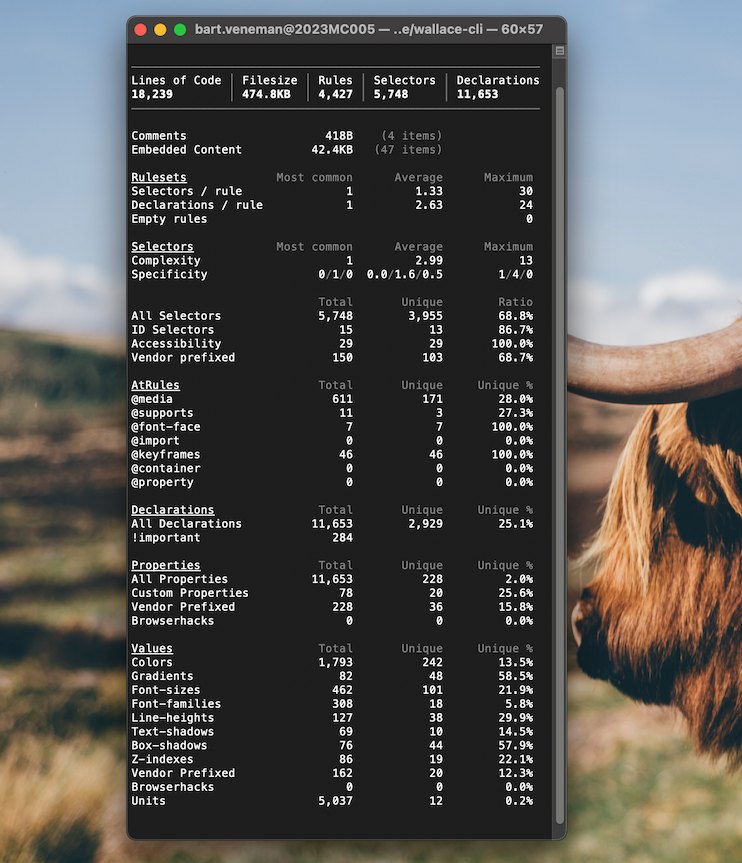
Example output
Related projects
- Online CSS Analyzer - Watch the analytics from this CLI online in a much more visual and detailed way!
- CSS Analyzer - The analyzer that powers this module
- CSS Code Quality Analyzer - A Code Quality analyzer that tells you how maintainable, complex and performant your CSS is
- Format CSS - Fast, small, zero-config library to format CSS using basic rules.
Contributors
Showing top 6 contributors by commit count.

![dependabot[bot]](https://avatars.githubusercontent.com/in/29110?v=4)


![github-actions[bot]](https://avatars.githubusercontent.com/in/15368?v=4)