

Surge iOS
(hook)绕过 Surge 安全机制!模拟许可证检查和其他授权功能,激活。
终端执行 克隆 Theos 仓库 git clone --recursive https://github.com/theos/theos.git The project is written primarily in Logos, first published in 2025.
<!-- 图片部分 --> <div style="display: flex; justify-content: space-evenly; align-items: center; flex-wrap: wrap; width: 100%; overflow: auto; gap: 20px;"> <img src="https://github.com/pxx917144686/Surge_pxx/blob/main/x/Surge++_0.5_0.png?raw=true" width="3000" /> <img src="https://github.com/pxx917144686/Surge_pxx/blob/main/x/Surge++_0.5_1.png?raw=true" width="3000" /> <img src="https://github.com/pxx917144686/Surge_pxx/blob/main/x/Surge++_0.5_2.png?raw=true" width="3000" /> <img src="https://github.com/pxx917144686/Surge_pxx/blob/main/x/Surge++_0.5_3.png?raw=true" width="3000" /> <img src="https://github.com/pxx917144686/Surge_pxx/blob/main/x/Surge++_0.5_4.png?raw=true" width="3000" /> <img src="https://github.com/pxx917144686/Surge_pxx/blob/main/x/Surge++_0.5_5.png?raw=true" width="3000" /> <img src="https://github.com/pxx917144686/Surge_pxx/blob/main/x/Surge++_0.5_6.png?raw=true" width="3000" /> <img src="https://github.com/pxx917144686/Surge_pxx/blob/main/x/Surge++_0.5_7.png?raw=true" width="3000" /> <img src="https://github.com/pxx917144686/Surge_pxx/blob/main/x/Surge++_0.5_8.png?raw=true" width="3000" /> <img src="https://github.com/pxx917144686/Surge_pxx/blob/main/x/Surge++_0.5_9.png?raw=true" width="3000" /> <img src="https://github.com/pxx917144686/Surge_pxx/blob/main/x/Surge++_0.5_10.png?raw=true" width="3000" /> <img src="https://github.com/pxx917144686/Surge_pxx/blob/main/x/Surge++_0.5_11.png?raw=true" width="3000" /> <img src="https://github.com/pxx917144686/Surge_pxx/blob/main/x/Surge++_0.5_12.png?raw=true" width="3000" /> <img src="https://github.com/pxx917144686/Surge_pxx/blob/main/x/Surge++_0.5_13.png?raw=true" width="3000" /> <img src="https://github.com/pxx917144686/Surge_pxx/blob/main/x/Surge++_0.5_14.png?raw=true" width="3000" /> <img src="https://github.com/pxx917144686/Surge_pxx/blob/main/x/Surge++_0.5_15.png?raw=true" width="3000" /> <img src="https://github.com/pxx917144686/Surge_pxx/blob/main/x/Surge++_0.5_16.png?raw=true" width="3000" /> <img src="https://github.com/pxx917144686/Surge_pxx/blob/main/x/Surge++_0.5_17.png?raw=true" width="3000" /> <img src="https://github.com/pxx917144686/Surge_pxx/blob/main/x/Surge++_0.5_18.png?raw=true" width="3000" /> <img src="https://github.com/pxx917144686/Surge_pxx/blob/main/x/Surge++_0.5_19.png?raw=true" width="3000" /> <img src="https://github.com/pxx917144686/Surge_pxx/blob/main/x/Surge++_0.5_20.png?raw=true" width="3000" /> <img src="https://github.com/pxx917144686/Surge_pxx/blob/main/x/Surge++_0.5_21.png?raw=true" width="3000" /> <img src="https://github.com/pxx917144686/Surge_pxx/blob/main/x/Surge++_0.5_22.png?raw=true" width="3000" /> <img src="https://github.com/pxx917144686/Surge_pxx/blob/main/x/Surge++_0.5_23.png?raw=true" width="3000" /> <img src="https://github.com/pxx917144686/Surge_pxx/blob/main/x/Surge++_0.5_24.png?raw=true" width="3000" /> <img src="https://github.com/pxx917144686/Surge_pxx/blob/main/x/Surge++_0.5_25.png?raw=true" width="3000" /> <img src="https://github.com/pxx917144686/Surge_pxx/blob/main/x/Surge++_0.5_26.png?raw=true" width="3000" /> <img src="https://github.com/pxx917144686/Surge_pxx/blob/main/x/Surge++_0.5_27.png?raw=true" width="3000" /> <img src="https://github.com/pxx917144686/Surge_pxx/blob/main/x/Surge++_0.5_28.png?raw=true" width="3000" /> <img src="https://github.com/pxx917144686/Surge_pxx/blob/main/x/Surge++_0.5_29.png?raw=true" width="3000" /> <img src="https://github.com/pxx917144686/Surge_pxx/blob/main/x/Surge++_0.5_30.png?raw=true" width="3000" /> <img src="https://github.com/pxx917144686/Surge_pxx/blob/main/x/Surge++_0.5_32.png?raw=true" width="3000" /> <img src="https://github.com/pxx917144686/Surge_pxx/blob/main/x/Surge++_0.5_33.png?raw=true" width="3000" /> <img src="https://github.com/pxx917144686/Surge_pxx/blob/main/x/Surge++_0.5_34.png?raw=true" width="3000" /> <img src="https://github.com/pxx917144686/Surge_pxx/blob/main/x/Surge++_0.5_35.png?raw=true" width="3000" /> <img src="https://github.com/pxx917144686/Surge_pxx/blob/main/x/Surge++_0.5_36.png?raw=true" width="3000" /> </div> <hr style="border: 1px solid #ccc; margin: 30px 0;"> <!-- 图片部分 --> <div style="display: flex; justify-content: space-evenly; align-items: center; flex-wrap: wrap; width: 100%; overflow: auto; gap: 20px;"> <img src="https://github.com/pxx917144686/Surge_pxx/blob/main/x/01.png?raw=true" width="300" /> <img src="https://github.com/pxx917144686/Surge_pxx/blob/main/x/02.png?raw=true" width="300" /> <img src="https://github.com/pxx917144686/Surge_pxx/blob/main/x/03.png?raw=true" width="300" /> <img src="https://github.com/pxx917144686/Surge_pxx/blob/main/x/04.png?raw=true" width="300" /> <img src="https://github.com/pxx917144686/Surge_pxx/blob/main/x/05.png?raw=true" width="300" /> <img src="https://github.com/pxx917144686/Surge_pxx/blob/main/x/06.png?raw=true" width="300" /> </div> <hr style="border: 1px solid #ccc; margin: 30px 0;"> <!-- Theos 图片与命令部分 --> <table style="width: 100%;"> <tr> <td style="padding-right: 20px; width: 50%;"> <img src="./x/theos.png" style="width: 100%; max-width: 400px; height: auto;" /> </td> <td style="width: 50%; vertical-align: top;"> <pre>
终端执行 克隆 Theos 仓库
git clone --recursive https://github.com/theos/theos.git

将 Theos 的路径添加到环境变量中:
方法一:
终端执行 直接添加到 ~/theos

export THEOS=~/theos
export PATH=$THEOS/bin:$PATH

终端执行 重新 加载配置:
source ~/.zshrc

另一种方法:
终端执行 打开配置文件 .zshrc
nano ~/.zshrc

# Theos 配置  // theos文件夹 的本地路径
export THEOS=/Users/pxx917144686/theos

之后;contron + X 是退出编辑; 按‘y’ 保存编辑退出!

终端执行 重新 加载配置:
source ~/.zshrc
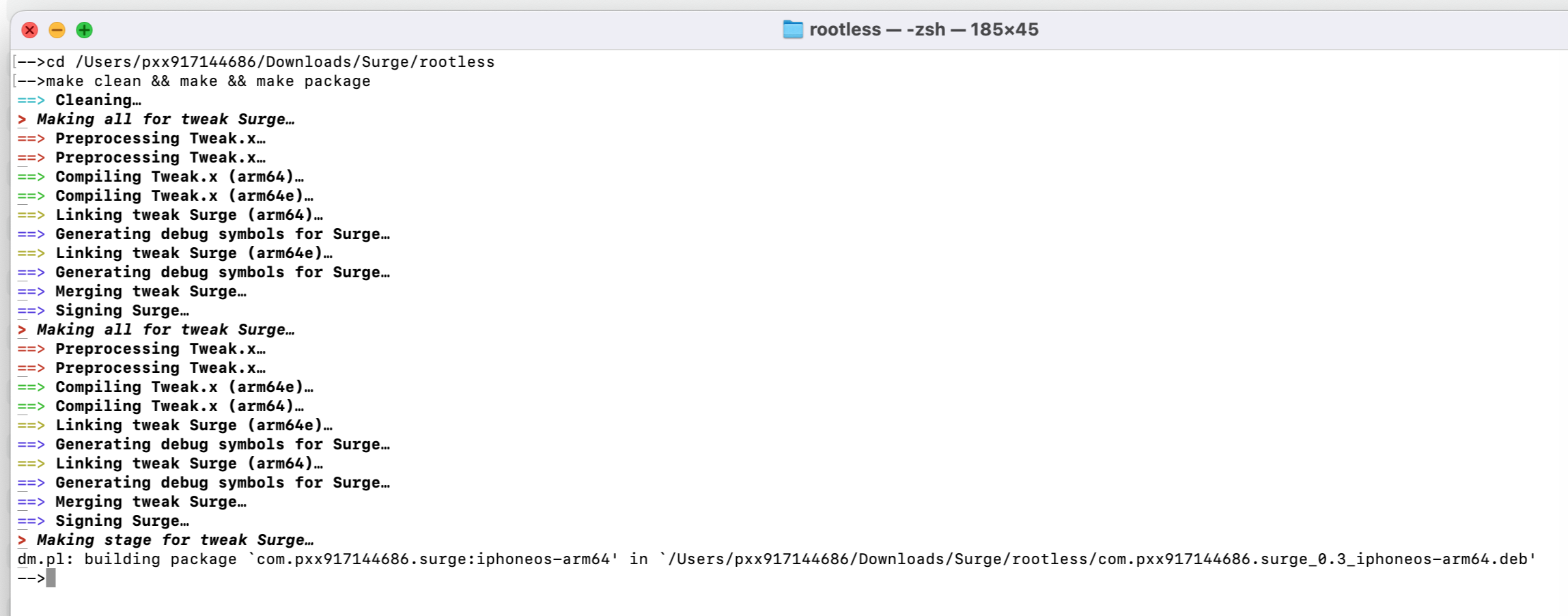
| theos报错 | 解释 |
|---|---|
| 报错 | ld: warning: -multiply_defined is obsolete |
| 解释 | 为什么会出现这个问题? |
| 原因 | 新版本的 Apple 链接器 (ld64) 不再推荐使用 -multiply_defined;Theos 为了兼容旧版本 iOS,才默认加入该选项。 |
| 解决 | 在文件 theos/makefiles/targets/_common/darwin_tail.mk 打开文件,搜索找到并删除 -multiply_defined suppress |
| make报错 | 解释 |
|---|---|
| 报错 | warning: ignoring file '/usr/local/Cellar/openssl@3/3.4.0/lib/libcrypto.3.dylib': found architecture 'x86_64', required architecture 'arm64e' |
| 解释 | 英特尔的Mac x86_64 不匹配架构 OpenSSL 库。 |
| 检查 | Mac 架构检查:<br>- 在终端执行 uname -m <br>- 输出 x86_64 表示 Intel Mac<br>- 输出 arm64 表示 Apple Silicon Mac |
| 解决(Intel x86_64 方法) | 避免耽误时间精力!网络指导可能产生误导,把 Intel (x86_64) 的方法误导为适用于 arm64 的方法。使用 Intel Mac 编译 iOS 插件时,目标架构应为 arm64 或 arm64e。 |
| 步骤一:下载 OpenSSL 官方源代码 | - 在终端执行:git clone https://github.com/openssl/openssl.git <br>- 进入目录:cd openssl |
| 步骤二:设置环境变量 | - 执行:export PLATFORM="iPhoneOS" <br>- 执行:export SDK=$(xcrun --sdk iphoneos --show-sdk-path) <br>- 执行:export CC="$(xcrun --sdk iphoneos -f clang)" |
| 设置支持多个架构 | - 执行:export ARCHS="arm64 arm64e" <br>- 执行:export CFLAGS="-arch arm64 -arch arm64e -isysroot $SDK -miphoneos-version-min=14.0" <br>- 执行:export LDFLAGS="-arch arm64 -arch arm64e -isysroot $SDK" |
| 配置 OpenSSL 编译 | 执行:./Configure ios64-cross no-shared no-dso no-hw no-engine --prefix=$(PWD)/../openssl-ios |
| 步骤三:编译 OpenSSL | - 清理缓存:make clean <br>- 编译 OpenSSL:make <br>- 安装 OpenSSL 到指定目录:make install |
| 验证编译结果 | 在终端执行:<br>- lipo -info ../openssl-ios/lib/libcrypto.a <br>- lipo -info ../openssl-ios/lib/libssl.a <br>成功的输出应显示:arm64 arm64e |
Contributors
Showing top 1 contributor by commit count.

Related Repositories

dayanch96/YTLite
A flexible enhancer for YouTube on iOS

YTLitePlus/YTLitePlus
⚠️ DEPRECATED — DEAD for now as YTPlus is now paid.

XLsn0w/Cydiapps
🔥🔥🔥微信公众号:Cydiapps🔥🔥🔥 => Cydia插件 Logos语言 开发Tweak.xm Cydia Substrate 注入dylib iOS逆向工程开发 越狱Jailbreak deb插件 - fishhook / Frida / iOSOpenDev / Cycript / MachOView / IDA / Hopper Disassembler / MonkeyDev / Class-dump / Theos / Reveal / Dumpdecryptd / FLEX / 汇编Assembly / CaptainHook / lldb/LLVM/XNU/Darwin/iOS Reverse

jjolano/shadow
A jailbreak detection bypass for modern iOS jailbreaks.

huami1314/DYYY
用于调整抖音的UI的Tweak

arichornlover/YouTubeRebornPlus
LillieH1000’s YouTube Reborn but with even more features!