

Vim config
Lean mean Neovim machine, carefully crafted with :heart: Use with latest Neovim.
Lean mean Neovim machine, 30-45ms startup time. Works best with [Neovim] ≥0.11.2 The project is written primarily in Lua, first published in 2014. It has gained significant community traction with 1,971 stars and 455 forks on GitHub. Key topics include: css, dotfiles, golang, html, ide.
Rafael Bodill's Neovim Config
Lean mean Neovim machine, 30-45ms startup time.
Works best with Neovim ≥0.11.2
(powered by LazyVim💤)
:gear: See Extending for customizing configuration and adding
plugins.
<details> <summary> <strong>Table of Contents</strong> <small><i>(🔎 Click to expand/collapse)</i></small> </summary> <!-- vim-markdown-toc GFM -->I encourage you to fork this repo and create your own experience.
Learn how to tweak and change Neovim to the way YOU like it.
This is my cultivation of years of tweaking, use it as a git remote
and stay in-touch with upstream for reference or cherry-picking.
- Features
- Screenshot
- Prerequisites
- Install
- Install LSP, DAP, Linters, Formatters
- Recommended Fonts
- Upgrade
- Structure
- Extending
- Plugin Highlights
- Plugins Included
- Extra Plugins
- Custom Key-mappings
Features
- Fast startup time — plugins are almost entirely lazy-loaded!
- Robust, yet light-weight
- Plugin management with folke/lazy.nvim. Use with
:Lazyor <kbd>Space</kbd>+<kbd>l</kbd> - Install LSP, DAP, linters, and formatters. Use with
:Masonor <kbd>Space</kbd>+<kbd>cm</kbd> - LSP configuration with nvim-lspconfig
- telescope.nvim centric work-flow with lists (try <kbd>;</kbd>+<kbd>f</kbd>…)
- Custom context-menu (try it! <kbd>;</kbd>+<kbd>c</kbd>)
- Auto-complete setup with blink.cmp or nvim-cmp
- Structure view with [hedyhli/outline.nvim]
- Git features using lewis6991/gitsigns.nvim, sindrets/diffview.nvim, and more
- Session management with folke/persistence.nvim
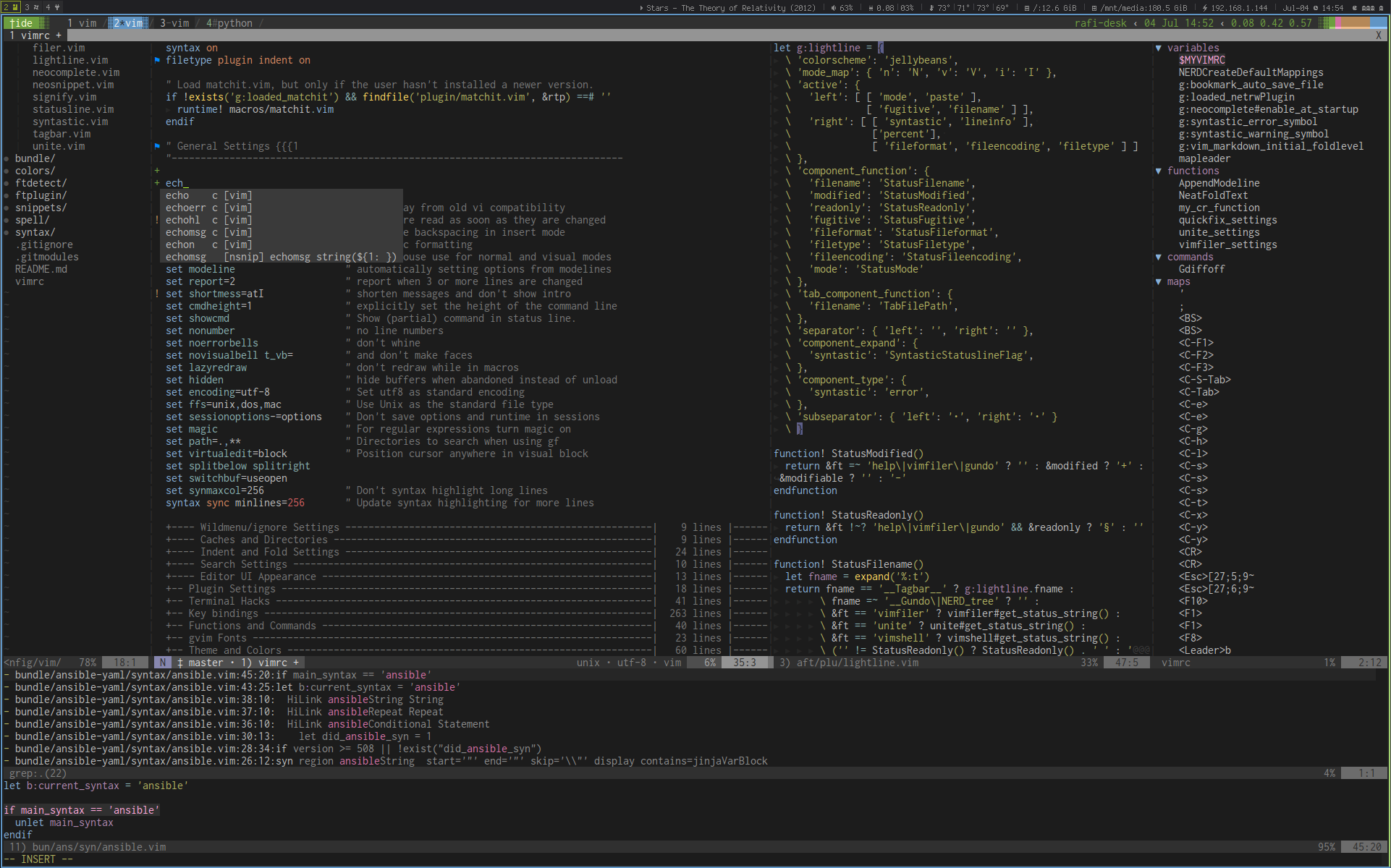
- Unobtrusive, yet informative status & tab lines
- Premium color-schemes
- Remembers last-used colorscheme
Screenshot
Prerequisites
Optional, but highly recommended:
- bat (
brew install bat) - fd (
brew install fd) - fzf (
brew install fzf) - ripgrep (
brew install ripgrep) - zoxide (
brew install zoxide)
Install
-
Let's clone this repo! Clone to
~/.config/nvimbashmkdir -p ~/.config git clone git@github.com:rafi/vim-config.git ~/.config/nvim cd ~/.config/nvim -
Run
nvim(will install all plugins the first time).It's highly recommended running
:checkhealthto ensure your system is healthy
and meet the requirements. -
Inside Neovim, run
:LazyExtrasand use <kbd>x</kbd> to install extras.
Enjoy! :smile:
Install LSP, DAP, Linters, Formatters
Use :Mason (or <kbd>Space</kbd>+<kbd>cm</kbd>) to install and manage LSP
servers, DAP servers, linters and formatters. See :h mason.nvim and
mason-org/mason.nvim for more information.
Language-Server Protocol (LSP)
You can install LSP servers using :Mason UI, or :MasonInstall <name>,
or :LspInstall <name> (use <kbd>Tab</kbd> to list available servers).
See Mason's PACKAGES.md
for the official list, and the Language server mapping
list. You can also view at :h mason-lspconfig-server-map
You'll need utilities like npm and curl to install some extensions, see
requirements
(or :h mason-requirements) for more information.
See lua/rafi/plugins/lsp/init.lua for custom key-mappings and configuration
for some language-servers.
Recommended LSP
vim:MasonInstall ansible-language-server bash-language-server css-lsp :MasonInstall dockerfile-language-server gopls html-lsp json-lsp :MasonInstall lua-language-server marksman pyright sqlls :MasonInstall svelte-language-server typescript-language-server :MasonInstall tailwindcss-language-server :MasonInstall vim-language-server yaml-language-server
and more…
Recommended Linters
vim:MasonInstall vint shellcheck editorconfig-checker flake8 gitlint hadolint :MasonInstall markdownlint mypy selene shellharden write-good yamllint
Recommended Formatters
vim:MasonInstall black fixjson gofumpt golines isort :MasonInstall shfmt sql-formatter stylua
Recommended Fonts
- Pragmata Pro (€19 — €1,990): My preferred font
- Any of the Nerd Fonts
On macOS with Homebrew, choose one of the Nerd Fonts,
for example, here are some popular fonts:
shbrew tap homebrew/cask-fonts brew search nerd-font brew install --cask font-victor-mono-nerd-font brew install --cask font-iosevka-nerd-font-mono brew install --cask font-hack-nerd-font brew install --cask font-fira-code
Upgrade
To upgrade packages and plugins:
- Neovim plugins:
:Lazy update - Mason packages:
:Masonand press <kbd>U</kbd>
To update Neovim configuration from my repo:
bashgit pull --ff --ff-only
Structure
- after/ — Language specific custom settings and plugins.
- lua/ — Lua configurations
config/— Custom user configurationplugins/— Custom user plugins (orlua/plugins.lua)- rafi/
- config/ — Neovim configurations
- autocmd.lua — Auto-commands
- init.lua — Initialization
- keymaps.lua — Key-mappings
- lazy.lua — Entry-point initialization
- options.lua — Editor settings
- plugins/ — Plugins and configurations
- util/ — Utility library
- config/ — Neovim configurations
- snippets/ — Personal code snippets
Extending
Extend: Config
Fork this repository and create a directory
lua/config with one or more of these files: (Optional)
lua/config/autocmds.lua— Custom auto-commandslua/config/options.lua— Custom optionslua/config/keymaps.lua— Custom key-mappingslua/config/setup.lua— Override config,
see extend defaults.
Adding plugins or override existing options:
lua/plugins/*.luaorlua/plugins.lua— Plugins (See lazy.nvim specs
for syntax)
Extend: Plugins
Install "extras" plugins using :LazyExtras and installing with <kbd>x</kbd>.
This saves choices in lazyvim.json which you can also edit manually, here's a
recommended starting point:
json{ "extras": [ "lazyvim.plugins.extras.ai.copilot", "lazyvim.plugins.extras.coding.neogen", "lazyvim.plugins.extras.coding.yanky", "lazyvim.plugins.extras.dap.core", "lazyvim.plugins.extras.dap.nlua", "lazyvim.plugins.extras.lang.docker", "lazyvim.plugins.extras.lang.json", "lazyvim.plugins.extras.lang.svelte", "lazyvim.plugins.extras.lang.terraform", "lazyvim.plugins.extras.lang.toml", "lazyvim.plugins.extras.lang.typescript", "lazyvim.plugins.extras.test.core", "lazyvim.plugins.extras.util.mini-hipatterns", "rafi.plugins.extras.lang.ansible", "rafi.plugins.extras.lang.go", "rafi.plugins.extras.lang.helm", "rafi.plugins.extras.lang.kubernetes", "rafi.plugins.extras.lang.markdown", "rafi.plugins.extras.lang.python", "rafi.plugins.extras.lang.tmux", "rafi.plugins.extras.ui.deadcolumn" ], "news": [], "version": 2 }
For installing/overriding/disabling plugins, create a lua/plugins/foo.lua
file (or lua/plugins/foo/bar.lua or simply lua/plugins.lua) and manage your
own plugin collection. You can add or override existing plugins' options, or
just disable them all-together. Here's an example:
luareturn { -- Disable default tabline { 'akinsho/bufferline.nvim', enabled = false }, -- And choose a different one! -- { 'itchyny/lightline.vim' }, -- { 'vim-airline/vim-airline' }, -- { 'glepnir/galaxyline.nvim' }, -- { 'glepnir/spaceline.vim' }, -- { 'liuchengxu/eleline.vim' }, -- Enable GitHub's Copilot { import = 'lazyvim.plugins.extras.ai.copilot' }, -- Enable incline, displaying filenames on each window { import = 'rafi.plugins.extras.ui.incline' }, -- Disable built-in plugins { 'shadmansaleh/lualine.nvim', enabled = false }, { 'folke/persistence.nvim', enabled = false }, -- Change built-in plugins' options { 'nvim-treesitter/nvim-treesitter', opts = { ensure_installed = { 'bash', 'comment', 'css', 'diff', 'dockerfile', 'fennel', 'fish', 'gitcommit', 'gitignore', 'gitattributes', 'git_rebase', 'go', 'gomod', 'gosum', 'gowork', 'graphql', 'hcl', 'html', 'javascript', 'jsdoc', 'json', 'json5', 'jsonnet', 'lua', 'make', 'markdown', 'markdown_inline', 'nix', 'perl', 'php', 'pug', 'python', 'regex', 'rst', 'ruby', 'rust', 'scss', 'sql', 'svelte', 'terraform', 'toml', 'tsx', 'typescript', 'vim', 'vimdoc', 'vue', 'yaml', 'zig', }, }, }, }
Extend: Defaults
-
Create
lua/config/options.luaand set any Neovim/RafiVim/LazyVim features:
(Default values are shown)lua-- Elite-mode (hjkl mode. arrow-keys resize window) vim.g.elite_mode = false -- External file diff program vim.g.diffprg = 'bcompare' -
You can override LazyVim options. For example in
lua/plugins/lazyvim.lua:luareturn { { 'LazyVim/LazyVim', opts = { icons = { diagnostics = { Error = '', Warn = '', Info = '', }, status = { diagnostics = { error = 'E', warn = 'W', info = 'I', hint = 'H', }, }, }, }, }, } -
You can override lazy.nvim (package-manager) global options.
Createlua/config/setup.luaand return this function:lazy_opts()— override LazyVim setup options
For example:
lualocal M = {} ---@return table function M.lazy_opts() return { -- See https://github.com/folke/lazy.nvim/#%EF%B8%8F-configuration concurrency = jit.os:find('Windows') and (vim.uv.available_parallelism() * 2) or nil, } end return M -
You can completely override lazy.nvim setup by creating
lua/config/lazy.lua
to replacelua/rafi/config/lazy.luawith your own procedure.
Extend: LSP Settings
Override server options with nvim-lspconfig plugin, for example:
lua{ 'neovim/nvim-lspconfig', opts = { servers = { yamlls = { filetypes = { 'yaml', 'yaml.ansible', 'yaml.docker-compose' }, }, lua_ls = { settings = { Lua = { workspace = { checkThirdParty = false }, completion = { callSnippet = 'Replace' }, }, }, }, }, } }
Plugin Highlights
- Plugin management with cache and lazy loading for speed
- Auto-completion with Language-Server Protocol (LSP)
- Project-aware tabline
- Extensive syntax highlighting with nvim-treesitter.
Note that 95% of the plugins are lazy-loaded.
Plugins Included
<details open> <summary><strong>List of plugins</strong> <small><i>(🔎 Click to expand/collapse)</i></small></summary>Completion & Code-Analysis
| Name | Description |
|---|---|
| neovim/nvim-lspconfig | Quickstart configurations for the Nvim LSP client |
| mason-org/mason.nvim | Portable package manager for Neovim |
| mason-org/mason-lspconfig.nvim | Mason extension for easier lspconfig integration |
| stevearc/conform.nvim | Lightweight yet powerful formatter plugin |
| mfussenegger/nvim-lint | Asynchronous linter plugin |
Editor Plugins
| Name | Description |
|---|---|
| folke/lazy.nvim | Modern plugin manager for Neovim |
| nmac427/guess-indent.nvim | Automatic indentation style detection |
| tweekmonster/helpful.vim | Display vim version numbers in docs |
| lambdalisue/suda.vim | An alternative sudo for Vim and Neovim |
| folke/persistence.nvim | Simple lua plugin for automated session management |
| mbbill/undotree | Ultimate undo history visualizer |
| folke/flash.nvim | Search labels, enhanced character motions |
| folke/todo-comments.nvim | Highlight, list and search todo comments in your projects |
| folke/trouble.nvim | Pretty lists to help you solve all code diagnostics |
| [hedyhli/outline.nvim] | Code outline sidebar powered by LSP |
| s1n7ax/nvim-window-picker | Fancy Window picker |
| dnlhc/glance.nvim | Pretty window for navigating LSP locations |
| MagicDuck/grug-far.nvim | Search/replace in multiple files |
Coding Plugins
| Name | Description |
|---|---|
| rafamadriz/friendly-snippets | Preconfigured snippets for different languages |
| nvim-mini/mini.pairs | Automatically manage character pairs |
| nvim-mini/mini.surround | Fast and feature-rich surround actions |
| JoosepAlviste/nvim-ts-context-commentstring | Set the commentstring based on the cursor location |
| numToStr/Comment.nvim | Powerful line and block-wise commenting |
| nvim-mini/mini.splitjoin | Split and join arguments |
| nvim-mini/mini.trailspace | Trailing whitespace highlight and remove |
| AndrewRadev/linediff.vim | Perform diffs on blocks of code |
| nvim-mini/mini.ai | Extend and create a/i textobjects |
| folke/lazydev.nvim | Faster LuaLS setup |
| Bilal2453/luvit-meta | Manage libuv types with lazy |
Colorscheme Plugins
| Name | Description |
|---|---|
| rafi/theme-loader.nvim | Use last-used colorscheme |
| rafi/neo-hybrid.vim | Modern dark colorscheme, hybrid improved |
| rafi/awesome-colorschemes | Awesome color-schemes |
Git Plugins
| Name | Description |
|---|---|
| lewis6991/gitsigns.nvim | Git signs written in pure lua |
| sindrets/diffview.nvim | Tabpage interface for cycling through diffs |
| NeogitOrg/neogit | Magit clone for Neovim |
| FabijanZulj/blame.nvim | Git blame visualizer |
| rhysd/committia.vim | Pleasant editing on Git commit messages |
Misc Plugins
| Name | Description |
|---|---|
| folke/snacks.nvim | Collection of small QoL plugins |
| hoob3rt/lualine.nvim | Statusline plugin written in pure lua |
| nvim-neo-tree/neo-tree.nvim | File explorer written in Lua |
| nvim-telescope/telescope.nvim | Find, Filter, Preview, Pick. All lua. |
| jvgrootveld/telescope-zoxide | Telescope extension for Zoxide |
| rafi/telescope-thesaurus.nvim | Browse synonyms for a word |
| nvim-lua/plenary.nvim | Lua functions library |
Treesitter & Syntax
| Name | Description |
|---|---|
| nvim-treesitter/nvim-treesitter | Nvim Treesitter configurations and abstraction layer |
| nvim-treesitter/nvim-treesitter-textobjects | Textobjects using treesitter queries |
| windwp/nvim-ts-autotag | Use treesitter to auto close and auto rename html tag |
| andymass/vim-matchup | Modern matchit and matchparen |
| iloginow/vim-stylus | Better vim plugin for stylus |
| mustache/vim-mustache-handlebars | Mustache and handlebars syntax |
| lifepillar/pgsql.vim | PostgreSQL syntax and indent |
| MTDL9/vim-log-highlighting | Syntax highlighting for generic log files |
| reasonml-editor/vim-reason-plus | Reason syntax and indent |
UI Plugins
| Name | Description |
|---|---|
| nvim-mini/mini.icons | Icon provider |
| MunifTanjim/nui.nvim | UI Component Library |
| stevearc/dressing.nvim | Improve the default vim-ui interfaces |
| akinsho/bufferline.nvim | Snazzy tab/bufferline |
| folke/noice.nvim | Replaces the UI for messages, cmdline and the popupmenu |
| SmiteshP/nvim-navic | Shows your current code context in winbar/statusline |
| chentau/marks.nvim | Interacting with and manipulating marks |
| lukas-reineke/indent-blankline.nvim | Visually display indent levels |
| nvim-mini/mini.indentscope | Visualize and operate on indent scope |
| folke/which-key.nvim | Create key bindings that stick |
| tenxsoydev/tabs-vs-spaces.nvim | Hint and fix deviating indentation |
| t9md/vim-quickhl | Highlight words quickly |
Extra Plugins
<details open> <summary><strong>List of extras</strong> <small><i>(🔎 Click to expand/collapse)</i></small></summary>You can view all LazyVim's extras at lazyvim.org/extras.
These plugins aren't enabled by default. You'll have to install them using
:LazyExtras and installing with <kbd>x</kbd>. (Or import them using specs)
See Extend: Plugins on how to add plugins and examples.
Following are extra-extras available with Rafi's Neovim on-top of LazyVim's:
Extra Plugins: Coding
Spec: rafi.plugins.extras.coding.<name>
| Name | Repository | Description |
|---|---|---|
align | nvim-mini/mini.align | Align text interactively |
chainsaw | chrisgrieser/nvim-chainsaw | Create log statements on the fly |
debugprint.lua | andrewferrier/debugprint.nvim | Easily add debug print lines |
editorconfig | sgur/vim-editorconfig | EditorConfig plugin written entirely in Vimscript |
emmet | mattn/emmet-vim | Provides support for expanding abbreviations alá emmet |
nvim-cmp | hrsh7th/nvim-cmp | Completion plugin |
sandwich | machakann/vim-sandwich | Search, select, and edit sandwich text objects |
Extra Plugins: Colorscheme
Spec: rafi.plugins.extras.colorscheme.<name>
| Name | Repository | Description |
|---|---|---|
bamboo | ribru17/bamboo.nvim | Warm green theme |
cyberdream | scottmckendry/cyberdream.nvim | High-contrast, futuristic & vibrant theme |
github | projekt0n/github-nvim-theme | GitHub's theme |
kanagawa | rebelot/kanagawa.nvim | Inspired by the colors of the famous painting by Katsushika Hokusai |
monokai-pro | loctvl842/monokai-pro.nvim | Monokai Pro theme with multiple filters |
Extra Plugins: Editor
Spec: rafi.plugins.extras.editor.<name>
| Name | Repository | Description |
|---|---|---|
anyjump | pechorin/any-jump.vim | Jump to any definition and references without overhead |
flybuf | glepnir/flybuf.nvim | List buffers in a float window |
harpoon2 | ThePrimeagen/harpoon | Marks for navigating your project |
mini-visits | nvim-mini/mini.visits | Track and reuse file system visits |
rest | rest-nvim/rest.nvim | Fast Neovim http client written in Lua |
sidebar | sidebar-nvim/sidebar.nvim | Generic and modular lua sidebar |
spectre | nvim-pack/nvim-spectre | Find and replace |
ufo | kevinhwang91/nvim-ufo | Make folds look modern and keep a high performance |
Extra Plugins: Git
Spec: rafi.plugins.extras.git.<name>
| Name | Repository | Description |
|---|---|---|
cmp-git | petertriho/cmp-git | Git source for nvim-cmp |
fugitive | tpope/vim-fugitive | Git client, including junegunn/gv.vim |
Extra Plugins: Lang
Spec: rafi.plugins.extras.lang.<name>
| Name | Description |
|---|---|
ansible | imports lazyvim.plugins.extras.lang.ansible, add syntax and pearofducks/ansible-vim |
go | imports lazyvim.plugins.extras.lang.go, add tools, patterns, etc. |
helm | imports lazyvim.plugins.extras.lang.helm, add filetype patterns |
kubernetes | imports lazyvim.plugins.extras.lang.yaml, add filetype patterns and ramilito/kubectl.nvim |
markdown | imports lazyvim.plugins.extras.lang.markdown, disable headlines, add mzlogin/vim-markdown-toc |
python | imports lazyvim.plugins.extras.lang.python, add syntax and filetype patterns |
tmux | syntax, completion andersevenrud/cmp-tmux, keymaps christoomey/tmux-navigator |
Extra Plugins: LSP
Spec: rafi.plugins.extras.lsp.<name>
| Key | Name | Description |
|---|---|---|
gtd | hrsh7th/nvim-gtd | LSP's go-to definition plugin |
lightbulb | kosayoda/nvim-lightbulb | VSCode 💡 for neovim's built-in LSP |
yaml-companion | yaml-companion.nvim | Get, set and autodetect YAML schemas in your buffers |
Extra Plugins: Org
Spec: rafi.plugins.extras.org.<name>
| Key | Name | Description |
|---|---|---|
calendar | itchyny/calendar.vim | Calendar application |
kiwi | serenevoid/kiwi.nvim | Stripped down VimWiki |
telekasten | renerocksai/telekasten.nvim | Manage text-based, markdown zettelkasten or wiki with telescope |
vimwiki | vimwiki/vimwiki | Personal Wiki for Vim |
zk-nvim | zk-org/zk-nvim | Extension for the zk plain text note-taking assistant |
Extra Plugins: Treesitter
Spec: rafi.plugins.extras.treesitter.<name>
| Key | Name | Description |
|---|---|---|
endwise | RRethy/nvim-treesitter-endwise | Wisely add "end" in various filetypes |
treesj | Wansmer/treesj | Splitting and joining blocks of code |
Extra Plugins: UI
Spec: rafi.plugins.extras.ui.<name>
| Key | Name | Description |
|---|---|---|
alpha | goolord/alpha-nvim | Fast and fully programmable greeter |
barbecue | utilyre/barbecue.nvim | VS Code like winbar |
bookmarks | tomasky/bookmarks.nvim | Bookmarks plugin with global file store |
bqf | kevinhwang91/nvim-bqf | Better quickfix window |
ccc | uga-rosa/ccc.nvim | Super powerful color picker/colorizer plugin |
cursorword | itchyny/cursorword | Underlines word under cursor |
cybu | ghillb/cybu.nvim | Cycle buffers with a customizable notification window |
deadcolumn | Bekaboo/deadcolumn.nvim | Show colorcolumn dynamically |
goto-preview | rmagatti/goto-preview | Preview definitions using floating windows |
headlines | lukas-reineke/headlines.nvim | Adds horizontal highlights for headlines and code background. |
illuminate | RRethy/vim-illuminate | Highlights other uses of the word under the cursor |
incline | b0o/incline.nvim | Floating statuslines |
marks | chentoast/marks.nvim | Interacting with and manipulating marks |
mini-clue | nvim-mini/mini.clue | Show next key clues |
mini-map | nvim-mini/mini.map | Window with buffer text overview, scrollbar and highlights |
quicker | stevearc/quicker.nvim | Improved quickfix UI and workflow |
symbols-outline | simrat39/symbols-outline.nvim | Tree like view for symbols using LSP |
LazyVim Extras
LazyVim is imported in specs (see lua/rafi/config/lazy.lua)
Therefore, you can import any of the "Extras" plugins defined at
LazyVim/LazyVim
and documented in lazyvim.org/extras.
Use <kbd>Space</kbd><kbd>m</kbd><kbd>x</kbd> or :LazyExtras to install them.
These are only highlights:
ai.copilotcoding.neogencoding.yankydap.coretest.coreutil.mini-hipatternslang.dockerlang.jsonlang.markdownlang.sveltelang.terraform- And much more…
Custom Key-mappings
Note that,
- Leader key set as <kbd>Space</kbd>
- Local-Leader key set as <kbd>;</kbd> and used for navigation and search
(Telescope/Snacks/FZF and Neo-tree) - Disable <kbd>←</kbd> <kbd>↑</kbd> <kbd>→</kbd> <kbd>↓</kbd> in normal mode by enabling
vim.g.elite_mode.
Legend: | Ⓝormal | Ⓥisual | Ⓢelect | Ⓘnsert | Ⓞperator | Ⓒommand |
Picker
(Telescope/Snacks/FZF)
| Key | Mode | Action |
|---|---|---|
| <kbd>Space</kbd> <kbd>;</kbd> | Ⓝ | Select picker |
| <kbd>;r</kbd> | Ⓝ | Resume previous picker |
| <kbd>;p</kbd> | Ⓝ | Projects |
| <kbd>;f</kbd> | Ⓝ | File |
| <kbd>;F</kbd> | Ⓝ | File (cwd) |
| <kbd>;g</kbd> | Ⓝ | Grep search |
| <kbd>;G</kbd> | Ⓝ | Grep search (cwd) |
| <kbd>;b</kbd> | Ⓝ | Switch buffers |
| <kbd>;h</kbd> | Ⓝ | Help pages |
| <kbd>;H</kbd> | Ⓝ | Highlights |
| <kbd>;j</kbd> | Ⓝ | Jumplist |
| <kbd>;m</kbd> | Ⓝ | Jump to mark |
| <kbd>;M</kbd> | Ⓝ | Man pages |
| <kbd>;o</kbd> | Ⓝ | Options |
| <kbd>;t</kbd> | Ⓝ | Goto symbol |
| <kbd>;T</kbd> | Ⓝ | Goto symbol (workspace) |
| <kbd>;v</kbd> | Ⓝ Ⓥ | Registers |
| <kbd>;s</kbd> | Ⓝ | Sessions |
| <kbd>;u</kbd> | Ⓝ | Spelling suggestions |
| <kbd>;x</kbd> | Ⓝ | Recent |
| <kbd>;X</kbd> | Ⓝ | Recent (cwd) |
| <kbd>;z</kbd> | Ⓝ | Zoxide directories |
| <kbd>;;</kbd> | Ⓝ | Command history |
| <kbd>;:</kbd> | Ⓝ | Commands |
| <kbd>;/</kbd> | Ⓝ | Search history |
| <kbd>;dd</kbd> | Ⓝ | LSP definitions |
| <kbd>;di</kbd> | Ⓝ | LSP implementations |
| <kbd>;dr</kbd> | Ⓝ | LSP references |
| <kbd>;da</kbd> | Ⓝ Ⓥ | LSP code actions |
| <kbd>Space</kbd> <kbd>/</kbd> | Ⓝ | Buffer fuzzy find |
| <kbd>Space</kbd> <kbd>gs</kbd> | Ⓝ | Git status |
| <kbd>Space</kbd> <kbd>gr</kbd> | Ⓝ | Git branches |
| <kbd>Space</kbd> <kbd>gh</kbd> | Ⓝ | Git stashes |
| <kbd>Space</kbd> <kbd>gF</kbd> | Ⓝ | Find files matching word under cursor |
| <kbd>Space</kbd> <kbd>gg</kbd> | Ⓝ Ⓥ | Grep word/selection |
| <kbd>Space</kbd> <kbd>gG</kbd> | Ⓝ Ⓥ | Grep word/selection (cwd) |
| <kbd>Space</kbd> <kbd>sc</kbd> | Ⓝ | Colorschemes |
| <kbd>Space</kbd> <kbd>sd</kbd> | Ⓝ | Document diagnostics |
| <kbd>Space</kbd> <kbd>sD</kbd> | Ⓝ | Workspace diagnostics |
| <kbd>Space</kbd> <kbd>sh</kbd> | Ⓝ | Help tags |
| <kbd>Space</kbd> <kbd>sk</kbd> | Ⓝ | Key-maps |
| <kbd>Space</kbd> <kbd>sm</kbd> | Ⓝ | Man pages |
| <kbd>Space</kbd> <kbd>ss</kbd> | Ⓝ | LSP document symbols |
| <kbd>Space</kbd> <kbd>sS</kbd> | Ⓝ | LSP workspace symbols |
| <kbd>Space</kbd> <kbd>st</kbd> | Ⓝ | Todo list |
| <kbd>Space</kbd> <kbd>sT</kbd> | Ⓝ | Todo/Fix/Fixme list |
| <kbd>Space</kbd> <kbd>sw</kbd> | Ⓝ | Grep string |
| <kbd>;i</kbd> | Ⓝ | (Snacks only) Icons |
| <kbd>;w</kbd> | Ⓝ | (Telescope only) Notes |
| <kbd>;n</kbd> | Ⓝ | (Telescope only) Plugin directories |
| <kbd>;k</kbd> | Ⓝ | (Telescope only) Thesaurus |
| Within Picker window | ||
| <kbd>?</kbd> | Ⓝ | Keymaps help screen |
| <kbd>Ctrl</kbd>+<kbd>Space</kbd> | Ⓝ | Move from none fuzzy search to fuzzy |
| <kbd>jj</kbd> or <kbd>Escape</kbd> | Ⓘ | Leave Insert mode |
| <kbd>i</kbd> | Ⓝ | Enter Insert mode (filter input) |
| <kbd>q</kbd> or <kbd>Escape</kbd> | Ⓝ | Exit |
| <kbd>Tab</kbd> or <kbd>Shift</kbd>+<kbd>Tab</kbd> | Ⓝ Ⓘ | Next/previous candidate |
| <kbd>Ctrl</kbd>+<kbd>d</kbd>/<kbd>u</kbd> | Ⓝ Ⓘ | Scroll down/upwards |
| <kbd>Ctrl</kbd>+<kbd>f</kbd>/<kbd>b</kbd> | Ⓝ Ⓘ | Scroll preview down/upwards |
| <kbd>Ctrl</kbd>+<kbd>j</kbd>/<kbd>k</kbd> | Ⓝ Ⓘ | Scroll preview vertically |
| <kbd>Ctrl</kbd>+<kbd>h</kbd>/<kbd>l</kbd> | Ⓝ Ⓘ | Scroll preview horizontally |
| <kbd>J</kbd> or <kbd>K</kbd> | Ⓝ | Select candidates up/downwards |
| <kbd>st</kbd> | Ⓝ | Open in a new tab |
| <kbd>sg</kbd> | Ⓝ | Open in a vertical split |
| <kbd>sv</kbd> | Ⓝ | Open in a split |
| <kbd>*</kbd> | Ⓝ | Toggle selection |
| <kbd>u</kbd> | Ⓝ | Drop all |
| <kbd>w</kbd> | Ⓝ | Smart send to quickfix list |
| <kbd>e</kbd> | Ⓝ | Send to quickfix list |
| <kbd>Ctrl</kbd>+<kbd>q</kbd> | Ⓘ | Send to quickfix list |
| <kbd>dd</kbd> | Ⓝ | Delete entry (buffer list) |
| <kbd>!</kbd> | Ⓝ | Edit in command line |
Toggle Features
| Key | Mode | Action |
|---|---|---|
| <kbd>Space</kbd> <kbd>dph</kbd> | Ⓝ | Toggle profiler highlights |
| <kbd>Space</kbd> <kbd>dpp</kbd> | Ⓝ | Toggle profiler |
| <kbd>Space</kbd> <kbd>ua</kbd> | Ⓝ | Toggle animation |
| <kbd>Space</kbd> <kbd>uA</kbd> | Ⓝ | Toggle tabline |
| <kbd>Space</kbd> <kbd>ub</kbd> | Ⓝ | Toggle background dark/light |
| <kbd>Space</kbd> <kbd>uc</kbd> | Ⓝ | Toggle conceal level |
| <kbd>Space</kbd> <kbd>uC</kbd> | Ⓝ | Colorschemes |
| <kbd>Space</kbd> <kbd>ud</kbd> | Ⓝ | Toggle buffer diagnostics |
| <kbd>Space</kbd> <kbd>uD</kbd> | Ⓝ | Toggle text dim |
| <kbd>Space</kbd> <kbd>uf</kbd> | Ⓝ | Toggle format on Save |
| <kbd>Space</kbd> <kbd>uF</kbd> | Ⓝ | Toggle format on Save (Global) |
| <kbd>Space</kbd> <kbd>ug</kbd> | Ⓝ | Toggle indentation lines |
| <kbd>Space</kbd> <kbd>uG</kbd> | Ⓝ | Toggle git signs |
| <kbd>Space</kbd> <kbd>uh</kbd> | Ⓝ | Toggle inlay-hints |
| <kbd>Space</kbd> <kbd>ui</kbd> | Ⓝ | Inspect position |
| <kbd>Space</kbd> <kbd>uI</kbd> | Ⓝ | Inspect tree |
| <kbd>Space</kbd> <kbd>ul</kbd> | Ⓝ | Toggle line numbers |
| <kbd>Space</kbd> <kbd>uL</kbd> | Ⓝ | Toggle relative line numbers |
| <kbd>Space</kbd> <kbd>um</kbd> | Ⓝ | Toggle markdown render |
| <kbd>Space</kbd> <kbd>un</kbd> | Ⓝ | Dismiss all notifications |
| <kbd>Space</kbd> <kbd>up</kbd> | Ⓝ | Disable auto-pairs |
| <kbd>Space</kbd> <kbd>ur</kbd> | Ⓝ | Redraw, clear hlsearch, and diff update |
| <kbd>Space</kbd> <kbd>us</kbd> | Ⓝ | Toggle spell-checker |
| <kbd>Space</kbd> <kbd>uS</kbd> | Ⓝ | Toggle smooth scroll |
| <kbd>Space</kbd> <kbd>uT</kbd> | Ⓝ | Toggle tree-sitter |
| <kbd>Space</kbd> <kbd>uw</kbd> | Ⓝ | Toggle wrap |
| <kbd>Space</kbd> <kbd>uz</kbd> | Ⓝ | Toggle distraction-free zen writing |
| <kbd>Space</kbd> <kbd>uZ</kbd> | Ⓝ | Toggle window zoom |
Navigation
| Key | Mode | Action | Plugin or Mapping |
|---|---|---|---|
| <kbd>j</kbd> / <kbd>k</kbd> | Ⓝ Ⓥ | Cursor moves through display-lines | <small>g j/k</small> |
| <kbd>]i</kbd> / <kbd>[i</kbd> | Ⓝ Ⓥ | Jump to scope edges | <small>folke/snacks.nvim</small> |
| <kbd>gh</kbd> / <kbd>gl</kbd> | Ⓝ Ⓥ | Easier line-wise movement | <small>g^ g$</small> |
| <kbd>zl</kbd> / <kbd>zh</kbd> | Ⓝ | Scroll horizontally and vertically wider | <small>z4 l/h</small> |
| <kbd>Ctrl</kbd>+<kbd>j</kbd> | Ⓝ | Move to split below | <small><C-w>j or christoomey/tmux-navigator</small> |
| <kbd>Ctrl</kbd>+<kbd>k</kbd> | Ⓝ | Move to upper split | <small><C-w>k or christoomey/tmux-navigator</small> |
| <kbd>Ctrl</kbd>+<kbd>h</kbd> | Ⓝ | Move to left split | <small><C-w>h or christoomey/tmux-navigator</small> |
| <kbd>Ctrl</kbd>+<kbd>l</kbd> | Ⓝ | Move to right split | <small><C-w>l or christoomey/tmux-navigator</small> |
| <kbd>Return</kbd> | Ⓝ | Toggle fold under cursor | <small>za</small> |
| <kbd>Shift</kbd>+<kbd>Return</kbd> | Ⓝ | Focus the current fold by closing all others | <small>zMzv</small> |
| <kbd>Ctrl</kbd>+<kbd>f</kbd> | Ⓒ | Move cursor forwards in command | <kbd>Right</kbd> |
| <kbd>Ctrl</kbd>+<kbd>b</kbd> | Ⓒ | Move cursor backwards in command | <kbd>Left</kbd> |
| <kbd>Ctrl</kbd>+<kbd>h</kbd> | Ⓒ | Move cursor to the beginning in command | <kbd>Home</kbd> |
| <kbd>Ctrl</kbd>+<kbd>l</kbd> | Ⓒ | Move cursor to the end in command | <kbd>End</kbd> |
| <kbd>Ctrl</kbd>+<kbd>Tab</kbd> | Ⓝ | Go to next tab | <small>:tabnext</small> |
| <kbd>Ctrl</kbd>+<kbd>Shift</kbd><kbd>Tab</kbd> | Ⓝ | Go to previous tab | <small>:tabprevious</small> |
| <kbd>Alt</kbd>+<kbd>j</kbd> or <kbd>]</kbd> | Ⓝ | Go to next tab | <small>:tabnext</small> |
| <kbd>Alt</kbd>+<kbd>k</kbd> or <kbd>[</kbd> | Ⓝ | Go to previous tab | <small>:tabprevious</small> |
| <kbd>Alt</kbd>+<kbd>{</kbd> | Ⓝ | Move tab backward | <small>:-tabmove</small> |
| <kbd>Alt</kbd>+<kbd>}</kbd> | Ⓝ | Move tab forward | <small>:+tabmove</small> |
Selection
| Key | Mode | Action | Plugin or Mapping |
|---|---|---|---|
| <kbd>Space</kbd>+<kbd>Space</kbd> | Ⓝ Ⓥ | Toggle visual-line mode | <small>V / <kbd>Escape</kbd></small> |
| <kbd>Ctrl</kbd>+<kbd>Space</kbd> / <kbd>V</kbd> | Ⓥ | Increment/shrink selection | <small>nvim-treesitter</small> |
| <kbd>vsp</kbd> | Ⓝ | Select last paste | <small>config/keymaps.lua</small> |
| <kbd>sg</kbd> | Ⓥ | Replace within selected area | <small>config/keymaps.lua</small> |
| <kbd>Ctrl</kbd>+<kbd>r</kbd> | Ⓥ | Replace selection with step-by-step confirmation | <small>config/keymaps.lua</small> |
| <kbd>></kbd> / <kbd><</kbd> | Ⓥ | Indent and re-select | <small>config/keymaps.lua</small> |
| <kbd>Tab</kbd> / <kbd>Shift</kbd>+<kbd>Tab</kbd> | Ⓥ | Indent and re-select | <small>config/keymaps.lua</small> |
| <kbd>I</kbd> / <kbd>gI</kbd> / <kbd>A</kbd> | Ⓥ | Force blockwise operation | <small>config/keymaps.lua</small> |
Jump To
| Key | Mode | Action | Plugin or Mapping |
|---|---|---|---|
| <kbd>],</kbd> or <kbd>[,</kbd> | Ⓝ | Next/previous parameter | <small>akinsho/bufferline.nvim</small> |
| <kbd>]q</kbd> or <kbd>[q</kbd> | Ⓝ | Next/previous on quick-fix | <small>:cnext / :cprev</small> |
| <kbd>]a</kbd> or <kbd>[a</kbd> | Ⓝ | Next/previous on location-list | <small>:lnext / :lprev</small> |
| <kbd>]d</kbd> or <kbd>[d</kbd> | Ⓝ | Next/previous diagnostics | <small>config/keymaps.lua</small> |
| <kbd>]e</kbd> or <kbd>[e</kbd> | Ⓝ | Next/previous error | <small>config/keymaps.lua</small> |
| <kbd>]w</kbd> or <kbd>[w</kbd> | Ⓝ | Next/previous warning | <small>config/keymaps.lua</small> |
| <kbd>]b</kbd> or <kbd>[b</kbd> | Ⓝ | Next/previous buffer | <small>akinsho/bufferline.nvim</small> |
| <kbd>]f</kbd> or <kbd>[f</kbd> | Ⓝ | Next/previous function start | <small>nvim-mini/mini.ai</small> |
| <kbd>]F</kbd> or <kbd>[F</kbd> | Ⓝ | Next/previous function end | <small>nvim-mini/mini.ai</small> |
| <kbd>]c</kbd> or <kbd>[c</kbd> | Ⓝ | Next/previous class start | <small>nvim-mini/mini.ai</small> |
| <kbd>]C</kbd> or <kbd>[C</kbd> | Ⓝ | Next/previous class end | <small>nvim-mini/mini.ai</small> |
| <kbd>]m</kbd> or <kbd>[m</kbd> | Ⓝ | Next/previous method start | <small>nvim-mini/mini.ai</small> |
| <kbd>]M</kbd> or <kbd>[M</kbd> | Ⓝ | Next/previous method end | <small>nvim-mini/mini.ai</small> |
| <kbd>]g</kbd> or <kbd>[g</kbd> | Ⓝ | Next/previous Git hunk | <small>lewis6991/gitsigns.nvim</small> |
| <kbd>]i</kbd> or <kbd>[i</kbd> | Ⓝ | Next/previous indent scope | <small>nvim-mini/mini.indentscope</small> |
| <kbd>]t</kbd> or <kbd>[t</kbd> | Ⓝ | Next/previous TODO | <small>folke/todo-comments.nvim</small> |
| <kbd>]z</kbd> or <kbd>[z</kbd> | Ⓝ | Next/previous whitespace error | <small>config/keymaps.lua</small> |
Buffers
| Key | Mode | Action | Plugin or Mapping |
|---|---|---|---|
| <kbd>Space</kbd>+<kbd>bd</kbd> | Ⓝ | Delete buffer | <small>folke/snacks.nvim</small> |
Clipboard
| Key | Mode | Action | Plugin or Mapping |
|---|---|---|---|
| <kbd>p</kbd> or <kbd>P</kbd> | Ⓥ | Paste without yank | <small>:let @+=@0</small> |
| <kbd>Space</kbd>+<kbd>y</kbd> | Ⓝ | Copy relative file-path to clipboard | <small>config/keymaps.lua</small> |
| <kbd>Space</kbd>+<kbd>Y</kbd> | Ⓝ | Copy absolute file-path to clipboard | <small>config/keymaps.lua</small> |
Auto-Completion
| Key | Mode | Action | Plugin or Mapping |
|---|---|---|---|
| <kbd>Tab</kbd> / <kbd>Shift-Tab</kbd> | Ⓘ Ⓢ | Navigate/open completion-menu | <small>nvim-cmp</small> |
| <kbd>Tab</kbd> / <kbd>Shift-Tab</kbd> | Ⓘ Ⓢ | Navigate snippet placeholders | <small>[L3MON4D3/LuaSnip]</small> |
| <kbd>Ctrl</kbd>+<kbd>Space</kbd> | Ⓘ | Open completion menu | <small>nvim-cmp</small> |
| <kbd>Enter</kbd> | Ⓘ | Select completion item or expand snippet | <small>nvim-cmp</small> |
| <kbd>Shift</kbd>+<kbd>Enter</kbd> | Ⓘ | Select and replace with completion item | <small>nvim-cmp</small> |
| <kbd>Ctrl</kbd>+<kbd>n</kbd>/<kbd>p</kbd> | Ⓘ | Movement in completion pop-up | <small>nvim-cmp</small> |
| <kbd>Ctrl</kbd>+<kbd>f</kbd>/<kbd>b</kbd> | Ⓘ | Scroll documentation | <small>nvim-cmp</small> |
| <kbd>Ctrl</kbd>+<kbd>d</kbd>/<kbd>u</kbd> | Ⓘ | Scroll candidates | <small>nvim-cmp</small> |
| <kbd>Ctrl</kbd>+<kbd>e</kbd> | Ⓘ | Abort selection and close pop-up | <small>nvim-cmp</small> |
| <kbd>Ctrl</kbd>+<kbd>l</kbd> | Ⓘ | Expand snippet at cursor | <small>[L3MON4D3/LuaSnip]</small> |
| <kbd>Ctrl</kbd>+<kbd>c</kbd> | Ⓘ | Close completion menu | <small>nvim-cmp</small> |
LSP
| Key | Mode | Action | Plugin or Mapping |
|---|---|---|---|
| <kbd>gr</kbd> | Ⓝ | Go to references | <small>plugins/lsp/keymaps.lua</small> |
| <kbd>gR</kbd> | Ⓝ | List references with Trouble | <small>folke/trouble.nvim</small> |
| <kbd>gd</kbd> | Ⓝ | Go to definition | <small>plugins/lsp/keymaps.lua</small> |
| <kbd>gD</kbd> | Ⓝ | Go to declaration | <small>plugins/lsp/keymaps.lua</small> |
| <kbd>gI</kbd> | Ⓝ | Go to implementation | <small>plugins/lsp/keymaps.lua</small> |
| <kbd>gy</kbd> | Ⓝ | Go to type definition | <small>plugins/lsp/keymaps.lua</small> |
| <kbd>K</kbd> | Ⓝ | Show hover help or collapsed fold | <small>plugins/lsp/keymaps.lua</small> |
| <kbd>gK</kbd> | Ⓝ | Show signature help | <small>plugins/lsp/keymaps.lua</small> |
| <kbd>Space</kbd> <kbd>cr</kbd> | Ⓝ | Rename | <small>plugins/lsp/keymaps.lua</small> |
| <kbd>Space</kbd> <kbd>ce</kbd> | Ⓝ | Open diagnostics window | <small>plugins/lsp/keymaps.lua</small> |
| <kbd>Space</kbd> <kbd>cs</kbd> | Ⓝ | Formatter menu selection | <small>plugins/lsp/keymaps.lua</small> |
| <kbd>Space</kbd> <kbd>ca</kbd> | Ⓝ Ⓥ | Code action | <small>plugins/lsp/keymaps.lua</small> |
| <kbd>Space</kbd> <kbd>cA</kbd> | Ⓝ | Source action | <small>plugins/lsp/keymaps.lua</small> |
| <kbd>Space</kbd> <kbd>cli</kbd> | Ⓝ | LSP incoming calls | <small>[plugins/lsp.lua]</small> |
| <kbd>Space</kbd> <kbd>clo</kbd> | Ⓝ | LSP outgoing calls | <small>[plugins/lsp.lua]</small> |
| <kbd>Space</kbd> <kbd>ciwa</kbd> | Ⓝ | Add workspace folder | <small>[plugins/lsp.lua]</small> |
| <kbd>Space</kbd> <kbd>ciwr</kbd> | Ⓝ | Remove workspace folder | <small>[plugins/lsp.lua]</small> |
| <kbd>Space</kbd> <kbd>ciwl</kbd> | Ⓝ | List workspace folders | <small>[plugins/lsp.lua]</small> |
| <kbd>Space</kbd> <kbd>cgd</kbd> | Ⓝ | Glance definitions | <small>dnlhc/glance.nvim</small> |
| <kbd>Space</kbd> <kbd>cgr</kbd> | Ⓝ | Glance references | <small>dnlhc/glance.nvim</small> |
| <kbd>Space</kbd> <kbd>cgy</kbd> | Ⓝ | Glance type definitions | <small>dnlhc/glance.nvim</small> |
| <kbd>Space</kbd> <kbd>cgi</kbd> | Ⓝ | Glance implementations | <small>dnlhc/glance.nvim</small> |
| <kbd>Space</kbd> <kbd>cgu</kbd> | Ⓝ | Glance resume | <small>dnlhc/glance.nvim</small> |
Diagnostics
| Key | Mode | Action | Plugin or Mapping |
|---|---|---|---|
| <kbd>Space</kbd> <kbd>ud</kbd> | Ⓝ | Toggle buffer diagnostics | <small>plugins/lsp/keymaps.lua</small> |
| <kbd>Space</kbd> <kbd>xt</kbd> | Ⓝ | List TODO with Trouble | <small>folke/todo-comments.nvim</small> |
| <kbd>Space</kbd> <kbd>xT</kbd> | Ⓝ | List TODO/FIXME with Trouble | <small>folke/todo-comments.nvim</small> |
| <kbd>Space</kbd> <kbd>st</kbd> | Ⓝ | Select TODO with Telescope | <small>folke/todo-comments.nvim</small> |
| <kbd>Space</kbd> <kbd>sT</kbd> | Ⓝ | Select TODO/FIXME with Telescope | <small>folke/todo-comments.nvim</small> |
| <kbd>Space</kbd> <kbd>xx</kbd> | Ⓝ | Toggle Trouble | <small>folke/trouble.nvim</small> |
| <kbd>Space</kbd> <kbd>xd</kbd> | Ⓝ | Toggle Trouble document | <small>folke/trouble.nvim</small> |
| <kbd>Space</kbd> <kbd>xw</kbd> | Ⓝ | Toggle Trouble workspace | <small>folke/trouble.nvim</small> |
| <kbd>Space</kbd> <kbd>xq</kbd> | Ⓝ | Toggle Quickfix via Trouble | <small>folke/trouble.nvim</small> |
| <kbd>Space</kbd> <kbd>xl</kbd> | Ⓝ | Toggle Locationlist via Trouble | <small>folke/trouble.nvim</small> |
Coding
| Key | Mode | Action | Plugin or Mapping |
|---|---|---|---|
| <kbd>Ctrl</kbd>+<kbd>q</kbd> | Ⓝ | Start recording macro | <small>q</small> |
| <kbd>Space</kbd> <kbd>cf</kbd> | Ⓝ Ⓥ | Format | <small>[plugins/formatting.lua]</small> |
| <kbd>Space</kbd> <kbd>cF</kbd> | Ⓝ Ⓥ | Format injected langs | <small>[plugins/formatting.lua]</small> |
| <kbd>Space</kbd> <kbd>cc</kbd> | Ⓝ | Generate doc annotations | <small>[danymat/neogen]</small> |
| <kbd>Shift</kbd>+<kbd>Return</kbd> | Ⓘ | Start new line from any cursor position | <small><C-o>o</small> |
| <kbd>]</kbd> <kbd>Space</kbd> | Ⓝ | Add new line below | <small>o<Esc></small> |
| <kbd>[</kbd> <kbd>Space</kbd> | Ⓝ | Add new line above | <small>O<Esc></small> |
| <kbd>gc</kbd> | Ⓝ Ⓥ | Comment prefix | <small>numToStr/Comment.nvim</small> |
| <kbd>gcc</kbd> | Ⓝ Ⓥ | Toggle comments | <small>numToStr/Comment.nvim</small> |
| <kbd>Space</kbd>+<kbd>j</kbd> or <kbd>k</kbd> | Ⓝ Ⓥ | Move lines down/up | <small>:m … |
| <kbd>Space</kbd>+<kbd>v</kbd> | Ⓝ Ⓥ | Toggle line-wise comments | <small>numToStr/Comment.nvim</small> |
| <kbd>Space</kbd>+<kbd>V</kbd> | Ⓝ Ⓥ | Toggle block-wise comments | <small>numToStr/Comment.nvim</small> |
| <kbd>Space</kbd>+<kbd>dd</kbd> | Ⓝ Ⓥ | Duplicate line or selection | <small>config/keymaps.lua</small> |
| <kbd>Space</kbd>+<kbd>cw</kbd> | Ⓝ | Remove all spaces at EOL | <small>nvim-mini/mini.trailspace</small> |
| <kbd>Space</kbd>+<kbd>cid</kbd> | Ⓝ | LazyDev | <small>folke/lazydev.nvim</small> |
| <kbd>Space</kbd>+<kbd>cif</kbd> | Ⓝ | LazyFormatterInfo | <small>[LazyVim/LazyVim]</small> |
| <kbd>Space</kbd>+<kbd>cir</kbd> | Ⓝ | LazyRoot | <small>[LazyVim/LazyVim]</small> |
| <kbd>sj</kbd> / <kbd>sk</kbd> | Ⓝ | Join/split arguments | <small>nvim-mini/mini.splitjoin</small> |
Search, Substitute, Diff
| Key | Mode | Action | Plugin or Mapping |
|---|---|---|---|
| <kbd>*</kbd> / <kbd>#</kbd> | Ⓝ Ⓥ | Search partial words | <small>g* / g#</small> |
| <kbd>g*</kbd> / <kbd>g#</kbd> | Ⓝ Ⓥ | Search whole-word forward/backward | <small>* / #</small> |
| <kbd>Ctrl</kbd>+<kbd>c</kbd> | Ⓝ | Change inner word | <small>ciw</small> |
| <kbd>Escape</kbd> | Ⓝ | Clear search highlight | <small>:nohlsearch</small> |
| <kbd>Backspace</kbd> | Ⓝ | Match bracket | <small>%</small> |
| <kbd>Space</kbd>+<kbd>bf</kbd> | Ⓝ | Diff current windows in tab | <small>windo diffthis</small> |
| <kbd>Space</kbd>+<kbd>bF</kbd> | Ⓝ | External diff | <small>!vim.g.diffprg % #</small> |
| <kbd>ss</kbd> | Ⓝ Ⓥ Ⓞ | Flash jump | <small>folke/flash.nvim</small> |
| <kbd>S</kbd> | Ⓝ Ⓥ Ⓞ | Flash treesitter | <small>folke/flash.nvim</small> |
| <kbd>r</kbd> | Ⓞ | Flash remote | <small>folke/flash.nvim</small> |
| <kbd>R</kbd> | Ⓥ Ⓞ | Flash treesitter search | <small>folke/flash.nvim</small> |
| <kbd>Ctrl</kbd>+<kbd>s</kbd> | Ⓒ | Toggle flash in search input | <small>folke/flash.nvim</small> |
Command & History
| Key | Mode | Action | Plugin or Mapping |
|---|---|---|---|
| <kbd>g!</kbd> | Ⓝ | Read vim command into buffer | <small>:put=execute('⌴')</small> |
| <kbd>Ctrl</kbd>+<kbd>n</kbd> / <kbd>p</kbd> | Ⓒ | Switch history search pairs | <kbd>↓</kbd> / <kbd>↑</kbd> |
| <kbd>↓</kbd> / <kbd>↑</kbd> | Ⓒ | Switch history search pairs | <small>Ctrl n/p</small> |
File Operations
| Key | Mode | Action | Plugin or Mapping |
|---|---|---|---|
| <kbd>Space</kbd>+<kbd>cd</kbd> | Ⓝ | Switch tab to the directory of current buffer | <small>:tcd %:p:h</small> |
| <kbd>Space</kbd>+<kbd>w</kbd> or <kbd>M</kbd>+<kbd>s</kbd> | Ⓝ | Write buffer to file | <small>:write</small> |
| <kbd>Ctrl</kbd>+<kbd>s</kbd> | Ⓝ Ⓥ Ⓒ | Write buffer to file | <small>:write</small> |
Window Management
| Key | Mode | Action | Plugin or Mapping |
|---|---|---|---|
| <kbd>Space</kbd> <kbd>qq</kbd> | Ⓝ | Quit all and exit | <small>:quitall</small> |
| <kbd>s]</kbd> | Ⓝ | Rotate window placement | <small>C-w x</small> |
| <kbd>sp</kbd> | Ⓝ | Choose a window to edit | <small>s1n7ax/nvim-window-picker</small> |
| <kbd>sw</kbd> | Ⓝ | Switch editing window with selected | <small>s1n7ax/nvim-window-picker</small> |
| <kbd>sv</kbd> | Ⓝ | Horizontal split | <small>:split</small> |
| <kbd>sg</kbd> | Ⓝ | Vertical split | <small>:vsplit</small> |
| <kbd>st</kbd> | Ⓝ | Open new tab | <small>:tabnew</small> |
| <kbd>so</kbd> | Ⓝ | Close other windows | <small>:only</small> |
| <kbd>sb</kbd> | Ⓝ | Previous buffer | <small>:b#</small> |
| <kbd>sc</kbd> | Ⓝ | Close current buffer | <small>:close</small> |
| <kbd>sd</kbd> | Ⓝ | Delete buffer | <small>:bdelete</small> |
| <kbd>sq</kbd> | Ⓝ | Quit window (if last window, quit nvim) | <small>:quit</small> |
| <kbd>sx</kbd> | Ⓝ | Delete buffer, leave blank window | <small>:enew │ bdelete</small> |
| <kbd>sz</kbd> | Ⓝ | Toggle window zoom | <small>:vertical resize │ resize</small> |
| <kbd>sh</kbd> | Ⓝ | Toggle colorscheme background=dark/light | <small>:set background … |
Plugins
| Key | Mode | Action | Plugin or Mapping |
|---|---|---|---|
| <kbd>;</kbd>+<kbd>c</kbd> | Ⓝ | Open context-menu | <small>lua/rafi/util/contextmenu.lua</small> |
| <kbd>g</kbd><kbd>Ctrl</kbd>+<kbd>o</kbd> | Ⓝ | Navigate to previous file on jumplist | <small>util/edit.lua</small> |
| <kbd>g</kbd><kbd>Ctrl</kbd>+<kbd>i</kbd> | Ⓝ | Navigate to next file on jumplist | <small>util/edit.lua</small> |
| <kbd>Ctrl</kbd>+<kbd>/</kbd> | Ⓝ | Toggle terminal | <small>folke/snacks.nvim</small> |
| <kbd>Space</kbd> <kbd>l</kbd> | Ⓝ | Open Lazy | <small>folke/lazy.nvim</small> |
| <kbd>Space</kbd> <kbd>o</kbd> | Ⓝ | Open Outline side | <small>[hedyhli/outline.nvim]</small> |
| <kbd>Space</kbd> <kbd>?</kbd> | Ⓝ | Open the macOS dictionary on current word | <small>:!open dict://</small> |
| <kbd>Space</kbd> <kbd>cp</kbd> | Ⓝ | Toggle Markdown preview | <small>iamcco/markdown-preview.nvim</small> |
| <kbd>Space</kbd> <kbd>mc</kbd> | Ⓝ | Open color-picker | <small>uga-rosa/ccc.nvim</small> |
| <kbd>Space</kbd> <kbd>tt</kbd> | Ⓝ | Open terminal (root dir) | <small>config/keymaps.lua</small> |
| <kbd>Space</kbd> <kbd>tT</kbd> | Ⓝ | Open terminal (cwd) | <small>config/keymaps.lua</small> |
| <kbd>Space</kbd> <kbd>gt</kbd> | Ⓝ | Open Lazygit (root dir) | <small>config/keymaps.lua</small> |
| <kbd>Space</kbd> <kbd>gT</kbd> | Ⓝ | Open Lazygit (cwd) | <small>config/keymaps.lua</small> |
| <kbd>Space</kbd> <kbd>gF</kbd> | Ⓝ | Open Lazygit on current file history | <small>config/keymaps.lua</small> |
| <kbd>Space</kbd> <kbd>gl</kbd> | Ⓝ | Open Lazygit log | <small>config/keymaps.lua</small> |
| <kbd>Space</kbd> <kbd>gL</kbd> | Ⓝ | Open Lazygit log (cwd) | <small>config/keymaps.lua</small> |
| <kbd>Space</kbd> <kbd>gb</kbd> | Ⓝ | Git blame | <small>FabijanZulj/blame.nvim</small> |
| <kbd>Space</kbd> <kbd>gB</kbd> | Ⓝ | Git blame in window | <small>FabijanZulj/blame.nvim</small> |
| <kbd>Space</kbd> <kbd>gm</kbd> | Ⓝ | Reveal commit under cursor | <small>config/keymaps.lua</small> |
| <kbd>Space</kbd> <kbd>go</kbd> | Ⓝ Ⓥ | Open source-code URL in browser | <small>config/keymaps.lua</small> |
| <kbd>Space</kbd> <kbd>gY</kbd> | Ⓝ Ⓥ | Copy source-code URL | <small>config/keymaps.lua</small> |
| <kbd>Space</kbd> <kbd>gu</kbd> | Ⓝ | Open undo-tree | <small>mbbill/undotree</small> |
| <kbd>Space</kbd> <kbd>mg</kbd> | Ⓝ | Open Neogit | <small>NeogitOrg/neogit</small> |
| <kbd>Space</kbd> <kbd>ml</kbd> | Ⓝ | Append modeline to end of buffer | <small>config/keymaps.lua</small> |
| <kbd>Space</kbd> <kbd>mda</kbd> | Ⓥ | Sequentially mark region for diff | <small>AndrewRadev/linediff.vim</small> |
| <kbd>Space</kbd> <kbd>mdf</kbd> | Ⓥ | Mark region for diff and compare if more than one | <small>AndrewRadev/linediff.vim</small> |
| <kbd>Space</kbd> <kbd>mds</kbd> | Ⓝ | Shows the comparison for all marked regions | <small>AndrewRadev/linediff.vim</small> |
| <kbd>Space</kbd> <kbd>mdr</kbd> | Ⓝ | Removes the signs denoting the diff regions | <small>AndrewRadev/linediff.vim</small> |
| <kbd>Space</kbd> <kbd>mh</kbd> | Ⓝ | Open HTTP Rest UI | <small>rest-nvim/rest.nvim</small> |
| <kbd>Space</kbd> <kbd>mt</kbd> | Ⓝ Ⓥ | Toggle highlighted word | <small>t9md/vim-quickhl</small> |
| <kbd>Space</kbd> <kbd>mo</kbd> | Ⓝ | Update Markdown TOC | <small>mzlogin/vim-markdown-toc</small> |
Plugin: Mini.Surround
See nvim-mini/mini.surround for more mappings and usage information.
| Key | Mode | Action |
|---|---|---|
| <kbd>sa</kbd> & movement | Ⓝ Ⓥ | Add surrounding |
| <kbd>cs</kbd> & movement | Ⓝ | Replace surrounding |
| <kbd>ds</kbd> & movement | Ⓝ | Delete surrounding |
| <kbd>gzf</kbd> & movement | Ⓝ | Find surrounding (to the right) |
| <kbd>gzF</kbd> & movement | Ⓝ | Find surrounding (to the left) |
| <kbd>gzh</kbd> & movement | Ⓝ | Highlight surrounding |
| <kbd>gzn</kbd> & movement | Ⓝ | Update neighbor lines |
Plugin: Gitsigns
See lewis6991/gitsigns.nvim for more mappings and usage information.
| Key | Mode | Action |
|---|---|---|
| <kbd>]g</kbd> or <kbd>]g</kbd> | Ⓝ | Next/previous Git hunk |
| <kbd>gs</kbd> | Ⓝ | Preview hunk |
| <kbd>Space</kbd> <kbd>hp</kbd> | Ⓝ | Preview hunk inline |
| <kbd>Space</kbd> <kbd>hb</kbd> | Ⓝ | Blame line |
| <kbd>Space</kbd> <kbd>hs</kbd> | Ⓝ Ⓥ | Stage hunk |
| <kbd>Space</kbd> <kbd>hr</kbd> | Ⓝ Ⓥ | Reset hunk |
| <kbd>Space</kbd> <kbd>hu</kbd> | Ⓝ | Undo stage hunk |
| <kbd>Space</kbd> <kbd>hS</kbd> | Ⓝ | Stage buffer |
| <kbd>Space</kbd> <kbd>hR</kbd> | Ⓝ | Reset buffer |
| <kbd>Space</kbd> <kbd>hd</kbd> | Ⓝ | Diff against the index |
| <kbd>Space</kbd> <kbd>hD</kbd> | Ⓝ | Diff against the last commit |
| <kbd>Space</kbd> <kbd>hw</kbd> | Ⓝ | Toggle word diff |
| <kbd>Space</kbd> <kbd>hl</kbd> | Ⓝ | Publish hunks to location-list |
| <kbd>Space</kbd> <kbd>htb</kbd> | Ⓝ | Toggle git current line blame |
| <kbd>Space</kbd> <kbd>htd</kbd> | Ⓝ | Toggle git deleted |
| <kbd>Space</kbd> <kbd>htw</kbd> | Ⓝ | Toggle git word diff |
| <kbd>Space</kbd> <kbd>htl</kbd> | Ⓝ | Toggle git line highlight |
| <kbd>Space</kbd> <kbd>htn</kbd> | Ⓝ | Toggle git number highlight |
| <kbd>Space</kbd> <kbd>hts</kbd> | Ⓝ | Toggle git signs |
| <kbd>ih</kbd> | Ⓞ | Select inner hunk operator |
Plugin: Diffview
See sindrets/diffview.nvim for more mappings and usage information.
| Key | Mode | Action |
|---|---|---|
| <kbd>Space</kbd> <kbd>gd</kbd> | Ⓝ | Diff view file history |
| <kbd>Space</kbd> <kbd>gv</kbd> | Ⓝ | Diff view open |
| Within diffview "view" window | ||
| <kbd>Tab</kbd> / <kbd>Shift</kbd>+<kbd>Tab</kbd> | Ⓝ | Select next/previous entry |
| <kbd>;</kbd> <kbd>a</kbd> | Ⓝ | Focus file |
| <kbd>;</kbd> <kbd>e</kbd> | Ⓝ | Toggle files panel |
| Within diffview "file" panel | ||
| <kbd>q</kbd> | Ⓝ | Close |
| <kbd>h</kbd> | Ⓝ | Previous entry |
| <kbd>o</kbd> | Ⓝ | Focus entry |
| <kbd>gf</kbd> | Ⓝ | Open file |
| <kbd>sg</kbd> | Ⓝ | Open file in split |
| <kbd>st</kbd> | Ⓝ | Open file in new tab |
| <kbd>Ctrl</kbd>+<kbd>r</kbd> | Ⓝ | Refresh files |
| <kbd>;</kbd> <kbd>e</kbd> | Ⓝ | Toggle panel |
| Within diffview "history" panel | ||
| <kbd>q</kbd> | Ⓝ | Close diffview |
| <kbd>o</kbd> | Ⓝ | Focus entry |
| <kbd>O</kbd> | Ⓝ | Show options |
Plugin: Neo-Tree
See nvim-neo-tree/neo-tree.nvim for more mappings and usage information.
| Key | Mode | Action |
|---|---|---|
| <kbd>Space</kbd> <kbd>e</kbd>/<kbd>fe</kbd> | Ⓝ | Toggle file explorer (root) |
| <kbd>Space</kbd> <kbd>E</kbd>/<kbd>fE</kbd> | Ⓝ | Toggle file explorer (cwd) |
| <kbd>ge</kbd> | Ⓝ | Open Git explorer |
| <kbd>be</kbd> | Ⓝ | Open Buffer explorer |
| <kbd>;a</kbd> | Ⓝ | Reveal in file explorer |
| <kbd>;A</kbd> | Ⓝ | Reveal in file explorer (cwd) |
| Within Neo-Tree window | ||
| <kbd>g?</kbd> | Ⓝ | Show help |
| <kbd>q</kbd> | Ⓝ | Close window |
| <kbd>j</kbd> or <kbd>k</kbd> | Ⓝ | Move up and down the tree |
| <kbd>Tab</kbd> or <kbd>Shift</kbd>+<kbd>Tab</kbd> | Ⓝ | Next or previous source |
| <kbd>]g</kbd> or <kbd>[g</kbd> | Ⓝ | Jump to next/previous git modified node |
| <kbd>l</kbd> | Ⓝ | Toggle collapse/expand directory or open file |
| <kbd>h</kbd> | Ⓝ | Collapse directory tree |
| <kbd>Return</kbd> | Ⓝ | Select window to open file |
| <kbd>gr</kbd> | Ⓝ | Grep in current position |
| <kbd>gf</kbd> | Ⓝ | Find files in current position |
| <kbd>.</kbd> | Ⓝ | Set as root directory |
| <kbd>Backspace</kbd> | Ⓝ | Change into parent directory |
| <kbd>sv</kbd> or <kbd>S</kbd> | Ⓝ | Open file in a horizontal split |
| <kbd>sg</kbd> or <kbd>s</kbd> | Ⓝ | Open file in a vertical split |
| <kbd>st</kbd> or <kbd>t</kbd> | Ⓝ | Open file in new tab |
| <kbd>p</kbd> | Ⓝ | Preview toggle |
| <kbd>a</kbd> | Ⓝ | Create new directories and/or files |
| <kbd>N</kbd> | Ⓝ | Create new directory |
| <kbd>r</kbd> | Ⓝ | Rename file or directory |
| <kbd>dd</kbd> | Ⓝ | Delete |
| <kbd>c</kbd> / <kbd>m</kbd> | Ⓝ | Copy/move |
| <kbd>y</kbd> / <kbd>x</kbd> / <kbd>P</kbd> | Ⓝ | Clipboard copy/cut/paste |
| <kbd>!</kbd> | Ⓝ | Filter |
| <kbd>D</kbd> | Ⓝ | Filter directories |
| <kbd>#</kbd> | Ⓝ | Fuzzy sorter |
| <kbd>F</kbd> | Ⓝ | Filter on submit |
| <kbd>Ctrl</kbd>+<kbd>c</kbd> | Ⓝ | Clear filter |
| <kbd>Ctrl</kbd>+<kbd>r</kbd> or <kbd>R</kbd> | Ⓝ | Refresh |
| <kbd>fi</kbd> / <kbd>fe</kbd> | Ⓝ | Include/exclude |
| <kbd>H</kbd> | Ⓝ | Toggle hidden files |
| <kbd>e</kbd> | Ⓝ | Toggle auto-expand window width |
| <kbd>w</kbd> | Ⓝ | Toggle window width |
| <kbd>z</kbd> | Ⓝ | Collapse all nodes |
Plugin: Marks
See chentau/marks.nvim for more mappings and usage information.
| Key | Mode | Action |
|---|---|---|
| <kbd>m,</kbd> | Ⓝ | Set the next available alphabetical (lowercase) mark |
| <kbd>m;</kbd> | Ⓝ | Toggle the next available mark at the current line |
| <kbd>m</kbd> <kbd>a-z</kbd> | Ⓝ | Set mark |
| <kbd>dm</kbd> <kbd>a-z</kbd> | Ⓝ | Remove mark |
| <kbd>dm-</kbd> | Ⓝ | Delete all marks on the current line |
| <kbd>dm<Space></kbd> | Ⓝ | Delete all marks in the current buffer |
| <kbd>m]</kbd> | Ⓝ | Move to next mark |
| <kbd>m[</kbd> | Ⓝ | Move to previous mark |
| <kbd>m:</kbd> <kbd>a-z</kbd> | Ⓝ | Preview mark |
| <kbd>m/</kbd> | Ⓝ | List marks from all opened buffers |
Plugin: Zk
See zk-org/zk-nvim and zk for
more mappings and usage information.
| Key | Mode | Action |
|---|---|---|
| <kbd>Space</kbd>+<kbd>zn</kbd> | Ⓝ | Ask for title and create new note |
| <kbd>Space</kbd>+<kbd>zo</kbd> | Ⓝ | Browse notes sorted by modification time |
| <kbd>Space</kbd>+<kbd>zt</kbd> | Ⓝ | Browse tags |
| <kbd>Space</kbd>+<kbd>zf</kbd> | Ⓝ | Search notes |
| <kbd>Space</kbd>+<kbd>zf</kbd> | Ⓥ | Search notes with selection |
| <kbd>Space</kbd>+<kbd>zb</kbd> | Ⓝ | Show backlinks |
| <kbd>Space</kbd>+<kbd>zl</kbd> | Ⓝ | Show links |
Contributors
Showing top 9 contributors by commit count.






Related Repositories

twbs/bootstrap
The most popular HTML, CSS, and JavaScript framework for developing responsive, mobile first projects on the web.

Chalarangelo/30-seconds-of-code
Coding articles to level up your development skills

electron/electron
:electron: Build cross-platform desktop apps with JavaScript, HTML, and CSS

microsoft/Web-Dev-For-Beginners
24 Lessons, 12 Weeks, Get Started as a Web Developer

tailwindlabs/tailwindcss
A utility-first CSS framework for rapid UI development.

florinpop17/app-ideas
A Collection of application ideas which can be used to improve your coding skills.